





.svg)
.svg)
.svg)
.svg)

.svg)
.svg)
.svg)

I’ve watched the same pattern play out a bunch of times: someone installs OpenClaw, runs a few tasks, gets that “oh wow” moment, then two days later they’re back to babysitting it because the agent keeps drifting. Different wording, different steps, different assumptions. Same end result, and it’s tiring.
OpenClaw skills are what turns that drift into something you can actually control. They won’t make the agent perfect, and honestly you don’t want perfect. You want repeatable behavior plus clear boundaries plus less improv when it matters.
If you want a quick baseline before we go deep you can skim what OpenClaw is and how it works. If you’re already running it, cool, let’s talk skills.
First contact with the skill system
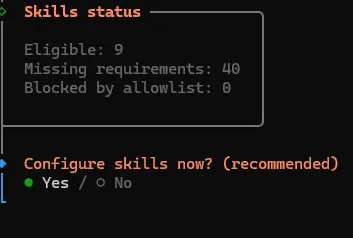
The first time you onboard an agent, OpenClaw will pause and ask if you want to configure skills. This is the moment where the skill system becomes visible instead of abstract.
You’ll see a short status summary showing how many skills are eligible, how many are blocked by missing requirements, and whether anything is filtered by an allowlist.
What a skill is in OpenClaw
A skill is a folder centered on a single file named SKILL.md. Inside that file you have YAML frontmatter (metadata) then markdown instructions (behavior). The folder can also contain scripts, templates, reference notes, or whatever else your skill needs to stay grounded in reality rather than “make it up as you go.”
The OpenClaw docs describe the system plainly on the skills page. The important bit is that the agent doesn’t have to be modified to add functionality. You drop a skill in place and OpenClaw can use it in the next session.
Why the frontmatter description matters
The frontmatter description is not marketing copy.... It’s closer to a trigger phrase. OpenClaw starts with name plus description to decide what’s relevant, and only after that does it pull the full instructions. If your description doesn’t match how people ask for the task, your skill sits there quietly while you swear at the agent.
I write descriptions like I’m describing the task to a coworker in chat. Simple words and I include the nouns users actually type, like “log summary” / “deploy checklist” / “ClawHub install” or “SKILL.md template.”
Where skills live and which one wins
Skills load from a few places, and conflicts are resolved by precedence. You can override a bundled skill without touching the bundled copy, and you can keep per-project behavior inside a workspace without affecting everything else.
Main locations
- Workspace skills in
<workspace>/skills - Managed skills in
~/.openclaw/skills - Bundled skills that ship with OpenClaw
Precedence is workspace first, then managed, then bundled. If you install a skill from ClawHub and later create a workspace skill with the same name, the workspace copy is the one OpenClaw sees, and it can feel like the ClawHub install “stopped working” even though it’s still on disk.
If you want extra shared directories you can scan them using skills.load.extraDirs in config. Those come last, which makes them nice for a shared library folder you don’t want overriding anything by accident.
The best SKILL.md format (in my opinion)
Skills work best when they feel like operating instructions. Clear defaults + clear stop conditions + clear questions when input is missing. If you write them like a blog post the agent will behave like it read a blog post, which is to say it will interpret things loosely.
SKILL.md example with YAML frontmatter and instructions
---
name: log-triage
description: Summarize errors from a service log in a time window.
user-invocable: true
---

If the user asks for log triage:
- ask for service name and time window if missing
- fetch logs (journalctl or docker logs)
- group repeated errors
- show the exact command used
- if logs are empty say so and suggest what to check next
You’ll notice it reads like a checklist and that’s intentional. The agent is already creative so your skill should be strict where strictness helps.
Common SKILL.md frontmatter fields
Two fields come up a lot once you build a library of skills. user-invocable controls whether the skill shows up as a slash command. disable-model-invocation is handy when you want a skill to exist but you only want it run manually, usually because it’s sensitive or expensive.
If you want to peek at how the config knobs are documented, OpenClaw has a dedicated page for skills configuration.
ClawHub installs are convenient, and that’s the problem
ClawHub is OpenClaw’s public skill registry. It makes discovery and installs easy, and it also makes supply chain mistakes easy. When installing a skill you’re adding instructions that can lead to file reads, shell commands, browser automation, and network requests, depending on what your agent is allowed to do.
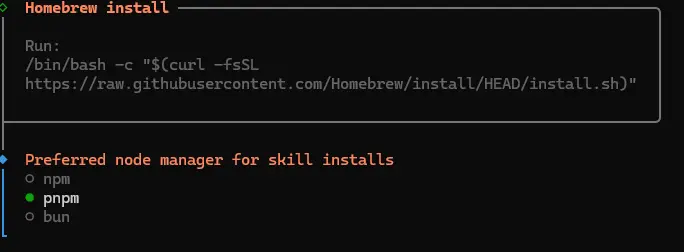
During setup, OpenClaw will also try to resolve skill dependencies up front. Many community skills rely on system binaries or Node-based tooling, so the installer asks how you want those handled.
On macOS this usually means Homebrew...

... followed by a choice of Node package manager for skill installs:
I’m not saying “never install community skills.” I install them too, but I just treat them like code. Open the folder, read it, skim any scripts. Search for remote downloads and suspicious one-liners. If you don’t do that, you’re trusting strangers with execution in a high-privilege environment.
The dependency list makes this concrete. A single setup can pull in dozens of binaries, each expanding what the agent can touch on the system:

Security reality check
In early February 2026 security researchers reported hundreds of malicious skills on ClawHub. The writeup on The Hacker News describes an audit that found 341 malicious skills out of 2,857 checked, and the campaigns were built around simple social engineering and infostealers.
My opinion here is boring: Skills are not “content” - they are an execution surface. And the registry is not an app store... It’s closer to a public scripts directory with nicer UX.
OpenClaw skill gating and requirements
Once you have more than a handful of skills you’ll want some way to keep broken ones from showing up. Gating is how you do that.
Skills can declare requirements like binaries on PATH, environment variables, OS constraints, or config flags. If the requirements are not met, the skill is not eligible.
This helps in two ways: it stops the agent from suggesting a skill that cannot run on the current machine, and it reduces the number of eligible skills that have to be considered during a turn, which keeps context lighter.
When gating is worth the effort
- A skill depends on a CLI like docker, git, or a vendor tool
- A skill needs an API key and you want it absent when the key is missing
- A skill only makes sense on one OS
- You want to reduce “skill spam” in the agent’s available list
OpenClaw skill configuration and environment variables
Skill configuration lives in ~/.openclaw/openclaw.json under skills.entries. You can enable or disable a skill, inject environment variables, and store a custom config bag for that skill.
One detail that matters when you start using API keys. OpenClaw injects environment variables for the agent run, then restores the original environment after the run. That means you can keep secrets out of chat history, and it also means config changes often take effect on a new session rather than instantly.
A practical openclaw.json pattern
{
  "skills": {
    "entries": {
      "example-skill": {
        "enabled": true,
        "env": {
          "EXAMPLE_API_KEY": "paste-your-key-here"
        },
        "config": {
          "endpoint": "https://example.invalid"
        }
      }
    }
  }
}
If your skill name contains hyphens you’ll often quote it as a JSON key. That’s normal. It looks ugly. You get over it.
Skill loading per session and snapshot behavior
OpenClaw snapshots eligible skills when a session starts and reuses that set for subsequent turns. This is good for consistency, and it explains the classic “I edited the skill and nothing changed” problem. In that case you start a new session, or you enable the skill watcher so changes are detected and the snapshot refreshes.
The watcher exists for a reason. You can iterate on skills quickly while developing, then turn things down once you want stability.
Token overhead from eligible skills and how to reduce it
Eligible skills are listed in a compact format inside the system prompt. Each skill adds overhead. It’s not catastrophic, but it’s real, and it grows faster than people expect once descriptions get long and once special characters expand through XML escaping.
The boring fix is the best fix. Disable what you don’t use. Keep descriptions short. Use gating. If you want a small built-in baseline, use the bundled allowlist so only specific bundled skills are eligible.
Bundled skills, overrides and the clean way to customize behavior
OpenClaw ships with bundled skills that cover the basics, like web research, file operations, shell execution, and browser automation. You can override a bundled skill by creating a managed or workspace skill with the same name. That’s the clean patch mechanism, and it avoids forks.
I prefer copying the original bundled skill then modifying it in small steps, because it’s easier to reason about what changed when you debug later.
Auto-generated skills save time but they still need review
OpenClaw can generate skills for you, including the folder structure and helper scripts. It’s a great way to bootstrap a rough version. The rough version is the key phrase there...
Auto-generated skills tend to be verbose and optimistic, and they often miss sharp boundaries around edge cases. Tighten them before you trust them with important tasks. Make them ask questions instead of guessing. Make them stop when input is missing. Make them show the commands they ran when they touched the system.
Sandboxing is worth it when you’re unsure
Skills can run inside Docker sandboxes depending on your agent configuration. Sandboxing reduces risk by limiting filesystem access and isolating execution. It also adds friction. Networking is often restricted by default, which breaks installs and remote downloads unless you allow it.
That friction is fine. It forces you to decide what the skill is allowed to do. If you’re testing a third party skill, or you’re running anything that touches the shell, sandboxing is a sensible default.
Skill ideas that stay useful after the honeymoon phase
Some skills are fun for ten minutes. The ones you keep are the ones that save you from repeat work and small mistakes.
For dev teams and builders
- Git automation for commit messages, PR descriptions, and release notes
- Docs research that grabs answers from API docs and returns code snippets
- Code review helpers for security checks and style consistency
- CI support that summarizes failing steps and suggests the next action
For ops and infrastructure
- Log triage that groups repeated errors and returns commands used
- Service restart runbooks with safe stop conditions
- Backup verification with simple restore spot checks
- Monitoring summaries that reduce noise into one short report
For bots and multi-channel setups
If you run OpenClaw across channels, a lot of value comes from consistency, like shared formatting, shared routing rules, shared escalation rules. The guide on OpenClaw multi-channel setup pairs nicely with skill design, because skills let you keep behavior consistent even when the messages come from different places.
Running skills on a VPS
You can run OpenClaw locally, and for many people that’s the right move. A VPS becomes appealing when you want always-on availability, stable paths, stable dependencies, and a cleaner separation from your personal machine.
If you want the fast path, we offer an Ubuntu 24.04 template on OpenClaw VPS hosting, and you can still use it like any normal KVM VPS. If you go the server route, please harden it. The checklist in host OpenClaw securely on a VPS covers the boring stuff that saves you later.
On top of that, treat skills like part of your security posture. Our OpenClaw security best practices guide focuses on the practical controls that matter when an agent can read files and run commands.
Where to look when you want real examples
When you want to learn by reading real skill folders, start at openclaw.ai for the official framing, and use the ClawHub repository to understand what a registry entry actually is, which is a SKILL.md plus supporting files plus versioning and moderation hooks.

