





.svg)
.svg)
.svg)
.svg)

.svg)
.svg)
.svg)

mod_crowdsec 1.0 is a rewrite of CrowdSec's Apache bouncer, and it's the first version that forwards requests to the AppSec component. That means Apache can now block virtual-patch hits and serve the same bot challenge the nginx bouncer has had for a while. This guide adds the module to an Ubuntu 24.04 server that already runs CrowdSec, moves it to stream mode and turns on the WAF and bot detection. It also covers how the module behaves with the Apache features most sites rely on: .htaccess, Basic auth, redirects, ModSecurity and a reverse proxy in front.
A version note before anything else. The documentation describes version 1.0. As I write this, in November 2026, the newest release on GitHub is 1.0.0-rc2 and the final 1.0.0 isn't tagged yet, so everything below was tested on rc2. When the final release is out, change the version in the download step and read its release notes for anything that moved.
What the server needs before you install mod_crowdsec
The module needs Apache 2.4.16 or newer, mod_socache_shmcb (the package loads it for you), libcurl and a CrowdSec Local API it can reach. On Ubuntu 24.04 that's the stock apache2 package (2.4.58 on my server) plus CrowdSec from its own apt repository. I started from the Apache + CrowdSec one-click template on a CrowdSec VPS, and any Ubuntu 24.04 server with Apache and CrowdSec installed works the same way. If CrowdSec isn't on the server yet, the complete guide to CrowdSec in production starts with the install.
My server also ran the nftables firewall bouncer (sudo cscli bouncers list shows what yours runs), and two things follow from that. The firewall bouncer drops banned IPs before Apache sees them, so testing a ban from your own machine needs a workaround, shown below. And CrowdSec will ban you if your tests produce enough 403s. Halfway through my AppSec tests the http-generic-403-bf scenario banned my test machine, and with the firewall bouncer running a ban cuts SSH as well as HTTP. Allowlist your own address before you start, or keep a console session open. The guide to rolling out CrowdSec without lockouts covers the order I'd switch things on in.
Upgrade CrowdSec to the current version
The package lists on a server image can be months old, so refresh them and upgrade the engine first. Bot detection depends on engine features that are still changing release to release, and the hub collections expect a recent engine.
sudo apt update
sudo apt install --only-upgrade crowdsec
cscli version
The version should read 1.8.2 or newer. The upgrade's post-install step also refreshed the hub index, upgraded the installed parsers and scenarios, rewrote the files in /etc/crowdsec/acquis.d/ and then asked for a reload. The service stayed up throughout. Reload it so the new hub items load:
sudo systemctl reload crowdsecDownload and install the mod_crowdsec .deb
mod_crowdsec 1.0 isn't in an apt repository. The packages are attached to the cs-apache2-bouncer releases on GitHub, one per distribution and architecture. For Ubuntu 24.04 on x86 the download is:
wget https://github.com/crowdsecurity/cs-apache2-bouncer/releases/download/v1.0.0-rc2/crowdsec-apache2-bouncer_1.0.0.rc2_noble_amd64.deb
sha256sum crowdsec-apache2-bouncer_1.0.0.rc2_noble_amd64.deb
Watch the file name. The package inside reports its version the Debian way, 1.0.0~rc2, and a URL built from that (with the tilde) returns a 404. In the download URL the version is written 1.0.0.rc2. On an ARM server, use arm64 in place of amd64.
The release files aren't GPG-signed, so the checksum is the only integrity check you get. The rc2 package I installed was 87,568 bytes with this SHA-256:
e8b5f0dd78c6408cece9396ea9e762afddd2abbcb5a73fe6856b23431f40a975Install it with apt so the dependencies come along (dpkg -i only works if they're already there):
sudo apt install ./crowdsec-apache2-bouncer_1.0.0.rc2_noble_amd64.debBecause cscli is on the same server, the post-install script registers the bouncer for you. It prints "API Key successfully created", writes the key into /etc/crowdsec/bouncers/crowdsec-apache2-bouncer.conf, enables the module and restarts Apache. That restart caught me out: I expected a reload, and the install did a full graceful restart with a new main process. On a busy site, run it in a quiet hour.
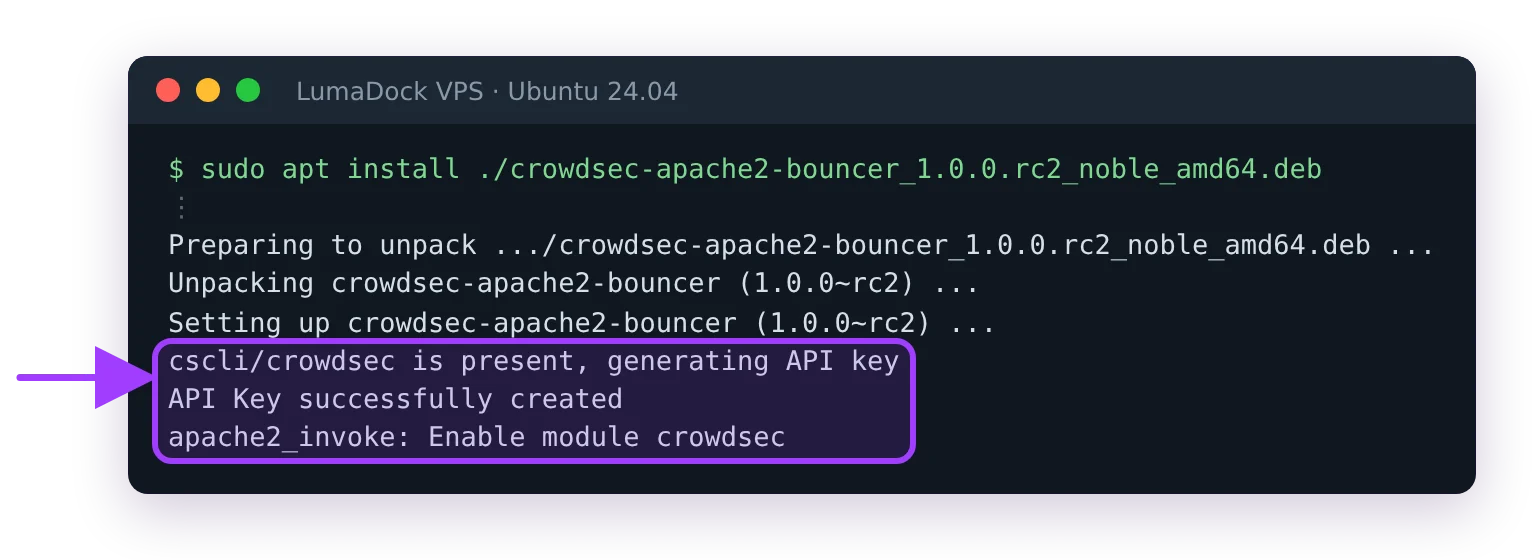
The post-install script finds cscli, creates the API key and enables the module.
sudo cscli bouncers list
apache2ctl -M | grep -E 'crowdsec|socache'
The list should show a bouncer named cs-apache2-bouncer- followed by a Unix timestamp (if it ever ends up with a missing or wrong key, fixing the CrowdSec API access forbidden error covers re-registering it). Apache should list crowdsec_module (shared).
What the shipped mod_crowdsec configuration does
Everything lives in /etc/crowdsec/bouncers/crowdsec-apache2-bouncer.conf. The values the package writes differ from the directive defaults in the reference table, so check which of the two a line comes from before you copy it:
| Directive | In the shipped file | Default if the line is missing |
|---|---|---|
Crowdsec | On, at server level | Off |
CrowdsecMode | live | live (the docs recommend stream) |
CrowdsecFallback | allow | fail |
CrowdsecBlockedHTTPCode | 403 | 429 |
CrowdsecCache | shmcb:crowdsec(16777216) | none |
CrowdsecAppsecURL, CrowdsecAppsec | commented out | none, Off |
The response code differs in the same way: a build from source with a minimal config answers blocked requests with 429, where this guide and the official quickstart expect 403.
CrowdsecFallback allow lets requests through when the Local API can't be reached. I'd keep it on a public site, because restarting CrowdSec shouldn't take the website down with it.
Switch mod_crowdsec to stream mode
In live mode the module asks the Local API about each new client and caches the answer for 60 seconds. Stream mode pulls the whole decision list every 10 seconds into shared memory, so no request ever waits on the API. The docs recommend stream, and the shipped file still says live:
sudo sed -i 's/^CrowdsecMode live/CrowdsecMode stream/' /etc/crowdsec/bouncers/crowdsec-apache2-bouncer.confThe 16 MB cache in the shipped line holds about 100,000 decisions at roughly 128 bytes each. That's plenty for one site on the community blocklist. If you subscribe to large blocklists, raise the size inside CrowdsecCache, because a cache that's too small evicts decisions and only the error log and the status page tell you.
Add the status page while you're in there. It's the quickest way to see what the module holds. Create /etc/apache2/conf-available/crowdsec-status.conf:
<Location /crowdsec-status>
    SetHandler crowdsec-status
    Crowdsec Off
    CrowdsecAppsec Off
    Require ip 127.0.0.1
</Location>
sudo a2enconf crowdsec-status
sudo apachectl configtest && sudo systemctl reload apache2
curl -s http://127.0.0.1/crowdsec-statusKeep the CrowdsecAppsec Off line even before AppSec is on. Once bot detection runs, a status page without it answers with the challenge page instead of the numbers. The docs warn about this, and I checked it: it does.
The output starts with mode: stream and primed: yes, then counters for pulls, stored, processed, dropped and active_decisions by origin. I timed how long a new decision took to reach Apache: between 6.3 and 10.4 seconds over four tries, and about the same for a deleted decision to stop blocking. The documented worst case with the default timings is 12 seconds in stream mode and 62 in live mode.
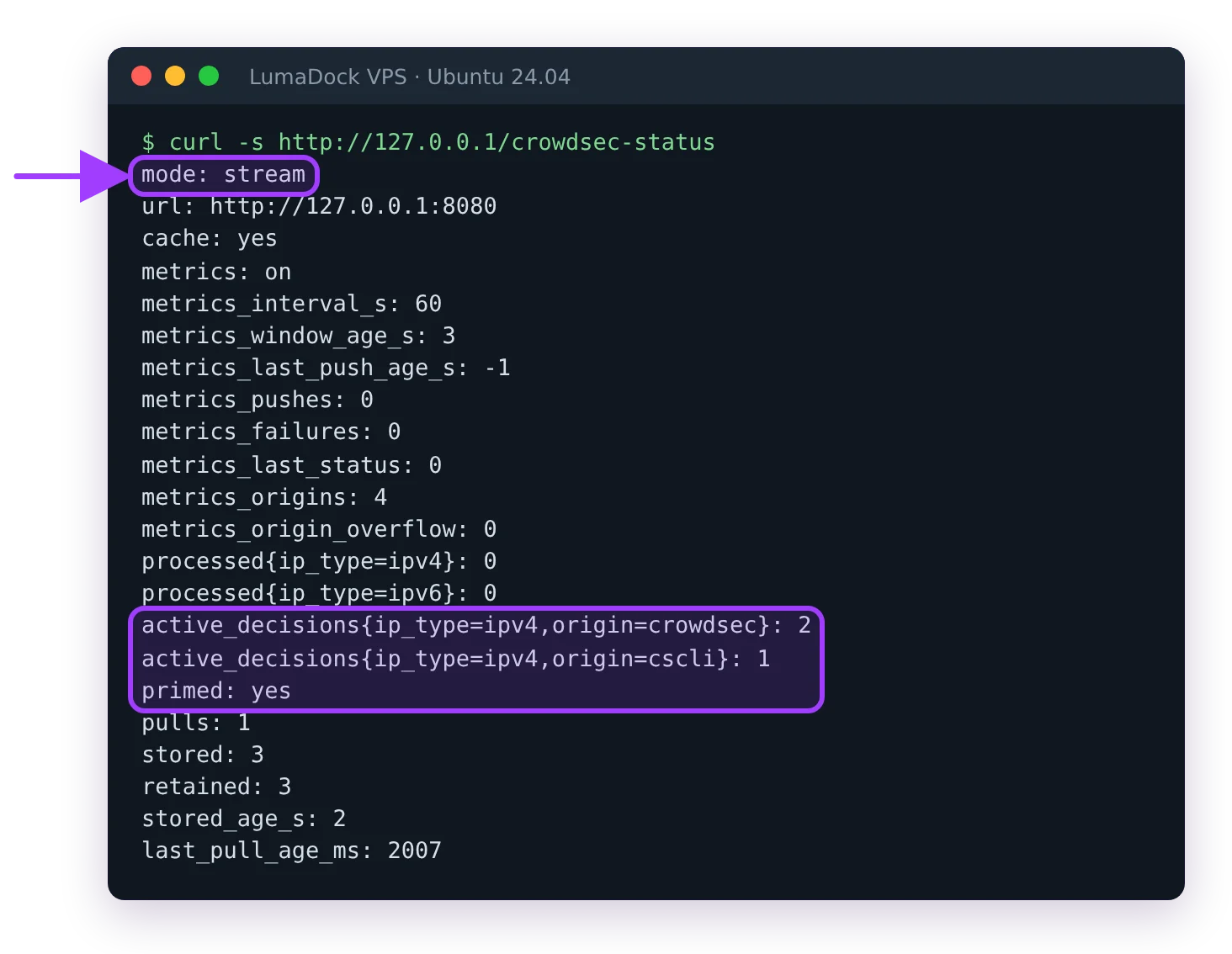
The status page after the switch: stream mode, primed, three decisions held in the cache.
The module also reports usage metrics to the Local API, so sudo cscli metrics show bouncers lists it next to the firewall bouncer. I set CrowdsecMetricsInterval 1m at server level while testing, and the first numbers showed up within a couple of minutes.
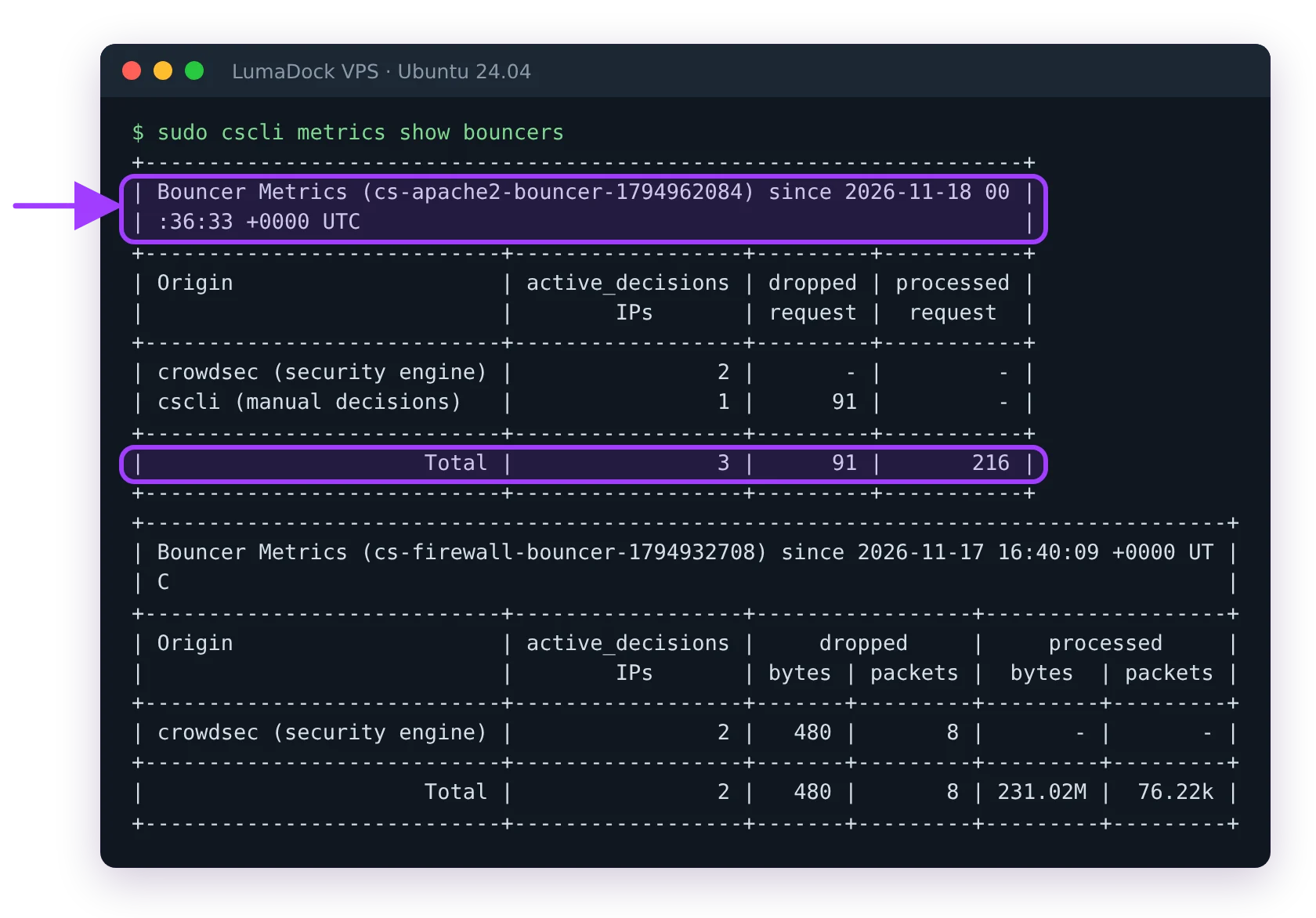
The Apache bouncer reports dropped and processed requests by origin, next to the firewall bouncer.
Test a CrowdSec ban on Apache without locking yourself out
The obvious test, banning your own IP and loading the site, shows nothing about Apache while the firewall bouncer runs. The firewall drops the packets first, so the browser times out and SSH goes with it. That's right for a real attacker and useless for a test. I banned my test machine for one minute to confirm it: HTTP timed out after 10 seconds and SSH froze; both came back when the decision expired.
The test that shows the module at work gives Apache a fake client address from the documentation range, through X-Forwarded-For on the loopback interface:
sudo cscli decisions add --ip 192.0.2.1 --duration 10m
printf 'RemoteIPHeader X-Forwarded-For\nRemoteIPTrustedProxy 127.0.0.1\n' | sudo tee /etc/apache2/conf-available/test-remoteip.conf
sudo a2enmod remoteip
sudo a2enconf test-remoteip
sudo systemctl reload apache2
sleep 12
curl -s -o /dev/null -w '%{http_code}\n' -H 'X-Forwarded-For: 192.0.2.1' http://127.0.0.1/
The last line prints 403, and any other address prints 200. The sleep covers the stream-mode pull. Remove the trust when you're done, because it lets anything on the server pick its own client address:
sudo a2disconf test-remoteip
sudo a2dismod remoteip
sudo systemctl reload apache2
If you lock yourself out anyway, removing a CrowdSec decision takes one cscli command from a console session.
Turn on the CrowdSec AppSec WAF for Apache
The engine side matches nginx: two collections and an acquisition file that opens the AppSec listener on port 7422.
sudo cscli collections install crowdsecurity/appsec-virtual-patching crowdsecurity/appsec-generic-rules
sudo tee /etc/crowdsec/acquis.d/appsec.yaml > /dev/null <<'EOF'
appsec_configs:
  - crowdsecurity/appsec-default
labels:
  type: appsec
listen_addr: 127.0.0.1:7422
source: appsec
EOF
sudo systemctl restart crowdsec
ss -ltn | grep 7422
The quickstart says to allow about half a minute for the listener. Mine was up 4.3 seconds after the restart with these two collections, and 15 seconds once the bot-detection configs were added later. Then uncomment the two AppSec lines in the bouncer config (lines 53 and 88 in rc2) and reload Apache:
sudo sed -i -E 's|^#(CrowdsecAppsecURL http://127.0.0.1:7422)|\1|; s|^#(CrowdsecAppsec On)$|\1|' /etc/crowdsec/bouncers/crowdsec-apache2-bouncer.conf
sudo apachectl configtest && sudo systemctl reload apache2
From another machine, ask for a file no site should serve:
curl -I http://YOUR_SERVER_IP/.envThe answer is 403 Forbidden. sudo cscli metrics show appsec counts one blocked request, and the rule that fired is vpatch-env-access. Before you trust a 403, make sure AppSec sent it. The quickstart names two other causes: your own IP already being banned, and a <FilesMatch "^\."> deny somewhere in the Apache config. The access log tells them apart, which is the next section.
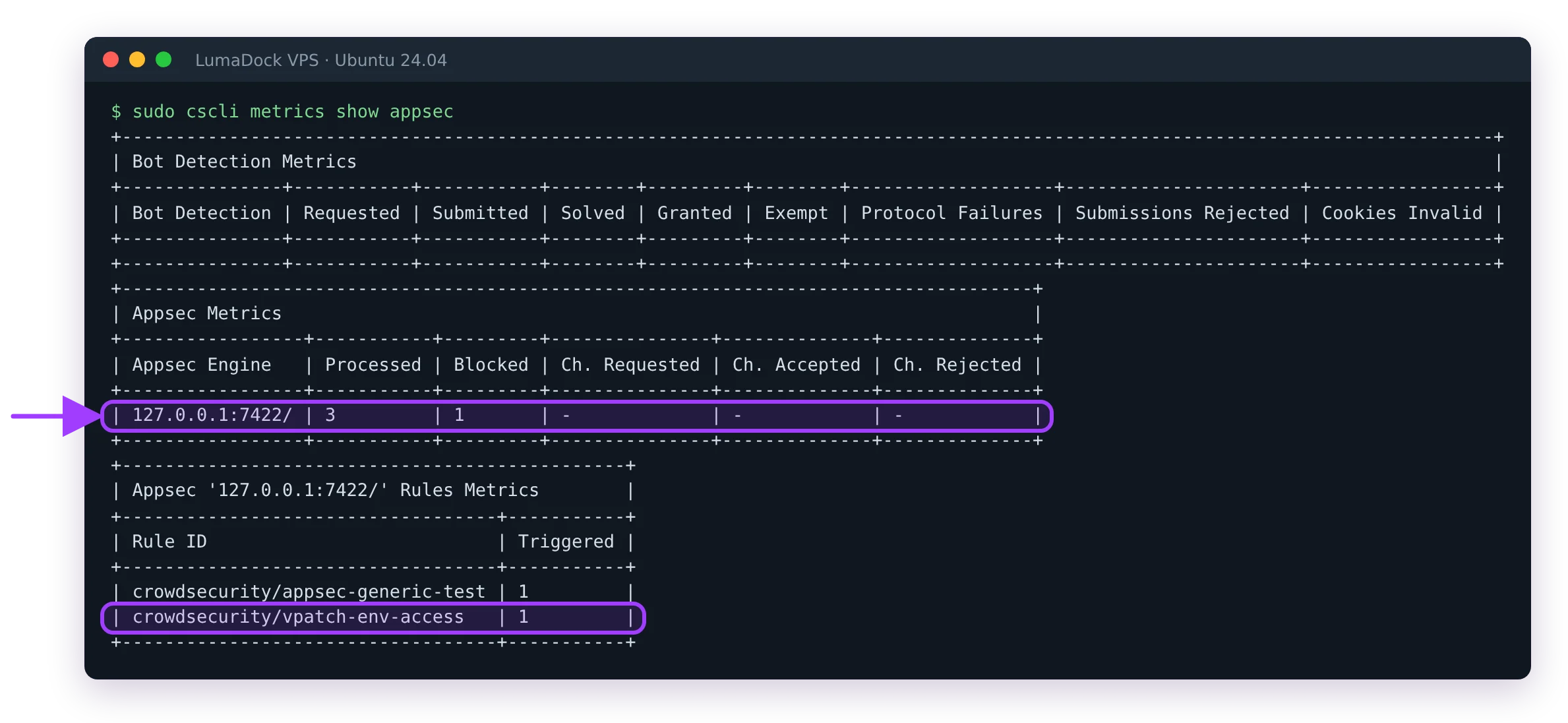
One request blocked, and the rule behind it is vpatch-env-access.
The OWASP Core Rule Set works on Apache the way the CrowdSec AppSec WAF guide for nginx describes it: install crowdsecurity/appsec-crs and add crowdsecurity/crs to appsec_configs. It runs out-of-band, so a classic ?id=1' OR '1'='1 probe still gets a 200 while the engine raises an alert with its anomaly score. For the first weeks on a live site, watching without blocking is what you want.
Log CrowdSec decisions in the Apache access log
The module sets three variables on every request: CROWDSEC_STATUS, CROWDSEC_SOURCE and CROWDSEC_APPSEC_STATUS. A custom log format puts them next to the status code. This line can go in a file under conf-available:
LogFormat "%h %l %u %t \"%r\" %>s %b cs=%{CROWDSEC_STATUS}e src=%{CROWDSEC_SOURCE}e appsec=%{CROWDSEC_APPSEC_STATUS}e" crowdsecThe CustomLog line that uses it has to go inside the virtual host. I put mine at server level first and the file stayed empty, because Ubuntu's 000-default.conf defines its own CustomLog and a vhost that has one doesn't use the server's. In /etc/apache2/sites-available/000-default.conf, inside <VirtualHost *:80>:
CustomLog ${APACHE_LOG_DIR}/access.log combined
CustomLog ${APACHE_LOG_DIR}/crowdsec.log crowdsec
After a reload the lines look like this, a banned test address first and a normal request second:
192.0.2.6 - - [18/Nov/2026:00:38:20 +0000] "GET / HTTP/1.1" 403 274 cs=ban src=cache appsec=-
127.0.0.1 - - [18/Nov/2026:00:38:20 +0000] "GET / HTTP/1.1" 200 10671 cs=allow src=cache appsec=-
A WAF block in the same log: 403 with appsec=ban. The line below it is a request AppSec allowed.
appsec=ban means the WAF blocked the request. cs=ban with appsec=- means a decision blocked it before AppSec was asked, with one exception that catches people out.
Fix 403 errors on large uploads with CrowdsecAppsecBodyLimit
Upload form failing for everyone since AppSec went on? AppSec inspects request bodies up to CrowdsecAppsecBodyLimit, 1 MB by default, and the default action for anything larger is to block it. A 2 MB POST got a 403 on every path of my server. In the log that 403 reads cs=ban src=cache appsec=-, exactly like an IP ban, so it's easy to go looking for a decision that doesn't exist.
Raise the limit only where uploads happen:
<Location /upload>
    CrowdsecAppsecBodyLimit 5m
</Location>
With that in place the same 2 MB POST reached Apache on /upload and still got a 403 everywhere else. Each worker can buffer up to the limit, so the worst case for memory is the limit times MaxRequestWorkers. Leave CrowdsecAppsecBodyLimitAction on its default: switching it to bypass lets anyone skip the WAF by padding a request past the limit.
Add CrowdSec bot detection to Apache
Nothing changes on the Apache side. With CrowdsecAppsec On set, bot detection is an engine setting: install the collection and add its configs to the AppSec acquisition file.
sudo cscli collections install crowdsecurity/appsec-bot-challenge
sudo tee /etc/crowdsec/acquis.d/appsec.yaml > /dev/null <<'EOF'
appsec_configs:
  - crowdsecurity/appsec-default
  - crowdsecurity/crs
  - crowdsecurity/appsec-bot-*
labels:
  type: appsec
listen_addr: 127.0.0.1:7422
source: appsec
EOF
sudo systemctl restart crowdsec
sudo grep "WAF challenge runtime initialized" /var/log/crowdsec.log
Leave out the crs line if you skipped the Core Rule Set. Without the "runtime initialized" line the engine has no challenge to serve, and requests pass as before. Mine printed it with cookie_ttl=12h0m0s and cookie_same_site=Lax.

This log line means the engine has a challenge to serve.
Collection 0.8 is split into sub-collections for scoring, detections, good bots and excluded paths. The wildcard loads both the default scoring config and the new balanced one, along with experimental detections that only raise alerts for now.
A plain curl to the site now gets a 200 with the page title "CrowdSec Challenge" in place of your content. /robots.txt, static files and API-style paths are exempt, so well-behaved crawlers and your uptime monitor still get through.
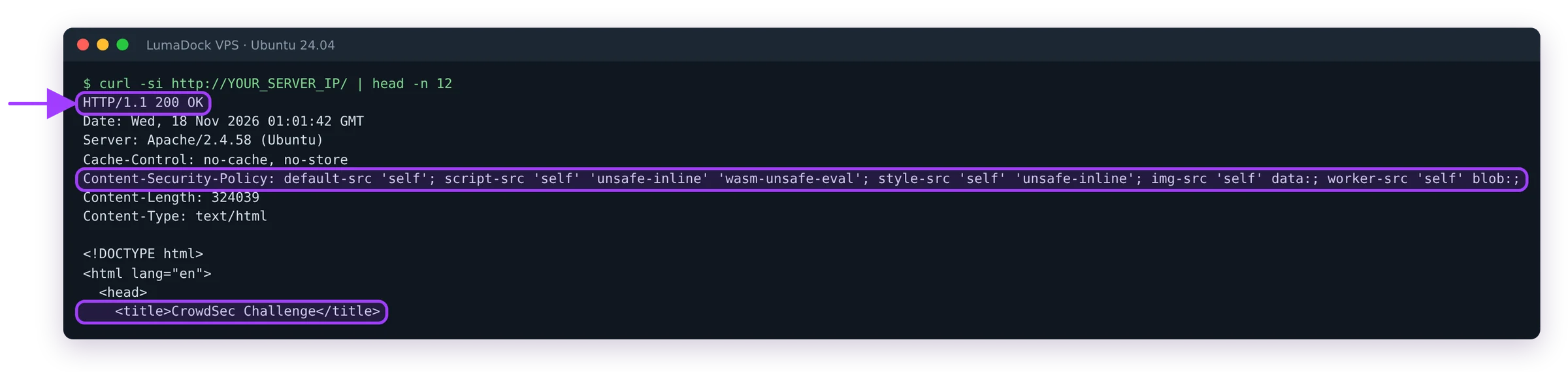
To curl, the challenge is a 200 with the engine's own Content-Security-Policy and the title CrowdSec Challenge.
A headless Chromium driven by Playwright loaded the challenge, ran its scripts, submitted and stayed stuck on the challenge page. The engine scored it 570, with cdp, webdriver and bot_user_agent among the reasons.
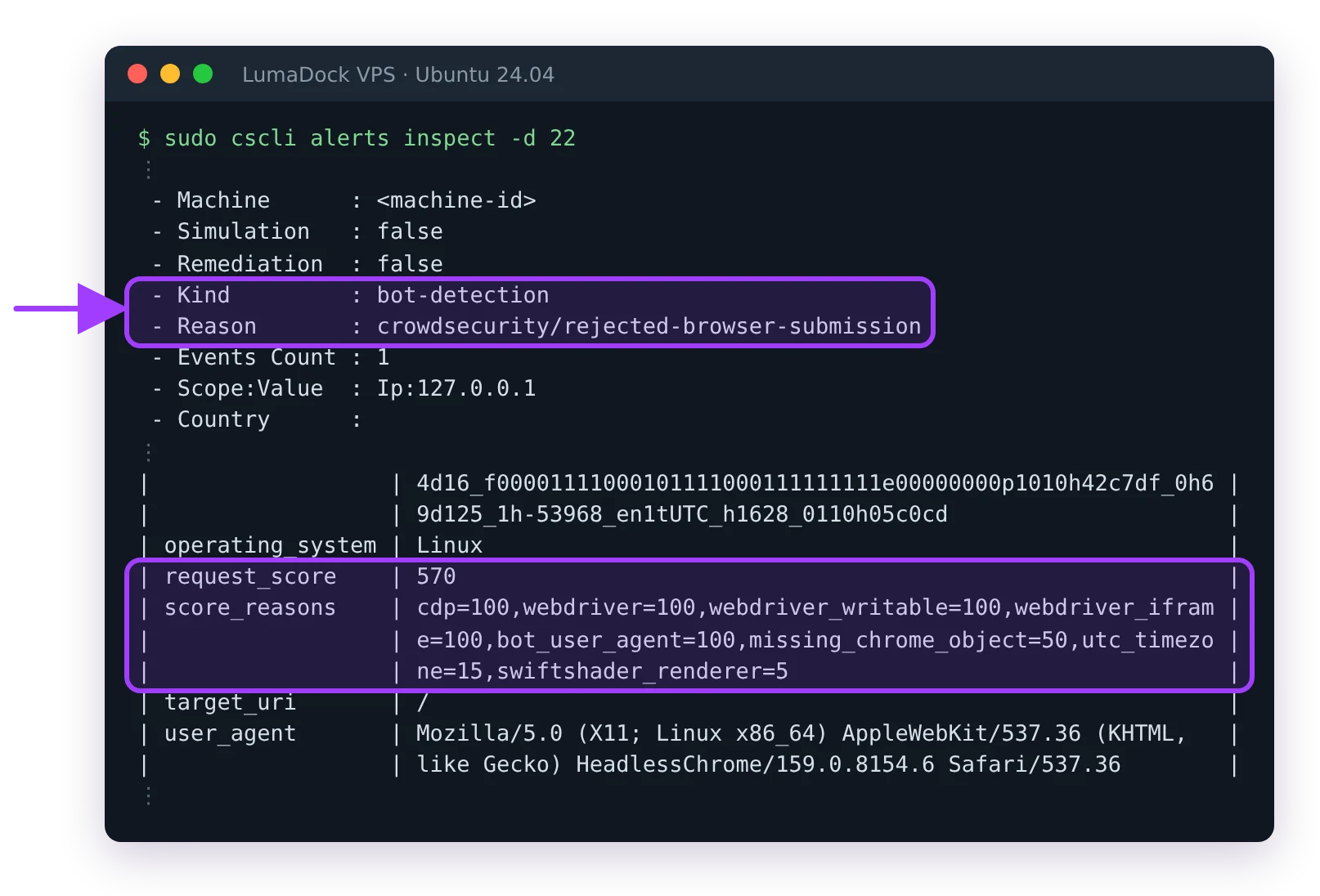
The alert for the headless browser: score 570, with cdp and webdriver at the top of the reasons.
A real Chrome passes without the visitor doing anything. The page runs its checks for a moment, posts the result to /crowdsec-internal/challenge/submit, gets a 200 back with the cookie and reloads the page, which Apache now serves (cs=allow appsec=allow in the log). On Apache there's no redirect in between, so don't go looking for a 307.
Test the challenge with developer tools closed. With DevTools open, my own Chrome got "Verification rejected", in a normal window and in Incognito alike. The engine scored every one of those attempts 100 with a single reason, cdp: an open DevTools attaches the Chrome DevTools Protocol, the same automation channel a headless bot uses. Closing DevTools and reloading passed at once. A rejection raises a crowdsecurity/rejected-browser-submission alert and no ban, so the visitor just sees the challenge again. If you want to inspect the cookie, pass first and open DevTools afterwards.
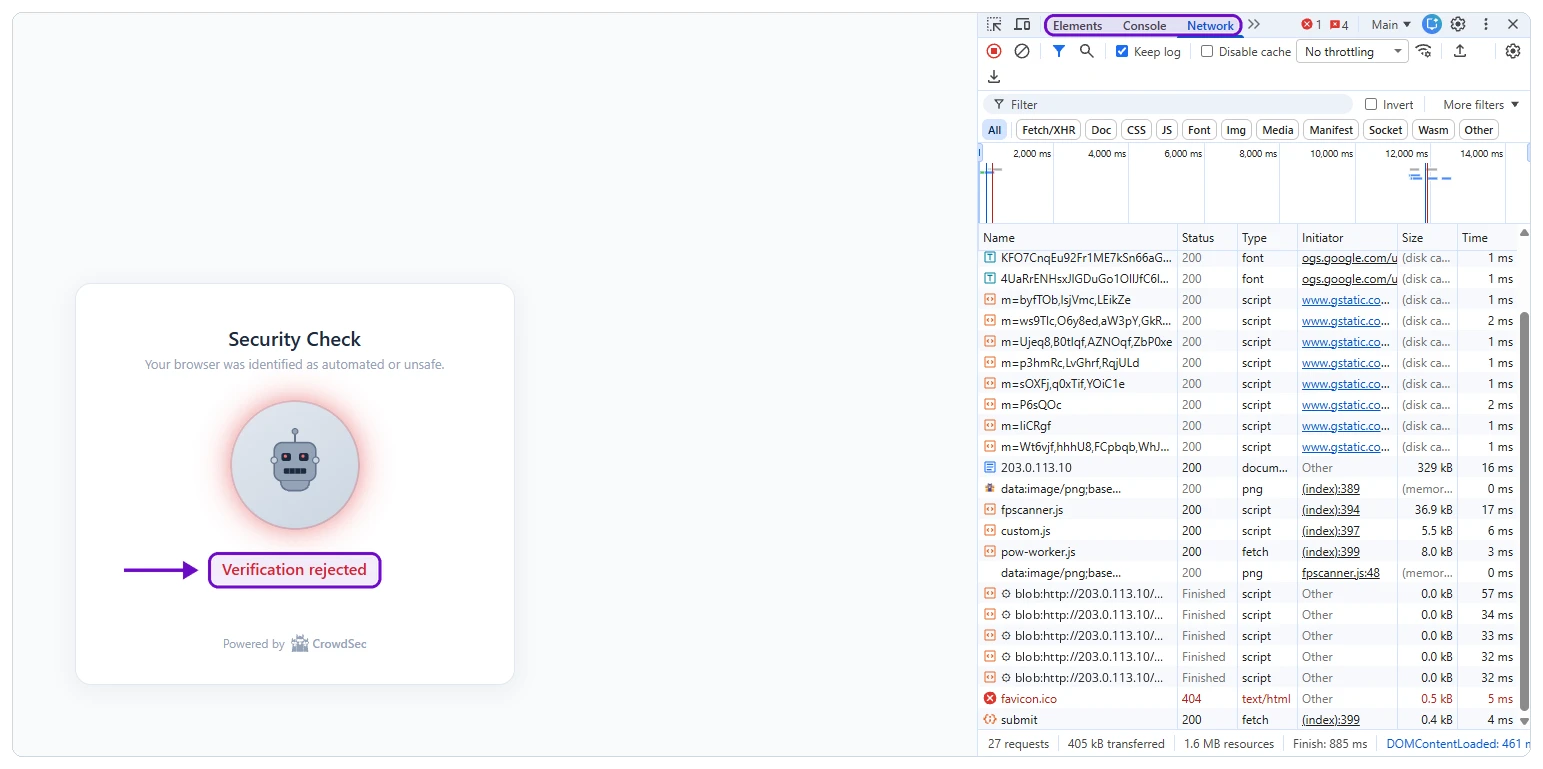
With DevTools open, a real Chrome is rejected: the open panel is what the check detects.
Scoring, thresholds, the strict and permissive overlays and master_secret are engine features and behave as they do on nginx; the CrowdSec bot detection guide for nginx explains them. Apache has no captcha, though, and challenge or captcha decisions that arrive through the stream are enforced as bans.
Content-Security-Policy and the CrowdSec challenge page on Apache
On nginx, a site-wide Content-Security-Policy and the engine's own policy both land on the challenge page. The browser enforces both and the challenge freezes on a blank page. The docs fix it on nginx with a map. On Apache you don't need a fix.
I set a CSP four ways: Header always set in the vhost, Header set in the vhost, both forms in .htaccess with AllowOverride All, and a PHP page sending its own header through PHP-FPM. Every challenge response carried exactly one CSP, the engine's, and the challenge completed each time. Normal pages kept the site's policy. The module answers in the access phase, before mod_headers or PHP get a turn, and its source removes any CSP already set before writing its own. The comment in crowdsec_appsec.c says why:
a Content-Security-Policy the engine sends and one the operator set would both go on the wire and the browser would enforce their intersection - a blank challenge page
Challenge only wp-login.php with a Location block
A full-site challenge is heavy for a blog where only /wp-login.php draws the bots. Turn both switches off at server level in the bouncer config (Crowdsec Off and CrowdsecAppsec Off), then back on for the one path in the vhost:
<Location /wp-login.php>
    Crowdsec On
    CrowdsecAppsec On
</Location>
Now / serves the normal page, /wp-login.php serves the challenge, and /.env goes back to a plain 404 because AppSec is off there as well. Decisions follow the same scope: a banned IP could still load the home page and got its 403 only on the login page. You give up the site-wide ban, so I'd only do this where the firewall bouncer handles bans for everything else.
For site-wide settings, the docs prefer server level over <Location />, because the merge order of Location blocks can override an opt-out such as the status page. If you find the <Location /> form in an older example, use the server-level form in its place.