





.svg)
.svg)
.svg)
.svg)

.svg)
.svg)
.svg)


Updated 22 October 2026
fail2ban and CrowdSec both read your logs, count failures and ban the address behind them. Past that shared reflex they're built on opposite assumptions, and the what is CrowdSec explainer covers the architecture behind CrowdSec's. fail2ban defends a server with what that server alone can see. CrowdSec treats defense as a shared problem: an address that brute-forced someone else's machine an hour ago shouldn't get a fresh start on yours.
fail2ban jails vs CrowdSec scenarios
A fail2ban jail pairs a filter, which is a regular expression over log lines, with an action, usually a firewall command, all configured in INI files. The design has barely changed since the project started in 2004, which says something good about it. Releases come slowly, and the fail2ban releases page shows the gap: 1.1.0 in April 2024, then 1.1.1 in August 2026. The project is maintained, just not in a hurry.
CrowdSec splits the same job into stages. Parsers turn log lines into events, YAML scenarios (mostly leaky buckets) detect behavior, a local API turns alerts into decisions, and separate bouncers enforce those decisions at the firewall, in the web server or at a CDN. Detection rules come from a public hub instead of your own regex, and the engine shares confirmed attacks with the network in exchange for a curated community blocklist.
| fail2ban | CrowdSec | |
|---|---|---|
| Detection | Regex filters per jail | Hub scenarios in YAML, behavior based |
| Enforcement | Actions run local firewall commands | Separate bouncers, local or remote |
| HTTP layer | Log parsing only | AppSec component: inline WAF with virtual patching |
| Bot detection | None | Browser challenge in AppSec since 1.8 (alpha) |
| IP reputation | Local knowledge only | Community blocklist through the Central API |
| Multi-server | Nothing built in | One local API, many bouncers |
| Default ban | 10 minutes | 4 hours |
| Stack | Python, GPLv2+, 1.1.1 (August 2026) | Go, MIT, 1.8.1 (September 2026) |
The release cadence row says more than it looks. fail2ban changes slowly because it's close to finished and a small group of maintainers keeps it patched. CrowdSec ships several engine releases a year with a company behind it, and its detection content updates through the hub between releases. That company is also the one strategic risk in the CrowdSec column: the MIT-licensed engine would outlive it, the shared blocklist wouldn't.
Where CrowdSec wins
The community blocklist is the main reason to switch, and CrowdSec's 2022 post CrowdSec, not your typical fail2ban clone already made the case. fail2ban punishes an attacker after the attempts on your server. CrowdSec refuses many attackers before their first attempt, because other installs already reported them.
Detection and enforcement are separate programs, which matters as soon as you run more than one machine. Detect on the web server, enforce on the CrowdSec firewall bouncer for iptables and nftables of every server in the fleet, or push the ban to a CDN so the request never reaches you. Visibility improves with it: cscli alerts inspect -d with an alert ID from cscli alerts list shows the parsed events behind a ban, usernames tried included, where fail2ban leaves you reading fail2ban.log with grep, and the CrowdSec Console puts the alerts of several machines on one timeline.
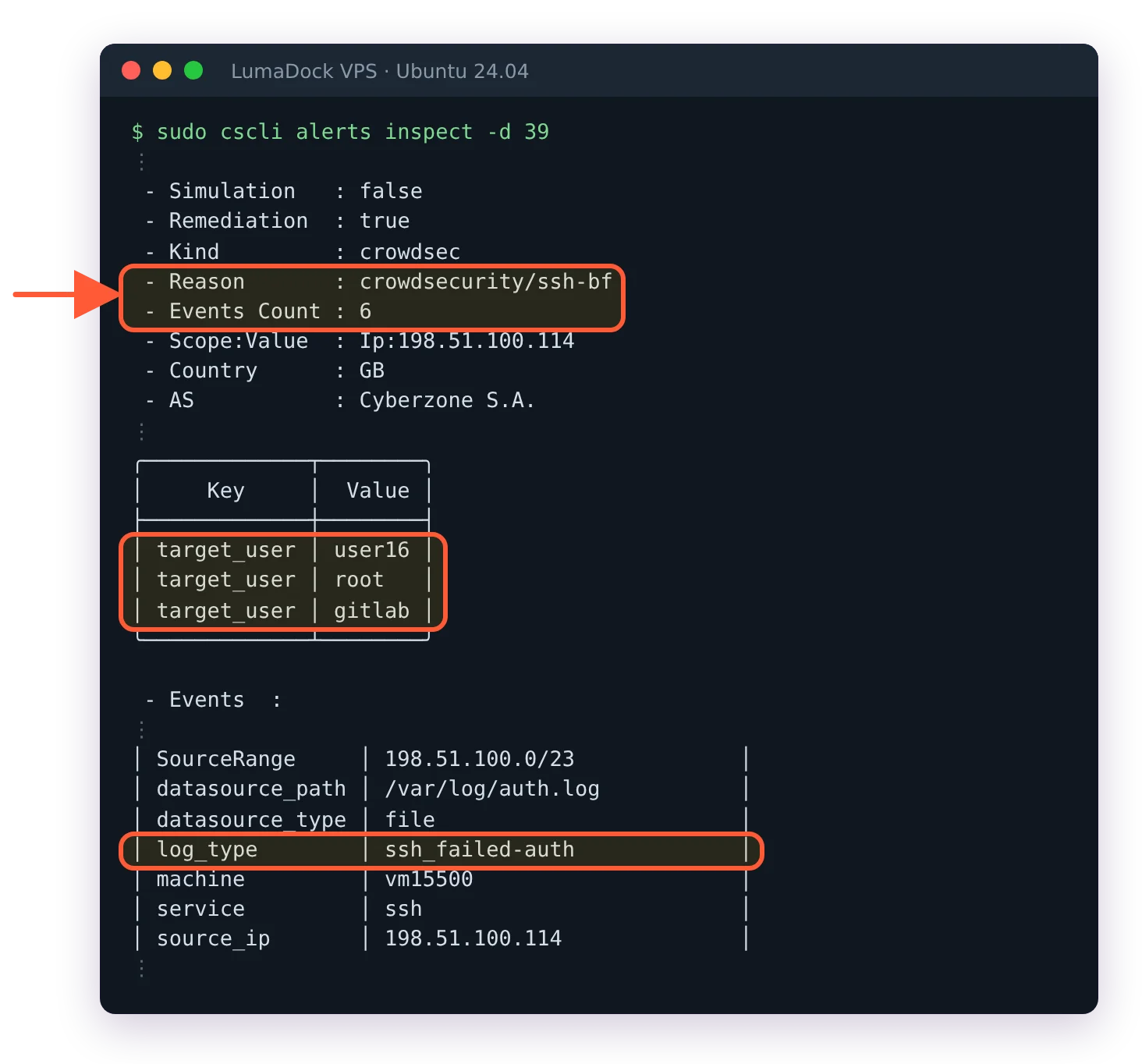
What fail2ban's log won't give you: the parsed events behind one ban, usernames tried included.
Hub scenarios are written by people who see the whole network's traffic, so they catch slow brute force spread over hours, HTTP probing across many paths and credential stuffing, patterns a per-jail regex can't express. The hub also tracks what people deploy today: Traefik, Caddy, HAProxy and Nginx Proxy Manager all have collections.
Then there's the HTTP layer, where fail2ban has never claimed a role. It only sees what a request left behind in a log, after the application handled it. CrowdSec's AppSec component inspects requests on the way in and blocks known exploits before the application parses them, and since version 1.8 it can also make visitors prove they're a real browser before the site loads, which the CrowdSec bot detection guide for nginx walks through. That's a different job from banning SSH brute force.
Decisions also carry a type. fail2ban's action model ends at running a command, while a CrowdSec profile can turn the same alert into a firewall ban or a captcha at nginx. On a shop or a SaaS login, a wrongly challenged customer solves a captcha and carries on; a wrongly dropped connection becomes a support ticket.
Where fail2ban still wins
It has no external dependencies. fail2ban contacts nobody, needs no account and never suggests a console sign-up, which CrowdSec does, mildly. Its memory footprint is smaller too, since one Python daemon watching a few jails undercuts the Go engine plus a bouncer, and on a 512 MB server that difference is real.
It's everywhere. fail2ban sits in every distribution's repository and in a decade of configuration management recipes, so on an inherited server it's often already there and working. Replacing working security on someone else's machine to gain features is rarely worth it. Migration makes sense at a rebuild, or when a fleet starts growing.
The model is also half the size. Filter, action, jail. There's no local API to authenticate bouncers against and no hub versions to track, and when something breaks you read one log file. CrowdSec's extra parts are the price of its architecture: the CrowdSec troubleshooting reference exists because the same few errors between components come up again and again. None of them is hard to fix, but there's more to learn.
The strongest argument for fail2ban isn't a feature. People trust finished software they understand completely, and that's a fair thing to value. I still weigh the shared blocklist higher, because attackers reuse the same infrastructure against millions of targets and knowledge that stays on one server wastes that fact.
Migrating from fail2ban to CrowdSec
On a brand-new server there's nothing to migrate: LumaDock's CrowdSec VPS templates, picked during ordering, deploy Ubuntu with CrowdSec preinstalled, with nginx and Apache variants for web servers. Everywhere else, most of a migration is working out what your jails protect.
Mapping common jails to collections
The standard jails have direct equivalents:
- sshd maps to the
crowdsecurity/sshdcollection, which the install picks automatically when it finds the service. - nginx-http-auth and nginx-botsearch map to
crowdsecurity/nginx, which pulls incrowdsecurity/base-http-scenariosand detects more than the original filters. - Apache jails map to
crowdsecurity/apache2the same way. - Postfix and Dovecot jails have matching collections on the hub.
recidive has no jail-shaped equivalent. Repeat-offender escalation lives in /etc/crowdsec/profiles.yaml, where a profile can lengthen bans for addresses that keep coming back. The community blocklist covers part of that job, since a persistent attacker is often on it already.
Before trusting any mapping, test it against your own history. cscli explain takes a log file and shows which parsers read each line and which scenarios the events would feed:
sudo cscli explain --file /var/log/auth.log --type syslogExpect a lot of output. cscli warns when the file is large and then prints the full parser tree for every line, which came to more than 30,000 lines for a 2,500-line auth.log on the server this was checked on. Pipe it through less, or test a slice first:
sudo tail -n 50 /var/log/auth.log > /tmp/sample.log
sudo cscli explain --file /tmp/sample.log --type syslog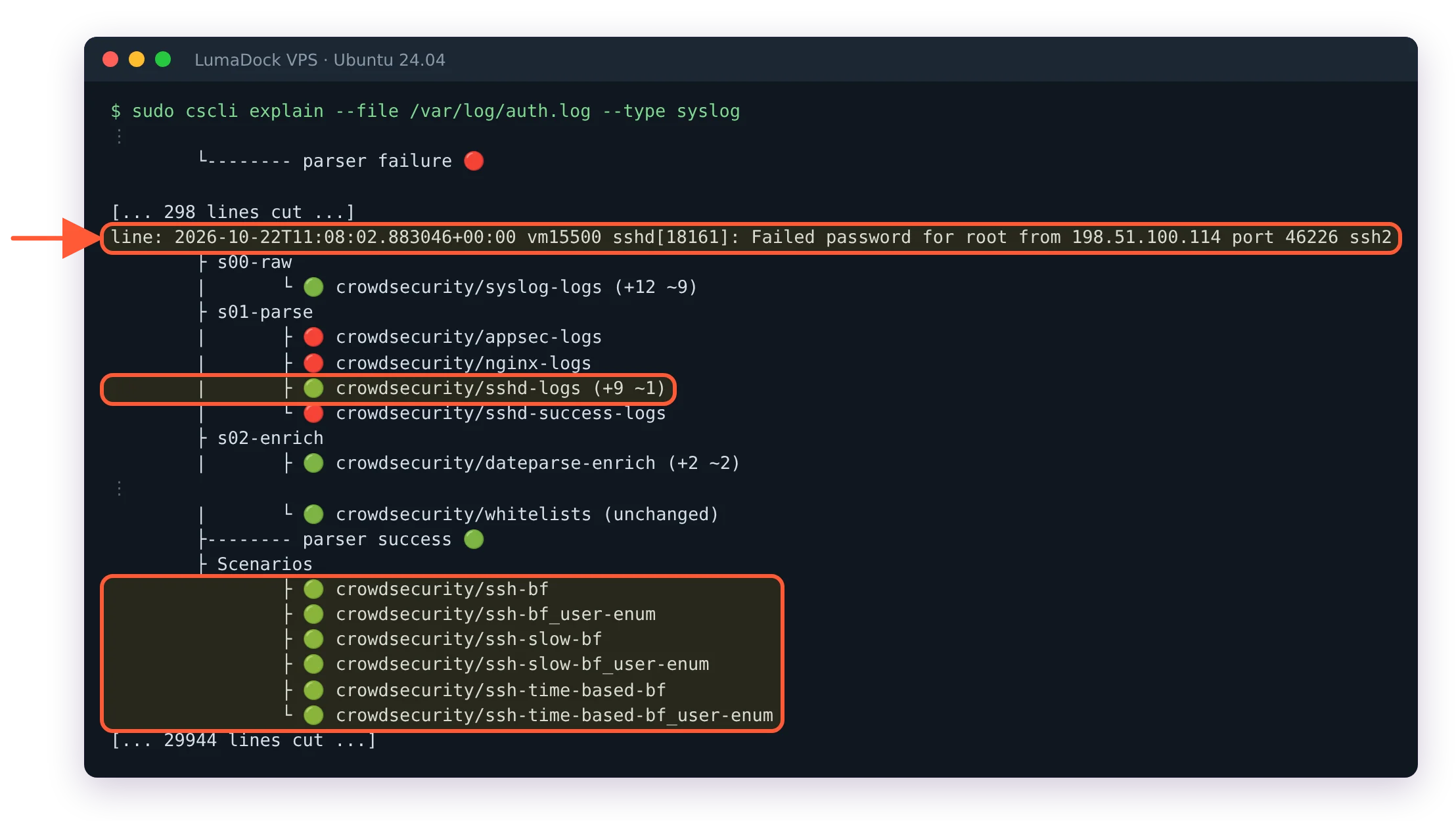
One failed SSH login through cscli explain: parsed by sshd-logs, fed to the ssh-bf scenarios.
Lines that no parser reads point to a missing collection or acquisition. For the list of addresses CrowdSec would have banned, run the engine in replay mode over the same file, as the CrowdSec replay mode guide shows; the resulting alerts land in cscli alerts list, ready to compare with what your sshd jail banned.
Running both during the transition
Run them side by side for a week or two, with different roles. Install CrowdSec without any bouncer, so it only detects (the CrowdSec install guide for Debian 12 and 13 applies to Ubuntu too), leave fail2ban enforcing, and compare cscli alerts list with fail2ban's bans every day. When the alerts look right, add the bouncer and stop fail2ban the same day.
Don't leave both enforcing for long. Two daemons writing firewall rules make "why is this address blocked" a slow question to answer. There's a quieter cost too: when fail2ban bans an attacker first, CrowdSec's bucket for that address never fills, the attack never becomes a signal and nothing reaches the network. Allowlist your own addresses in both tools before you change anything; the safe rollout guide gives the order.
Cutover is two commands:
sudo systemctl disable --now fail2ban
sudo systemctl status crowdsec crowdsec-firewall-bouncer
fail2ban removes its own firewall rules when it stops. Keep the package and its configuration for a few weeks in case you want to compare behavior, then purge it.
Custom applications are the one gap
An in-house application that writes its own log format is the place where fail2ban stays quicker. There, it's one failregex in a filter file plus a jail stanza. In CrowdSec the same job means writing a parser and a scenario: YAML files with grok patterns and bucket settings that no wizard generates for you. The format pays off once you know it, and the hub documentation covers both, but someone who wants one odd application protected this afternoon will find fail2ban faster. Keeping fail2ban for that one log while CrowdSec handles the rest works, as long as each tool owns different logs.


