Step 1: get Docker and the official files
You need Docker Engine v25 or newer with the compose plugin (docker compose version to check; note the space, the old hyphenated docker-compose binary is deprecated). On a fresh Ubuntu VPS, install Docker Engine from Docker's own apt repository, as the Ubuntu page of Docker's install docs describes.
Make a home for Immich and pull the two release files:
mkdir -p /opt/immich && cd /opt/immich
wget -O docker-compose.yml https://github.com/immich-app/immich/releases/latest/download/docker-compose.yml
wget -O .env https://github.com/immich-app/immich/releases/latest/download/example.env
Resist the urge to hand-roll the compose file from a blog post (including this one). Immich's own release attaches the compose file matching that version, and the project changes internals often enough that third-hand compose files are the top source of broken installs.
Step 2: edit the .env file
Open .env and set three things:
UPLOAD_LOCATION=/opt/immich/library
DB_PASSWORD=pick_something_alphanumeric
TZ=Europe/London
In the downloaded file the time zone line ships commented out as # TZ=Etc/UTC, so replace that line with your zone.
Two footnotes with teeth. UPLOAD_LOCATION is where every photo you ever upload will live, so put it on the volume with the space (this is the line you'd point at mounted bulk storage). And the database password only accepts plain A-Z, a-z and 0-9; special characters break the connection string, a documented quirk that costs new installs an hour of confused log reading. The password never leaves the machine (Postgres isn't exposed publicly), so a long boring alphanumeric string is exactly right. openssl rand -hex 16 prints one. The downloaded .env is readable by every user on the server (mode 644) and holds that password, so run chmod 600 .env once you've saved it.
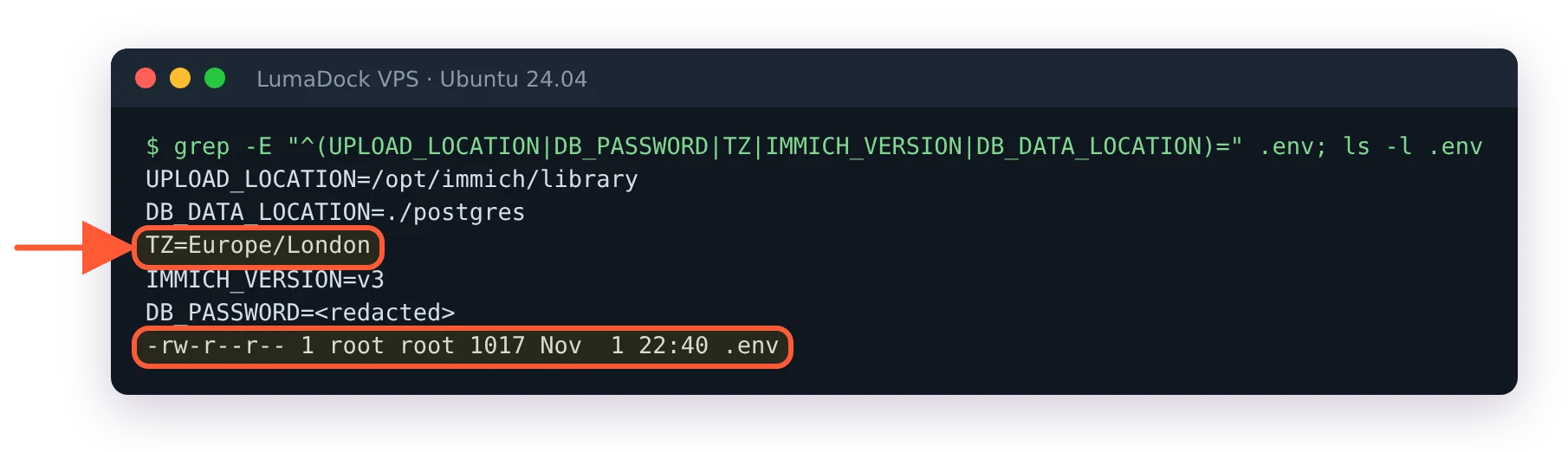
After my edits the .env held the three values, and the downloaded file was readable by every user on the box.
The IMMICH_VERSION variable defaults to the current major, v3. Pinning it to an exact release instead is the conservative move; more on that trade-off in our Immich update guide, because it's really an upgrade-strategy decision.
Step 3: start the containers
docker compose up -d
First run pulls a few gigabytes of images (the machine-learning container carries models), so give it a few minutes, then check all four containers report healthy:
docker compose ps
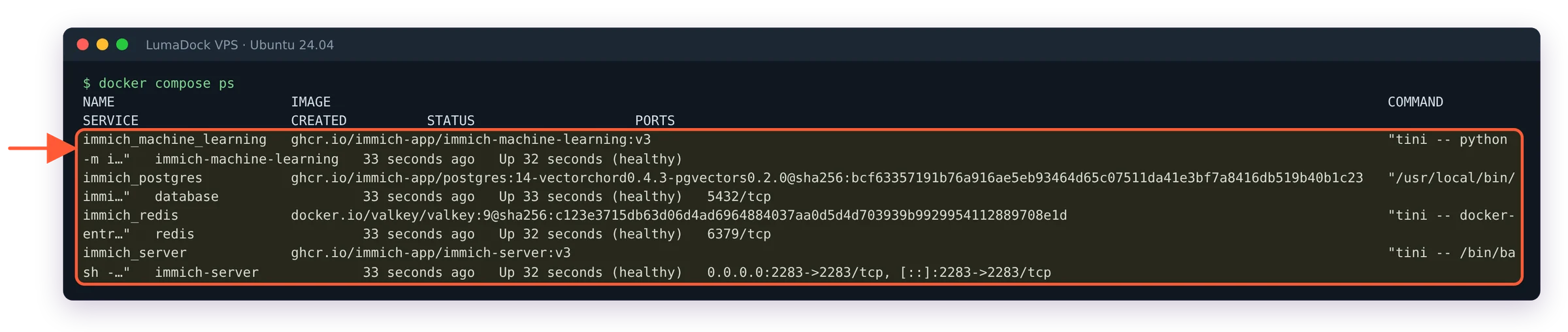
About half a minute after up -d all four containers on my server were healthy, with only 2283 published.
The web interface answers at http://YOUR_SERVER_IP:2283. The first visit asks you to create the admin account (this first account owns server administration, treat the password accordingly), then runs a short onboarding (theme, language, privacy settings, the storage template, backup advice and the mobile app) and you land in an empty library. Port 2283 and what to put in front of it get their own article in the Immich ports guide; short version, for anything beyond a quick test you want a reverse proxy with HTTPS in front, since your phone will be shipping your entire camera roll to this address.
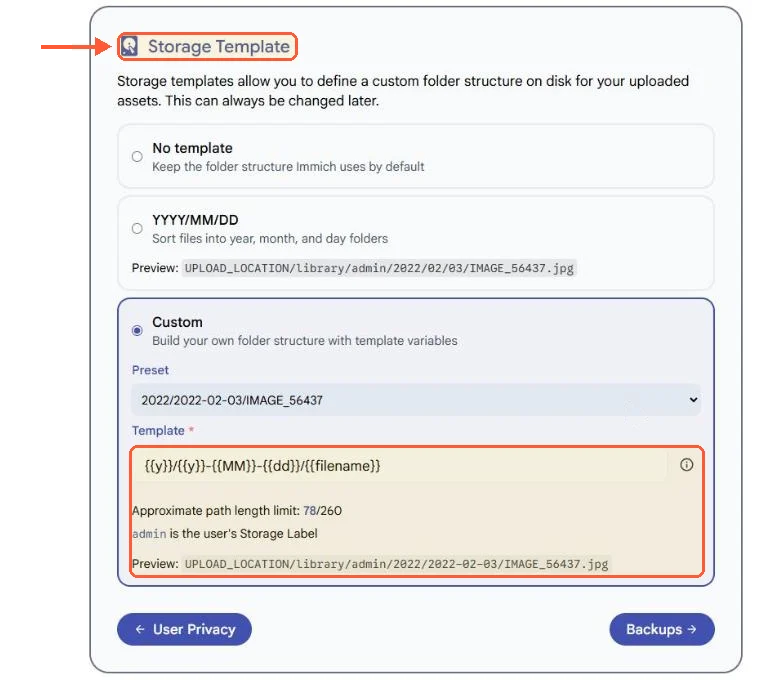
The onboarding on my v3.3.5 server includes a storage template step, so this is the moment to decide on it.
Do the welcome screen right after up -d. Until the first admin exists, anyone who reaches port 2283 can create it; on my server the sign-up stayed open until the first account existed and refused a second one after that. Docker publishes 2283 on every address and ufw rules don't reach it, so to keep it private change the line - '2283:2283' under immich-server in docker-compose.yml to - '127.0.0.1:2283:2283' and put the reverse proxy in front.
Step 4: connect the mobile app
Install Immich from the App Store or Play Store, point it at your server URL (the full address with scheme and port, or your proxied HTTPS domain), sign in and enable backup for the albums you want synced. The first backup of a full camera roll is measured in hours and entirely network-bound; leave the phone on wifi and charging overnight and it's done by morning. Photos land in UPLOAD_LOCATION, thumbnails generate, faces start clustering after the ML jobs chew through the library.
Web uploads, album sharing and partner accounts all work out of the box from here. The one setup piece I'd do in week one rather than someday: backups. Immich dumps its database nightly on its own, but the photo files themselves are your responsibility, and a photo library is the least replaceable data most people own.
Verify the install
Four checks and you're done. All containers healthy in docker compose ps. A test photo uploaded through the web UI appears with a thumbnail (proves storage writes and the thumbnail pipeline). The same photo turns up in a smart search for its content a few minutes later (proves the ML container is doing its job). And Administration » Job Queues shows queues ticking along rather than piling up errors. Anything failing there usually traces to permissions on UPLOAD_LOCATION or too little RAM for the ML container, in that order.
From here Immich mostly runs itself, with one standing obligation: read the release notes before you update, because the project ships fast and breaking changes are routine housekeeping rather than rare events. That habit, plus the backup, is the entire maintenance story. You can also start Immich from a one-click template on the Immich VPS plans.






.svg)
.svg)
.svg)
.svg)

.svg)
.svg)
.svg)