






.svg)
.svg)
.svg)
.svg)

.svg)
.svg)
.svg)


Updated and tested 27 October 2026
You start a movie on Jellyfin, crank the volume to maximum and the dialog still sounds like it's coming from the apartment next door. Then an ad or a YouTube video plays at normal loudness and confirms it's not your speakers. Low audio in Jellyfin is almost always one specific thing: a surround-sound track being squeezed into stereo. Once you know that, the fixes sort themselves into quick, proper and nuclear.
The actual cause: 5.1 downmixed to stereo
Movie audio is usually mastered as 5.1 or 7.1 surround, with dialog living on its own center channel at a modest level because it's supposed to have a dedicated speaker. Play that track through a laptop, phone or TV with stereo speakers and someone has to fold six channels into two. That folding (downmixing) divides everything down to avoid clipping, and dialog, already the quietest part, sinks furthest. Explosions stay loud-ish, speech drowns. The reason it doesn't happen on commercial streaming apps is that they serve a separately mastered stereo track; your rips carry the theatrical mix.
Confirm it in one step: open the failing title, click the audio track selector (or the three-dot menu » Media info) and look at the channel count. "5.1" or "7.1" playing on stereo hardware is your diagnosis.
Fix 1: pick the stereo track when one exists
Plenty of files carry both the surround mix and a stereo track. The player's audio selector switches between them mid-play, and setting your user preference (Settings » Playback, Maximum Allowed Audio Channels or track language options depending on client) makes stereo the default where available. Zero cost, works instantly, only limited by the fact that not every file brings a stereo track along.
Fix 2: the downmix boost setting
The setting this whole article orbits lives on the server: Dashboard » Playback » Transcoding has Audio boost when downmixing (0.5 to 3, default 2, where 1 keeps the original volume) and Stereo Downmix Algorithm next to it. Both apply to every user, and only when the server transcodes a track with more than two channels down to stereo; on a direct play the client folds the channels itself and neither setting takes part. To send a stereo device down that route, set Maximum Allowed Audio Channels to Stereo in Settings » Playback on that device, which makes the server convert surround tracks for it. Raising the boost is what brings dialog back to human levels. Nudge it up rather than maxing it; boost too far and loud scenes clip into crunch. Each client keeps its own channel setting, and each needs setting once. Per-user, per-device, which is annoying and also the price of everyone's speakers being different.
Fix 3: let the server transcode audio properly
When the client reports stereo-only capability and the server transcodes the audio, Jellyfin's ffmpeg applies its own downmix. If you run the server, confirm it's using the project's jellyfin-ffmpeg build rather than a distro ffmpeg (the bundled build carries the tuned filters), and keep the server current; audio downmix handling has been improved repeatedly across releases. Server-side matters most for the web client on random laptops, exactly the devices with the worst speakers.
Fix 4: normalize the files themselves (nuclear, permanent)
For a library that will forever play on stereo gear, the permanent fix is adding a properly normalized stereo track to the files. ffmpeg's loudnorm filter implements broadcast-standard loudness (EBU R128), and a one-line-per-file pass adds a loudness-corrected stereo track while keeping the original surround track intact. On a Jellyfin server plain ffmpeg isn't on the PATH (the packages keep Jellyfin's build in /usr/lib/jellyfin-ffmpeg/), so call it by its full path, or install Ubuntu's own with sudo apt install ffmpeg:
/usr/lib/jellyfin-ffmpeg/ffmpeg -i input.mkv -map 0 -map 0:a:0 -c copy \
  -c:a:1 aac -ac:a:1 2 -ar:a:1 48000 -filter:a:1 loudnorm \
  output.mkv
That copies everything as-is, then appends a second audio stream: stereo AAC, loudness-normalized. Clients pick the stereo track, dialog sits at streaming-service loudness and nothing about the original is lost. Batch it over a library with a shell loop overnight. It's the most work of the four fixes and the only one you do exactly once.
The stream numbers assume a file with one audio track: only then is a:1 the new stereo track. The -ar:a:1 48000 keeps the new track at 48 kHz; without it, loudnorm pushed my test output to 96000 Hz. To make the stereo track the default, add -disposition:a:0 0 -disposition:a:1 default before output.mkv, because without those flags both audio tracks came out marked default.
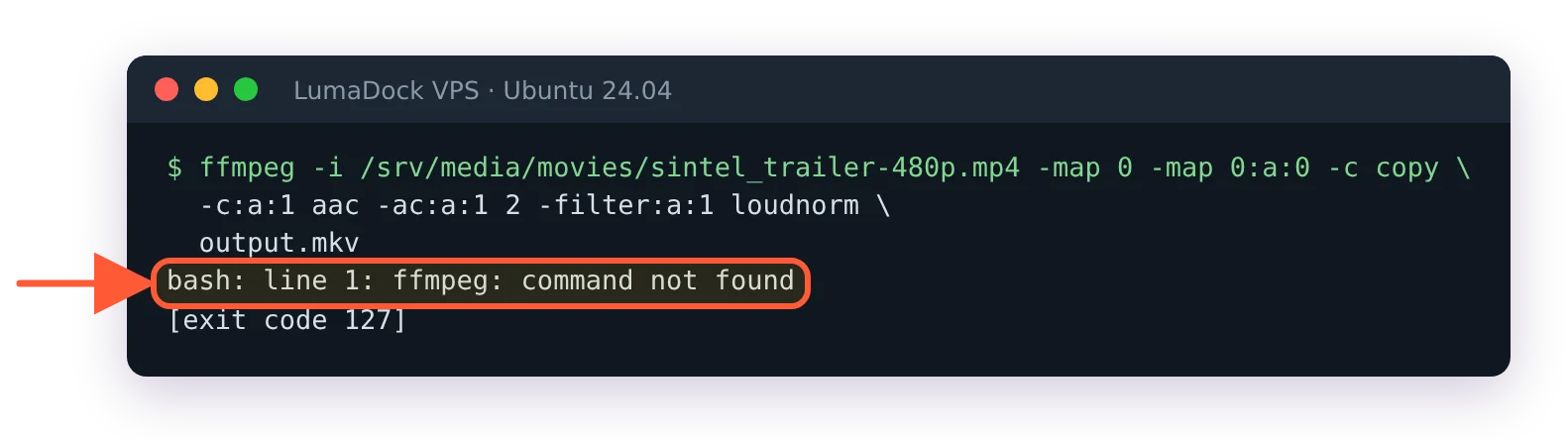
Typed as plain ffmpeg, the command found nothing to run on my Jellyfin server.
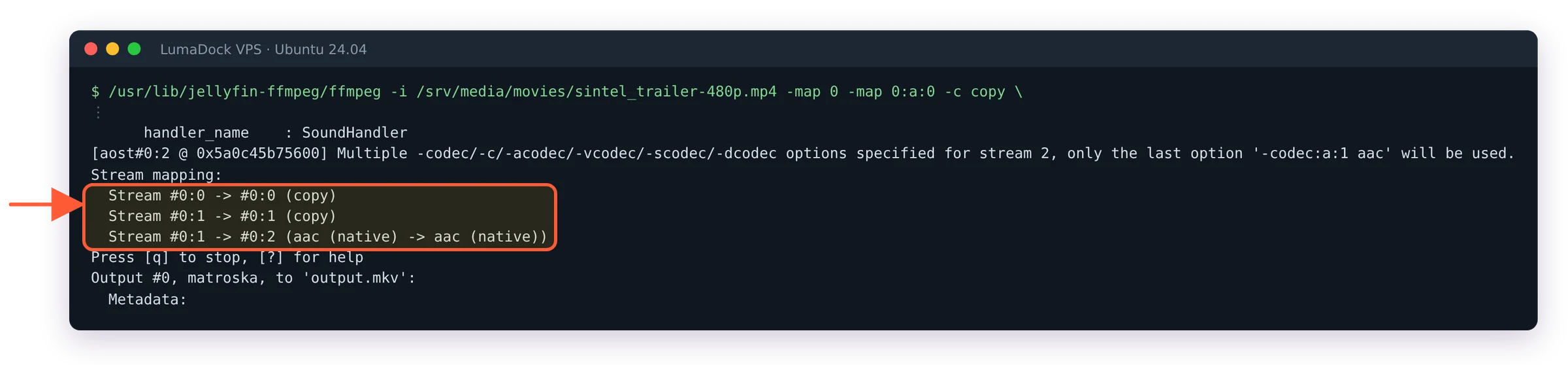
With the full path the command runs (this is the first version, still without -ar:a:1): two streams copied, one new AAC track encoded.
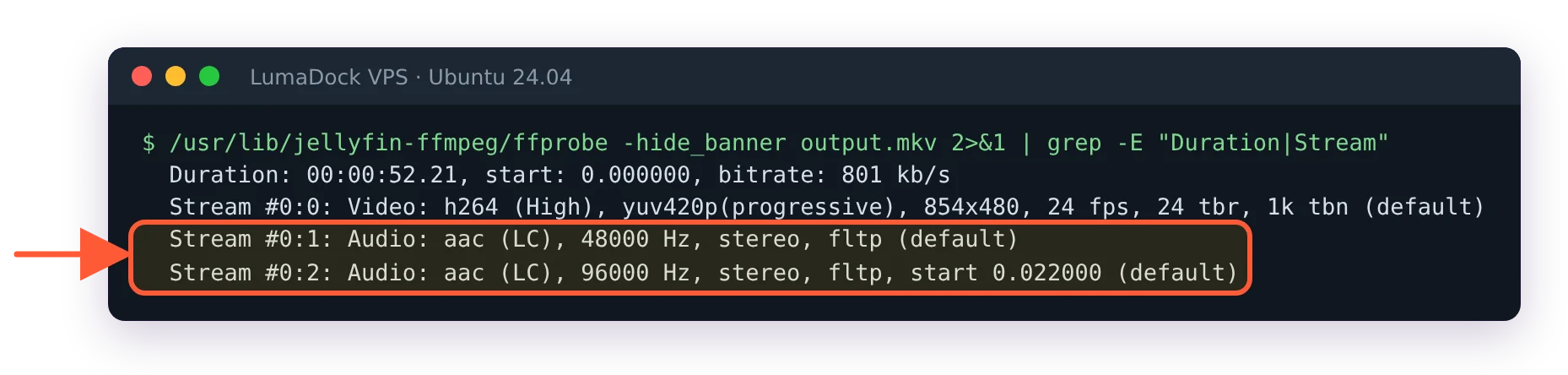
The output has the second stereo track, but at 96000 Hz and flagged default like the first.
Worth saying: for music libraries, Jellyfin has proper loudness normalization built in server-side (album and track gain), so quiet-music complaints have a checkbox fix in the server settings. The movie-dialog problem is the one that needs the layers above.
Fix order: quick settings to permanent re-encode
Realistically: track selector first (ten seconds), downmix boost second (one minute per device), then decide who you are. Households with a receiver and real surround speakers should do none of this on the living-room setup, let the receiver decode the 5.1 and enjoy it as mastered, applying fixes only on the stereo devices. Households that are all-stereo, all-the-time get the most from the ffmpeg pass. And if you're hearing distortion rather than quiet after all this, you've boosted somewhere twice, in Jellyfin and in the TV's own dialog-enhancer; pick one layer to do the job and reset the other. If playback breaks outright rather than sounding wrong, that's a different article, our fatal player error guide covers the transcoding failures.
The satisfying part of this fix is its permanence. Diagnose the downmix once, set your defaults and Jellyfin's loudness stops being a nightly negotiation with the volume button, which is more than can be said for most TV apps.