Back to Article List

Nextcloud vs ownCloud: Which to self-host in 2026

Nextcloud vs ownCloud: Which to self-host in 2026

Updated and tested 3 November 2026

If you're picking a file server for yourself or a small team in 2026, pick Nextcloud. That's my verdict up front, and I'll spend the rest of this article earning it, because the interesting part is the why. The ownCloud vs Nextcloud question stopped being a fair fight years ago, and the reason has less to do with one project beating the other than with ownCloud walking off to compete for entirely different customers.

I say this as someone who ran ownCloud before the fork and has run Nextcloud at home and for clients since around version 24, currently on a 4 GB VPS holding 400 GB of family photos and project files. I've watched both projects the whole way. Here's where they stand.

The 2016 fork in two paragraphs

Nextcloud is a fork of ownCloud. In 2016 Frank Karlitschek, who had started ownCloud in 2010, resigned from the company he founded over disagreements about its direction, in particular the balance between the open source community and the commercial side. Weeks later he announced Nextcloud, and most of the core developers followed him. The US arm of ownCloud shut down shortly after, while the German company carried on.

The codebases were identical on day one, down to the bugs. For a few years the two servers looked like siblings, same PHP core, same sync protocol, drifting apart one release at a time, and forum answers for one mostly worked on the other. That period is over, and comparing them today means comparing two genuinely different products, which older comparison posts (and there are many still ranking) tend to miss. If you're reading a "Nextcloud vs ownCloud" piece that talks about them as near-twins with different logos, check its date.

What ownCloud is in 2026

ownCloud has been part of Kiteworks, an American content security company, since the acquisition was announced on November 21, 2023, together with the German vendor DRACOON. Kiteworks has since set up an open source program office under the ownCloud brand and retired the old contributor license agreement, which credit where due, is a better outcome than open source projects usually get from an acquisition.

The product itself changed even more than the ownership. The newer line is ownCloud Infinite Scale, oCIS for short: a complete rewrite in Go, shipped as a single binary under the Apache 2.0 license. There's no PHP stack in it and no separate database server behind it. You download one file, run it, and you have a file sync server with its metadata handled by its own storage backend. It is fast, and it's a genuinely modern piece of engineering aimed at large deployments and the enterprise compliance market Kiteworks lives in.

The classic PHP server is still developed alongside it. ownCloud 11 shipped on 30 July 2026 and is the maintained PHP line now, while the 10 series gets maintenance releases until its end of life in January 2027 (both dates from the ownCloud core maintenance schedule). A new ownCloud install today means choosing between ownCloud 11 and oCIS.

What Nextcloud is in 2026

Nextcloud kept the PHP architecture and built upward. The server is on version 35 (35.0.2 since mid-October 2026; the marketing name is Hub 26 Summer, a seasonal scheme that takes some getting used to), with a new major every four months and development happening in the open on github.com/nextcloud/server. It stopped being a Dropbox alternative somewhere around version 20 and became a collaboration platform: file sync at the core, plus Talk for calls and chat, office editing through Collabora or Euro-Office, calendars and contacts, an AI assistant and an app store with hundreds of community apps covering everything from photo timelines to two-factor hardware keys.
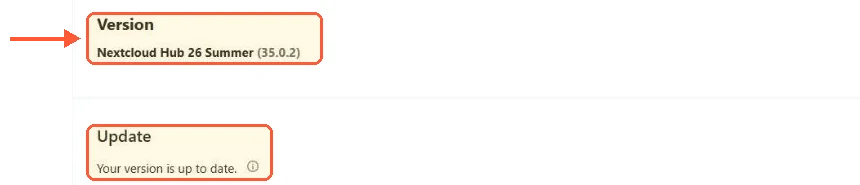
Nextcloud admin overview: Version Nextcloud Hub 26 Summer (35.0.2), Update: Your version is up to date

My test instance after the move to 35: Hub 26 Summer, 35.0.2, nothing newer on the stable channel.

The licensing model matters as much as the features. Everything is AGPL, and files, sync, sharing, Talk and Office all ship in the free release. A Nextcloud Enterprise subscription comes in three tiers (Standard, Premium and Ultimate) and buys support, longer maintenance windows and someone to call; the features it adds are a few enterprise connectors, such as Exchange and Global Scale in the higher tiers, and Oracle Database support. There's no open-core split where the self-hosting parts sit behind a paywall, which was one of the original fork grievances, and ten years on the project still holds that line.

Make room for every file you'll ever keep

Keep your backups and media libraries on reliable storage with unmetered bandwidth and a cost that stays predictable as your archive grows.
Ciclo de Facturación

VPS.H1

$6.99 Save  14 %
$5.99 Mensual
  • 1 vCPU AMD EPYC
  • 2 GB memoria RAM
  • ✔HDD disco
  • ✔Ilimitado ancho de banda
  • ✔ IPv4 e IPv6 incluidos El soporte IPv6 no está disponible en Francia o Países Bajos.
  • ✔Gestión de firewall
  • ✔Monitoreo gratis
  • ✔KVM virtualización

VPS.H3

$24.99 Save  20 %
$19.99 Mensual
  • 4 vCPU AMD EPYC
  • 8 GB memoria RAM
  • ✔HDD disco
  • ✔Ilimitado ancho de banda
  • ✔ IPv4 e IPv6 incluidos El soporte IPv6 no está disponible en Francia o Países Bajos.
  • ✔Gestión de firewall
  • ✔Monitoreo gratis
  • ✔KVM virtualización

VPS.H4

$36.49 Save  18 %
$29.99 Mensual
  • 6 vCPU AMD EPYC
  • 12 GB memoria RAM
  • ✔HDD disco
  • ✔Ilimitado ancho de banda
  • ✔ IPv4 e IPv6 incluidos El soporte IPv6 no está disponible en Francia o Países Bajos.
  • ✔Gestión de firewall
  • ✔Monitoreo gratis
  • ✔KVM virtualización

*VAT excluded.

INCLUDED WITH EVERY PLAN

✓ No setup fees ✓1 Gbps network
✓ Free server monitoring ✓ Firewall management ✓24/7 support ✓ KVM virtualization

What the architecture means on your VPS

Run Nextcloud and you're running a PHP application with everything that implies: a webserver, PHP-FPM with a tuned pool, MariaDB or PostgreSQL, Redis for caching and file locking, a cron job for background work. Concretely, my instance keeps pm.max_children at 12 on 4 GB, opcache sized up from the distro default and Redis on a Unix socket, and with that treatment the stack hums along nicely. But it is a stack, four services that each want a little attention, and it rewards an operator who reads the admin overview warnings before touching anything. I've written up the whole build in my guide to installing Nextcloud on Ubuntu, and it's a pleasant evening of work rather than a hard one, but it is an evening.

oCIS is one Go binary. It starts in about a second, idles in a few hundred megabytes and needs no database server, no PHP tuning and no opcache settings. For pure file sync on minimal hardware, that's a real architectural win and I won't pretend otherwise. The cost shows up on the extension side: a single compiled binary can't offer anything like the install-an-app-from-the-web model that PHP makes possible, so the app catalog stays thin. You get excellent file sync and sharing, web office integration and admin tooling, and the platform mostly ends there.

Features, side by side

Nextcloud's pitch is breadth. Files plus Talk plus Office plus calendars, mail, forms, photo management and whatever else the app store holds, all on one server with one login.

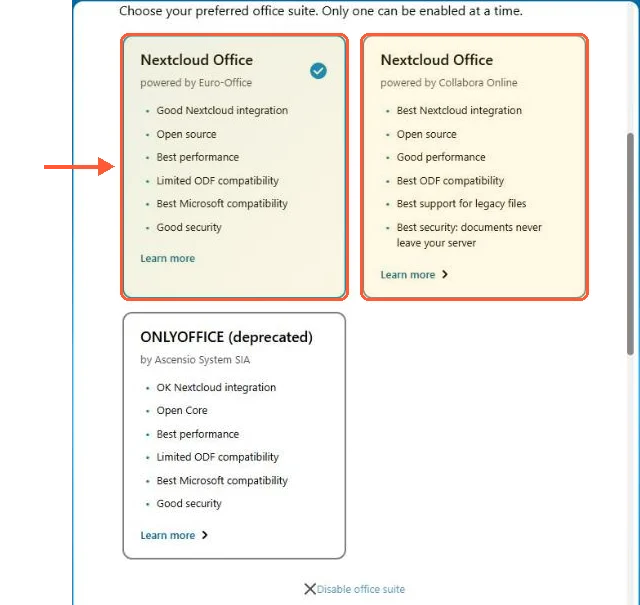
Nextcloud AIO office suite choice: Euro-Office selected by default, Collabora Online beside it, ONLYOFFICE marked deprecated

Setting up the all-in-one container, I got Euro-Office preselected, Collabora as the other choice and ONLYOFFICE marked deprecated.

Some of those apps are excellent and some are hobby-grade, and part of running Nextcloud is learning which is which. oCIS's pitch is depth on one thing: files sync fast, shares work, Spaces give teams shared folders with sane permissions, and office editing arrives via Collabora or OnlyOffice integration rather than in the box. If a feature grid decides your choice, Nextcloud wins on almost every row. That framing quietly favors the platform over the tool though, and a files-only server that does files brilliantly is a legitimate thing to want. I've made the same argument about Seafile in my Seafile vs Nextcloud comparison, and it applies here too.

Licensing and openness

Both projects are open source, and the differences still shape who controls your server's future. Nextcloud's server is AGPL, a copyleft license that obliges anyone building on it to share their changes, and the company has kept everything a self-hoster uses in the free release since the fork. Contributing doesn't require signing rights over to the company either, a detail that seems academic right up until a project changes hands, at which point it decides what the new owner can do with the community's work.

oCIS sits under Apache 2.0, a permissive license that allows proprietary derivatives, and ownCloud historically ran an open-core model where enterprise modules lived behind a paywall. The Kiteworks era has moved in a good direction here, the retired CLA being the concrete example rather than a press-release promise. The commercial gravity is still plainly enterprise, though. Neither model is wrong. As a self-hoster I sleep better under copyleft with a vendor whose paying customers run the same AGPL server as everyone else, because the incentive to hollow out the free version later doesn't exist.

Migration between them

Years ago, migrating from ownCloud to Nextcloud was an in-place upgrade, the fork was that close. That path is long gone. The supported ownCloud 10 to Nextcloud routes assumed versions both projects have left far behind, so today it's an export-and-reimport project. And moving from oCIS to Nextcloud (or the reverse) was never a migration at all: different storage layout, different metadata model, nothing in common to upgrade through. You sync your files down with a client, stand up the new server and sync them back up. Shares, comments and versions don't come with you. Plan accordingly, because with these two, switching costs grow with every month of history you accumulate.

The verdict

For self-hosters, families and small teams, Nextcloud, and it isn't close. You get the full platform for free under AGPL, an enormous community answering questions in public and an app catalog that lets one modest VPS replace four subscription services. The PHP stack costs you some tuning attention, which I'd call a fair price for owning the whole thing.

oCIS makes sense in two honest cases. You want a fast, minimal, files-only server and you accept the thin catalog as a feature rather than a gap. Or you're an organization already in compliance territory where Kiteworks operates, in which case you were never reading a self-hosting blog for advice anyway. What I wouldn't do in 2026 is start anything new on ownCloud 10, which reaches end of life in January 2027.

One practical note if you do go the Nextcloud route: decide early how it gets installed, because the manual, Docker and AIO paths shape your next two years of maintenance. I've compared them properly in Nextcloud AIO vs manual install, and it's the decision I'd make before touching a terminal.

Questions?

Can I use the ownCloud desktop client with Nextcloud?

Use the Nextcloud desktop client instead. The two clients share an ancestor, and older forum threads describe the ownCloud one connecting to a Nextcloud server, but each project has shipped its own client for ten years and Nextcloud builds its server features against its own. I haven't tested a current ownCloud client against Nextcloud 35, and I wouldn't hand an untested client write access to every file on an account.

Never run out of space again

Keep backups, archives and media on reliable storage with unmetered bandwidth and a cost per gigabyte that stays low as the years add up. Your first VPS comes with a 30-day money-back guarantee.