.svg)
.svg)
.svg)
.svg)

.svg)
.svg)
.svg)

Updated 22 October 2026
The most common broken CrowdSec-in-Docker setup I get asked about isn't broken at all, in the sense that every container is green. The engine runs, cscli alerts list fills up with scanner traffic and nothing ever gets blocked, because the Security Engine is a detector and nobody gave it an enforcer. The official Docker install docs say this in a big warning box and people still sail past it, so I'm putting it in the first paragraph instead of the conclusion: the crowdsecurity/crowdsec container decides, a bouncer somewhere else blocks.
This guide builds the full chain on Docker Compose, reverse proxy logs in, enforced bans out. Let's get to it!
The docker-compose.yml
services:
  crowdsec:
    image: crowdsecurity/crowdsec:latest
    container_name: crowdsec
    restart: unless-stopped
    environment:
      COLLECTIONS: "crowdsecurity/nginx-proxy-manager"
      TZ: "Etc/UTC"
    ports:
      - 127.0.0.1:8080:8080
    volumes:
      - crowdsec-config:/etc/crowdsec
      - crowdsec-data:/var/lib/crowdsec/data
      - ./acquis.d:/etc/crowdsec/acquis.d:ro
      - ./npm/data/logs:/var/log/npm:ro
    networks:
      - proxy

volumes:
  crowdsec-config:
  crowdsec-data:

networks:
  proxy:
    external: true
Walking through the choices. COLLECTIONS installs hub collections at container start; here it's the parser set for Nginx Proxy Manager logs. The two named volumes are non-negotiable: since CrowdSec 1.7.0 the container refuses to start if /var/lib/crowdsec/data isn't persisted, and you'll want /etc/crowdsec in a separate volume anyway so credentials and local tweaks survive a recreate. The proxy network is whatever network your reverse proxy already sits on. The LAPI port is published to the host loopback only, for a bouncer we'll install later, and the log mount is read-only because the engine has no business writing to another container's files.
Start it with docker compose up -d. On a server where no proxy stack has created the proxy network yet, the first run pulls the image and then stops on network proxy declared as external, but could not be found. Create the network once and run it again:
docker network create proxy
docker compose up -d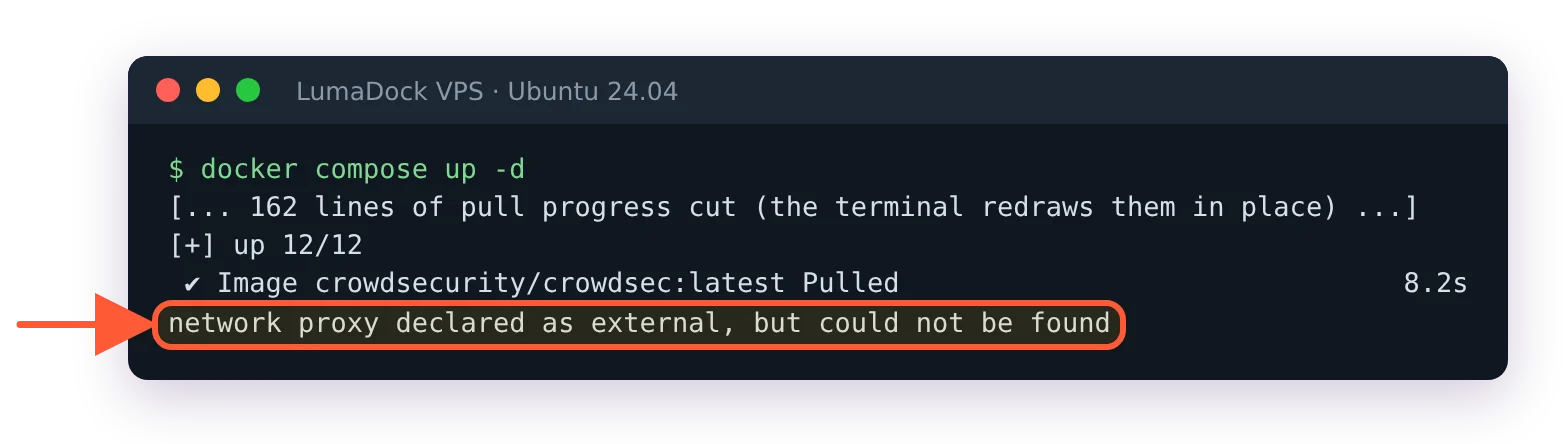
First run on a host without the proxy network: the image pulls, then compose stops.
The second trap hits servers where CrowdSec already runs on the host, which includes LumaDock's nginx + CrowdSec template and anyone who followed the Debian install guide. The host engine holds 127.0.0.1:8080, so compose fails with failed to bind host port 127.0.0.1:8080/tcp: address already in use. Publish the container's LAPI on another loopback port, 127.0.0.1:8081:8080 for example, and point host bouncers at that one. Better still, decide if one box really needs two engines.
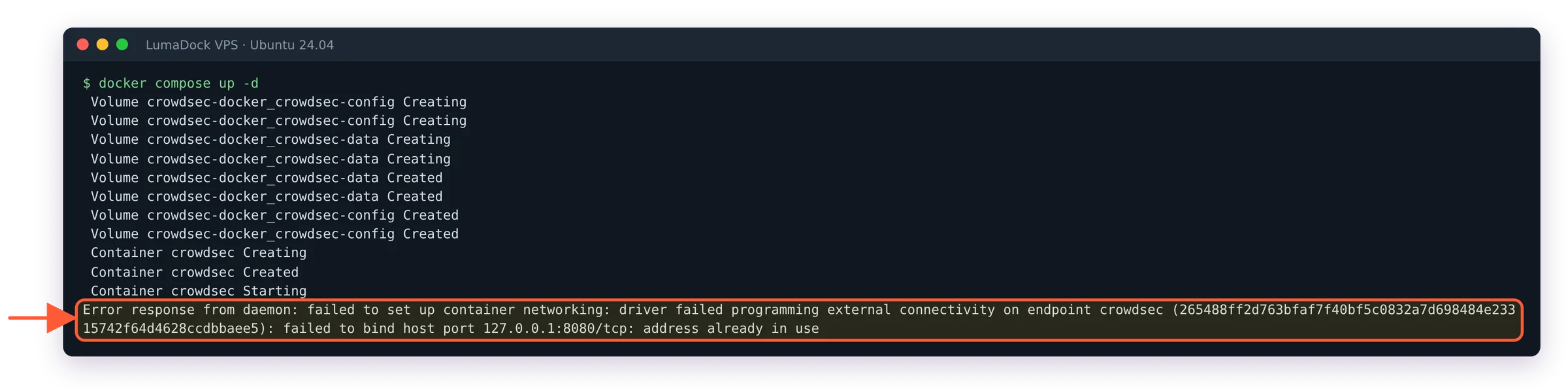
On a server that already runs CrowdSec, 127.0.0.1:8080 is taken.
Getting reverse proxy logs into the container
CrowdSec doesn't sit in the traffic path. It reads logs, so the job is making your proxy's log directory visible inside the CrowdSec container and then describing it in an acquisition file. With Nginx Proxy Manager the logs live in the data/logs folder of your NPM directory, which the compose file above bind-mounts to /var/log/npm. The matching acquisition goes in ./acquis.d/npm.yaml:
filenames:
  - /var/log/npm/*.log
labels:
  type: nginx-proxy-manager
The type label is the routing key that tells the engine which parser handles these lines, and it has to match what the collection expects. This is the single most common misconfiguration I see in shared compose files: proxy logs labelled type: syslog, parsed line count stuck at zero, everyone confused. For a plain nginx container it's type: nginx with the crowdsecurity/nginx collection; for Traefik, enable Traefik's access log to a file, mount that file and use the Traefik collection's documented label. A recent r/selfhosted thread on this exact stack is worth skimming to see how other people wire the same pieces.
Docker socket acquisition vs mounted log files
The engine can also read container output straight from the Docker daemon with the docker acquisition source, no bind mounts needed. I don't use it on anything I care about, for one architectural reason and one practical one. Architecturally, handing the Docker socket to any container gives it root-equivalent control of the host, which is a lot of trust to extend to a log reader. Practically, mounted files behave identically on every stack, survive engine restarts without drama and can be tailed from the host when something looks off. Mounted files are boring. Boring is exactly what I want from the component that decides who gets banned.
Registering a bouncer against the containerized LAPI
Every bouncer authenticates to the engine's local API with a key. Generate one inside the container:
docker exec crowdsec cscli bouncers add traefik-bouncerCopy the key it prints; it's shown once. The part that trips people up is the API URL. Inside a compose network the LAPI is http://crowdsec:8080, the service name, while 127.0.0.1 means "this container" to whoever dials it. A bouncer container pointed at http://127.0.0.1:8080 is talking to itself and will log connection errors forever. If you end up staring at a 403 from the LAPI instead, I've collected the causes in fixing the CrowdSec API access forbidden error.
You can also seed bouncer keys declaratively with the BOUNCER_KEY_<name> environment variable on the crowdsec service, documented in the Docker image README, which keeps the whole setup reproducible from the compose file alone. I switched to that approach after the second time I rebuilt a stack and couldn't remember where I'd stashed a key.
Host firewall bouncer vs proxy-level bouncer
Path one is the firewall bouncer installed on the host from the normal package repo, pointed at http://127.0.0.1:8080 (or whichever host port you published) through the published port. It blocks at the kernel, which protects every service on the machine, SSH included. The catch is Docker itself. Published ports bypass the INPUT chain entirely, so a stock firewall bouncer config happily bans IPs that keep reaching your containers anyway. Docker performs its own iptables surgery at daemon start, wiring published ports through PREROUTING and FORWARD with a set of DOCKER chains it rewrites at will; the first time I watched it silently reorder rules I'd placed by hand was the day I stopped assuming I understood my own firewall. The fix is enforcing in the DOCKER-USER chain, and my firewall bouncer deep dive covers it properly.
Path two blocks in the proxy itself, via the Traefik bouncer plugin or an nginx bouncer baked into the proxy image. HTTP-level blocking gets you proper 403 responses and per-request decisions, and it's immune to the Docker chain mess. I pick the proxy path when the only exposed surface is HTTP behind one reverse proxy, and the host firewall path (with the DOCKER-USER fix) when the box also exposes SSH or mail or anything else worth defending. On servers that matter, both at once; they don't conflict.