





.svg)
.svg)
.svg)
.svg)

.svg)
.svg)
.svg)

Updated 22 October 2026
This is the reference I wish I'd had during my first year of running CrowdSec on client servers: every failure mode I keep meeting, with the exact error string and the shortest fix that works.
Please note it's written against Security Engine 1.7.x, and where a version matters I say so.
| Symptom | Where it shows | Likely cause | First command |
|---|---|---|---|
API error: access forbidden | bouncer log | API key invalid or missing | cscli bouncers list |
connect: connection refused | bouncer log | LAPI down or listening elsewhere | cscli lapi status |
| CrowdSec Access Forbidden page | browser | active decision on your IP | cscli decisions list -i YOUR_IP |
| Nothing gets blocked | attacks continue | empty firewall set or dead registration | cscli metrics show bouncers |
| No alerts, ever | cscli alerts list empty | acquisition reads zero lines | cscli metrics show acquisition |
| Community blocklist missing | only local decisions exist | CAPI credentials or rate limit | cscli capi status |
| IPv6 attackers not banned | nftables or ip6tables | v6 set absent or disabled | nft list table ip6 crowdsec6 |
| Console shows nothing | app.crowdsec.net | engine not enrolled | cscli console status |
API error: Access forbidden
The bouncer logs level=error msg="API error: access forbidden" and enforcement silently stops while everything else looks healthy. The API key the Remediation Component (bouncer, in everyday speech) sends doesn't match any registered identity on LAPI, most often because a package upgrade replaced the config file. Fix by deleting the registration under the name cscli bouncers list shows (the packages use cs-firewall-bouncer- plus a timestamp) and regenerating under a fresh name:
sudo cscli bouncers list
sudo cscli bouncers delete cs-firewall-bouncer-1792659514
sudo cscli bouncers add firewall-bouncer-new
Paste the printed key into /etc/crowdsec/bouncers/crowdsec-firewall-bouncer.yaml and restart the service. There's a related string, API error: access forbidden from this IP (x.x.x.x), that hits cscli admin commands when LAPI is bound to a non-localhost address; that one is solved by api.server.trusted_ips in config.yaml rather than any key. Both variants, including the Docker and Kubernetes angles, get full treatment in my guide to the CrowdSec access forbidden 403.
Connection refused on 127.0.0.1:8080
The bouncer log shows Get "http://127.0.0.1:8080/v1/decisions/stream...": dial tcp 127.0.0.1:8080: connect: connection refused, as reported in crowdsec issue 3729. Nobody is listening where the bouncer is calling. Either the crowdsec service is down, listen_uri points somewhere else or, in containers, api_url targets the container's own loopback instead of the LAPI service name. Diagnose in two commands:
sudo systemctl status crowdsec
sudo ss -tlnp | grep 8080
The bouncer keeps calling 127.0.0.1:8080 and nobody answers.
cscli lapi status fails with the same connection refused while the engine is down, so it works as a third check from the same terminal. A few of these lines right after a normal systemctl restart crowdsec are harmless: the bouncer polls every ten seconds and the engine needs a moment to bind the port again.

cscli lapi status fails the same way while the engine is down.
If crowdsec is up and the port is bound to another address, align api_url in the bouncer config with reality. On Compose stacks the value should read http://crowdsec:8080 or whatever you named the container; my CrowdSec Docker Compose guide shows the working layout.
CrowdSec Access Forbidden page in the browser
A visitor sees "CrowdSec Access Forbidden. You are unable to visit the website." instead of your site. This is the opposite of a malfunction: a bouncer found an active decision against that IP and served the ban template. When the visitor is you, list what LAPI holds against your address and note the origin column, because a ban from a local scenario, the community blocklist or a subscribed list each needs a different cure:
sudo cscli decisions list -i YOUR_IP
sudo cscli decisions delete -i YOUR_IP
The full recovery path, including what to do when the firewall bouncer has taken SSH down with it, is in fixing the CrowdSec Access Forbidden page.
Bouncer runs but nothing gets blocked
The service is active, the log is quiet and attackers keep hammering. Check what the firewall actually holds:
sudo nft list table ip crowdsec | head -n 20
sudo cscli metrics show bouncers
That first line is for the nftables bouncer, which LumaDock's nginx + CrowdSec template ships; there ipset isn't installed at all. It keeps one set per decision origin, crowdsec-blacklists-CAPI, crowdsec-blacklists-crowdsec and crowdsec-blacklists-cscli. The iptables bouncer uses ipsets named crowdsec-blacklists-0, -1 and so on, and sudo ipset list -n shows which exist.
Empty sets (or zero active_decisions in the metrics) while the bouncer runs means the registration or the decision stream is broken, a case documented in a solved Discourse thread. Confirm with cscli bouncers list that the component is valid and pulled recently, and confirm with cscli decisions list that there's anything to enforce at all. One more trap for people testing from home: since 1.6.3 the crowdsecurity/whitelists parser ships by default and whitelists private RFC1918 ranges, so hammering your server from the LAN will never produce a ban. Test from a public address, or read my firewall bouncer guide for a proper verification routine.
ent: bouncer not found
The log pairs while fetching bouncer info: ent: bouncer not found with Http error 403 while talking to LAPI. The key is syntactically fine but the bouncer identity it belongs to no longer exists in the database, which shows up after someone runs cscli bouncers delete, after database restores and chronically in Kubernetes when replicas scale and share a deleted identity. Re-register with cscli bouncers add, give each replica its own name and the 403s end.
IPSET hash is full
The firewall bouncer logs IPSET Hash is full, cannot add more elements and new bans silently fail to land. Your decision count, usually inflated by blocklist subscriptions, has outgrown the set's capacity. Add ipset_size to the bouncer yaml and restart. The packaged file doesn't carry the key (bouncer 0.0.34 on Ubuntu 24.04 didn't), so there's nothing to edit until you add it; the default is 131072 entries since v0.0.28:
ipset_size: 262144In ipset set-only mode the sets are yours, so recreate them with a bigger maxelem instead. The behavior and the fix are discussed in cs-firewall-bouncer issue 368.
Allowlist entries not applying to existing bans
You allowlisted an address and it stays banned. Allowlists drop new alerts and strip incoming blocklist IPs before database insertion; they don't purge decisions that already exist. So a decision created before your allowlist entry lives on until it expires or you remove it:
sudo cscli allowlists check 198.51.100.7
sudo cscli decisions delete -i 198.51.100.7
If check says the value isn't covered, remember that allowlists match IPs and ranges only, and an entry for a single address won't cover the /24 around it. The allowlist also guards the other direction: once an address is on it, cscli decisions add refuses to ban it unless you pass --bypass-allowlist.
No alerts from any scenario
Days of uptime, zero alerts, and you know the internet has been knocking. Detection starts at acquisition, so measure that first:
sudo cscli metrics show acquisition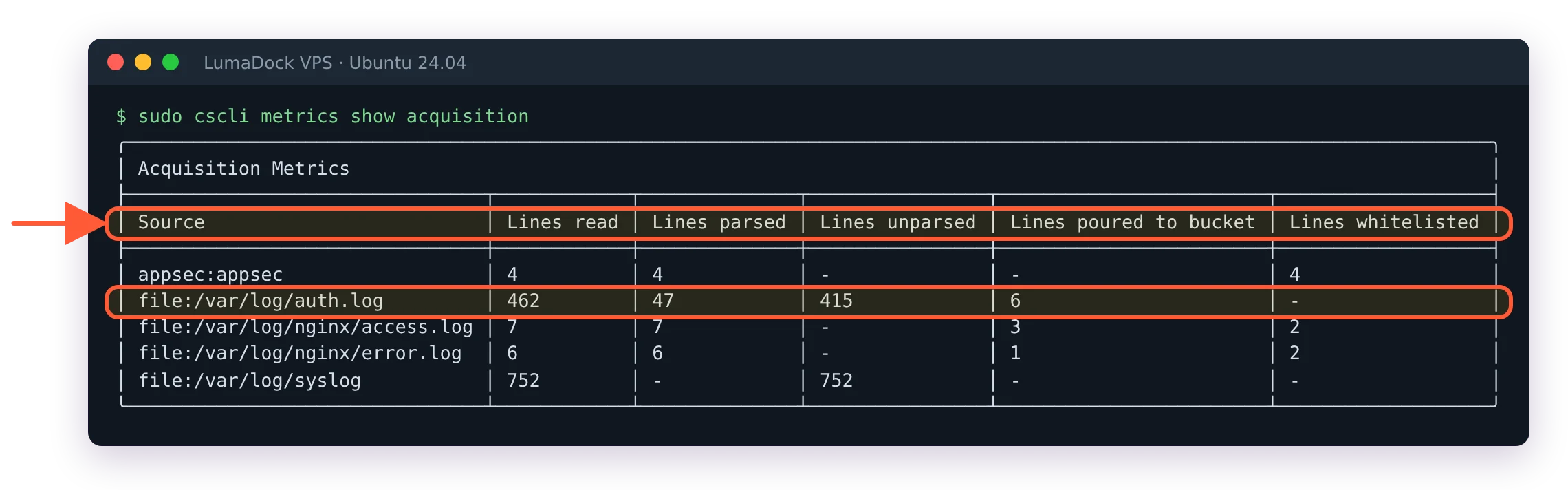
Acquisition first: lines read and parsed per source. Zero read means the engine is watching the wrong place.
Zero lines read means CrowdSec is watching the wrong places. The usual causes sort into four buckets: the log file path in /etc/crowdsec/acquis.yaml (or acquis.d/) doesn't exist on this distro, the service logs to journald while acquisition expects a file, the app runs in Docker so its logs live under the container runtime rather than /var/log or the file exists and lines are read but a missing parser leaves them all unparsed. For journald sources, point acquisition at the unit instead of a path:
source: journalctl
journalctl_filter:
  - _SYSTEMD_UNIT=ssh.service
labels:
  type: syslog
Lines read but nothing parsed points at a missing collection for that service. Distro defaults differ more than people expect (Debian in particular ships thinner logging than Ubuntu), which is why my CrowdSec on Debian install guide spends half its length on acquisition.
Community blocklist not pulling and CAPI rate limits
Local detection works while community bans never arrive. Start with:
sudo cscli capi statusCredential errors point at /etc/crowdsec/online_api_credentials.yaml, fixable by re-registering the engine with the Central API. If credentials check out and pulls still fail, you may be rate limited: CrowdSec introduced CAPI rate limiting in December 2025, and engines stuck in restart loops, retrying aggressively or sharing one set of credentials across machines can be temporarily banned from CAPI for several hours. Normal deployments never hit it. The tell is a healthy engine whose CAPI calls suddenly fail for hours while journalctl -u crowdsec shows a crash or restart pattern beforehand. Fix the loop, stop cloning credentials between servers and the ban lifts on its own.
IPv6 attackers not banned
IPv4 bans land while v6 attackers walk straight through. The firewall bouncer keeps IPv6 in a table and sets of its own, and they're the ones people forget to check. With the nftables bouncer, the IPv6 bans sit in the crowdsec6 table:
sudo nft list table ip6 crowdsec6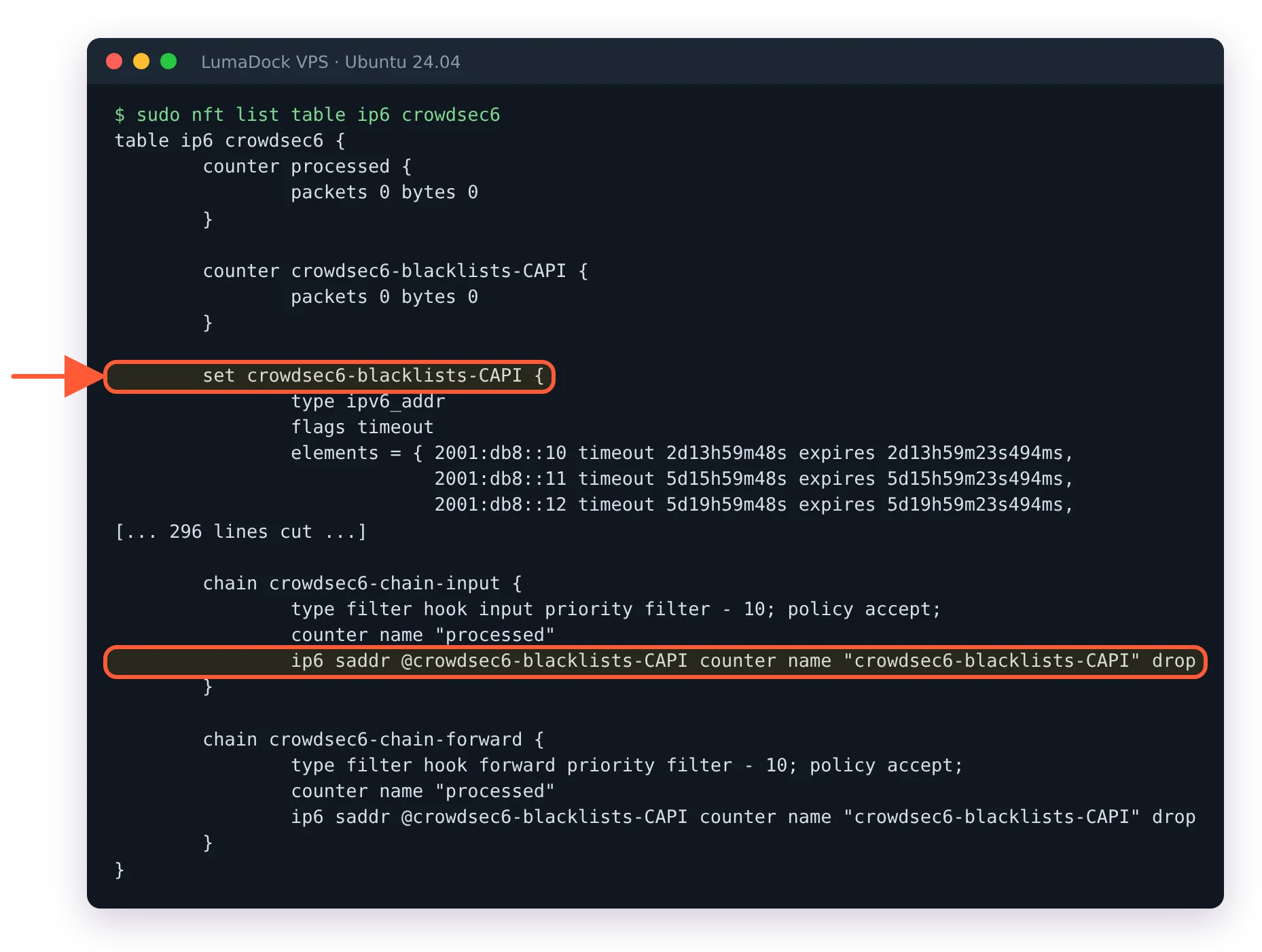
With the nftables bouncer the IPv6 bans live in the crowdsec6 table, one set per origin.
With the iptables bouncer, look for the v6 ipsets and the jump rule. The rule's target is CROWDSEC_CHAIN in capitals, so a case-sensitive grep finds nothing:
sudo ipset list -n | grep crowdsec6
sudo ip6tables -L INPUT -n | grep -i crowdsec
An absent table, set or rule usually traces to disable_ipv6: true left in the bouncer config, or to set-only mode where nobody created the v6 set. Appliance users have their own variant of this; see CrowdSec troubleshooting on OPNsense if your engine lives on the firewall.
Machine not validated
A remote Log Processor registers against a central LAPI and then can't push alerts. Registration via cscli lapi register creates the machine in a pending state, and someone has to approve it on the LAPI side:
sudo cscli machines list
sudo cscli machines validate MACHINE_NAME
The validated column tells you instantly which machine is stuck. On single-server installs you'll rarely meet this, since the local machine validates during setup.
Hub errors and tainted collections after upgrade
After an engine upgrade, scenarios misbehave or cscli complains about hub items. Refresh and upgrade the hub in one line:
sudo cscli hub update && sudo cscli hub upgradeThen run cscli hub list and look for items marked tainted, which means locally edited; the hub refuses to overwrite your changes, so those items stay frozen at old versions forever. The clean pattern is to copy the hub file into a local item under /etc/crowdsec/parsers/ or /etc/crowdsec/scenarios/, customize the copy and let the original upgrade normally. I've inherited servers where a parser tainted in 2023 was still parsing 2026 traffic, badly.
Metrics missing from the console
The engine works locally while app.crowdsec.net shows it offline or empty. Check enrollment state and the export flags:
sudo cscli console status
sudo cscli console enroll YOUR_ENROLL_KEY
Enrollment needs accepting in the console UI after the command runs, which is the step everyone misses. Also worth a glance: disable_usage_metrics_export in config.yaml, which does exactly what it says and occasionally survives from someone's old hardening template.


