





.svg)
.svg)
.svg)
.svg)

.svg)
.svg)
.svg)


Updated and tested 29 July 2026
Two years ago I moved my family's photos off Google Photos and onto an Immich server I run myself, and I'll say the quiet part first: it's been one of the most satisfying pieces of self-hosting I've done, and there were three separate evenings where I questioned every decision that led me there. This guide is both of those truths, organized. What Immich is, what it takes to run well, where it bites and the order I'd do everything in if I were starting today. Where a topic deserves depth, I'll point you to the dedicated tutorial we've written for it, so think of this page as the map and the ten guides linked from it as the terrain.
What is Immich
Immich is an open-source, self-hosted photo and video platform: your own Google Photos running on hardware you control. The comparison is the project's explicit design goal rather than marketing shorthand, and it delivers on the parts people assume can't work without a trillion-dollar backend. The phone app backs up your camera roll automatically. Machine learning runs face recognition and a search that understands "kids in the pool at sunset". There are albums, shared links, a map of everywhere you've photographed and the "one year ago today" lane that makes people sentimental at breakfast.
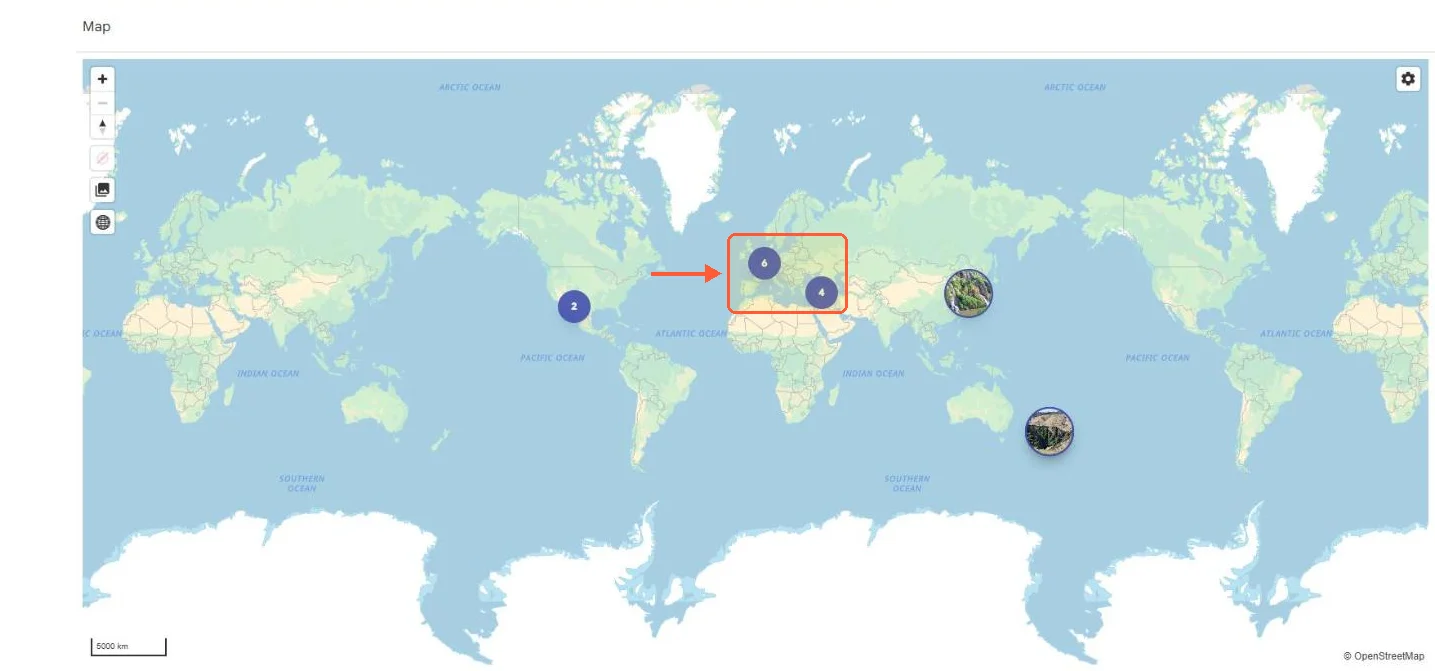
The map view on my test server, with the photos grouped by where they were taken.
The project's trajectory matters when you're trusting it with your photos, so the short version: after years of famously fast development, the core team shipped the stable v2.0 in October 2025 with 78,000 GitHub stars and over 1,500 contributors behind it, and the team works on it full time under FUTO's funding rather than as a side project. Since stable, versioning is semantic and compatibility is a stated promise instead of a hope. I watched the beta years up close; the difference in upgrade anxiety between then and now is night and day.
What Immich isn't: a photo editor (basic adjustments only), a Lightroom replacement or a sync-everything file platform like Nextcloud. It does photos and videos, deliberately. I consider that focus the reason it's good.
What you need to run Immich
Honest requirements, not minimums. Immich runs as four Docker containers, and the machine-learning one is why the official floor is 6 GB of RAM (8 GB recommended, 4 GB only with machine learning switched off); give it 2 to 4 vCPU and the initial indexing of your library goes from days to hours. Then there's the question that decides everything else: where the server lives.
A home machine (old PC, NAS, mini box) costs nothing monthly and puts your photos physically in your house, at the price of managing remote access through your router and your ISP's moods. A VPS inverts the trade: static IP, real bandwidth, no port forwarding and the photos live in a datacenter you trust instead of a closet that can flood. I've run both and settled on the VPS for one unglamorous reason: my family's backups can't depend on my home internet being up. Disk is the budget line either way, because a photo library only grows, and phone cameras now produce files that make 2015 look quaint. Count your library, double it, plan for that.
If you go the server route, the full walkthrough is our Immich install guide: Docker Compose, the two official files, the .env settings with teeth (UPLOAD_LOCATION placement, the alphanumeric-only database password) and the first-run wizard. The Immich VPS plans on LumaDock include a one-click template too.
Getting it online safely
An Immich server your phone can't reach from the coffee shop is a demo, so the networking layer is not optional homework. The good news is the surface is small: one port (2283) faces the world, everything else stays inside Docker, and the right production setup hides even that behind a reverse proxy speaking HTTPS on a domain. Which port does what, the firewall rules per scenario and the Caddy config I run myself are in the Immich ports guide.
Do this part before inviting anyone. Retrofitting HTTPS after the family's apps are configured means touching every phone twice, and I've done that walk of shame. Ask me how the "it's temporary" plain-HTTP setup went.
Getting the family to use it
Here's the part no other guide told me: the technical install is maybe a third of the project. The rest is adoption, and adoption is won or lost in the phone app's backup settings. Each person needs the app pointed at your server, background backup enabled and the right albums selected, five minutes per phone that you should do personally rather than describe over dinner.
After backup, the features sell themselves in a specific order. Smart search first (search "passport" in front of someone who's been scrolling for theirs, it's a party trick that converts skeptics). Then faces, named in an evening. Then partner sharing, the feature couples don't know they need until it quietly ends the "send me those pics" ritual forever. The full tour, including the sharing modes and the utilities people find months late, is the how to use Immich guide.
The maintenance reality
Immich needs two habits from its admin, and they're the two that separate a calm year from a stressful one.
First, deliberate updates. The project ships fast (a feature I'm grateful for weekly) and it labels breaking changes honestly, which only helps if you read them. My routine is monthly-ish: skim release notes, pin the exact version, pull, verify. The whole discipline, including why downgrading is off the table and why the apps stay on the same version as the server, is the Immich update guide.
Second, real backups. Immich dumps its own database nightly (a genuinely great default), and that covers half of what matters; your photo files are the other half, and they need to leave the machine. The two-halves model, the rsync and restic setups and the restore drill you run exactly once are in the backup guide, and I'd rank it the most important link on this page. Photos are the one dataset with no second copy out in the world.
When something breaks
Things will occasionally break, and after two years I can report the breakage is boring and repetitive, which is the best kind. Two failure modes cover nearly everything.
Gray tiles saying "error loading image" while everything else works: that's the thumbnail pipeline or the path to it, almost never your actual photos, and the fix ladder (regenerate thumbnails, check disk, fix the proxy limits) lives in the error loading image guide. The whole page refusing to load at all: that's a five-layer walk from container health to browser cache, written up in the web UI troubleshooting guide. Between those two articles you've got maybe 95% of the tickets my household has ever filed with its sysadmin, who is me, at dinner.
The root cause behind a suspicious share of both: a full disk. Photo servers grow toward full disks by nature, so put a usage alert at 85% and half this section retires itself.