





.svg)
.svg)
.svg)
.svg)

.svg)
.svg)
.svg)

Updated and tested 21 September 2026
Webmin installs on AlmaLinux and Rocky Linux from the vendor's yum repository, using dnf. The install has the same shape it has on Ubuntu, and the packaging details are what change: the repository arrives as a .repo file under /etc/yum.repos.d/, package signatures are checked against a key in /etc/pki/rpm-gpg/, and Webmin's program files land somewhere different on disk than they do on Debian.
AlmaLinux and Rocky Linux are binary-compatible rebuilds of the same upstream source, so every command here works unmodified on both. CentOS Stream and Fedora take the same route, with one difference covered at the end.
What's different on the RHEL family
Webmin's program files install to /usr/libexec/webmin here. An Ubuntu or Debian install puts them in /usr/share/webmin. The configuration directory stays /etc/webmin on every distribution Webmin supports, so miniserv.conf, miniserv.users, config and helper scripts like /etc/webmin/restart are where anyone coming from the Debian side expects them.
The program path matters for source installs, where the CLI has to be invoked by full path as /usr/libexec/webmin/bin/webmin. Package installs put webmin on your PATH.
The rest carries over unchanged. Port 10000 over HTTPS, a systemd unit called webmin.service, a persistent miniserv.pl daemon and no default password anywhere in the product.
Add the Webmin repository
Run the setup script
Webmin isn't in the AlmaLinux, Rocky, EPEL or RHEL repositories, so dnf install webmin gets you nothing until the vendor repository exists on the machine. The setup script adds it. Its one hard requirement is /usr/bin/curl, which the minimal images already ship. Check with command -v curl if you built the image yourself.
curl -o webmin-setup-repo.sh https://raw.githubusercontent.com/webmin/webmin/master/webmin-setup-repo.sh
sh webmin-setup-repo.sh
Run it as root. It asks for confirmation, offers the stable channel by default and takes -f if you want it silent inside a kickstart or an Ansible task. Stable is the build with the extra testing behind it. It's the only channel I'd put on a server somebody depends on.
The .repo file it writes
The script drops /etc/yum.repos.d/webmin-stable.repo. Its contents in full:
[webmin-stable]
name=Webmin Stable
baseurl=https://download.webmin.com/download/newkey/yum
enabled=1
gpgkey=file:///etc/pki/rpm-gpg/RPM-GPG-KEY-webmin-developers
gpgcheck=1
The gpgkey= line points at a file the script has already imported. gpgcheck=1 makes dnf verify the signature on every package it pulls from this repository. On a SUSE system the same script writes the equivalent file into /etc/zypp/repos.d/.
The baseurl carries no release version and no architecture. Webmin is Perl and the RPMs are noarch, so one repository serves EL 8, EL 9, EL 10 and Fedora at once. The newkey path segment is the current signing key generation, and older guides pointing at the pre-newkey path describe a repository that is no longer current.
Verify the repository and install
dnf repolist | grep webmin
dnf info webmin
dnf info prints the version dnf is about to give you along with the repository it came from. Current at the time of writing is 2.670, announced on 20 September 2026, with the packages in the yum tree carrying a 21 September build date. The yum package index lists every RPM with its date, and the 2.6x line has been shipping about once a month all year.
dnf install webminThe first run asks you to accept the GPG key, and the fingerprint it shows belongs to the Webmin developers. Accept it once and dnf remembers. There's no --install-recommends equivalent to worry about here: the RPM declares what it needs as proper dependencies, and dnf pulls the Perl modules in without being asked.
systemctl status webminThe list of common Webmin errors covers the reasons a fresh install fails to start. The package enables and starts the unit for you, so active (running) is the expected output. If it isn't running, nothing on port 10000 will answer no matter what you do to the firewall next.
Open port 10000 in firewalld
AlmaLinux and Rocky both run firewalld by default, and its default zone blocks 10000. Two commands fix that:
firewall-cmd --add-port=10000/tcp --permanent
firewall-cmd --reload
The --permanent flag writes the rule to the zone's configuration. The --reload applies it to the running firewall. Without the reload, the rule exists on disk and has no effect on traffic. Confirm it with firewall-cmd --list-ports.
The guide to hardening a Webmin install covers the access options in detail. Webmin edits system files as root, and port 10000 left open to the whole internet is reachable by anything that scans for it. If your administration comes from a fixed address or a VPN, restrict the port to a zone bound to that source and take it out of the public zone.
firewalld is only the firewall inside the machine. Providers commonly run a network-level firewall in front of the VM, and that one needs its own rule for 10000 before any of this becomes reachable.
Log in for the first time
Go to https://YOUR_SERVER_IP:10000. The certificate generated during installation is self-signed, so your browser will object once and then let you through.
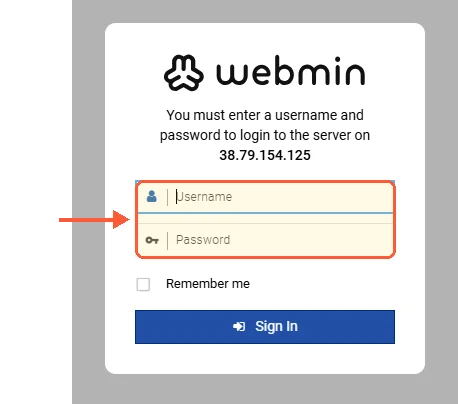
The Webmin login form is the same on every distribution: it asks for a system account.
Webmin has no built-in credentials. A package install creates one Webmin user, named root or admin, and it authenticates against the Unix account with that name. RHEL-family installers ask for a root password during setup, so on a machine built from the ISO you log in as root with the password you set then. Cloud images are the exception, since most of them lock root and expect key-based access, in which case use a sudo-capable account and its system password.
SELinux and Webmin
AlmaLinux and Rocky ship SELinux in enforcing mode. Webmin installs and runs under it without any tuning, and you should get a working login without touching it. Check where you stand with getenforce.
Webmin ships no SELinux policy module of its own, so miniserv.pl isn't confined to a tailored domain the way a distribution-packaged daemon would be. SELinux is still protecting the rest of the system. It isn't fencing Webmin in, which follows from what Webmin does, since a tool for editing arbitrary system configuration as root can't be confined tightly and stay useful.
Running setenforce 0 doesn't fix a failed first connection to a new install. On AlmaLinux that failure comes from the firewall or the service state almost every time, and turning SELinux off removes your ability to diagnose it.


