

.svg)
.svg)
.svg)
.svg)

.svg)
.svg)
.svg)

Updated and tested 3 November 2026
Nextcloud is an open source platform for file sync and collaboration that you run on your own server: your files, calendars, contacts, video calls and document editing on hardware you control, reachable from a web interface, desktop clients and mobile apps. Think of the feature set of Dropbox, Google Drive and a slice of Microsoft 365, self-hosted. Mine has run since around version 24, currently on a 4 GB VPS with roughly 400 GB of family photos and client project files in it, and over the past months I've written fourteen deep guides on installing, tuning and repairing it. This page is the map that holds them together: what Nextcloud is, what it needs and the order I'd do things in, with a pointer into the right guide at each step.
What Nextcloud is in 2026
The project started in 2016 as a fork of ownCloud, led by ownCloud's founder and most of its core developers, and it has long since outgrown its origin. The same code now runs at every scale, from a single-board computer in a closet to public-sector deployments with tens of thousands of seats. The server is PHP, developed in the open at github.com/nextcloud/server, with a release cadence worth understanding before you commit: a new major version every four months, each supported for about a year with monthly maintenance releases. As I write this at the end of October 2026, the current stable release is 35.0.2 (15 October), from the Nextcloud 35 major that shipped on 16 September. If you install with AIO, the official all-in-one container, note that it sets up the previous major, 34, unless the "Install Nextcloud Hub 26 Summer" box is ticked before the first start; afterwards it offers an upgrade button for 35. The practical reading of that cadence: you'll be upgrading two or three times a year, so pick an install method you can upgrade calmly, a theme this page returns to twice.
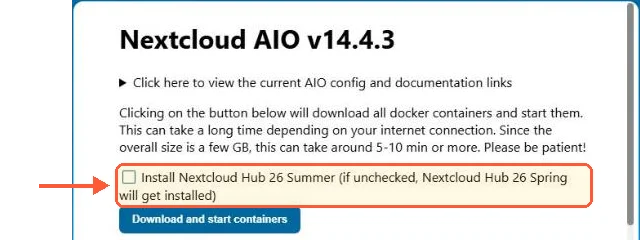
On a fresh AIO the Hub 26 Summer box is unticked, so it installs 34 unless you tick it before the first start.
The naming needs one paragraph of decoding, because it confuses everyone. Marketing calls the product Nextcloud Hub, and majors carry seasonal names: version 34 is Hub 26 Spring, 33 is Hub 26 Winter, 35 is Hub 26 Summer. When someone on a forum says "Hub 26 Summer" and the changelog says "35.0.2", they mean the same software. I'll use plain version numbers throughout, and so does every error message you'll ever read.
Is Nextcloud free? Yes, genuinely. The entire server is AGPL-licensed and everything a self-hoster uses ships in the free release, Talk and Office included. The paid Nextcloud Enterprise subscription, in Standard, Premium and Ultimate tiers, buys support contracts and longer maintenance windows for organizations, plus a few enterprise-only connectors such as Exchange and Global Scale. For a self-hoster the only real costs are the server it runs on and your own time, and this page exists to shrink the second one.
The moving parts, in one section
Every Nextcloud instance, no matter how it was installed, is the same five pieces wearing different clothes. A webserver (Apache in the docs' recommended setup) receives requests. PHP runs the application code. A database, MariaDB or PostgreSQL, holds users, shares and file metadata. Redis caches and handles file locking, which stops two devices corrupting the same file, and it stops being optional the moment a second person logs in. And the data directory holds your actual files as plain files on disk, the property I lean on hardest when things go wrong.
Two more names you'll meet constantly. config.php, in the config/ folder of the install, is the one configuration file that matters, and nearly every fix in this series touches it. And occ is the command-line tool for administering the server, run as the webserver user, like this:
sudo -u www-data php /var/www/nextcloud/occ statusAnyone comfortable with those five pieces plus those two names can operate a Nextcloud server. That's the whole secret, and it's why the troubleshooting half of this series is shorter than you'd fear.
What it's good at, and the honest limits
Nextcloud earns its place as the default answer for self-hosted files. Sync works well across every platform, sharing is flexible down to passwords and expiry dates on links, and the app catalog turns one server into a calendar host, a photo library, a Kanban board or an office suite as needed. The breadth is the point: one modest VPS, one login, four or five subscription services replaced. There's also a quieter argument that convinced me before any feature did. Files on your own server sit under your jurisdiction and your retention rules, and no product decision made in a boardroom next quarter can lock you out of them.
The honest limits: it's a PHP web application with a database, so its web interface and sync engine carry more weight than a single-purpose tool, and it rewards (quietly demands, really) proper caching and tuning. If all you want is the fastest possible file sync for a team and nothing else, dedicated sync servers have a case, and I've written fairly about the strongest one in my Seafile vs Nextcloud comparison. The other name that always comes up is its own ancestor, and my Nextcloud vs ownCloud comparison explains why that rivalry is mostly over. For the mix of files plus everything around them, Nextcloud stands alone, which is how it ended up with this whole tutorial series.
The install paths, compared
There are three real ways onto a server, and the choice shapes your next two years of maintenance more than any config option will. It's also sticky. Migrating between install methods later is possible, and nobody who has done it recommends the experience, so this is the decision to get right while the server is still empty.
The manual install puts the stack straight on the OS: Apache with PHP-FPM, MariaDB, Redis and the Nextcloud code itself, on Ubuntu 26.04 LTS, which ships PHP 8.5 in its default repos and is what the docs currently recommend. It's my own setup and the path I'd pick for anyone who wants to understand every layer. The full build, from bare server to green admin overview, is in how to install Nextcloud on Ubuntu.
The Docker route runs the official image with compose: standard tooling, clean coexistence with other containers and an update path of bumping an image tag. That build, reverse proxy included, is in my Nextcloud Docker Compose guide. Then there's AIO, the official all-in-one container that manages the entire stack for you, Talk and backups included, which is excellent when Nextcloud owns the whole machine and prickly when it doesn't. Picking between these three is a genuine decision with real trade-offs, and I've argued it through properly in Nextcloud AIO vs manual install.
A fourth path exists and I'll be fair to it in one sentence: the snap package works and updates itself, and I left it years ago because the config felt hidden behind the snap's abstractions, so I'd call it right for an appliance and wrong for anyone who plans to reach the config files. All the official options, snap included, are listed on nextcloud.com/install. And if you'd rather skip installation entirely, you can also start Nextcloud from a one-click template.
What hardware it needs
The official system requirements read modestly, 512 MB of memory recommended per process, and the docs aren't wrong, but real installs want more. My sizing after years of running one: 2 GB of RAM is the floor for a usable instance with a few users, once the webserver, PHP-FPM pool, MariaDB and Redis all take their share. 4 GB is comfortable, with room for photo previews and the occasional heavy app. A busy team of ten or more wants 8 GB and faster disks before it wants more CPU. Cores matter less than people expect; RAM and disk latency decide how Nextcloud feels. Keep the database on the same host at this scale, since splitting a five-user stack across servers adds latency and a second machine to patch in exchange for nothing you'll measure.
One number from my own box for calibration: with Apache, PHP-FPM capped at 12 workers, MariaDB and Redis serving a family plus occasional client hand-offs, the whole stack idles around 1.5 GB and peaks well inside 4 GB during photo uploads. The instances that struggle on that hardware are nearly always missing their caching config rather than short on cores.
Disk is the resource that grows forever, because a file server's job is to accumulate: file versions, trashed files on their retention clock, previews for every photo, all of it stacking on top of the data itself. Budget for three times your current data if you want backups and versions to breathe, and decide early where big libraries will live. Past a few hundred gigabytes you either give the VPS a large local volume, the kind of thing a storage VPS exists for, or you put the data in an object store. That second option is a day-one architectural decision with sharp edges, and I've laid them out in Nextcloud S3 primary storage before you make it by accident.
The first week
Whatever the install path, the first session is the same: create the admin account, get HTTPS working with a real certificate and set the basics. I keep a KB walkthrough of exactly that first login and certificate setup in the Nextcloud initial setup and HTTPS guide, and it's the page I send people on day one.
Two gotchas arrive in week one so reliably that they get their own guides. The first is the "Access through untrusted domain" screen, which appears the moment you reach the server by a name it wasn't configured for; the fix is one config array, explained in fixing the Nextcloud untrusted domain error. The second is background jobs. Nextcloud ships in AJAX cron mode, where maintenance tasks only run while someone has the web UI open, which on a quiet server means they barely run at all. Switching to a real system cron entry in the www-data crontab is the single highest-value five minutes of the first week:
*/5 * * * * php -f /var/www/nextcloud/cron.phpThe why behind it, the Docker and AIO variants and the ways this quietly breaks later are in Nextcloud cron and background jobs.
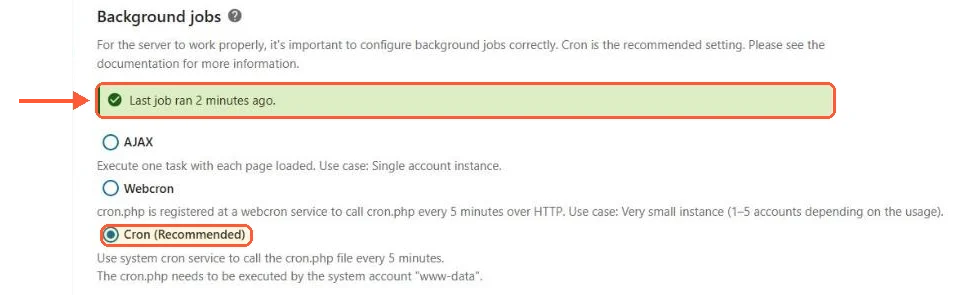
With the www-data crontab line in place, my test install switched to Cron and the last job had run two minutes earlier.
Then connect the clients: desktop for Windows, macOS and Linux, mobile apps for both stores. The desktop client's virtual files mode on Windows deserves a mention, since it shows the whole server's contents in Explorer while downloading only what gets opened, which is how a laptop with a 256 GB drive lives comfortably with a 400 GB server. Give each device its own app password from the security settings instead of the account password; revoking one stolen laptop later shouldn't mean rotating everything.
Watch the admin overview screen while you do all this (Administration settings, Overview). It's Nextcloud's own health report, and a fresh install that shows green checks there is a rare and satisfying sight worth chasing.
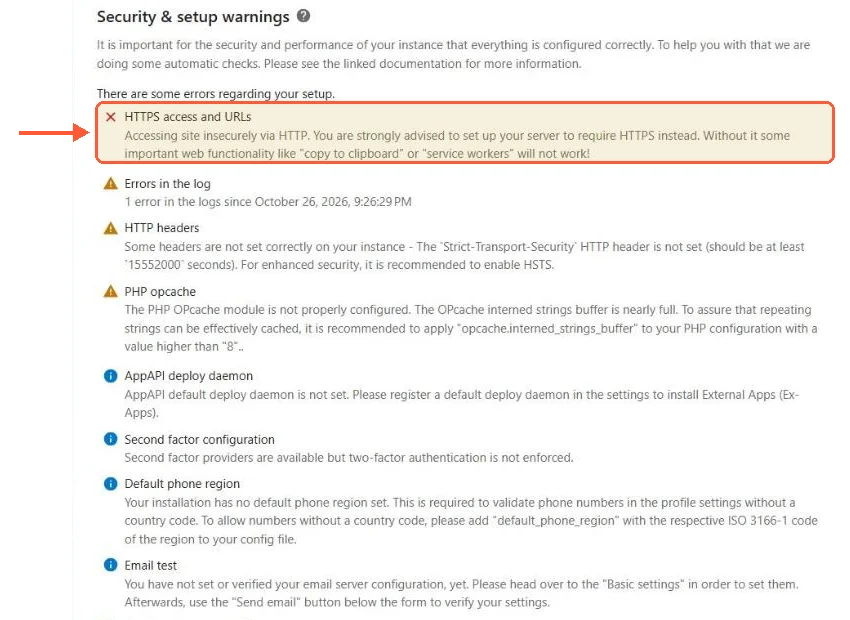
My fresh install before the certificate step: HTTPS first in the list, then the smaller items to work through.
I check that screen before and after every change I make, a habit that has caught more misconfigurations than any log file.