Connect Ollama to Open WebUI and LibreChat
Open WebUI speaks Ollama's own API. Point OLLAMA_BASE_URL at the daemon (in the Docker image the default is http://host.docker.internal:11434, which reaches an Ollama on the same host because of the --add-host flag, while the pip install defaults to http://localhost:11434) and the model list, pulls and deletes all happen from the admin settings (Settings, Admin, Connections, then Manage on the Ollama connection). Anything OpenAI-compatible goes in through OPENAI_API_BASE_URL and OPENAI_API_KEY (the Ollama API guide shows both the native and the /v1 paths Ollama exposes, if that's new to you), and you can add several such connections from the UI.
On my server I set nothing: Open WebUI found the Ollama container at that default address, and it also listed the OpenAI API as a connection, switched on with no key.
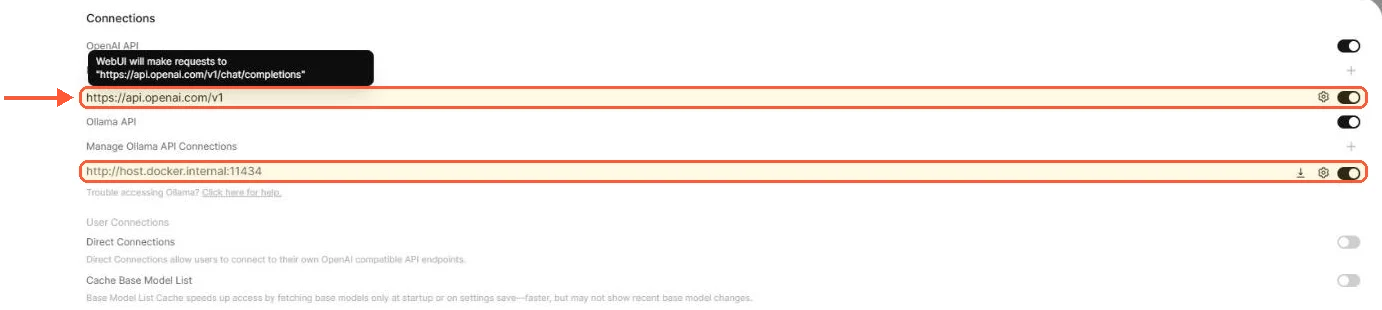
Open WebUI found Ollama at host.docker.internal on its own, and the OpenAI connection was switched on with no key.
LibreChat has no Ollama endpoint type. It reaches Ollama as a custom endpoint through the /v1/ OpenAI-compatible surface, configured in librechat.yaml. The official Ollama example looks like this, trimmed:
endpoints:
  custom:
    - name: "Ollama"
      apiKey: "ollama"
      baseURL: "http://host.docker.internal:11434/v1/"
      models:
        default: ["llama3.1"]
        fetch: true
      titleConvo: true
      titleModel: "current_model"
      modelDisplayLabel: "Ollama"
The apiKey is required by the schema and ignored by Ollama. fetch: true pulls the model list from the daemon so you don't maintain it by hand (an endpoint name that starts with ollama makes LibreChat use Ollama's native model list, and other names fall back to /v1/models), and host.docker.internal is the docs' suggestion for reaching a host-side Ollama from inside the container. Model pulls stay on the Ollama side; LibreChat only lists and calls what's already there.
One trip on a fresh install: LibreChat opened on an OpenAI model, which asks for a key before it answers. Ollama and its models sit lower down in the same model menu.
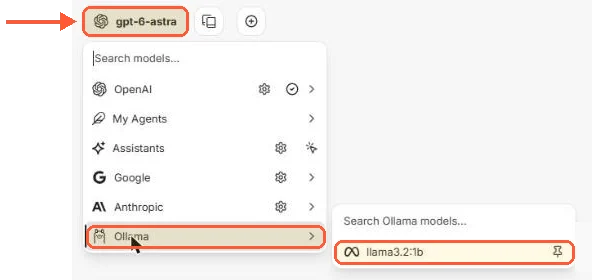
LibreChat opened on an OpenAI model; Ollama and llama3.2:1b were lower down in the same menu.
For commercial APIs the roles flip. LibreChat ships native endpoint types for OpenAI, Azure OpenAI, Anthropic, AWS Bedrock, Google and Vertex AI, with provider-specific settings (prompt cache TTL for Anthropic custom endpoints arrived in 0.8.7, for instance) and a user_provided mode that makes each person paste their own key. Open WebUI treats everything that isn't Ollama as a generic OpenAI-compatible connection. Anthropic works that way: add https://api.anthropic.com/v1 under Connections and the Claude models appear, though Anthropic describes that compatibility layer as meant for evaluation and testing, and prompt caching, extended thinking, PDFs and citations don't pass through it. For those, the route is a proxy such as LiteLLM or a Pipe function. Gemini connects directly through Google's OpenAI-compatible URL (https://generativelanguage.googleapis.com/v1beta/openai) for plain chat, but tool calling is broken on that endpoint and the docs send you to LiteLLM, OpenRouter or a Pipe function for it.
With Ollama as the only backend I'd install Open WebUI, mostly because model management is in the UI. LibreChat makes more sense once you're fronting two or three commercial APIs with per-user keys and don't want a proxy layer in between.
Users, permissions and admin
Open WebUI defaults: ENABLE_SIGNUP is True and DEFAULT_USER_ROLE is pending, but sign-up switches itself off once the admin account exists: on my server a second sign-up got HTTP 403 and the admin settings showed New Sign Ups off. Turn New Sign Ups back on under Settings, Admin, Authentication and every new account waits as pending until an admin approves it. Groups carry permissions down to the model level, so a support team can see one set of models and engineering another. Federated login covers OAuth, OIDC and LDAP, and the feature list adds SCIM 2.0 for automated provisioning from an identity provider, which is unusual at this end of the market.
LibreChat gates registration with ALLOW_REGISTRATION and ALLOW_SOCIAL_REGISTRATION, logs people in by email, OAuth/OpenID, LDAP or SAML, and since 0.8.7 syncs roles from OpenID claims. The bundled admin panel is new in the same release and is the first time LibreChat has had a proper administrative UI; before that, user management meant scripts inside the api container, and balances are still set in librechat.yaml and with scripts. There's also a token balance system that can meter each user's spend across providers, which Open WebUI doesn't have as a first-class feature.
Registration is where the two differ on day one. ALLOW_REGISTRATION is true in .env.example, and registration stays open after the first account: on my server the first account became ADMIN and a second account registered straight after it. Set ALLOW_REGISTRATION=false in .env once your accounts exist, or anyone who reaches port 3080 can sign up.

The first LibreChat account became ADMIN, and a second account could still register right after it.
Three people won't notice any of this. At fifty, the need for SCIM provisioning or for per-user spend metering usually settles the choice on its own.
RAG, documents and web search
Open WebUI's document handling is called Knowledge. Upload files or whole folders into a knowledge base, attach it to a model or pull it into a chat with #, and the retrieval runs inside the same container. The default vector store is Chroma on a local SQLite file, and the docs are blunt about its limits: it isn't fork-safe, so the moment you run more than one uvicorn worker or more than one replica you switch VECTOR_DB to pgvector, qdrant, milvus or one of the other supported backends and move DATABASE_URL to Postgres at the same time. The scaling guide in the docs lists the full set and the Redis requirement for multi-instance websockets.
LibreChat splits retrieval out into the rag_api service, which stores embeddings in the pgvector container and handles file uploads for chats and agents. The separation is cleaner and lets a busy RAG deployment scale retrieval by itself. The downside is two more containers that have to be healthy before file upload works, and a fair share of the "upload failed" threads in the LibreChat discussions trace back to one of them being down.
Web search exists in both. Open WebUI supports it with a long list of engines to choose from (SearXNG, Brave, Tavily and others), and the model cites what it fetched. LibreChat wires search through a search provider, a scraper and a reranker configured in librechat.yaml, so you control each stage of the pipeline, at the cost of up to three sets of API keys to manage (the reranker is optional, and SearXNG needs no key).
Open WebUI and LibreChat MCP support
Open WebUI added native MCP in v0.6.31. Add a server under Settings, Admin, Integrations, External Tool Servers, set the type to MCP (Streamable HTTP), give it the URL and any OAuth 2.1 details, and its tools show up for the models you allow. The catch is transport: only Streamable HTTP is supported natively. For stdio or SSE servers the project points you at mcpo, its own proxy that turns those into OpenAPI endpoints, and the docs still describe OpenAPI as the preferred integration path. Open WebUI also has an extension system of its own that predates MCP. Tools are Python scripts run from the chat, and Functions are Pipe and Filter hooks on requests. The separate Pipelines server was archived on 29 October 2026; its jobs now go to Pipe Functions, or to an OpenAPI or MCP tool server for heavier work.
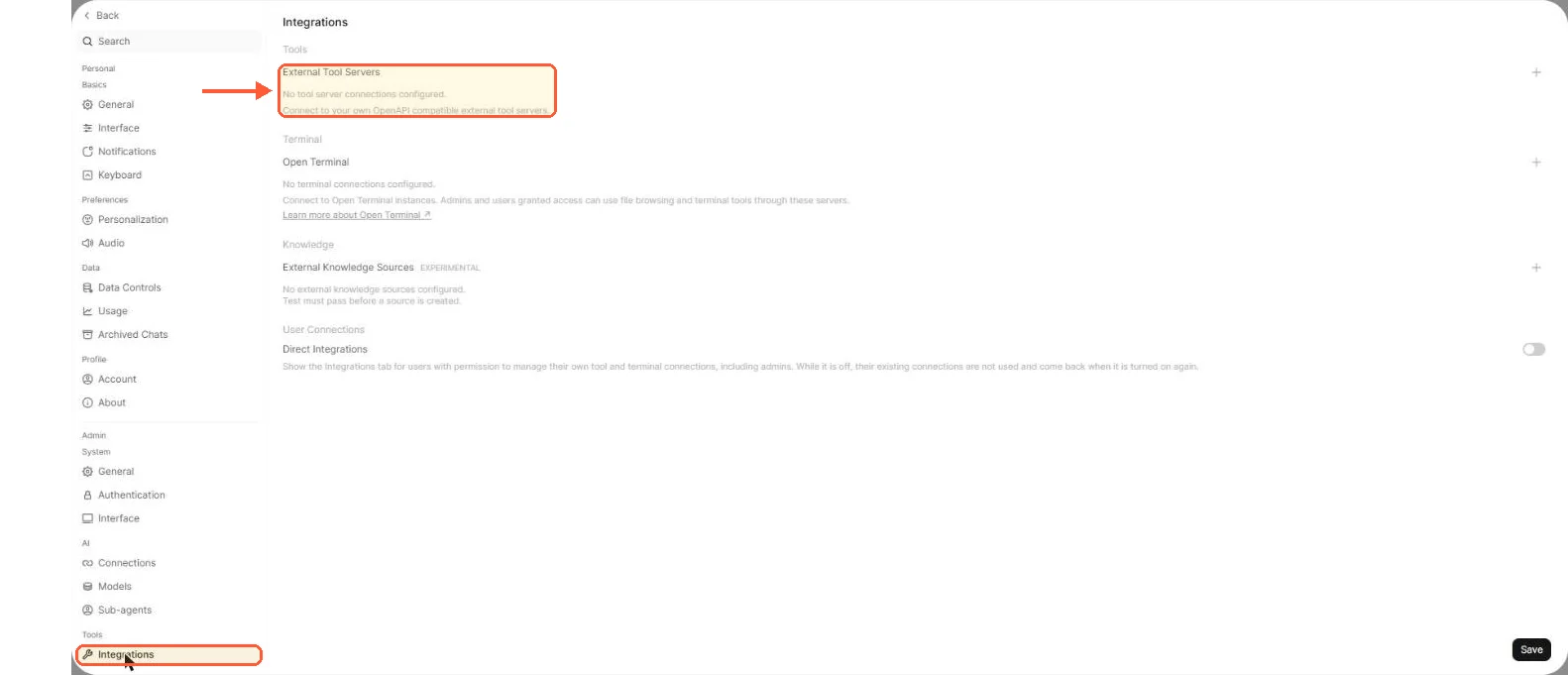
MCP servers go in under Integrations, External Tool Servers, a page that only talks about OpenAPI tool servers.
LibreChat declares MCP servers in librechat.yaml under mcpServers, with type set to stdio, sse, streamable-http or websocket, and it infers the type if you leave it out: a command gives stdio, an http(s) url gives sse and a ws(s) url gives websocket, so write type: streamable-http yourself for a Streamable HTTP server. A stdio server needs a command and its arguments:
mcpServers:
  filesystem:
    type: stdio
    command: npx
    args:
      - -y
      - "@modelcontextprotocol/server-filesystem"
      - /data
The tools then attach to Agents, and users can hold their own credentials for servers that need them. A server you already run over HTTP, the Grafana MCP server for instance, connects to either app without a proxy. Running stdio servers inside the api container does mean the container needs Node or Python for whatever the server is written in.
Agents, code execution and the rest
LibreChat's Agents are the centre of the product now. A no-code builder, a marketplace for sharing them, file attachments, tool selection per agent, and as of 0.8.7 skills that an agent can author for itself and sync from GitHub. The Code Interpreter runs in a sandbox powered by ClickHouse/code-interpreter, an Apache 2.0 service you can self-host and point LibreChat at through LIBRECHAT_CODE_BASEURL. LIBRECHAT_CODE_API_KEY covers deployments that use an API key, while the current ClickHouse service authenticates with LibreChat's JWT instead. The same release added chat projects (folders), a context usage gauge with token cost and a settings redesign.
Open WebUI's equivalent is the model builder under Workspace: pick a base model, bind knowledge, tools and a system prompt, set who can see it. Python runs in the browser (Pyodide) or through Open Terminal. Then there are the features the other side lacks entirely: Channels, which are persistent shared rooms where several people and several models talk in one thread, and Memory, where the model keeps facts about a user across conversations. Image generation plugs into ComfyUI, OpenAI's image models or Gemini, and voice covers both directions plus a hands-free call mode.
Licensing and who owns the project
Open WebUI changed its licence in v0.6.6, released on 19 April 2025. Everything up to 0.6.5 stays BSD-3-Clause. From 0.6.6 the code is still public but the licence page states plainly that it "is not an OSI-approved 'open source' license", because of a branding clause: you may not alter, remove or obscure the Open WebUI branding in a deployment, with exceptions for installs of 50 or fewer users in a rolling 30-day period, for those who hold an enterprise licence and for substantive contributors with prior written permission from the Open WebUI team. An internal tool never hits this. If you white-label and sell it, you'll be talking to their sales team about an enterprise licence.
LibreChat is MIT and stayed MIT through the ownership change. ClickHouse announced the acquisition on 4 November 2025. Founder Danny Avila and the team moved in-house, and the new owner says ClickHouse and LibreChat together form the foundation of what it calls the open-source Agentic Data Stack. The announcement says existing deployments continue unchanged with ongoing investment in the open-source project. The v0.8.8 compose file pulled the admin panel from a clickhouse namespace on the project registry; the main branch has since moved it to librechat-ai, the organisation that now also hosts the GitHub repository.
How the ClickHouse roadmap shapes the standalone chat product a year from now, I can't tell you. The releases since the deal, 0.8.6 through 0.8.8, have been ordinary feature releases, so nothing has changed in practice yet.
Which one to pick
For a solo or small-team VPS with Ollama behind it, go with Open WebUI. One container, one volume, model pulls from the UI, RAG without standing up Postgres. The RAM the models need (the Ollama hardware requirements guide has the per-model numbers) will be a bigger cost line than the front end whichever way you go.
LibreChat is the right call once the team is on commercial APIs, needs SAML or spend limits, or wants agents with sandboxed code. You pay for that with the six-container stack, and MongoDB stays on the server for as long as LibreChat does. And if you plan to rebrand and sell either of them, read the Open WebUI licence before you do anything else.
If you'd rather not assemble either by hand, LumaDock has both as one-click templates: Ollama with Open WebUI and LibreChat.
One last thing. Neither project imports the other's export. LibreChat's importer reads ChatGPT, Claude, ChatbotUI v1 and LibreChat JSON, and Open WebUI reads its own JSON, ChatGPT's and custom JSON in its documented structure, so a conversion script is possible. Without one, switching later means the history starts again from zero.



.svg)
.svg)
.svg)
.svg)

.svg)
.svg)
.svg)