





.svg)
.svg)
.svg)
.svg)

.svg)
.svg)
.svg)


Updated and tested 17 October 2026
pi.hole is a name Pi-hole answers for itself. It resolves only on devices that already use that Pi-hole as their DNS server. Everything else on this page follows from that: a laptop that hasn't switched its resolver yet, a phone whose tunnel is down, a browser profile holding a stale cookie, a second web server sitting on port 80. Each gives a different symptom in the browser and each has a short fix.
Try the address form that needs no name resolution first. On a VPS set up as in the Pi-hole over WireGuard install that is http://10.100.0.1/admin/ with the tunnel connected; on a LAN install it's http://YOUR_SERVER_IP/admin/. When the IP form works, the problem is name resolution and the first section covers it. When it doesn't, the browser's own message (403, a certificate warning, a login page that keeps coming back) points at one of the others.
The device does not use Pi-hole for DNS yet
A fresh install changes nothing on the clients. FTL serves the name pi.hole itself, so a device only gets an answer for it once its resolver points at Pi-hole. On a home network that means the router hands out the Pi-hole address with DHCP, or the device has it set by hand. Over WireGuard it means the client config carries DNS = 10.100.0.1 and the tunnel is up. A completed handshake on its own doesn't change the resolver, and on a Linux client the DNS line only does something when resolvconf is installed, which the article on a DNS-only WireGuard split tunnel goes through platform by platform. Nothing on the server changes for either case.
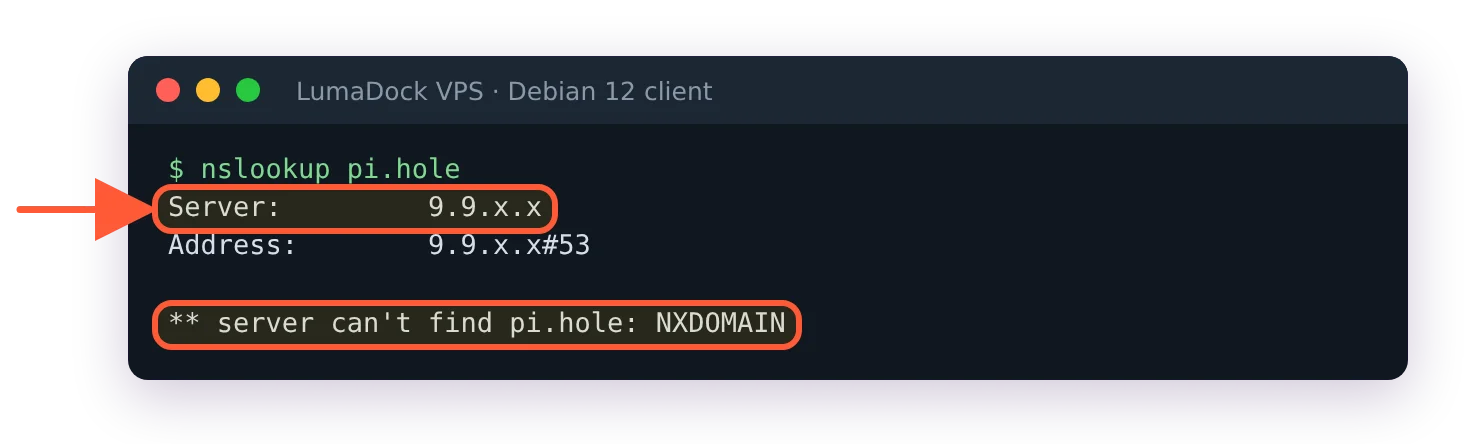
The tunnel is up but the device still asks its old resolver, which has never heard of pi.hole.
Check from the device, not from the server. nslookup pi.hole should come back with the Pi-hole address. If it fails or the answering server isn't your Pi-hole, fix the DNS setting and come back; until then the IP form of the URL works fine.
404 or 403 when you open the IP without /admin/
http://10.100.0.1/ with nothing after the slash returns a 404 page, and that is the embedded web server doing what it's built to do. The embedded web server page in the Pi-hole docs gives the interface address as https://pi.hole/admin/ and nothing shorter, and says files outside admin/ are not served unless webserver.serve_all is switched on. The redirect from the site root to /admin/ fires only when the request's Host header matches webserver.domain, which defaults to pi.hole. A raw IP or any other hostname gets no redirect, so / is handled like any other path outside the web home and answered 404 Not Found. Releases before FTL v6.8 passed it on to CivetWeb instead, which found no index file in /var/www/html, had directory listing switched off and answered 403 Forbidden, so a box that hasn't been updated still shows the 403.
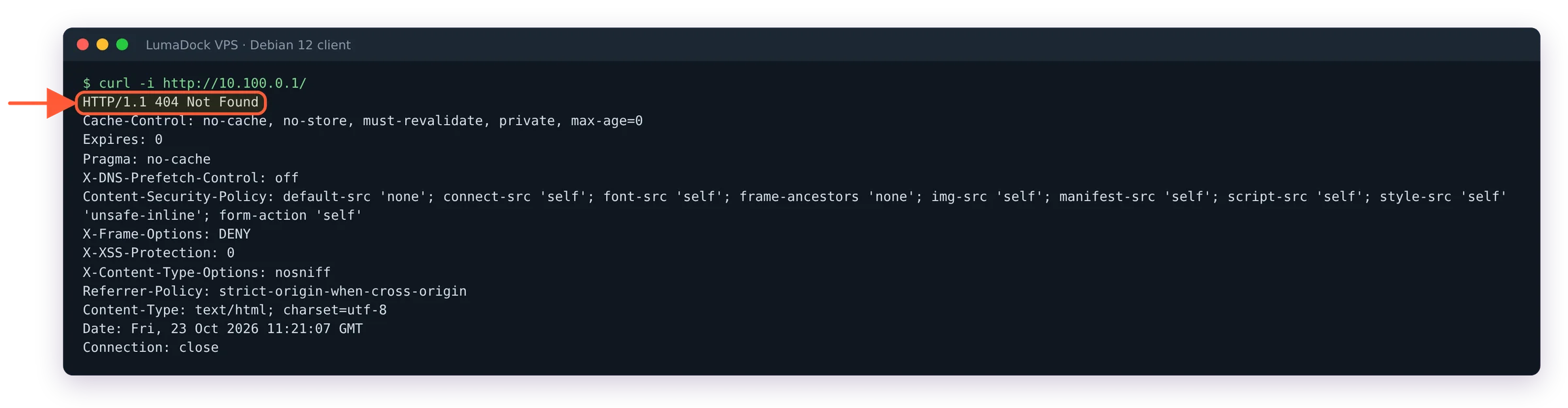
On FTL v6.8 the bare address returns 404; the interface lives under /admin/.
Type the full path. /admin without the trailing slash redirects to /admin/, so both spellings land on the login page. If you want the bare address to redirect too, set the domain to the name you use: sudo pihole-FTL --config webserver.domain "pihole.example". If you always open the page by IP, the IP can be the domain: with webserver.domain "10.100.0.1" a request for http://10.100.0.1/ gets a 308 to /admin/. The self-signed certificate is issued for webserver.domain as well, so a domain change means regenerating it; that command is two sections down.
Port 80 is taken and Pi-hole moved to 8080
FTL picks its web ports once, when pihole.toml is first created or migrated from v5. If something already holds TCP 80 at that moment it writes 8080 instead, and 8443 in place of 443. The line in /var/log/pihole/FTL.log reads Config initialized with webserver ports 8080 (HTTP) and 8443 (HTTPS), IPv6 support is enabled. Nginx, Apache or Caddy on the same machine is the usual holder, so http://10.100.0.1:8080/admin/ is the first thing to try.
That probe never runs again. Install a web server later and nothing moves, because the default port string 80o,443os,[::]:80o,[::]:443os marks every port optional with the o suffix: a port that can't be opened is skipped and, in the words of the configuration reference, "inability to use this port is not considered an error". The admin page is gone, FTL.log says nothing, and the only trace is one line in /var/log/pihole/webserver.log: cannot bind to 10.100.0.1:80o: 98 (Address in use). A port without the suffix fails loudly, with Start of webserver failed! Web interface will not be available! in FTL.log and a hint pointing at /var/log/pihole/webserver.log, and then FTL serves none of its ports, 443 included; the Pi-hole v6 error reference covers that line with the rest. Either way, find the owner of the port and move one of the two:
sudo ss -tlpn 'sport = :80'
sudo pihole-FTL --config webserver.port "8080o,8443os,[::]:8080o,[::]:8443os"
Without the o flag a taken port stops the whole web server, and FTL.log says so.
Changing webserver.port makes FTL restart itself, so there is nothing to reload. On a VPS where the page lives on the tunnel address the same key carries the IP, 10.100.0.1:8080o, and the flags stay the same: s for TLS, o for optional, r to redirect plain HTTP to the first TLS port.
lighttpd is still running after the v5 upgrade
v6 serves the interface from inside pihole-FTL and has no use for lighttpd or PHP. The migration step in the installer asks "Do you want to disable lighttpd (recommended)?" and, on yes, stops and disables the service. It doesn't remove the package, and an unattended run assumes yes. The Discourse thread Upgrading to v6 (pihole -up) didn't disable lighttpd collected the cases where the old server kept port 80 anyway and /admin returned 403. Nothing in v6 reads the lighttpd configuration, so there is nothing to carry over before removing it.
systemctl status lighttpd
sudo apt remove lighttpd
sudo service pihole-FTL restart
Then read the port line in FTL.log again. The rest of what the migration leaves behind, from /etc/dnsmasq.d to setupVars.conf, is in the v5 to v6 upgrade article; the port is what matters here. If lighttpd held port 80 while pihole.toml was being created, FTL wrote 8080 into webserver.port and keeps using it after lighttpd is gone. Set the key back to the default string from the previous section.
The certificate warning on https://pi.hole/admin/
Pi-hole creates a self-signed certificate during installation and serves HTTPS on 443 with it from the first start. Browsers don't trust it, so the warning is expected, and it comes back as a name mismatch whenever you open the page by IP, because the certificate was issued for webserver.domain. The server certificate and its key are /etc/pihole/tls.pem, the CA that signed it is /etc/pihole/tls_ca.crt (FTL also writes the bare certificate as tls.crt), and FTL reissues its own certificates two days before they expire (webserver.tls.validity, 47 days by default).
Three ways out. Click through, which over a WireGuard tunnel costs little since the traffic is already encrypted by the tunnel. Import the CA into the browser, and it has to be tls_ca.crt, not tls.pem; the TLS page in the API docs walks through Firefox, Chrome and Android. Each renewal comes with a new CA, so the import has to be repeated after FTL reissues the certificate. Or regenerate after changing the domain:
sudo rm /etc/pihole/tls* && sudo service pihole-FTL restartA certificate of your own goes in PEM format with both the key and the certificate in one file, and webserver.tls.cert points at it.
The login page reloads after the password is accepted
The password is right, the page flashes and the login form is back. What the browser is doing: after a successful login the interface loads the dashboard, every dashboard page calls the API, and the web code reloads the page on any 401. A page request without a valid session gets a 302 to the login page. So the loop means the browser isn't sending the sid cookie it was just given, or FTL doesn't recognise it.
Two documented reasons. Cookies are stored per host, not per port; rdwebdesign from the Pi-hole team put it this way in September 2025, in the thread Trying to login to Pi-hole WebUI and the login page just reloads:
Cookies are unique to domain/IP but not ports. Browsers can't distinguish cookies that are just using different ports
The API authentication docs also say the session ID is bound to the client's IP address and that this "may cause issues if your IP address changes during the session's lifetime", as when a phone drops off the tunnel and comes back on mobile data. On FTL v6.8 that doesn't hold in practice: a session ID issued to one tunnel address was accepted from another, and /api/auth/sessions still listed the first address. An IP change alone doesn't end a session on current versions, so look at the cookie first.
The practical list, derived from those mechanics: open the interface at one origin only, http://10.100.0.1/admin/ or http://pi.hole/admin/, and stick to it; clear the site cookies for that host; don't mix HTTP and HTTPS on the same host in the same browser; and if nothing else moves, remove the password and set it again with sudo pihole setpassword, which the article on the Pi-hole v6 password reset covers along with 2FA. When the loop shows up I try a private window first, since it starts with no cookies for the host and one login there tells me if the cookie is the problem. In the browser's developer tools the response to GET /api/auth after a login attempt says which it is: "message":"no SID provided" means the cookie never left the browser, "session unknown" means FTL has no session for it.
The admin page is bound to the tunnel address on a VPS
With webserver.port set to 10.100.0.1:80o,10.100.0.1:443os, the interface answers on the WireGuard address and on nothing else. The public IP gives nothing, by design, and the firewall rules from the VPS setup allow 80 and 443 only on wg0, so a wildcard binding wouldn't answer there either. Connect the tunnel, confirm a recent handshake with sudo wg show on the server, then load http://10.100.0.1/admin/.
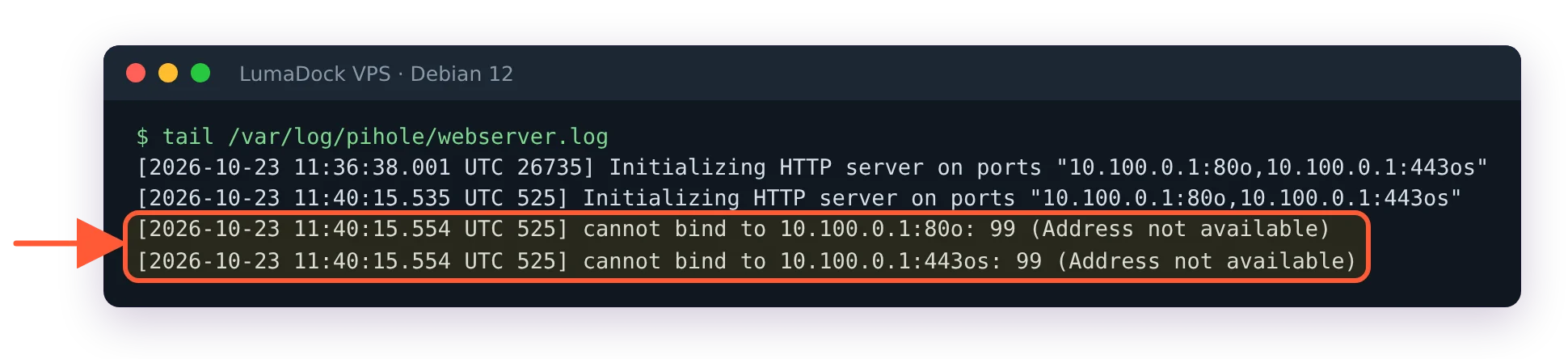
After a reboot FTL started before wg0 had its address, so both web ports were skipped.
Then the timing case, which on Debian 12 is every reboot. The two ports carry the o flag, and 10.100.0.1 exists on the box only while wg0 is up. pihole-FTL.service waits for the network but not for the tunnel, so it starts a fraction of a second before wg-quick@wg0 brings the address up, and webserver.log records cannot bind to 10.100.0.1:80o: 99 (Address not available). DNS recovers by itself once wg0 appears; the admin page doesn't, and the pihole command answers Communication error. Is FTL running?. sudo service pihole-FTL restart brings both back for now. Set the delay once and the next reboot comes up clean:
sudo pihole-FTL --config misc.delay_startup 10A webserver.acl of +10.100.0.0/24, if you set that second lock, refuses every address outside the tunnel subnet, which includes a client whose tunnel is down.
It can also lock out the VPS itself. If you also routed all client traffic through the VPS, the masquerade rule from the WireGuard install guide has to be limited to the tunnel subnet. A rule with no match rewrites the server's own connection to 10.100.0.1 to the public address, the ACL refuses it (accept_new_connection: YOUR_PUBLIC_IP is not allowed to connect in webserver.log), and every pihole command that talks to the API stops with this:
curl: (56) Recv failure: Connection reset by peer
curl: (35) OpenSSL SSL_connect: SSL_ERROR_SYSCALL in connection to 10.100.0.1:443
API not available. Please check FTL.log
Exiting.
Adding 127.0.0.1 or 10.100.0.1 to the ACL doesn't help, since the request arrives from the public IP. Limit the masquerade instead, in the PostUp line of /etc/wireguard/wg0.conf, then restart the tunnel with sudo systemctl restart wg-quick@wg0:
nft add rule ip wireguard wireguard_chain ip saddr 10.100.0.0/24 oifname "eth0" masqueradeReplace eth0 with your public interface. The problem tends to show up after a reboot rather than right away, because a ruleset that starts with flush ruleset removes the NAT table until the next tunnel start.
An empty webserver.port disables the web interface
FTL.log shows Not starting web server as webserver.port is empty. API will not be available! at WARNING level, and that is the whole story: an empty string for the port key switches the web server off, which the configuration reference says in as many words. It happens after a hand edit of pihole.toml that left the quotes but nothing between them, or a Docker variable set to an empty value. The pihole.toml guide covers what FTL does with a hand edit and where the previous copies of the file go.
Put the default back and the page returns on the next start:
sudo pihole-FTL --config webserver.port "80o,443os,[::]:80o,[::]:443os"On a VPS, swap in the tunnel-bound string from the section above, or the page comes back on the public IP as well.


