





.svg)
.svg)
.svg)
.svg)

.svg)
.svg)
.svg)


Updated and tested 8 September 2026
Tuesday, a little after nine in the evening. The API on a 4 vCPU VPS that has answered in 40 ms all year starts answering in 300, the on-call alert fires, and top shows the odd picture of a server that's slow while doing nothing: us at 12%, sy at 3%, load average creeping up past four, and in the corner of the CPU line a number that's normally 0.0 sitting at 18.3. That number is st, steal, and it means the hypervisor had work for your vCPUs and somewhere else to run first. Nothing on your server changed. A neighbour on the same host did.
This page is about that number and its relatives: what overcommit is and why every shared VPS has some, how to read steal time properly, what disk and network contention look like from inside a guest, how to log it for a day so you have evidence instead of a feeling, and what to do with the evidence. Commands are for Ubuntu 24.04 LTS, though nothing here is distro-specific beyond package names.
What CPU and RAM overcommit means on a VPS host
Overcommit is selling more virtual resources than the host physically has. Red Hat's KVM administration guide defines it as "allocating more virtualized CPUs or memory than there are physical resources on the system", and treats it as a normal thing to do, with limits. The same chapter on overcommitting with KVM says the hypervisor "should safely support guests with loads under 100% at a ratio of five vCPUs (on 5 virtual machines) to one physical CPU on one single host". Then, in the next breath, it says to "use caution when overcommitting vCPUs, as loads near 100% may cause dropped requests or unusable response times".
Both halves are true. A 64-thread host with 200 vCPUs sold is unremarkable and performs well as long as most guests idle most of the time, which they do. The trouble is the second clause: the moment several guests get busy at once, the physical cores are the limit and the scheduler starts making everyone wait in turn. A provider's overcommit ratio is a bet on how often that happens, and you never see the ratio. What you see is steal.
Memory overcommit is a separate decision. KVM can hand out more guest RAM than the host has, relying on guests not touching all of it, and reclaim pages through the balloon driver or by swapping guest memory on the host. Well-run VPS platforms mostly don't do this, because a swapped guest is a miserable guest, and the ones that do use ballooning leave a visible trace, covered below. CPU overcommit is the one nearly everybody does.
What steal time is
The kernel accounts CPU time per vCPU into a set of buckets, and steal is the eighth of them. In /proc/stat the cpu line reads user nice system idle iowait irq softirq steal guest guest_nice, in that order, and the proc_stat(5) man page defines the field as "stolen time, which is the time spent in other operating systems when running in a virtualized environment". The field has been there since Linux 2.6.11, which is 2005. Put more plainly: steal is the time during which your vCPU had something to run and the physical core it would have used was running a different VM.
It's reported by the hypervisor to the guest, through a paravirtual interface, which is why an OpenVZ container shows nothing useful here and a KVM guest shows an honest number. On bare metal the column is always zero. On a VM it's the single best signal you have about the host, because it measures the host's decisions from inside your kernel.
Cache and hyperthread contention is not steal. If your vCPU is running on one hyperthread and a neighbour's vCPU is hammering the sibling thread on the same core, your instructions per cycle drop and steal stays at zero. That shows up as your own us time getting slower per unit of work: the same job takes longer and nothing in top says why. Keep that in mind when steal is low and things are still slow.
How to read steal time with top, vmstat and mpstat
The number is in every CPU tool, under slightly different names. All of these are percentages of elapsed time on the sampled interval, so a one-second reading of 40% and a one-hour average of 2% can both be true of the same afternoon.
top and the %st column
top -bn1 | head -3The %Cpu(s) line ends in st. Press 1 in interactive top to split it per vCPU, which matters: steal that lands on one vCPU while the others read zero usually means one busy thread of yours is sharing a core with one busy thread of theirs.
vmstat and the st column
vmstat 5 12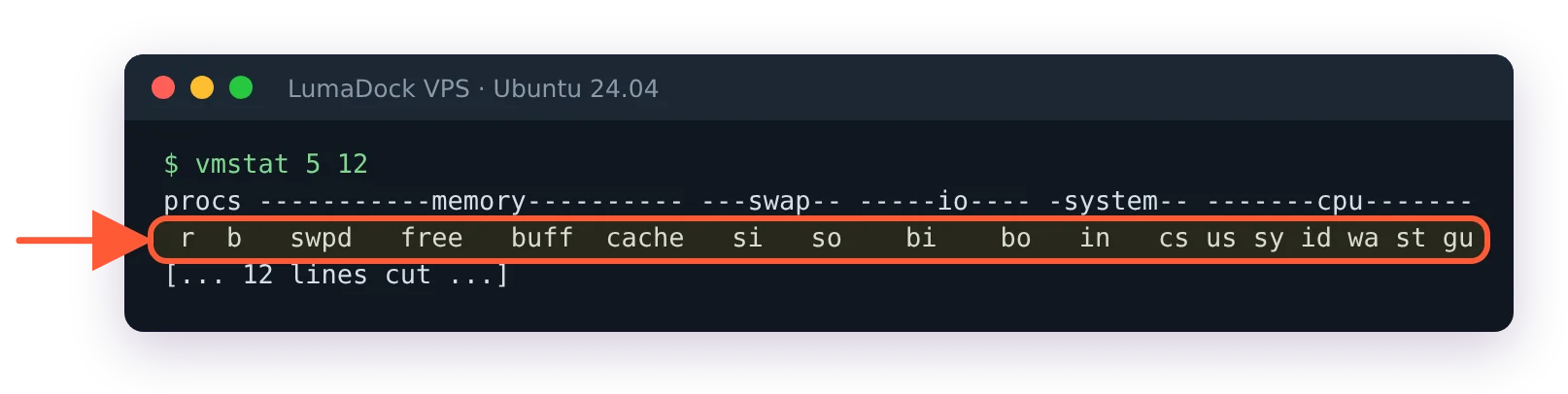
Steal sits in the st column; procps 4 on Ubuntu 24.04 adds gu after it.
Twelve samples five seconds apart, one minute total. The last two columns are st and, on the procps 4.x that Ubuntu 24.04 ships, gu for guest time. Ignore the first line; it's the average since boot. vmstat is the tool I reach for first because it's on every system with no install and the output is easy to paste into a ticket.
mpstat, sar and per-CPU steal
sudo apt install sysstat
mpstat -P ALL 2 5
The %steal column per CPU, defined in the sysstat man pages as the share of time the vCPU spent "in involuntary wait" while the hypervisor served another virtual processor. sar -u 2 5 prints the same for the whole system, and with the sysstat collector running (below) sar -u -f /var/log/sysstat/saDD reads it back for any past day.
Steal time thresholds
Under 1%, sustained: a normal shared host, nothing to do. A few percent, sustained: a busy but functional host, and note the time of day. Over 5% for an hour or more: your server is measurably slower than it was sold as, and it's time to collect evidence. Over 10% sustained, or regular spikes past 20-30%, means the host is oversold for the load on it, and no tuning inside your VM will fix that, because the missing time isn't yours to tune.
Those thresholds are mine, from what customers tolerate before they notice. There's no standard. What I'd add is that the pattern matters as much as the level: steal that arrives every evening at the same hour is one neighbour with a schedule, steal that's flat all day is a host with too many guests, steal that appeared last week and never left is a host that got a new tenant, and steal that only shows during your own busiest minutes is a plan cap, covered below.
Disk I/O contention on a shared NVMe
Your disk image sits on the same drives as everyone else's. When a neighbour restores a 200 GB backup or runs a badly indexed query, your reads queue behind theirs, and the symptom in your VM is latency, which is a different thing from throughput.
iostat -x 5 6Without a device name it reports every disk. To narrow it, add yours from lsblk, usually vda or sda; a name that doesn't exist prints an empty device table and no error.
Watch r_await and w_await, the average milliseconds a read or write took including its time in the queue, and aqu-sz, the queue depth. On a healthy NVMe-backed VPS, r_await for small reads is under a millisecond, low single digits under real load. Reads averaging 20 ms with your own iowait climbing and nothing heavy in iotop is the disk being busy for someone else. Take %util with a grain of salt; the iostat man page says it "does not reflect their performance limits" for devices that serve requests in parallel, which NVMe does, so 100% on your disk tells you the device was never idle, not that it was saturated. Latency is the number to argue from.
Run the same iostat at a quiet hour and again when things feel slow, and keep both outputs: r_await that triples while your own load stays the same is contention, and it's the comparison a provider can check against the host.
Network contention symptoms
Rarer, and harder to pin on a neighbour, because most of the internet is also between you and the test target. The signs from inside are throughput that varies wildly by hour on a fixed path, latency to your first hop (the host's gateway) that jumps from under a millisecond to several, and TCP retransmits climbing in nstat -az TcpRetransSegs during the slow periods. mtr -rwc 50 1.1.1.1 run at a good hour and a bad hour, side by side, is usually enough to see if the problem starts at hop one.
A repeatable 24-hour steal check
One reading proves nothing, but a day of timestamped readings is a case, and there are two ways to get them.
sysstat's collector
systemctl list-timers 'sysstat*'
ls /var/log/sysstat/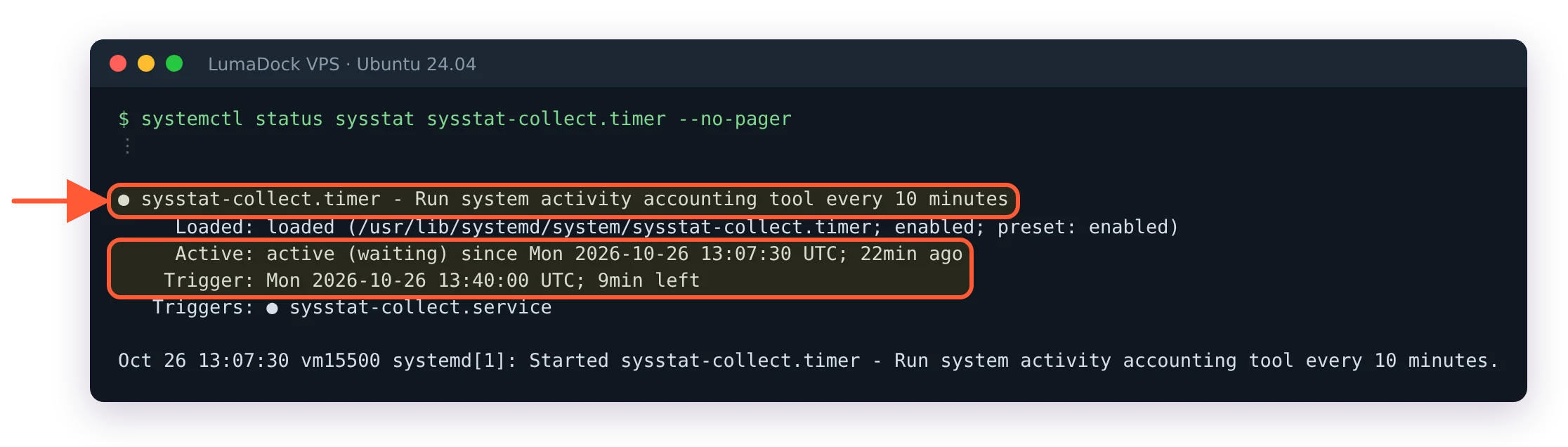
On Ubuntu 24.04 the sysstat timer is already sampling every ten minutes.
On Ubuntu 24.04 the sysstat package samples every ten minutes through sysstat-collect.timer as soon as it's installed. The first command shows the timer and the second the daily files, one saDD per day of the month. The ENABLED="true" switch in /etc/default/sysstat that older guides tell you to flip only drives the cron fallback on systems without systemd, so there's nothing to turn on. From the next sample, sar -u gives you a per-interval history for today with %steal in it and sar -d -p the disk side. This is the low-effort route and the one I'd leave on permanently.
A small script on a finer interval
When ten minutes is too coarse (spiky steal averages away), this logs a one-minute steal percentage computed straight from /proc/stat. It writes to /usr/local/bin and /var/log, so open a root shell with sudo -i before pasting it and exit once it's running:
cat > /usr/local/bin/steal-log.sh <<'EOF'
#!/bin/bash
prev=$(head -n1 /proc/stat)
while true; do
  sleep 60
  cur=$(head -n1 /proc/stat)
  echo "$prev" "$cur" | awk -v d="$(date +%FT%T)" '{
    tot1=$2+$3+$4+$5+$6+$7+$8+$9; tot2=$13+$14+$15+$16+$17+$18+$19+$20;
    st=$20-$9; tot=tot2-tot1;
    if (tot>0) printf "%s steal=%.2f%%\n", d, 100*st/tot }' >> /var/log/steal.log
  prev=$cur
done
EOF
chmod +x /usr/local/bin/steal-log.sh
nohup /usr/local/bin/steal-log.sh >/dev/null 2>&1 &
Field 9 of the first snapshot and field 20 of the second are the steal counters (the second line's fields start at 12 because both lines are on one awk record), and the total excludes guest time since the kernel already folds that into user. Leave it for a day, then awk -F'steal=' '{print $2}' /var/log/steal.log | sort -n | tail for the worst minutes and grep 'T2[01]:' /var/log/steal.log for the evening. The logger stops at the next reboot, so for anything longer than a test run, start the script from a systemd unit instead.
If you run Netdata, it has already done this. The system.cpu chart has a steal dimension sampled every second, with as much history as its storage tiers are set to keep, and the guide to monitoring a VPS covers setting it up along with an alert on it, which is the version of this article that runs on its own. Set the alert at 5% over ten minutes and it pages you before the customers do.
Memory ballooning symptoms
On a host that overcommits RAM through the virtio balloon, the guest's total memory changes while it runs. grep MemTotal /proc/meminfo should print the same number every time for the life of the VM; if it prints less tonight than it did this morning, the balloon inflated and the host took the pages. Applications see it as sudden memory pressure with no process to blame, and the OOM killer can fire on a VM that was "using" half its RAM ten minutes earlier. lspci | grep -i balloon shows if the VM has a balloon device at all (Ubuntu's kernel has the driver built in, so lsmod and dmesg stay silent about it); only a MemTotal change shows it's being used.
Your own CPU load vs a noisy neighbour
Steal answers this one directly. A server that's slow because your code is busy shows high us or sy, a load average that matches the process list and steal near zero. A server that's slow because of the host shows low us, a load average higher than the CPU use explains (runnable threads waiting for a core that's busy elsewhere) and steal in the double digits. Mixed cases exist, and there a job of your own with a known run time helps: a nightly export that took 60 seconds last month and 90 today with the same steal reading points at something other than the neighbour.
One more distinction. CPU throttling from your own plan's limit, if the provider caps a VM's CPU time through cgroups, also shows as steal, because from the guest's view a vCPU that's runnable and not running is stolen regardless of why. A VM that hits a hard cap at exactly 100% of two cores' worth on a 4 vCPU plan is being limited by policy, and the steal will appear the instant you exceed the cap and vanish the instant you drop below it. That's a plan question, and the write-up on what scaling a VPS means covers what changes when you resize. The distinction matters in a ticket, because a cap is working as designed and a neighbour isn't.
What dedicated cores change
A VDS pins each vCPU to a physical core reserved for that VM, so there is no other guest for the scheduler to run there and steal stays at zero by construction. Disk and network contention are unchanged by it; the cores are dedicated, the NVMe and the uplink are still shared. That's the honest scope of the product, and the comparison in what dedicated cores change on a VDS goes through which applications feel the difference. For a job that's CPU-bound and latency-sensitive, it removes the whole class of problem this page is about; for everything else it removes the CPU part only.
What you can't see from inside a guest
You can't see the overcommit ratio, how many guests share the host, what they're doing, which physical cores you're on or if your hyperthread sibling is busy. You can't see host swap, host CPU frequency scaling or thermal throttling, and you can't distinguish a host that's overloaded from a host that's deliberately weighted your VM below a neighbour's. Steal tells you time was taken and when. It doesn't say by whom, and the guest-side story of how the hypervisor exposes it is in KVM VPS explained. Every conclusion beyond "the host was busy at these times" is inference, and I'd write the ticket that way.
I also don't know, for any provider I've not worked at, what steal level or duration triggers their own migration automation, or if they have any. Some platforms rebalance guests between hosts on a schedule and some only when a customer asks. It changes how long you should wait before writing in.

