





.svg)
.svg)
.svg)
.svg)

.svg)
.svg)
.svg)

Updated and tested 28 September 2026
If top on your VPS has shown a steal figure above 5% for most of a week, or iostat reports 4 KB reads waiting 10 ms or more at a quiet hour, you are past the point where a bigger VPS plan fixes anything. Those two numbers are the honest signal that the machine you're sharing is the limit, and the choice in front of you is a virtual dedicated server with pinned cores or a physical server with nobody else on it. This article is about the second option: what changes operationally when the hypervisor goes away, what you give up, the concrete triggers I use to decide, and the odd case where you rent bare metal and put a hypervisor back on it yourself.
The comparison assumes you already know what a VPS is and how the shared host works. If not, the explainer on KVM VPS covers the mechanics. Commands below assume Ubuntu 24.04 LTS.
What a dedicated server is operationally
A dedicated server is a physical machine in a rack that the provider hands to you whole. There's no hypervisor unless you install one, no other tenant, and the resources printed on the order page are the resources in the chassis: the CPU sockets, every DIMM, the NVMe or SATA drives in their bays and the physical network port. You boot an OS on it the same way you would on a desktop, except the console is a remote KVM-over-IP session and the install media is an ISO you mount over the network.
Everything that follows in this article is a consequence of that one difference. The VPS gives you a slice of a host that the provider manages; the dedicated server gives you the host and makes you the manager.
Single tenant vs shared host
On a VPS your vCPUs are threads scheduled onto cores that other VMs also use, your RAM is a region of the host's memory and your disk is an image on storage that everyone on the host reads and writes. That's fine most of the time and it's the reason a VPS is priced the way it is. The failure mode is the noisy neighbour, which shows up as CPU steal, as disk latency or as a saturated host NIC, and the diagnosis routine for all three, from %st to r_await, is in the piece on CPU steal time and noisy neighbours, along with the ticket template. On bare metal the neighbour problem doesn't exist in that form. The only thing that can steal from you is your own software.
The flip side is that the provider can no longer fix contention for you by moving your VM to a quieter host. There is no quieter host. If the server you rented is too small, the fix is a different server and a migration you perform.
Memory bandwidth and NUMA
A detail that rarely appears on a VPS order page: memory bandwidth. A VM with 8 GB on a host with 512 GB across two sockets is sharing the memory controllers with every other VM, and a neighbour running a large in-memory analytics job pulls bandwidth you can't see from inside your guest. On a dedicated server the whole memory subsystem is yours, and on a two-socket box you also get to care about NUMA (non-uniform memory access), which is the reason a database pinned to socket 0 should have its memory allocated from socket 0's DIMMs. numactl --hardware prints the topology. Most people never need to touch it; the ones who do tend to be running a single large process that wants all the RAM.
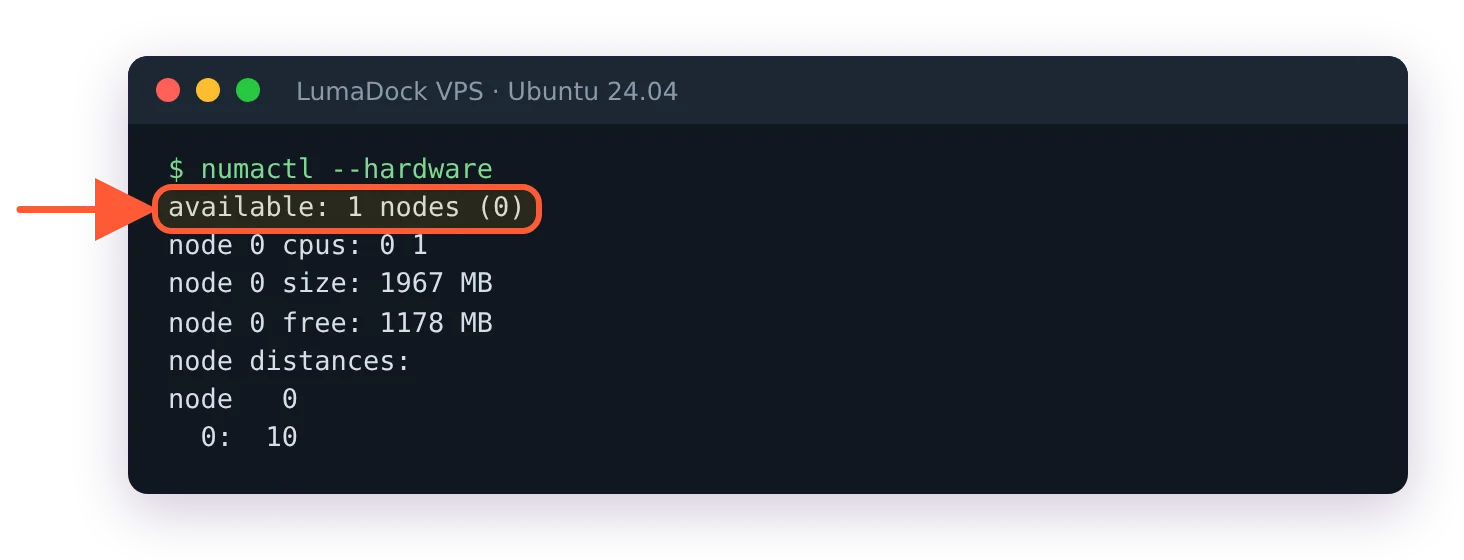
A VPS sees a single NUMA node; a two-socket dedicated server shows at least one per socket.
Raw NVMe, RAID and the filesystem
On a VPS you get a virtual disk (/dev/vda or /dev/sda) whose backing store is the provider's business. Replication, RAID level, the drive model, the write cache policy: all decided for you, and mostly not disclosed. On a dedicated server you get the drives. You choose software RAID with mdadm, ZFS with a mirror or RAID-Z, a hardware controller if the chassis has one, or no redundancy at all for a scratch box. You also inherit the consequence, which is that a failed drive is your alert to handle, and a controller with a dead battery-backed cache is your Tuesday.
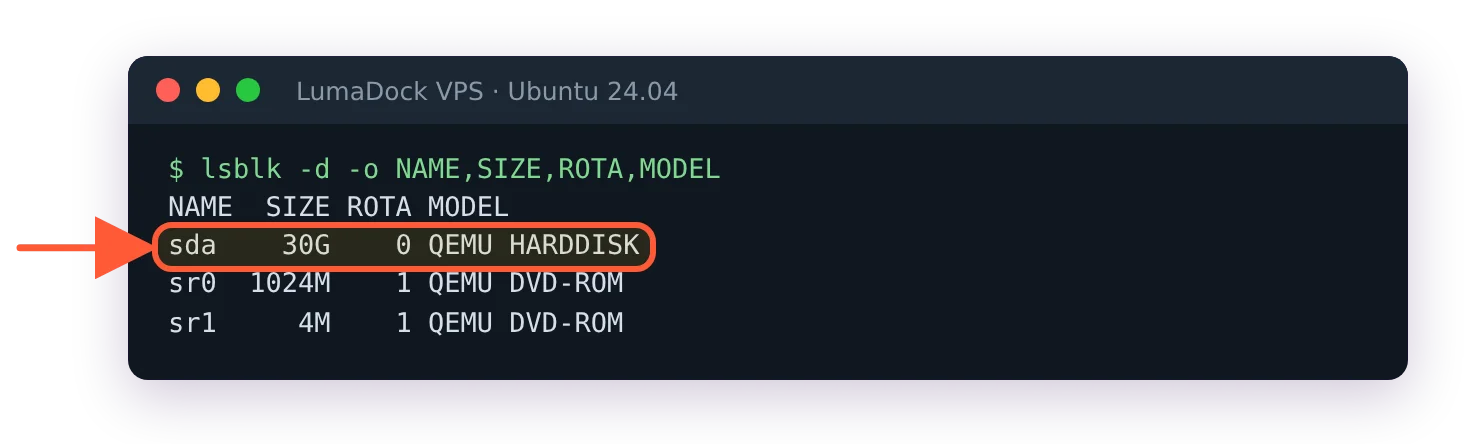
From inside a VPS the disk is a virtual QEMU device; the hardware under it stays out of view.
The performance side is real. A single enterprise NVMe drive on a bare-metal host with iodepth=1 random reads answers in tens of microseconds. The same test on a VPS goes through virtio, the host's I/O scheduler and whatever storage layer sits behind it, and a few hundred microseconds is a normal result even on an idle host. For a queue-depth-heavy database the difference is a multiplier on every query. For a web server serving cached pages it doesn't register.
The network port
A VPS port is a virtual NIC on a host bridge, and its speed is a cap the provider sets on top of a physical port shared with the other VMs. A dedicated server's port is a physical cable, and 1 Gbps or 10 Gbps means the whole thing. Bandwidth terms (transfer volume, fair use) still apply, but the port itself isn't contended.
Out-of-band management
Every serious dedicated server has a BMC (baseboard management controller), the small always-on computer inside the chassis that Dell calls iDRAC, HPE calls iLO and everyone else exposes through IPMI or Redfish. It's what replaces the VPS control panel's console button. Through it you get a remote console that works when the OS has crashed, power cycling, sensor readings and virtual media. Dell's documentation on the iDRAC virtual media function describes it as allowing "the remote usage of software image files (ISO files)", which in practice means you mount an installer ISO from your laptop and the server boots from it as if a USB stick were plugged in. Dell also notes an Enterprise licence is required for that feature on iDRAC 7 through 9, which is one of the things to ask a provider about, because a bare-metal server without console access is a server you have to open a ticket to rescue.
The BMC network is its own attack surface. I put it on a management VLAN or behind a VPN and never on the public address, and I'd treat a provider that exposes iDRAC directly to the internet with a default password as a reason to look elsewhere.
Provisioning time and the failure domain
A VPS deploys in about a minute because it's a copy of a disk image onto storage that's already running. A dedicated server takes anywhere from minutes (if the provider has the exact configuration racked and pre-tested) to days (if they have to build it). Installing the OS is then your job through the console, or the provider's automated installer if they run one.
Failure domains are the part I'd think about longest. When a VPS host dies, every VM on it goes down together, and the provider's job is to restart them elsewhere from shared storage, which on a well-run KVM cluster means minutes of downtime that you didn't have to act on. When a dedicated server dies, exactly one tenant is affected (you) and the recovery is physical: a technician swaps the PSU, the DIMM or the board, and your data is on the drives inside that chassis. A provider with spare parts on site and a four-hour hardware SLA will have you back the same day. Without those, you're waiting on a courier. This is why anyone running a single dedicated server for something that matters keeps a second one, or a VPS, ready to take over. Off-site backups matter more on bare metal too, since nobody else is snapshotting your disks.
Snapshots, live resize and the things bare metal can't do
The hypervisor is what makes a VPS convenient, and losing it costs you specific features.
Snapshots. On a KVM host the provider freezes your disk image at a point in time and lets you roll back. On bare metal that capability comes only from your own filesystem (LVM or ZFS snapshots), only covers what those tools cover, and the off-site half of the job is a restic or Borg timer, set up the way the restic and Borg VPS backup guide describes, pointed at somewhere that isn't this chassis. Plan to build it before you need it.
Live resize. A VM's disk can be grown while it runs; the Proxmox wiki on resizing disks gives the operator-side command as qm resize 100 virtio0 +5G and notes that "Linux should see the new size online without reboot with kernel >= 3.6". RAM and vCPU changes are a reboot at most, and the knowledge base note on what scaling your VPS means lists which changes need one. On a dedicated server, more RAM means a technician, a maintenance window and a DIMM.
Live migration. A VM can move between hosts while running, with downtime the QEMU project measures in the low hundreds of milliseconds. A physical server cannot move anywhere.
Reinstall from the panel. Two clicks on a VPS. On bare metal it's an ISO over the BMC or the provider's PXE installer, and it takes as long as a real install takes.
The cost model
No prices here, because they move, but the shape matters. A VPS is priced on the fraction of a host you hold, so small slices are cheap and the price climbs roughly linearly with resources. A dedicated server is priced on the whole machine, which means a fixed floor regardless of how little you use it and a much flatter curve above that. The crossover is the point where a VPS with the RAM and cores you need costs about the same as a small dedicated server, and above that line bare metal buys you more hardware per unit of money, plus everything in the sections above. Below that line a VPS is the better deal, and it comes with snapshots and a provider who handles the hardware.
Setup fees and contract terms are part of this. Some providers charge to rack a dedicated server or require a minimum term; monthly VPS billing rarely does either. Both belong in the comparison alongside the monthly figure.
Decision triggers
These are the conditions under which I stop resizing a VPS and price a dedicated server. Any one of them is enough.
Sustained CPU steal
A %st figure that averages above a few percent over a working week, confirmed with sar -u or a small /proc/stat sampler, on a plan that's already the top shared tier. The intermediate step is a VDS, which fixes the CPU side without leaving the hypervisor, and the comparison in VPS vs VDS and dedicated cores is where to check if that's enough. It usually is for game servers and trading bots. It usually isn't for a database that also hits the next trigger.
IOPS and latency ceilings
Random 4 KB read latency (r_await in iostat -x) that sits in the double digits of milliseconds at quiet hours, or an IOPS figure (r/s plus w/s in the same output) that stops at the same number under load on two plan sizes. The second one is the clearer signal: the provider has an I/O limit per VM and you've hit it. Raw NVMe on a single-tenant box removes the ceiling and the queueing behind neighbours at once.
Memory above roughly 128 GB
This is the threshold where the VPS pricing curve and the dedicated pricing curve cross for most providers I've looked at, and the number is deliberately rough. A VPS plan with 128 GB of RAM exists at some providers, but you're then paying for a quarter or half of a host anyway, and for a bit more you get the whole host with the memory bandwidth and the NVMe bays to go with it. Below 32 GB the question doesn't come up. Between the two it depends on the other triggers.
Compliance that requires single tenancy
Some audit regimes, and some customers' security questionnaires, require that no other organisation's code runs on the same physical hardware. A KVM VM has strong isolation, but strong isn't the same as absent, and a checkbox that says "dedicated hardware" is satisfied by bare metal and nothing else. If you're in a sector where that box exists, the decision is made for you.
Software licensed per socket or per physical core
Databases and some middleware charge per physical CPU or per core of the machine they run on, and a few vendors count the host's cores when the software runs in a VM unless the virtualisation platform is on their approved list. On a dedicated server the count is the count on the invoice, and you can pick a chassis with one fast socket instead of two slow ones to keep it small. Windows Server is a milder version of the same shape: Microsoft's Windows Server 2025 licensing guidance requires "a minimum of 8 core licenses per physical processor" and 16 per server for the physical model, and licensing per VM needs 8 cores per VM with active Software Assurance or a subscription. For a Windows box on either product the licence is yours to bring.
Something a VM can't do
Kernel modules the provider's KVM configuration doesn't expose, a PCIe card you own and want installed (a specific capture card, a specific NIC), a dozen drives in one chassis for a storage array, or a GPU setup with NVLink between cards. None of those fit in a VM, so the decision makes itself.

