Back to Article List

VPS vs VDS: What dedicated cores change

VPS vs VDS: What dedicated cores change

Updated and tested 28 August 2026

If you searched "VDS" hoping for a video display standard or a data-science acronym, this is the wrong page. In hosting, VDS means virtual dedicated server, and the rest of this article uses it that way only: a KVM virtual machine whose virtual CPUs are mapped to physical cores reserved for that one machine, sold next to ordinary VPS plans whose vCPUs are scheduled across cores everybody shares.

That single difference is the whole product. RAM works the same way on both. Disk works the same way. The kernel, the panel, the snapshots, the IP, the reinstall button, all identical. What changes is who else can run on your cores, and the answer on a VDS is nobody.

What a VDS is at the hypervisor

On a standard VPS, each vCPU is a thread in the QEMU process and the host's Linux scheduler puts it wherever there's room. Hosts sell more vCPUs than they have cores, the scheduler juggles, and when the juggling fails you get steal time. On a VDS the provider takes those same threads and pins them. In libvirt terms that's the vcpupin element, which the domain XML reference describes as specifying "which of host's physical CPUs the domain vCPU will be pinned to"; in Proxmox it's the affinity option on the VM, which takes a core list such as affinity: 8-11. The other half is that the provider doesn't put any other guest on those cores. Pinning without reservation is just a VM that's stuck to a busy core; reservation without pinning is a VM that could still be scheduled onto a neighbour's core. A real VDS does both.

Proxmox's own VM settings documentation is careful to say that "the CPU affinity is not a security feature", and that's the right way to think about it. Pinning is a performance arrangement. Your isolation from other tenants comes from KVM, exactly as on a VPS, and the guide to KVM VPS hosting covers that side. Pinning adds nothing to it and takes nothing away.

Some providers use "dedicated vCPU" to mean a 1:1 ratio of vCPUs to physical threads on the host without pinning. That's a decent middle product and a different one. With 1:1 and no pinning, your thread still migrates between cores and still shares L1 and L2 cache with whoever lands next to it, and a burst from a neighbour still costs you scheduler latency even if it never costs you throughput. Ask which one you're buying.

What the scheduler does differently

The Linux CFS (and EEVDF since kernel 6.6) scheduler gives each runnable thread a share of the core proportional to its weight. Proxmox exposes that weight as cpuunits, "a relative weight which defaults to 100" on cgroup v2 hosts, and libvirt as shares. On a shared host every VM starts equal, so two busy 4 vCPU guests on the same four cores each get half. That's fair, and it's also why a VPS sold as "4 vCPU" delivers four cores' worth of time only when the neighbours are quiet.

Pinned and reserved cores take the scheduler out of the picture. Your thread wakes up, its core is idle because nobody else is allowed there, and it runs within microseconds. The ceiling is the physical core's clock, every time, and the floor is the same as the ceiling. That consistency is the thing people are paying for, more than the peak.

When dedicated cores matter

Single-thread heavy, latency-sensitive jobs, which is a smaller list than the marketing suggests but a real one.

Game servers first. Minecraft, Valheim, Rust, ARK, most of them run the world simulation on one thread with a fixed tick rate (20 ticks per second for Minecraft), and a tick that runs long because the core was busy elsewhere is felt by every player as lag at the same moment. High clock speed and an uncontended core is exactly the combination a game server wants, and it's the reason the Ryzen-based VDS plans exist as a category. Trading platforms are the same shape: MetaTrader terminals and expert advisors do their work on a single thread, order latency is measured in milliseconds and a 30 ms steal spike at market open is a missed fill. I wrote about that setup in the piece on forex VPS hosting for MetaTrader. The same logic covers any bot that reacts to a live feed.

Compilers and build servers, because a full build of anything large pegs every core for minutes and a shared host makes the build time a lottery. Databases with lock contention, since a thread holding a lock that gets descheduled by the host holds it for everyone else too (PostgreSQL's spinlocks and MySQL's InnoDB mutexes both behave badly when the core underneath them disappears mid-critical-section). And latency-sensitive APIs, where the p99 is the metric that matters and steal widens it without touching the median.

Audio and video encoding, scientific code, anything that's CPU-bound for long stretches: yes, though for those the throughput on a shared VPS is often fine and the argument is about predictability of run time, which matters when the encode has to finish before a deadline and doesn't when it's a nightly batch.

Your own cores, at full speed

Run builds and game servers on Ryzen 9 7950X cores reserved for your server, boosting to 4.5 GHz with DDR5 memory and Gen4 NVMe.
Fatura Kesim Döngüsü

AMD Ryzen VPS.R1

$16.99 Save  18 %
$13.99 Aylık
  • 1 özel CPU AMD Ryzen 9 7950X, 4,5 GHz veya benzeri, Zen 4 mimarisinde. vCPU
  • 4 GB DDR5BELLEK
  • 50 GB NVMeDEPOLAMA
  • Sınırsız bant genişliği
  • IPv4 & IPv6 dahil IPv6 desteği şu anda Fransa, Finlandiya veya Hollanda'da mevcut değil.
  • Otomatik yedekleme dahil

AMD Ryzen VPS.R2

$29.99 Save  17 %
$24.99 Aylık
  • 2 özel CPU AMD Ryzen 9 7950X, 4,5 GHz veya benzeri, Zen 4 mimarisinde. vCPU
  • 8 GB DDR5BELLEK
  • 100 GB NVMeDEPOLAMA
  • Sınırsız bant genişliği
  • IPv4 & IPv6 dahil IPv6 desteği şu anda Fransa, Finlandiya veya Hollanda'da mevcut değil.
  • Otomatik yedekleme dahil

AMD Ryzen VPS.R4

$109.99 Save  18 %
$89.99 Aylık
  • 8 özel CPU AMD Ryzen 9 7950X, 4,5 GHz veya benzeri, Zen 4 mimarisinde. vCPU
  • 32 GB DDR5BELLEK
  • 400 GB NVMeDEPOLAMA
  • Sınırsız bant genişliği
  • IPv4 & IPv6 dahil IPv6 desteği şu anda Fransa, Finlandiya veya Hollanda'da mevcut değil.
  • Otomatik yedekleme dahil

*VAT excluded.

INCLUDED WITH EVERY PLAN

✓ No setup fees ✓1 Gbps network
✓ Free server monitoring ✓ Firewall management ✓24/7 support ✓ KVM virtualization

When dedicated cores don't matter

An idle web server. A WordPress site that gets 3,000 visits a day uses a fraction of one vCPU and never notices scheduling, because there's nothing to schedule. Bursty batch jobs that run at 3 AM on a host where everyone else is asleep. Development boxes, staging, a Nextcloud for a family, a WireGuard endpoint, a monitoring server. The bulk of what runs on VPS hosting, in other words, is served perfectly well by shared cores, and moving it to a VDS buys a number that's already zero.

The honest test is steal. If your existing VPS shows steal under 1% over a week and your application's latency is what you want, dedicated cores change nothing for you, and the money is better spent on RAM or a faster disk.

RAM and disk on a VDS

They're the same technology as on the VPS line. RAM is reserved for the VM by the hypervisor on any KVM plan, so there's nothing for a VDS to add there. Disk is a virtio device on shared NVMe, same as a VPS, so I/O contention from a neighbour's backup job is exactly as possible on a VDS as on a VPS, and the disk-side checks in the article on VPS steal time and noisy neighbours apply unchanged. A neighbour can still fill the drive queue on a VDS.

Where VDS plans do differ in practice is the hardware they're built on. Providers put dedicated-core plans on desktop-class CPUs with high single-thread clocks, because that's the audience, and pair them with faster memory than the server-class hosts get. (LumaDock's Ryzen VPS hosting is the version of this I know best: dedicated Ryzen cores sold as a VDS line.) So a VDS often does have faster RAM and disk than the VPS next to it. That's the plan's hardware choice and it's worth checking, but it's a property of the specific offer and not of the VDS category.

How to tell what you have

A few checks from inside the guest, none of them conclusive alone. Commands are for Ubuntu 24.04 LTS.

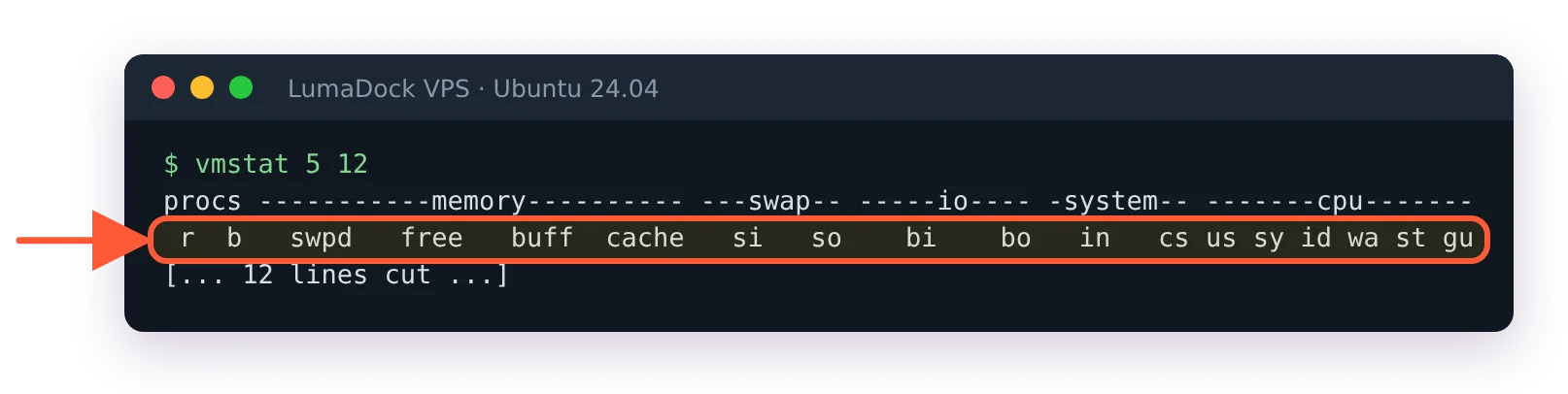
vmstat 5 12
lscpu | grep -E 'Model name|Thread|Core|Socket|MHz'
grep -m1 'model name' /proc/cpuinfo

vmstat 5 12 column headers on Ubuntu 24.04, ending in us sy id wa st gu

The st column is steal; on Ubuntu 24.04 vmstat adds a gu column after it.

Steal in the st column that reads zero across a week, including your busy hours, is the strongest evidence. A shared host that's lightly loaded also reads zero, which is why a week matters, and why it's better to look during the evening peak than at lunch.

lscpu gives you the CPU model and the topology. A VDS on a Ryzen or Core desktop chip shows the exact model name and, when the hypervisor exposes a MHz line at all, a boost clock in the 4-5 GHz range. A VPS may show the host's real model (an EPYC or Xeon) or a generic one such as QEMU Virtual CPU or x86-64-v2-AES chosen for live migration, so the model name alone tells you little. Topology is subtler. A pinned VM often reports "Thread(s) per core: 2" because the provider gave you a core and its hyperthread sibling together, whereas a VPS reports one thread per core with the vCPUs floating. Neither is a rule, only a hint.

I don't know of any way, from inside a guest, to prove the cores are reserved as opposed to merely quiet. A cooperative provider will tell you the affinity list for your VM if you ask, and that's the only proof there is.

VDS vs dedicated server

A VDS is still a virtual machine. It runs under KVM, its disk is an image on shared storage, its network goes through the host's bridge and the provider can snapshot it, migrate it and resize it like any VM. What you've bought is exclusive use of some of the host's cores. A dedicated server is the whole physical machine with no hypervisor between you and the hardware, your own drives, your own NIC, and the option to run your own hypervisor on top. The two products get confused because "dedicated" appears in both names, and the confusion costs people money in both directions: renting bare metal for a game server that needed four fast cores, or renting a VDS for a database that needed twelve drives and 256 GB of RAM. The comparison in VPS vs dedicated server is where the second case is worked through. The first case is this page.

A short history aside. The word VDS is older than the current use; in the mid-2000s some hosts used "VDS" for what everyone now calls a VPS, and in parts of Europe the two terms are still swapped freely on hosting forums. That's why a search for "VDS hosting" turns up ordinary shared-core plans as often as pinned ones, and why the questions below matter more than the label on the plan.

What to ask a provider before buying a VDS

Are the vCPUs pinned to specific physical cores, and are those cores excluded from every other VM on the host. That's the definition and a provider selling a real VDS answers it in one sentence. Does a vCPU map to a full core or to one hyperthread of a core, which halves the answer if it's the latter. What's the physical CPU model and its sustained clock under load, since boost figures on the box are for one core at a time. Is the storage shared with the VPS tenants on the same host, and is there any I/O weighting for VDS plans. Can the VM be live-migrated, and does the pinning survive it (on most platforms the affinity is part of the VM config and moves with it, but the target host has to have the cores free).

And one for yourself, before any of those: does the application you're moving have a single thread whose latency you can measure. If you can't name that thread, buy the VPS, log steal for a month and revisit when a number tells you to.

Questions?

Does 1 vCPU equal 1 core?

Usually a vCPU is one hardware thread, which on a processor with SMT (hyperthreading) is half of a physical core. Some platforms map each vCPU to a whole core instead, and the same plan size can mean either, so 2 vCPU might be one core's two threads or two separate cores. Inside the VM each vCPU looks like a full processor regardless, since the hypervisor runs every vCPU as its own host thread. So 4 vCPU on an SMT host is usually the capacity of two physical cores, and of four only where the plan states one core per vCPU.

About the author

Lucía Elena Navarro

I was born in Zaragoza and have lived in Valencia since my twenties. My first work with language was translation: training materials and software interfaces. Then several years in customer education.

I have 3 kids, so my working day is organised carefully. I work very early. I like having a quiet hour before the house wakes up, especially when I need to understand something new before I can explain it. Professionally, I have written a lot about Linux servers and cloud services. In recent years I have done more editing. I enjoy this part because two writers can understand the same technical subject and still choose completely different ways to explain it. At home, we have been playing in the same Minecraft world for nearly 5 years. I am responsible mainly for storage rooms and keeping the animals where they are supposed to be.

Put your fastest projects on dedicated cores

Ryzen 9 7950X cores boosting to 4.5 GHz, reserved for your server alone, so busy neighbours never take your CPU time. Your first VDS comes with a 30-day money-back guarantee.