.svg)
.svg)
.svg)
.svg)

.svg)
.svg)
.svg)

Updated 22 October 2026
The AppSec component turns CrowdSec into a web application firewall. Without it, CrowdSec reads your logs and bans an address after the web server has already answered the request. With it, the nginx bouncer forwards each request to a local CrowdSec listener before nginx passes it on, and a request that matches a rule gets a 403 without your application ever seeing it.
This guide sets it up on Ubuntu 24.04 with nginx and CrowdSec 1.7 or 1.8 (LumaDock's template ships 1.7.8, and everything up to the bot detection section works on it), following the AppSec quickstart as the documentation describes it in October 2026. It installs the in-band rules first, proves them with one request, then adds the OWASP Core Rule Set in a mode that can't break your site on day one.
Prerequisites and the nginx bouncer
You need a running Security Engine; the CrowdSec install guide for Debian 12 and 13 gets you there, and its commands work unchanged on Ubuntu 24.04. You also need nginx itself; the bouncer package depends on it, so apt pulls it in if it's missing. Then add the bouncer:
sudo apt update
sudo apt install crowdsec-nginx-bouncer
Don't skip the update on a freshly deployed server. On a new LumaDock template VPS the package lists date from the image build, so without it apt installs nginx bouncer 1.1.6: fine for everything in this guide, too old for bot detection.
It's a Lua module that runs in nginx's access phase. It checks each client against the ban decisions from the local API and, once AppSec is switched on, sends the request to the AppSec listener for inspection. The package registers the bouncer with the local API during install and prints the bouncer's API key while it does, so keep that output out of tickets and chat logs.
It's a bigger install than the name suggests. On Ubuntu 24.04 apt pulls in a compiler toolchain and luarocks, about 185 MB on disk, because the package builds two Lua libraries from luarocks.org during setup; the server needs outbound HTTPS at that point. LumaDock's nginx + CrowdSec template deploys with nginx and CrowdSec preinstalled but without this bouncer, so the step still applies there. dpkg -l crowdsec-nginx-bouncer answering "no packages found" confirms it.
Install the AppSec rule collections
sudo cscli collections install \
    crowdsecurity/appsec-virtual-patching \
    crowdsecurity/appsec-generic-rules
appsec-virtual-patching carries rules for known CVEs, which the hub updates daily, plus rules for the constant probing for exposed .env files. appsec-generic-rules adds rules for common attack patterns that aren't tied to a single CVE. The install also pulls the default AppSec configuration, crowdsecurity/appsec-default, which loads both the virtual patching rules and the generic rules in-band: they're evaluated before the request continues, and a match blocks it. On 1.7.x every hub command also opens with a "new CrowdSec release is available" warning, which you can ignore here.
Both sets match narrow, specific patterns, which keeps false positives rare. That's what makes in-band blocking safe to leave on for them.
Turn on the AppSec listener
Rules do nothing until an acquisition starts the listener. Create /etc/crowdsec/acquis.d/appsec.yaml:
appsec_configs:
  - crowdsecurity/appsec-default
labels:
  type: appsec
listen_addr: 127.0.0.1:7422
source: appsec
sudo systemctl restart crowdsecKeep listen_addr on 127.0.0.1. Only nginx on the same machine should ever talk to it, and the CrowdSec docs are explicit that the component must not be reachable from the internet.
Point the nginx bouncer at port 7422
The bouncer config ships with an empty APPSEC_URL= line, so one sed fills it in:
sudo sed -i 's|^APPSEC_URL=.*|APPSEC_URL=http://127.0.0.1:7422|' \
    /etc/crowdsec/bouncers/crowdsec-nginx-bouncer.conf
sudo systemctl restart nginx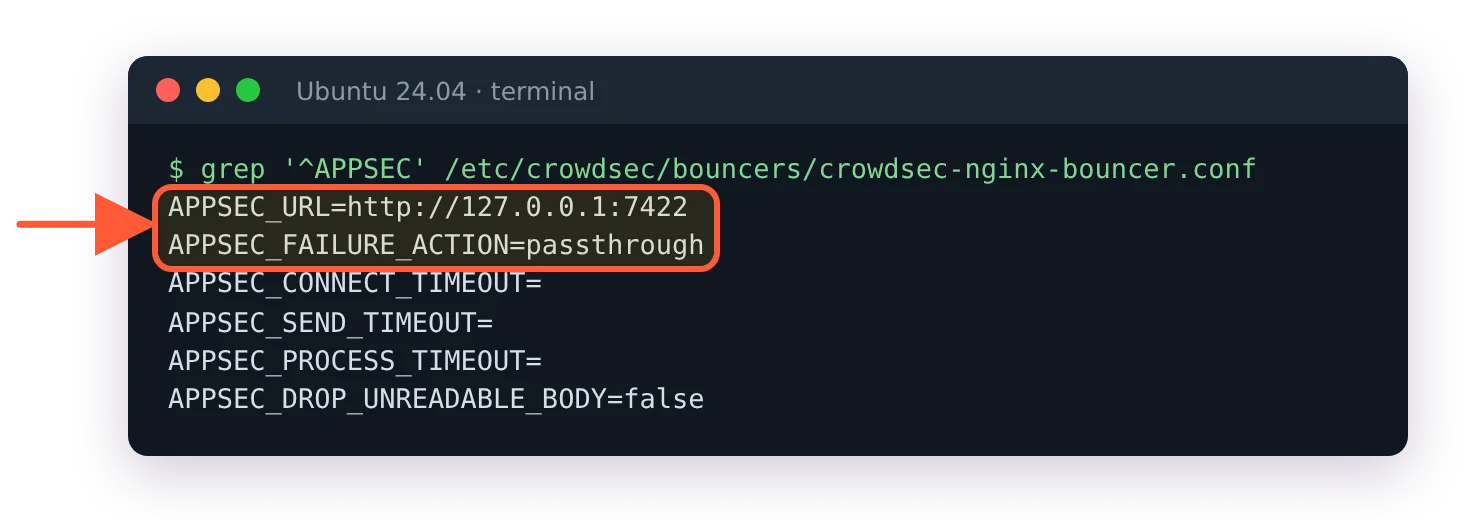
After the sed: APPSEC_URL points at port 7422 and the failure action stays passthrough.
Two other settings in /etc/crowdsec/bouncers/crowdsec-nginx-bouncer.conf deserve a decision now rather than during an incident:
- APPSEC_FAILURE_ACTION decides what nginx does when the AppSec listener can't be reached. The default,
passthrough, lets the request through uninspected. I keep that on anything customers use, because a stopped CrowdSec service taking the whole site down with it is the worse outage. - APPSEC_DROP_UNREADABLE_BODY is
falseby default. The library the bouncer relies on can't read the body of an HTTP/2 or HTTP/3 request that arrives without aContent-Length, so those bodies go uninspected. Setting it totruedrops such requests, which closes the gap and can break clients that stream uploads.
Local overrides can go in crowdsec-nginx-bouncer.conf.local, which takes precedence over the main file. It won't make upgrades silent, though. The installer writes your API key into the main file, so dpkg treats that file as locally modified and asks about it whenever a bouncer upgrade ships a changed version. Answer N, the default, to keep yours.
Test the WAF with a .env probe
Give CrowdSec half a minute after the restart first. On a 2-vCPU test VPS the AppSec listener took up to 35 seconds to come back, and until it does the bouncer passes requests through uninspected, so a test sent too early looks like a broken setup. sudo ss -ltn | grep 7422 prints a line once the listener is up.
curl -I http://localhost/.envExpect HTTP/1.1 403 Forbidden. The request matched crowdsecurity/vpatch-env-access, the AppSec listener answered 403 and the bouncer served CrowdSec's ban page; your application never saw it. Confirm the count:
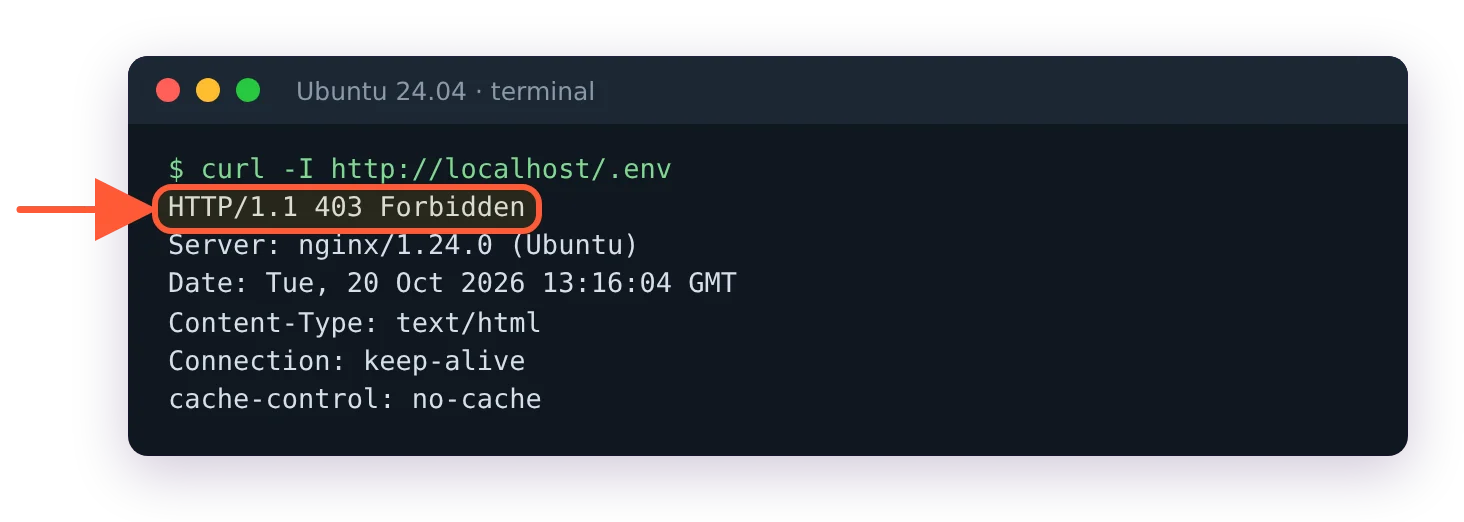
The .env probe gets a 403: the WAF answered before the application saw the request.
sudo cscli metrics show appsec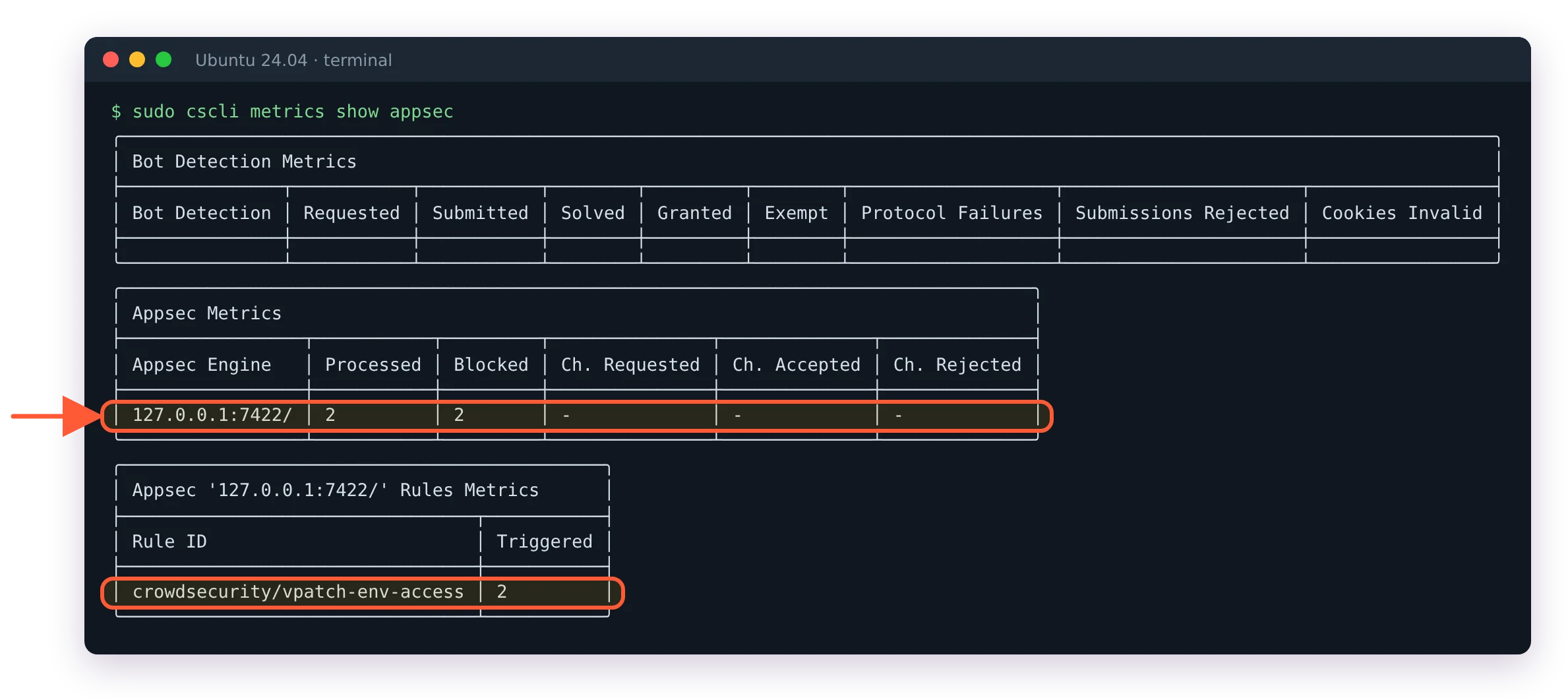
Processed and Blocked count the probe, and vpatch-env-access is the rule that fired.
The output has a Processed and a Blocked column per listener and a table of the rules that fired. On 1.8 an empty Bot Detection table sits above them until you set up bot detection. If Processed stays at zero while you send traffic, the bouncer isn't forwarding: check APPSEC_URL and that nginx was restarted after the change.
Two pages to keep at hand once real traffic flows through it. When a user reports a full-page 403, that's a decision to find and lift, covered in fixing the CrowdSec Access Forbidden page. And if switching on enforcement on a production server makes you nervous, the CrowdSec safe rollout guide covers the order of allowlists and bouncers that avoids locking yourself out.