





.svg)
.svg)
.svg)
.svg)

.svg)
.svg)
.svg)

CrowdSec 1.8.0, released on 31 August 2026, added bot detection to its WAF. When it's on, a visitor without a valid cookie gets a challenge page first: the browser solves a proof-of-work puzzle, collects a device fingerprint and posts both back to CrowdSec. A real browser passes and receives a cookie that lasts 12 hours by default. Stock headless Chrome, Selenium, Playwright and scripts that never run JavaScript get no cookie and are filtered out before they reach your application. A scraping service that patches its browser to hide the automation can still get through, which is what the behavioral scenarios and the strict threshold further down are for.
This guide turns it on for nginx on Ubuntu 24.04, with the CrowdSec nginx bouncer and an AppSec setup you already have. CrowdSec labels the feature alpha, so the shipped rules and settings can still change between releases; everything below follows the 1.8 documentation as published in October 2026.
What bot detection needs before you start
Four things have to be true. When the third is missing, CrowdSec doesn't start at all:
- Engine 1.8.0 or newer. Prefer 1.8.1, which fixed a false positive on Brave with Shields enabled.
- nginx bouncer 1.2.0 or newer. Challenge support arrived in the Lua library the bouncer bundles in July 2026, and 1.2.0 is the first bouncer release that carries it.
- A CPU and kernel that can run the challenge runtime. The engine host needs
arm64, oramd64with SSE4.1, and it must be allowed to map executable memory. Strict W^X hardening, a seccomp profile or an SELinux policy can deny that, and then the AppSec datasource fails to load withwasm compiler mode unavailable. - AppSec already answering requests. Bot detection is a layer of the WAF, so the AppSec component from the CrowdSec AppSec guide for nginx has to be running and the bouncer has to point at it. Nothing below works without that.
Check all four from a shell:
sudo cscli version
dpkg -l crowdsec-nginx-bouncer
grep -c sse4_1 /proc/cpuinfo
grep '^APPSEC_URL' /etc/crowdsec/bouncers/crowdsec-nginx-bouncer.conf
sudo cscli metrics show appsec
Run the checks on a server built from LumaDock's nginx + CrowdSec template as well: the package versions are whatever the template was built with, and the checks show if the nginx bouncer and AppSec are set up yet. On amd64, a count of zero from the grep line means the CPU flag isn't exposed to the VM and the challenge runtime won't load. APPSEC_URL should read http://127.0.0.1:7422 or wherever your AppSec listener lives.
Behind a CDN or another reverse proxy, one more thing. The bouncer reports $remote_addr as the client address, so without nginx's real IP module (set_real_ip_from plus real_ip_header) every visitor looks like the proxy. The challenge itself still works per browser, since it rides on a cookie, but the rest breaks: the scenarios that ban repeat offenders end up banning your CDN's addresses, verified search engines are no longer recognised and get challenged, IP allowlists stop matching and the timezone check compares visitors against the CDN's country.
Upgrade CrowdSec and the nginx bouncer
sudo apt-get update
sudo apt-get install --only-upgrade crowdsec crowdsec-nginx-bouncer
sudo cscli hub update
Expect apt to stop and ask about crowdsec-nginx-bouncer.conf whenever the new bouncer ships a changed version of it: the installer wrote your API key into that file, so dpkg treats it as yours. Answer N, the default, to keep it. Your bouncer API key and APPSEC_URL live there, the maintainer's version has a literal ${API_KEY} placeholder and an empty APPSEC_URL, and taking it can leave you with the error from fixing CrowdSec API error: access forbidden and a bouncer that has stopped enforcing anything without saying so. Settings in crowdsec-nginx-bouncer.conf.local override the main file, but they don't stop that question. The bouncer package also copies its own /etc/nginx/conf.d/crowdsec_nginx.conf into place on every upgrade without asking, so local edits to that file don't survive one.
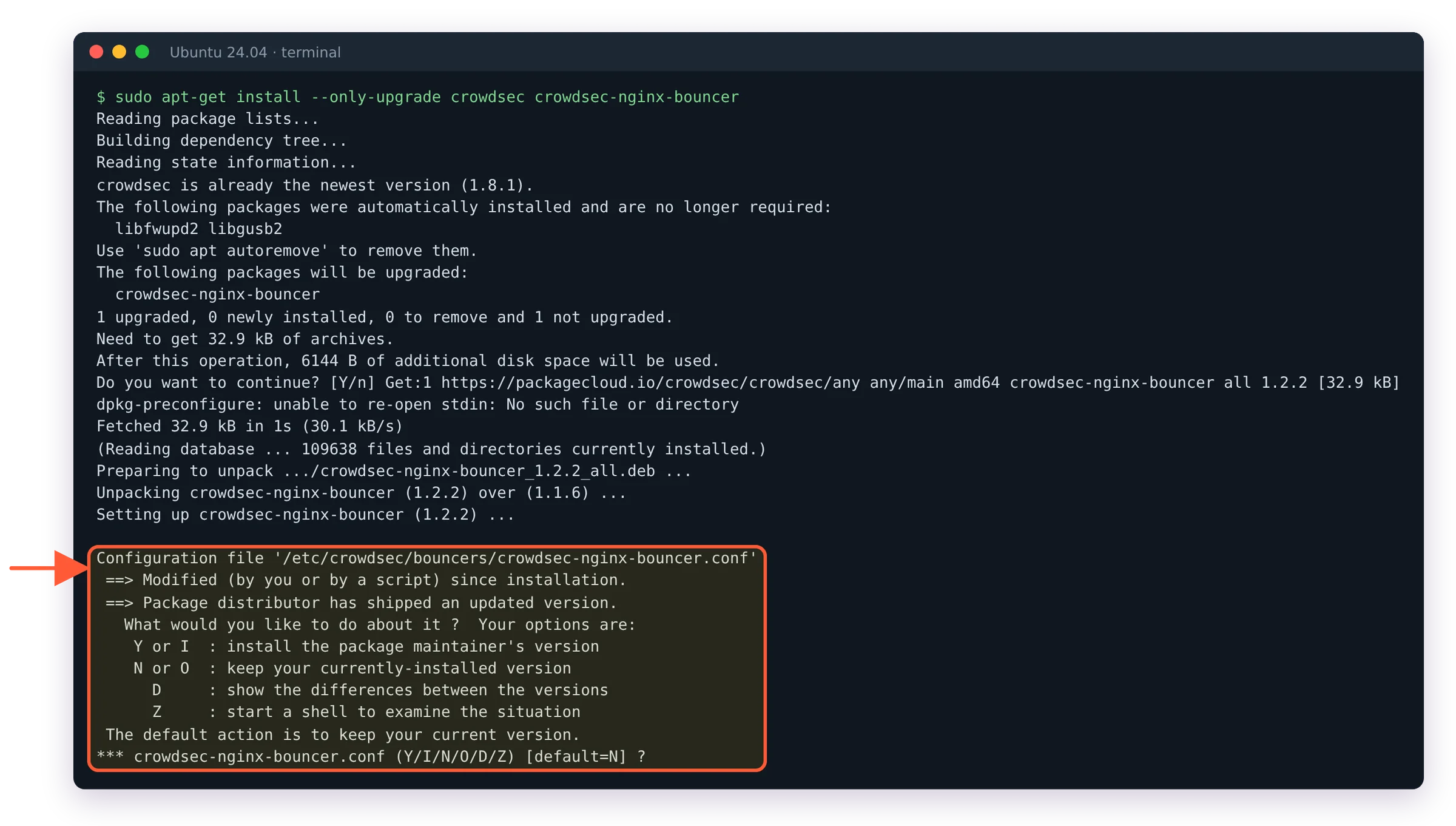
The question apt asks on a bouncer upgrade: answer N, the default, to keep your API key and APPSEC_URL.
Install the appsec-bot-challenge collection
sudo cscli collections install crowdsecurity/appsec-bot-challengeThe collection brings the scoring config that serves the challenge, a threshold config that rejects submissions scoring 75 or more, exclusion configs for verified bots and machine-facing paths, two behavioral scenarios and the parsers and alert context that go with them.
Installing it isn't enough, because the AppSec listener only loads the appsec-configs named in its acquisition file. Open /etc/crowdsec/acquis.d/appsec.yaml and add the wildcard line, keeping whatever you already load:
source: appsec
listen_addr: 127.0.0.1:7422
appsec_configs:
  - crowdsecurity/appsec-default
  - crowdsecurity/crs
  - crowdsecurity/appsec-bot-*
labels:
  type: appsec
Drop the crowdsecurity/crs line if you never installed the Core Rule Set. The wildcard matches installed configs only, so it picks up the scoring engine, the threshold and every exclusion the collection gave you. Then reload:
sudo systemctl reload crowdsecGive it half a minute before you test. The AppSec listener restarts on a reload, the challenge runtime takes a few seconds of that to start, and until the listener is back nginx passes requests through unchecked. On a 2-vCPU VPS it took about 35 seconds.
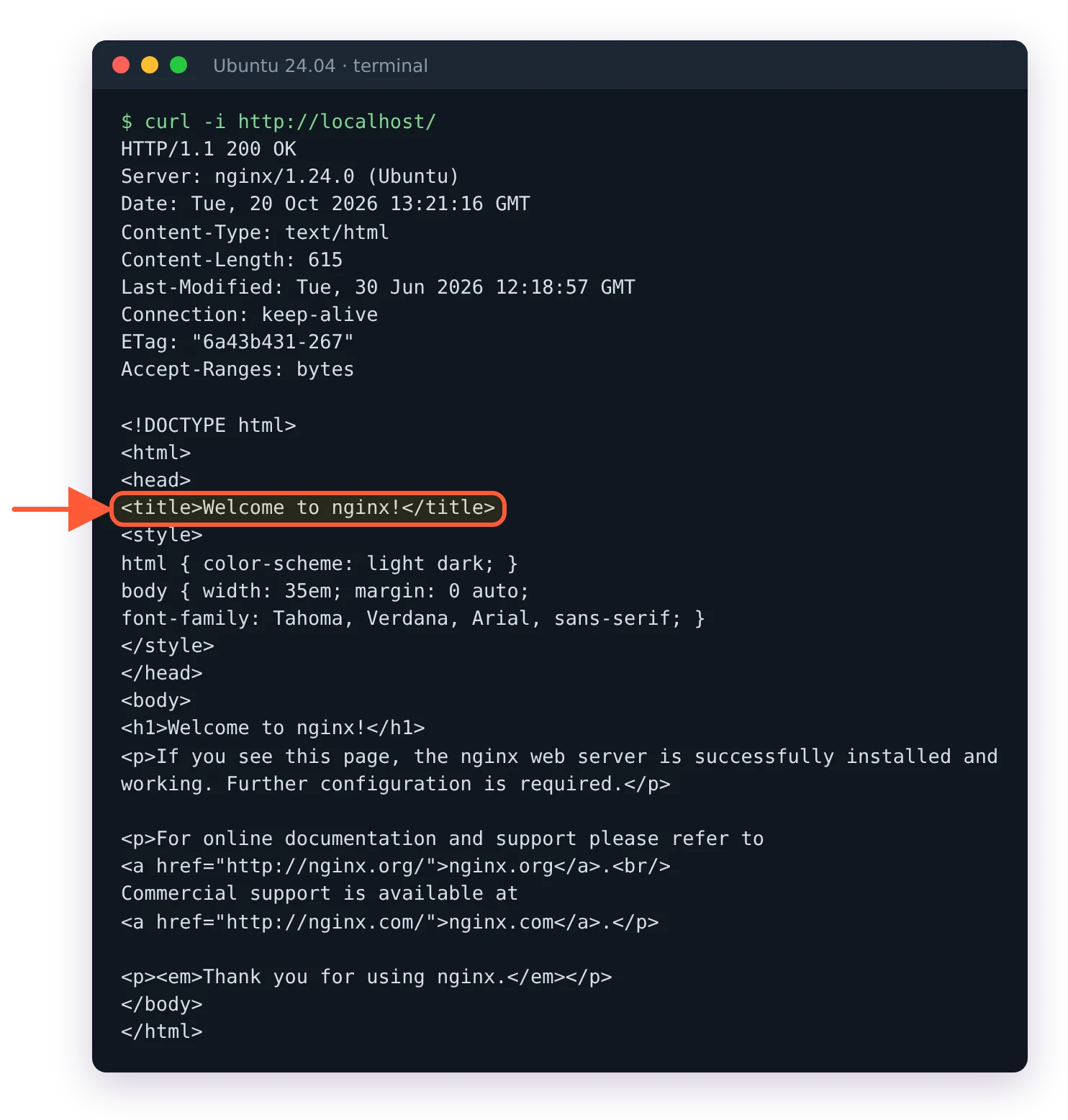
Too soon: right after the reload curl still gets your normal page. Wait about 30 seconds.
From this point every page on the site is challenged, except verified bots and the excluded paths. That's the shipped default, and it's the right one for a blog or a shop. An app with a public API is better off challenging only the paths that attract abuse.
Fix the Content-Security-Policy conflict in nginx
The challenge page runs an inline script and an inline style and starts its proof-of-work worker from a blob: URL, so CrowdSec sends a permissive Content-Security-Policy header with it. If your nginx config also adds a CSP to every response, the browser receives two policies and enforces both. A site policy without 'unsafe-inline' or blob: blocks the challenge, and the visitor stares at a page that can never finish. In Chrome's console it shows as Executing inline script violates the following Content Security Policy directive; older browser versions word it Refused to execute inline script or Refused to create a worker.
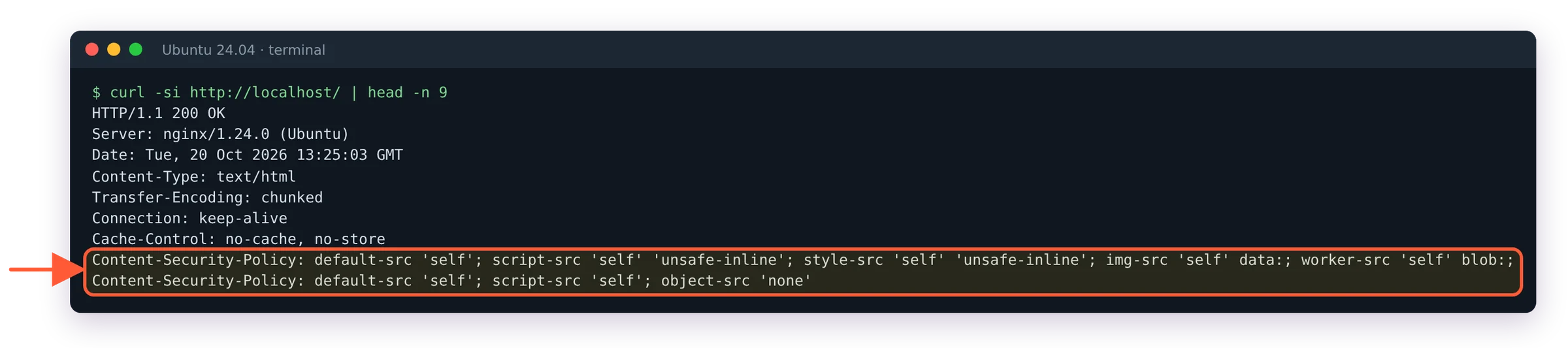
The conflict: the challenge page carries two Content-Security-Policy headers.
I'd check this before anything else on a site that already sends a CSP, because a frozen challenge page looks like a slow site and nobody reports it. The fix from the CrowdSec docs is to add your policy only when the response doesn't carry one yet:
http {
    map $sent_http_content_security_policy $hdr_csp {
        ""  "default-src 'self'; script-src 'self'; object-src 'none'";
    }

    server {
        add_header Content-Security-Policy $hdr_csp;
    }
}
Put your real policy in place of the example string. The map has no default, so $hdr_csp stays empty whenever the response already has a CSP, the challenge page included, and nginx skips a header whose value is empty. Test with sudo nginx -t and reload nginx.
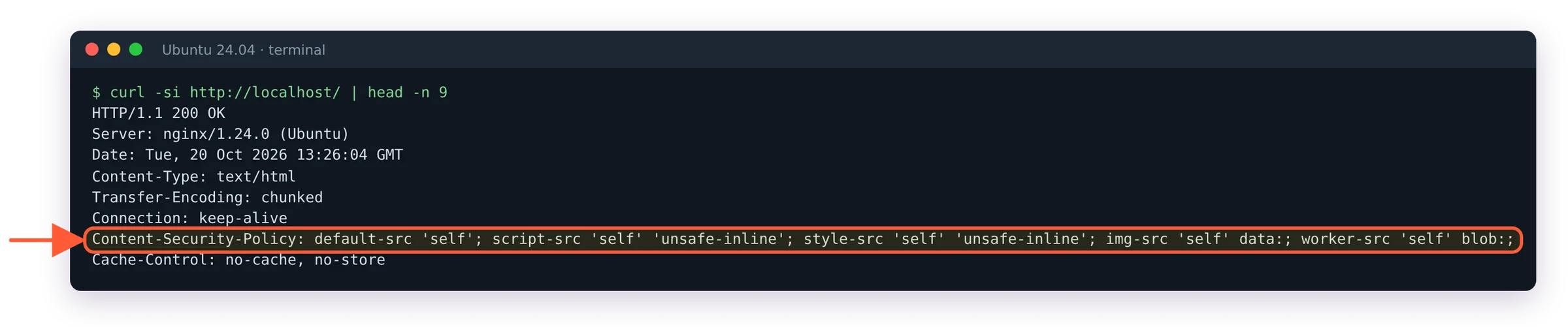
After the map fix only CrowdSec's policy is left on the challenge page.
Verify the challenge page with curl and cscli metrics
From a machine with no cookie for the site:
curl -i https://example.com/Expect a 200 and a page titled CrowdSec Challenge instead of your homepage. It carries a few hundred KB of inline script, so check the title rather than scrolling through it:
curl -s https://example.com/ | grep -o '<title>.*</title>'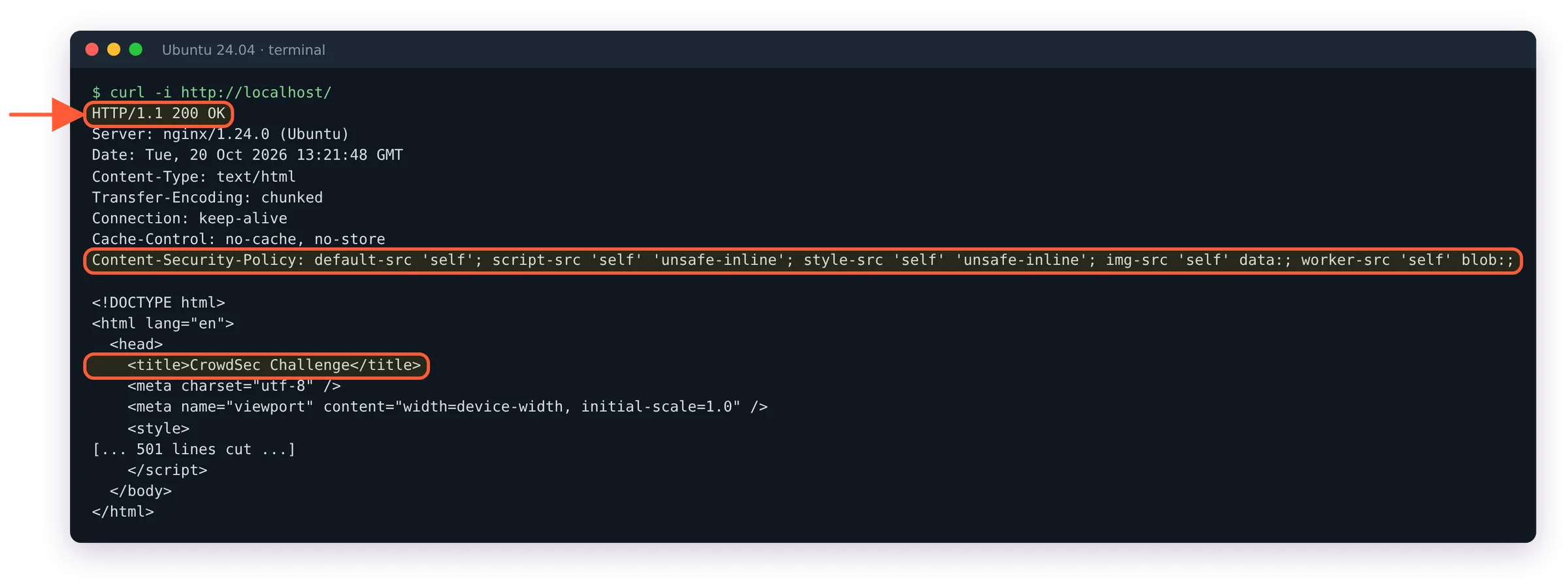
The challenge from curl: a 200, CrowdSec's own CSP header and the title CrowdSec Challenge.
Open the same URL in a normal browser and the page clears by itself; the cookie it receives is named __crowdsec_challenge, and the browser's developer tools show it in the cookie list for the site. A visit to /robots.txt or /sitemap.xml should return the file directly, because the crawler-files exclusion skips those paths.
The funnel is in the metrics:
sudo cscli metrics show bot-detection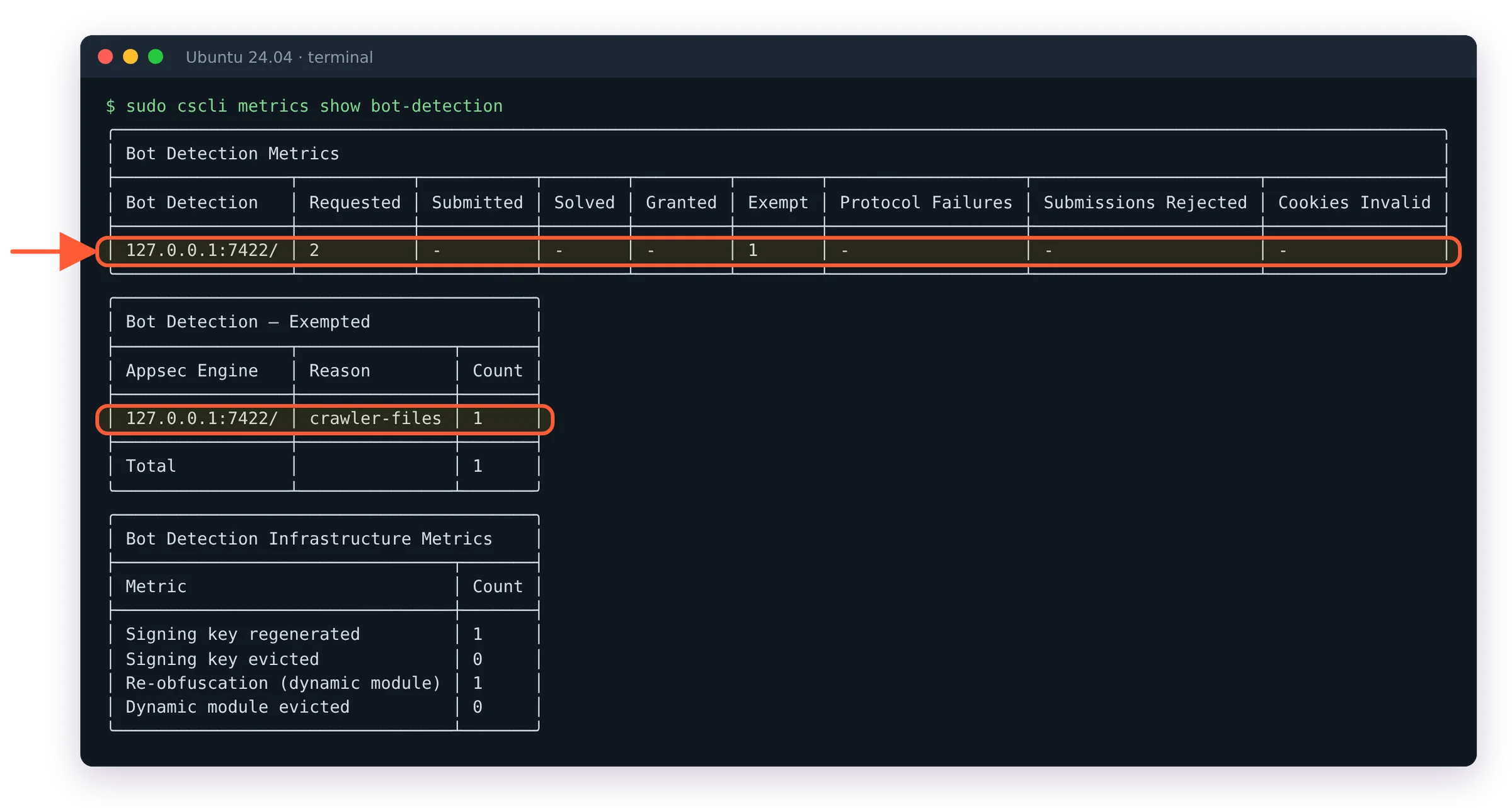
The bot-detection funnel: two challenges requested, robots.txt exempted as crawler-files.
Requested, Submitted, Solved and the rejection columns should start moving as traffic arrives, and the Exempt column counts requests an exclusion config waved through. Challenges requested but never submitted, with real browsers in the logs, points straight back at the CSP section above. To see a rejection on purpose, the docs suggest loading a page with any browser driven over the Chrome DevTools Protocol, such as Puppeteer or Playwright with Chromium. That signal alone is worth 100 points.
Read why a client was rejected
Each rejected submission becomes an alert of its own kind, which keeps it apart from WAF and log alerts:
sudo cscli alerts list --kind bot-detection
sudo cscli alerts inspect ALERT_ID -d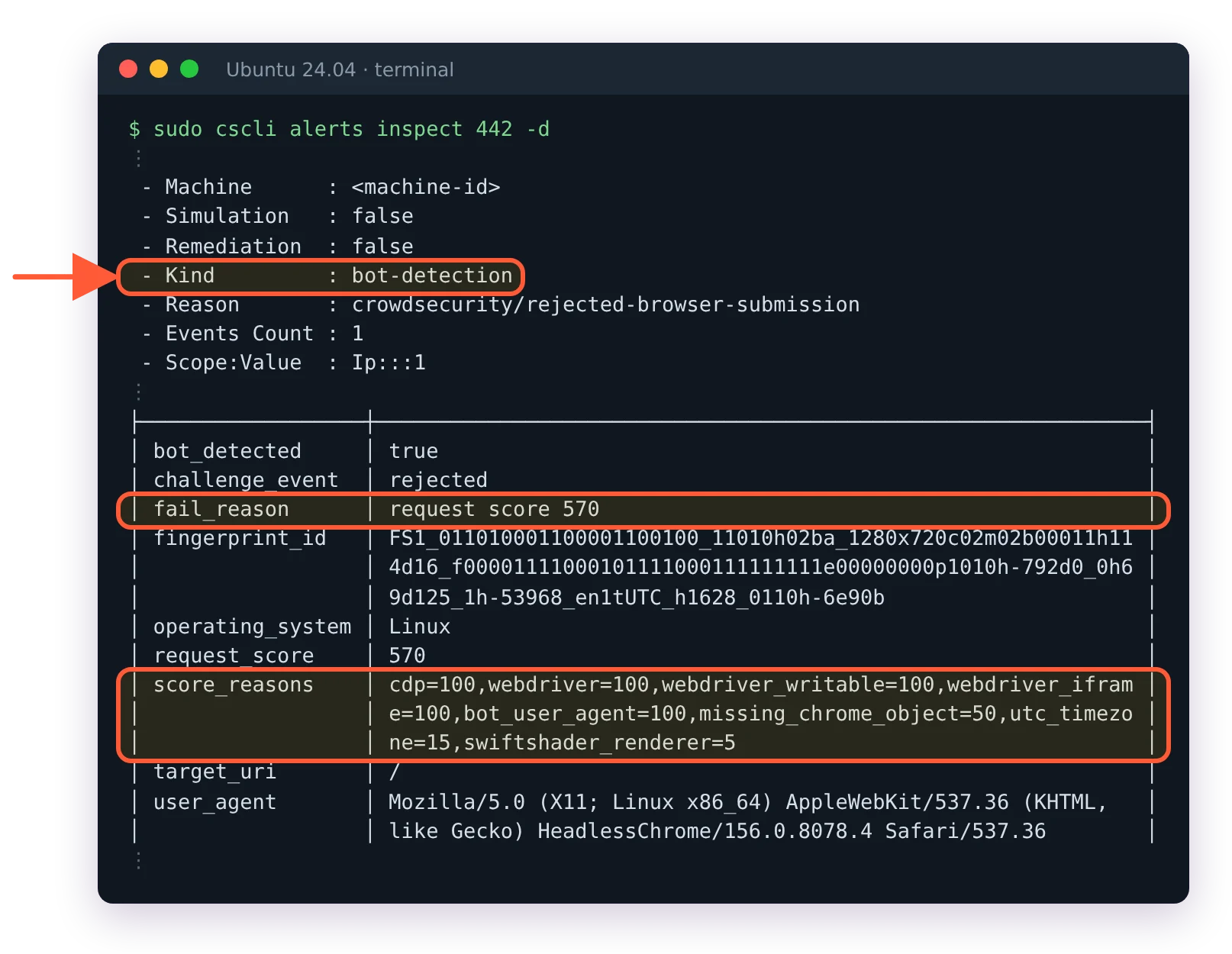
Why it was rejected: score_reasons starts with cdp=100, for a total of 570 against a threshold of 75.
The field to read in the inspect output is score_reasons, and the bot detection default configuration page names every signal that can appear in it. The field breaks the score down per signal, so cdp=100,utc_timezone=15 tells you a browser was being driven by automation, while a row of small numbers that only just crosses 75 tells you a human with an odd setup may have been turned away. Grouped by weight:
| Points | Signals |
|---|---|
| 100 | Automation frameworks (CDP, WebDriver, Selenium, Playwright) and a User-Agent that declares itself a bot |
| 50 | Headless screen sizes, a missing Chrome object, impossible memory, a JavaScript engine that doesn't match the claimed browser and values that disagree between the page, an iframe and a worker |
| 30 | Platform or GPU mismatches and unusually high CPU counts |
| 15 | UTC timezone, a mobile User-Agent with a desktop-width viewport and an Accept-Language header that disagrees with the browser's language |
| 5 | SwiftShader rendering, mismatched languages and a timezone that doesn't match the country |
The UTC row deserves a second look. The docs put it plainly:
Servers, VPNs and privacy tooling all produce a UTC timezone.
One rejection doesn't ban anyone. The per-submission alert explains what happened and stops there. Bans come from the two behavioral scenarios, appsec-bot-challenge-too-many-requests for an address that keeps fetching the challenge without ever submitting it and appsec-bot-challenge-too-many-submissions for one that submits over and over, which is what an automated solver does. Those create normal decisions, so the bouncer blocks the address on every request until the decision expires.
Switch to the strict or permissive threshold
Three bundles ship the same scoring and exclusions and differ only in where they reject:
- crowdsecurity/appsec-bot-challenge rejects at 75 or more. The default.
- crowdsecurity/appsec-bot-challenge-strict rejects at 45 or more, for sites that would rather turn away a few people than let a bot through.
- crowdsecurity/appsec-bot-challenge-permissive rejects at 100 or more, which in practice means only clear automation.
Install one. With the wildcard in the acquisition file, a second bundle loads its threshold too, the rules stack and the strictest one wins without telling you. To switch, remove the old collection first:
sudo cscli collections remove crowdsecurity/appsec-bot-challenge
sudo cscli collections install crowdsecurity/appsec-bot-challenge-strict
sudo systemctl reload crowdsec
I'd leave the default in place for a couple of weeks and read score_reasons on real rejections before moving in either direction. Tightening because the Rejected table looks short is how you end up blocking people on VPNs.
Keep search engines, monitors and your API unchallenged
Anything that can't run JavaScript fails the challenge by definition, so the collection exempts two groups by default. The first is verified bots: search engines (Googlebot, Bingbot, DuckDuckBot and others), AI crawlers (GPTBot, OpenAI's search and ChatGPT-User agents, PerplexityBot), social preview fetchers and monitors such as UptimeRobot and Datadog. They're recognised by the vendor's published IP ranges or a forward-confirmed reverse DNS lookup, so a scraper that only copies Googlebot's User-Agent goes through the challenge like anyone else. The second group is paths: /robots.txt and /.well-known/, feeds, /webhooks/, static assets and API routes such as /api/, /graphql and /wp-json/.
Your own clients are the gap. A health check from a monitor not on that list, a mobile app calling a route outside /api/, a partner's integration: each one gets the challenge page and fails. When the client has a fixed address, a CrowdSec allowlist is the cleanest fix, because an allowlisted IP bypasses AppSec entirely. Run the commands on the server that hosts the local API; the AppSec side picks up changes within a minute:
sudo cscli allowlists create trusted_clients --description "monitors and integrations"
sudo cscli allowlists add trusted_clients 203.0.113.10 198.51.100.0/24
The CrowdSec allowlist guide sorts out how allowlists differ from parser whitelists and the older mechanisms. Keep the list short: an allowlisted address skips the WAF rules as well as the challenge.
Challenge only the login or checkout path
On a site where most traffic is machine-to-machine, challenging every page causes more trouble than it prevents. The docs handle that with an overlay: a small appsec-config of your own that exempts everything outside the path you want to protect, leaving the hub files untouched. Save it as /etc/crowdsec/appsec-configs/mysite-challenge-login.yaml:
name: mysite/appsec-bot-challenge-login-only
inband:
  pre_eval:
    - filter: '!(req.URL.Path startsWith "/login")'
      apply:
        - ExemptFromChallenge("outside-login")
Your own namespace doesn't match the crowdsecurity/appsec-bot-* wildcard, so list the overlay by name in appsec.yaml, above the wildcard line, then reload CrowdSec and confirm the name with sudo cscli appsec-configs list. ExemptFromChallenge mints no cookie, so the condition is checked again on every request, which is what you want for a path rule. The same overlay mechanism can raise the proof-of-work cost on /login with SetChallengeDifficulty("high"), about 0.4 seconds on a desktop browser and around 8 on a low-end phone according to the hooks reference.

With the login-only overlay, /login gets the challenge page.


