Back to Article List

CrowdSec in production: The complete guide

CrowdSec in production: The complete guide

fail2ban guarded my servers for eleven years and CrowdSec retired it in 2024, first on my own boxes and then on client fleets; these days it also runs on the OPNsense box guarding my home network. Since the switch I've written fourteen deep tutorials on it, and this page is the map that holds them together: the architecture in one section and the deployment order I use in production, with a pointer into the right deep guide at each stage.

If the name is new to you, CrowdSec is an open source IPS (Intrusion Prevention System) that reads your server logs for attacks and bans the IPs behind them, then trades those detections with every other install for a curated blocklist of currently active attackers. The full tour of that model, including where the free-versus-paid line sits, is in my what is CrowdSec explainer.

Everything below matches the Security Engine 1.7 line, v1.7.8 on the official release page as I write this in July 2026. That matters more than it sounds. A lot of CrowdSec advice floating around dates from the 1.4 era, before centralized allowlists existed and before private ranges were whitelisted by default, and following it produces configs that fight the current engine.

The CrowdSec architecture in five parts

You can hold the whole system in your head with five names. The Log Processor (the detection half, called the agent in older docs) tails your logs through acquisition files and parses each line into structured events. Scenarios watch those events for hostile patterns; most are leaky buckets, so enough failed SSH logins from one address inside a short window overflows a bucket and raises an alert. The Local API (LAPI) receives alerts and turns them into decisions, "ban this IP for four hours" being the default, though profiles can hand out a captcha challenge instead, which is the kinder option on anything a paying customer touches. A decision on its own is a database row.

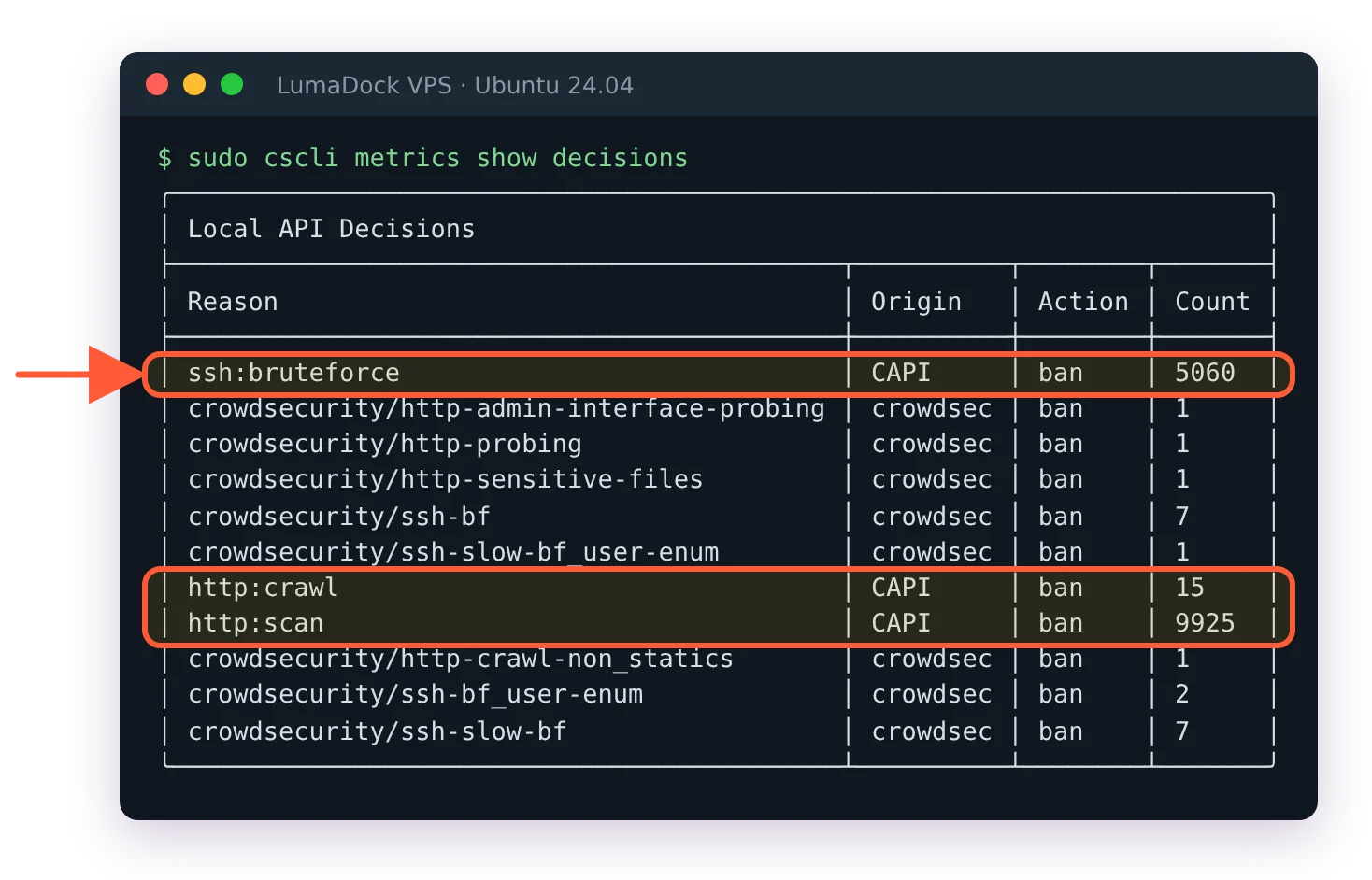
Enforcement belongs to Remediation Components, which everyone calls bouncers: separate programs that subscribe to the LAPI and block at the firewall, the reverse proxy, the CDN or wherever else you attach one. The fifth piece is the community blocklist. Your engine reports confirmed attacks to the Central API (CAPI) as bare signals and pulls back a curated list of addresses the whole network is currently seeing, so most attackers arrive on your server already banned. Without that trade CrowdSec would be fail2ban with YAML and a nicer CLI. With it, cscli metrics on my boxes shows the majority of dropped traffic coming from IPs my own detection never had to learn about.

Detection content lives outside the binary. Parsers, scenarios and the collections that bundle them per service sit on a hub and refresh through cscli hub upgrade independently of engine releases, the way apt refreshes packages. The split between detection and enforcement pays off the moment you run more than one machine, since several Log Processors can share a single LAPI and every bouncer in the fleet enforces the merged decision list; a credential stuffer caught on the web node is banned on the mail server seconds later. The official documentation covers each component exhaustively, but the mental model to carry into everything below is smaller than the docs suggest. Every deployment decision reduces to two questions. Where does the engine read logs, and where do bouncers block.

Installing the first Security Engine

Skip your distro's package. Debian 12 ships CrowdSec frozen at 1.4.6, roughly three years behind on detection content and missing the AppSec component entirely, and Debian 13 trails upstream too. The official repository costs one line, the engine one more:

curl -s https://install.crowdsec.net | sudo sh
sudo apt install crowdsec

The post-install step detects your services, installs the matching collections and leaves you with an engine that detects without blocking, which is exactly the right resting state for the first week. My CrowdSec install guide for Debian 12 and 13 walks the full sequence and spends half its length on acquisitions for a reason: modern Debian doesn't install rsyslog, so /var/log/auth.log may simply not exist and SSH events live in journald instead, a wrinkle that leaves detection silently reading nothing when an acquisition points at the wrong place. Every command in that guide works unchanged on Ubuntu 24.04, and it also covers console enrollment and the two-track upgrade routine (apt for the binaries, cscli hub for the detection rules) that people forget half of. On a public address the first SSH brute force alert usually lands within the hour, which makes a better demo than any sales page.

Or skip the assembly. LumaDock ships one-click CrowdSec VPS templates on Ubuntu 24.04, selected during ordering, with nginx and Apache variants where the web bouncer is already wired; the box boots protected and you can jump straight to the rollout section below. I'd still read the install guide once so you know what's running on your behalf.

Safe rollout: Allowlists before bouncers

CrowdSec will gladly ban the hand that configured it, and I write that with the authority of someone who has locked himself out of a production firewall twice. Your uptime checker, your backup agent, your dashboard's polling and your API scripts all look like attack traffic to a scenario, and the moment a bouncer attaches, every decision becomes a dropped packet with no grace period. So the order matters more than any individual setting. Run detection alone for a week and read cscli alerts list daily, because every false positive you find in that list is a lockout you won't have in week three. Allowlist your admin addresses while enforcement still doesn't exist; cscli allowlists entries apply the moment you add them and also strip matching IPs out of blocklist imports. Your LAN is already covered by the default private-range whitelist, so it's the public addresses, the office egress and the VPN endpoint, that need entries. Only then attach a bouncer, to one service, and I start with the reverse proxy rather than the firewall on the theory that a wrong HTTP ban costs me a dashboard while a wrong firewall ban costs me SSH. Third-party blocklist subscriptions come last or never.

The reasoning behind each step, the test-ban routine against documentation addresses and the WireGuard tunnel I keep as a permanent side door (its subnet is private, so the default whitelist already trusts it) are in how to roll out CrowdSec without locking yourself out. If I could make one article in this library mandatory, that's the one.

Enforcement layers: Firewall bouncer, Docker and the AppSec WAF

On a plain Linux server the firewall bouncer is the natural first enforcement point: a small Go daemon that streams decisions into nftables sets or ipset-backed iptables, where a banned IP loses every port at once and lookup cost stays constant no matter how many thousand entries the sets hold. The defaults are good and the config surface is small. Which package to pick (nftables mode on any modern Debian or Ubuntu, where the iptables command is a shim anyway), how decisions become dropped packets and the verification routine I run after every change are in the firewall bouncer guide for iptables and nftables.

Docker bends the picture twice. Published ports bypass the INPUT chain entirely, so a stock firewall bouncer protects the host's own services while banned IPs keep reaching your containers, a half-working state that goes unnoticed for months; on a container host, enforcement has to land in the DOCKER-USER chain, which the firewall bouncer guide covers. The engine itself usually moves into a container too, reading the reverse proxy's logs through a read-only bind mount. At that point acquisition labels and LAPI networking grow container-shaped failure modes (inside a compose network, 127.0.0.1 means "this container", the classic mistake), and volume persistence becomes the difference between an upgrade and an amnesty for every banned attacker. The compose file I run with Nginx Proxy Manager and Traefik logs, plus the reasons I refuse the Docker socket acquisition, are in the CrowdSec Docker Compose guide.

The newest layer moves inspection inline. The AppSec component turns the engine into a WAF: nginx forwards each request to a local inspection endpoint before your application parses it, virtual patching rules block known exploits in-band with near-zero false positives and the OWASP Core Rule Set watches out-of-band, banning repeat offenders rather than challenging every twitchy first match. When the React2Shell RCE went public in December 2025, a virtual patch hit the hub within hours; the CrowdSec writeup of that response doubles as the best argument for running this layer at all. Setup on Ubuntu 24.04, the two-layer rule split and when I move CRS in-band are in CrowdSec AppSec on nginx.

CrowdSec on OPNsense and pfSense

The firewall appliance side earns its own cluster because the mechanics differ from Linux servers in ways that fill forums. Two routes exist. The os-crowdsec plugin puts a full engine and firewall bouncer on OPNsense itself, detection and enforcement on the perimeter device, with the plugin owning service management (fight it and lose). The agentless route skips the engine entirely: the firewall pulls CrowdSec's curated blocklists over HTTP into a native URL Table alias, which works the same on OPNsense and pfSense and hands a busy perimeter box real threat intel with nothing new to run or upgrade. I lean agentless on firewalls that already have enough jobs. The integration endpoint setup and the rule-ordering trap that quietly voids the whole exercise are in CrowdSec blocklists on OPNsense and pfSense, and the two routes coexist fine when you want both.

The plugin route has two sharp edges with dedicated guides. Self-bans hit differently on the device standing between you and your own network, and CrowdSec's three overlapping allowlist mechanisms confuse everyone the first time; allowlisting an IP in CrowdSec on OPNsense untangles which mechanism does what and opens with the emergency unban for anyone reading it while locked out. And when the plugin misbehaves, usually right after an OPNsense upgrade, the CrowdSec OPNsense troubleshooting walkthrough traces the chain in dependency order, from plugin to services to LAPI to bouncer to the pf tables where bans actually live. It also closes on the setup I'd pick for anything heavier than a home network: only the bouncer on the firewall, with the engine and its database on a Linux box behind it, so an appliance upgrade can never take your detection history with it.

Troubleshooting CrowdSec by symptom

Three articles cover the breakage, split by symptom, because the word "forbidden" alone means opposite things in this stack depending on where you read it. Bookmark the right one before you need it; error strings read differently at 1 AM.

A bouncer's own log showing API error: access forbidden means enforcement is silently dead while every service reports healthy: the bouncer's API key no longer matches what the LAPI has registered, classically after a package upgrade replaced the config. That failure, its trusted_ips lookalike on cscli admin commands and the Docker and Kubernetes variants are in fixing the CrowdSec API access forbidden error. A browser showing the full-page "CrowdSec Access Forbidden" template means the opposite, enforcement working perfectly against a decision on your own address; fixing the CrowdSec Access Forbidden page traces that ban to its origin, lifts it and closes the hole that caused it. Everything else lives in the CrowdSec troubleshooting reference, a symptom table running from empty ipsets to CAPI rate limits, plus the fixed triage order I follow when no error string presents itself: logs first, then metrics, then decisions, then bouncers. Detection problems surface in the first half of that sequence and enforcement problems in the second, and knowing which half you're in is most of the diagnosis.

CrowdSec vs fail2ban and Suricata

Two comparisons close the library, both written from the seat of someone who ran the alternative for years. fail2ban and CrowdSec share a reflex, count failures in the logs and ban the IP, and disagree on everything downstream of it; my CrowdSec vs fail2ban comparison carries the jail-to-collection migration map, the double-enforcement trap, verdicts per use case and the one thing I still genuinely miss from fail2ban. Suricata is a different animal altogether, a packet inspector rather than a log reader, and the Suricata vs CrowdSec comparison names the layer each one defends and shows the hub collection that converts Suricata's eve.json alerts into CrowdSec bans on a box running both, which is what my own OPNsense edge has done for four years.

And sometimes CrowdSec is the wrong tool, which vendor marketing won't say so I will. On an air-gapped network the community blocklist can't reach you, and an engine cut off from CAPI is a heavier fail2ban, so run the lighter one. Below about 512 MB of RAM the Go engine's footprint stops being theoretical. An application that writes no usable log gives the Log Processor nothing to read, and a virtual patch shielding an unpatched app is a tourniquet, never the surgery. Every recommendation above assumes a server with real logs, a public address and an operator who'd rather spend two weeks rolling out carefully than one evening recovering.

If you take one action from this page, take this one: install the engine on the server you'd least like to lose, attach no bouncer yet and read cscli alerts list over tomorrow's coffee. Last night's attacker list converts more people than any architecture diagram, mine included.

Your idea deserves better hosting

24/7 support 30-day money-back guarantee Cancel anytime
Számlázási ciklus

VPS.S1

$5.99 Save  17 %
$4.99 havonta
  • 2 vCPU AMD EPYC
  • 2 GB RAMMEMÓRIA
  • 30 GB NVMeTÁRHELY
  • Korlátlan sávszélesség
  • IPv4 & IPv6Az IPv6 támogatás jelenleg nem érhető el Franciaországban, Finnországban vagy Hollandiában. mellékelve

VPS.S3

$14.99 Save  33 %
$9.99 havonta
  • 4 vCPU AMD EPYC
  • 6 GB RAMMEMÓRIA
  • 70 GB NVMeTÁRHELY
  • Korlátlan sávszélesség
  • IPv4 & IPv6Az IPv6 támogatás jelenleg nem érhető el Franciaországban, Finnországban vagy Hollandiában. mellékelve

EPYC VPS.P1

$8.99 Save  22 %
$6.99 havonta
  • 2 vCPU AMD EPYC
  • 4 GB RAMMEMÓRIA
  • 40 GB NVMeTÁRHELY
  • Korlátlan sávszélesség
  • IPv4 & IPv6Az IPv6 támogatás jelenleg nem érhető el Franciaországban, Finnországban vagy Hollandiában. mellékelve
  • Ingyenes auto mentésEgy mentési helyet tartalmaz, amelyet napi, heti vagy havi futásra állíthatsz be.

EPYC VPS.P2

$16.99 Save  24 %
$12.99 havonta
  • 2 vCPU AMD EPYC
  • 8 GB RAMMEMÓRIA
  • 80 GB NVMeTÁRHELY
  • Korlátlan sávszélesség
  • IPv4 & IPv6Az IPv6 támogatás jelenleg nem érhető el Franciaországban, Finnországban vagy Hollandiában. mellékelve
  • Ingyenes auto mentésEgy mentési helyet tartalmaz, amelyet napi, heti vagy havi futásra állíthatsz be.

EPYC VPS.P4

$29.99 Save  23 %
$22.99 havonta
  • 4 vCPU AMD EPYC
  • 16 GB RAMMEMÓRIA
  • 160 GB NVMeTÁRHELY
  • Korlátlan sávszélesség
  • IPv4 & IPv6Az IPv6 támogatás jelenleg nem érhető el Franciaországban, Finnországban vagy Hollandiában. mellékelve
  • Ingyenes auto mentésEgy mentési helyet tartalmaz, amelyet napi, heti vagy havi futásra állíthatsz be.

EPYC VPS.P5

$39.99 Save  25 %
$29.99 havonta
  • 8 vCPU AMD EPYC
  • 16 GB RAMMEMÓRIA
  • 180 GB NVMeTÁRHELY
  • Korlátlan sávszélesség
  • IPv4 & IPv6Az IPv6 támogatás jelenleg nem érhető el Franciaországban, Finnországban vagy Hollandiában. mellékelve
  • Ingyenes auto mentésEgy mentési helyet tartalmaz, amelyet napi, heti vagy havi futásra állíthatsz be.

EPYC VPS.P6

$59.99 Save  25 %
$44.99 havonta
  • 8 vCPU AMD EPYC
  • 32 GB RAMMEMÓRIA
  • 200 GB NVMeTÁRHELY
  • Korlátlan sávszélesség
  • IPv4 & IPv6Az IPv6 támogatás jelenleg nem érhető el Franciaországban, Finnországban vagy Hollandiában. mellékelve
  • Ingyenes auto mentésEgy mentési helyet tartalmaz, amelyet napi, heti vagy havi futásra állíthatsz be.

EPYC VPS.P7

$69.99 Save  29 %
$49.99 havonta
  • 16 vCPU AMD EPYC
  • 32 GB RAMMEMÓRIA
  • 240 GB NVMeTÁRHELY
  • Korlátlan sávszélesség
  • IPv4 & IPv6Az IPv6 támogatás jelenleg nem érhető el Franciaországban, Finnországban vagy Hollandiában. mellékelve
  • Ingyenes auto mentésEgy mentési helyet tartalmaz, amelyet napi, heti vagy havi futásra állíthatsz be.

Genoa VPS.G2

$24.99 Save  20 %
$19.99 havonta
  • 2 vCPUAMD EPYC Genoa 4. generációs 9xx4 3,25 GHz-en vagy hasonló, Zen 4 architektúrán. AMD EPYC G4
  • 4 GB DDR5MEMÓRIA
  • 50 GB NVMeTÁRHELY
  • Korlátlan sávszélesség
  • IPv4 & IPv6Az IPv6 támogatás jelenleg nem érhető el Franciaországban, Finnországban vagy Hollandiában. mellékelve
  • Ingyenes auto mentésEgy mentési helyet tartalmaz, amelyet napi, heti vagy havi futásra állíthatsz be.

Genoa VPS.G4

$44.99 Save  22 %
$34.99 havonta
  • 4 vCPUAMD EPYC processzor dedikált vCPU magokkal, vállalati szerverhardveren. AMD EPYC G4
  • 8 GB DDR5MEMÓRIA
  • 100 GB NVMeTÁRHELY
  • Korlátlan sávszélesség
  • IPv4 & IPv6Az IPv6 támogatás jelenleg nem érhető el Franciaországban, Finnországban vagy Hollandiában. mellékelve
  • Ingyenes auto mentésEgy mentési helyet tartalmaz, amelyet napi, heti vagy havi futásra állíthatsz be.

Genoa VPS.G6

$89.99 Save  22 %
$69.99 havonta
  • 8 vCPUAMD EPYC processzor dedikált vCPU magokkal, vállalati szerverhardveren. AMD EPYC G4
  • 16 GB DDR5MEMÓRIA
  • 200 GB NVMeTÁRHELY
  • Korlátlan sávszélesség
  • IPv4 & IPv6Az IPv6 támogatás jelenleg nem érhető el Franciaországban, Finnországban vagy Hollandiában. mellékelve
  • Ingyenes auto mentésEgy mentési helyet tartalmaz, amelyet napi, heti vagy havi futásra állíthatsz be.

Genoa VPS.G7

$159.99 Save  22 %
$124.99 havonta
  • 8 vCPUAMD EPYC processzor dedikált vCPU magokkal, vállalati szerverhardveren. AMD EPYC G4
  • 32 GB DDR5MEMÓRIA
  • 250 GB NVMeTÁRHELY
  • Korlátlan sávszélesség
  • IPv4 & IPv6Az IPv6 támogatás jelenleg nem érhető el Franciaországban, Finnországban vagy Hollandiában. mellékelve
  • Ingyenes auto mentésEgy mentési helyet tartalmaz, amelyet napi, heti vagy havi futásra állíthatsz be.

AMD Ryzen VPS.R1

$16.99 Save  18 %
$13.99 havonta
  • 1 dedikált CPU AMD Ryzen 9 7950X 4,5 GHz-en vagy hasonló, Zen 4 architektúrán. vCPU
  • 4 GB DDR5MEMÓRIA
  • 50 GB NVMeTÁRHELY
  • Korlátlan sávszélesség
  • IPv4 & IPv6 mellékelve Az IPv6 támogatás jelenleg nem érhető el Franciaországban, Finnországban vagy Hollandiában.
  • Auto mentés mellékelve

AMD Ryzen VPS.R2

$29.99 Save  17 %
$24.99 havonta
  • 2 dedikált CPU AMD Ryzen 9 7950X 4,5 GHz-en vagy hasonló, Zen 4 architektúrán. vCPU
  • 8 GB DDR5MEMÓRIA
  • 100 GB NVMeTÁRHELY
  • Korlátlan sávszélesség
  • IPv4 & IPv6 mellékelve Az IPv6 támogatás jelenleg nem érhető el Franciaországban, Finnországban vagy Hollandiában.
  • Auto mentés mellékelve

AMD Ryzen VPS.R4

$109.99 Save  18 %
$89.99 havonta
  • 8 dedikált CPU AMD Ryzen 9 7950X 4,5 GHz-en vagy hasonló, Zen 4 architektúrán. vCPU
  • 32 GB DDR5MEMÓRIA
  • 400 GB NVMeTÁRHELY
  • Korlátlan sávszélesség
  • IPv4 & IPv6 mellékelve Az IPv6 támogatás jelenleg nem érhető el Franciaországban, Finnországban vagy Hollandiában.
  • Auto mentés mellékelve

Q&A

Can I run CrowdSec on Windows servers?

Yes. The Security Engine ships as an MSI installer and a Windows Firewall bouncer handles enforcement, with hub content covering IIS logs and Windows authentication events. Coverage is thinner than on Linux and the community around it is smaller, so I treat it as solid for the basics rather than feature parity. Everything in this library assumes Linux or FreeBSD unless it says otherwise.