





.svg)
.svg)
.svg)
.svg)

.svg)
.svg)
.svg)

Updated and tested 6 October 2026
Start on the VPS, with the client's tunnel switched on:
sudo wg show wg0 latest-handshakes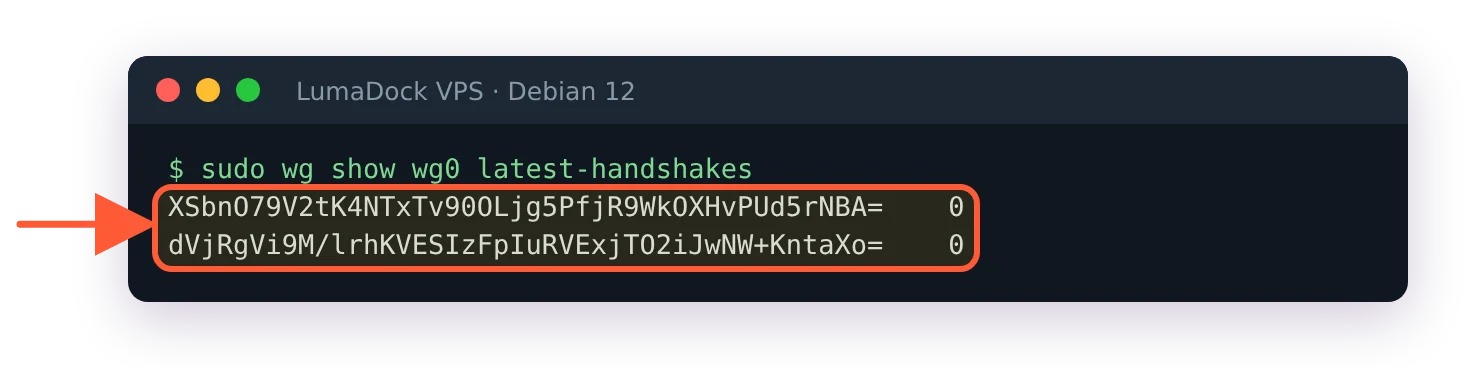
With UDP 51820 blocked, latest-handshakes stays at 0 for every peer.
One line per peer: the public key, a tab, seconds since the epoch. The number is the kernel's last_handshake_time for that peer, printed as is, so 0 means no handshake has ever completed. A timestamp that is old but nonzero is a different situation: a handshake did complete and the peer has gone quiet since, which is the NAT case below. Every other section is for the 0.
I think the firewall is where to look first, because WireGuard answers nothing to a wrong key and nothing to a blocked port, so from the client the two look identical. The protocol page puts it as the server "does not even respond at all to an unauthorized client; it is silent and invisible". That silence is the point on the public internet, and the reason a Pi-hole on a VPS behind WireGuard can sit on a server with nothing but 51820 exposed; while debugging it's a nuisance, since there is no connection refused to tell a dead port from a bad key. Rule out the cheap thing first.
UDP port 51820 closed on the VPS or in the provider firewall
On the server, check that the port is bound and that the firewall lets it through:
sudo ss -ulpn 'sport = :51820'
sudo nft list ruleset | grep 51820![ss -ulpn on port 51820: WireGuard UDP sockets on 0.0.0.0 and [::] with no process name, because the kernel owns them](/templates/lagom2/assets/img/page-manager/lumadock-fix-wireguard-handshake-not-completing-wireguard-udp-socket-51820.webp)
WireGuard listens on UDP 51820 for IPv4 and IPv6; the empty process column is normal for the kernel module.
The first command should show a UDP socket on 51820, with an empty process column, because the socket belongs to the kernel module and not to a program. The second should show an accept rule for it, which the guide to installing a WireGuard server on Debian 12 adds in Step 4. On Ubuntu, sudo ufw status should list 51820/udp as allowed. Then the firewall in your provider's panel, if there is one, because a rule there blocks the packet before the VPS ever sees it. The port in the client's Endpoint and the server's ListenPort must be the same number. Pi-hole's guide picks 47111 and Ubuntu's picks 51000, so a config copied from one guide with a firewall rule from another sits at 0 forever.
Endpoint set to the wrong address or port
The wg(8) man page defines Endpoint as an IP or hostname, a colon and a port number. The address is the VPS's public IP, the one you SSH to, and ip -br a on the server shows it on the public interface. The tunnel address 10.100.0.1 only exists once a handshake has completed, so Endpoint = 10.100.0.1:51820 can never complete one. A hostname works too; the [email protected] unit sets WG_ENDPOINT_RESOLUTION_RETRIES=infinity, so a tunnel started at boot before DNS is ready keeps retrying a temporary resolution failure instead of giving up after the default 15 tries.
Public and private keys swapped between peers
Both keys are base64 strings of the same length and nothing in the format tells them apart; the Ubuntu troubleshooting page puts the mix-up first on its checklist, because the contents of these keys are just random data and public and private keys look the same. The server's [Peer] block carries the client's public key. The client's [Interface] carries its own private key and its [Peer] carries the server's public key. Recompute instead of eyeballing: on the server, wg pubkey < phone.key must print the PublicKey in that client's block, and sudo wg show wg0 public-key must print the PublicKey the client has for the server. One mix-up has a symptom of its own: if sudo wg show on the client lists the interface with no peer: section under it, the PublicKey in the client's [Peer] is the client's own key, and wg drops that peer without a word. If a PresharedKey is in use it has to be identical on both sides; a mismatch there fails the handshake just as silently as a wrong public key.
AllowedIPs mismatch and Required key not available
A handshake is keyed on public keys, so an AllowedIPs mistake shows up after it: latest-handshakes has a fresh timestamp and ping 10.100.0.1 still fails, sometimes with Required key not available. The Ubuntu page explains the error as a route pointing at the WireGuard interface for an address that no peer's AllowedIPs contains, and with debug on the kernel logs No peer has allowed IPs matching followed by the address. Check both sides: the server's block for the peer must list the client's tunnel address, 10.100.0.2/32, and the client's block for the server must include 10.100.0.1/32. The split tunnel for DNS only page has the three client shapes that line can take; the server side stays at the client's /32 whichever one you pick.
Destination address required and expired NAT mappings
This is where the old-but-nonzero timestamp belongs. A peer behind NAT has no Endpoint line on the server side; the server learns where to send packets from the first authenticated packet, which wg(8) describes as the endpoint being "updated automatically to the most recent source IP address and port of correctly authenticated packets from the peer". Until that packet arrives the server has no address for the peer at all. That is what ping: sendmsg: Destination address required means: sudo wg show wg0 endpoints prints (none) for that peer, which is the normal state right after a reboot or a systemctl restart wg-quick@wg0, before the client has sent anything. An expired mapping is quieter. When the phone goes quiet, the home router or the mobile carrier drops the mapping, but the server keeps the last address it learned and sends into it without any error. Both are cured from the client side. The fix is PersistentKeepalive = 25 in the client's [Peer] section, an empty authenticated packet every 25 seconds, which is the interval the man page itself suggests for a peer behind NAT. It belongs in the roaming peer's config; the server has no mapping to keep alive.
wg0 not up or the kernel module missing
sudo wg show answering Unable to access interface wg0: Protocol not supported, or wg-quick up ending in RTNETLINK answers: Operation not supported, means the running kernel has no WireGuard. Run sudo modprobe wireguard and lsmod | grep wireguard. Debian 12 and Ubuntu 24.04 kernels ship the module in-tree, so on a VPS this points at a container-style virtualisation or a custom kernel from the provider. A different message, wg-quick: `wg0' already exists, means the interface is up already, usually started by wg-quick@wg0 at boot; sudo wg-quick down wg0 and up again, or leave it to systemd and use systemctl restart wg-quick@wg0. In either case, once ip -br a shows wg0 with its 10.100 address, the tunnel exists and the handshake is a separate question.
Enable WireGuard kernel debug logging
Two last things before the logs. The handshake initiation carries a TAI64N timestamp; per the protocol page the server keeps the greatest timestamp it has seen per client and discards an initiation whose timestamp is not newer, so a client clock that has jumped backwards is worth ruling out with date on both sides. I haven't tested this myself and the protocol page gives no tolerance, so treat it as a thing to exclude and move on. And if the config was edited by hand, read the error from wg-quick up or from wg syncconf wg0 <(wg-quick strip wg0): the parser in wg reports a bad key as Key is not the correct length or format and an unknown line as Line unrecognized, with the offending text quoted. The quote drops the spaces, so KeepAlive = 25 comes back as Line unrecognized: `KeepAlive=25'. On the server, wg syncconf refuses the whole file on such an error and leaves the running tunnel as it was. wg-quick strip on its own doesn't validate anything; it prints the config, broken key included, and only drops the wg-quick keys.
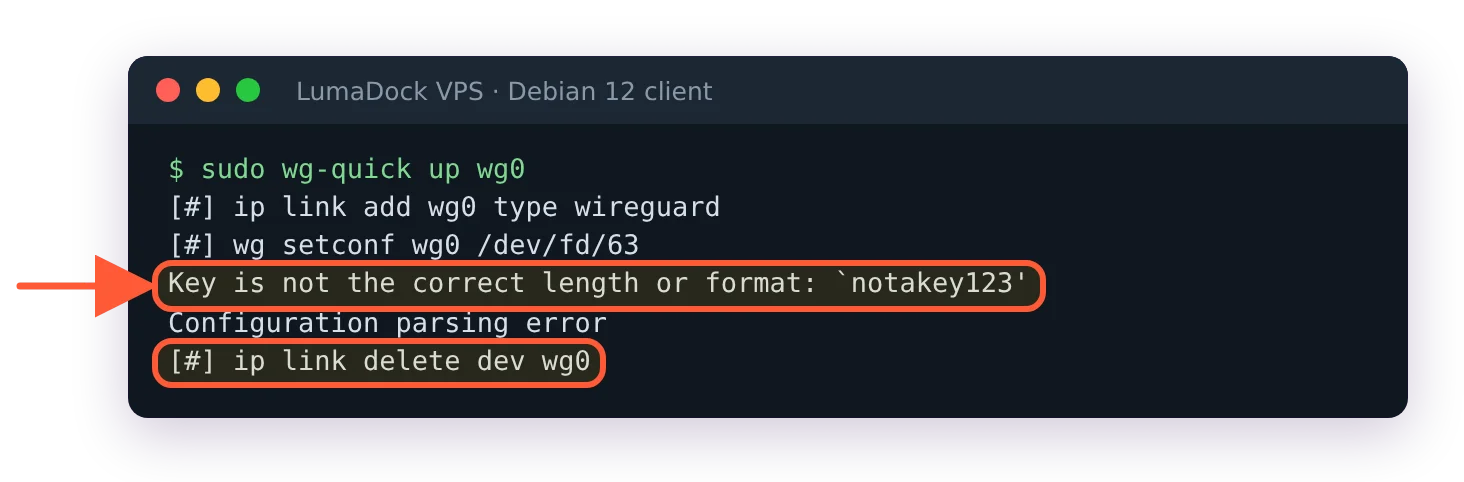
A damaged key stops wg-quick with the offending text quoted, and the interface is removed again.
When the checks above come back clean, ask the kernel. The Ubuntu page's debug switch turns on WireGuard's dynamic debug messages, and dmesg then names the peer and the reason for every handshake it drops, provided kernel lockdown is off. Run both, then switch the client's tunnel off and on while the second one is still streaming:
echo "module wireguard +p" | sudo tee /sys/kernel/debug/dynamic_debug/control
sudo dmesg -wT
With debug logging on, traffic to an address no peer owns is named in the kernel log.
A few lines to look for. A client that holds the wrong public key for the server makes the server log Invalid MAC of handshake, dropping packet from with the client's address, on every retry. A PresharedKey mismatch shows up on the client instead: the server logs that it is sending a handshake response, and the client answers with Invalid handshake response from the server's address. A blocked port leaves the server's log empty, while the client keeps printing did not complete after 5 seconds, retrying. Switch the messages off again when you're done:
echo "module wireguard -p" | sudo tee /sys/kernel/debug/dynamic_debug/control

