





.svg)
.svg)
.svg)
.svg)

.svg)
.svg)
.svg)


Updated and tested 2 October 2026
/usr/bin/wg-quick: line 32: resolvconf: command not found is what wg-quick up prints on a Debian 12 machine when the config has a DNS = line and nothing on the system provides a resolvconf command. The line number first turned up in a 2020 report on the WireGuard mailing list, Debian 12's wireguard-tools 1.0.20210914 still prints line 32, and it moves with the wg-quick version; the text after the second colon is the part to search for. wg-quick runs with set -e, so the script stops at that line and its exit trap deletes the interface it had just created: the tunnel doesn't come up at all, and name lookups keep going wherever they went before.
Why wg-quick calls resolvconf
The wg-quick(8) man page says it in one sentence: a DNS line makes wg-quick run resolvconf -a tun.INTERFACE -m 0 -x when the interface comes up and resolvconf -d tun.INTERFACE when it goes down. Jason Donenfeld's answer to the 2020 report came down to two words: "Use openresolv." The script makes no check that the binary exists, bash reports the missing command and that is the whole error.
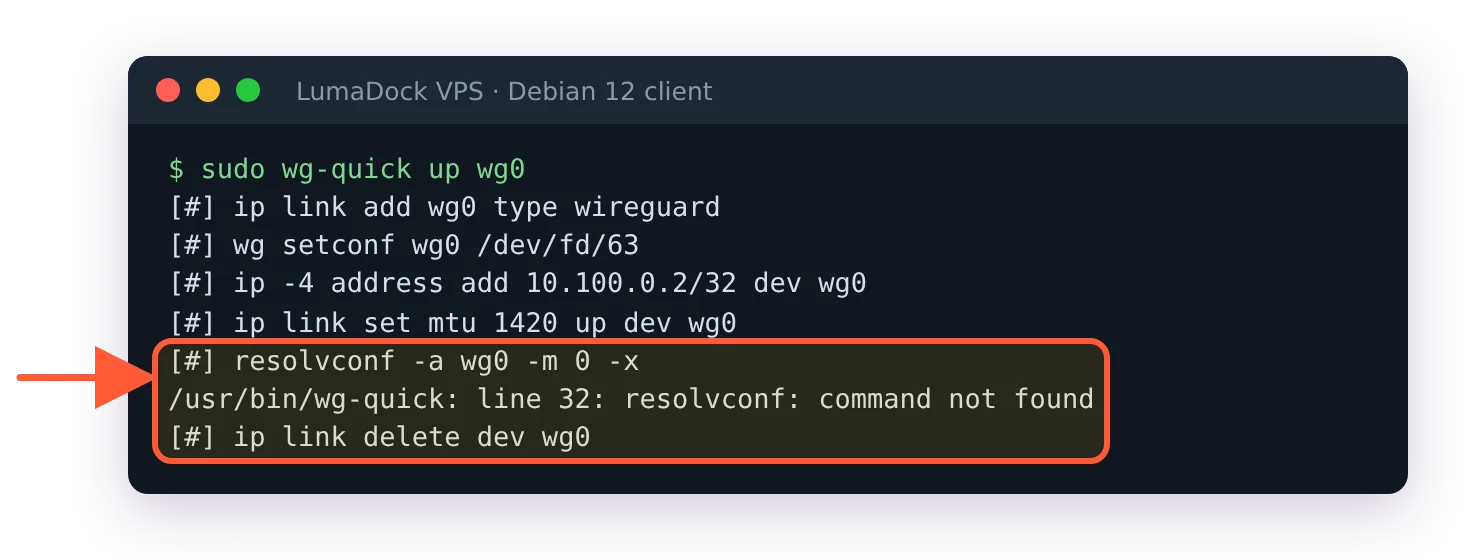
Without any resolvconf on the system, wg-quick stops at the DNS line and removes wg0.
Debian 12 ships wireguard-tools with openresolv and resolvconf as Suggests, so apt install wireguard brings in neither, though both sit in the archive. Ubuntu 24.04 gets a resolvconf command from systemd-resolved, which is why one client file works on an Ubuntu laptop and fails on a plain Debian one. Some Debian 12 images ship systemd-resolved too (LumaDock's Debian 12 image does), and there the command exists already and the error never appears. systemctl is-active systemd-resolved tells you which machine you have: active means the shim is there, and anything else on a Debian 12 machine without openresolv or resolvconf means the DNS line has nothing to call. The shim turns the call into resolvectl and the -x into a ~. domain on wg0, so lookups prefer the tunnel even on a split tunnel that carries DNS only. Which fix applies depends on what manages /etc/resolv.conf on the machine.
Install openresolv on Debian 12
Check first that systemd-resolved isn't running. openresolv and systemd-resolved both provide resolvconf and conflict with each other, so on a machine with systemd-resolved, apt lists systemd-resolved under The following packages will be REMOVED: and goes ahead. /etc/resolv.conf is then left pointing into /run/systemd/resolve/, which nothing fills any more, and the machine has no DNS after the next reboot. If systemctl is-active systemd-resolved says active, skip to the resolvectl section below. On a Debian 12 machine without it:
sudo apt install openresolv
sudo wg-quick down wg0
sudo wg-quick up wg0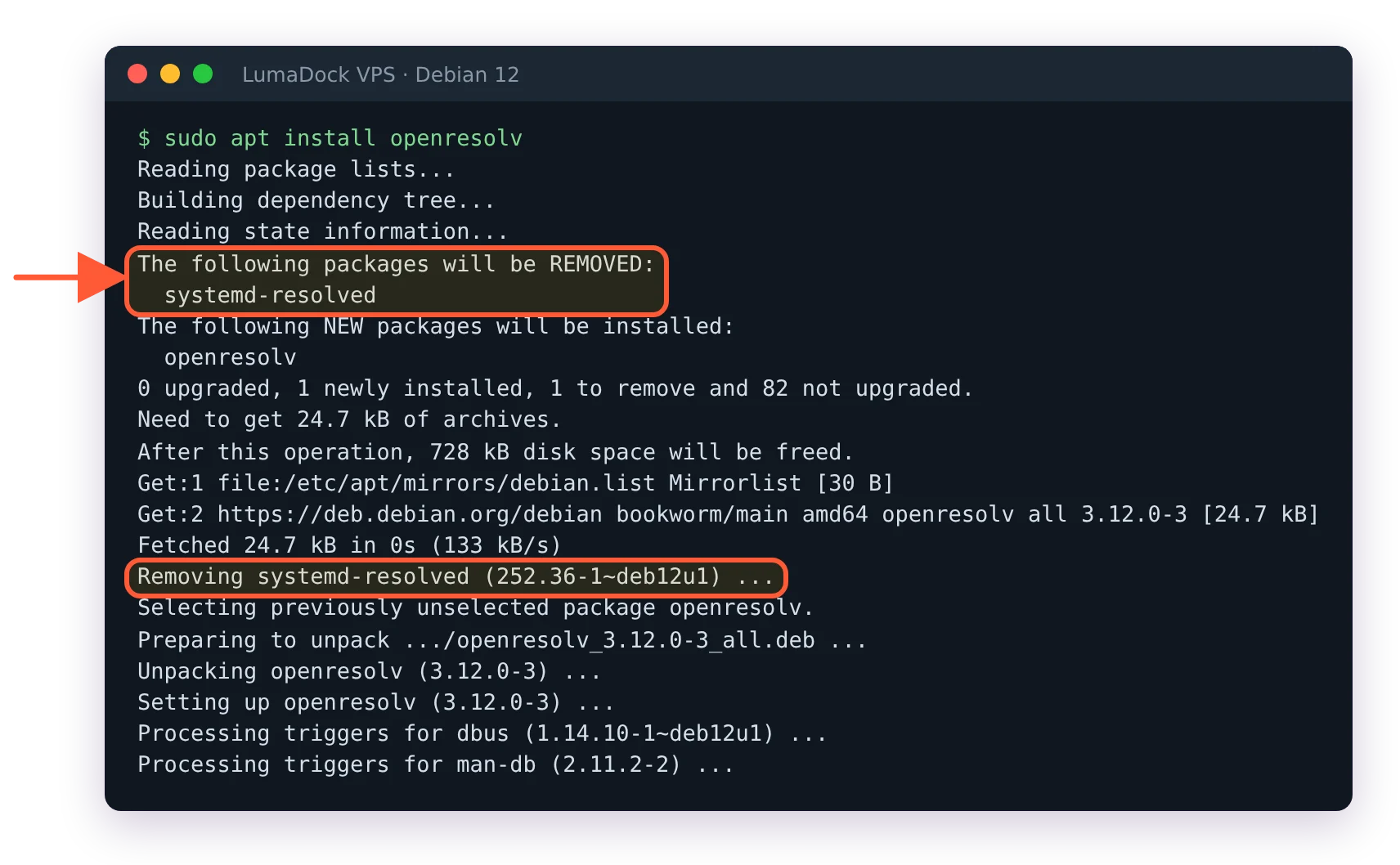
On a Debian 12 system that runs systemd-resolved, installing openresolv removes systemd-resolved.
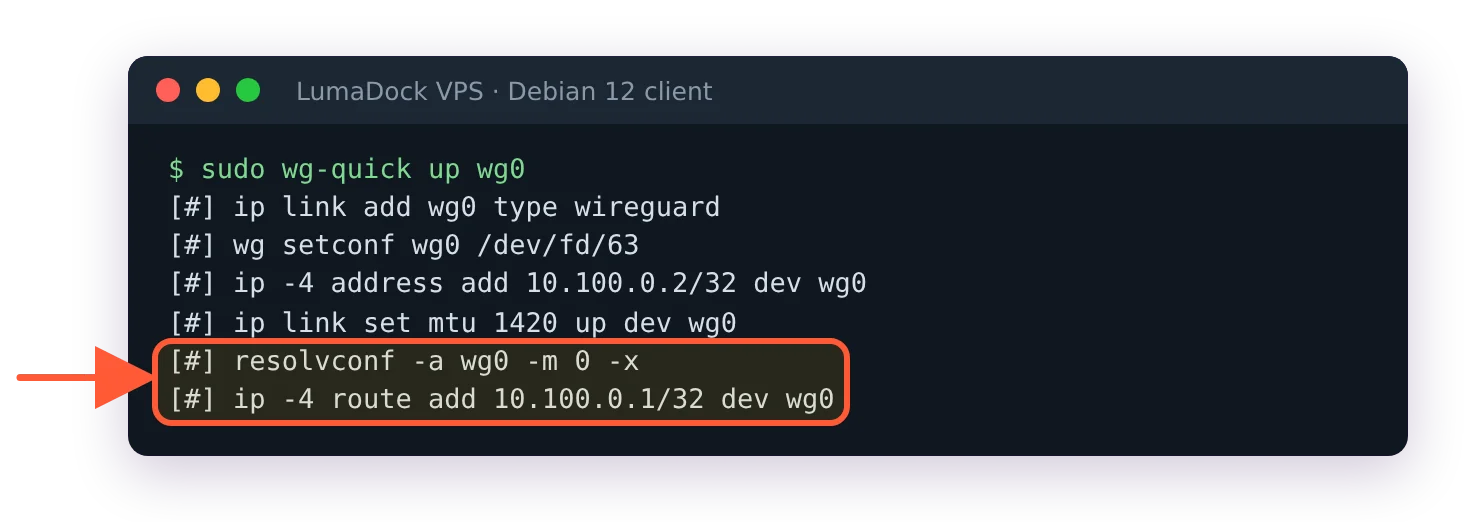
After apt install openresolv the same command completes.
The down may answer wg-quick: `wg0' is not a WireGuard interface, because the failed up already deleted it; ignore that and run up. That is the fix for a laptop or desktop that moves between networks, and the resolvconf package does the same job if you prefer it. Nothing in the config changes; the DNS line now has a command to call.
Set DNS with resolvectl in PostUp
On a machine that runs systemd-resolved, drop the DNS line and do what the shim would have done, explicitly:
[Interface]
Address = 10.100.0.2/32
PrivateKey = CLIENT_PRIVATE_KEY
PostUp = resolvectl dns %i 10.100.0.1; resolvectl domain %i ~.
PreDown = resolvectl revert %i
%i expands to the interface name. The resolvectl(1) man page defines dns as setting the link's DNS servers, domain with a ~ prefix as a route-only domain (and maps resolvconf's exclusive flag to ~.) and revert as resetting the link's DNS settings to their defaults. Without the ~. line, resolved treats wg0 as one link among several and may send a query to the Wi-Fi's resolver, which is the leak the Pi-hole DNS leak over WireGuard article covers. revert sits in PreDown so that it runs while the link still exists.
Third case: the error shows up on the server. The server config in the guide to installing WireGuard on Debian 12 never had a DNS line, because a VPS keeps resolving through its own /etc/resolv.conf and the tunnel's resolver is for the peers. Delete the line and bring the interface up again.
Verify from the client once the interface is up:
resolvectl status wg0The link's DNS Servers line should read 10.100.0.1 and its DNS Domain line ~.. With openresolv in place of systemd-resolved, cat /etc/resolv.conf shows the nameserver instead, under openresolv's # Generated by resolvconf header: nameserver 10.100.0.1.

