.svg)
.svg)
.svg)
.svg)

.svg)
.svg)
.svg)

Updated and tested 31 October 2026
Here's the entire Portainer update, four commands, safe to run as written if you installed with the standard names:
docker stop portainer
docker rm portainer
docker pull portainer/portainer-ce:lts
docker run -d -p 8000:8000 -p 9443:9443 --name portainer --restart=always \
  -v /var/run/docker.sock:/var/run/docker.sock \
  -v portainer_data:/data \
  portainer/portainer-ce:lts
If that looks like deleting Portainer and installing it again, correct, that's exactly what a container update is. The part that makes it safe: your data never lived in the container. Users, environments, stacks and settings sit in the portainer_data volume, the stop-rm-pull-run cycle replaces only the application around them and the login page that comes back is your same Portainer, newer. Compose users get the even shorter version from the file's directory:
docker compose pull && docker compose up -dNow the judgment that surrounds those commands, because the commands were never the hard part.
LTS or latest, decided once
Portainer publishes two tracks and your image tag picks one. The :lts tag follows the long-term support line (2.45 at the moment; my test server went to 2.45.3 on 31 October 2026), fed with fixes rather than experiments, and it's where servers that matter belong. The :latest tag tracks short-term releases with the newest features and, historically, the newest regressions; the "failed to find local environment" episode that ran through several short-term versions before the LTS fix is the case study, documented in our local environment error guide. My rule is unoriginal and earned: LTS everywhere, and version-pin (portainer/portainer-ce:2.45.3 style) on machines where even scheduled surprises are unwelcome. Whatever you choose, the update commands don't change, only the tag in them does.
One tag warning from the field: mixing tracks by accident. On CE, :latest and :lts currently point at the same 2.45 build, so that pair is safe today; on Business Edition, :sts now means 3.x, so don't mix BE tags. Portainer's database migrates forward like most apps, so downgrades range from unsupported to broken. Check what you're running (bottom-left corner of the UI shows the version) before pulling a different tag than you installed with.
Back up the data volume before updating
Portainer updates have been drama-free for me across years of them, and the insurance costs so little I take it anyway: a copy of the data volume while the container is stopped.
docker run --rm -v portainer_data:/data -v $(pwd):/backup alpine \
  tar czf /backup/portainer-data-$(date +%F).tar.gz /data
Slot that between the stop and the rm, and the worst possible update outcome becomes a restore instead of a rebuild. The only line it printed on my server was tar: removing leading '/' from member names, which is normal.

The tar inside the alpine image prints one line about the leading slash; nothing else needs reading.
Settings also has a built-in backup. In CE it downloads Portainer's own configuration only (the panel says it "does not include containers") and the S3 upload on a schedule is a Business feature, so your containers and volumes still need a backup of their own.
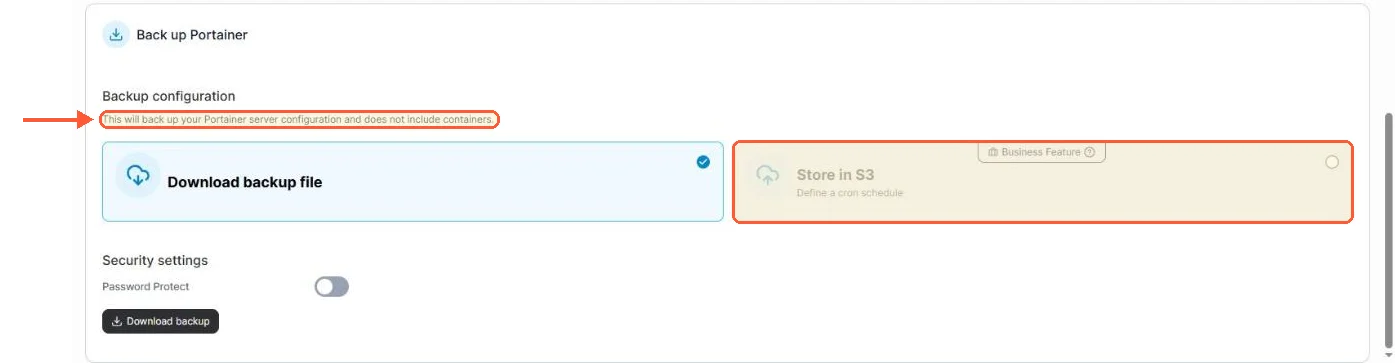
The backup panel in CE 2.45.3: a configuration download, with the scheduled S3 option marked as a Business feature.
Release notes are the other thirty seconds; Portainer's are short and flag breaking changes honestly, and skimming them beats discovering a changed default by surprise.