





.svg)
.svg)
.svg)
.svg)

.svg)
.svg)
.svg)


Updated and tested 15 October 2026
To install Webmin on Ubuntu 24.04 LTS you add the vendor's apt repository first, and the rest is ordinary apt. The first command most people try is apt install webmin, and on a clean server it returns E: Unable to locate package webmin with nothing in the message to explain why. Ubuntu doesn't package Webmin. By the end your Webmin installation on Ubuntu answers over HTTPS on port 10000, sits behind a firewall rule and has had its first login.
Everything below runs on any Ubuntu VPS with sudo access and a network route to download.webmin.com. On a clean server the whole thing takes about three minutes. Nothing here is specific to 24.04 beyond the version numbers printed back at you, so setting up Webmin on Ubuntu 22.04 follows the same steps.
Why apt install webmin fails on a clean Ubuntu server
Debian, which Ubuntu builds on, doesn't package Webmin either, which is why installing Webmin on Debian also starts with the vendor repository. Debian removed the package from testing on 26 January 2006. The removal notice is still sitting on the Debian package tracker page for webmin, twenty years later.
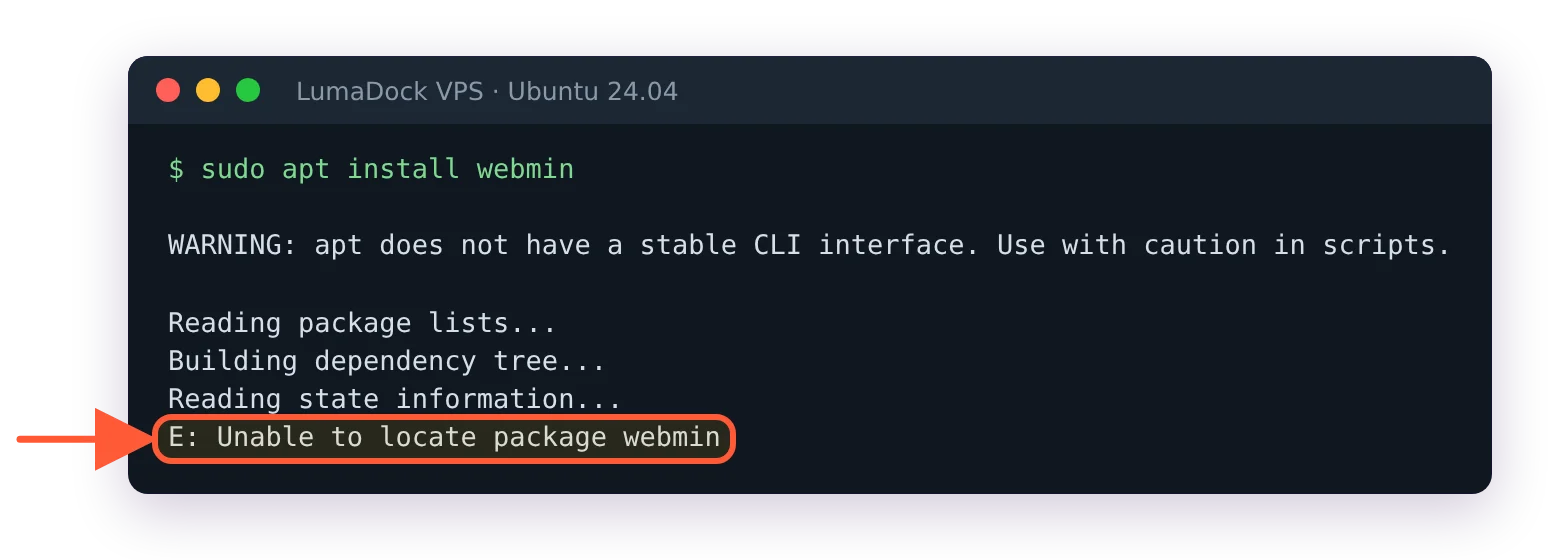
Before the vendor repository is added, apt has no webmin package to find.
Search the Ubuntu package index for "webmin" and the only match, in the 25.10 and 26.04 releases, is python3-webmin-xmlrpc. That's a client library for talking to a Webmin server over XML-RPC.
Apt isn't misbehaving here; the package genuinely isn't there to locate.
Two routes are open to you. Add the official repository maintained by the Webmin developers, or download a single .deb and install that by hand. The repository keeps Webmin updating with the rest of the system, so it's what the bulk of this guide covers. The manual .deb is at the end for the cases where a third-party apt source is off the table.
Add the official Webmin repository
Fetch and run the setup script
The script calls /usr/bin/curl and gives up if it isn't there, which catches people on minimal cloud images more often than you'd expect.
sudo apt update
sudo apt install -y curl
Now download the setup script and run it. Saving it as a file instead of piping a URL straight into a shell lets you read it first, which for a script that rewrites your apt configuration as root is a fair trade for ten seconds.
curl -o webmin-setup-repo.sh https://raw.githubusercontent.com/webmin/webmin/master/webmin-setup-repo.sh
sudo sh webmin-setup-repo.sh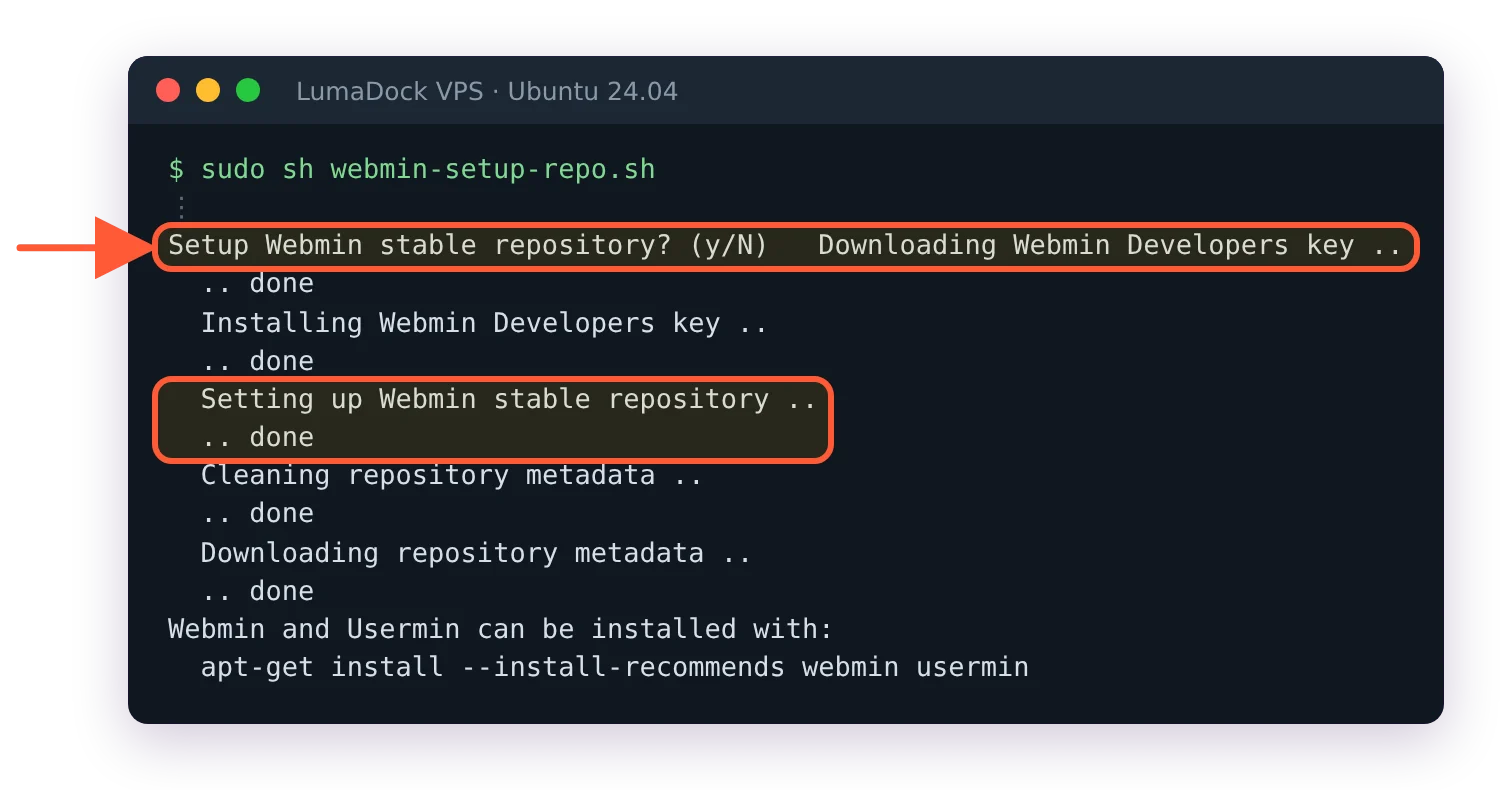
One y at the prompt, and the script adds the key and the stable repository.
The sudo is required. Run it as a normal user and it stops at once with Error: `webmin-setup-repo.sh` must be run as root!. As root it asks one question, Setup Webmin stable repository? (y/N). Type y and press Enter. It defaults to the stable repository, which is the one you want on a production box. -f skips the prompt if you're driving this from a provisioning script. The --prerelease and --unstable channels exist as well, and they get their own section at the end.
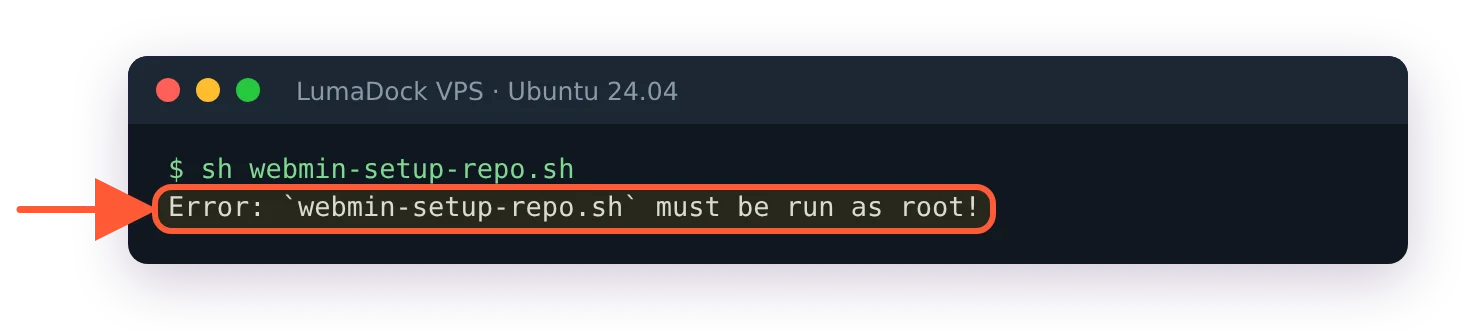
Without sudo the setup script stops before it changes anything.
What the script writes to disk
It creates an apt sources file and a keyring. Read the exact names, because a good number of published guides describe files Webmin stopped creating a long time ago.
The sources file is /etc/apt/sources.list.d/webmin-stable.list, with the -stable suffix in the filename. It is not webmin.list, which is what a lot of older posts will tell you to look for. Run the script with --prerelease or --unstable and you get webmin-prerelease.list or webmin-unstable.list. Inside is one line:
deb [signed-by=/usr/share/keyrings/ubuntu-webmin-developers.gpg] https://download.webmin.com/download/newkey/repository stable contribThe signing key is dearmored into /usr/share/keyrings/ubuntu-webmin-developers.gpg at mode 644, and apt trusts it for this repository only, through that signed-by= attribute. The filename is built from the distribution ID, so the same script on Debian produces debian-webmin-developers.gpg. If a tutorial tells you to run apt-key add for Webmin, it's reproducing a pattern that predates signed-by keyrings, and nothing in the current script goes anywhere near /etc/apt/trusted.gpg.d/.
Nothing lands in /etc/apt/preferences.d/ on a normal run. The script can write an apt pin file there, but only when you pass it --pkg-prefs, and a plain install doesn't.
The suite in that repository line is a flat stable with no codename anywhere in it, and the packages are _all.deb because Webmin is Perl and architecture independent. The same line works on 22.04, on 24.04 and on 26.04, which Ubuntu released on 23 April 2026. Webmin 2.620 added support for the 26.04 development preview in January. Waiting for Webmin to add support for your Ubuntu version isn't a thing that happens, though the question still gets asked every few weeks.
Verify the repository was added
Check the sources file and the keyring
cat /etc/apt/sources.list.d/webmin-stable.list
ls -l /usr/share/keyrings/ubuntu-webmin-developers.gpg
The first prints the deb line shown above. The second should give you a file of a few kilobytes owned by root, mode -rw-r--r--. A sources file with no matching keyring means the script died partway through, usually because curl or gpg wasn't installed at the time, and rerunning it after fixing that is enough.
Ask apt what it can see
sudo apt update
apt policy webmin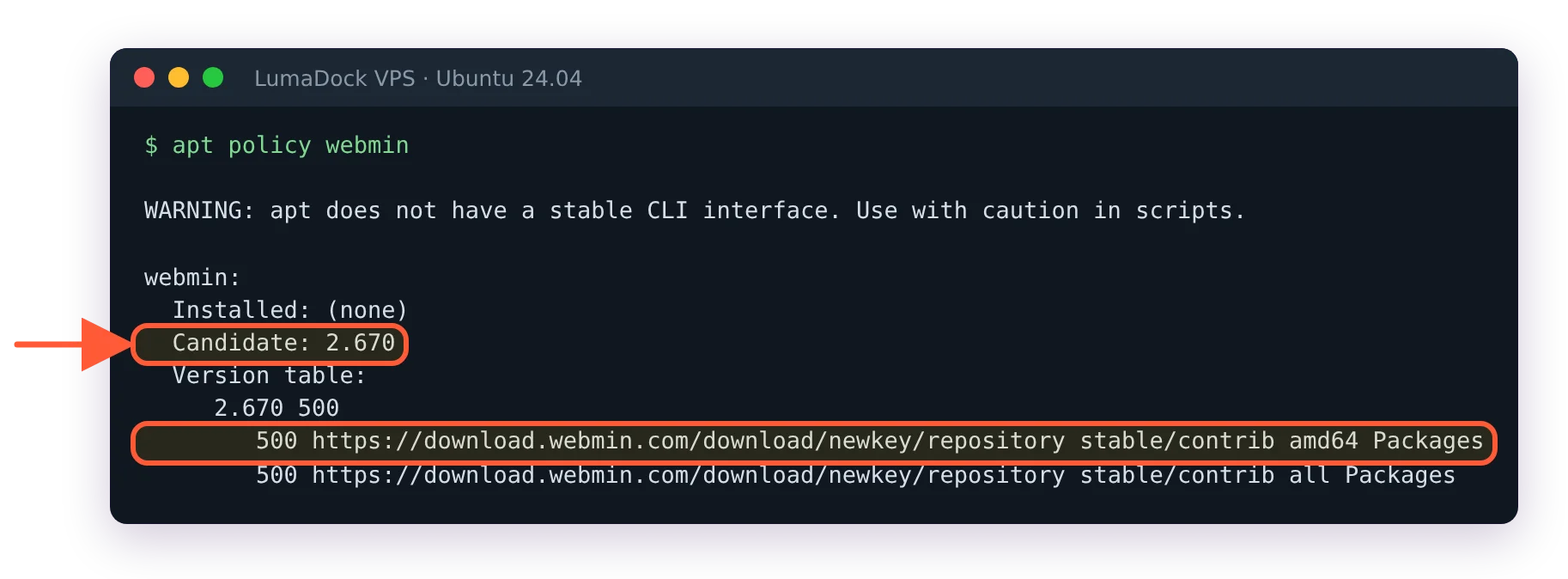
apt now sees Webmin 2.670 in the vendor repository.
If something stranger comes back, the common Webmin errors and their real causes are collected separately. Normal output names a candidate version with the download.webmin.com origin underneath it. A candidate of (none) means apt hasn't read the new list file yet. A signature error on apt update means the keyring path in the sources line doesn't match the file on disk, which happens if you copied a line from another machine.
Install the Webmin package with apt-get
sudo apt-get install webmin --install-recommends--install-recommends is in the official instructions for a reason. Webmin's recommended packages are the Perl modules and system utilities its individual modules shell out to, and without them those modules still appear in the menu and then fall over the first time you open them. Ubuntu installs recommends by default, so on a stock image the flag changes nothing at all. On minimal and hardened images that switch recommends off globally, it's the difference between a working install and an afternoon of confusing bug reports.
Some people type apt at this step and some type apt-get. Both pull the same package and I don't have a preference.
Skipping the manual work is an option too. LumaDock's one-click Webmin template deploys with Webmin already installed, which puts you at the login screen with nothing typed. The template runs on Debian 12, not Ubuntu, so on that server the guide to follow is the Debian one linked above, from its login and firewall steps on.
The version this guide was tested with is 2.670, released on 20 September 2026, which is what apt policy webmin offered as the candidate in October 2026. The dates are readable straight off the package index on download.webmin.com. The 2.6x line has been shipping roughly monthly through 2026.
Check the service started
sudo systemctl status webmin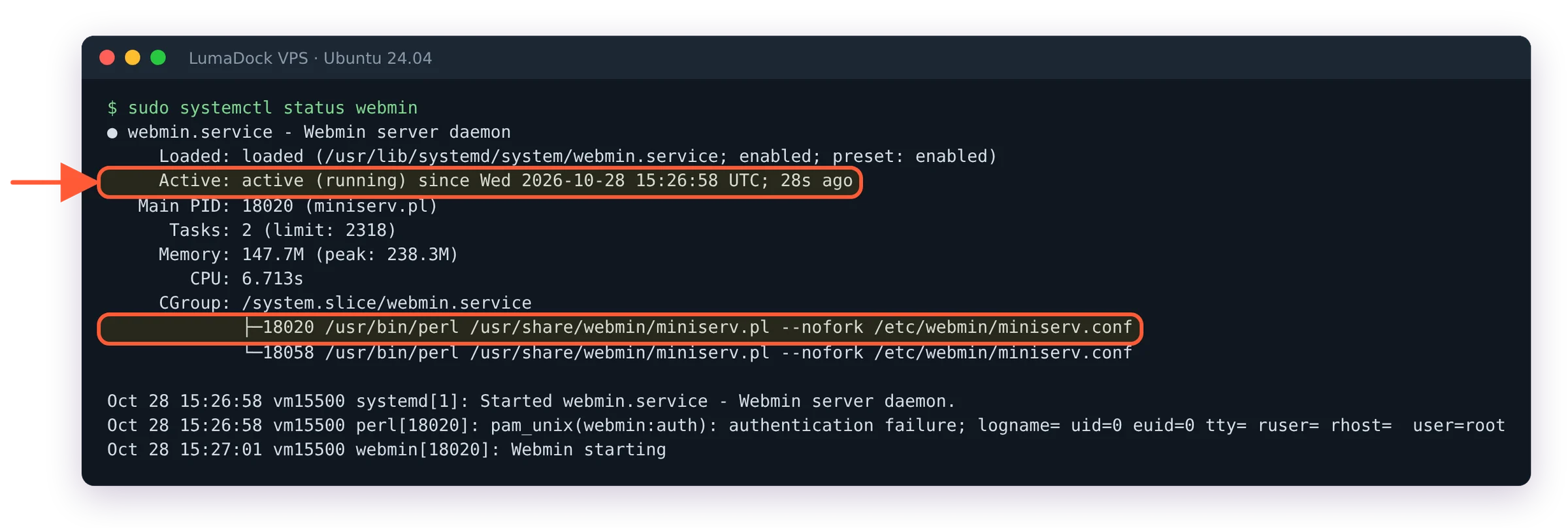
Webmin is a persistent miniserv.pl daemon under webmin.service.
You're looking for active (running). Webmin runs a persistent Perl daemon called miniserv.pl and it isn't socket activated, so if that unit is dead then nothing answers on port 10000 regardless of what the firewall allows. The package enables the unit itself, and sudo systemctl enable webmin is there if something has disabled it.
Webmin has its own CLI for the same job. sudo webmin server status reports on the running service, and that subcommand also takes start, stop, restart, reload and stats. It refuses to run as a non-root user with Error: webmin command must be run as root, which is why the sudo is there. sudo webmin server restart restarts it, the shorter sudo webmin restart works too on 2.670, and systemctl restart webmin does the same job if you'd sooner stay in systemd.
Log in to Webmin for the first time
Open https://YOUR_SERVER_IP:10000 in a browser. The installer turns SSL on, and if you type http:// by habit, current Webmin answers with a redirect to https://. Older builds gave a protocol error instead.
The certificate warning
Click through it. Once you have a hostname pointing at the box, the SSL Provider tab under Webmin Configuration issues a Let's Encrypt certificate for Webmin in about a minute, assuming port 80 is free for the validation request. The certificate you're clicking past now is self-signed and was generated during installation, and your browser has no way to tell a fresh Webmin install apart from something hostile.
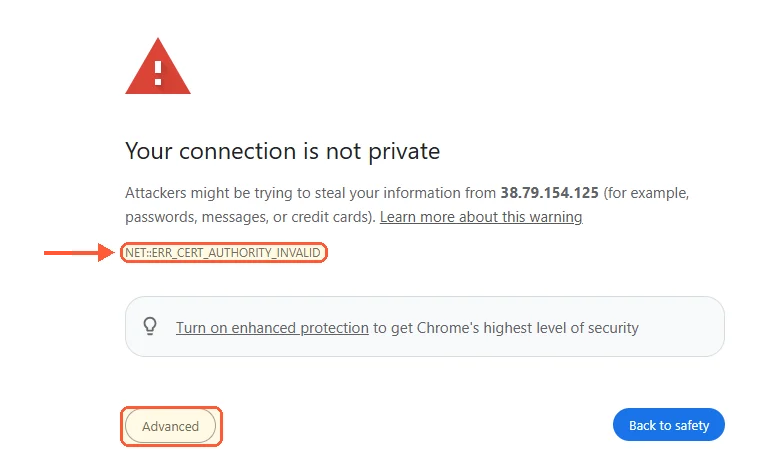
The first visit: Chrome flags the self-signed certificate Webmin made at install.
Which account you log in as
Webmin has no default username and password. None. Credential-list sites that print "admin / admin" for Webmin are inventing it, and this catches more first-time installs than anything else in this article.
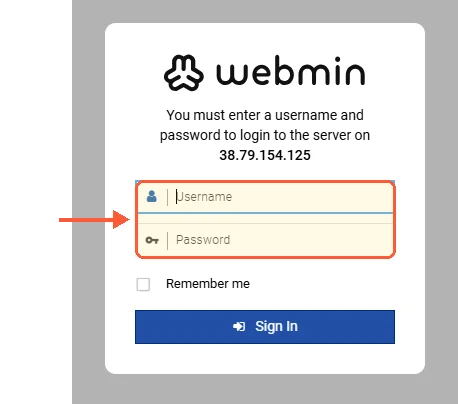
Webmin's login form: a system account, not a Webmin default.
What a package install gives you is a single Webmin user, called root or admin depending on the system, and that user authenticates against the Unix account of the same name. The guide to the Webmin default login and password covers the account model, including how to recover when you're locked out. If your server's root account has a password, root logs in with it. LumaDock's Ubuntu image ships that way, and sudo passwd -S root shows P in the second field when it does. Any sudo user works too, with that user's own system password, because the package gives sudo users access. On a stock Ubuntu install where root is locked, the sudo user is the only way in.
That root password is also the reason the next section isn't optional.
Open port 10000 in UFW
Check if UFW is on
sudo ufw status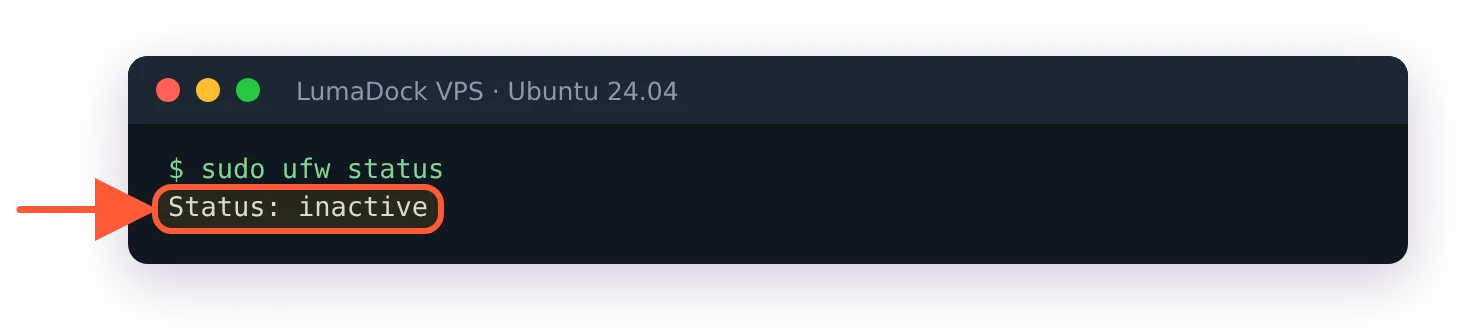
On a fresh image UFW is off, so nothing filters port 10000 yet.
On LumaDock's Ubuntu 24.04 image this prints Status: inactive. Nothing is filtering yet, so Webmin was reachable from the whole internet the moment it installed, with the root password as the only thing between a scanner and a root shell in a browser. A ufw allow rule on an inactive firewall prints Rules updated and does nothing at all.
Allow SSH and your own address, then enable UFW
The order matters. Allow SSH first, or enabling UFW drops the session you're typing in. Then allow Webmin from the address you administer from, and only then switch UFW on:
sudo ufw allow OpenSSH
sudo ufw allow from 203.0.113.42 to any port 10000 proto tcp
sudo ufw enable
sudo ufw status
Replace 203.0.113.42 with your own public IP. ufw status should now list OpenSSH allowed from anywhere and 10000/tcp allowed from that one address. Open a second SSH session before you close the first, so a typo costs you nothing.
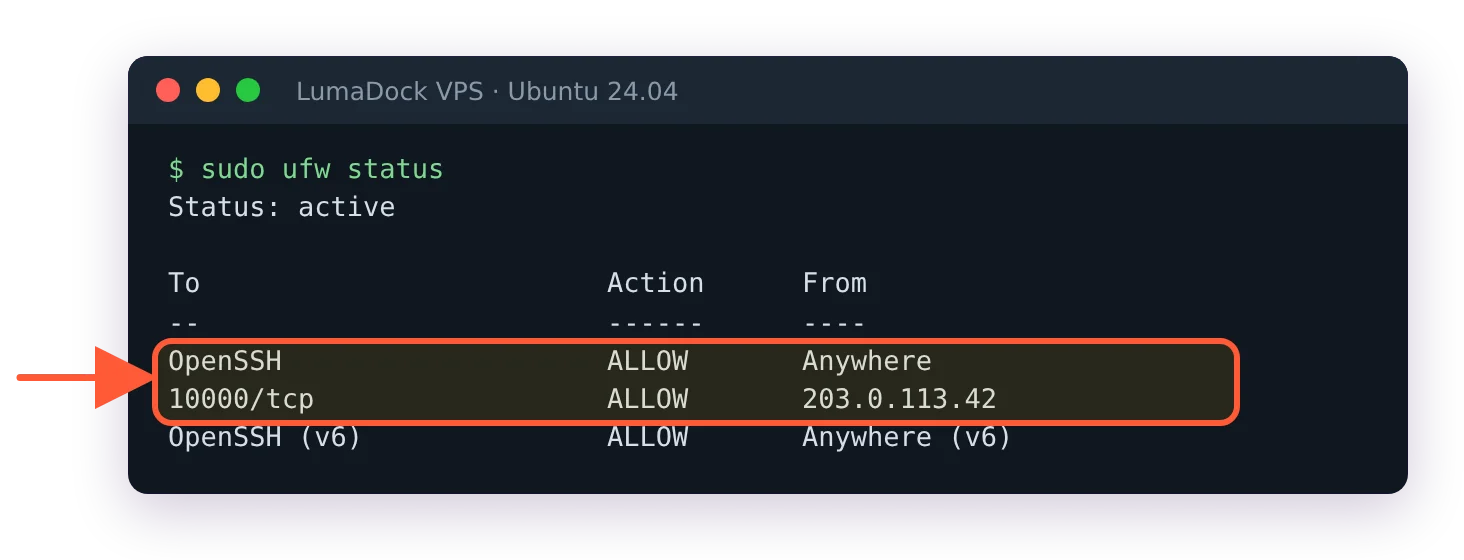
UFW on, with SSH open and Webmin limited to one address.
If UFW was already active on your server, the two allow lines are all you need. sudo ufw allow 10000/tcp opens the port to everyone, which works and is the weaker choice.
Webmin releases before 2.640 had a two-factor authentication bypass over HTTP basic auth, tracked as CVE-2026-42210 and CVE-2026-56022, where an account with 2FA enabled could be reached without the second factor at all. It's patched. It's also a good argument for keeping a management port off the open internet even when you're confident about your passwords.
The provider firewall
Moving Webmin somewhere else is the other approach, and changing the Webmin port from 10000 takes one config value plus a matching firewall rule. UFW is one layer. Most hosts run a second firewall in front of the machine that the VM never sees, and a rule you added inside the guest does nothing about that one. If ufw status shows 10000 allowed and the browser still times out, that outer layer is where to look.
Verify the install from the command line
sudo webmin --version
sudo webmin server status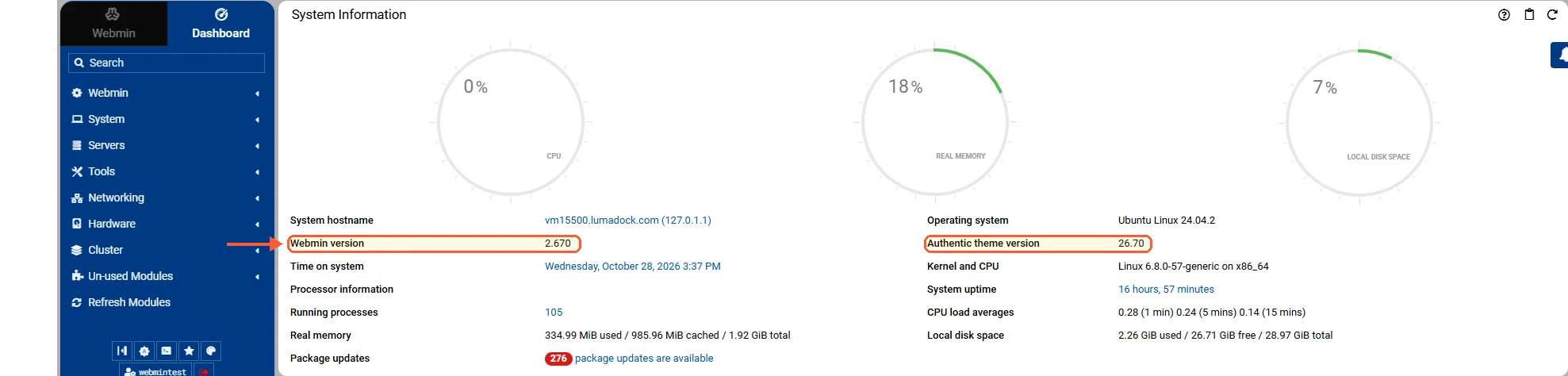
The dashboard after the first login, with the Webmin and Authentic versions.
Version first, then service state.

