Back to Article List

OpenCloud vs Nextcloud after the ownCloud fork

OpenCloud vs Nextcloud after the ownCloud fork

Updated and tested 4 November 2026

Nextcloud forked from ownCloud in 2016 and took the PHP codebase with it. In November 2023 Kiteworks announced its merger with ownCloud. OpenCloud GmbH was founded in September 2024 inside the Berlin-based Heinlein Group, the company behind mailbox.org and OpenTalk, and the project was announced publicly on 22 January 2025 as being based on ownCloud Infinite Scale. Version 1.0 shipped on 24 February 2025 and 2.0.0 followed on 26 March 2025. That history is behind most OpenCloud vs Nextcloud questions, and it explains why the two still look alike from the outside.

Anyone weighing the two is comparing two descendants of the same project. One carries the 2016 PHP codebase forward, the other starts from the Go rewrite that ownCloud shipped as Infinite Scale. They share ancestry and very little of their current internals.

What OpenCloud says about the ownCloud fork

OpenCloud's own press material describes the software as based on ownCloud Infinite Scale and never names Kiteworks. The 2016 split that produced Nextcloud is documented in public, including in this comparison of Nextcloud and ownCloud, and the 2024 one is not. In a public discussion thread on GitHub, OpenCloud GmbH's CEO, Peer Heinlein, says Kiteworks threatened the team with serious legal action in the past. The Kiteworks date above comes from ownCloud's side of the chronology.

openDesk, the sovereign workplace from ZenDiS (the German federal Zentrum für Digitale Souveränität), lists Nextcloud as its file storage component on its product page. ZenDiS's former CEO Jutta Horstmann became co-CEO of Heinlein Group in September 2025.

A caveat before the technical detail. OpenCloud's rolling release is currently 9.0.0, from 27 October 2026, and its lifecycle page names rolling, production and LTS channels. The production channel sits at 7.2.x, with its next release listed for 17 November 2026. The documentation demonstrates the rolling image. For a move from Nextcloud the docs offer a migration guide built on rclone that copies personal space files over WebDAV, so there is no one-click import and everything outside personal files has to be rebuilt.
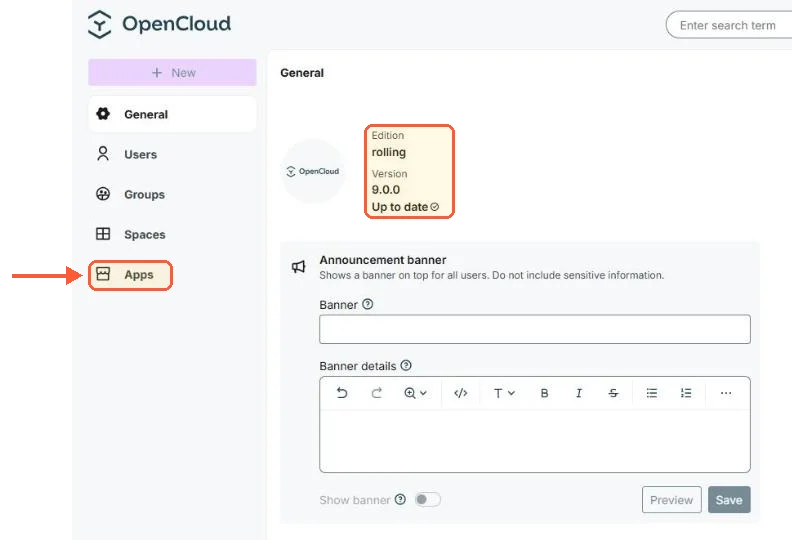
OpenCloud Admin Settings General: edition rolling, version 9.0.0, up to date, with an Apps entry in the menu

My test server ran the rolling line: OpenCloud 9.0.0, with Apps in the admin menu.

Nextcloud vs OpenCloud architecture and storage

PosixFS is the default storage driver for new OpenCloud installs, and it accounts for most of what feels different about the project. OpenCloud runs as a single Go binary containing a set of microservices. Nextcloud is a PHP application (8.3 through 8.5 on the current release) with a web server in front and MySQL, MariaDB or PostgreSQL underneath.

Under PosixFS, files live as an ordinary directory tree on disk, metadata goes into extended attributes and there is no database at all. Backups are filesystem snapshots. A collaborative mode lets processes outside OpenCloud modify the tree, with changes detected in real time. There is no migration path from the older DecomposedFS driver to PosixFS that avoids copying the data.

Extended attributes are an interesting place to keep metadata. They travel with the file as long as it stays on the same filesystem, and a local move carries them along without a rewrite, but plenty of everyday tools drop them silently. rsync needs -X and tar needs --xattrs; a copy onto a filesystem with no xattr support leaves the file intact and the metadata gone.

For object storage there's a second driver, DecomposedS3, which keeps files in an S3-compatible bucket such as MinIO.

Nextcloud keeps files as regular files in a per-user directory under its data directory, and indexes them in a file cache in the database. Copy files into that tree by hand and Nextcloud doesn't notice them. On my test server a file copied into the data folder was still missing from the file cache eleven minutes later, and occ files:scan (for one user, or with --all) added it. Nextcloud's ScanFiles background job does run every ten minutes, but its code only picks storages that already have unscanned entries in the file cache, and a file copied in by hand has no entry at all. S3-compatible object storage can also serve as primary storage for a Nextcloud install, which puts both projects in much the same position at the object-storage end.
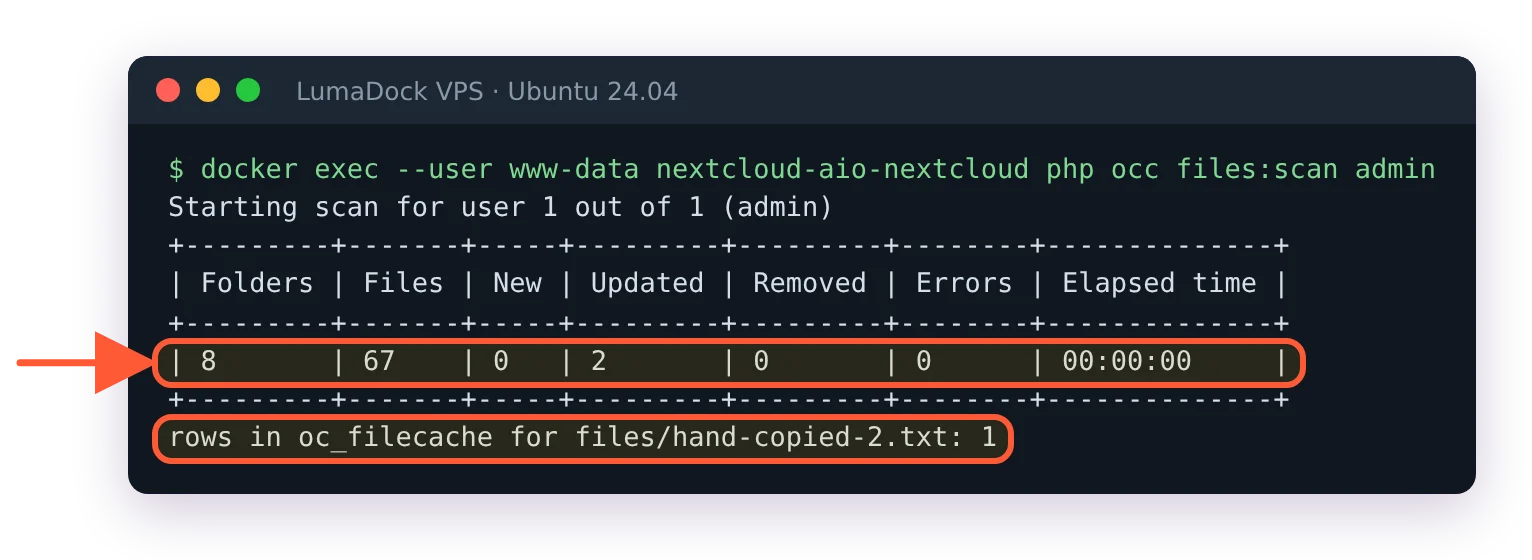
occ files:scan admin scans 8 folders and 67 files, after which the hand-copied file has a row in oc_filecache

The scan on my server, and the file cache row that appeared for the hand-copied file.

Spaces are the other structural difference. In OpenCloud a Space is a core primitive, a team folder with its own delegated admins. Nextcloud reaches a similar shape through the Team Folders app (formerly Group folders).

Features and integrations

Everything past file sync in OpenCloud is an external service wired in through an extra compose file. Collabora Online and Euro Office are the two office backends and they exclude each other. Radicale supplies CalDAV and CardDAV. Apache Tika handles content extraction. ClamAV plugs in over the clamd socket. The production release announced on 1 December 2025 brought true multi-tenancy, Helm charts for Kubernetes high availability and OpenSearch as a scalable search backend, with that OpenSearch integration included in the Enterprise licence. Version 7.5.0 added end-to-end encrypted vaults, with the encryption done in the browser and filenames included.

On the client side there's a desktop app with file-manager integration on Windows, macOS and Linux, an iOS app announced in May 2025 and an Android app from August 2025 that does photo auto-backup and offline files.

Several pieces are small or missing. The App Store holds web extensions only (21 of them on my 9.0.0 server, Draw.io, Excalidraw, Maps and Notes among them), nothing on the scale of Nextcloud's catalogue of server apps. Video calls aren't part of it and there's no mail client. Groupware stops at calendar and contacts through Radicale. The maintainers describe the design goal as doing one thing well.

OpenCloud application switcher open with Files, App Store, Admin Settings and Calendar

The App Store sits in OpenCloud's application switcher, next to Files and Admin Settings.

Nextcloud 35, released 16 September 2026 as Hub 26 Summer, is the counterweight. Files sits alongside Talk, Groupware, Nextcloud Office, Assistant and Flow, with an app store behind all of it. Face recognition through Recognize and Deck boards arrive as apps you install into the server.

Licences differ per repository: the OpenCloud server is Apache-2.0, its Vue web interface AGPL-3.0, GPL-2.0 for the desktop client and GPL-3.0 for the compose repo. Nextcloud is AGPLv3 throughout. Both projects sell subscriptions on top of open-source code, OpenCloud in tiers that add support levels and multi-tenancy, Nextcloud as an annual per-user enterprise subscription on the same code everyone else runs.

If the missing pieces on the OpenCloud side rule it out, the wider field of Nextcloud alternatives covers what else is available. Seafile and Pydio Cells turn up on the same shortlists.


Make room for every file you'll ever keep

Keep your backups and media libraries on reliable storage with unmetered bandwidth and a cost that stays predictable as your archive grows.
Abonament

VPS.H1

$6.99 Save  14 %
$5.99 Lunar
  • 1 vCPU AMD EPYC
  • 2 GB memorie RAM
  • ✔HDD stocare
  • ✔Trafic necontorizat
  • ✔ IPv4 și IPv6 incluse Suportul IPv6 nu este disponibil momentan în Franța sau Olanda.
  • ✔Firewall configurabil
  • ✔Monitorizare server gratuit
  • ✔KVM virtualizare

VPS.H3

$24.99 Save  20 %
$19.99 Lunar
  • 4 vCPU AMD EPYC
  • 8 GB memorie RAM
  • ✔HDD stocare
  • ✔Trafic necontorizat
  • ✔ IPv4 și IPv6 incluse Suportul IPv6 nu este disponibil momentan în Franța sau Olanda.
  • ✔Firewall configurabil
  • ✔Monitorizare server gratuit
  • ✔KVM virtualizare

VPS.H4

$36.49 Save  18 %
$29.99 Lunar
  • 6 vCPU AMD EPYC
  • 12 GB memorie RAM
  • ✔HDD stocare
  • ✔Trafic necontorizat
  • ✔ IPv4 și IPv6 incluse Suportul IPv6 nu este disponibil momentan în Franța sau Olanda.
  • ✔Firewall configurabil
  • ✔Monitorizare server gratuit
  • ✔KVM virtualizare

*VAT excluded.

INCLUDED WITH EVERY PLAN

✓ No setup fees ✓1 Gbps network
✓ Free server monitoring ✓ Firewall management ✓24/7 support ✓ KVM virtualization

Install with Docker Compose

OpenCloud with the compose repo

Clone the compose repo, work from inside it and create .env from the example file, because the repo ships only .env.example.

git clone https://github.com/opencloud-eu/opencloud-compose.git
cd opencloud-compose
cp .env.example .env

A few values in .env decide the install. OC_DOCKER_TAG is empty, so the compose file uses the release it pins (9.0.0 when I tested), and a git pull moves it to the next one. The domain is cloud.opencloud.test until you set OC_DOMAIN. INITIAL_ADMIN_PASSWORD has to be set before the first start, and so does TRAEFIK_ACME_MAIL, because Let's Encrypt rejects the example.org default. Then bring the stack up with Traefik in front.

docker compose -f docker-compose.yml -f traefik/opencloud.yml up -d

Optional services are extra -f flags on that same command. weboffice/collabora.yml plus traefik/collabora.yml adds Collabora (it needs its own subdomain in DNS), search/tika.yml adds Tika-backed content search, radicale/radicale.yml adds CalDAV and CardDAV and antivirus/clamav.yml adds a ClamAV container that OpenCloud talks to over the clamd socket.

Ports: Traefik takes 80 and 443, OpenCloud itself listens on 9200 and Collabora on 9980.

Traefik log: Unable to obtain ACME certificate, invalidContact, contact email has forbidden domain example.org

With the example.org contact left in place, Let's Encrypt refused to register the account on my server.

Single container quick test

For a look at the interface without a domain or a proxy, the docs run one container. Create the two host folders first and hand them to UID 1000, the user the image runs as.

mkdir -p $HOME/opencloud/opencloud-config $HOME/opencloud/opencloud-data
sudo chown -R 1000:1000 $HOME/opencloud

When I ran init as root without the chown, the folders belonged to root and init couldn't write its config file.

opencloud init run as root stops: Could not create config: open /etc/opencloud/opencloud.yaml: permission denied

The init error on my server when Docker had created the folders as root.

Initialise it next. The init step asks if you want to configure OpenCloud with certificate checking disabled; answer yes for a local test like this one.

docker run --rm -it \
  -v $HOME/opencloud/opencloud-config:/etc/opencloud \
  -v $HOME/opencloud/opencloud-data:/var/lib/opencloud \
  -e IDM_ADMIN_PASSWORD=changeme \
  opencloudeu/opencloud-rolling:latest init

Then start the server.

docker run --name opencloud --rm -d -p 9200:9200 \
  -v $HOME/opencloud/opencloud-config:/etc/opencloud \
  -v $HOME/opencloud/opencloud-data:/var/lib/opencloud \
  -e OC_INSECURE=true \
  -e PROXY_HTTP_ADDR=0.0.0.0:9200 \
  -e OC_URL=https://localhost:9200 \
  opencloudeu/opencloud-rolling:latest

Both commands mount the same two host directories, otherwise the init output disappears with the first container. The login is admin with whatever IDM_ADMIN_PASSWORD was at init time. The docs' own example uses admin and the block above uses changeme; change it either way before anything outside can reach the box. Every container example in the docs uses opencloud-rolling (9.0.0 now), the rolling line. Production releases are opencloudeu/opencloud (7.2.x), and the compose repo's .env.example switches between the two with OC_DOCKER_IMAGE.

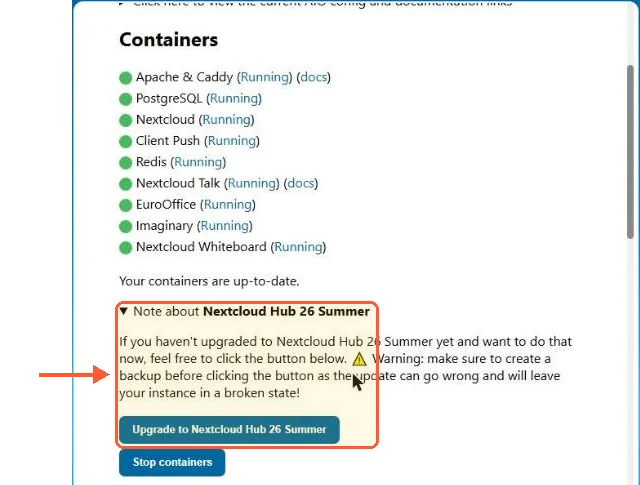
The Nextcloud half isn't repeated here. The compose file, the database container and the proxy in front of them are covered in Nextcloud with Docker Compose. If you'd rather skip that setup, the one-click Nextcloud template on LumaDock removes that install work, while OpenCloud you bring up yourself with the compose commands above. The choice between the all-in-one image and a hand-built server is set out in Nextcloud AIO vs manual install. If you pick All-in-One, tick "Install Nextcloud Hub 26 Summer" before the first start. On my test server the unticked default installed Hub 26 Spring (34.0.5), and getting to 35 took the upgrade button in the AIO interface.

Nextcloud AIO with all containers running and the Upgrade to Nextcloud Hub 26 Summer button under a backup warning

On a running AIO instance the move to Hub 26 Summer is a button, with a warning to back up first.

Which one to run

OpenCloud suits installs where the files are the product: a directory tree on disk, Spaces for teams, an office backend and clients that sync. Nextcloud suits installs that need the apps around the files, and it has ten years of them.

A practical test before committing to either one. List the Nextcloud apps in daily use on the current install. If Files and an office backend cover that list, OpenCloud covers it too. If Talk carries the team's calls, it doesn't.

Questions?

How do I prepare OpenCloud for a migration from Nextcloud?

Switch on OpenCloud's auth-app service first, because the rclone copy in OpenCloud's migration guide logs in with an app token for each user. In .env that means START_ADDITIONAL_SERVICES="auth-app" and PROXY_ENABLE_APP_AUTH="true". Each token then comes from opencloud auth-app create --user-name=<user> --expiration=72h, with the expiry in hours, minutes or seconds; the guide gives no default lifetime, so pick one that outlasts the whole copy. Creating tokens through the API instead needs AUTH_APP_ENABLE_IMPERSONATION=true when the server starts.

About the author

Diego Cabrera Domínguez

My job is systems administration. I write in the evenings or at the weekend, depending on the week. I started because I kept notes for everything I configured: mail servers, backups, monitoring, Docker, strange permissions problems, things I knew I would forget six months later. Some of those notes became articles. If I have not tested a procedure myself, I do not feel comfortable writing instructions for it!

I am from Granada and still live there. I studied computer systems administration and went directly into IT. I play football with friends once a week when enough people answer the group chat, and I repair old electronics, mostly motherboards and game consoles. I keep several boxes of parts that my mother believes should have been thrown away a long time ago. That's about it. I'm not very good at biographies.

Never run out of space again

Keep backups, archives and media on reliable storage with unmetered bandwidth and a cost per gigabyte that stays low as the years add up. Your first VPS comes with a 30-day money-back guarantee.