Back to Article List

How pihole.toml works in Pi-hole v6 and why edits revert

How pihole.toml works in Pi-hole v6 and why edits revert

Updated and tested 17 October 2026

You opened /etc/pihole/pihole.toml in nano, changed upstreams, saved, restarted pihole-FTL for good measure, and the line is back the way it was. The header now says # Last updated on a minute ago. Discourse thread 78859, "Pihole.toml file keeps reverting", is the same story with a different key. Nothing is broken. FTL owns that file, it noticed your edit, decided the value was not acceptable and wrote its own copy over yours.

The rest of this page is the contract: what the file is, the five ways to change a value, what FTL does the moment the file changes on disk and which keys restart the daemon.

What the pihole.toml header tells you

One file, /etc/pihole/pihole.toml, replaced setupVars.conf, pihole-FTL.conf and the 01-pihole.conf family in v6. FTL writes it, so it always contains every setting, each with its documentation comment, and the first lines read:

# Pi-hole configuration file (v6.8)
# Encoding: UTF-8
# This file is managed by pihole-FTL
# Last updated on ...

A value that differs from the default gets a trailing annotation, ### CHANGED, default = ..., or ### CHANGED (env), default = ... when an environment variable set it. The file ends with a # Configuration statistics: block counting how many entries are at their default. The FTL configuration reference is generated from the same source as the file, so the defaults it shows are the ones FTL writes. Those annotations are the fastest way to audit a Pi-hole you did not set up: grep CHANGED /etc/pihole/pihole.toml lists everything that was ever touched. An array spans several lines, so its annotation lands on the closing bracket and the grep prints ] ### CHANGED, default = [] with no key name; grep -B3 CHANGED shows the lines above it.
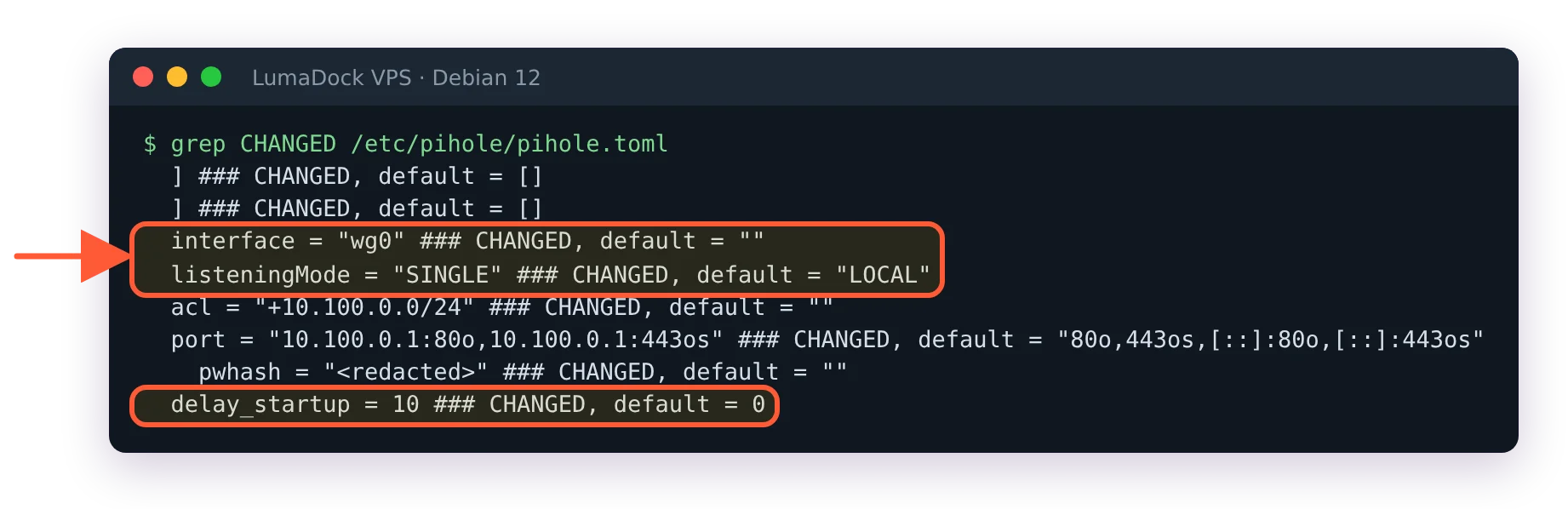
grep CHANGED pihole.toml: interface wg0, listeningMode SINGLE, delay_startup 10, arrays shown only by their closing bracket

grep CHANGED lists every key that differs from its default; arrays show only their closing bracket.

Five ways to set a value

The reference page lists them and then says which to prefer: "Using the web interface, the API or the CLI is preferred as they can do error checking for you".

  • The CLI: sudo pihole-FTL --config dns.upstreams prints the value, sudo pihole-FTL --config dns.upstreams '[ "127.0.0.1#5335" ]' sets it and sudo pihole-FTL --config -t dns.listeningMode SINGLE tests a value without applying it.
  • The web interface: Settings, with the Basic/Expert toggle at the top right to expose every key. On a VPS behind WireGuard that is http://10.100.0.1/admin/.
  • The API: /api/config, with the session ID from /api/auth.
  • Environment variables: FTLCONF_<section>_<key>, so dns.upstreams becomes FTLCONF_dns_upstreams. Arrays are semicolon-separated.
  • The file itself, with the behaviour described in the next section.

The Docker configuration page writes the CLI form as --config setting.name=value; the FTL help text and the reference use a space between key and value, and the space form is the one the examples on this page use.

What FTL does when the file changes on disk

None of this is in the docs prose; it comes from reading the FTL source, src/config/inotify.c and the reread_config() function in src/config/config.c. FTL keeps an inotify watch on /etc/pihole and reacts when pihole.toml is written and closed, or moved into place. On a change it checksums the file, and if the checksum differs from the last one it logs Reloading config due to pihole.toml change to /var/log/pihole/FTL.log and parses the file against the validators.

A valid edit is installed without a restart, unless one of the changed keys is flagged to need one, in which case FTL logs Restarting FTL due to change of <key> and restarts itself. A value that fails its validator isn't kept: FTL logs Invalid value with the reason and ----> <key> has been reset to its default value, installs the rest of the file with that key at its default, and writes the file back to disk. A key with a fixed list of options behaves differently: listeningMode = "SINGEL" logs Config setting dns.listeningMode is invalid and the key keeps the value it had before the edit. Since FTL v6.8 an array such as dns.upstreams loses only the entries that fail, each logged as ----> <key>[n] has been removed, and keeps the rest. A file that won't parse at all is dropped whole: Cannot parse TOML file in the log, the running configuration stays as it was, and the file is written back from it. Either way every option and every annotation is present again afterwards. That rewrite is why the header timestamp moved and why the typo is gone.

So a hand edit is fine when the value is right, and the way to know is the log:

sudo tail -f /var/log/pihole/FTL.log

Edit, save, watch. One Reloading config line and nothing red means it took. I keep that tail open in a second terminal for as long as the file is open in the first; it has caught more of my typos than reading the file back ever did. Pushing the file from Ansible? The same check applies to configuration management: a template that writes the whole file works, provided every value in it passes the validators, and the -t test above is how to find out before the deploy.

At startup the logic differs slightly. FTL reads the file and rewrites it; if it cannot parse the file at all it walks the rotated copies in /etc/pihole/config_backups from newest to oldest until one parses, logs No config file nor backup available, using defaults if none does and renames the unreadable file to pihole.toml.broken before writing defaults. A stopped FTL and a careful edit is therefore a supported path; a TOML syntax error is the one mistake that costs you the file.

Restart-flagged keys in pihole.toml

Restart-flagged keys in config.c include dns.upstreams, dns.interface, dns.listeningMode, dns.port, dns.dnssec, dns.queryLogging, webserver.port, webserver.domain, webserver.acl, webserver.tls.cert, misc.etc_dnsmasq_d and the dhcp.* and ntp.* activation switches. Setting any of them through the CLI, the API or the web interface restarts the daemon on its own, so a pihole-FTL --config dns.listeningMode SINGLE on a live resolver costs a few seconds of DNS and nothing else needs to be typed.
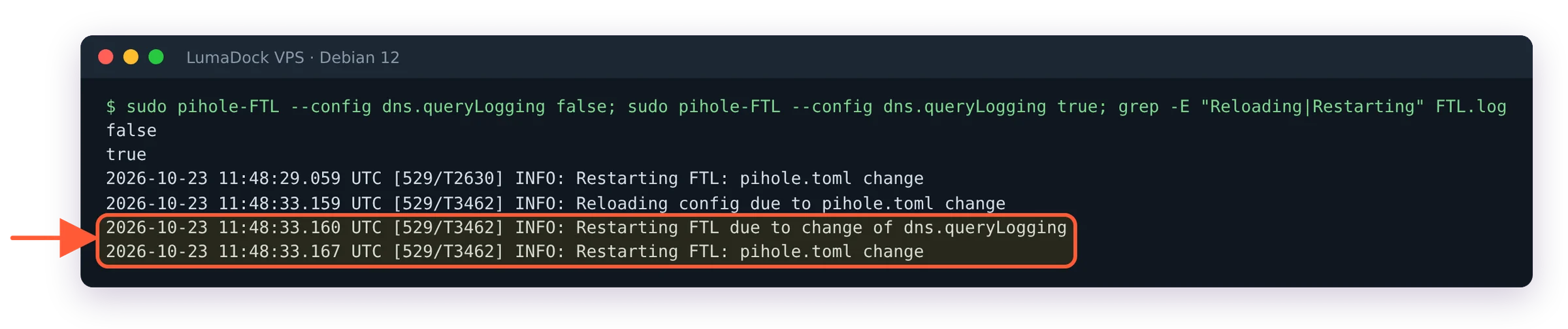
FTL.log after changing dns.queryLogging: Restarting FTL due to change of dns.queryLogging

Changing a restart-flagged key makes FTL restart itself.

A changed webserver.api.pwhash, by any route, invalidates every open web session, which is what the reset the Pi-hole v6 admin password page relies on. pihole setpassword writes the pseudo-key webserver.api.password and FTL stores the hash; the plaintext never lands in the file.

Rotated copies in config_backups

Every time FTL replaces pihole.toml, including after an import with Teleporter on Pi-hole v6, it rotates the previous version into /etc/pihole/config_backups/ first. That directory is a short undo history. It lives on the same disk and a reinstalled VPS takes it along, so the zip Teleporter exports is the copy to keep off the server.

Read-only keys from environment variables

A key set through FTLCONF_* becomes read-only. The Docker configuration page says it in one sentence: "All FTL settings that are set via environment variables effectively become read-only, meaning that you will not be able to change them via the web interface or CLI." The file marks such a key ### CHANGED (env), and the same page adds that removing the variable later makes FTL revert that setting to its default.

The whole file can be frozen the same way with misc.readOnly = true, which the reference describes as the setting for a configuration "to be forced/modified by some third-party application (like infrastructure-as-code providers)". It blocks changes through the API and CLI; the file and environment variables still apply. Set it in the file itself, as readOnly = true under [misc], because the CLI refuses that one key with Config option misc.readOnly can only be set in pihole.toml, not via the CLI. Once it's on, a CLI change prints Config is in read-only mode, changes are not allowed (misc.readOnly = true), while a hand edit of the file still reloads.

The dnsmasq side of the configuration

FTL turns the [dns] section into /etc/pihole/dnsmasq.conf on every start. The header of that generated file says any changes made to it will be lost when the configuration changes and points back at pihole.toml. Extra dnsmasq directives go in one of two keys: misc.etc_dnsmasq_d = true makes FTL read /etc/dnsmasq.d/*.conf again, and misc.dnsmasq_lines takes an array of single lines. pihole reloaddns does not re-read either; a config change there needs a restart of pihole-FTL.

Since FTL v6.7.1, a security release of 19 September 2026, misc.dnsmasq_lines and webserver.advancedOpts stopped accepting changes from the API and the web interface (GHSA-ww5x-xx4x-qvjr and GHSA-2794-hrj8-5jg9). The reference explains why: dnsmasq directives such as dhcp-script and conf-script name programs dnsmasq then executes, which is the remote code execution the advisory describes. Both keys stay settable in the file, by environment variable and with pihole-FTL --config, which all require a shell on the host.


Your idea deserves better hosting

24/7 support 30-day money-back guaranteeRefund covers the VPS plan on your first order. Cancel anytime
Verrechnungszyklus

VPS.S1

$5.99 Save  17 %
$4.99 Monatlich
  • 2 vCPU AMD EPYC
  • 2 GB RAMRAM
  • 30 GB NVMeSPEICHER
  • Unbegrenzter Traffic
  • IPv4 & IPv6IPv6-Support ist derzeit nicht verfügbar in Frankreich, Finnland oder den Niederlanden. inklusive

VPS.S3

$14.99 Save  33 %
$9.99 Monatlich
  • 4 vCPU AMD EPYC
  • 6 GB RAMRAM
  • 70 GB NVMeSPEICHER
  • Unbegrenzter Traffic
  • IPv4 & IPv6IPv6-Support ist derzeit nicht verfügbar in Frankreich, Finnland oder den Niederlanden. inklusive

VPS.S4

$19.99 Save  20 %
$15.99 Monatlich
  • 6 vCPU AMD EPYC
  • 8 GB RAMRAM
  • 80 GB NVMeSPEICHER
  • Unbegrenzter Traffic
  • IPv4 & IPv6IPv6-Support ist derzeit nicht verfügbar in Frankreich, Finnland oder den Niederlanden. inklusive

EPYC VPS.P1

$8.99 Save  22 %
$6.99 Monatlich
  • 2 vCPU AMD EPYC
  • 4 GB RAMRAM
  • 40 GB NVMeSPEICHER
  • Unbegrenzter Traffic
  • IPv4 & IPv6IPv6-Support ist derzeit nicht verfügbar in Frankreich, Finnland oder den Niederlanden. inklusive
  • Kostenloses Auto-BackupEnthält einen Backup-Slot, den du auf täglich, wöchentlich oder monatlich einstellen kannst.

EPYC VPS.P2

$16.99 Save  24 %
$12.99 Monatlich
  • 2 vCPU AMD EPYC
  • 8 GB RAMRAM
  • 80 GB NVMeSPEICHER
  • Unbegrenzter Traffic
  • IPv4 & IPv6IPv6-Support ist derzeit nicht verfügbar in Frankreich, Finnland oder den Niederlanden. inklusive
  • Kostenloses Auto-BackupEnthält einen Backup-Slot, den du auf täglich, wöchentlich oder monatlich einstellen kannst.

EPYC VPS.P4

$29.99 Save  23 %
$22.99 Monatlich
  • 4 vCPU AMD EPYC
  • 16 GB RAMRAM
  • 160 GB NVMeSPEICHER
  • Unbegrenzter Traffic
  • IPv4 & IPv6IPv6-Support ist derzeit nicht verfügbar in Frankreich, Finnland oder den Niederlanden. inklusive
  • Kostenloses Auto-BackupEnthält einen Backup-Slot, den du auf täglich, wöchentlich oder monatlich einstellen kannst.

EPYC VPS.P5

$39.99 Save  25 %
$29.99 Monatlich
  • 8 vCPU AMD EPYC
  • 16 GB RAMRAM
  • 180 GB NVMeSPEICHER
  • Unbegrenzter Traffic
  • IPv4 & IPv6IPv6-Support ist derzeit nicht verfügbar in Frankreich, Finnland oder den Niederlanden. inklusive
  • Kostenloses Auto-BackupEnthält einen Backup-Slot, den du auf täglich, wöchentlich oder monatlich einstellen kannst.

EPYC VPS.P6

$59.99 Save  25 %
$44.99 Monatlich
  • 8 vCPU AMD EPYC
  • 32 GB RAMRAM
  • 200 GB NVMeSPEICHER
  • Unbegrenzter Traffic
  • IPv4 & IPv6IPv6-Support ist derzeit nicht verfügbar in Frankreich, Finnland oder den Niederlanden. inklusive
  • Kostenloses Auto-BackupEnthält einen Backup-Slot, den du auf täglich, wöchentlich oder monatlich einstellen kannst.

EPYC VPS.P7

$69.99 Save  29 %
$49.99 Monatlich
  • 16 vCPU AMD EPYC
  • 32 GB RAMRAM
  • 240 GB NVMeSPEICHER
  • Unbegrenzter Traffic
  • IPv4 & IPv6IPv6-Support ist derzeit nicht verfügbar in Frankreich, Finnland oder den Niederlanden. inklusive
  • Kostenloses Auto-BackupEnthält einen Backup-Slot, den du auf täglich, wöchentlich oder monatlich einstellen kannst.

Genoa VPS.G2

$24.99 Save  20 %
$19.99 Monatlich
  • 2 vCPUAMD EPYC Genoa 4. Generation 9xx4 mit 3,25 GHz oder ähnlich, auf Zen 4-Architektur. AMD EPYC G4
  • 4 GB DDR5RAM
  • 50 GB NVMeSPEICHER
  • Unbegrenzter Traffic
  • IPv4 & IPv6IPv6-Support ist derzeit nicht verfügbar in Frankreich, Finnland oder den Niederlanden. inklusive
  • Kostenloses Auto-BackupEnthält einen Backup-Slot, den du auf täglich, wöchentlich oder monatlich einstellen kannst.

Genoa VPS.G4

$44.99 Save  22 %
$34.99 Monatlich
  • 4 vCPUAMD EPYC Prozessor mit dedizierten vCPU Kernen, auf Enterprise Serverhardware. AMD EPYC G4
  • 8 GB DDR5RAM
  • 100 GB NVMeSPEICHER
  • Unbegrenzter Traffic
  • IPv4 & IPv6IPv6-Support ist derzeit nicht verfügbar in Frankreich, Finnland oder den Niederlanden. inklusive
  • Kostenloses Auto-BackupEnthält einen Backup-Slot, den du auf täglich, wöchentlich oder monatlich einstellen kannst.

Genoa VPS.G6

$89.99 Save  22 %
$69.99 Monatlich
  • 8 vCPUAMD EPYC Prozessor mit dedizierten vCPU Kernen, auf Enterprise Serverhardware. AMD EPYC G4
  • 16 GB DDR5RAM
  • 200 GB NVMeSPEICHER
  • Unbegrenzter Traffic
  • IPv4 & IPv6IPv6-Support ist derzeit nicht verfügbar in Frankreich, Finnland oder den Niederlanden. inklusive
  • Kostenloses Auto-BackupEnthält einen Backup-Slot, den du auf täglich, wöchentlich oder monatlich einstellen kannst.

Genoa VPS.G7

$159.99 Save  22 %
$124.99 Monatlich
  • 8 vCPUAMD EPYC Prozessor mit dedizierten vCPU Kernen, auf Enterprise Serverhardware. AMD EPYC G4
  • 32 GB DDR5RAM
  • 250 GB NVMeSPEICHER
  • Unbegrenzter Traffic
  • IPv4 & IPv6IPv6-Support ist derzeit nicht verfügbar in Frankreich, Finnland oder den Niederlanden. inklusive
  • Kostenloses Auto-BackupEnthält einen Backup-Slot, den du auf täglich, wöchentlich oder monatlich einstellen kannst.

AMD Ryzen VPS.R1

$16.99 Save  18 %
$13.99 Monatlich
  • 1 dedizierter CPU AMD Ryzen 9 7950X mit 4,5 GHz oder ähnlich, auf Zen 4-Architektur. vCPU
  • 4 GB DDR5RAM
  • 50 GB NVMeSPEICHER
  • Unbegrenzter Traffic
  • IPv4 & IPv6 inklusive IPv6-Support ist derzeit nicht verfügbar in Frankreich, Finnland oder den Niederlanden.
  • Auto-Backup inklusive

AMD Ryzen VPS.R2

$29.99 Save  17 %
$24.99 Monatlich
  • 2 dedizierte CPUs AMD Ryzen 9 7950X mit 4,5 GHz oder ähnlich, auf Zen 4-Architektur. vCPU
  • 8 GB DDR5RAM
  • 100 GB NVMeSPEICHER
  • Unbegrenzter Traffic
  • IPv4 & IPv6 inklusive IPv6-Support ist derzeit nicht verfügbar in Frankreich, Finnland oder den Niederlanden.
  • Auto-Backup inklusive

AMD Ryzen VPS.R4

$109.99 Save  18 %
$89.99 Monatlich
  • 8 dedizierte CPUs AMD Ryzen 9 7950X mit 4,5 GHz oder ähnlich, auf Zen 4-Architektur. vCPU
  • 32 GB DDR5RAM
  • 400 GB NVMeSPEICHER
  • Unbegrenzter Traffic
  • IPv4 & IPv6 inklusive IPv6-Support ist derzeit nicht verfügbar in Frankreich, Finnland oder den Niederlanden.
  • Auto-Backup inklusive

*VAT excluded.

INCLUDED WITH EVERY PLAN

✓ No setup fees ✓1 Gbps network
✓ Full root access on KVM ✓ Free server monitoring ✓ Firewall management ✓24/7 support

What the file replaced from v5

On an upgraded server setupVars.conf and pihole-FTL.conf were read once by pihole-FTL migrate v6 and moved into /etc/pihole/migration_backup_v6/, together with the 01-pihole.conf family from /etc/dnsmasq.d/. They are not consulted again; what each old key became, and the traps the migration leaves behind, are in the Pi-hole v5 to v6 upgrade page. The one v5 file with a direct successor is custom.list, which turned into the dns.hosts array.

On the VPS resolver from Pi-hole v6 on a VPS behind WireGuard, the three keys that keep port 53 off the public internet are dns.interface = "wg0", dns.listeningMode = "SINGLE" and webserver.port bound to 10.100.0.1. If any of those shows up without its ### CHANGED annotation, FTL reverted it, and the errors that follow, ignoring query from non-local network among them, fill the Pi-hole v6 errors and fixes page. That matters on a resolver because the default for dns.interface is auto-detection.

Before any of that, test the value you are about to write:

sudo pihole-FTL --config -t dns.interface wg0

Questions?

How do I add local DNS records and CNAMEs in pihole.toml?

Local records go in the dns.hosts array as strings in hosts-file form, "IP HOSTNAME [HOSTNAME ...]", and CNAMEs go in dns.cnameRecords as "alias,target" with an optional TTL as a third field. The validated way to write them is sudo pihole-FTL --config dns.hosts '[ "10.100.0.5 nas.home" ]', and the entries then appear under Settings, Local DNS Records in the web interface. A change to dns.hosts applies without a restart, while dns.cnameRecords carries the restart flag, so FTL restarts itself when that one changes.

About the author

William Ramsay

I've earned my living from technical writing for more than 20 years. There were a few other jobs before that: university IT, a spell doing Unix administration, some training/paid work. Over these years, writing became the part people kept asking me to do, so I stopped pretending it was secondary.

Most of my career has been in infrastructure. The names have changed. We had dedicated servers, then virtual servers, then cloud instances; now there are another dozen ways to rent somebody else's computer. But the underlying problems don't change nearly as quickly. I'm in Glasgow, where I've lived for most of my life. I keep paper notebooks, walk in the hills when my knees agree to it and repair old hand tools. I've never been particularly interested in gadgets for their own sake. I like knowing how things work and being able to fix them.

Deploy your next project in seconds

Bring your winning ideas online faster, with modern hardware and unmetered bandwidth. Join a European cloud trusted by thousands of developers and businesses worldwide.