






.svg)
.svg)
.svg)
.svg)

.svg)
.svg)
.svg)


Updated and tested 13 October 2026
Unbound listens on 127.0.0.1 port 5335 in the config file the Pi-hole documentation publishes, and Pi-hole forwards to 127.0.0.1#5335. Two values, one line each. The rest of this page is making sure nothing else on the VPS argues with them, starting with a Debian package hook that rewrites /etc/resolv.conf behind your back.
What changes once it's done: Pi-hole stops forwarding to whichever public provider you picked at install and hands each uncached name to Unbound, which asks a root server, then the TLD server, then the authoritative server for the name. The Pi-hole guide to Unbound is frank about the cost. The first request to a TLD you haven't touched can take up to a second, more with DNSSEC, and later names under the same TLD usually come back in under 0.1 s. I think that's a fair trade on a VPS, because the queries leave the box either way and the only thing that moves is who sees them: each authoritative server sees your VPS's IP for its own names, where before one resolver operator saw all of them.
This assumes a Pi-hole already pinned to wg0 the way Pi-hole v6 on a VPS behind WireGuard leaves it. Unbound binds the loopback address only, so nothing here opens a port. Port 53 on the public IP was closed before this page and is still closed after it. Debian 12 throughout, Ubuntu 24.04 noted where it differs.
Install Unbound on Debian 12
sudo apt install unboundThe package pulls in dns-root-data, which carries the root hints, so Unbound knows where the root servers are without any download from you and the hints get updated with the rest of the system. Same command on Ubuntu 24.04. The guide's optional step of fetching named.root from InterNIC by hand is for installs that don't come from a package manager; skip it here, and leave the root-hints: line in the config commented out.
On a box where Pi-hole already holds port 53, the install ends with an error:
Could not execute systemctl: at /usr/bin/deb-systemd-invoke line 145.That's expected. Unbound's default config tries to listen on port 53 too, so systemctl is-active unbound says failed and the journal shows can't bind socket: Address already in use for ::1 port 53. It starts normally once the config below moves it to 5335.
Before writing any config, check that the VPS can reach a root server directly. The guide added this test because ISPs and home routers intercept port 53 without saying so, and a hosting network can do the same:
dig @198.41.0.4 . NS +norec +time=3Look at the flags: line. Talking to the real root server gives qr aa with no ra. An ra flag means something between you and 198.41.0.4 answered instead, and Unbound will fail in ways that take an afternoon to diagnose. Stop there and ask your provider if that's what you see.
Unbound config file for Pi-hole
The file below is the one from the Pi-hole documentation's Unbound guide, reproduced as published. The Pi-hole team maintains it and it's the version to copy, comments included, since the comments explain each choice better than a paraphrase would. Save it as /etc/unbound/unbound.conf.d/pi-hole.conf:
server:
    # If no logfile is specified, syslog is used
    # logfile: "/var/log/unbound/unbound.log"
    verbosity: 0

    interface: 127.0.0.1
    port: 5335
    do-ip4: yes
    do-udp: yes
    do-tcp: yes

    # May be set to no if you don't have IPv6 connectivity
    do-ip6: yes

    # You want to leave this to no unless you have *native* IPv6. With 6to4 and
    # Terredo tunnels your web browser should favor IPv4 for the same reasons
    prefer-ip6: no

    # Use this only when you downloaded the list of primary root servers!
    # If you use the default dns-root-data package, unbound will find it automatically
    #root-hints: "/var/lib/unbound/root.hints"

    # Trust glue only if it is within the server's authority
    harden-glue: yes

    # Require DNSSEC data for trust-anchored zones, if such data is absent, the zone becomes BOGUS
    harden-dnssec-stripped: yes

    # Don't use Capitalization randomization as it known to cause DNSSEC issues sometimes
    # see https://discourse.pi-hole.net/t/unbound-stubby-or-dnscrypt-proxy/9378 for further details
    use-caps-for-id: no

    # Reduce EDNS reassembly buffer size.
    # IP fragmentation is unreliable on the Internet today, and can cause
    # transmission failures when large DNS messages are sent via UDP. Even
    # when fragmentation does work, it may not be secure; it is theoretically
    # possible to spoof parts of a fragmented DNS message, without easy
    # detection at the receiving end. Recently, there was an excellent study
    # >>> Defragmenting DNS - Determining the optimal maximum UDP response size for DNS <<<
    # by Axel Koolhaas, and Tjeerd Slokker (https://indico.dns-oarc.net/event/36/contributions/776/)
    # in collaboration with NLnet Labs explored DNS using real world data from the
    # the RIPE Atlas probes and the researchers suggested different values for
    # IPv4 and IPv6 and in different scenarios. They advise that servers should
    # be configured to limit DNS messages sent over UDP to a size that will not
    # trigger fragmentation on typical network links. DNS servers can switch
    # from UDP to TCP when a DNS response is too big to fit in this limited
    # buffer size. This value has also been suggested in DNS Flag Day 2020.
    edns-buffer-size: 1232

    # Perform prefetching of close to expired message cache entries
    # This only applies to domains that have been frequently queried
    prefetch: yes

    # One thread should be sufficient, can be increased on beefy machines. In reality for most users running on small networks or on a single machine, it should be unnecessary to seek performance enhancement by increasing num-threads above 1.
    num-threads: 1

    # Ensure kernel buffer is large enough to not lose messages in traffic spikes
    so-rcvbuf: 1m

    # Ensure privacy of local IP ranges
    private-address: 192.168.0.0/16
    private-address: 169.254.0.0/16
    private-address: 172.16.0.0/12
    private-address: 10.0.0.0/8
    private-address: fd00::/8
    private-address: fe80::/10

    # Ensure no reverse queries to non-public IP ranges (RFC6303 4.2)
    private-address: 192.0.2.0/24
    private-address: 198.51.100.0/24
    private-address: 203.0.113.0/24
    private-address: 255.255.255.255/32
    private-address: 2001:db8::/32
Two lines decide the exposure. interface: 127.0.0.1 with port: 5335 keeps Unbound off every real interface, including wg0, which is why the firewall from the install article needs no new rule. And do-ip6: yes comes with a comment that says to set it to no if you don't have IPv6 connectivity, which is the case on a VPS with no IPv6 route.
The private-address block includes 10.0.0.0/8, which contains your 10.100.0.0/24 tunnel. That's fine. It tells Unbound to distrust a public answer pointing into those ranges, and names for hosts on the tunnel come from Pi-hole's own dns.hosts entries, which never reach Unbound.
so-rcvbuf: 1m asks the kernel for a bigger receive buffer than Debian allows by default. It produces a warning later on this page, with its fix.
Disable unbound-resolvconf.service on Debian 12
The guide says Debian Bullseye and later install openresolv alongside Unbound, though Debian 12's unbound package doesn't list it as a dependency. The guide describes the hook in one sentence:
The effect is that the unbound-resolvconf.service instructs resolvconf to write unbound's own DNS service at nameserver 127.0.0.1 , but without the 5335 port, into the file /etc/resolv.conf.
On this VPS, 127.0.0.1 port 53 is Pi-hole. So the host's own resolver becomes the Pi-hole, and the day FTL is down for any reason the host has no DNS at all and pihole -g prints DNS resolution is currently unavailable. The guide's steps, in order:
systemctl is-active unbound-resolvconf.service
sudo systemctl disable --now unbound-resolvconf.service
sudo sed -Ei 's/^unbound_conf=/#unbound_conf=/' /etc/resolvconf.conf
sudo rm /etc/unbound/unbound.conf.d/resolvconf_resolvers.conf
sudo service unbound restart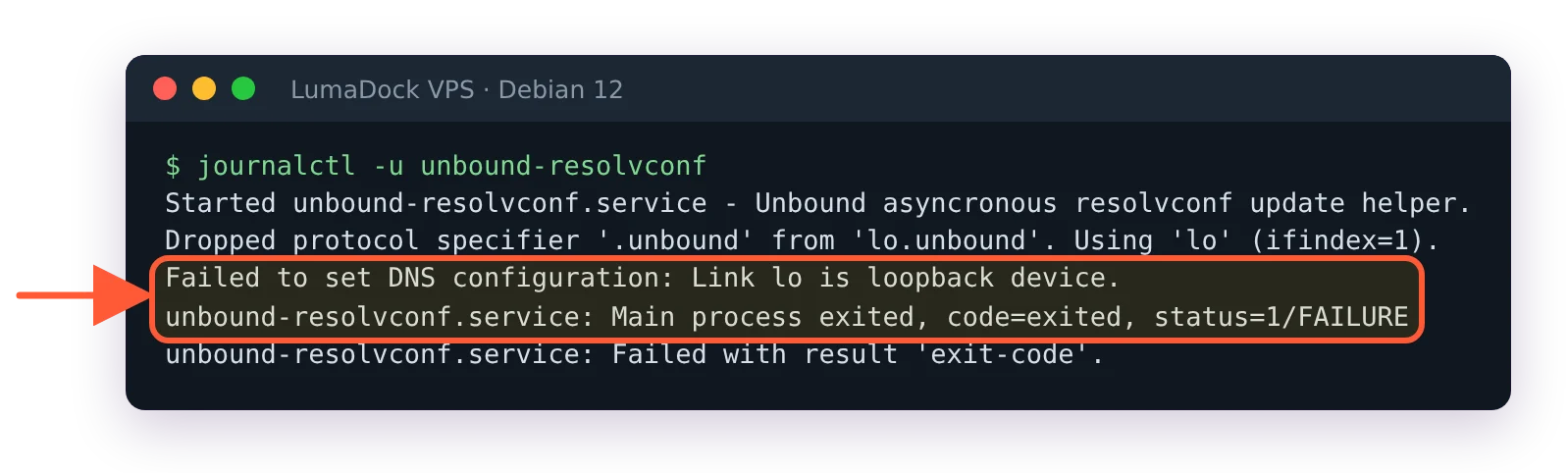
On an image with systemd-resolved, unbound-resolvconf fails at install time.
The first line is a check. It answers active or inactive, because the unbound package ships the unit itself, or failed on an image where systemd-resolved provides the resolvconf command (LumaDock's Debian 12 image is one). There the helper's call is refused with Failed to set DNS configuration: Link lo is loopback device., so the hook never touches /etc/resolv.conf. The disable line is safe to run in all three cases. The sed and rm lines only apply when openresolv is installed, since /etc/resolvconf.conf belongs to that package: test -f /etc/resolvconf.conf && echo openresolv tells you, and without it both lines fail with "No such file" and you skip them. The guide marks the section as required for Debian Bullseye and later. The sed line comments out the unbound_conf= entry so resolvconf stops regenerating the file the rm line deletes.
Skip those two lines on a box with openresolv and the loop is easy to trigger. As soon as any interface registers a nameserver through openresolv (a wg-quick config with a DNS = line pointing at 10.100.0.1 is enough), openresolv writes resolvconf_resolvers.conf with a forward-zone for "." to that address and restarts Unbound. Pi-hole then forwards to Unbound, Unbound forwards back to Pi-hole, and every new name times out. If you're on a Pi-hole where the resolution error above already appeared, the Pi-hole v6 errors page carries the temporary nameserver workaround for getting pihole -g through while you fix the cause.
Fix the so-rcvbuf warning
After the restart, look in Unbound's log for this line, which the guide says you may see:
so-rcvbuf 1048576 was not granted. Got 425984. To fix: start with root permissions(linux) or sysctl bigger net.core.rmem_max(linux) or kern.ipc.maxsockbuf(bsd) values.Unbound still runs; it just got a smaller buffer than the config asked for. Raise the limit now and make it survive a reboot:
sudo sysctl -w net.core.rmem_max=1048576
echo 'net.core.rmem_max=1048576' | sudo tee /etc/sysctl.d/99-unbound.conf
sudo service unbound restart
A second warning shows up on every start and stays after this fix: subnetcache: prefetch is set but not working for data originating from the subnet module cache. Debian builds Unbound with the subnet module, and the config's prefetch: yes doesn't apply to that module's cache. Nothing is broken, so leave it.
The guide files Debian 12 and older under the systems that keep the value in /etc/sysctl.conf and apply it with sudo sysctl -p, and reserves sudo systemctl restart systemd-sysctl for Debian 13 and newer. The drop-in above is fine on Debian 12 too, since systemd-sysctl reads /etc/sysctl.d/*.conf at boot on any systemd system (sysctl.d(5)), and the -w line covers you until then.
Test Unbound on port 5335
dig pi-hole.net @127.0.0.1 -p 5335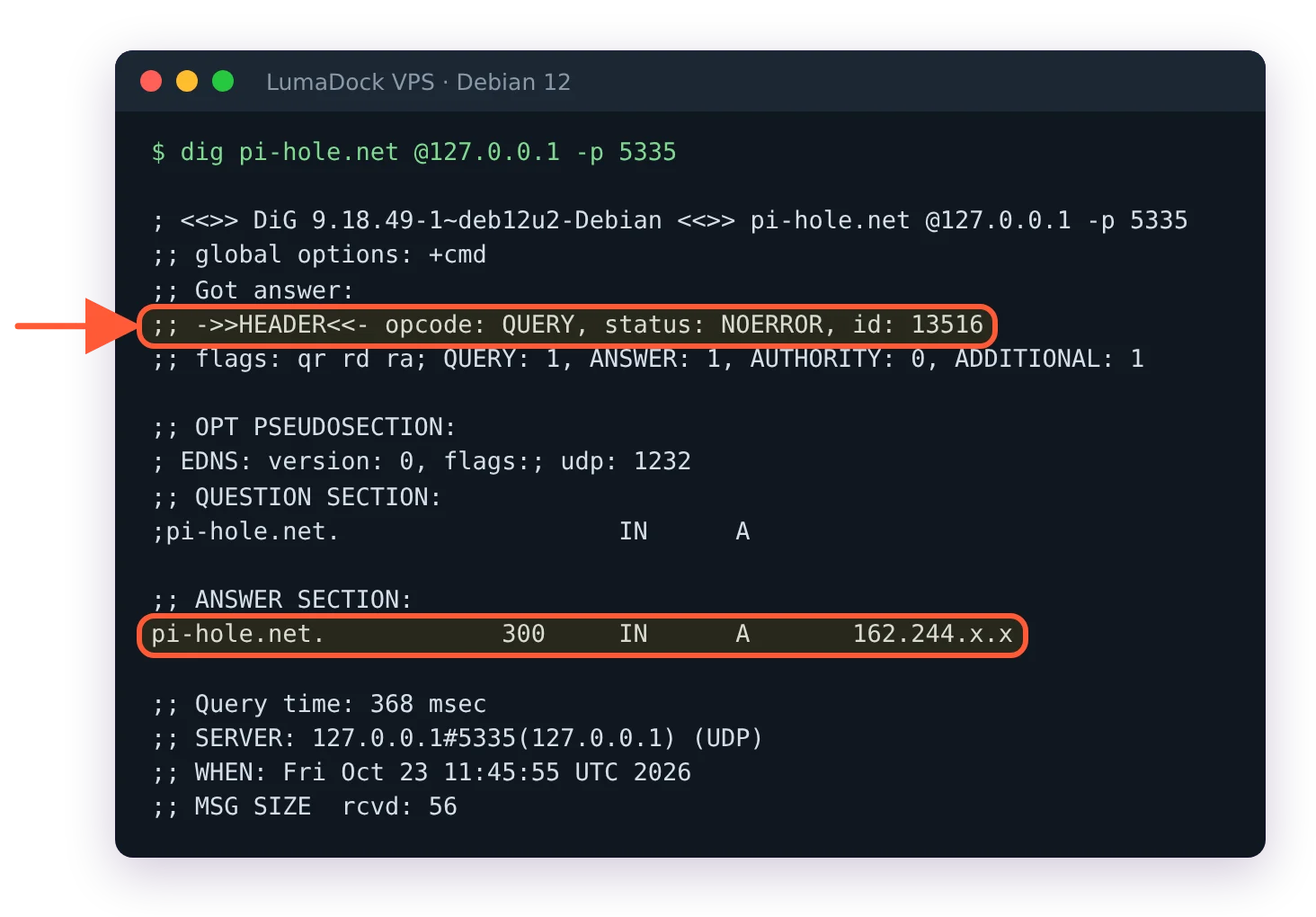
Unbound answers on 127.0.0.1#5335; the first query takes a few hundred milliseconds.
Expect an answer with status: NOERROR and a query time that looks slow the first run. Run it twice; the second is cached. Then the two DNSSEC checks from the guide:
dig fail01.dnssec.works @127.0.0.1 -p 5335
dig +ad dnssec.works @127.0.0.1 -p 5335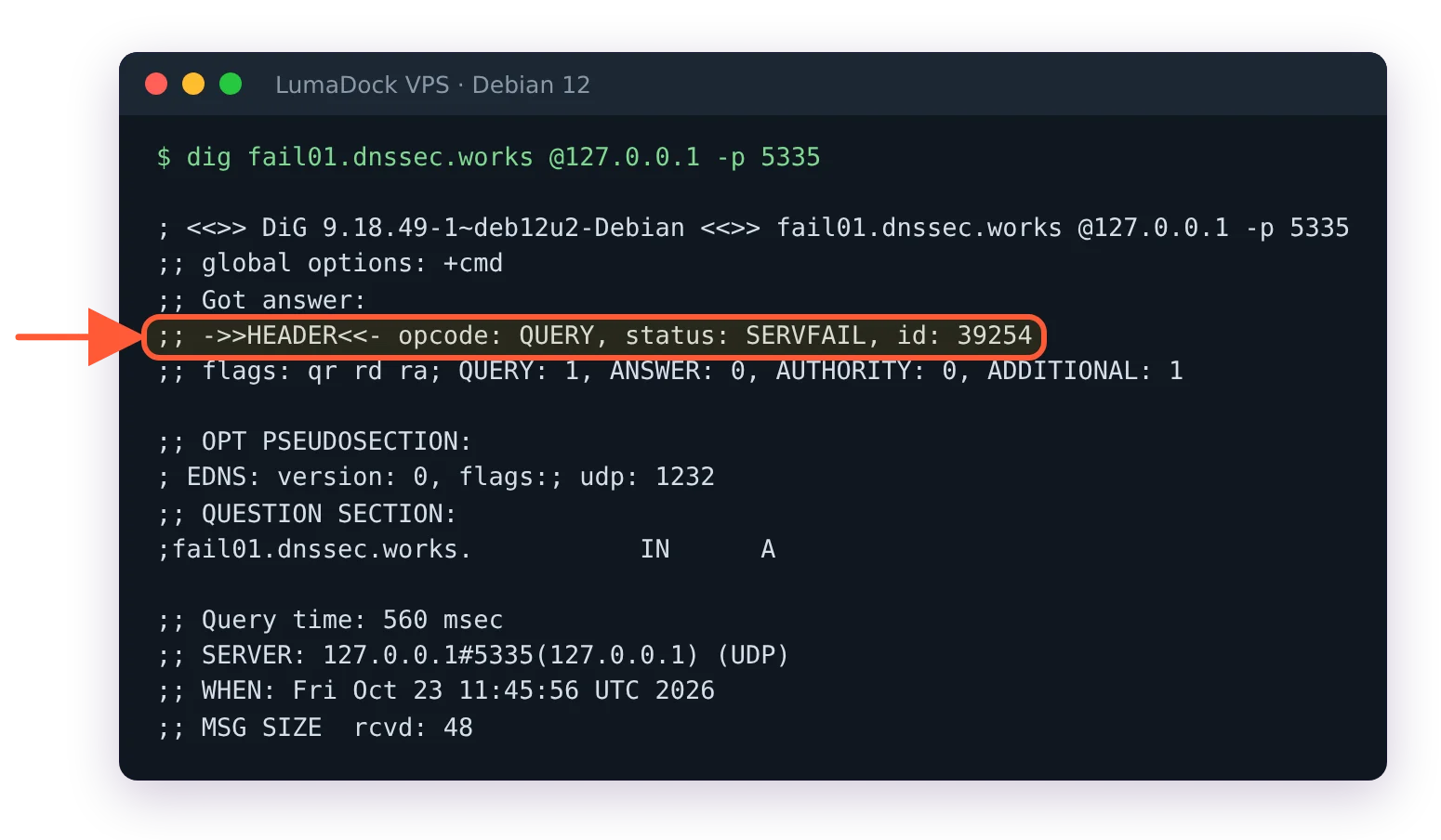
A deliberately broken DNSSEC domain gets SERVFAIL: Unbound is validating.
The first must come back SERVFAIL with no address, because that zone is deliberately broken and Unbound refuses to pass a failed signature through. The second returns NOERROR, an address and an ad flag in the flags: line, meaning the answer was validated. A fail01 query that returns an address means validation isn't happening, usually because the root trust anchor isn't loaded (the Unbound manual says the validator needs trust anchors "for validation to be useful"). Check that root-auto-trust-anchor-file.conf is still in /etc/unbound/unbound.conf.d/, then restart Unbound and read the error it prints before anything else.
Point Pi-hole at 127.0.0.1#5335
sudo pihole-FTL --config dns.upstreams '[ "127.0.0.1#5335" ]'The value replaces the whole array, so the provider you chose at install is gone and Unbound is the only upstream. dns.upstreams is one of the keys that restart FTL on their own when changed, so the DNS server comes back on wg0 by itself a moment later; the full list of restart-flagged keys and the other four ways to set a value are in how pihole.toml works in Pi-hole v6. In the web interface the same change is Settings > DNS > Custom DNS servers: enter 127.0.0.1#5335, untick every other upstream and click Save & Apply, which is how the guide shows it.
I'd keep Unbound as the only entry, because a second, public upstream hides an Unbound failure behind lookups that still work, and you find out months later from a log. With Unbound alone, a dead resolver is visible at once: uncached lookups time out on every client, and /var/log/pihole/pihole.log shows forwarded ... to 127.0.0.1#5335 lines with no reply after them. A SERVFAIL is different: Unbound is up and refused the answer, as it does for a name whose DNSSEC signature fails. The errors page linked above covers both, with their causes (Unbound stopped, wrong port, a provider intercepting port 53).
Leave dns.dnssec off in Pi-hole
dns.dnssec defaults to false in the FTL configuration reference, and with Unbound in front of the internet that's where it stays. Unbound already validates with the guide's config (the Debian package ships the root trust anchor setup in /etc/unbound/unbound.conf.d/root-auto-trust-anchor-file.conf, and the fail01 test above only works because Unbound validates), so a second validation in Pi-hole adds latency for nothing, and the standing advice on the Pi-hole forum is not to validate twice. The Unbound guide doesn't spell this out in a sentence; its test does. Confirm the value:
sudo pihole-FTL --config dns.dnssecIt prints false. If someone turned it on earlier, set it back with sudo pihole-FTL --config dns.dnssec false; it's another restart-flagged key.
Check pihole.log for forwarded to 127.0.0.1#5335
Nothing to open in nftables or ufw: 5335 is bound to loopback and Pi-hole reaches it on the same box. From a device on the tunnel, resolve a name you haven't looked up today, then read the query log on the VPS:
dig @10.100.0.1 en.wikipedia.org
sudo grep 'to 127.0.0.1#5335' /var/log/pihole/pihole.log | tail -n 5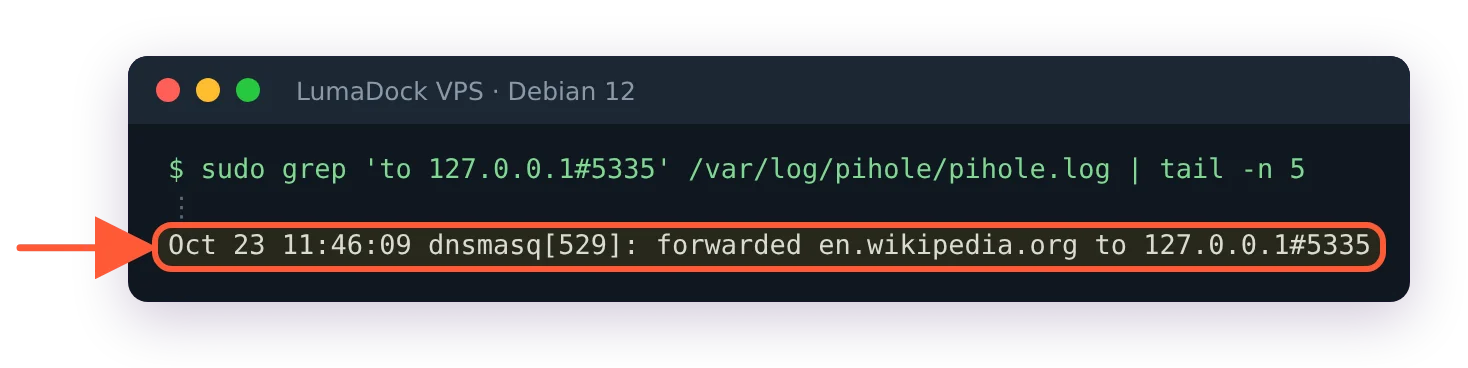
Queries from the tunnel now go to Unbound on 127.0.0.1#5335.
Each hit is a forwarded line, and the reply lines after it in the full log are Unbound's answers coming back. A query that shows forwarded to some other address means the upstream change didn't take; re-read dns.upstreams with sudo pihole-FTL --config dns.upstreams. The client-side checks, including the leak test that should now show only your VPS's public IP as the DNS server, are in how to test that Pi-hole is working.
Last, the thread that collects the ways this setup breaks: a Pi-hole forum thread on DNS resolution being unavailable with Unbound runs through a systemd-resolved loop, a firewall blocking 5335 and an upstream that was commented out, all of which produce the same symptom. Keep that thread for the day a lookup from the VPS itself stops working and the tunnel clients still resolve fine.


