Back to Article List

9 Portainer alternatives, grouped by use case

9 Portainer alternatives, grouped by use case

Updated and tested 31 October 2026

This list of Portainer alternatives covers self-hosted tools that manage Docker on servers you control. Anything that only manages Kubernetes is out, apart from a short note on Rancher, and so is anything that only runs on a laptop. Every entry gets the same details: what it manages, the port it listens on, the licence, the most recent release as of 31 October 2026 and the reason you'd pick it over Portainer. The reasons people go looking for an alternative to Portainer in the first place tend to be a short list. Portainer CE has no role-based permissions, the Business Edition is free only up to 3 nodes, the UI has grown a lot of screens a homelab never opens and an install nobody claims within five minutes of its first start times out and needs a restart. Each tool below fixes at least one of those and gives up something else.

Dockge

Dockge is the compose-only manager from Louis Lam, the Uptime Kuma author, and it gets a full side-by-side in Portainer vs Dockge, so this is the short version. Stacks are directories under /opt/stacks, each with a compose.yaml, and the UI is an editor for those files with a live terminal that streams docker compose output while a stack pulls and starts. It converts docker run commands into compose services. It has agents for managing stacks on other Dockge hosts, added in 1.4.0. It runs on amd64, arm64 and armv7, listens on port 5001 and is MIT licensed.

What it gives up: every non-compose object. Containers started by hand, images, volumes and networks aren't in the interface, and existing compose projects have to move into the stacks directory before Dockge manages them (until then it lists them greyed out as not managed). The bigger caveat is cadence. Its newest tag is still 1.5.0, cut on 30 March 2025, and the latest and 1 image tags on Docker Hub point at that same build, so the Docker CLI and Compose binary inside are from that era too. A nightly image was still being rebuilt on 31 October, so it isn't abandoned, but check the releases page and the tag dates before choosing it.
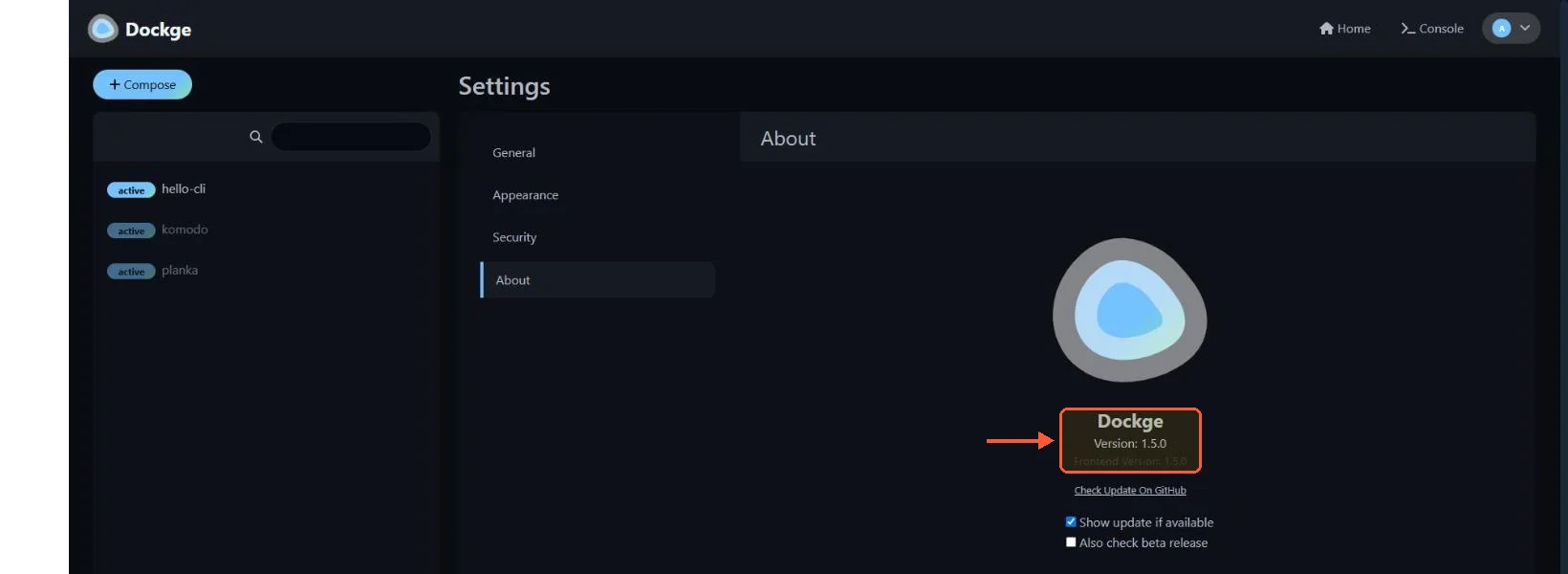
Dockge Settings, About: Version 1.5.0, with hello-cli, komodo and planka in the stack list

Settings > About on my test server: Dockge 1.5.0, the latest tagged release.

Pick it for: one box, everything already in compose, an operator who prefers editing YAML to clicking through forms.

Komodo

Komodo is the fleet tool. A Core (port 9120, needs MongoDB or FerretDB) talks to a Periphery agent (port 8120) on each server, and the resource model goes well past containers: Stacks from git, Deployments for single containers, Builds that build and push images from a repo, Procedures that chain those steps, Alerters for CPU, memory and disk thresholds, browser terminals and Resource Syncs that let you keep the entire configuration as TOML in a git repo. Role-based access control is included, and it manages Docker Swarm but not Kubernetes. GPL-3.0, written in Rust, version 2.3.4 released 22 October 2026.
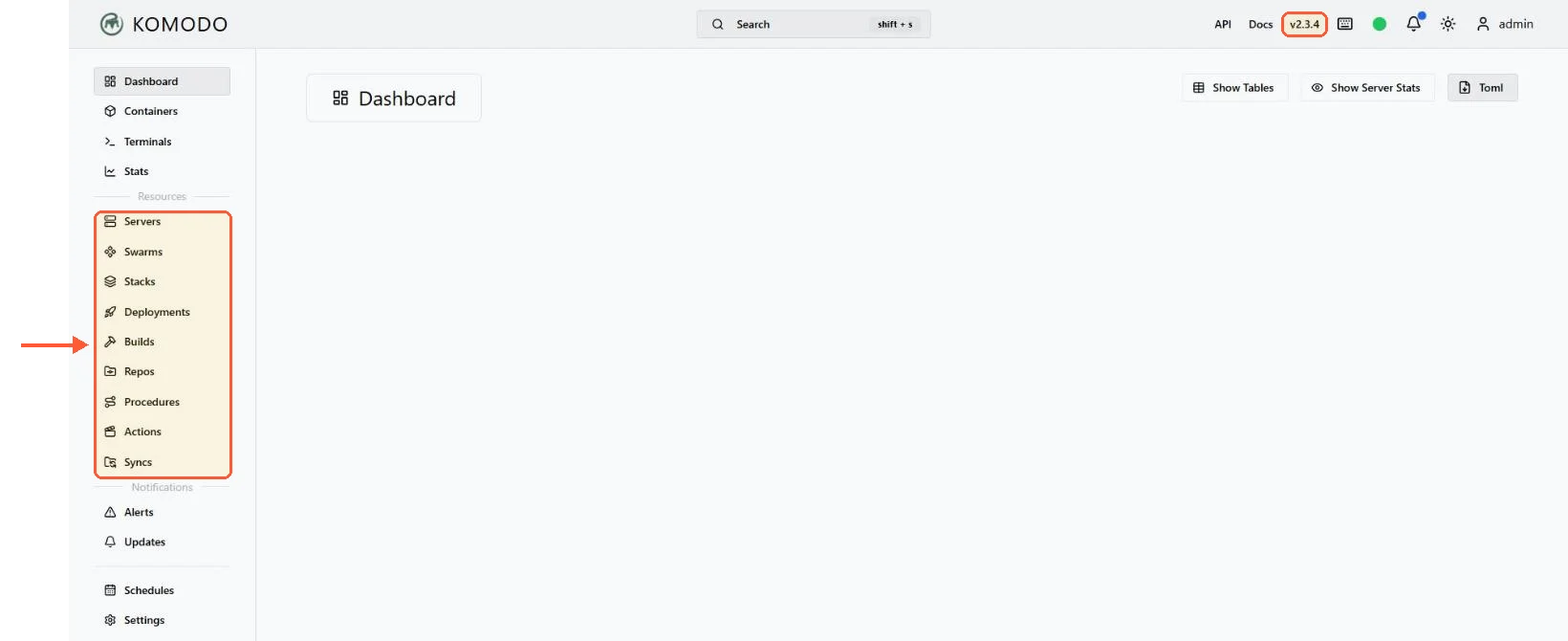
Komodo 2.3.4 sidebar listing Servers, Swarms, Stacks, Deployments, Builds, Repos, Procedures, Actions and Syncs

Komodo's resource menu goes well past containers: builds, procedures, actions and syncs sit next to stacks.

Where it loses to Portainer is simplicity on a single host, where the Core plus database plus Periphery arrangement is more machinery than the job needs, and any Kubernetes cluster, which Komodo doesn't manage. The Komodo vs Portainer comparison goes through the connection modes (since version 2, Periphery can connect out to Core as well as the other way round) and what each means for firewalls.

Pick it for: three or more servers, compose-based deployments, a preference for configuration in version control, RBAC without a licence.

Arcane

Arcane is the newest single-host manager with real momentum, at 8.1k GitHub stars and a 2.17.1 release on 25 October 2026. Go backend, SvelteKit frontend, BSD-3-Clause. The Manager listens on 3552, and the compose file in the Arcane installation docs needs an APP_URL and a 32-byte ENCRYPTION_KEY before it will start. It covers containers, images, volumes, networks and compose projects with a modern interface, supports OIDC single sign-on, and current versions manage remote hosts through its own agent in either direction: direct mode where the Manager connects to the agent on port 3553, or edge mode where the agent connects outbound to the Manager, which is the same idea as Portainer's Edge Agent.

The cost of that pace is age. A project moving this quickly changes its configuration between versions (the docs currently note that JWT_SECRET is no longer used and warns on startup if it's still set), and its docs cover Docker Swarm and Podman but don't mention Kubernetes cluster management. It's also the entry on this list with the least operational history behind it, so run it for a month on something unimportant before it manages anything that matters.

Between Arcane and Dockge for a single host I'd take Arcane now, mostly because it's shipping and Dockge isn't tagging releases. If Dockge cuts a 1.6 that changes.

Dockhand

Dockhand pitches itself as "Modern Docker management for everyone" and its feature list reads like a Portainer CE replacement with a few Business-style extras: container operations, compose stacks, Git deployments, multi-host management (with an agent called Hawser for hosts behind NAT), OIDC single sign-on, TOTP two-factor login, vulnerability scanning, notifications, external secrets and a REST API. The install is a single docker run of fnsys/dockhand:latest with the socket and a data volume mounted, listening on port 3000. It is still on the 1.0.x line, with v1.0.56 released on 30 October 2026.

Read the licence before you adopt it. Dockhand is under the Business Source License 1.1, and each version converts to Apache 2.0 four years after its release, per the licence file in the Dockhand repository and dockhand.pro alike. The source is public, but BSL restricts certain production and commercial uses until the conversion date, and dockhand.pro says its free tier carries no commercial usage licence (a paid SMB tier adds one). Role-based access control, LDAP and audit logging sit in a paid Enterprise tier. For a homelab that changes nothing. For a company standardising on a tool, it's a conversation with whoever handles licensing.

Coolify

Coolify isn't a Docker manager. It's a self-hosted PaaS in the Heroku and Vercel mould that happens to run everything as Docker containers: connect a git repo, pick a buildpack or a Dockerfile, get a deployed app with a domain and a Let's Encrypt certificate, with databases and one-click services alongside. Version 4.5.3 shipped 28 October 2026 under the Apache 2.0 licence, and the dashboard sits on port 8000. If the reason you're looking past Portainer is that you want deployments to happen on git push and you'd like the tool to handle the reverse proxy, this is the category you want. The install is a shell script that takes a few minutes, covered in install Coolify on Ubuntu 24.04.

The trade is control over containers that Coolify didn't create. It will happily coexist with them but doesn't manage them, and it expects to own the Traefik or Caddy proxy on the host.

Dokploy

Same category as Coolify, smaller and simpler. Dokploy deploys applications, databases and compose stacks from git or an image, uses Traefik for routing, supports Docker Swarm for multi-node and runs its UI on port 3000. Releases are frequent; 0.30.10 landed 22 October 2026. The licence is Apache 2.0, apart from a /proprietary directory in the repository that carries its own terms. The two PaaS options are compared directly in Coolify vs Dokploy, and the version number below 1.0 is honest about where Dokploy is.

Lazydocker

A terminal UI, not a web one. Lazydocker is a Go program that draws containers, compose projects, images and volumes in panes inside your SSH session, with keybindings for logs, stats, restart, remove and prune. No port, no login, no daemon, nothing listening on the network. It reads the same Docker socket as everything else on this list. MIT licensed, and the current release is v0.25.2 from 19 April 2026.

The Lazydocker repository has install instructions for every platform, and on a server the install script is the simplest one: it puts the binary in $HOME/.local/bin unless you set DIR to another folder. It replaces the part of Portainer most people use on a single VPS, which is looking at what's running and reading a log without typing container IDs. It replaces nothing else.

CasaOS

CasaOS calls itself a personal cloud system. It installs onto an existing Linux host with a shell script, takes port 80 for its dashboard when it's free (the installer moves to the next free port otherwise) and gives you an app store of self-hosted services that deploy as containers, plus file management and basic system stats. The audience is people who want a NAS-like experience on a small box, and for that audience it's the friendliest thing here.

Two reasons it's near the bottom. The CasaOS repository (Apache-2.0) marks v0.4.15 as the latest stable release, with a v0.4.17-alpha1 pre-release as the newest tag, so it moves slowly. And it's a system that wants to own the machine, port 80 included whenever 80 is free, which is the opposite of what you want on a VPS you plan to put a web server on.

Your idea deserves better hosting

24/7 support 30-day money-back guaranteeRefund covers the VPS plan on your first order. Cancel anytime
Verrechnungszyklus

VPS.S1

$5.99 Save  17 %
$4.99 Monatlich
  • 2 vCPU AMD EPYC
  • 2 GB RAMRAM
  • 30 GB NVMeSPEICHER
  • Unbegrenzter Traffic
  • IPv4 & IPv6IPv6-Support ist derzeit nicht verfügbar in Frankreich, Finnland oder den Niederlanden. inklusive

VPS.S3

$14.99 Save  33 %
$9.99 Monatlich
  • 4 vCPU AMD EPYC
  • 6 GB RAMRAM
  • 70 GB NVMeSPEICHER
  • Unbegrenzter Traffic
  • IPv4 & IPv6IPv6-Support ist derzeit nicht verfügbar in Frankreich, Finnland oder den Niederlanden. inklusive

VPS.S4

$19.99 Save  20 %
$15.99 Monatlich
  • 6 vCPU AMD EPYC
  • 8 GB RAMRAM
  • 80 GB NVMeSPEICHER
  • Unbegrenzter Traffic
  • IPv4 & IPv6IPv6-Support ist derzeit nicht verfügbar in Frankreich, Finnland oder den Niederlanden. inklusive

EPYC VPS.P1

$8.99 Save  22 %
$6.99 Monatlich
  • 2 vCPU AMD EPYC
  • 4 GB RAMRAM
  • 40 GB NVMeSPEICHER
  • Unbegrenzter Traffic
  • IPv4 & IPv6IPv6-Support ist derzeit nicht verfügbar in Frankreich, Finnland oder den Niederlanden. inklusive
  • Kostenloses Auto-BackupEnthält einen Backup-Slot, den du auf täglich, wöchentlich oder monatlich einstellen kannst.

EPYC VPS.P2

$16.99 Save  24 %
$12.99 Monatlich
  • 2 vCPU AMD EPYC
  • 8 GB RAMRAM
  • 80 GB NVMeSPEICHER
  • Unbegrenzter Traffic
  • IPv4 & IPv6IPv6-Support ist derzeit nicht verfügbar in Frankreich, Finnland oder den Niederlanden. inklusive
  • Kostenloses Auto-BackupEnthält einen Backup-Slot, den du auf täglich, wöchentlich oder monatlich einstellen kannst.

EPYC VPS.P4

$29.99 Save  23 %
$22.99 Monatlich
  • 4 vCPU AMD EPYC
  • 16 GB RAMRAM
  • 160 GB NVMeSPEICHER
  • Unbegrenzter Traffic
  • IPv4 & IPv6IPv6-Support ist derzeit nicht verfügbar in Frankreich, Finnland oder den Niederlanden. inklusive
  • Kostenloses Auto-BackupEnthält einen Backup-Slot, den du auf täglich, wöchentlich oder monatlich einstellen kannst.

EPYC VPS.P5

$39.99 Save  25 %
$29.99 Monatlich
  • 8 vCPU AMD EPYC
  • 16 GB RAMRAM
  • 180 GB NVMeSPEICHER
  • Unbegrenzter Traffic
  • IPv4 & IPv6IPv6-Support ist derzeit nicht verfügbar in Frankreich, Finnland oder den Niederlanden. inklusive
  • Kostenloses Auto-BackupEnthält einen Backup-Slot, den du auf täglich, wöchentlich oder monatlich einstellen kannst.

EPYC VPS.P6

$59.99 Save  25 %
$44.99 Monatlich
  • 8 vCPU AMD EPYC
  • 32 GB RAMRAM
  • 200 GB NVMeSPEICHER
  • Unbegrenzter Traffic
  • IPv4 & IPv6IPv6-Support ist derzeit nicht verfügbar in Frankreich, Finnland oder den Niederlanden. inklusive
  • Kostenloses Auto-BackupEnthält einen Backup-Slot, den du auf täglich, wöchentlich oder monatlich einstellen kannst.

EPYC VPS.P7

$69.99 Save  29 %
$49.99 Monatlich
  • 16 vCPU AMD EPYC
  • 32 GB RAMRAM
  • 240 GB NVMeSPEICHER
  • Unbegrenzter Traffic
  • IPv4 & IPv6IPv6-Support ist derzeit nicht verfügbar in Frankreich, Finnland oder den Niederlanden. inklusive
  • Kostenloses Auto-BackupEnthält einen Backup-Slot, den du auf täglich, wöchentlich oder monatlich einstellen kannst.

Genoa VPS.G2

$24.99 Save  20 %
$19.99 Monatlich
  • 2 vCPUAMD EPYC Genoa 4. Generation 9xx4 mit 3,25 GHz oder ähnlich, auf Zen 4-Architektur. AMD EPYC G4
  • 4 GB DDR5RAM
  • 50 GB NVMeSPEICHER
  • Unbegrenzter Traffic
  • IPv4 & IPv6IPv6-Support ist derzeit nicht verfügbar in Frankreich, Finnland oder den Niederlanden. inklusive
  • Kostenloses Auto-BackupEnthält einen Backup-Slot, den du auf täglich, wöchentlich oder monatlich einstellen kannst.

Genoa VPS.G4

$44.99 Save  22 %
$34.99 Monatlich
  • 4 vCPUAMD EPYC Prozessor mit dedizierten vCPU Kernen, auf Enterprise Serverhardware. AMD EPYC G4
  • 8 GB DDR5RAM
  • 100 GB NVMeSPEICHER
  • Unbegrenzter Traffic
  • IPv4 & IPv6IPv6-Support ist derzeit nicht verfügbar in Frankreich, Finnland oder den Niederlanden. inklusive
  • Kostenloses Auto-BackupEnthält einen Backup-Slot, den du auf täglich, wöchentlich oder monatlich einstellen kannst.

Genoa VPS.G6

$89.99 Save  22 %
$69.99 Monatlich
  • 8 vCPUAMD EPYC Prozessor mit dedizierten vCPU Kernen, auf Enterprise Serverhardware. AMD EPYC G4
  • 16 GB DDR5RAM
  • 200 GB NVMeSPEICHER
  • Unbegrenzter Traffic
  • IPv4 & IPv6IPv6-Support ist derzeit nicht verfügbar in Frankreich, Finnland oder den Niederlanden. inklusive
  • Kostenloses Auto-BackupEnthält einen Backup-Slot, den du auf täglich, wöchentlich oder monatlich einstellen kannst.

Genoa VPS.G7

$159.99 Save  22 %
$124.99 Monatlich
  • 8 vCPUAMD EPYC Prozessor mit dedizierten vCPU Kernen, auf Enterprise Serverhardware. AMD EPYC G4
  • 32 GB DDR5RAM
  • 250 GB NVMeSPEICHER
  • Unbegrenzter Traffic
  • IPv4 & IPv6IPv6-Support ist derzeit nicht verfügbar in Frankreich, Finnland oder den Niederlanden. inklusive
  • Kostenloses Auto-BackupEnthält einen Backup-Slot, den du auf täglich, wöchentlich oder monatlich einstellen kannst.

AMD Ryzen VPS.R1

$16.99 Save  18 %
$13.99 Monatlich
  • 1 dedizierter CPU AMD Ryzen 9 7950X mit 4,5 GHz oder ähnlich, auf Zen 4-Architektur. vCPU
  • 4 GB DDR5RAM
  • 50 GB NVMeSPEICHER
  • Unbegrenzter Traffic
  • IPv4 & IPv6 inklusive IPv6-Support ist derzeit nicht verfügbar in Frankreich, Finnland oder den Niederlanden.
  • Auto-Backup inklusive

AMD Ryzen VPS.R2

$29.99 Save  17 %
$24.99 Monatlich
  • 2 dedizierte CPUs AMD Ryzen 9 7950X mit 4,5 GHz oder ähnlich, auf Zen 4-Architektur. vCPU
  • 8 GB DDR5RAM
  • 100 GB NVMeSPEICHER
  • Unbegrenzter Traffic
  • IPv4 & IPv6 inklusive IPv6-Support ist derzeit nicht verfügbar in Frankreich, Finnland oder den Niederlanden.
  • Auto-Backup inklusive

AMD Ryzen VPS.R4

$109.99 Save  18 %
$89.99 Monatlich
  • 8 dedizierte CPUs AMD Ryzen 9 7950X mit 4,5 GHz oder ähnlich, auf Zen 4-Architektur. vCPU
  • 32 GB DDR5RAM
  • 400 GB NVMeSPEICHER
  • Unbegrenzter Traffic
  • IPv4 & IPv6 inklusive IPv6-Support ist derzeit nicht verfügbar in Frankreich, Finnland oder den Niederlanden.
  • Auto-Backup inklusive

*VAT excluded.

INCLUDED WITH EVERY PLAN

✓ No setup fees ✓1 Gbps network
✓ Full root access on KVM ✓ Free server monitoring ✓ Firewall management ✓24/7 support

Rancher, for the Kubernetes case

If your reason for leaving Portainer is that Docker is on its way out and Kubernetes is on its way in, the alternative isn't a Docker UI at all. Rancher is the multi-cluster Kubernetes management platform from SUSE, with RBAC, cluster provisioning and a catalog, Apache 2.0 licensed and at v2.15.3 since 29 October 2026. It's a much larger install than anything else on this page and it manages nothing that isn't Kubernetes. Portainer's Kubernetes support is lighter and stays within reach of a single operator; Rancher is what teams pick when the cluster count passes one. On a small K3s setup, Portainer's Kubernetes mode is usually enough.

Portainer Business Edition

Portainer CE has an alternative inside its own product line. Business Edition is the same product with RBAC, activity logs and the other gated features switched on, free up to 3 nodes (Portainer's licensing FAQ describes a key you renew before it expires, though its marketing says "no expiry"), and the full split is in Portainer CE vs Portainer Business Edition. For a homelab with two hosts and a desire for per-user permissions, the free BE licence solves the problem without changing tools.

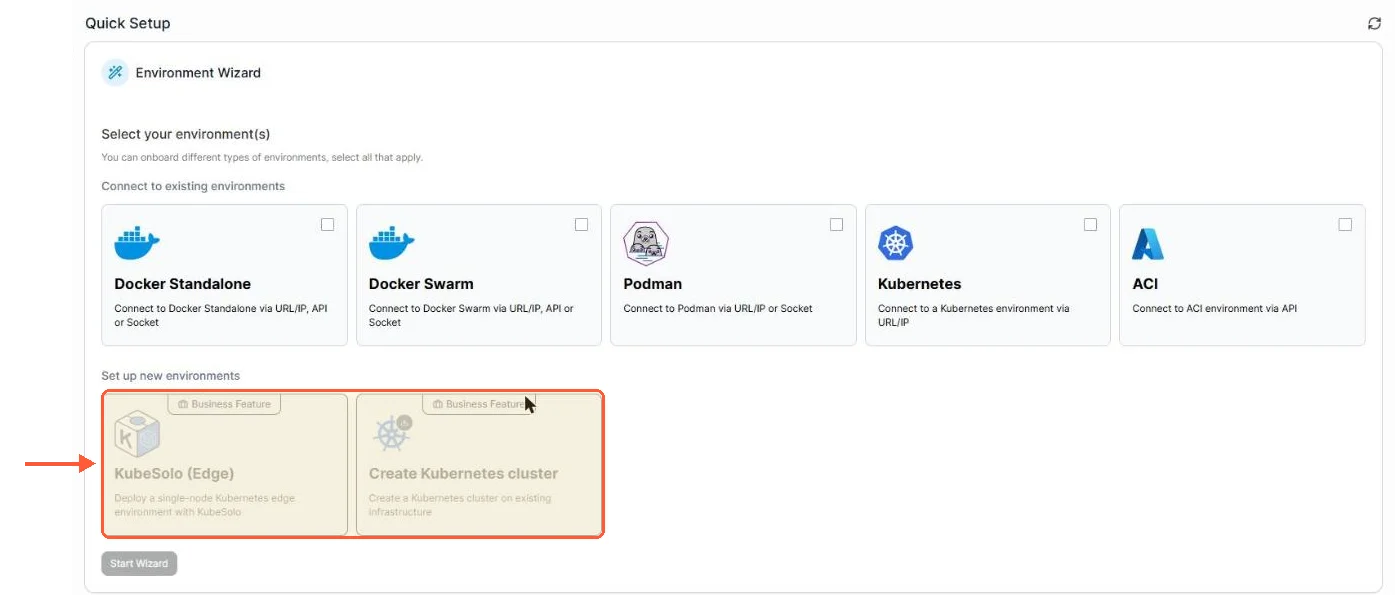
It is also where Portainer is heading. In September 2026 the company announced 3.0 as a Kubernetes-first line that will remain free under the 3 Nodes Free program, and on 29 October 2026 it shipped 3.0.0 to Business Edition users only, as a short-term-support build. Community Edition remains on 2.x, with 2.45 as its last release line. Docker, Swarm and Podman keep working in 3.x but stop getting new policy, GitOps and observability features.

Portainer CE 2.45.3 environment wizard: KubeSolo (Edge) and Create Kubernetes cluster greyed out with Business Feature badges

In CE 2.45.3 the new Kubernetes options in the environment wizard already carry Business Feature badges.

One to skip

Yacht was the template-driven Portainer alternative of 2020 and 2021. The project moved to Yacht-sh/Yacht on GitHub and cut v1.1 in September 2026 after years without a release. It's back in development, but too early to bet a server on.

If you need a Swarm UI today, Portainer, Komodo and Arcane all list Swarm support.

Which one, by situation

Single VPS, everything in compose, one operator: Arcane or Dockge, with the cadence caveat on Dockge above. Single VPS with mixed containers and a colleague who needs a login: Portainer CE, or Portainer BE on the free licence if that colleague needs restricted permissions. Several servers you own: Komodo. Several servers where some are behind NAT: Komodo with an outbound Periphery, Portainer with the Edge Agent, or Arcane in edge mode if you're comfortable with its age. Git push deployments with a managed proxy: Coolify, or Dokploy if you want less. Just want to read logs over SSH: Lazydocker.

And if the answer after all that is still Portainer, the fastest route to a working install is the Portainer VPS template, a one-click deployment of Portainer CE at order time.

One thing this list can't tell you is how each of these behaves at a hundred containers on one host. None of the sources above measure it, so test that yourself before moving a busy server.

Questions?

Is there a Portainer alternative that works with Podman?

Yes: Dockge lists Podman as a supported runtime in its README (on Debian with the podman-docker package), and Arcane's docs have a Podman section that covers pods, Quadlets and secrets. Cockpit's cockpit-podman plugin adds a container page to the Cockpit admin UI, packaged for Fedora, RHEL, Debian and Ubuntu. Komodo's docs are written around Docker. Portainer itself manages Podman as well, though the only officially supported setup is Podman 5.x on CentOS 9 running as root.

About the author

Lucía Elena Navarro

I was born in Zaragoza and have lived in Valencia since my twenties. My first work with language was translation: training materials and software interfaces. Then several years in customer education.

I have 3 kids, so my working day is organised carefully. I work very early. I like having a quiet hour before the house wakes up, especially when I need to understand something new before I can explain it. Professionally, I have written a lot about Linux servers and cloud services. In recent years I have done more editing. I enjoy this part because two writers can understand the same technical subject and still choose completely different ways to explain it. At home, we have been playing in the same Minecraft world for nearly 5 years. I am responsible mainly for storage rooms and keeping the animals where they are supposed to be.

Deploy your next project in seconds

Bring your winning ideas online faster, with modern hardware and unmetered bandwidth. Join a European cloud trusted by thousands of developers and businesses worldwide.