Back to Article List

Portainer CE vs Portainer Business Edition

Portainer CE vs Portainer Business Edition - Portainer CE vs Portainer Business Edition

Updated and tested 1 November 2026

Three nodes. That's the number that decides most of this. Portainer Community Edition is open source under the zlib licence, has no licence key and no node limit. Portainer Business Edition is the commercial edition, needs a licence key and is free up to 3 nodes with no trial period and no card on file, though the key has an expiry date and is renewed through a form. Paid plans start above that. Below the line, the question is which feature set you want. Above it, the question is which one you're willing to pay for.

What counts as a node

Portainer's definition, from its pricing page: any server, VM, Raspberry Pi, desktop, laptop, industrial computer or embedded device capable of running containers that is either running the Portainer Server or is managed by one. Two details catch people. The machine running the Server counts when Portainer also manages it, which is the usual setup on a single VPS; a Server that only manages other machines doesn't use a licence, according to the node definition in the licensing FAQ. And a Swarm or Kubernetes cluster counts per node, not per cluster, so a three-node Swarm plus a VPS where Portainer also manages its own Docker is four nodes and outside the free tier.

The free tier used to be 5 nodes, and older tutorials still say five. The 3 Nodes Free program replaced it for new users, and existing 5 Nodes Free keys run until their expiry date. After that, Portainer's renewal FAQ says 5 nodes stays available for non-commercial use only, and commercial users move to the 3-node key.

Features behind the Business licence key

The Community Edition is a full product. It manages Docker standalone, Swarm, Kubernetes and Podman environments, deploys stacks from compose files and git repositories, has users and teams with per-environment access, app templates, registries, the Agent and the Edge Agent. The Portainer stacks guide and everything else in this tutorial series runs on CE.

A few screens in my CE 2.45.3 install showed Business Feature badges on things CE users tend to expect: webhooks on running stacks and on containers, and scheduled backups to S3. The one webhook CE does offer is a toggle on the repository form, at the moment you create the stack.
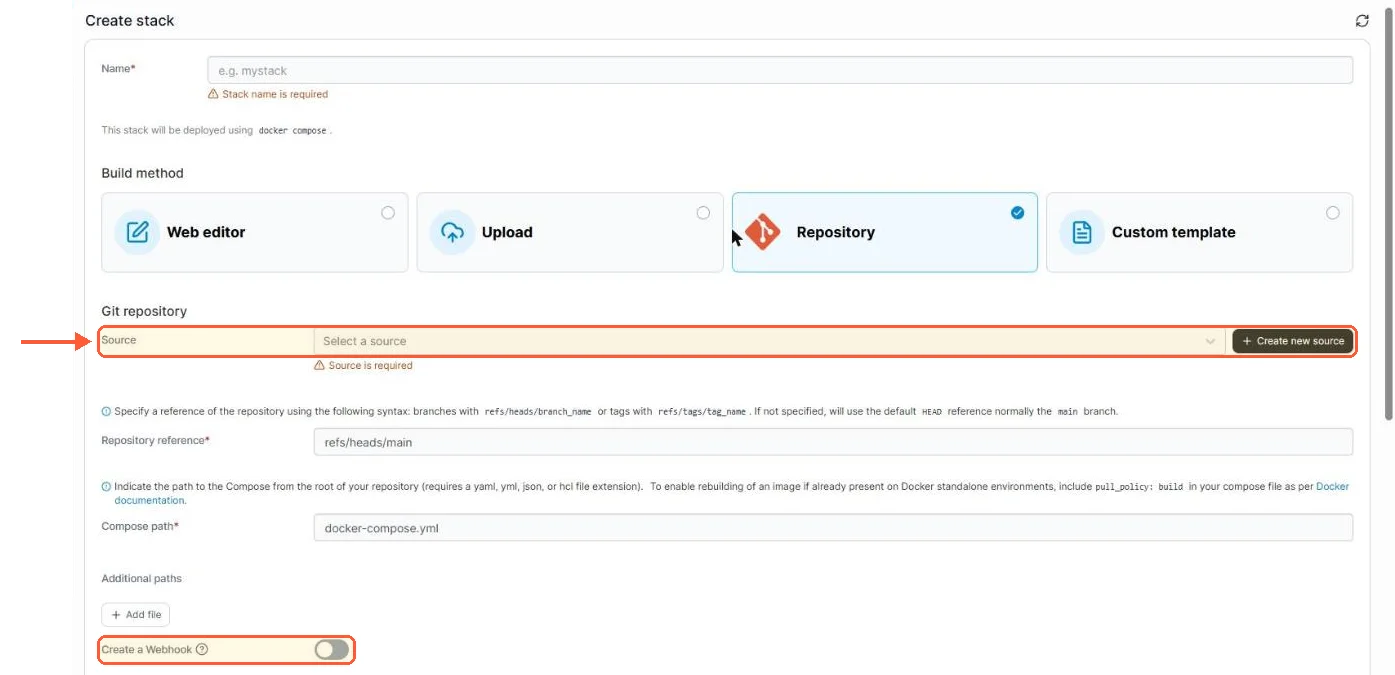
Portainer CE Create stack from Repository: Source picker, reference, compose path and a Create a Webhook toggle

In CE 2.45.3 a git stack starts from a saved Source, and the webhook toggle is on the create form.

CE's own backup is a manual download of Portainer's configuration, and the Settings page says it "does not include containers", so your volumes need a backup of their own.
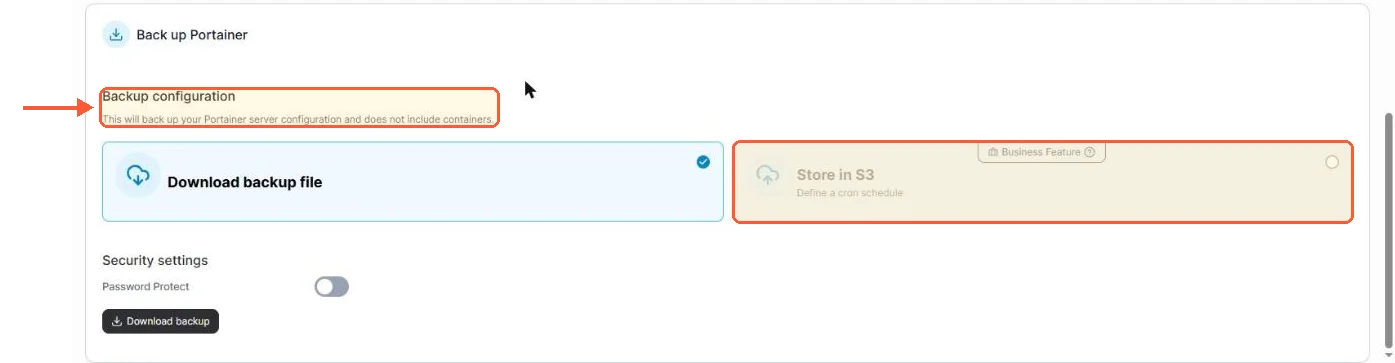
Portainer CE backup covers configuration, not containers; Store in S3 on a cron schedule is marked Business Feature

CE backs up Portainer's own configuration as a download; scheduled S3 backups are a Business feature.

Business Edition adds the layer an organisation asks for. Role-based access control is the biggest of them and the first one people run into: CE has users, teams and an Administrator flag, while BE has the full role hierarchy of Administrator, Environment administrator, Edge administrator, Operator, Helpdesk, Namespace operator, Standard user and Read-only user, per the Portainer roles documentation. Around that, Portainer's own CE versus BE comparison lists single sign-on with provider templates and Active Directory, registry management with image update notifications, audit logs with syslog export, kubeconfig import, Kubernetes cluster provisioning, fleet governance policies, GitOps extras like change windows and stored git credentials, and commercial support. CE is not supported by Portainer; the forums and GitHub issues are what you get.
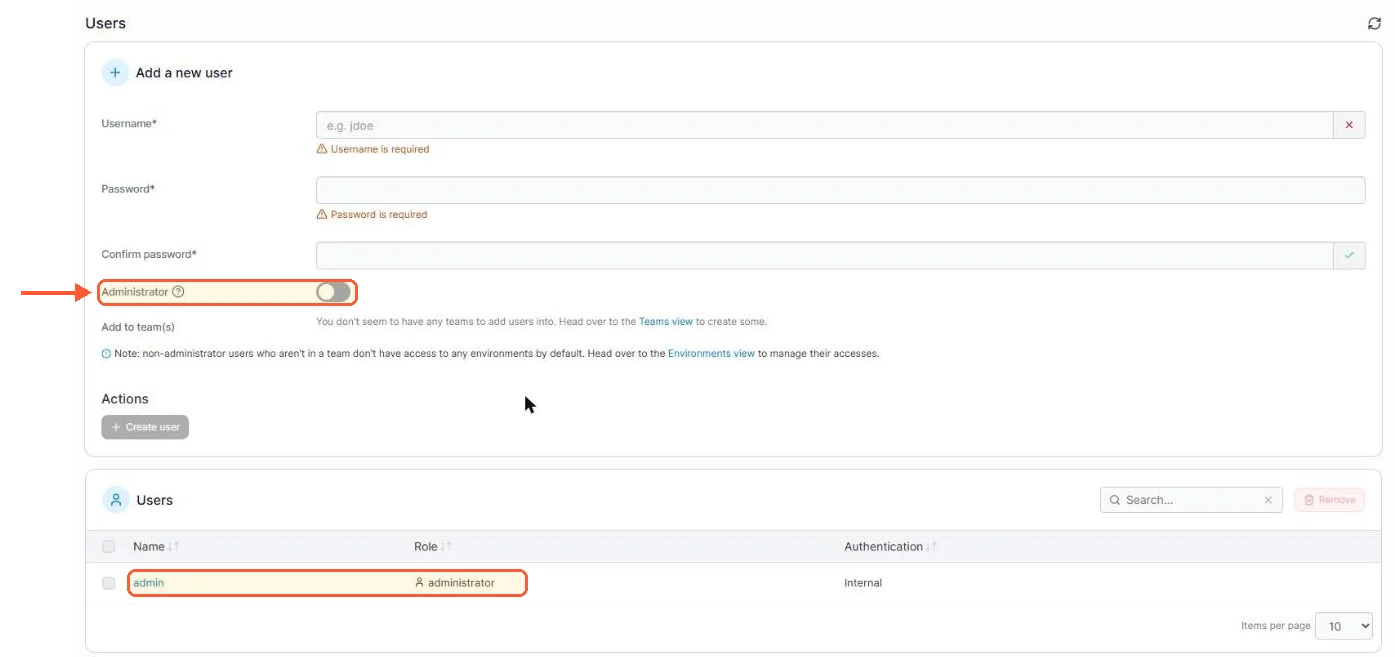
Portainer CE Add a new user form with only an Administrator toggle, and the admin user listed with role administrator

In CE the only role choice for a new user is the Administrator toggle.

The flat version of that paragraph, for scanning: if the words RBAC, SSO, audit log or support contract appear in your requirements, it's BE. If they don't, CE does the job.
Your idea deserves better hosting

24/7 support 30-day money-back guaranteeRefund covers the VPS plan on your first order. Cancel anytime
Billing Cycle

VPS.S1

£4.47 Save  17 %
£3.72 Monthly
  • 2 vCPU AMD EPYC
  • 2 GB RAMMEMORY
  • 30 GB NVMeSTORAGE
  • Unmetered bandwidth
  • IPv4 & IPv6IPv6 is currently unavailable in France, Finland or the Netherlands. included

VPS.S3

£11.19 Save  33 %
£7.46 Monthly
  • 4 vCPU AMD EPYC
  • 6 GB RAMMEMORY
  • 70 GB NVMeSTORAGE
  • Unmetered bandwidth
  • IPv4 & IPv6IPv6 is currently unavailable in France, Finland or the Netherlands. included

VPS.S4

£14.92 Save  20 %
£11.93 Monthly
  • 6 vCPU AMD EPYC
  • 8 GB RAMMEMORY
  • 80 GB NVMeSTORAGE
  • Unmetered bandwidth
  • IPv4 & IPv6IPv6 is currently unavailable in France, Finland or the Netherlands. included

EPYC VPS.P1

£6.71 Save  22 %
£5.22 Monthly
  • 2 vCPU AMD EPYC
  • 4 GB RAMMEMORY
  • 40 GB NVMeSTORAGE
  • Unmetered bandwidth
  • IPv4 & IPv6IPv6 is currently unavailable in France, Finland or the Netherlands. included
  • Free auto backupsIncludes one backup slot you can set to run daily, weekly or monthly.

EPYC VPS.P2

£12.68 Save  24 %
£9.70 Monthly
  • 2 vCPU AMD EPYC
  • 8 GB RAMMEMORY
  • 80 GB NVMeSTORAGE
  • Unmetered bandwidth
  • IPv4 & IPv6IPv6 is currently unavailable in France, Finland or the Netherlands. included
  • Free auto backupsIncludes one backup slot you can set to run daily, weekly or monthly.

EPYC VPS.P4

£22.38 Save  23 %
£17.16 Monthly
  • 4 vCPU AMD EPYC
  • 16 GB RAMMEMORY
  • 160 GB NVMeSTORAGE
  • Unmetered bandwidth
  • IPv4 & IPv6IPv6 is currently unavailable in France, Finland or the Netherlands. included
  • Free auto backupsIncludes one backup slot you can set to run daily, weekly or monthly.

EPYC VPS.P5

£29.85 Save  25 %
£22.38 Monthly
  • 8 vCPU AMD EPYC
  • 16 GB RAMMEMORY
  • 180 GB NVMeSTORAGE
  • Unmetered bandwidth
  • IPv4 & IPv6IPv6 is currently unavailable in France, Finland or the Netherlands. included
  • Free auto backupsIncludes one backup slot you can set to run daily, weekly or monthly.

EPYC VPS.P6

£44.77 Save  25 %
£33.58 Monthly
  • 8 vCPU AMD EPYC
  • 32 GB RAMMEMORY
  • 200 GB NVMeSTORAGE
  • Unmetered bandwidth
  • IPv4 & IPv6IPv6 is currently unavailable in France, Finland or the Netherlands. included
  • Free auto backupsIncludes one backup slot you can set to run daily, weekly or monthly.

EPYC VPS.P7

£52.24 Save  29 %
£37.31 Monthly
  • 16 vCPU AMD EPYC
  • 32 GB RAMMEMORY
  • 240 GB NVMeSTORAGE
  • Unmetered bandwidth
  • IPv4 & IPv6IPv6 is currently unavailable in France, Finland or the Netherlands. included
  • Free auto backupsIncludes one backup slot you can set to run daily, weekly or monthly.

Genoa VPS.G2

£18.65 Save  20 %
£14.92 Monthly
  • 2 vCPUAMD EPYC Genoa 4th generation 9xx4 with 3.25 GHz or similar, on Zen 4 architecture. AMD EPYC G4
  • 4 GB DDR5MEMORY
  • 50 GB NVMeSTORAGE
  • Unmetered bandwidth
  • IPv4 & IPv6IPv6 is currently unavailable in France, Finland or the Netherlands. included
  • Free auto backupsIncludes one backup slot you can set to run daily, weekly or monthly.

Genoa VPS.G4

£33.58 Save  22 %
£26.11 Monthly
  • 4 vCPUAMD EPYC Genoa 4th generation 9xx4 with 3.25 GHz or similar, on Zen 4 architecture. AMD EPYC G4
  • 8 GB DDR5MEMORY
  • 100 GB NVMeSTORAGE
  • Unmetered bandwidth
  • IPv4 & IPv6IPv6 is currently unavailable in France, Finland or the Netherlands. included
  • Free auto backupsIncludes one backup slot you can set to run daily, weekly or monthly.

Genoa VPS.G6

£67.16 Save  22 %
£52.24 Monthly
  • 8 vCPUAMD EPYC Genoa 4th generation 9xx4 with 3.25 GHz or similar, on Zen 4 architecture. AMD EPYC G4
  • 16 GB DDR5MEMORY
  • 200 GB NVMeSTORAGE
  • Unmetered bandwidth
  • IPv4 & IPv6IPv6 is currently unavailable in France, Finland or the Netherlands. included
  • Free auto backupsIncludes one backup slot you can set to run daily, weekly or monthly.

Genoa VPS.G7

£119.41 Save  22 %
£93.28 Monthly
  • 8 vCPUAMD EPYC Genoa 4th generation 9xx4 with 3.25 GHz or similar, on Zen 4 architecture. AMD EPYC G4
  • 32 GB DDR5MEMORY
  • 250 GB NVMeSTORAGE
  • Unmetered bandwidth
  • IPv4 & IPv6IPv6 is currently unavailable in France, Finland or the Netherlands. included
  • Free auto backupsIncludes one backup slot you can set to run daily, weekly or monthly.

AMD Ryzen VPS.R1

£12.68 Save  18 %
£10.44 Monthly
  • 1 dedicated CPU AMD Ryzen 9 7950X with 4.5 GHz or similar, on Zen 4 architecture. vCPU
  • 4 GB DDR5MEMORY
  • 50 GB NVMeSTORAGE
  • Unmetered bandwidth
  • IPv4 & IPv6 included IPv6 support is currently unavailable in France, Finland or the Netherlands.
  • Auto backup included

AMD Ryzen VPS.R2

£22.38 Save  17 %
£18.65 Monthly
  • 2 dedicated CPUs AMD Ryzen 9 7950X with 4.5 GHz or similar, on Zen 4 architecture. vCPU
  • 8 GB DDR5MEMORY
  • 100 GB NVMeSTORAGE
  • Unmetered bandwidth
  • IPv4 & IPv6 included IPv6 support is currently unavailable in France, Finland or the Netherlands.
  • Auto backup included

AMD Ryzen VPS.R4

£82.09 Save  18 %
£67.16 Monthly
  • 8 dedicated CPUs AMD Ryzen 9 7950X with 4.5 GHz or similar, on Zen 4 architecture. vCPU
  • 32 GB DDR5MEMORY
  • 400 GB NVMeSTORAGE
  • Unmetered bandwidth
  • IPv4 & IPv6 included IPv6 support is currently unavailable in France, Finland or the Netherlands.
  • Auto backup included

*VAT excluded.

INCLUDED WITH EVERY PLAN

✓ No setup fees ✓1 Gbps network
✓ Full root access on KVM ✓ Free server monitoring ✓ Firewall management ✓24/7 support

When to pick which

A homelab with one to three hosts and a second person who should see things but not delete them: take the free BE key. It's the same data volume under the BE image with a licence key entered at first login, it costs nothing at that size, and the Read-only role is exactly what the second person needs. The one reason to stay on CE at that size is a preference for open-source software with no licence key and no dependency on Portainer's licensing servers, which is a real preference and the zlib licence is the argument for it.

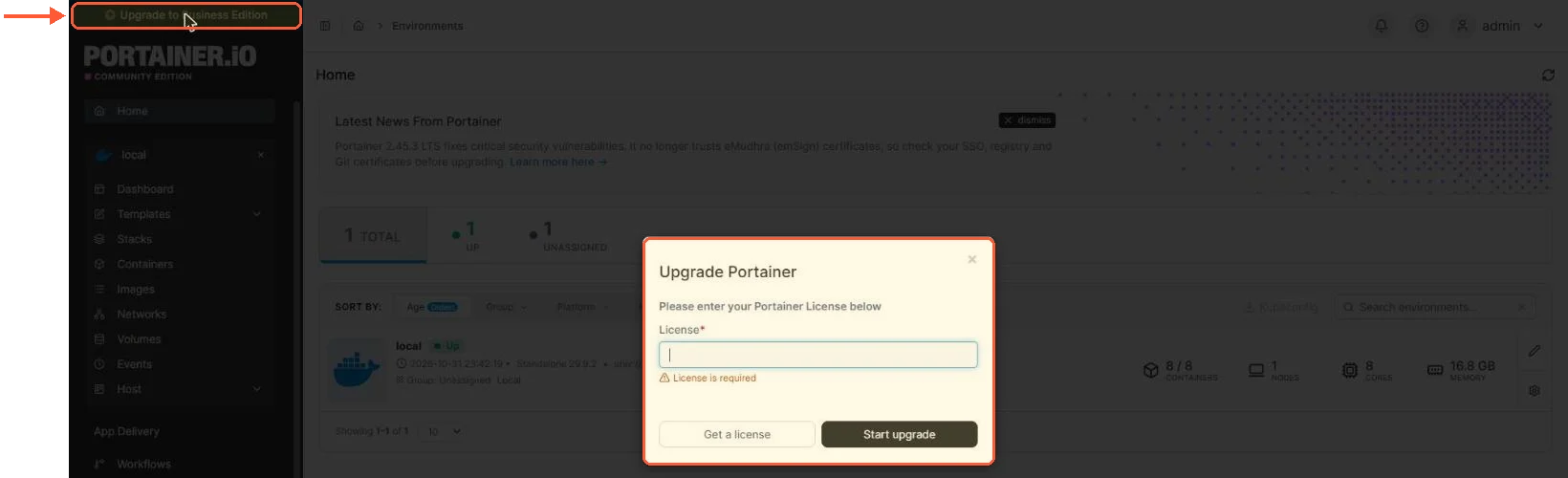
Portainer CE Upgrade Portainer dialog asking for a License, opened from the Upgrade to Business Edition banner

CE's Upgrade to Business Edition banner opens this dialog; the free key goes in the License field.

One more factor since September 2026: Portainer announced a 3.0 built around Kubernetes, released 3.0.0 for Business Edition on 29 October 2026 and said CE stays on 2.x, with no separate CE 3.x build. The 2.45 LTS is the last 2.x line and keeps getting security fixes and backports until the end of its support window, which the Portainer lifecycle page puts at May 2027. Portainer says 3.x will stay free under the same 3 Nodes Free program, so on a small homelab the free BE key is also the way onto 3.x. Version 3.0.0 is a short-term-support release, which Portainer's own 3.0 notes don't recommend for production, and the lifecycle page plans the first 3.x LTS (3.3) for December 2026.

A single production VPS with one operator: CE. There's nothing in BE that a single admin uses day to day, and CE's LTS releases (2.45 LTS, supported until May 2027) are the same codebase with the gated features off. LumaDock's Portainer VPS template installs CE in one click, and moving that install to BE later reuses the same data volume.

Four nodes or more with a need for roles: this is where the comparison leaves Portainer's own product line. Business at that size is a paid plan (Starter starts at 5 nodes), and Komodo ships RBAC under GPL with no node limit at all, which is the case made in the Komodo vs Portainer comparison. Kubernetes in the mix pulls the answer back toward Portainer BE, since Komodo doesn't manage it.

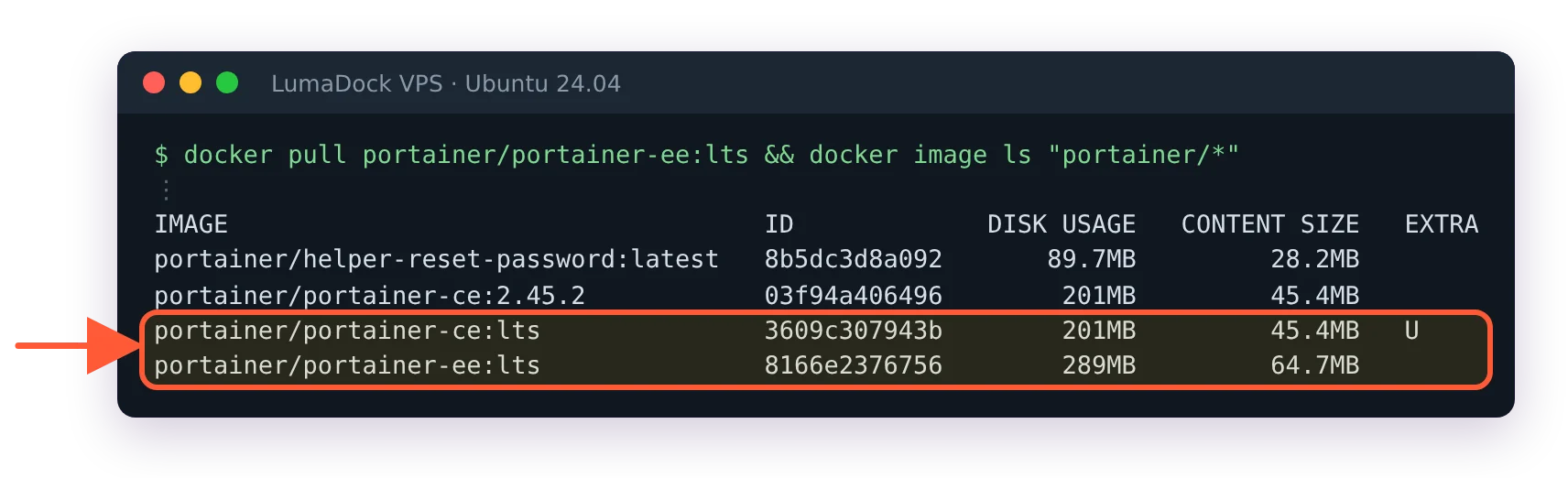
Switching from CE to BE is a container swap. The images are portainer/portainer-ce and portainer/portainer-ee, both read the same portainer_data volume, and the update Portainer procedure covers the stop, remove and re-run sequence that applies to a version bump and an edition change alike. Portainer's CE to BE upgrade page is the reference for the exact docker run line, and there is also an in-app upgrade from the Upgrade to Business Edition link in the UI. That page covers only the CE to BE direction, so take a copy of the volume before switching either way.

docker image ls lists portainer/portainer-ce:lts at 201MB and portainer/portainer-ee:lts at 289MB on the same server

The Business Edition image is a separate pull, portainer-ee, sitting next to the CE image I was running.

Questions?

Is Portainer free for commercial use?

Yes, Community Edition's zlib licence allows commercial use, though Portainer's README now positions CE for homelabs and non-production work and offers no support for it. Business Edition's 3 Nodes Free key is open to home and business users alike, according to Portainer's licensing FAQ. A commercial setup above three nodes needs a paid Business plan.

About the author

Lucía Elena Navarro

I was born in Zaragoza and have lived in Valencia since my twenties. My first work with language was translation: training materials and software interfaces. Then several years in customer education.

I have 3 kids, so my working day is organised carefully. I work very early. I like having a quiet hour before the house wakes up, especially when I need to understand something new before I can explain it. Professionally, I have written a lot about Linux servers and cloud services. In recent years I have done more editing. I enjoy this part because two writers can understand the same technical subject and still choose completely different ways to explain it. At home, we have been playing in the same Minecraft world for nearly 5 years. I am responsible mainly for storage rooms and keeping the animals where they are supposed to be.

Deploy your next project in seconds

Bring your winning ideas online faster, with modern hardware and unmetered bandwidth. Join a European cloud trusted by thousands of developers and businesses worldwide.