Back to Article List

VPS vs cloud hosting: What the difference means in practice

VPS vs cloud hosting: What the difference means in practice

Updated and tested 21 October 2026

Three different products get sold under the name "cloud VPS". The first is an ordinary KVM virtual machine whose provider put "cloud" in the plan name because it sells better. The second is a VM on a hyperscaler (AWS, Azure, Google Cloud), billed by the second, surrounded by a catalogue of managed services and priced per gigabyte on the way out. The third is a VPS whose disk lives on distributed storage such as Ceph so the VM can move between hosts without stopping, which is a real technical difference and the one the term should have meant. When someone asks "VPS or cloud hosting", they're nearly always comparing the first product with the second, and that's the comparison this article makes. The third comes up in the storage section, because it changes what "high availability" means.

If your question is one step earlier, shared web hosting vs a VPS, the piece on web hosting vs VPS hosting covers it and none of the cost or storage arguments below apply there. Shared hosting has no instance to compare.

The hyperscaler model

A hyperscaler sells compute as an API. You call it, or a tool like Terraform calls it for you, and an instance appears within a minute with a network interface, a block volume and an identity that other services in the same account recognise. Stop the instance and billing stops. AWS's own EC2 on-demand pricing page states you "pay for compute capacity by the hour or second (minimum of 60 seconds)", and the other two large clouds work the same way. That granularity is the whole design: fleets of instances that grow at nine in the morning and shrink at six, controlled by an autoscaling group watching a CPU metric.

Around the compute sits the catalogue. A managed relational database that patches itself and fails over to a standby in another zone. Object storage with an HTTP API and versioning. Message queues, DNS, a CDN, a load balancer with a health check, a key store, a container scheduler. Each one is a service you'd otherwise install and run on a server, offered as something you configure and pay for by usage. That's the value, and for a team that would rather write application code than run Postgres, it's a large one.

The bill has three main lines: instance-hours, storage gigabyte-months and network egress. The last one surprises people. Traffic into the cloud is free or close to it, and traffic leaving to the internet is metered per gigabyte after a small allowance (AWS lists 100 GB a month across all services at the time of writing). A busy media server or a backup target that clients pull from can generate a network line larger than the compute line.

The VPS model

A VPS is a fixed monthly instance. You pick a size with a set number of vCPUs, a set amount of RAM and a disk, pay one price for the month and the bill is the same number next month unless you resized. Bandwidth is bundled: a port speed and either a transfer allowance in terabytes or an unmetered plan with a fair-use clause. No egress meter, no request counter.

Provisioning is instant too, and most providers have an API, but the culture is different. A VPS is a server you keep and maintain, with an IP address that stays the same for years and a hostname people know. You run the database on it, you run the reverse proxy, you set up the backups. The provider's job stops at the hypervisor and the network, and yours starts at the kernel. The first evening of that job is laid out in how to secure a VPS, and the ongoing part is monitoring and backups. Neither is optional on either platform, but on a hyperscaler some of it is sold back to you as a service.

Resizing exists but it's a step, usually a reboot to a larger plan, and downsizing is often not possible on the disk. Nobody autoscales a VPS in the hyperscaler sense. You size it for the peak, which is the trade the flat bill is built on.

Your idea deserves better hosting

24/7 support 30-day money-back guaranteeRefund covers the VPS plan on your first order. Cancel anytime
Cycle de facturation

VPS.S1

$5.99 Save  17 %
$4.99 Mensuel
  • 2 vCPU AMD EPYC
  • 2 GB RAMMÉMOIRE
  • 30 GB NVMeSTOCKAGE
  • Bande passante illimitée
  • IPv4 & IPv6Le support IPv6 est actuellement indisponible en France, Finlande ou aux Pays-Bas. inclus

VPS.S3

$14.99 Save  33 %
$9.99 Mensuel
  • 4 vCPU AMD EPYC
  • 6 GB RAMMÉMOIRE
  • 70 GB NVMeSTOCKAGE
  • Bande passante illimitée
  • IPv4 & IPv6Le support IPv6 est actuellement indisponible en France, Finlande ou aux Pays-Bas. inclus

VPS.S4

$19.99 Save  20 %
$15.99 Mensuel
  • 6 vCPU AMD EPYC
  • 8 GB RAMMÉMOIRE
  • 80 GB NVMeSTOCKAGE
  • Bande passante illimitée
  • IPv4 & IPv6Le support IPv6 est actuellement indisponible en France, Finlande ou aux Pays-Bas. inclus

EPYC VPS.P1

$8.99 Save  22 %
$6.99 Mensuel
  • 2 vCPU AMD EPYC
  • 4 GB RAMMÉMOIRE
  • 40 GB NVMeSTOCKAGE
  • Bande passante illimitée
  • IPv4 & IPv6Le support IPv6 est actuellement indisponible en France, Finlande ou aux Pays-Bas. inclus
  • Sauvegarde auto gratuiteComprend un emplacement de sauvegarde que vous pouvez programmer en quotidien, hebdomadaire ou mensuel.

EPYC VPS.P2

$16.99 Save  24 %
$12.99 Mensuel
  • 2 vCPU AMD EPYC
  • 8 GB RAMMÉMOIRE
  • 80 GB NVMeSTOCKAGE
  • Bande passante illimitée
  • IPv4 & IPv6Le support IPv6 est actuellement indisponible en France, Finlande ou aux Pays-Bas. inclus
  • Sauvegarde auto gratuiteComprend un emplacement de sauvegarde que vous pouvez programmer en quotidien, hebdomadaire ou mensuel.

EPYC VPS.P4

$29.99 Save  23 %
$22.99 Mensuel
  • 4 vCPU AMD EPYC
  • 16 GB RAMMÉMOIRE
  • 160 GB NVMeSTOCKAGE
  • Bande passante illimitée
  • IPv4 & IPv6Le support IPv6 est actuellement indisponible en France, Finlande ou aux Pays-Bas. inclus
  • Sauvegarde auto gratuiteComprend un emplacement de sauvegarde que vous pouvez programmer en quotidien, hebdomadaire ou mensuel.

EPYC VPS.P5

$39.99 Save  25 %
$29.99 Mensuel
  • 8 vCPU AMD EPYC
  • 16 GB RAMMÉMOIRE
  • 180 GB NVMeSTOCKAGE
  • Bande passante illimitée
  • IPv4 & IPv6Le support IPv6 est actuellement indisponible en France, Finlande ou aux Pays-Bas. inclus
  • Sauvegarde auto gratuiteComprend un emplacement de sauvegarde que vous pouvez programmer en quotidien, hebdomadaire ou mensuel.

EPYC VPS.P6

$59.99 Save  25 %
$44.99 Mensuel
  • 8 vCPU AMD EPYC
  • 32 GB RAMMÉMOIRE
  • 200 GB NVMeSTOCKAGE
  • Bande passante illimitée
  • IPv4 & IPv6Le support IPv6 est actuellement indisponible en France, Finlande ou aux Pays-Bas. inclus
  • Sauvegarde auto gratuiteComprend un emplacement de sauvegarde que vous pouvez programmer en quotidien, hebdomadaire ou mensuel.

EPYC VPS.P7

$69.99 Save  29 %
$49.99 Mensuel
  • 16 vCPU AMD EPYC
  • 32 GB RAMMÉMOIRE
  • 240 GB NVMeSTOCKAGE
  • Bande passante illimitée
  • IPv4 & IPv6Le support IPv6 est actuellement indisponible en France, Finlande ou aux Pays-Bas. inclus
  • Sauvegarde auto gratuiteComprend un emplacement de sauvegarde que vous pouvez programmer en quotidien, hebdomadaire ou mensuel.

Genoa VPS.G2

$24.99 Save  20 %
$19.99 Mensuel
  • 2 vCPUAMD EPYC Genoa 4e génération 9xx4 à 3,25 GHz ou similaire, sur architecture Zen 4. AMD EPYC G4
  • 4 GB DDR5MÉMOIRE
  • 50 GB NVMeSTOCKAGE
  • Bande passante illimitée
  • IPv4 & IPv6Le support IPv6 est actuellement indisponible en France, Finlande ou aux Pays-Bas. inclus
  • Sauvegarde auto gratuiteComprend un emplacement de sauvegarde que vous pouvez programmer en quotidien, hebdomadaire ou mensuel.

Genoa VPS.G4

$44.99 Save  22 %
$34.99 Mensuel
  • 4 vCPUProcesseur AMD EPYC avec cœurs vCPU dédiés, sur matériel serveur d'entreprise. AMD EPYC G4
  • 8 GB DDR5MÉMOIRE
  • 100 GB NVMeSTOCKAGE
  • Bande passante illimitée
  • IPv4 & IPv6Le support IPv6 est actuellement indisponible en France, Finlande ou aux Pays-Bas. inclus
  • Sauvegarde auto gratuiteComprend un emplacement de sauvegarde que vous pouvez programmer en quotidien, hebdomadaire ou mensuel.

Genoa VPS.G6

$89.99 Save  22 %
$69.99 Mensuel
  • 8 vCPUProcesseur AMD EPYC avec cœurs vCPU dédiés, sur matériel serveur d'entreprise. AMD EPYC G4
  • 16 GB DDR5MÉMOIRE
  • 200 GB NVMeSTOCKAGE
  • Bande passante illimitée
  • IPv4 & IPv6Le support IPv6 est actuellement indisponible en France, Finlande ou aux Pays-Bas. inclus
  • Sauvegarde auto gratuiteComprend un emplacement de sauvegarde que vous pouvez programmer en quotidien, hebdomadaire ou mensuel.

Genoa VPS.G7

$159.99 Save  22 %
$124.99 Mensuel
  • 8 vCPUProcesseur AMD EPYC avec cœurs vCPU dédiés, sur matériel serveur d'entreprise. AMD EPYC G4
  • 32 GB DDR5MÉMOIRE
  • 250 GB NVMeSTOCKAGE
  • Bande passante illimitée
  • IPv4 & IPv6Le support IPv6 est actuellement indisponible en France, Finlande ou aux Pays-Bas. inclus
  • Sauvegarde auto gratuiteComprend un emplacement de sauvegarde que vous pouvez programmer en quotidien, hebdomadaire ou mensuel.

AMD Ryzen VPS.R1

$16.99 Save  18 %
$13.99 Mensuel
  • 1 CPU dédié AMD Ryzen 9 7950X à 4,5 GHz ou similaire, sur architecture Zen 4. vCPU
  • 4 GB DDR5MÉMOIRE
  • 50 GB NVMeSTOCKAGE
  • Bande passante illimitée
  • IPv4 & IPv6 inclus Le support IPv6 est actuellement indisponible en France, Finlande ou aux Pays-Bas.
  • Sauvegarde auto incluse

AMD Ryzen VPS.R2

$29.99 Save  17 %
$24.99 Mensuel
  • 2 CPU dédiés AMD Ryzen 9 7950X à 4,5 GHz ou similaire, sur architecture Zen 4. vCPU
  • 8 GB DDR5MÉMOIRE
  • 100 GB NVMeSTOCKAGE
  • Bande passante illimitée
  • IPv4 & IPv6 inclus Le support IPv6 est actuellement indisponible en France, Finlande ou aux Pays-Bas.
  • Sauvegarde auto incluse

AMD Ryzen VPS.R4

$109.99 Save  18 %
$89.99 Mensuel
  • 8 CPU dédiés AMD Ryzen 9 7950X à 4,5 GHz ou similaire, sur architecture Zen 4. vCPU
  • 32 GB DDR5MÉMOIRE
  • 400 GB NVMeSTOCKAGE
  • Bande passante illimitée
  • IPv4 & IPv6 inclus Le support IPv6 est actuellement indisponible en France, Finlande ou aux Pays-Bas.
  • Sauvegarde auto incluse

*VAT excluded.

INCLUDED WITH EVERY PLAN

✓ No setup fees ✓1 Gbps network
✓ Full root access on KVM ✓ Free server monitoring ✓ Firewall management ✓24/7 support

Storage models: local NVMe, network block, distributed

Storage is where the two products differ most in what you can feel from inside the machine.

Local NVMe

The classic VPS puts your disk image on drives inside the host, usually in a mirror or RAID-10, and your VM reads them through virtio. Latency is the lowest of the three models because nothing crosses a network. The cost is that the image is tied to that host: if the host dies, your VM is down until the provider brings that host back or restores your image from a backup elsewhere. The buying checklist in what a VPS server is tells you to ask about this, and most providers answer it in one line if asked. Few volunteer it.

Network block storage

Hyperscaler volumes (EBS on AWS, managed disks on Azure) are block devices served over the network from a storage service that replicates them within a zone. The instance can be stopped and started on any host; the volume follows. Performance is sold in tiers, with IOPS and throughput as line items, and the baseline tier is slower than a local NVMe on a VPS by a wide margin. A local NVMe answers a random 4 KB read in the low hundreds of microseconds through virtio; a network volume adds the round trip and the storage service's own queue, and single-digit milliseconds is a normal baseline figure. You buy your way down from there.

Distributed storage such as Ceph

Some KVM providers run Ceph under the VMs. The Ceph block device documentation describes them as "thin-provisioned, resizable" and storing data "striped over multiple OSDs", and since QEMU talks to Ceph directly, the disk image exists on several physical servers at once. That is the third "cloud VPS" from the opening. It's slower than local NVMe (there's a network in the path, and every write waits for replicas), but a host failure no longer takes your data with it, and the VM can be restarted or live-migrated onto another host in seconds. Providers who run this rarely advertise it in a way customers understand, which is a shame, because it's the single most useful thing to know about a plan.

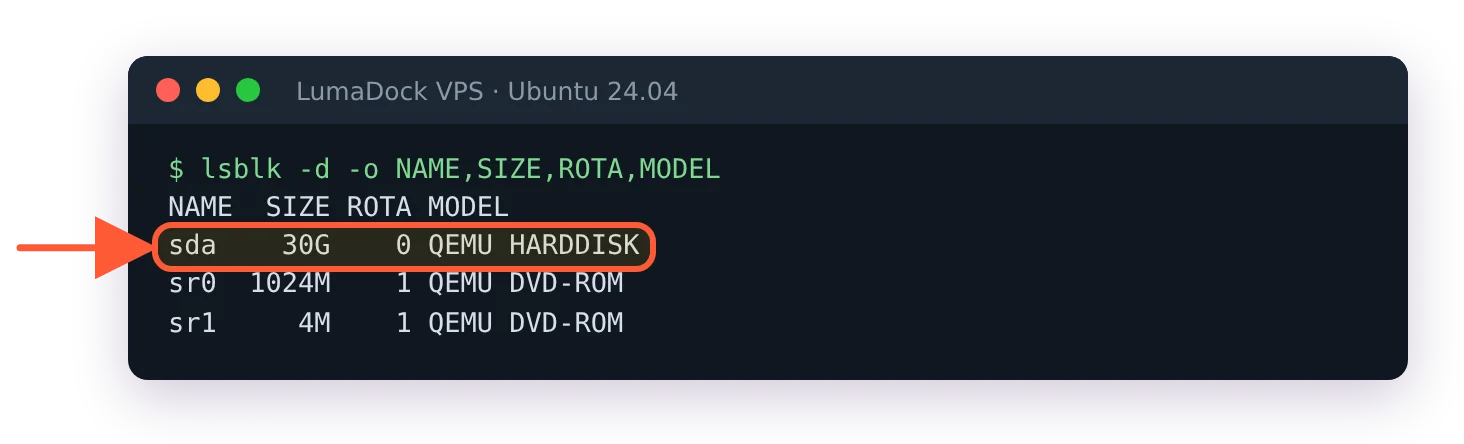
From inside the VM you can't tell which of these you're on: lsblk -d -o NAME,SIZE,ROTA,MODEL shows a QEMU disk either way, so ask the provider.

lsblk -d inside a VPS shows only a QEMU HARDDISK, nothing about local NVMe or Ceph

The guest sees a QEMU disk either way, so local NVMe and network storage look identical from inside.

What high availability means in each

On a hyperscaler, high availability is something you build out of their parts. Two instances in two availability zones behind a load balancer, a managed database with a standby in the second zone, DNS with health checks. The platform gives you the zones and the failover primitives; you're expected to design for a whole zone disappearing, and their own guidance says as much. A single instance in a single zone on a hyperscaler has no more availability than a VPS, and usually less, since the network storage tier adds another thing to fail.

On a KVM VPS platform, availability is mostly the provider's cluster doing its job under you. Live migration is the mechanism. QEMU's migration framework, per the QEMU developer documentation, copies the guest's RAM to a second host while the guest keeps running and pauses it only "while the last part of the state is transferred", with the unresponsive window in "the low hundred of milliseconds". A provider with shared or distributed storage uses this to drain a host before maintenance, so your uptime counter never notices the kernel update on the hypervisor. A provider with local storage can still migrate but has to copy the disk too, which takes longer and is done less casually.

Neither gives you application-level HA. If your Postgres is one process on one VM, a crash of that process is downtime on both platforms. The hyperscaler sells you a managed replacement for that process; the VPS route is to run the replica yourself on a second VPS in a second location and handle failover with a tool like Patroni or repmgr.

When a hyperscaler wins

Elastic load. If your traffic is ten times higher for two hours a day, or one week a year, paying for the peak on a fixed VPS is waste and an autoscaling group is exactly the right tool. Batch jobs with the same shape (nightly renders, a weekly model retrain) fit the same way, and per-second billing is what makes them cheap.

Managed databases and queues, when the team is small and nobody wants to be the DBA. The premium over running it yourself buys you patching, backups, point-in-time restore and a failover you didn't have to test. I've watched a two-person startup lose a weekend to a corrupted self-hosted MySQL, and the managed version would have cost them less than the weekend did.

Global edge and identity. If you need the same app served from six continents with a CDN in front and a single sign-on system that other SaaS tools already integrate with, the hyperscaler catalogue has it and the VPS world doesn't. Compliance attestations for the platform itself (the long list of certifications the big three carry) matter to some buyers as well, though the audit still covers what you built on top.

When a VPS wins

Steady-state services. A web app that serves roughly the same load every day, a mail server, a game server, a company's internal tools, a monitoring stack. The load doesn't spike, the instance never stops, and per-second billing gives you nothing while the network meter takes something every month. A fixed instance with bundled transfer is the cheaper and simpler product for that shape, and it's most of what the internet runs on.

Egress-heavy services. This is the decisive one. A Jellyfin or Plex server streaming to a family, a Nextcloud instance that a team syncs against, a backup target that gets restored from, a WireGuard or OpenVPN endpoint that routes a whole office's traffic, a mirror, a download server. All of these move terabytes out per month, and on a metered platform the transfer line dominates. On a VPS with unmetered bandwidth the number is zero and the only limit is the port. Plans on the standard VPS hosting line, for instance, bundle unmetered bandwidth on NVMe-backed KVM, which is the shape of product this whole category was built for. The fair-use clause is the thing to read before assuming a 1 Gbps port can be saturated all month.

Predictable cost. Finance departments like a number that's the same every month, and so do people paying with their own card. A cloud bill that depends on how many requests an object store served and how many gigabytes left the region is a bill nobody can forecast without a spreadsheet. When the VPS itself stops being enough, the triggers for moving to bare metal in VPS vs dedicated server apply unchanged, because the cloud comparison doesn't alter them. Bare metal has the same bill shape as a VPS, only larger.

The bill shape in words

A hyperscaler bill starts near zero and rises with use: seconds of compute, gigabyte-months of storage, gigabytes out, API requests, load balancer hours, NAT gateway hours, snapshot storage, public IPv4 hours (AWS started charging for those in February 2024). Every line is small and there are forty of them. The total for an idle account is a few dollars of forgotten volumes; the total for a busy one is impossible to guess from the compute line alone, and most of the surprise sits in egress and in services you didn't realise were metered.

A VPS bill is one line per server, the same every month, plus the occasional add-on (an extra IP, a second backup slot). The total for an idle server is the same as the total for a busy one. That's a waste when the server is idle, and a relief when it's busy.

No surprises on your invoice

Every plan renews at the price you see, with unmetered bandwidth and no setup fees, so next month's bill looks the same.

Hybrid setups

The two aren't exclusive, and the best setups I run mix them by putting each thing where its bill shape fits. Compute on a VPS, because it's always on and egress-heavy. Object storage on a hyperscaler or an S3-compatible provider, because durable multi-site storage is something they do better than a single VM and the pull traffic is small. Backups from the VPS into that bucket with restic (the restic and Borg backup guide walks through the S3 backend), where the bucket's egress line stays small because you only read it during a restore. DNS on whichever provider has the API your automation likes.

The variant that goes wrong is the reverse: compute on a hyperscaler and a media library that clients stream out of it. Every stream is metered egress, and the bill lands where the VPS would have charged nothing.

A short digression. The word "cloud" entered hosting vocabulary around 2006 with EC2, and it meant elastic compute from an API. Within five years the shared-hosting industry had relabelled ordinary VPS plans as "cloud servers" because the word tested well, and the distinction never recovered. Which is why the storage layer, the one difference you can measure with fio, is a more useful test of what you bought than the plan name.

A rough decision list

Pick a hyperscaler when the load is elastic, the team wants managed databases and queues, or the app needs a global footprint with a CDN and an identity layer from day one. Pick a VPS when the service is always on, moves a lot of data outward, needs a fixed bill or is a thing you're happy to run yourself. Ask any VPS provider what's under the disk (local NVMe, or Ceph) and what their live migration policy is, because those two answers tell you more about the availability you're buying than the word "cloud" in the plan name ever will. And if you're unsure, price the same server both ways for a month including egress. The number will decide it for you.

I don't have a good figure for one thing: how large the latency penalty of a Ceph-backed VPS is on a well-tuned cluster with NVMe OSDs and a 25 Gbps storage network, versus local NVMe on the same generation of host. The gap on the clusters I've measured was real but those were 10 Gbps and mixed drives, and I'd expect the newer builds to be closer than my numbers suggest.

Questions?

Can I use Terraform and Ansible on a VPS the way I would on a cloud?

Ansible works on any VPS as it is, because it's agentless and connects over native OpenSSH by default, so a server is just an inventory entry with an IP address. Terraform asks more of the host: it works through plugins called providers that talk to an API, so you can create and destroy VPS instances from code only where the host publishes an API and a Terraform provider for it. Where there isn't one, the usual split is to order the servers once by hand and let Ansible take over from the first SSH login. Either way the Terraform part of a VPS setup stays short, since there are no managed databases, queues or autoscaling groups to declare.

About the author

Oliver P. Redmond

I studied history and, for a while, expected to end up in archives (or academic publishing). Instead I took a copy-editing job with a small specialist publisher, learnt rather more about XML than the job description had implied and gradually found myself editing software manuals. Naturally, technical writing followed from there.

What I like about infrastructure is the accumulated quality. A modern service may have an elegant interface sitting on top of conventions and protocols that are sometimes older than the person using it. And so, understanding a system often means following those layers backwards. I write mostly about Linux systems, virtual machines and storage. I live in Bristol and still use a fountain pen for notes.

Deploy your next project in seconds

Bring your winning ideas online faster, with modern hardware and unmetered bandwidth. Join a European cloud trusted by thousands of developers and businesses worldwide.