





.svg)
.svg)
.svg)
.svg)

.svg)
.svg)
.svg)


Updated and tested 29 October 2026
Every list of Webmin alternatives has the same problem: no dates. A panel that looked healthy when the article was written can have gone quiet two years ago, and nothing on the page tells you. So every entry below carries the version and release date I could verify in October 2026. Eleven panels, grouped by the job they do instead of ranked, because a Podman-era server console and a shared hosting panel are not competing for the same server.
Why people look for alternatives to Webmin
Webmin itself is fine. It was at 2.670 in October 2026 and the release cadence has been roughly monthly all year, so nobody is switching because the project died. The reasons I hear are more specific.
Structure is the first one. Authentic Theme is a real improvement over what came before, but underneath it Webmin is a tree of modules that each expose one daemon's settings, and if you think in terms of websites and customers instead of Apache and BIND, that structure fights you all day. Webmin has no concept of a hosting account. There's no object that bundles a domain, its DNS records, its mailboxes, its database and its FTP user, so provisioning a new site means visiting five modules and remembering what you did last time.
Second reason: the security record. The 2026 advisories include CVE-2026-42210 and CVE-2026-56022, a two-factor bypass through HTTP basic authentication, fixed in 2.640, a privilege escalation through the Help feature in the same release and a stored XSS in System and Server Status fixed in 2.641 (CVE-2026-22678). Every panel with root privileges accumulates these. The pattern still makes some teams uncomfortable about a persistent daemon on port 10000, and I understand why.
Third, containers. Webmin has no Docker or Podman module and never has, which for a lot of 2026 servers ends the conversation there.
General server administration panels
These replace Webmin's system side: users, disks, services, logs, updates. None of them manage web hosting.
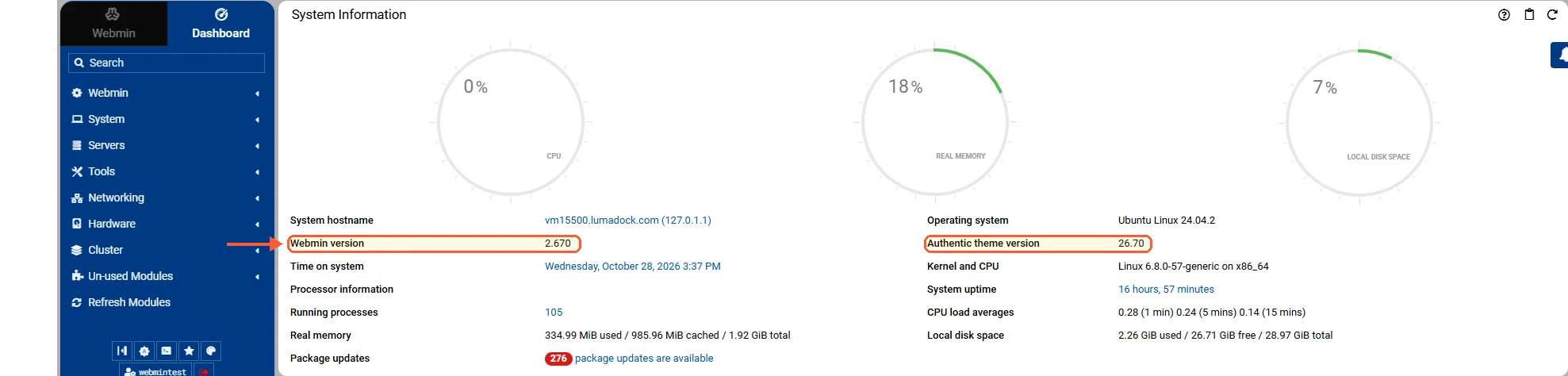
The dashboard after the first login, with the Webmin and Authentic versions.
Cockpit
Version 370, released 22 October 2026, LGPL-2.1+ and free, listening on port 9090. The project site is unusually honest about what it leaves out, which is more than most panels manage. Red Hat sponsors it, it ships as the RHEL web console and in Fedora Server by default, it's packaged in Debian and Ubuntu (use the backports version, the archive builds lag by a year or more), and it costs nothing in memory while idle because systemd starts it on demand. Storage, networking, firewalld, systemd units, journald, Podman containers, libvirt VMs, package updates with CVE detail. For a single Linux server it's the better-engineered product.
The full comparison is in Webmin vs Cockpit, and the short version is that Cockpit has no DNS, no web virtual hosts, no databases and no mail. If those are why you run Webmin, Cockpit replaces nothing. The multi-server host switcher everyone cites was deprecated in Cockpit 322 and is off by default on Fedora, RHEL 10 and Debian testing, though Ubuntu 24.04's backports build still shows it.
Ajenti
The Angular 13 rewrite advertised in the ajenti-3-dev branch on the Ajenti repository has never shipped. Angular 13 came out in 2021, which tells you how long that rewrite has been coming. Development is effectively one maintainer and the pace is maintenance work with few new features, so treat the whole thing as low-assurance: a release on the ajenti-panel PyPI page in September 2026 means it isn't dead, and that is the strongest claim available for it.
What it is, when it works, is the closest thing to a philosophical replacement for Webmin: a general-purpose admin panel with plugins for services, files, terminals and packages, written in Python where Webmin is Perl. It's light and it looks better than Webmin did a decade ago. Fine for a personal box. I wouldn't put it in front of a customer. Version 2.2.17 on PyPI, released 12 September 2026, MIT licensed and free, on HTTPS port 8000.
Free hosting panels
This is where most people who leave Webmin end up, because what they wanted all along was an account object with a domain attached.
Virtualmin
Not really an alternative, and it goes first here because that keeps coming up. Virtualmin runs on Webmin. Same team, same code, same port 10000, with the hosting features appearing as a tab in the panel you already have. Installing it moves you away from nothing you disliked about Webmin. What it adds is the missing abstraction: a virtual server that owns a domain, DNS zone, mailboxes, database, SSL certificate and backup schedule as one unit.
Version 8.3.0 of the virtual-server module, 29 September 2026, GPLv3 free with a commercial Pro edition. Virtualmin 8 arrived in late January 2026 after more than three years on 7.x, and the release announcement is the thing to read if you're still on 7.x. It was a large refactor. The free edition picked up EL 10 and Debian 13 support, modern password recovery, a WebSockets terminal and JSON output from the CLI, with Ubuntu 26.04 support following in 8.2.0.
Get it from the official download page and not from a distro package. The install is heavy and opinionated and it wants to own the whole stack. The Pro edition also takes several things you might assume are standard: WP Workbench for bulk WordPress management, cloud provider DNS and backup integrations, Jailkit enhancements, multiple ACME providers and systemd cgroup resource limits. Since 8.2.0 it also has a Podman plugin for per-domain containers.
HestiaCP
The VestaCP successor, and the default suggestion for a straightforward web server: nginx in front of Apache or nginx alone, MariaDB or PostgreSQL, Exim and Dovecot, DNS clustering, Let's Encrypt, file manager, quotas. GPLv3, free, port 8083. Version 1.10.5 landed on 14 September 2026 with security hardening for sessions and suspended users, after four point releases in the 11 days from 13 August, so this project ships constantly. Debian and Ubuntu only, though. The supported list is Debian 12 and 13 plus Ubuntu 22.04, 24.04 and 26.04, with no RHEL, AlmaLinux or Rocky build, so a CentOS-family shop stops reading here.
ISPConfig
It's the one free panel with genuine multi-server management: the control layer is separate from the nodes it controls, so one installation can drive several web servers, a separate mail server and a pair of DNS servers, with services distributed across machines that don't need to be identical. Nothing else on this list does that for free, which is why ISPConfig survives against prettier competition. BSD licensed, usually on port 8080. It looks its age, although the auto-installer script at get.ispconfig.org builds the stack for you on a fresh Debian or Ubuntu server, and version 3.3.2 from 18 September 2026 is the current one. Four servers on a budget, it's the only real answer.
CyberPanel
Version 3.0.8, released 18 October 2026, GPLv3 core with paid add-ons, usually on port 8090. It installs quickly on AlmaLinux, Ubuntu and Debian, and a CyberPanel VPS saves you the stack build. Built around OpenLiteSpeed, with LSCache integration, one-click WordPress and staging, a Docker manager and an S3-compatible backup layer. On a WordPress-heavy server the LiteSpeed caching is a genuine performance argument and not marketing.
Weakness: the security track record needs stating. Version 3.0.3 on 20 August 2026 was an API authentication hotfix and 3.0.5 on 26 August was an API two-factor security update, with 3.0.4 in between. That kind of sequence has repeated more than once. The .htaccess module that lets OpenLiteSpeed read Apache rules is a paid add-on, so a stack that assumes .htaccess costs money on a panel that is otherwise free.
aaPanel
The official release forum lists 8.0.7 as the current stable build, dated 13 October 2026, next to a separate beta track that reached 8.26.0 on 26 October. The project's GitHub repository disagrees: its README still points at an install_6.0 script and port 8888, so it is no guide to what you would install. Call it version 8.0.7, free edition, paid Pro tier.
It's enormously popular, with more than three million installs claimed on its own site, because the one-click stack installer is quick and the app store covers most of what a small host needs: LAMP or LEMP in a few minutes, site management, backups and a decent file manager. Read the licence terms before deploying it: the free edition sits next to a paid Pro tier, and the repository's front page doesn't name a licence. The management port was 8888 for years, the aaPanel forum says you can pick another during install or change it afterwards, and half the tutorials out there still tell you to open 8888 in the firewall.
Froxlor
Version 2.3.16, released 20 October 2026, GPL and free, running as a virtual host on the web server you already have with no dedicated port of its own. A lightweight German panel aimed at resellers, deliberately narrow: customers, domains, mail accounts, FTP, quotas and traffic accounting, with the templates it generates handed to Apache or nginx. I don't have much to say about it beyond that, except that 2026 has been a long run of back-to-back security releases, including a fix for a two-factor "remember this device" bypass in 2.3.11 and more security fixes in 2.3.14 and 2.3.15, at a frequency that means you want a patching habit in place before you deploy it. The release file listing dates 2.3.16 to 20 October 2026.
Commercial panels
You pay per server or per account, and what you buy is support and the fact that your customers already recognise the screens.
Plesk
A Plesk VPS is the usual home for agencies managing a few dozen client sites, and Plesk is the strongest all-round commercial panel plus the only serious option if you need Windows Server as well as Linux. WordPress Toolkit is better than any free equivalent, the extension catalogue is deep and the security defaults are sane out of the box. Obsidian 18.0.82 landed on 27 October 2026. It's proprietary, on ports 8443 for HTTPS and 8880 for HTTP.
Against that: per-server licensing, a heavy footprint on small instances and a stream of critical security updates you're expected to apply promptly. The update numbering moves fast enough that documentation goes stale.
cPanel and WHM
Setting one up on a cPanel VPS is a well-trodden path, and the reason anyone does it is inertia plus familiarity: your customers have used it before and every hosting tutorial on the internet assumes it. If you're reselling hosting, arguing with that is expensive. Version 138 dates from 27 July 2026, it's proprietary, and it listens on port 2087 for WHM, 2083 for cPanel and 2096 for webmail.
It's also the most expensive option on this list by a distance, the per-account pricing model introduced in 2019 punishes exactly the accounts a growing host adds, and it's Linux only with a narrow supported-distribution list. For a personal server it makes no sense at all.
ispmanager
There's a full walkthrough in the guide to ispmanager control panel hosting, licensing included. Version 6.154.1 stable, released 23 October 2026, proprietary, on port 1500. Lighter than Plesk and cPanel, popular with VPS resellers and small hosts across Europe, covering web, mail, DNS, databases, backups and reseller accounts, with a licensing model that scales down below the other two. No free tier of any kind, so evaluating it means a trial licence, and the third-party extension range is far smaller than Plesk's.
The comparison in one table
| Panel | Version | Last release | Licence | Port | Best for |
|---|---|---|---|---|---|
| Cockpit | 370 | 22 Oct 2026 | LGPL-2.1+, free | 9090 | Single-server Linux administration |
| Virtualmin | 8.3.0 | 29 Sep 2026 | GPLv3 free, Pro paid | 10000 | Hosting on top of an existing Webmin |
| Ajenti | 2.2.17 | 12 Sep 2026 | MIT, free | 8000 | Light general admin on a personal box |
| aaPanel | 8.0.7 | 13 Oct 2026 | Free edition, paid Pro tier | 8888 historically | Fast LAMP or LEMP stack setup |
| CyberPanel | 3.0.8 | 18 Oct 2026 | GPLv3 core | 8090 usually | OpenLiteSpeed and WordPress |
| HestiaCP | 1.10.5 | 14 Sep 2026 | GPLv3, free | 8083 | Free full hosting on Debian or Ubuntu |
| ISPConfig | 3.3.2 | 18 Sep 2026 | BSD, free | 8080 usually | Multi-server hosting without licence fees |
| Froxlor | 2.3.16 | 20 Oct 2026 | GPL, free | Runs as a vhost | Small reseller setups |
| Plesk | 18.0.82 | 27 Oct 2026 | Proprietary | 8443 | Agencies, Windows support, WordPress |
| cPanel and WHM | 138 | 27 Jul 2026 | Proprietary | 2087 and 2083 | Shared hosting resale |
| ispmanager | 6.154.1 | 23 Oct 2026 | Proprietary | 1500 | Small hosts and VPS resellers |
Picks by situation
One VPS you administer yourself, no websites for other people: Cockpit, with Webmin kept alongside it if you edit DNS zones. Two commands to install and no vendor repository.
If you want hosting features and you already know Webmin, Virtualmin is the shortest path by a distance. You keep the screens and the muscle memory and you gain the domain object that was missing.
Starting fresh on Debian or Ubuntu with no budget: HestiaCP. Fast install and no paywalled essentials.
What a managed web hosting plan covers is the thing to read before any of this, because for a handful of sites a panel may be work you don't need to take on at all. If you're taking it on anyway and page speed is the point, CyberPanel, with the caveat about its patch history and the .htaccess add-on.
Several servers, no budget: ISPConfig, and the dated screens are the price you pay.
Paying customers who expect something familiar: cPanel if they're hosting buyers, Plesk if they're agencies or if any of them run Windows.

