





.svg)
.svg)
.svg)
.svg)

.svg)
.svg)
.svg)


Updated and tested 28 October 2026
Webmin vs Cockpit looks like a fair fight because both give you a Linux box in a browser over HTTPS, but the overlap stops fairly close to there. Cockpit 370 is the current upstream release (22 October 2026) and Webmin is at 2.670, so neither project is coasting. Plenty of people who have used both for years keep both installed on the same server.
The versions below are the current ones and, where it matters, the versions your distro will really hand you. One correction up front, because most Webmin vs Cockpit articles get it wrong: Cockpit's multi-server dashboard has been deprecated since version 322 and is switched off by default on Fedora, RHEL 10 and Debian testing. Ubuntu 24.04's backports build still shows it, which the section on several servers comes back to.
What Cockpit administers
Storage (partitions, LUKS, RAID, NFS and iSCSI targets), network interfaces with bonds, bridges and VLANs, firewalld zones, systemd services and sockets and timers, local users and their SSH keys, journald logs, package updates annotated with CVE information, a browser terminal, SELinux troubleshooting, kdump, sosreport and metrics history backed by PCP. Every one of those is a property of the operating system.
Cockpit does not write third-party daemon configuration. No BIND zone editor. No Apache or nginx virtual host screens, no MySQL or PostgreSQL administration, nothing for Postfix and Dovecot, no crontab editor (it shows systemd timers, which won't surface the jobs already sitting in /etc/cron.d). That boundary is deliberate and the project has never pretended otherwise.
The metrics history page is an odd one. It leans on PCP, a Red Hat performance stack with its own daemons and its own vocabulary, and what Cockpit draws out of it is a thin slice of what PCP collects. Most people open that page twice.
What Webmin edits
Webmin is a Perl application whose entire purpose is reading and writing other people's config files. The module index in the official documentation runs to roughly 90 modules (a 2.670 package install brings 115) across the Webmin, System, Servers, Tools, Networking, Hardware and Cluster categories. Apache, BIND, MySQL, Postfix, Dovecot, Squid, Samba, LDAP, ProFTPD, cron. That long tail of daemons that ship with a text config file and no web interface of their own is why Webmin still has users in 2026.
Installing each panel
Cockpit ships in the distro repositories
It's packaged in Debian, Ubuntu, Fedora and the RHEL family, so there's no third-party repository to trust and no signing key to add. The project's own instructions on the Cockpit installation page tell Debian and Ubuntu users to pull from backports:
. /etc/os-release
sudo apt install -t ${VERSION_CODENAME}-backports cockpit
They recommend backports for a reason. The archive versions lag badly. Ubuntu 24.04 noble carries Cockpit 314-1 in universe, and the backports command above installed 362 on noble in October 2026, Debian 12 bookworm has 287.1 with 337 in bookworm-backports, while Debian 13 trixie has 337 with 368 in trixie-backports. Testing and sid are on 370. On a trixie box, plain apt install cockpit gets you a release that is roughly eighteen months behind, and the backports line closes almost all of that gap.
On Ubuntu the backports install pulls in NetworkManager too, with wpasupplicant, ppp and dnsmasq-base, 26 new packages in all. It leaves the existing network interface alone (nmcli lists it as unmanaged), so SSH stays up, but it's a bigger footprint than the one package name suggests.
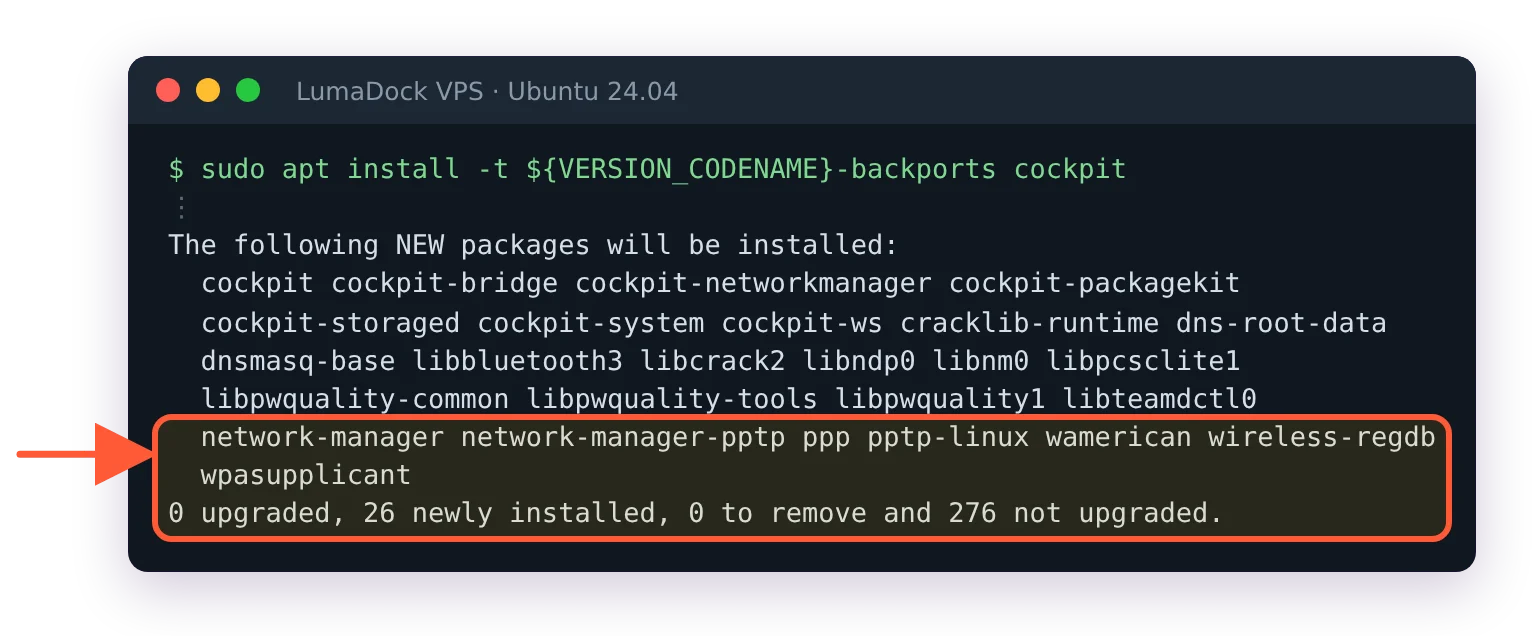
The backports install brings NetworkManager along: 26 new packages.
Webmin needs its own repository
Webmin is not in Debian and not in Ubuntu. The Debian package tracker has listed Webmin as outside every Debian distribution since it was removed from testing back in 2006, and the only webmin hit on packages.ubuntu.com is an unrelated XML-RPC client library. So apt install webmin fails with E: Unable to locate package webmin, apt behaves correctly and the first-timer concludes something is broken.
The exact commands, keyring paths and pin file are in the walkthrough for installing Webmin on Ubuntu 24.04, and the same repo line works on Debian 11 through 13. The supported route is the setup-repo script, which writes an APT source with a modern signed-by= keyring or a yum repo file, after which the package manager does the rest. One detail in Webmin's favour: the APT repo is a single flat suite called stable with arch-independent _all.deb packages, so there's no codename split and no waiting for your Debian release to be supported.
If your security policy forbids adding vendor repositories, that policy has already made this decision for you.
Ports 9090 and 10000
Cockpit listens on 9090 and Webmin on 10000, both over HTTPS with a self-signed certificate generated at install time. Running both together needs no port juggling.
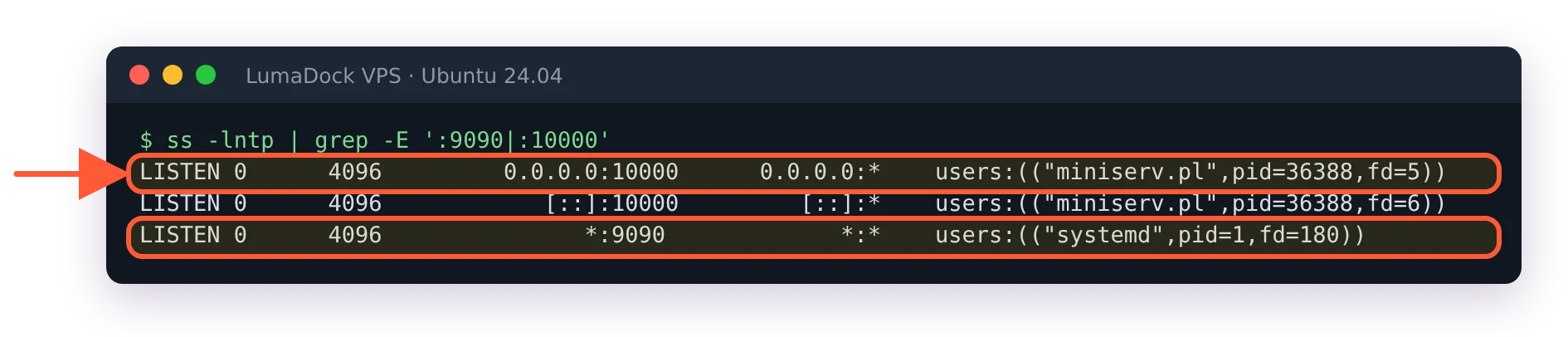
Webmin's daemon on 10000 and Cockpit's socket on 9090, side by side.
The steps for locking that down are in the guide to Webmin security hardening. Webmin's own advisory page lists CVE-2026-42210 and CVE-2026-56022, a 2FA bypass on the HTTP basic authentication path in releases before 2.640, where an account with two-factor enabled could be reached without the second factor. Keep 10000 behind a firewall rule or a VPN. The same goes for 9090.
How each one runs when nobody is looking
Cockpit is socket-activated. In the project's own words, "Cockpit itself doesn't eat resources or even run in the background when you're not using it. It runs on demand, thanks to systemd socket activation." Nothing is resident until a browser hits 9090, and the session tears down afterwards.
![systemctl status cockpit.socket: active (listening) on [::]:9090, with no Cockpit process running](/templates/lagom2/assets/img/page-manager/lumadock-webmin-vs-cockpit-cockpit-socket-listening.webp)
Cockpit waits on a socket; nothing runs until a browser connects.
Webmin runs miniserv.pl as a persistent daemon under webmin.service. It waits for connections, it holds memory while it waits and it's running while you're asleep. On a machine with 2 GB of RAM that's measurable and not dramatic. On a 512 MB instance where you also want a database, you notice it.
Cockpit wins this one outright. There's no Webmin counter-argument to put next to it.
Logins and authentication
Both authenticate against your existing Unix accounts. Cockpit ships a dedicated PAM stack at /etc/pam.d/cockpit, configured to let you log in with the username and password of any local account, with optional Kerberos single sign-on and smart-card certificate authentication on top. I've never set up Kerberos against either of them, so I don't have a view on how that goes. Webmin's package install creates one administrative user, root or admin, which authenticates against the system account through PAM or /etc/shadow.
Root is where they part ways. Cockpit refuses root out of the box, because /etc/cockpit/disallowed-users lists it, and the login form answers a correct root password with Permission denied. On a VPS where you've only ever been root, that means creating a sudo user before Cockpit is any use. That user then lands in limited access mode, with a Turn on administrative access button that asks for the sudo password before Cockpit will change anything. Webmin lets root in with the root password, if root has one.
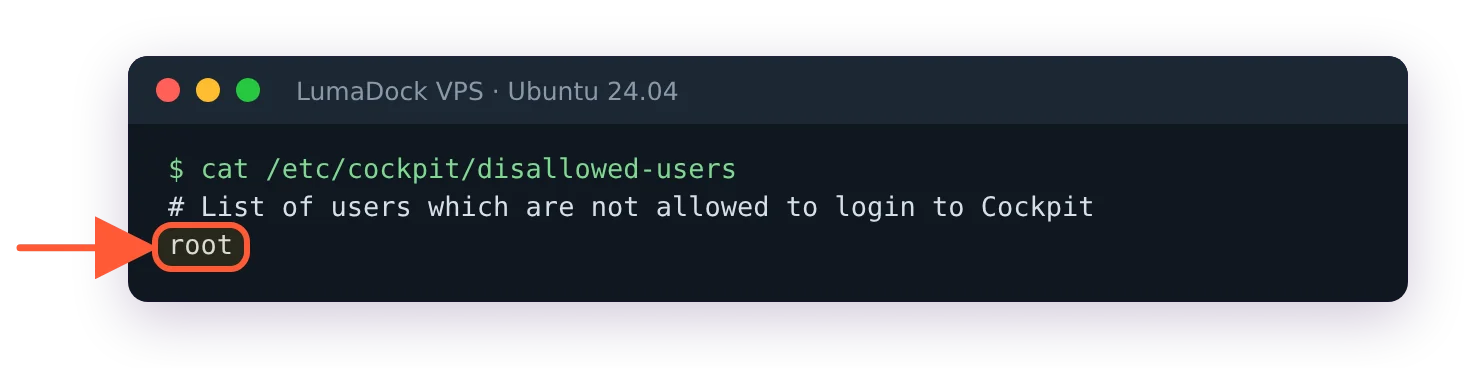
root is on Cockpit's disallowed list out of the box.
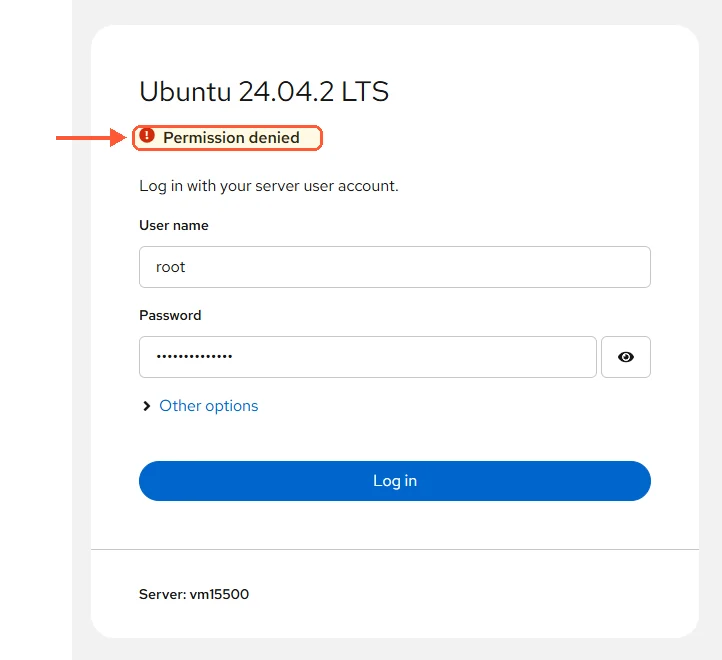
Cockpit refuses root even with the right password.
Webmin goes past that with per-user access control. You can create a Webmin-only account with its own password hash in /etc/webmin/miniserv.users, give it three modules out of more than a hundred and hand it to a junior without giving them a shell account. Cockpit has no module-level permission system at all. Its permission model is the operating system's: what you can do in the UI is what your user can do at the shell, with sudo or polkit deciding the rest.
What each panel manages
The Cockpit applications list is short and honest about scope, and reading it before you commit saves an argument later.
| Cockpit | Webmin | |
|---|---|---|
| Current release | 370 upstream (22 October 2026), 362 in Ubuntu 24.04 backports | 2.670 |
| Default port | 9090 HTTPS | 10000 HTTPS |
| Packaging | Default distro repos, backports advised | Vendor repo via setup script |
| Process model | systemd socket activation, on demand | Persistent miniserv.pl daemon |
| DNS, web vhosts, databases, mail | None | Dedicated modules for each |
| Containers | cockpit-podman, Podman only | Nothing built in |
| Several servers at once | Host switcher, deprecated since 322 | Cluster modules, manual setup |
| Backed by | Red Hat, LGPL-2.1+ | Independent project, BSD licence |
The row that decides most arguments is the fourth from the bottom. If the services you care about are DNS, web, database or mail, Cockpit will never manage them. That's the second time I've said it in this article, which is deliberate, because no amount of version comparison changes it.
Managing several servers
Here's the claim you'll find repeated in nearly every comparison: Cockpit lets you manage multiple servers from one dashboard. It has been wrong since Cockpit 322.
The host switcher connects to remote machines over SSH from inside your existing session, and the project deprecated it and disabled it by default on Fedora 41 and later, Debian testing and unstable, CentOS Stream 10, RHEL 10 and Arch. Ubuntu isn't on that list. On Ubuntu 24.04 with Cockpit 362 from backports, the top-left menu still shows Hosts and an Add new host button, with no cockpit.conf in place. The reason for switching it off elsewhere, given in the Cockpit multi-host guide, is a browser isolation problem: all connected hosts "run at the same time, in the same browser context. They are not isolated from each other in the browser", so a compromised machine can reach across the SSH trust boundary into the others.
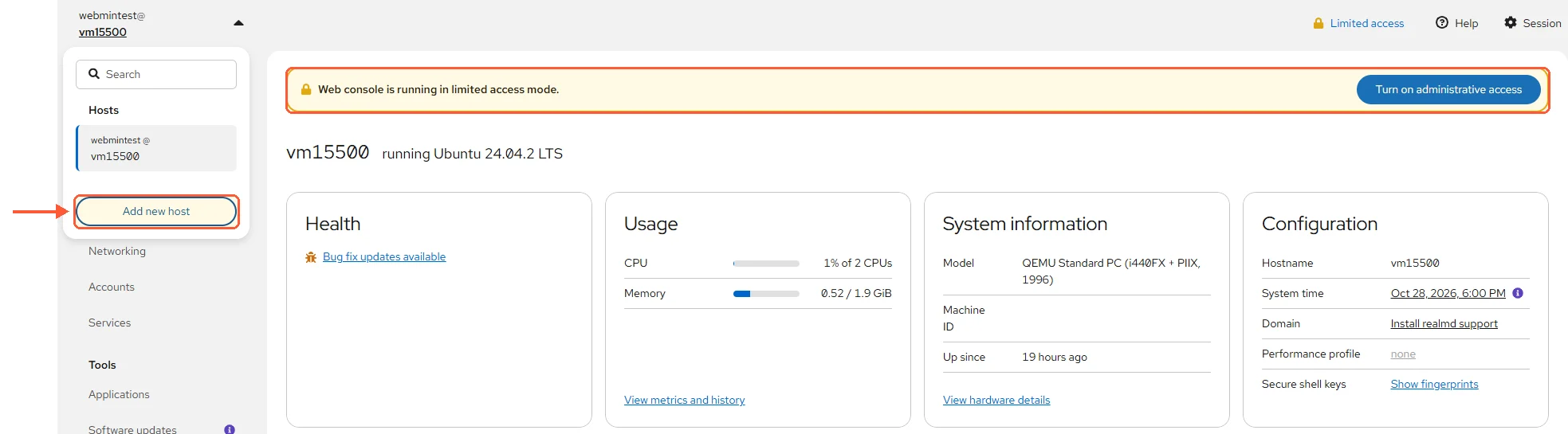
Cockpit 362 from noble-backports still offers Add new host, and a sudo user starts in limited access.
You can turn it back on with AllowMultiHost in the [WebService] section of cockpit.conf, and WarnBeforeConnecting controls the once-per-session warning. Think about what you're re-enabling first. Even with the switch flipped there's still no aggregate view and no configuration push, so what you get is a tab per machine rather than fleet management.
The standalone Dashboard page that older screenshots show was removed years ago. Those screenshots are still close to the top of image search, which is probably where the claim keeps coming from.
Webmin's position is no better. Its Cluster category can copy files, users and packages between servers you register by hand, and hardly anybody uses it. Treat both as single-server tools and reach for Ansible when you have twenty machines.
Containers
Cockpit takes this one, with an asterisk. cockpit-podman is an official module packaged in the distro repos (Ubuntu 24.04 has 86-1ubuntu0.1 in universe) and it manages Podman only. The Cockpit team has no Docker module, and the applications list shows just two third-party Docker entries, both marked pre-release.
The third-party modules and what to use in their place are covered in the write-up on Webmin and Docker. Webmin has nothing built in. Neither the 2.6x module index nor the official module directory carries anything container-shaped, so you're left with the browser terminal plus the Systemd Services and Units module added in 2.650, which handles container units the same way it handles any other unit.
Who maintains each project
Cockpit is sponsored by Red Hat, licensed LGPL-2.1+, and shipped as the RHEL web console and by default in Fedora Server, with SUSE using it for SLE Micro. The Cockpit 370 release notes read like every set before them, which is what the corporate backing buys: predictable releases, and a roadmap that follows Red Hat's priorities.
Webmin is an independent project under a BSD 3-Clause licence (the LICENCE file in /usr/share/webmin says so), with a small team, releasing roughly monthly, with the minor versions 2.630 in March 2026, 2.640 in May, 2.650 in June, 2.660 in August and 2.670 in September. Alpine Linux support and three new modules arrived in 2.650 alone. It's not a big organisation, and its security history is more eventful than Cockpit's.
Which one I'd install, Cockpit or Webmin
Searches for the best Linux server control panel want a single name back. These four situations produce two.
One server you mostly leave alone
Cockpit. It's in your repos and it costs nothing while idle, the storage and networking screens are better than Webmin's equivalents, and the package updates page with CVE annotations is the most useful screen either project ships.
A server running BIND, Apache vhosts or a mail stack
Webmin, and it isn't close. Pair it with a Linux VPS you control at the root level, since both want real system access. Editing zone files and virtual hosts through forms is what those modules were built for, and Cockpit offers no substitute.
A Fedora, RHEL or CentOS Stream shop
Cockpit is already installed and already integrated with SELinux, sosreport and kdump. Add Webmin on top when a specific service needs configuring through a browser.
A hosting-style box with many sites and mailboxes
Neither, on its own. The free and commercial options are compared in the roundup of Webmin alternatives. That job wants a hosting panel with domain and account abstractions, which is a different category, and Virtualmin runs on top of Webmin and gives you exactly that.


