





.svg)
.svg)
.svg)
.svg)

.svg)
.svg)
.svg)

Updated and tested 27 October 2026
Short answer: no. There is no built-in Webmin Docker module and no Podman module, and that's still true in the 2.6x line, checked on Webmin 2.670 with Docker installed and a container running. If you came here hoping to click Servers and find a container manager sitting between Apache and BIND, it isn't there, and nothing in the release notes suggests it's coming.
Docker and Podman support in Webmin 2.6x
The complete module index on the Webmin documentation site lists around 90 modules across seven categories: Webmin, System, Servers, Tools, Networking, Hardware and Cluster. Read the whole thing and there is no Docker module, no Podman module, no LXC module and no container module of any kind. It has never shipped in any form. Virtualmin Pro gained a Podman plugin in 8.2.0, but that is a Virtualmin feature and not a Webmin module.

Nothing container-shaped in the Webmin install directory.
The second place to check is the official standard-modules directory on download.webmin.com, which holds the individually downloadable .wbm.gz modules that aren't in the base install. In October 2026 it held 354 .wbm.gz files, the current packages sit on the download page, and not one of those file names contains docker, podman, lxc or container.
The third check is Webmin itself. On a server with Docker installed and a container running, Webmin's search box answers docker with No Webmin modules or pages matching docker were found., and the Un-used Modules list has nothing container-related either. Three places, same answer.

Webmin's own search finds nothing for docker, with Docker installed.
That directory is also one of those pages that hasn't changed its layout since the early 2000s. Plain index, file names, sizes and dates, no styling to speak of. It is oddly reassuring to look at.
Why the module never appeared is easy enough to see. Webmin reads and writes config files for daemons that keep their settings in text files. Docker's state lives in an API socket and a daemon that expects to be driven by a client, so the module would have to be a real client and not a form over a file. That isn't an excuse. If container management is central to your server, this is where Webmin stops being the right tool.
What people are usually asking
Two questions arrive at this search. One comes from people already running Webmin who have started deploying things in containers and want one browser tab for both. The other comes from people who found a Webmin Docker module on GitHub and want to know if it's safe.
Third-party Docker modules for Webmin
Three exist and get shared in forum threads: dave-lang/webmin-docker, pknw1/webmin-docker-module and idanzam/webmin-docker-source. They're named here and not linked, deliberately.
None is affiliated with webmin.com. A search for docker in Webmin's own third-party module index returns no modules and none is on the download site, so nobody upstream has reviewed the code. The pknw1 one describes itself as a work in progress in its repository description. A Webmin module runs with root privileges inside the panel that manages your server, so installing an unreviewed one from a stranger's repository is a bigger decision than installing an unreviewed CLI tool, and the failure mode is worse.
On a machine that matters, no. On a lab box where a reinstall would be no drama, read the source and decide for yourself. If one of them breaks your install, the recovery path is the same as for any other broken module, and it's written up under the complete Webmin guide along with the rest of the 2.6x line.
What Webmin does give you for containers
More than nothing, which surprises people expecting a flat no. A stock Webmin VPS install has four modules that touch containers sideways, none of them container-aware.
Terminal and Command Shell
Both modules run commands as root on the host, so they need Docker installed first. On Ubuntu 24.04, sudo apt install docker.io docker-compose-v2 gives you docker and docker compose from the Ubuntu archive (29.1.3 and 2.40.3 in October 2026). docker ps, docker compose up -d, docker logs -f, podman ps. That's the real extent of Docker management from Webmin, and it's what most of those third-party modules are wrapping anyway. A shell in a browser is fine for an occasional restart or a look at a log while you're already logged in, and poor for anything you do every day, since browser terminals drop on connection blips and don't scroll back the way a real terminal does.

Docker itself works fine from a shell on the same server; Webmin just doesn't manage it.
Custom Commands
Custom Commands saves a shell command as a named button, so a restart of your reverse proxy stack becomes a click instead of a remembered incantation, and you can hand a colleague that single button without giving them a shell account. For a small fixed set of container operations it covers the day-to-day.
Systemd Services and Units
Webmin 2.650 added a Systemd Services and Units module in June 2026, alongside GRUB 2 Boot Loader and Kea DHCP Server modules. If you run containers as systemd units, which is Podman's standard pattern with Quadlet and increasingly common for Docker too, this module starts, stops, enables and inspects them like any other unit. Docker's own daemon shows up there too, with one catch when you look for it: the page lists units without the .service suffix, alphabetically, so search the Unit name column for docker and containerd, not docker.service. It won't show you image tags or open a shell into the container. Quadlet against a plain Compose file under systemd is an argument I've stayed out of.
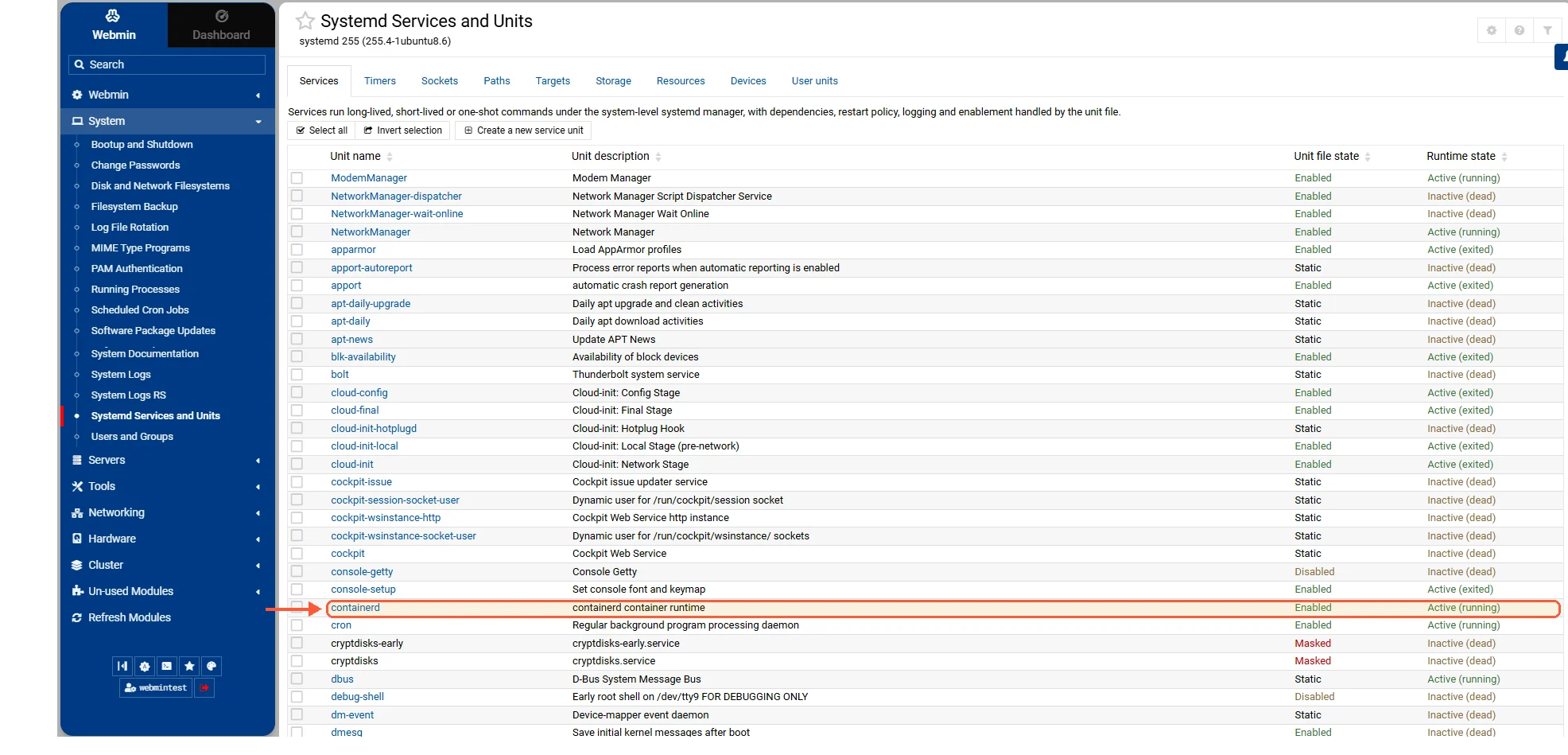
Container runtimes appear as plain units, named without .service.

