blog.back_article_list

Is there a Webmin Docker module?

Is there a Webmin Docker module?

Updated and tested 27 October 2026

Short answer: no. There is no built-in Webmin Docker module and no Podman module, and that's still true in the 2.6x line, checked on Webmin 2.670 with Docker installed and a container running. If you came here hoping to click Servers and find a container manager sitting between Apache and BIND, it isn't there, and nothing in the release notes suggests it's coming.

Docker and Podman support in Webmin 2.6x

The complete module index on the Webmin documentation site lists around 90 modules across seven categories: Webmin, System, Servers, Tools, Networking, Hardware and Cluster. Read the whole thing and there is no Docker module, no Podman module, no LXC module and no container module of any kind. It has never shipped in any form. Virtualmin Pro gained a Podman plugin in 8.2.0, but that is a Virtualmin feature and not a Webmin module.

Searching /usr/share/webmin for docker, podman, lxc or container returns nothing

Nothing container-shaped in the Webmin install directory.

The second place to check is the official standard-modules directory on download.webmin.com, which holds the individually downloadable .wbm.gz modules that aren't in the base install. In October 2026 it held 354 .wbm.gz files, the current packages sit on the download page, and not one of those file names contains docker, podman, lxc or container.

The third check is Webmin itself. On a server with Docker installed and a container running, Webmin's search box answers docker with No Webmin modules or pages matching docker were found., and the Un-used Modules list has nothing container-related either. Three places, same answer.

Webmin search for docker: found 0 results, No Webmin modules or pages matching docker were found

Webmin's own search finds nothing for docker, with Docker installed.

That directory is also one of those pages that hasn't changed its layout since the early 2000s. Plain index, file names, sizes and dates, no styling to speak of. It is oddly reassuring to look at.

Why the module never appeared is easy enough to see. Webmin reads and writes config files for daemons that keep their settings in text files. Docker's state lives in an API socket and a daemon that expects to be driven by a client, so the module would have to be a real client and not a form over a file. That isn't an excuse. If container management is central to your server, this is where Webmin stops being the right tool.

What people are usually asking

Two questions arrive at this search. One comes from people already running Webmin who have started deploying things in containers and want one browser tab for both. The other comes from people who found a Webmin Docker module on GitHub and want to know if it's safe.

Third-party Docker modules for Webmin

Three exist and get shared in forum threads: dave-lang/webmin-docker, pknw1/webmin-docker-module and idanzam/webmin-docker-source. They're named here and not linked, deliberately.

None is affiliated with webmin.com. A search for docker in Webmin's own third-party module index returns no modules and none is on the download site, so nobody upstream has reviewed the code. The pknw1 one describes itself as a work in progress in its repository description. A Webmin module runs with root privileges inside the panel that manages your server, so installing an unreviewed one from a stranger's repository is a bigger decision than installing an unreviewed CLI tool, and the failure mode is worse.

On a machine that matters, no. On a lab box where a reinstall would be no drama, read the source and decide for yourself. If one of them breaks your install, the recovery path is the same as for any other broken module, and it's written up under the complete Webmin guide along with the rest of the 2.6x line.

What Webmin does give you for containers

More than nothing, which surprises people expecting a flat no. A stock Webmin VPS install has four modules that touch containers sideways, none of them container-aware.

Terminal and Command Shell

Both modules run commands as root on the host, so they need Docker installed first. On Ubuntu 24.04, sudo apt install docker.io docker-compose-v2 gives you docker and docker compose from the Ubuntu archive (29.1.3 and 2.40.3 in October 2026). docker ps, docker compose up -d, docker logs -f, podman ps. That's the real extent of Docker management from Webmin, and it's what most of those third-party modules are wrapping anyway. A shell in a browser is fine for an occasional restart or a look at a log while you're already logged in, and poor for anything you do every day, since browser terminals drop on connection blips and don't scroll back the way a real terminal does.

docker ps lists one running busybox container

Docker itself works fine from a shell on the same server; Webmin just doesn't manage it.

Custom Commands

Custom Commands saves a shell command as a named button, so a restart of your reverse proxy stack becomes a click instead of a remembered incantation, and you can hand a colleague that single button without giving them a shell account. For a small fixed set of container operations it covers the day-to-day.

Systemd Services and Units

Webmin 2.650 added a Systemd Services and Units module in June 2026, alongside GRUB 2 Boot Loader and Kea DHCP Server modules. If you run containers as systemd units, which is Podman's standard pattern with Quadlet and increasingly common for Docker too, this module starts, stops, enables and inspects them like any other unit. Docker's own daemon shows up there too, with one catch when you look for it: the page lists units without the .service suffix, alphabetically, so search the Unit name column for docker and containerd, not docker.service. It won't show you image tags or open a shell into the container. Quadlet against a plain Compose file under systemd is an argument I've stayed out of.
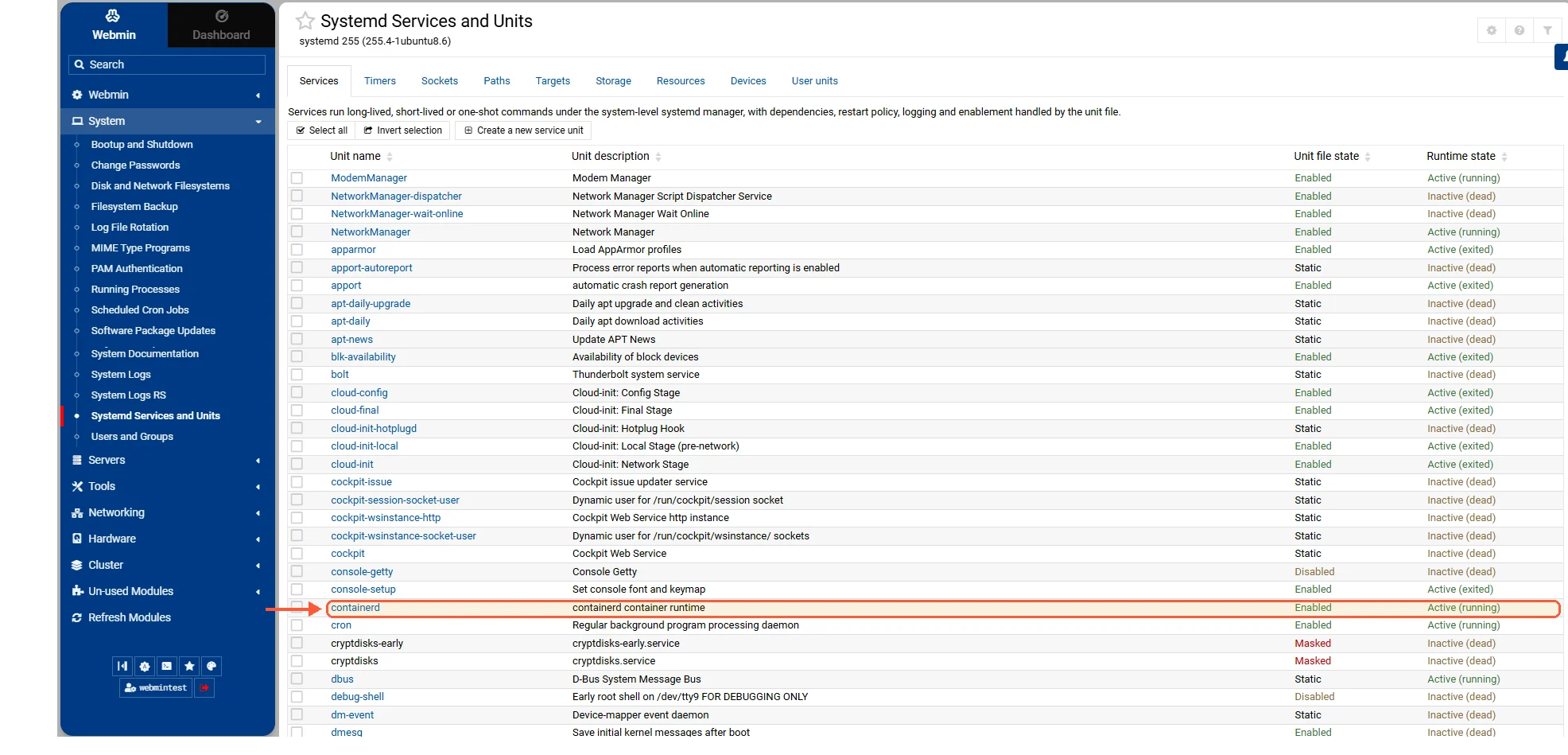
Webmin Systemd Services and Units list with the containerd unit, listed without the .service suffix

Container runtimes appear as plain units, named without .service.

Your idea deserves better hosting

24/7 support 30-day money-back guaranteeRefund covers the VPS plan on your first order. Cancel anytime
Billing Cycle

VPS.S1

$5.99 packages.save  17 %
$4.99 Monthly
  • 2 vCPU AMD EPYC
  • 2 GB RAMPAMIĘĆ
  • 30 GB NVMeDYSK
  • Nielimitowane łącze
  • IPv4 & IPv6Obsługa IPv6 jest obecnie niedostępna we Francji, Finlandii ani w Holandii. w cenie

VPS.S3

$14.99 packages.save  33 %
$9.99 Monthly
  • 4 vCPU AMD EPYC
  • 6 GB RAMPAMIĘĆ
  • 70 GB NVMeDYSK
  • Nielimitowane łącze
  • IPv4 & IPv6Obsługa IPv6 jest obecnie niedostępna we Francji, Finlandii ani w Holandii. w cenie

VPS.S4

$19.99 packages.save  20 %
$15.99 Monthly
  • 6 vCPU AMD EPYC
  • 8 GB RAMPAMIĘĆ
  • 80 GB NVMeDYSK
  • Nielimitowane łącze
  • IPv4 & IPv6Obsługa IPv6 jest obecnie niedostępna we Francji, Finlandii ani w Holandii. w cenie

EPYC VPS.P1

$8.99 packages.save  22 %
$6.99 Monthly
  • 2 vCPU AMD EPYC
  • 4 GB RAMPAMIĘĆ
  • 40 GB NVMeDYSK
  • Nielimitowane łącze
  • IPv4 & IPv6Obsługa IPv6 jest obecnie niedostępna we Francji, Finlandii ani w Holandii. w cenie
  • Darmowa autokopiaZawiera jeden slot kopii zapasowej, który możesz ustawić na codzienne, cotygodniowe lub comiesięczne uruchamianie.

EPYC VPS.P2

$16.99 packages.save  24 %
$12.99 Monthly
  • 2 vCPU AMD EPYC
  • 8 GB RAMPAMIĘĆ
  • 80 GB NVMeDYSK
  • Nielimitowane łącze
  • IPv4 & IPv6Obsługa IPv6 jest obecnie niedostępna we Francji, Finlandii ani w Holandii. w cenie
  • Darmowa autokopiaZawiera jeden slot kopii zapasowej, który możesz ustawić na codzienne, cotygodniowe lub comiesięczne uruchamianie.

EPYC VPS.P4

$29.99 packages.save  23 %
$22.99 Monthly
  • 4 vCPU AMD EPYC
  • 16 GB RAMPAMIĘĆ
  • 160 GB NVMeDYSK
  • Nielimitowane łącze
  • IPv4 & IPv6Obsługa IPv6 jest obecnie niedostępna we Francji, Finlandii ani w Holandii. w cenie
  • Darmowa autokopiaZawiera jeden slot kopii zapasowej, który możesz ustawić na codzienne, cotygodniowe lub comiesięczne uruchamianie.

EPYC VPS.P5

$39.99 packages.save  25 %
$29.99 Monthly
  • 8 vCPU AMD EPYC
  • 16 GB RAMPAMIĘĆ
  • 180 GB NVMeDYSK
  • Nielimitowane łącze
  • IPv4 & IPv6Obsługa IPv6 jest obecnie niedostępna we Francji, Finlandii ani w Holandii. w cenie
  • Darmowa autokopiaZawiera jeden slot kopii zapasowej, który możesz ustawić na codzienne, cotygodniowe lub comiesięczne uruchamianie.

EPYC VPS.P6

$59.99 packages.save  25 %
$44.99 Monthly
  • 8 vCPU AMD EPYC
  • 32 GB RAMPAMIĘĆ
  • 200 GB NVMeDYSK
  • Nielimitowane łącze
  • IPv4 & IPv6Obsługa IPv6 jest obecnie niedostępna we Francji, Finlandii ani w Holandii. w cenie
  • Darmowa autokopiaZawiera jeden slot kopii zapasowej, który możesz ustawić na codzienne, cotygodniowe lub comiesięczne uruchamianie.

EPYC VPS.P7

$69.99 packages.save  29 %
$49.99 Monthly
  • 16 vCPU AMD EPYC
  • 32 GB RAMPAMIĘĆ
  • 240 GB NVMeDYSK
  • Nielimitowane łącze
  • IPv4 & IPv6Obsługa IPv6 jest obecnie niedostępna we Francji, Finlandii ani w Holandii. w cenie
  • Darmowa autokopiaZawiera jeden slot kopii zapasowej, który możesz ustawić na codzienne, cotygodniowe lub comiesięczne uruchamianie.

Genoa VPS.G2

$24.99 packages.save  20 %
$19.99 Monthly
  • 2 vCPUAMD EPYC Genoa 4. generacji 9xx4 z 3,25 GHz lub podobny, na architekturze Zen 4. AMD EPYC G4
  • 4 GB DDR5PAMIĘĆ
  • 50 GB NVMeDYSK
  • Nielimitowane łącze
  • IPv4 & IPv6Obsługa IPv6 jest obecnie niedostępna we Francji, Finlandii ani w Holandii. w cenie
  • Darmowa autokopiaZawiera jeden slot kopii zapasowej, który możesz ustawić na codzienne, cotygodniowe lub comiesięczne uruchamianie.

Genoa VPS.G4

$44.99 packages.save  22 %
$34.99 Monthly
  • 4 vCPUProcesor AMD EPYC z dedykowanymi rdzeniami vCPU, na serwerowym sprzęcie dla firm. AMD EPYC G4
  • 8 GB DDR5PAMIĘĆ
  • 100 GB NVMeDYSK
  • Nielimitowane łącze
  • IPv4 & IPv6Obsługa IPv6 jest obecnie niedostępna we Francji, Finlandii ani w Holandii. w cenie
  • Darmowa autokopiaZawiera jeden slot kopii zapasowej, który możesz ustawić na codzienne, cotygodniowe lub comiesięczne uruchamianie.

Genoa VPS.G6

$89.99 packages.save  22 %
$69.99 Monthly
  • 8 vCPUProcesor AMD EPYC z dedykowanymi rdzeniami vCPU, na serwerowym sprzęcie dla firm. AMD EPYC G4
  • 16 GB DDR5PAMIĘĆ
  • 200 GB NVMeDYSK
  • Nielimitowane łącze
  • IPv4 & IPv6Obsługa IPv6 jest obecnie niedostępna we Francji, Finlandii ani w Holandii. w cenie
  • Darmowa autokopiaZawiera jeden slot kopii zapasowej, który możesz ustawić na codzienne, cotygodniowe lub comiesięczne uruchamianie.

Genoa VPS.G7

$159.99 packages.save  22 %
$124.99 Monthly
  • 8 vCPUProcesor AMD EPYC z dedykowanymi rdzeniami vCPU, na serwerowym sprzęcie dla firm. AMD EPYC G4
  • 32 GB DDR5PAMIĘĆ
  • 250 GB NVMeDYSK
  • Nielimitowane łącze
  • IPv4 & IPv6Obsługa IPv6 jest obecnie niedostępna we Francji, Finlandii ani w Holandii. w cenie
  • Darmowa autokopiaZawiera jeden slot kopii zapasowej, który możesz ustawić na codzienne, cotygodniowe lub comiesięczne uruchamianie.

AMD Ryzen VPS.R1

$16.99 packages.save  18 %
$13.99 Monthly
  • 1 dedykowane CPU AMD Ryzen 9 7950X z 4,5 GHz lub podobny, na architekturze Zen 4. vCPU
  • 4 GB DDR5PAMIĘĆ
  • 50 GB NVMeDYSK
  • Nielimitowane łącze
  • IPv4 & IPv6 w cenie Obsługa IPv6 jest obecnie niedostępna we Francji, Finlandii ani w Holandii.
  • Auto kopia zapasowa w cenie

AMD Ryzen VPS.R2

$29.99 packages.save  17 %
$24.99 Monthly
  • 2 dedykowane CPU AMD Ryzen 9 7950X z 4,5 GHz lub podobny, na architekturze Zen 4. vCPU
  • 8 GB DDR5PAMIĘĆ
  • 100 GB NVMeDYSK
  • Nielimitowane łącze
  • IPv4 & IPv6 w cenie Obsługa IPv6 jest obecnie niedostępna we Francji, Finlandii ani w Holandii.
  • Auto kopia zapasowa w cenie

AMD Ryzen VPS.R4

$109.99 packages.save  18 %
$89.99 Monthly
  • 8 dedykowane CPU AMD Ryzen 9 7950X z 4,5 GHz lub podobny, na architekturze Zen 4. vCPU
  • 32 GB DDR5PAMIĘĆ
  • 400 GB NVMeDYSK
  • Nielimitowane łącze
  • IPv4 & IPv6 w cenie Obsługa IPv6 jest obecnie niedostępna we Francji, Finlandii ani w Holandii.
  • Auto kopia zapasowa w cenie

*VAT excluded.

INCLUDED WITH EVERY PLAN

✓ No setup fees ✓1 Gbps network
✓ Full root access on KVM ✓ Free server monitoring ✓ Firewall management ✓24/7 support

What to run instead

Portainer for Docker

Portainer gives you images, volumes, networks, stacks from Compose files, live logs, an exec console into a running container and role-based access if several people need in. It runs as a container itself, so nothing on the host changes. A Portainer deployment is a one-click template on our side and a compose file anywhere else, and it sits next to Webmin on port 10000 without either one touching the other's files.

cockpit-podman for Podman

What each of the two covers is compared in Webmin vs Cockpit. On Podman, especially on Fedora or the RHEL family, cockpit-podman is the official answer and it's packaged in the distro repositories. Podman only: the Cockpit applications list describes it as "Podman replaces Docker" and shows just two third-party Docker entries, both marked pre-release. Cockpit and Webmin coexist without trouble.

A PaaS layer if what you want is deployments

Some people asking about Webmin and Docker don't want container plumbing at all. A Dokploy install is nearer to what they're describing: push a repository and have it build, run and get a certificate. Dokploy, Coolify and their peers sit above Docker and hide it, giving you apps, databases, environment variables and automatic HTTPS.

Running Webmin and a container UI on the same server

Webmin on 10000 for the system (users, firewall, DNS, backups, cron, the services that keep configuration in /etc), a container UI on its own port for the containers, both behind a firewall rule that allows only your own IP. Two ports and one extra bookmark.

If containers are becoming the main thing a server does, a panel built around /etc is a strange fit for a box where the interesting state lives in images and volumes. The panels that handle both jobs are listed in the roundup of Webmin alternatives. Nothing stops you running Docker on the same VPS as Webmin. It just won't help you drive it.

Questions?

Is there an official Webmin Docker image?

No, Webmin doesn't publish an official Docker image. The webmin account on Docker Hub exists but lists no repositories (I checked on 28 October 2026), and the project distributes Webmin as repository packages and as .deb, .rpm and .tar.gz downloads.

About the author

Diego Cabrera Domínguez

My job is systems administration. I write in the evenings or at the weekend, depending on the week. I started because I kept notes for everything I configured: mail servers, backups, monitoring, Docker, strange permissions problems, things I knew I would forget six months later. Some of those notes became articles. If I have not tested a procedure myself, I do not feel comfortable writing instructions for it!

I am from Granada and still live there. I studied computer systems administration and went directly into IT. I play football with friends once a week when enough people answer the group chat, and I repair old electronics, mostly motherboards and game consoles. I keep several boxes of parts that my mother believes should have been thrown away a long time ago. That's about it. I'm not very good at biographies.

Deploy your next project in seconds

Bring your winning ideas online faster, with modern hardware and unmetered bandwidth. Join a European cloud trusted by thousands of developers and businesses worldwide.