





.svg)
.svg)
.svg)
.svg)

.svg)
.svg)
.svg)

Updated and tested 11 September 2026
A VPS (virtual private server) is a virtual machine you rent from a hosting provider. One physical server in a datacenter runs a hypervisor, the hypervisor splits that machine into a number of isolated virtual machines and you pay for one of them by the month. Inside it you have root, your own kernel, your own disk image and a public IP address, and from the outside it behaves like a small server that belongs to you. The physical machine is shared with other customers. The virtual machine is yours alone.
That's the whole idea. The rest of this page is what that sentence hides: how the slicing works, what a vCPU is, which parts of the box you share with strangers, what a provider's control panel does for you and what you still have to do yourself once you're logged in. The questions people ask before their first one are nearly always the same six, so those get their own section near the end.
How a hypervisor turns one server into many
The host is an ordinary rack server: two CPU sockets with a lot of cores, a few hundred gigabytes of RAM, a handful of NVMe drives and one or two network ports. On it runs a hypervisor, which on most Linux hosting platforms is KVM (Kernel-based Virtual Machine), a kernel module that uses the virtualization extensions built into Intel and AMD processors to run guest operating systems directly on the CPU at close to native speed. QEMU sits in userspace alongside it and provides the emulated machine the guest sees: a motherboard, a disk controller, a network card, a clock. QEMU's own security requirements page names "cloud and virtual private server (VPS) hosting" as the primary virtualization use case it's designed for, and the isolation model it describes is the one your VPS relies on: each guest is confined to its own virtual machine and can only touch its own disk image, never a neighbour's. That confinement is layered, with the hardware boundary on top and things like seccomp and cgroups wrapped around the QEMU process underneath, which is more than you need to know to rent one.
When the provider creates your VPS, the hypervisor allocates it a fixed amount of RAM, a set number of virtual CPUs, a disk image on the host's storage and a virtual network interface bridged to the datacenter network. Your operating system boots inside that, sees hardware that looks real and runs as if it had the machine to itself. The host kernel schedules your vCPUs onto physical cores the same way it schedules any other process.
What you're renting, then, is a defined share of a machine plus the promise that nobody else's share can reach into yours. The piece on KVM VPS hosting and how the isolation works goes deeper into the kernel module, the CPU extensions and the virtio drivers. Here I'll stay at the level of what the arrangement means for you, starting with what's in the box.
What you get with a VPS
Root. Your own kernel, so you can load modules, run Docker, bring up a WireGuard interface or swap the distribution entirely. A dedicated public IPv4 address (and usually an IPv6 block) that's yours for as long as you keep the server. A disk image that holds your OS and data, sized to the plan. The ability to reboot, reinstall, mount an ISO and get at a console even when SSH is broken. Snapshots. And a fixed allocation of RAM that no other customer can consume.
Compare that with shared web hosting, where you get an FTP login and a control panel on a server whose kernel, PHP version and firewall belong to someone else, and with a dedicated server, where the whole physical machine is yours and nobody else's traffic touches the disks. A VPS sits between those. It costs a fraction of the dedicated box because the hardware is shared, and it gives you nearly all of the control because the operating system is yours. For most projects that's the right trade, and I've written up the cases where it isn't in VPS vs dedicated server: when to move. Disk-heavy databases and software licensed per physical core are the usual two.
What "vCPU" means
A vCPU (virtual CPU) is one thread of execution the hypervisor lets your VM run. On the host it's a QEMU thread that the Linux scheduler places on a physical core or a hyperthread. A "4 vCPU" plan means your OS sees four processors and can run four things at once, and the host will put those four threads on physical cores whenever there are free ones.
The key word is whenever. On a standard VPS the host has more vCPUs handed out than it has physical threads, because most servers sit idle most of the time and selling only as many vCPUs as there are cores would waste the machine. The provider is betting that your four vCPUs and your neighbour's four won't all be busy at the same moment. When that bet fails you feel it as steal time, and there's a whole article on CPU steal time and noisy neighbours covering how to measure it. Some providers also sell plans where each vCPU is pinned to a physical core reserved for you alone; that's a VDS, and the difference is explained in VPS vs VDS and what dedicated cores change. The ratio itself is never on the plan page, and that's one of the six questions at the end.
What is shared and what isn't
Shared: the physical CPU cores (time-sliced, as above), the NVMe drives your disk image lives on (everyone's images sit on the same storage, so a neighbour running a heavy database import can push your disk latency up), the host's network port (a 10 or 25 Gbps uplink divided among the guests) and the host's memory bandwidth. Not shared: your RAM allocation, which on a KVM host is reserved for your VM and shows up in free -m at its full size, less the small slice the kernel keeps for itself at boot (a 2 GB plan shows a total just under 2,000 MB); your disk image, which no other guest can open; your IP addresses; your kernel and everything above it.
Reserved RAM is one of the real dividing lines between KVM and container-based VPS products. On OpenVZ or LXC hosting the "VPS" is a container on a kernel shared with every other customer, and RAM is a limit the host enforces on a process group, which is a different thing from memory a VM owns. Those products still exist, and for a small web server they're fine. For anything that needs kernel modules, a custom kernel, Docker without restrictions or a non-Linux OS, they're not.
What happens the moment you click deploy
Take a plain 2 vCPU / 4 GB Ubuntu 24.04 LTS order as the example. When you confirm it, the provider's platform picks a host with free capacity, creates a VM definition with your RAM, vCPU count and a fresh disk image, then clones the Ubuntu cloud image onto that disk. Cloud images are the same few-hundred-megabyte OS templates Canonical publishes for every cloud, and they ship with cloud-init preinstalled and no password of their own, so whatever login you get is set on first boot.
The VM starts. The kernel boots, finds the virtio disk and network devices, and cloud-init runs. Its boot stages go in a fixed order: the local stage finds the datasource the provider attached (a small config drive or a metadata endpoint), applies the network configuration for your assigned IP, then the network stage grows the root partition to fill the disk you paid for, sets the hostname and writes your SSH public key, if you gave one at order time, into ~/.ssh/authorized_keys for the default user. The config stage handles locale, passwords and runcmd; on templates that log you in as root, this is where the root password shown in the panel gets set. The final stage installs packages and runs any first-boot script the provider or you supplied. The whole thing takes under a minute on NVMe, most of it waiting for the kernel.
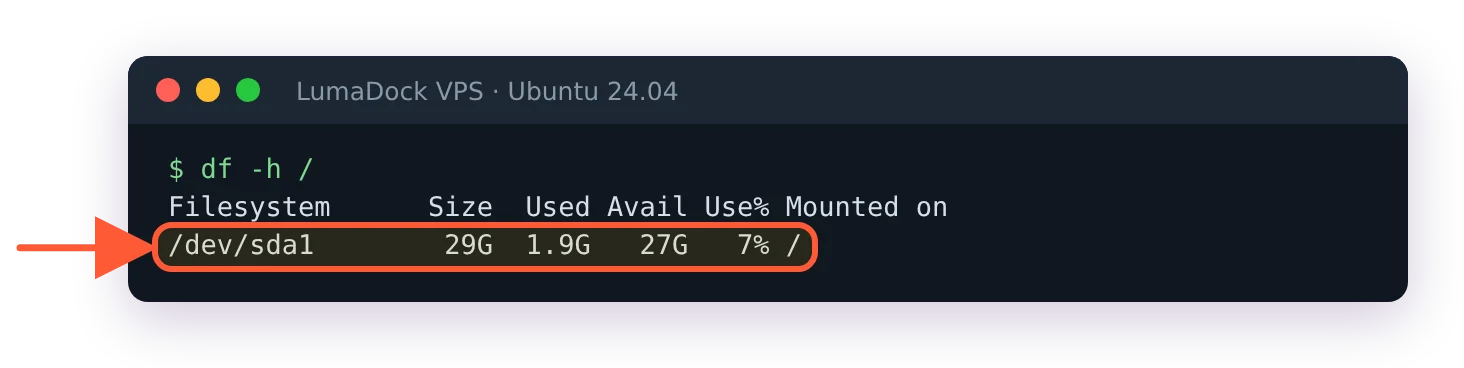
Minutes after deploy, the root filesystem already fills the disk you ordered.
Then a green light in the panel and an IP address. You SSH in with the key you uploaded (or as root with that password) and the server is empty apart from the base OS. Nothing is firewalled yet, no updates have been applied since the image was built and root login policy is whatever the template set, which on some templates means root with a password over SSH. That's why the first hour on any new VPS looks the same, and I keep the checklist for it in how to secure a VPS. Key-only SSH and a firewall with two ports open, before anything else.
One thing I've never pinned down: how long a cloud image can sit in a provider's template store before the first apt upgrade on a new VM takes longer than the deploy did. I've seen templates refreshed weekly and I've seen ones eight months stale. The panel never tells you.
The control panel vs the operating system
The provider's panel controls the virtual hardware. Power on, power off, hard reset, reinstall from a template, boot from an ISO, take or restore a snapshot, attach extra storage, change the reverse DNS on your IP, open a VNC console and (on most platforms) manage a firewall that sits in front of the VM on the host side. Those operations happen outside your OS and work even when the OS is broken, which is the point of them.
Everything else is yours. Users, packages, the firewall inside the OS, the web server, TLS certificates, cron jobs, mail, monitoring agents, application deployments. The provider doesn't see inside the VM and doesn't manage it unless you've bought a managed plan. If you've only used shared hosting before, this is the adjustment: a VPS ships with nothing installed and nothing configured, and every service that runs on it is one you put there.
Snapshots, backups and reinstalls
A snapshot freezes the disk image at a point in time so you can roll back. It's the right thing to take before an upgrade or a risky config change, and the wrong thing to rely on as a backup, because it lives on the same host as the VM. A backup is a copy stored somewhere else, on a schedule, that you've tested restoring. Most panels offer both, sometimes with one backup slot included and more available as an add-on. I run my own as well, with restic to off-site storage, and the setup is in automated VPS backups with restic and Borg.
Reinstall wipes the disk and starts again from a template. It takes about as long as the first deploy did. Keep that in mind when a server is in a bad state after an experiment: sometimes the fastest fix is a fresh image plus your backup, and it's a good habit to build servers so that's always an option.
Linux VPS or Windows VPS
Most VPSes run Linux, and the distro choice is mostly about what you're used to and how long you want the security updates to last. Ubuntu 24.04 LTS gets standard security maintenance until May 2029 according to Canonical's release cycle page, which is a comfortable window for a server you'd like to leave alone. Debian, Rocky, Alma, Alpine and the rest each have a case, and I've laid them out in the best Linux distro for a VPS. For a first server, Ubuntu LTS or Debian stable, and don't overthink it.
A Windows VPS is the same virtual machine with Windows Server installed from an ISO or a provider template, managed over RDP instead of SSH. It works well for the things that need it (a .NET app tied to IIS, a trading terminal, a piece of software with no Linux build). Two practical notes. Windows wants more RAM and disk than a Linux server doing the same job, so size accordingly. And the licence is yours to supply; a provider gives you the VM and the install, and the Windows Server licence or a SPLA arrangement comes from you or through the provider as a separate paid item.
What people run on a VPS
Web applications and APIs, which is still the bulk of it: a Node or Django app behind Nginx with a Postgres database on the same box. Personal VPNs, because a WireGuard endpoint on a VPS with a static IP is a twenty-minute job. Game servers for a friend group, Minecraft and Valheim mostly, where a few dedicated cores matter more than anything else. Self-hosted apps like Nextcloud, Jellyfin, Immich or n8n, usually under Docker. CI runners and automation, the sort of thing that used to run on a spare machine under a desk. Mail, for the brave. And more recently, always-on AI agents and bots that need to be reachable and awake when the laptop is closed.
Media servers are the one where the plan size question gets interesting. Jellyfin idling is nothing; Jellyfin transcoding two 4K streams will eat every vCPU you gave it. For libraries in the terabytes the disk type matters more than the CPU, and that's a different product category, covered in storage VPS vs object storage vs NAS. A storage VPS trades NVMe for high-capacity HDD, which suits the library and not the database that indexes it.
Cloud VMs from the big providers are the same technology with a different billing model and a lot more surrounding services. The trade-offs are their own article, VPS vs cloud hosting. The short version is that the VPS wins on predictable monthly cost and the cloud wins when you need managed databases and autoscaling around the VM.

