Back to Article List

What is CrowdSec and how does it work in 2026

What is CrowdSec and how does it work in 2026

CrowdSec is an open source IPS (Intrusion Prevention System) that watches your server logs for hostile behavior and bans the IPs behind it. The interesting part is what happens after the ban: your install reports the attack to the CrowdSec network, and in exchange you receive a curated blocklist built from what every other install saw. Attackers get blocked on your server before they've sent it a single request.

I moved my own boxes off fail2ban and onto CrowdSec in 2024, and this is the explainer I wish someone had handed me back then, written for people who already run servers and want the real picture instead of the pitch.

Everything below is checked against Security Engine 1.7.8, released in May 2026. The engine is MIT licensed, written in Go and sits at 13.8k stars on the CrowdSec GitHub repository. The company behind it sells threat intelligence on top of the free engine, and that split matters, so I'll cover exactly where the paid line sits further down.

How the CrowdSec architecture works

The pipeline has four stages, and once you see them the whole product makes sense. The Security Engine (the docs now call the detection half a Log Processor, though everyone I know still says agent) tails your data sources: flat log files, journald, syslog, Docker container output. Parsers normalize each line into structured events. Scenarios then watch those events for patterns, and most of them are leaky buckets: ten failed SSH logins from the same IP inside a minute overflows the bucket and an alert fires.

An alert doesn't block anything by itself. It goes to the Local API (LAPI), which turns it into a decision, typically "ban this IP for four hours". Enforcement is a separate program called a Remediation Component, still universally known as a bouncer. The firewall bouncer writes iptables or nftables rules, the nginx bouncer rejects requests inside the web server, and there are bouncers for Traefik, Cloudflare, HAProxy, OPNsense and plenty more. On plain VPSes I run the firewall bouncer with iptables, because a banned IP then loses every port at once, SSH included.

Decisions don't have to be bans either. Profiles in /etc/crowdsec/profiles.yaml map alerts to remediation types and durations, so a web scanner can get a captcha challenge instead of a hard block while an SSH brute forcer gets the full four hours. The nginx and Cloudflare bouncers both handle captcha decisions, which matters on anything commercial: a false positive behind a captcha solves itself in five seconds, while a false positive behind a dropped connection becomes a support ticket. I keep bans for infrastructure ports and captchas for anything a paying human might legitimately touch.

Splitting detection from enforcement sounds academic until you run more than one machine. CrowdSec calls it "detect here, remedy there": several servers can stream alerts to a single LAPI, and every bouncer in the fleet enforces the merged decision list. One web node catches a credential stuffer and your mail server bans the same IP seconds later. State lives in a small local database, SQLite by default and PostgreSQL or MariaDB when a fleet shares one LAPI, and the trust boundary is clean: bouncers authenticate with API keys, machines with credentials, and the answer to "what does this component talk to" is always the LAPI. fail2ban has no answer to that, which is a large part of why I switched (the full argument is in my CrowdSec vs fail2ban comparison).

The community blocklist and signal curation

When a scenario fires, your engine sends a signal to the Central API (CAPI): the offending IP, the scenario name, a timestamp and nothing else. Your log lines never leave the box. CrowdSec's backend cross-checks signals from the whole network, weighs how many independent installs reported the same IP, filters out false positives and poisoning attempts and publishes the survivors as the community blocklist. Every enrolled engine pulls that list back down, and bouncers enforce it alongside your local decisions.

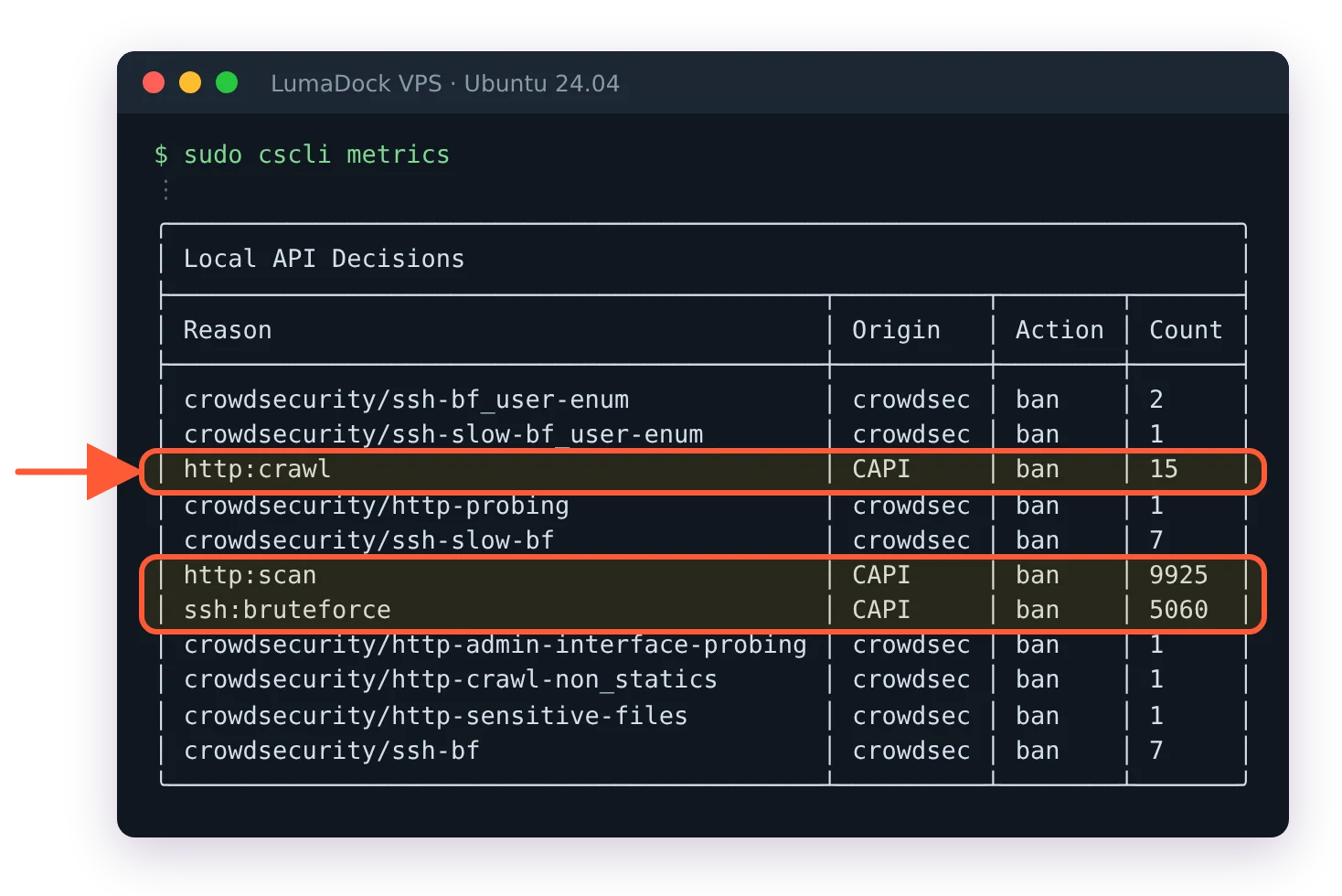
The curation is the whole point. A raw feed of "IPs somebody somewhere banned" would be dangerous to enforce; a home user misconfiguring their own NAS shouldn't get their IP blocked on ten thousand servers. An address only makes the list once the consensus engine trusts the reports, and in two years of enforcing it in blocking mode on production hosts I haven't traced a single customer complaint back to it. The practical effect shows up in cscli metrics: on a fresh box, most drops come from the community list rather than local detection, because the background noise that hammers every public IPv4 address is already known to the network. (The network got busy enough that CrowdSec added rate limiting to CAPI in December 2025, which is a nice problem to have.)

Sharing is opt-out rather than mandatory. Disable it and the engine keeps working on local detection alone, though you stop receiving the community list, which removes the best part of the deal. The give-to-get design is explicit and I find it fair. It's the same trade Waze made for road traffic: the map is only as good as the drivers reporting into it, and a solo copy with reporting switched off is just a worse map.

Collections and scenarios on the hub

Detection logic isn't baked into the binary. It lives on the CrowdSec hub as small YAML files you install with cscli. A parser teaches the engine to read a log format. A scenario describes the behavior to catch. A collection bundles everything needed for one service, so a single command pulls the sshd parser together with its brute force and slow brute force scenarios:

sudo cscli collections install crowdsecurity/sshd

The install wizard detects the services on your box and picks collections for you, which is why a default install already understands sshd and whatever web server it found. Writing your own scenario is YAML plus grok patterns, and it's genuinely nicer than maintaining regex once you've done it twice. The first time has a learning curve, I won't pretend otherwise.

A scenario file is short enough to read over coffee. The sshd brute force one declares a leaky bucket keyed on source IP, a capacity, a leak rate and a blackhole period so one attacker doesn't generate fifty duplicate alerts. Because the format is declarative, cscli hub update and cscli hub upgrade refresh your detection rules the way apt refreshes packages, no engine release required. Compare that with hand-editing regex on every box you own, which is what improving detection used to mean, and the appeal of a shared hub is obvious.

The AppSec component and virtual patching

Since release 1.6 the engine also carries a WAF layer called the AppSec Component. Web bouncers forward incoming HTTP requests to it for inspection, which catches things that never produce an error log line: exploit payloads for fresh CVEs, path traversal probes, injection attempts, scanner fingerprints. CrowdSec ships virtual patching rules for actively exploited vulnerabilities, the component runs out-of-band by default so it observes before it blocks, and you can layer the OWASP Core Rule Set on top through the embedded Coraza engine. The nginx setup is a proper tutorial of its own, so I wrote the CrowdSec AppSec WAF guide for nginx separately. Do you still need a standalone WAF after that? For most VPS stacks, no. The AppSec component covers the virtual patching cases that matter and inherits all of CrowdSec's remediation machinery; I run it in blocking mode on two production nginx frontends and the overhead hasn't been worth measuring.

The same exploitation data feeds the public CVE Explorer, launched in August 2025, where you can look up which CVEs are actively being exploited in the wild. I check it before deciding if a patch can wait until Monday.
Observability with cscli and the console

Day to day you interact with the engine through cscli, and it's a genuinely good CLI. cscli metrics shows lines parsed per source, bucket activity, decision counts and what each bouncer dropped. cscli alerts inspect replays the exact log lines that triggered a scenario, which makes false positive hunting fast. When something misbehaves, nine times out of ten the answer surfaces in metrics before you ever open a log, and for the tenth time there's a CrowdSec troubleshooting cheat sheet for the errors that actually come up.

The console adds the fleet view: alerts from every enrolled engine on one timeline, plus remediation metrics that show exactly what the community blocklist blocked on each machine. On one server it's a convenience. On five it changes how you operate, because you stop SSHing around to answer "is this IP hitting all of us?"

What's free and what's paid

The free side is bigger than people expect. The Security Engine, every bouncer, the cscli tooling and all the hub content are MIT licensed with no strings. The community blocklist is free too: you share signals, you get the curated list back. The console at app.crowdsec.net (a web dashboard that aggregates alerts across all your engines) has a free tier that covers a small number of machines, and enrolling is one cscli console enroll command.

The paid side is data and team tooling. Premium blocklists are extra curated feeds targeted at specific attack classes or industries, and the CTI API answers reputation queries about arbitrary IPs at volume. The console grows multi-user features on paid plans. I run the free tier on personal boxes and paid feeds at work, and the model feels honest: the software is free, you pay for more of the network's data. I've seen no move to claw features back behind a paywall in the two years I've watched it, which is more than I can say for a lot of open core projects.

A middle path exists for network gear. Blocklist integration endpoints let a firewall or CDN pull CrowdSec feeds directly over HTTP with no engine installed at all, which is how most OPNsense and pfSense deployments consume the data. Same curated intelligence, different enforcement point, and it's often the first CrowdSec exposure a network team gets.

Install CrowdSec on Ubuntu in five minutes

Reading about it only gets you so far. On Ubuntu 24.04 (Debian is nearly identical, and the CrowdSec Debian install guide covers the differences), add the repo and install the engine:

curl -s https://install.crowdsec.net | sudo sh
sudo apt install crowdsec

The wizard scans your services and installs matching collections. At this point CrowdSec detects but doesn't block, which is a sensible default. Add the firewall bouncer to enforce:

sudo apt install crowdsec-firewall-bouncer-iptables

Before you enforce anything, whitelist your own IP. Getting banned by your own IPS over SSH is a rite of passage nobody enjoys, and the safe rollout guide exists because I've done it. Then verify the pipeline is alive:

sudo cscli metrics
sudo cscli alerts list

On a server with a public IP, give it twenty minutes and cscli alerts list will show its first SSH brute force attempts. That speed still surprises people. Enrolling in the console is one more optional command with the key from your dashboard:

sudo cscli console enroll YOUR_ENROLL_KEY

From then on this box reports to the shared timeline. If your logs live somewhere unusual, acquisition files under /etc/crowdsec/acquis.d/ tell the engine what to read; the defaults already cover standard paths for the services the wizard found. You can also fake a decision to watch the bouncer react, then clean it up:

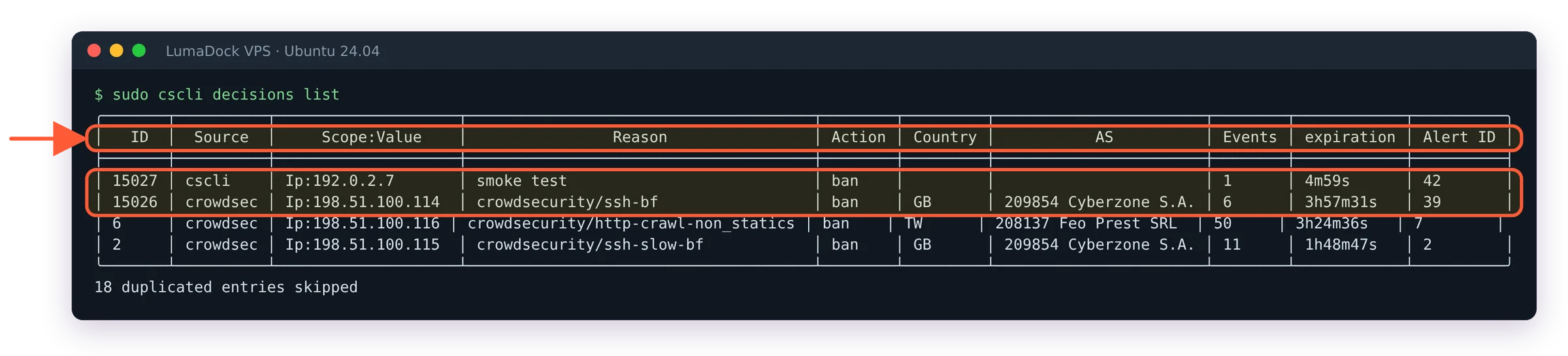
sudo cscli decisions add --ip 192.0.2.7 --duration 5m --reason "smoke test"
sudo cscli decisions list
sudo cscli decisions delete --ip 192.0.2.7

Container setups follow a different path since the engine needs your logs mounted in, and the CrowdSec Docker Compose guide walks through that layout. And if you'd rather skip the setup entirely, LumaDock ships one-click VPS templates with CrowdSec preinstalled on Ubuntu 24.04, plus nginx and Apache variants with the web bouncer already wired in, selectable from the CrowdSec VPS hosting page when you order.

Whichever route you take, run cscli metrics again tomorrow morning. The drop counts from the community blocklist will tell you more about what's crawling the internet than any explainer, mine included.

Your idea deserves better hosting

24/7 support 30-day money-back guarantee Cancel anytime
Verrechnungszyklus

VPS.S1

£4.44 Save  17 %
£3.70 Monatlich
  • 2 vCPU AMD EPYC
  • 2 GB RAMRAM
  • 30 GB NVMeSPEICHER
  • Unbegrenzter Traffic
  • IPv4 & IPv6IPv6-Support ist derzeit nicht verfügbar in Frankreich, Finnland oder den Niederlanden. inklusive

VPS.S3

£11.12 Save  33 %
£7.41 Monatlich
  • 4 vCPU AMD EPYC
  • 6 GB RAMRAM
  • 70 GB NVMeSPEICHER
  • Unbegrenzter Traffic
  • IPv4 & IPv6IPv6-Support ist derzeit nicht verfügbar in Frankreich, Finnland oder den Niederlanden. inklusive

EPYC VPS.P1

£6.67 Save  22 %
£5.19 Monatlich
  • 2 vCPU AMD EPYC
  • 4 GB RAMRAM
  • 40 GB NVMeSPEICHER
  • Unbegrenzter Traffic
  • IPv4 & IPv6IPv6-Support ist derzeit nicht verfügbar in Frankreich, Finnland oder den Niederlanden. inklusive
  • Kostenloses Auto-BackupEnthält einen Backup-Slot, den du auf täglich, wöchentlich oder monatlich einstellen kannst.

EPYC VPS.P2

£12.61 Save  24 %
£9.64 Monatlich
  • 2 vCPU AMD EPYC
  • 8 GB RAMRAM
  • 80 GB NVMeSPEICHER
  • Unbegrenzter Traffic
  • IPv4 & IPv6IPv6-Support ist derzeit nicht verfügbar in Frankreich, Finnland oder den Niederlanden. inklusive
  • Kostenloses Auto-BackupEnthält einen Backup-Slot, den du auf täglich, wöchentlich oder monatlich einstellen kannst.

EPYC VPS.P4

£22.25 Save  23 %
£17.06 Monatlich
  • 4 vCPU AMD EPYC
  • 16 GB RAMRAM
  • 160 GB NVMeSPEICHER
  • Unbegrenzter Traffic
  • IPv4 & IPv6IPv6-Support ist derzeit nicht verfügbar in Frankreich, Finnland oder den Niederlanden. inklusive
  • Kostenloses Auto-BackupEnthält einen Backup-Slot, den du auf täglich, wöchentlich oder monatlich einstellen kannst.

EPYC VPS.P5

£29.67 Save  25 %
£22.25 Monatlich
  • 8 vCPU AMD EPYC
  • 16 GB RAMRAM
  • 180 GB NVMeSPEICHER
  • Unbegrenzter Traffic
  • IPv4 & IPv6IPv6-Support ist derzeit nicht verfügbar in Frankreich, Finnland oder den Niederlanden. inklusive
  • Kostenloses Auto-BackupEnthält einen Backup-Slot, den du auf täglich, wöchentlich oder monatlich einstellen kannst.

EPYC VPS.P6

£44.51 Save  25 %
£33.38 Monatlich
  • 8 vCPU AMD EPYC
  • 32 GB RAMRAM
  • 200 GB NVMeSPEICHER
  • Unbegrenzter Traffic
  • IPv4 & IPv6IPv6-Support ist derzeit nicht verfügbar in Frankreich, Finnland oder den Niederlanden. inklusive
  • Kostenloses Auto-BackupEnthält einen Backup-Slot, den du auf täglich, wöchentlich oder monatlich einstellen kannst.

EPYC VPS.P7

£51.93 Save  29 %
£37.09 Monatlich
  • 16 vCPU AMD EPYC
  • 32 GB RAMRAM
  • 240 GB NVMeSPEICHER
  • Unbegrenzter Traffic
  • IPv4 & IPv6IPv6-Support ist derzeit nicht verfügbar in Frankreich, Finnland oder den Niederlanden. inklusive
  • Kostenloses Auto-BackupEnthält einen Backup-Slot, den du auf täglich, wöchentlich oder monatlich einstellen kannst.

Genoa VPS.G2

£18.54 Save  20 %
£14.83 Monatlich
  • 2 vCPUAMD EPYC Genoa 4. Generation 9xx4 mit 3,25 GHz oder ähnlich, auf Zen 4-Architektur. AMD EPYC G4
  • 4 GB DDR5RAM
  • 50 GB NVMeSPEICHER
  • Unbegrenzter Traffic
  • IPv4 & IPv6IPv6-Support ist derzeit nicht verfügbar in Frankreich, Finnland oder den Niederlanden. inklusive
  • Kostenloses Auto-BackupEnthält einen Backup-Slot, den du auf täglich, wöchentlich oder monatlich einstellen kannst.

Genoa VPS.G4

£33.38 Save  22 %
£25.96 Monatlich
  • 4 vCPUAMD EPYC Prozessor mit dedizierten vCPU Kernen, auf Enterprise Serverhardware. AMD EPYC G4
  • 8 GB DDR5RAM
  • 100 GB NVMeSPEICHER
  • Unbegrenzter Traffic
  • IPv4 & IPv6IPv6-Support ist derzeit nicht verfügbar in Frankreich, Finnland oder den Niederlanden. inklusive
  • Kostenloses Auto-BackupEnthält einen Backup-Slot, den du auf täglich, wöchentlich oder monatlich einstellen kannst.

Genoa VPS.G6

£66.76 Save  22 %
£51.93 Monatlich
  • 8 vCPUAMD EPYC Prozessor mit dedizierten vCPU Kernen, auf Enterprise Serverhardware. AMD EPYC G4
  • 16 GB DDR5RAM
  • 200 GB NVMeSPEICHER
  • Unbegrenzter Traffic
  • IPv4 & IPv6IPv6-Support ist derzeit nicht verfügbar in Frankreich, Finnland oder den Niederlanden. inklusive
  • Kostenloses Auto-BackupEnthält einen Backup-Slot, den du auf täglich, wöchentlich oder monatlich einstellen kannst.

Genoa VPS.G7

£118.70 Save  22 %
£92.73 Monatlich
  • 8 vCPUAMD EPYC Prozessor mit dedizierten vCPU Kernen, auf Enterprise Serverhardware. AMD EPYC G4
  • 32 GB DDR5RAM
  • 250 GB NVMeSPEICHER
  • Unbegrenzter Traffic
  • IPv4 & IPv6IPv6-Support ist derzeit nicht verfügbar in Frankreich, Finnland oder den Niederlanden. inklusive
  • Kostenloses Auto-BackupEnthält einen Backup-Slot, den du auf täglich, wöchentlich oder monatlich einstellen kannst.

AMD Ryzen VPS.R1

£12.61 Save  18 %
£10.38 Monatlich
  • 1 dedizierter CPU AMD Ryzen 9 7950X mit 4,5 GHz oder ähnlich, auf Zen 4-Architektur. vCPU
  • 4 GB DDR5RAM
  • 50 GB NVMeSPEICHER
  • Unbegrenzter Traffic
  • IPv4 & IPv6 inklusive IPv6-Support ist derzeit nicht verfügbar in Frankreich, Finnland oder den Niederlanden.
  • Auto-Backup inklusive

AMD Ryzen VPS.R2

£22.25 Save  17 %
£18.54 Monatlich
  • 2 dedizierte CPUs AMD Ryzen 9 7950X mit 4,5 GHz oder ähnlich, auf Zen 4-Architektur. vCPU
  • 8 GB DDR5RAM
  • 100 GB NVMeSPEICHER
  • Unbegrenzter Traffic
  • IPv4 & IPv6 inklusive IPv6-Support ist derzeit nicht verfügbar in Frankreich, Finnland oder den Niederlanden.
  • Auto-Backup inklusive

AMD Ryzen VPS.R4

£81.60 Save  18 %
£66.76 Monatlich
  • 8 dedizierte CPUs AMD Ryzen 9 7950X mit 4,5 GHz oder ähnlich, auf Zen 4-Architektur. vCPU
  • 32 GB DDR5RAM
  • 400 GB NVMeSPEICHER
  • Unbegrenzter Traffic
  • IPv4 & IPv6 inklusive IPv6-Support ist derzeit nicht verfügbar in Frankreich, Finnland oder den Niederlanden.
  • Auto-Backup inklusive

Frequently asked questions

How do I stop CrowdSec from sending anything off the box?

Set sharing: false under api.server.online_client in /etc/crowdsec/config.yaml and restart the service, or remove the Central API credentials file (online_api_credentials.yaml) entirely. The engine then runs on local detection alone and cscli capi status confirms the box talks to nobody. You give up the community blocklist in the same move, which for me kills the point, but on machines with strict data-flow rules it's a supported way to run.

GPU products are in high demand at the moment. Fill the form to get notified as soon as your preferred GPU server is back in stock.