





.svg)
.svg)
.svg)
.svg)

.svg)
.svg)
.svg)


Updated and tested 28 October 2026
Stacks are the feature that turns Portainer from a viewer into a deployer, and once the pattern clicks you can install nearly anything the self-hosted world publishes, because nearly everything publishes a docker-compose file and a stack is exactly that: a compose file Portainer runs and then manages as one unit. Learn it once and "how do I install Planka with Portainer" and "immich on portainer" and every future variant become the same five-minute answer. So here's the once: a complete worked example with Planka (the self-hosted Trello people keep asking about), then the general recipe, then the app-specific notes for the usual suspects.
Install Planka with a Portainer stack, start to finish
Planka wants two containers (the app plus Postgres), which makes it a perfect first stack: real enough to teach the pattern, small enough to read in one screen.
Create the stack
In Portainer: Stacks » Add stack, name it planka, choose the web editor and paste a compose definition based on Planka's official one:
services:
  planka:
    image: ghcr.io/plankanban/planka:latest
    restart: always
    ports:
      - "3015:1337"
    environment:
      - BASE_URL=http://YOUR_SERVER_IP:3015
      - DATABASE_URL=postgresql://postgres@postgres-server/planka
      - SECRET_KEY=CHANGE_ME_LONG_RANDOM
      - [email protected]
      - DEFAULT_ADMIN_PASSWORD=CHANGE_ME_ADMIN_PASSWORD
      - DEFAULT_ADMIN_NAME=Your Name
      - DEFAULT_ADMIN_USERNAME=admin
    depends_on:
      postgres-server:
        condition: service_healthy
    volumes:
      - data:/app/data

  postgres-server:
    image: postgres:16-alpine
    restart: always
    environment:
      - POSTGRES_DB=planka
      - POSTGRES_HOST_AUTH_METHOD=trust
    volumes:
      - planka-db:/var/lib/postgresql/data
    healthcheck:
      test: ["CMD-SHELL", "pg_isready -U postgres -d planka"]
      interval: 10s
      timeout: 5s
      retries: 5

volumes:
  data:
  planka-db:
Before deploying, edit the values that are yours: BASE_URL to the address users will visit (your domain once a proxy fronts it), SECRET_KEY to a long random string (openssl rand -hex 32 makes a good one) and the four DEFAULT_ADMIN_ lines, which create the first admin account when Planka starts. Planka's own file ships those four commented out and notes that keeping DEFAULT_ADMIN_EMAIL set protects that account from being edited or deleted. Always check the app's own repository for the current compose reference too; projects move, and their README outranks any tutorial's snapshot, mine included.
The data volume and the healthcheck come from Planka's official file. Planka 2.x keeps its files in /app/data, so that one volume is the one to back up, and the healthcheck holds Planka back until Postgres accepts connections. I haven't run this exact file on my server. I ran the older four-volume version of it: Planka 2.2.1 answered only after restarting twice, because it started before Postgres was ready, and it wrote its files to an anonymous volume at /app/data while the four named volumes stayed unused.

With the guide's old four-volume compose, Planka 2.2.1 wrote to an anonymous volume at /app/data on my server.
Deploy and create the admin
Hit Deploy the stack. Portainer pulls the images, wires the containers onto a shared network (note how DATABASE_URL just says postgres-server; container names resolve inside a stack) and both containers should go green in the stack view. Planka 2.x creates the first admin from the DEFAULT_ADMIN_ lines (the other route is Planka's db:create-admin-user script), so open http://YOUR_SERVER_IP:3015 and log in with that email or username and the password you set. You now have a kanban board whose data lives on your own disk.
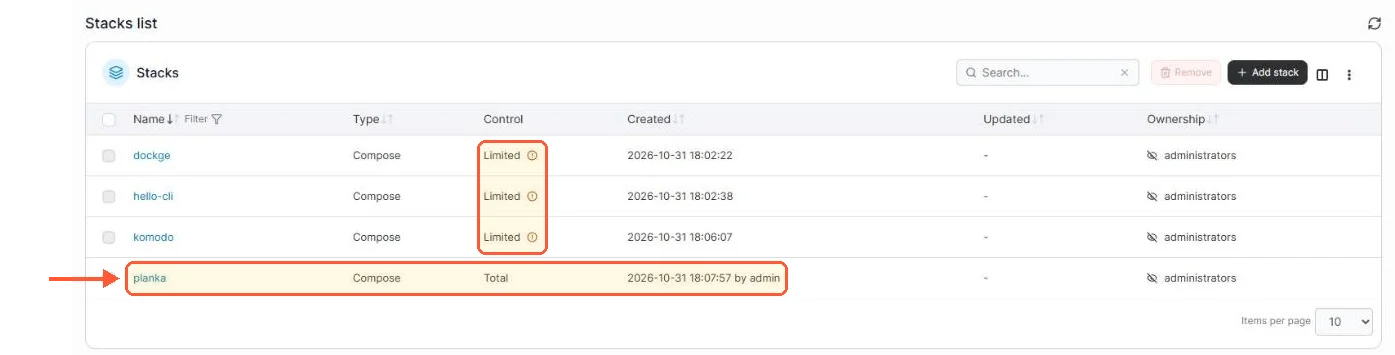
My planka stack, deployed from Portainer, has Total control; the stacks I started with docker compose on the CLI show Limited.
Manage it as a unit
The stack view is the payoff: logs per container, restart the whole app in one action, and the editor holds your compose definition for tweaks. Redeploying after an edit recreates only what changed. Updates ride the Update the stack button with re-pull enabled, the flow our Portainer update guide covers alongside its warnings about :latest tags, which apply to the Planka image above verbatim.
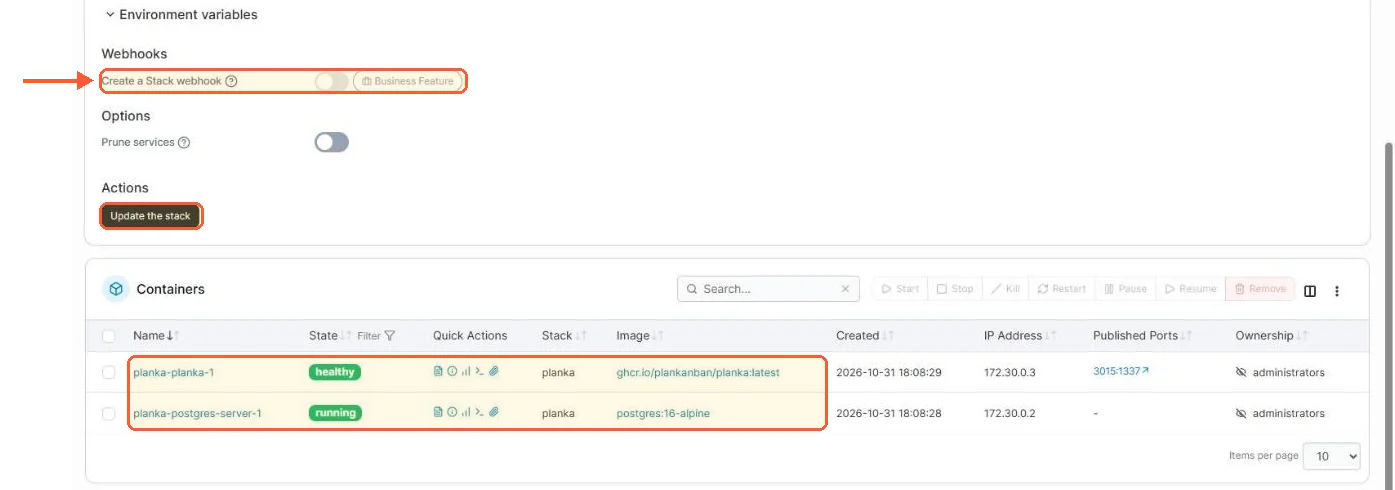
Below the editor: the stack webhook is a Business feature in CE 2.45.3, Update the stack is not, and both Planka containers are up.
Webhooks for redeploying from a URL call are marked as a Business feature on an existing stack and on containers in the CE 2.45 UI. The Add stack form for a Git repository still shows a webhook toggle when you create the stack.

