.svg)
.svg)
.svg)
.svg)

.svg)
.svg)
.svg)

Updated and tested 3 November 2026
Pick Emby if you want a vendor-supported server and the paid extras are worth a key: DVR, unlocked mobile apps and scheduled format conversion. Pick Jellyfin if the server sits on a VPS and you'd sooner edit a config file than buy a key. Those two sentences cover most "emby vs jellyfin" decisions, and the rest of this page is the detail behind them.
Emby and Jellyfin were the same program until December 2018. Emby, which began life as Media Browser, had been drifting toward closed components for a while, and with version 3.5.3 it relicensed the server as proprietary. A group of contributors forked the last open release, 3.5.2, on December 8, 2018 and called it Jellyfin. Nearly eight years on they share a file layout, a naming convention for media, the same broad feature list and a family resemblance in the web UI. What they don't share is a business model, and most of the practical differences trace back to that.
Current versions and release cadence
Emby Server's stable build is 4.10.2.0 from October 20, 2026, per the maintained Emby latest versions thread, with 4.11 in beta (4.11.0.13 on October 31, 2026, per the Emby releases page). Emby moves in 4.x cycles, with a beta channel running ahead of the stable build.
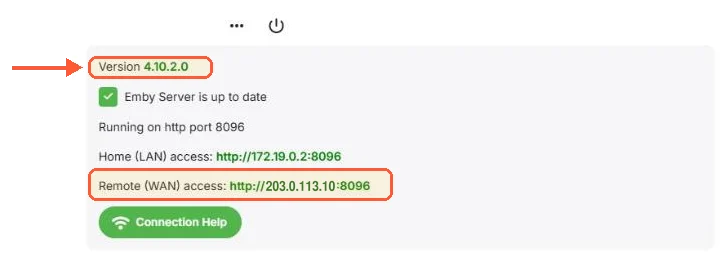
My Emby 4.10.2.0 dashboard shows remote access on port 8096, although Docker published it on host port 8097.
Jellyfin's stable is 12.4 from October 26, 2026. Version 12.0 shipped on September 7, 2026 and carries that number instead of 10.12, and 12.1 to 12.4 followed within seven weeks. The 12.0 release post warns that the first start converts the database in place, so a full manual backup is the only way back to 10.11.
Emby Premiere and what free Emby leaves out
Emby's server is free to install and free to stream from, locally and remotely, in the web client and the Roku, Apple TV, Samsung and LG apps, and on up to five Android TV and Fire TV devices per server; the desktop, console and mobile apps stop after one minute of playback without Premiere or an app unlock. Premiere is sold monthly, yearly and as a lifetime key, and the Emby Premiere page lists what it unlocks: hardware-accelerated transcoding, Emby DVR, offline downloads to phones and tablets, cinema intros, automatic format conversion on a schedule, cover art styles, backup and restore, folder sync to external drives, CarPlay and Android Auto, Alexa and Google Home control and the Emby TV app on Windows, Xbox One, PS4 and browsers. The page also lists full access to the Emby apps for Android, Fire TV, iOS, Xbox One and PS4 as a Premiere benefit and notes that some apps can unlock basic playback individually, so the mobile apps are not fully free without it. A single Premiere licence covers one household with a 30 device limit.
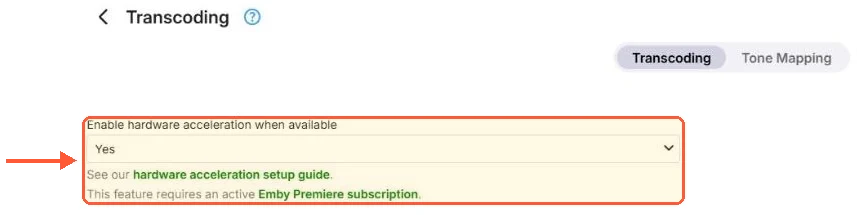
On my server Emby puts the hardware acceleration setting behind an active Premiere subscription.
Read that list against Jellyfin and the pattern is simple. Everything on it is free in Jellyfin: hardware transcoding through QSV, NVENC, VA-API, AMF, VideoToolbox or RKMPP, live TV and DVR with a tuner or M3U, offline downloads in the official mobile apps plus backup and restore, which arrived as a built-in feature in 10.11. The mobile apps have no unlock. There is no device limit because there is no licence key.
Two things Emby has that Jellyfin doesn't have an equivalent for: the scheduled format conversion, which pre-transcodes a library into a chosen profile so most playback doesn't have to transcode live, and the cover art treatments. Neither is a reason to choose a server, but both are missed by people who migrate.
Remote access deserves its own line because this is the point people bring over from the Plex comparison. Emby has never gated remote streaming. Emby Connect is an optional sign-in service for finding your server from outside; it isn't required, and a plain reverse proxy in front of Emby works exactly as it does in front of Jellyfin. Of the three big media servers, Emby's paid model is the one that leaves the core use case, streaming your own files to your own devices, free from the browser and the main TV apps, at home or away. That's a fairer deal than Plex's, and it's the main reason Emby still has a case.
Client apps, Samsung TVs and Kodi
Emby has apps in the Samsung and LG TV stores, on Roku, Fire TV, Android TV, Apple TV (2.0.3 as of December 2025), iOS, Android and Xbox, plus a web client and the Emby app on Windows. The versions thread above tracks each one.
Jellyfin covers most of the same platforms with one footnote and one workaround. The footnote is Samsung: the Tizen app landed in Samsung's TV store early this year for Tizen 6 and newer, and older sets still need it packaged and sideloaded with Tizen Studio. The workaround for Apple hardware is Swiftfin, the native iOS and tvOS app in the Jellyfin GitHub organisation, or Infuse, a third-party player with a paid Pro tier. Jellyfin's Android app rebuilt its downloads in the August 2026 2.7 release. On Roku, LG, Fire TV and Android TV the two are close enough that the choice comes down to which UI the household prefers.
Both have Kodi integration, and the Jellyfin one is more flexible. The Jellyfin for Kodi docs describe two add-ons: Jellyfin for Kodi, which syncs metadata into Kodi's own database so the library feels native, and JellyCon, which behaves like a normal streaming add-on and is easier to run against several servers. Emby for Kodi does the synced-database approach.
Database, metadata and the 10.11 migration
Both servers store the library in SQLite and both scrape TMDB, TheTVDB and MusicBrainz. Both read and write Kodi-style NFO files, so a library that was tagged under one can be rescanned by the other without losing titles, years or artwork.
Jellyfin 10.11 rewrote the database layer on EF Core, and its upgrade is the operational event that separates the two. It has to start from 10.10.7, it can take hours on a large library and it won't start if any data directory has less than 2 GB free. The 12.0 upgrade rewrites data on first boot again, and the release post says a backup is the only way back, so take one first.
Once past 10.11, Jellyfin caches metadata in memory far more aggressively than 10.10 did and uses more RAM for it, which matters on a 2 GB VPS and doesn't on 8 GB. How the two compare on a 50,000 track music library after the 10.11 migration hasn't been measured for this article; the 10.11 notes ask for a scan for missing metadata on music libraries afterwards.
Plugins and community code
Jellyfin's plugin catalogue is in the dashboard. The official repository covers metadata providers, LDAP, Trakt and Kodi Sync Queue; OIDC sign-in, Intro Skipper and a long tail of other community plugins come from repositories you add by URL. If the catalogue shows nothing after an update, the usual cause is a stale repository URL, and the corrected one is in Jellyfin plugin repositories not working.
Emby has a plugin catalogue too, smaller and mostly first-party, and the server's closed source means the community can't patch the core when a plugin API breaks. That's the trade you make for a maintained commercial product: fewer moving parts, fewer people able to fix them.