Back to Article List

Immich alternatives for self-hosted photos

Immich alternatives for self-hosted photos

Updated and tested 3 November 2026

Immich's repository shows about 118,000 GitHub stars, nearly three times PhotoPrism's count and almost four times Ente's. That's a fair reason to start there, and the reason to keep reading is that Immich makes specific choices: it owns the upload folder, it runs machine learning on the server, it wants 6 GB of RAM and it has no encryption at rest beyond what the disk gives it. Every one of these Immich alternatives rejects at least one of those choices. Release dates and licences were checked against each project's GitHub page in late October 2026.

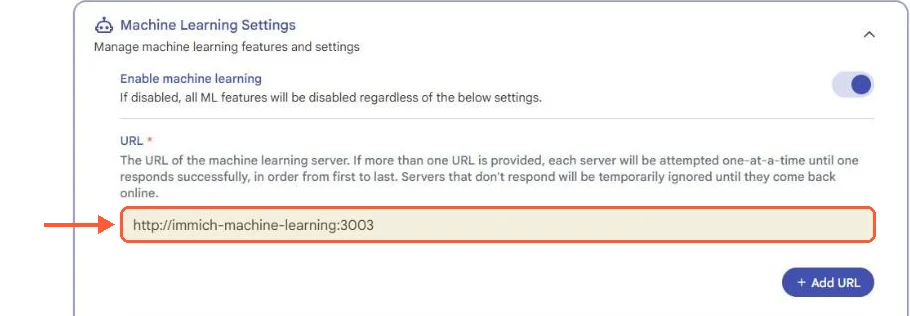
Immich Machine Learning Settings: machine learning enabled, URL http://immich-machine-learning:3003 and an Add URL button

Immich sends its machine learning jobs to a separate container on the server, reached at immich-machine-learning:3003.

PhotoPrism

The obvious first stop. PhotoPrism indexes a folder of originals in place, keeps metadata in its own database plus sidecar files, and asks for 3 GB of RAM and 4 GB of swap where Immich asks for 6 GB. It has no native phone app, so camera backup runs through PhotoSync or another WebDAV client into an import folder. The Community edition is AGPL; user roles beyond admin and guest come with a paid membership. Search is by classifier labels (ONNX models since October 2026), captions (optionally generated through Ollama or the OpenAI API since 2025), places and camera fields. The PhotoPrism vs Immich comparison goes through the storage model, the RAW pipeline and the edition limits in detail, so this entry stays short. Pick it when the folder tree is the thing you're protecting.

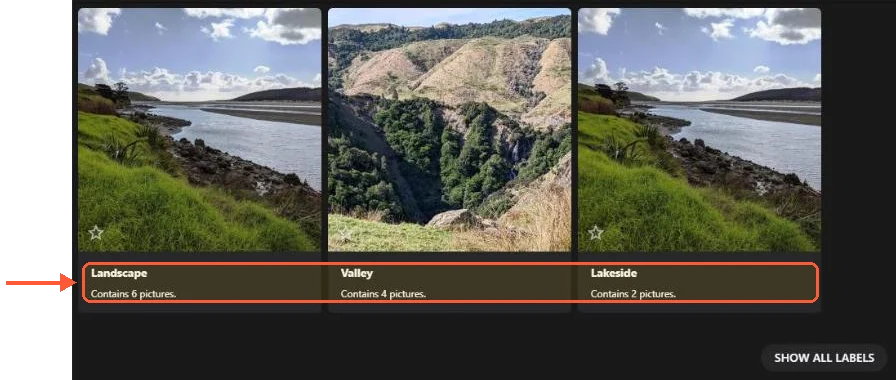
PhotoPrism Labels page showing Landscape (6 pictures), Valley (4) and Lakeside (2) before Show all labels

PhotoPrism's classifier sorted part of my 25-photo test set into labels such as Valley and Lakeside.

Ente vs Immich

Ente starts from the assumption that the server can't be trusted. Photos are end-to-end encrypted before upload, Cure53 audited the cryptography in collaboration with Symbolic Software, and the machine learning docs state that all ML runs on the device, so face recognition and "magic search" (natural language, including queries like a red motorcycle next to a fountain) never see the server. In exchange, ML features aren't available in the web app, only on mobile and desktop clients, and the phone does the indexing work.

The project is AGPL and the paid cloud service funds it, with 10 GB free and family plans that share one storage pool with up to five other people. Self-hosting means running the server through a quickstart script that needs Docker Compose and a machine with 1 GB of RAM and one core. The configuration lives in compose.yaml and museum.yaml, and the docs send you to a separate object storage page for the buckets. The latest photos client release at the time of checking was photos-v1.3.67 from October 2026.

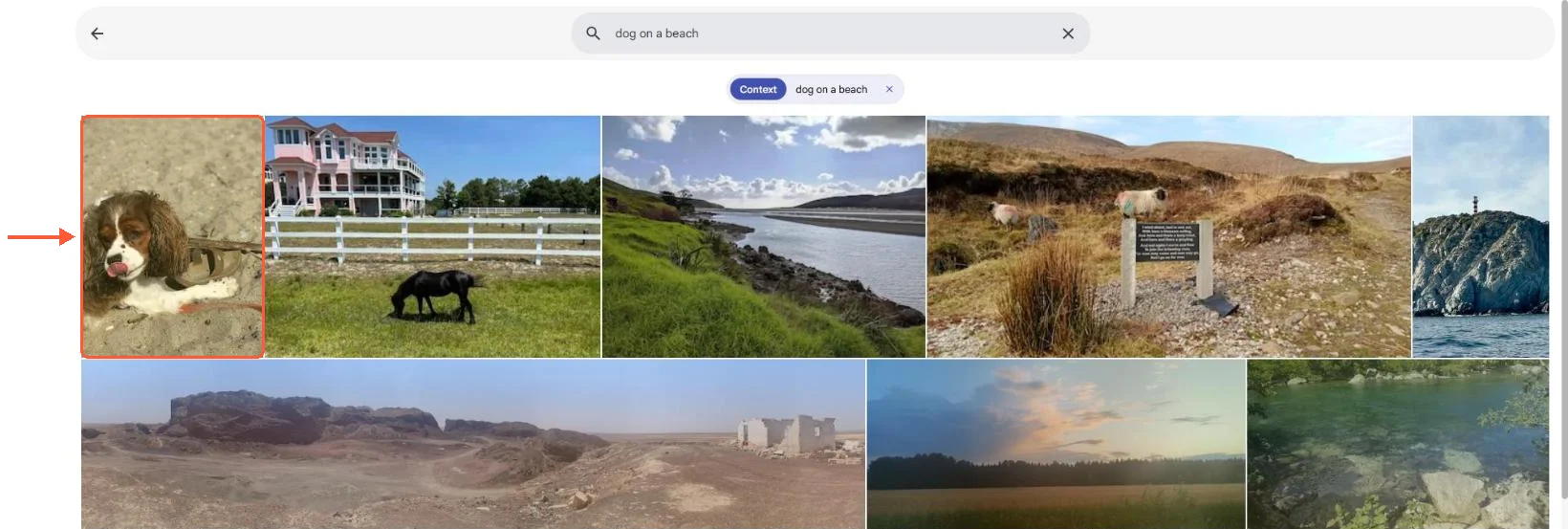
Immich smart search in the web app: the query dog on a beach returns the spaniel photo first

Typed search in the Immich web app, answered by Immich's own ML container instead of a phone.

Ente vs Immich comes down to who has root on the machine. On a box I control, Immich's server-side ML is the better trade, because that box has more CPU than my phone and I want search to work in a browser. On someone else's hardware or for a family member who would never run an update, Ente's encryption is the feature and the rest is detail.

Keep your data where you put it

Pick London, Frankfurt, Amsterdam or another of our zones, and your server and its backups stay there.

Nextcloud with Memories and Recognize

Three apps rather than one. Nextcloud 35 ships the Photos app, redesigned in that release with a map view; Memories 10 adds the timeline, map, albums with external sharing and HLS video transcoding with VAAPI or NVENC; Recognize adds faces, objects and landmarks, and wants an x86_64 CPU with AVX plus around 4 GB of RAM for native speed, with a slower WASM fallback for ARM. The result is a photo layer over a file server that already syncs documents and calendars, which is the whole appeal. There's an early-access Android Memories app and no iOS one. The Immich vs Nextcloud comparison includes the read-only external library setup for running both against one folder. Recognize's models are a separate download of around 1.5 GB on first run.

LibrePhotos

MIT licensed, Django and PostgreSQL on the back end, React on the front, with a React Native (Expo) mobile app for Android and iOS in the same monorepo. Feature-wise it sits closest to Immich of anything here: face recognition, object and scene detection, semantic search, reverse geocoding, an automatic events timeline, RAW and video support and multiple users. Version 1.5.0 shipped on 28 October 2026, so it's maintained. What it lacks is the polish and the size of the Immich community; the LibrePhotos repository has a fraction of the contributors. A good choice for someone who prefers Python to TypeScript and plans to read the code.

Piwigo

Piwigo predates the whole self-hosted photo wave. It's a PHP gallery under GPL v2 at version 16.4.0 as of May 2026, built around albums, plugins and themes, with official iOS and Android apps for browsing and upload and a hosted option, Piwigo Cloud, run from France. There's no machine learning of any kind in the core: no face recognition, no smart search, no duplicate detection.

That sounds like a weakness and for a phone backup it is, but Piwigo was designed as a publishing tool: a photographer's public portfolio, a club's event archive, a family site where grandparents log in. Fine-grained album permissions and a mature plugin catalogue are the point. Runs on any LAMP stack and needs nothing like 6 GB.

Lychee

Lychee is a PHP and Vue gallery, MIT licensed, at v7.12.0 from October 2026. That release switched the Docker image to a PHP base image and fixed two remote code execution vulnerabilities in it, so keep the container current. It's album-oriented like Piwigo, with a cleaner modern interface and a paid Supporter Edition that adds extras on top of the free core. The site describes a browser-based interface and mentions no mobile app. Face recognition is documented as an optional separate service that is switched off by default. Lychee is for people who want a good-looking gallery they can hand a link to, not a Google Photos replacement.

PiGallery2

Directory-first, read-only and built to run on low-resource hardware; the README says exactly that. PiGallery2 shows your folder structure as it is, indexes on the fly, and is at version 3.5.2 (January 2026), the latest release. MIT licence, Docker recommended. Nothing gets uploaded through it and nothing gets moved, which makes it the safest app in this list to point at an archive you'd cry about losing. Faces and search are basic. A multi-terabyte archive on an HDD storage VPS with PiGallery2 in front of it is a workable and cheap read-only family archive, and the app's memory needs won't compete with the disk for the budget. Expect the first index of a few hundred thousand files to take a while on spinning disks.

Photoview

Also filesystem-based and also aimed at photographers, with RAW and EXIF support, automatic face detection and grouping, video, password-protected sharing and per-user path access. AGPL. The caveat is the release history: the last release is 2.4.0 from June 2024, titled "Project restart", and nothing has shipped since. The code works and the Docker image runs, but more than two years without a release means every dependency has aged. Watch the Photoview repository for activity before committing a library to it, and treat it as a gallery for files you already back up elsewhere. Nothing is broken today; the risk is the next dependency that stops getting security updates.

Damselfly

A DAM (digital asset management) tool for large collections, in .NET, GPL v3, at v4.5.3 from January 2026. Local face detection and recognition, object detection, full-text search, RAW and HEIC, multi-user roles, a map and Electron desktop clients for Windows, macOS and Linux. Damselfly's audience is someone with 200,000 RAW files and a keyword workflow, which is a different person from someone with two phones. The desktop client pulls a selection to a local folder for editing, and you copy the edited files back yourself; the README lists syncing them back as a planned feature.

HomeGallery

A Node.js progressive web app that indexes multiple sources, detects faces and objects, finds similar images, transcodes video and works offline once the previews are generated. MIT licence. The author describes it as a private spare-time project, which is honest and also the reason to keep expectations modest on support. Its tag query language is unusually good for a small project and the offline mode is real, so it suits a laptop-plus-server setup where the browser cache matters.

Synology Photos

Only relevant if the NAS is already there, and then very relevant, because it's free with DSM 7, lets you choose the phone backup destination and shares photos by link with a password and an expiry date. Face and object recognition depend on the model and on RAM (a DS224+ needs an upgrade to 4 GB for object recognition, the DS223j and DS423 list faces only), search is filter-based and HEIC and HEVC need a client-side Image Assistant since DSM 7.2.2. The Immich vs Synology Photos article covers running Immich on the NAS in Container Manager against the RAM ceiling of each model, and the VPS layout with the NAS as a backup target. For an owner of a model without enough RAM headroom the VPS layout is the one that works.

Photonix, PhotoStructure and Stingle

Photonix had a good idea, Django plus React with object recognition and colour analysis, and has not shipped a release since 0.24.0 in November 2021. PhotoStructure is a self-hosted DAM with a free LITE tier and a PLUS subscription ($5 a month, with a 15-day trial), from a company that promises to open the source if it ever closes; it's competent, and apart from Synology Photos it's also the only closed-source self-hosted app here, which for a personal archive spanning decades felt like the wrong trade to recommend. Stingle sits near Ente with end-to-end encryption and a self-hostable PHP API, but its self-hosting requires an S3-compatible bucket and a domain and the documentation is thinner.

Never delete a memory again

Keep every photo and video of the people you love, on reliable storage with unmetered bandwidth and a cost that stays predictable as the years add up.
Ciclo de Facturación

VPS.H1

68.07 kr Save  14 %
58.33 kr Mensual
  • 1 vCPU AMD EPYC
  • 2 GB memoria RAM
  • ✔HDD disco
  • ✔Ilimitado ancho de banda
  • ✔ IPv4 e IPv6 incluidos El soporte IPv6 no está disponible en Francia o Países Bajos.
  • ✔Gestión de firewall
  • ✔Monitoreo gratis
  • ✔KVM virtualización

VPS.H3

243.35 kr Save  20 %
194.66 kr Mensual
  • 4 vCPU AMD EPYC
  • 8 GB memoria RAM
  • ✔HDD disco
  • ✔Ilimitado ancho de banda
  • ✔ IPv4 e IPv6 incluidos El soporte IPv6 no está disponible en Francia o Países Bajos.
  • ✔Gestión de firewall
  • ✔Monitoreo gratis
  • ✔KVM virtualización

VPS.H4

355.34 kr Save  18 %
292.04 kr Mensual
  • 6 vCPU AMD EPYC
  • 12 GB memoria RAM
  • ✔HDD disco
  • ✔Ilimitado ancho de banda
  • ✔ IPv4 e IPv6 incluidos El soporte IPv6 no está disponible en Francia o Países Bajos.
  • ✔Gestión de firewall
  • ✔Monitoreo gratis
  • ✔KVM virtualización

Google Photos and iCloud storage limits

A Google Account includes up to 15 GB of storage that photo backups count against, and iCloud gives every Apple Account 5 GB. Both have the best phone integration on the market and both are the thing everyone in this list is trying to replace, so compare cost and control over ten years instead of features this month. Every self-hosted option above needs a server, a backup plan and someone who updates it. Immich makes that job about as small as it gets on a VPS with 8 GB and NVMe, and the Immich VPS template removes the compose setup from the list entirely, but "small" is still bigger than zero. Backups stay your job on every option here.

Which Immich alternative for which case

Encrypted and zero-trust: Ente. Existing folder tree you curate by hand: PhotoPrism. A file server that also needs photos: Nextcloud with Memories. Python codebase and Immich-like features: LibrePhotos. Publishing a gallery to the public: Piwigo or Lychee. Read-only view over a fragile archive on cheap disk: PiGallery2. A quarter-million RAW files and a desktop keywording habit: Damselfly. A NAS already on the shelf: Synology Photos, until the search starts to grate.

And for everyone whose photos come from a phone and who wants one app with backup, faces, typed search and sharing: the thing being compared against. The complete guide to self-hosting Immich is where that path starts, and the first setting it asks about is the storage template. Turn it on before the first upload.

Questions?

Is there an Immich alternative for Windows?

LibrePhotos is the closest: its Windows standalone build is one folder holding librephotos.exe, the API server, the web front end, the job workers, the machine learning parts, ExifTool and ffmpeg, with SQLite as the database and no Docker or Python to install. It is built for one person's library, and the program isn't signed yet, so Windows warns on first launch. Immich itself runs on Windows only through Docker Desktop or WSL 2, which its requirements page files under strongly discouraged non-Linux setups, and its database folder can't sit on an NTFS drive.

About the author

Matteo De Luca

I am from Turin. I studied electronic engineering there and discovered, somewhere during the second year, that I enjoyed explaining our laboratory work more than I enjoyed the laboratory work itself. I wrote for small Italian technology sites during university, then took freelance assignments on consumer hardware and later Linux and server software. The second change was better for me. I like subjects where there is something concrete to understand before the writing begins.

I live with my girlfriend and a very old Syberian cat. I go bouldering two evenings a week and draw when I remember to. I also have a small collection of film cameras inherited from my grandfather. Photography is one of the few hobbies where I am quite happy not to become more efficient. I don't want every interest I have to become work.

Never run out of space again

Keep backups, archives and media on reliable storage with unmetered bandwidth and a cost per gigabyte that stays low as the years add up. Your first VPS comes with a 30-day money-back guarantee.