.svg)
.svg)
.svg)
.svg)

.svg)
.svg)
.svg)

Updated and tested 16 July 2026
If the DiskStation is already on the shelf, Synology Photos costs nothing extra and the phone app backs up in the background without a single config file. That's a real advantage and the reason a lot of people never look past it. The reasons to look past it are the model-specific feature gates and the search, plus the question of what happens to the library when the NAS is replaced. In the Immich vs Synology Photos comparison, Immich answers those differently, and it can run on the same NAS, on a VPS with the NAS as a backup target or on both.
What Synology Photos includes
Synology Photos is a DSM 7 package. It needs Node.js 12 and the Synology Application Service, and each user gets a Personal Space once the user home service is on, plus an optional Shared Space that can be opened to selected users for collaboration. Photos and videos display in chronological order or by folder structure. Albums can be manual or conditional, and a conditional album adds matching photos on its own. Mobile photos can be shared through links with a password and an expiry date. Photo Request links let outsiders upload photos and videos, which is handy after a wedding. The mobile app, iOS 16 and Android 11 or later, lets you customise the backup destination. Quick Filters cover file type, date, people, geolocation, tag, rating, camera, lens, focal length, exposure, aperture and ISO.
That list comes from the DSM 7.4 Synology Photos spec, apart from Personal Space, which the Synology Photos help documents. Read it once before deciding, because it also carries the limits.
Face and object recognition depends on the NAS model
The spec page says face and object recognition "is only supported on certain models", and the product pages fill in the detail. The DS224+ lists both facial and object recognition, with a footnote that object recognition needs the memory upgraded to at least 4 GB, and the unit ships with 2 GB. The DS925+ and DS1525+ list both without a footnote. The DS223j and DS423, on the Realtek RTD1619B, list facial recognition only. So a Subjects album, the automatic grouping of dogs, food, sunsets and so on, needs a model on Synology's object-recognition list, and on the cheapest Plus boxes that means a paid RAM upgrade.
Search is filter-based. You combine people, places, tags, dates and camera fields, which is fine when you know what you're looking for and useless when you don't. Synology announced natural-language AI Search with DSM 7.4 on 16 June 2026, but as a Synology Drive feature that needs a system with GPU support and was not due until the fourth quarter of 2026. The Synology Photos spec does not mention it.
Immich's search runs on CLIP embeddings, so a query like "kids in a paddling pool" returns matches with no tags involved, and OCR, in Immich since v2.2.0 (October 2025), makes text in screenshots and receipts searchable too. Duplicate detection is on by default. Face recognition runs on every install with a supported CPU, no model list. The trade is that Immich has no automatic Subjects album at all, because CLIP produces embeddings and no labels; the guide to using Immich shows how far typed search gets you without them. Tags exist in the web app, but you assign them yourself.
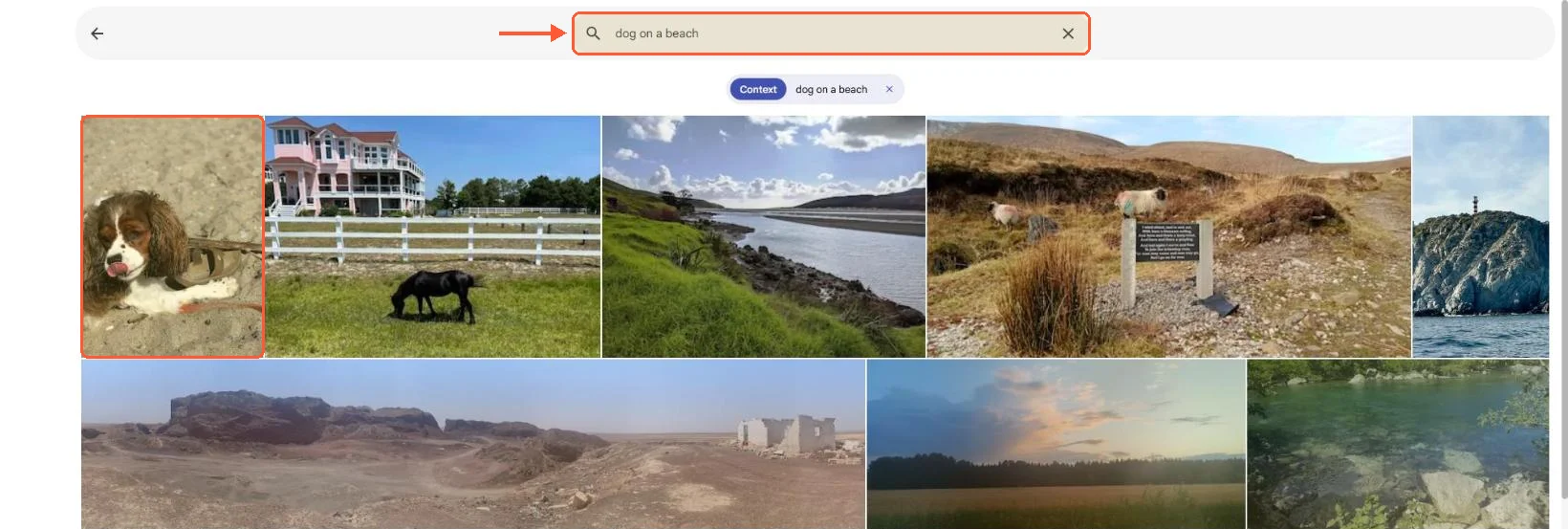
On my 25-photo test set, typing "dog on a beach" put the only dog photo first and ranked the rest by similarity.
File formats and Image Assistant
From DSM 7.2.2 onward Synology Photos won't display HEIC, HEIF or HIF images and a long list of video containers (MOV and MP4 in HEVC, AVI, WMV, MTS, M2TS and more) without Synology Image Assistant installed on the client, which generates previews on the phone or desktop instead of on the NAS. The RAW list is decent: arw, cr2, cr3, nef, raf, rw2, dng, orf, pef and the rest of the usual set. The DS224+, DS925+ and DS1525+ spec pages don't list hardware video transcoding, so HEVC playback in a browser depends on that client-side assistant and on Chrome 107, Safari 13 or Edge 79 or newer (Edge on macOS only).
Immich decodes HEIC server-side, transcodes clips with FFmpeg (h264, 720p by default) and can use an embedded RAW preview instead of a full decode. On a NAS without a GPU the transcode queue is CPU time; a four-core Celeron J4125 doesn't have much of that to spare.