Back to Article List

Immich vs Synology Photos on a NAS or a VPS

Immich vs Synology Photos on a NAS or a VPS

Updated and tested 16 July 2026

If the DiskStation is already on the shelf, Synology Photos costs nothing extra and the phone app backs up in the background without a single config file. That's a real advantage and the reason a lot of people never look past it. The reasons to look past it are the model-specific feature gates and the search, plus the question of what happens to the library when the NAS is replaced. In the Immich vs Synology Photos comparison, Immich answers those differently, and it can run on the same NAS, on a VPS with the NAS as a backup target or on both.

What Synology Photos includes

Synology Photos is a DSM 7 package. It needs Node.js 12 and the Synology Application Service, and each user gets a Personal Space once the user home service is on, plus an optional Shared Space that can be opened to selected users for collaboration. Photos and videos display in chronological order or by folder structure. Albums can be manual or conditional, and a conditional album adds matching photos on its own. Mobile photos can be shared through links with a password and an expiry date. Photo Request links let outsiders upload photos and videos, which is handy after a wedding. The mobile app, iOS 16 and Android 11 or later, lets you customise the backup destination. Quick Filters cover file type, date, people, geolocation, tag, rating, camera, lens, focal length, exposure, aperture and ISO.

That list comes from the DSM 7.4 Synology Photos spec, apart from Personal Space, which the Synology Photos help documents. Read it once before deciding, because it also carries the limits.

Face and object recognition depends on the NAS model

The spec page says face and object recognition "is only supported on certain models", and the product pages fill in the detail. The DS224+ lists both facial and object recognition, with a footnote that object recognition needs the memory upgraded to at least 4 GB, and the unit ships with 2 GB. The DS925+ and DS1525+ list both without a footnote. The DS223j and DS423, on the Realtek RTD1619B, list facial recognition only. So a Subjects album, the automatic grouping of dogs, food, sunsets and so on, needs a model on Synology's object-recognition list, and on the cheapest Plus boxes that means a paid RAM upgrade.

Search is filter-based. You combine people, places, tags, dates and camera fields, which is fine when you know what you're looking for and useless when you don't. Synology announced natural-language AI Search with DSM 7.4 on 16 June 2026, but as a Synology Drive feature that needs a system with GPU support and was not due until the fourth quarter of 2026. The Synology Photos spec does not mention it.

Immich's search runs on CLIP embeddings, so a query like "kids in a paddling pool" returns matches with no tags involved, and OCR, in Immich since v2.2.0 (October 2025), makes text in screenshots and receipts searchable too. Duplicate detection is on by default. Face recognition runs on every install with a supported CPU, no model list. The trade is that Immich has no automatic Subjects album at all, because CLIP produces embeddings and no labels; the guide to using Immich shows how far typed search gets you without them. Tags exist in the web app, but you assign them yourself.
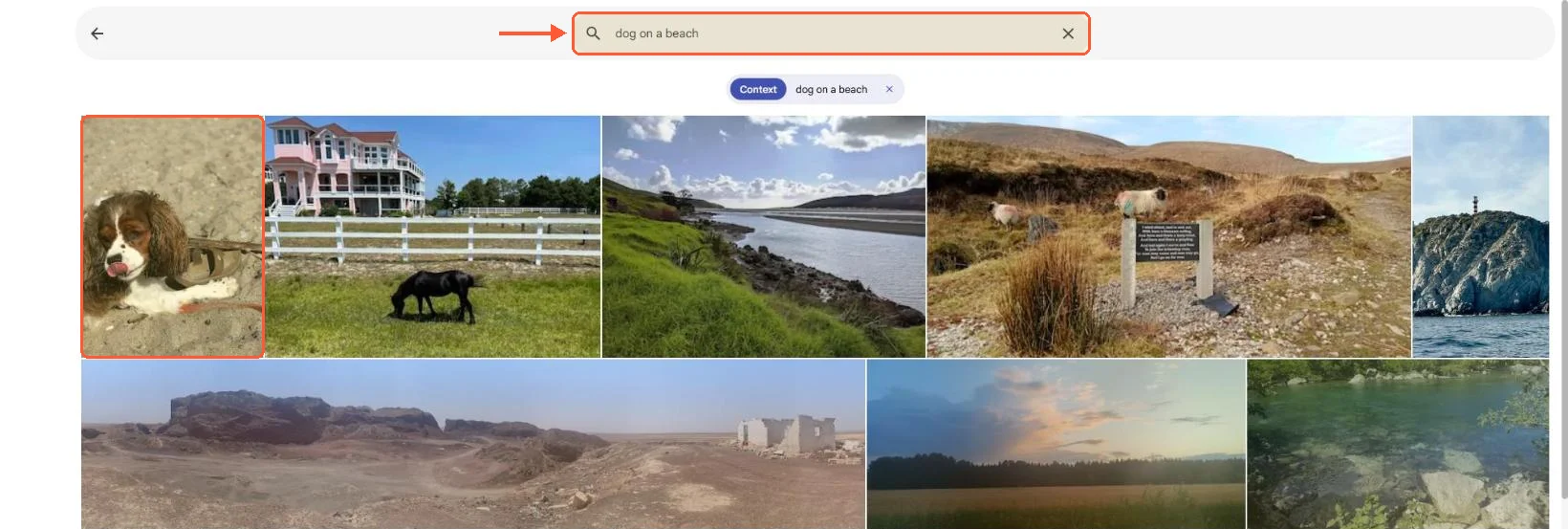
Immich smart search for dog on a beach ranks a spaniel on sand first, with the other photos ordered by similarity

On my 25-photo test set, typing "dog on a beach" put the only dog photo first and ranked the rest by similarity.

File formats and Image Assistant

From DSM 7.2.2 onward Synology Photos won't display HEIC, HEIF or HIF images and a long list of video containers (MOV and MP4 in HEVC, AVI, WMV, MTS, M2TS and more) without Synology Image Assistant installed on the client, which generates previews on the phone or desktop instead of on the NAS. The RAW list is decent: arw, cr2, cr3, nef, raf, rw2, dng, orf, pef and the rest of the usual set. The DS224+, DS925+ and DS1525+ spec pages don't list hardware video transcoding, so HEVC playback in a browser depends on that client-side assistant and on Chrome 107, Safari 13 or Edge 79 or newer (Edge on macOS only).

Immich decodes HEIC server-side, transcodes clips with FFmpeg (h264, 720p by default) and can use an embedded RAW preview instead of a full decode. On a NAS without a GPU the transcode queue is CPU time; a four-core Celeron J4125 doesn't have much of that to spare.

Never delete a memory again

Keep every photo and video of the people you love, on reliable storage with unmetered bandwidth and a cost that stays predictable as the years add up.
Verrechnungszyklus

VPS.H1

$6.99 Save  14 %
$5.99 Monatlich
  • 1 vCPU AMD EPYC
  • 2 GB RAM-speicher
  • ✔HDD speicher
  • ✔Unbegrenzte Bandbreite
  • ✔ IPv4 & IPv6 inklusive IPv6-Unterstützung ist derzeit in Frankreich oder den Niederlanden nicht verfügbar.
  • ✔Firewall-Verwaltung
  • ✔Server-Überwachung
  • ✔KVM-Virtualisierung

VPS.H3

$24.99 Save  20 %
$19.99 Monatlich
  • 4 vCPU AMD EPYC
  • 8 GB RAM-speicher
  • ✔HDD speicher
  • ✔Unbegrenzte Bandbreite
  • ✔ IPv4 & IPv6 inklusive IPv6-Unterstützung ist derzeit in Frankreich oder den Niederlanden nicht verfügbar.
  • ✔Firewall-Verwaltung
  • ✔Server-Überwachung
  • ✔KVM-Virtualisierung

VPS.H4

$36.49 Save  18 %
$29.99 Monatlich
  • 6 vCPU AMD EPYC
  • 12 GB RAM-speicher
  • ✔HDD speicher
  • ✔Unbegrenzte Bandbreite
  • ✔ IPv4 & IPv6 inklusive IPv6-Unterstützung ist derzeit in Frankreich oder den Niederlanden nicht verfügbar.
  • ✔Firewall-Verwaltung
  • ✔Server-Überwachung
  • ✔KVM-Virtualisierung

Running Immich on Synology with Container Manager

Container Manager runs Compose projects, and Immich's docs carry a community Synology guide with the note that it isn't officially supported by the Immich team. The guide works. The constraints come from the requirements page: 6 GB RAM minimum with machine learning on, 4 GB with it off, 2 cores minimum, and Postgres data kept off network shares, preferably on a local SSD. Since v3 the amd64 machine learning image also needs an x86-64-v2 CPU; the migration post says nearly every mainstream x86 chip since 2010 qualifies and that AVX is not required.

Put those numbers against the boxes. DS224+: Celeron J4125, 4 cores, 2 GB RAM, 6 GB maximum. DS923+: Ryzen R1600, 2 cores, 4 GB ECC, 32 GB maximum. DS925+ and DS1525+: Ryzen V1500B, 4 cores and 8 threads, 4 GB and 8 GB ECC respectively, 32 GB maximum. A stock DS224+ can't meet the Immich minimum with ML on. A DS923+ or DS925+ at 4 GB runs DSM, Synology Photos and Immich only with ML disabled, which removes the search and faces that made Immich interesting. With a memory upgrade to 16 or 32 GB, the Plus models run the full stack and the ML jobs finish eventually.

Two more things for the NAS route. The immich-machine-learning container accepts requests without any login, and the default compose file doesn't publish its port 3003. Keep it that way, on the internal Compose network.

docker inspect shows no published ports for immich_machine_learning; the server container still gets pong from port 3003

On my test server the ML container had no host port, and the Immich server still reached it on 3003 inside Docker.

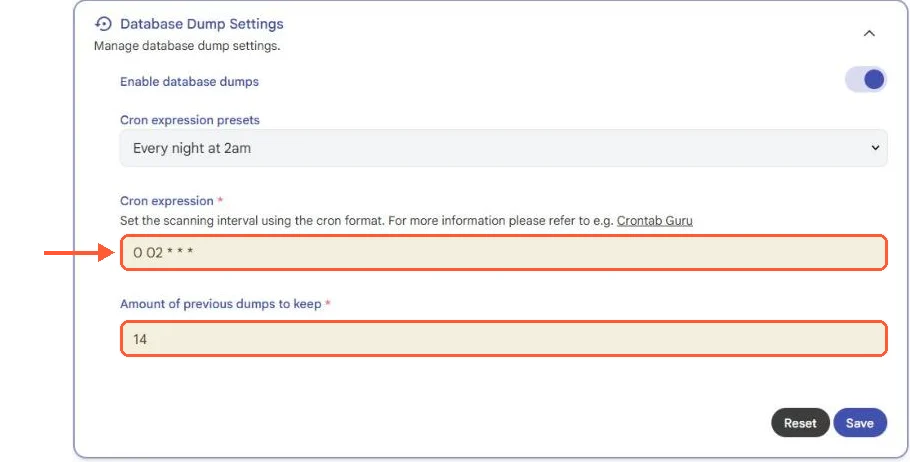
And Immich's backups are two separate objects: the automatic database dumps that land in UPLOAD_LOCATION/backups (daily at 02:00, 14 kept, by default) and the library, upload and profile folders that hold the originals. Hyper Backup needs both, and the Immich backup guide explains which subfolders can be regenerated and which can't. Thumbnails and encoded video are the regenerable ones; everything else is the library.

Immich Database Dump Settings: dumps enabled, cron 0 02 * * * (every night at 2am), 14 previous dumps kept

The nightly dump is on out of the box, and it covers the database only, never the photos.

Running Immich on a VPS with the NAS as backup

The other layout keeps the NAS doing what it's good at. Immich runs on a small server with 8 GB and NVMe, phones upload there from anywhere without QuickConnect or port forwarding on the home router, and the NAS pulls a nightly copy of the Immich folders into its photo shared folder over rsync or Hyper Backup's rsync target. Synology Photos indexes that copy like any other folder in Shared Space, so the family sees the same pictures in both apps and the NAS becomes the offsite copy of a library that lives elsewhere. Start with installing Immich on a VPS, and if the manual compose steps aren't interesting the Immich VPS template installs Immich as a one-click app on a plan with unmetered traffic, which matters for the first multi-hundred-gigabyte upload. Nothing on the NAS changes except one scheduled task.

Disk sizing is the one decision to get right up front. The Immich requirements page says thumbnails and transcoded video grow a library by about 10 to 20 percent on average, so a 400 GB phone library needs around 480 GB before growth. Resizing the volume later is easier than migrating Postgres.

Remote access to a VPS is a reverse proxy with TLS on port 443 forwarding to 2283, or a WireGuard VPN if the server should stay off the public internet. The Immich app takes a server URL and nothing else.

Synology drive compatibility policy, 2025 to 2026

A short detour, because it changed how people think about the Synology platform in 2025. In spring 2025 Synology restricted storage pool creation on the 25-series Plus models to drives on its compatibility list, which in practice meant Synology-branded drives. In October 2025 it reversed course for 25-model-year DiskStation Plus, Value and J units running DSM 7.3, which again accept third-party drives for pool creation, though M.2 pools and cache still need listed parts. Then DSM 7.4, announced on 16 June 2026, listed Synology hard drives as a requirement for post-processing deduplication and compression. The pattern is a platform where features move behind hardware conditions, and Synology Photos, with recognition gated by model and RAM, sits inside that pattern. Immich's gates are RAM, CPU level and a local disk for the database, which any hardware can meet.

Synology's KB has a Backup and Restoration page for Photos; what it says about People albums and face data surviving a Hyper Backup restore onto a different model is something this article can't confirm, because the page body didn't load at the time of writing. Test that before trusting it.

Which to use

In the Synology Photos vs Immich decision, keep Synology Photos when the library is small, the NAS is a Plus model with enough RAM for recognition and nobody needs to find a photo by describing it. It's free, it's maintained and the backup app is good.

Move to Immich when search matters, when the NAS is a J or Value model, or when the household's phones spend more time away from the home network than on it. Run it on the NAS if the box has 16 GB and an idle evening for the initial jobs; run it on a VPS if the box doesn't. The PhotoPrism vs Immich comparison covers the other self-hosted option for anyone who wants folders left exactly as they are, and the wider Immich alternatives roundup covers the rest. Whichever way it goes, point the phones at a single server.

Questions?

Can Immich use the folders Synology Photos already indexes?

Yes, and on the NAS they are two fixed folders: Synology's Manage Photos help page puts each user's Personal Space in /home/Photos and the Shared Space in the shared folder /photo. Mount the one you want into the Immich project in Container Manager with :ro and add it as an external library, so Immich indexes the files in place while Synology Photos keeps working on the same folder. The Immich external library guide has the rest of the setup.

About the author

Matteo De Luca

I am from Turin. I studied electronic engineering there and discovered, somewhere during the second year, that I enjoyed explaining our laboratory work more than I enjoyed the laboratory work itself. I wrote for small Italian technology sites during university, then took freelance assignments on consumer hardware and later Linux and server software. The second change was better for me. I like subjects where there is something concrete to understand before the writing begins.

I live with my girlfriend and a very old Syberian cat. I go bouldering two evenings a week and draw when I remember to. I also have a small collection of film cameras inherited from my grandfather. Photography is one of the few hobbies where I am quite happy not to become more efficient. I don't want every interest I have to become work.

Never run out of space again

Keep backups, archives and media on reliable storage with unmetered bandwidth and a cost per gigabyte that stays low as the years add up. Your first VPS comes with a 30-day money-back guarantee.