





.svg)
.svg)
.svg)
.svg)

.svg)
.svg)
.svg)


Updated 22 October 2026
Debian ships CrowdSec in its own archive, and my advice is to skip it. The Debian 12 package is frozen at 1.4.6, which predates the AppSec component, the current hub format and roughly three years of scenario updates. Debian 13 carries something newer but it still trails the official repository, and CrowdSec is one of those tools where the detection rules matter as much as the binary.
This walkthrough uses the official repo on a Debian 12 VPS, and every command was run on a fresh Debian 12 server and on Ubuntu 24.04. Debian 13 uses the same packages but wasn't part of that test run. By the end the Security Engine will be parsing your logs and a firewall bouncer will be enforcing its bans, with the community blocklist layered on top.
If you're new to the architecture, the short version is that CrowdSec splits detection from enforcement. The engine reads logs and decides who's hostile; a separate Remediation Component (a bouncer, in CrowdSec speak) does the blocking. I've written a longer piece on what CrowdSec is and how the parts fit together if you want the full picture, and a CrowdSec vs Fail2ban comparison if you're migrating from the old guard.
Why the official repository beats the distro package
Distro archives freeze at release time. That's the right call for coreutils and a bad fit for a security tool whose parsers chase log formats and whose scenarios chase attacker behaviour. The official packagecloud repository tracks upstream, which in October 2026 means the 1.8.1 release. The 1.7 line brought cscli setup (the service detection machinery) and usage metrics that show what your bouncers are dropping, and 1.8 added bot detection to the AppSec WAF. None of that exists in 1.4.6.
The one argument for the distro package is unattended updates through Debian's own infrastructure. I don't find it convincing. CrowdSec's repo signs its packages, upgrades are boring in practice and you'd be trading a current engine for a fossil.
Add the CrowdSec repository
sudo apt update
curl -s https://install.crowdsec.net | sudo sh
Don't skip the first line on a freshly deployed server. The script installs gnupg if it's missing, and on package lists that are months old that install fails with a wall of 404 Not Found errors and "Repository installation aborted." A fresh Debian 12 VPS has no gnupg, so this is the usual case rather than a corner one.
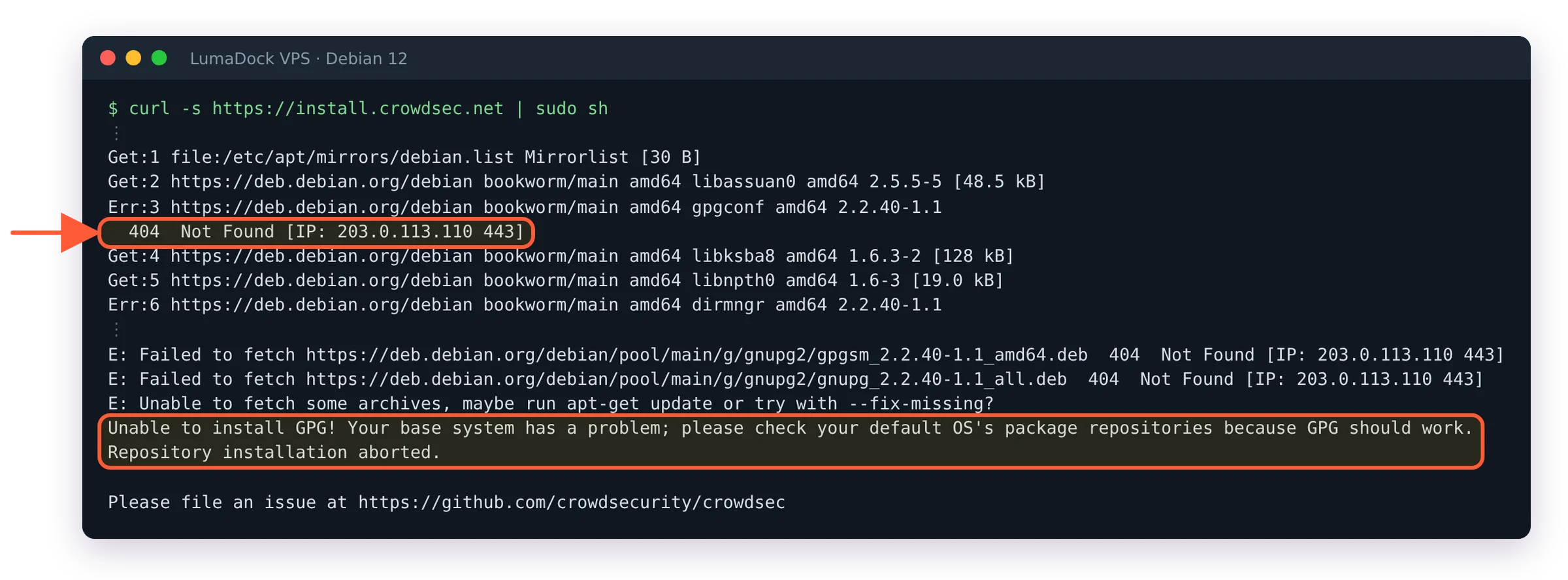
Without apt update first, the script can't install gnupg and stops.
The script detects your distribution and writes a sources file under /etc/apt/sources.list.d/. If piping a script from the internet into a root shell makes you twitch (healthy instinct), the official install docs list the manual steps: import the GPG key into /etc/apt/keyrings/ and add the packagecloud repo line yourself. Same result.
Before installing, confirm apt will pick the repo version and not Debian's:
apt-cache policy crowdsec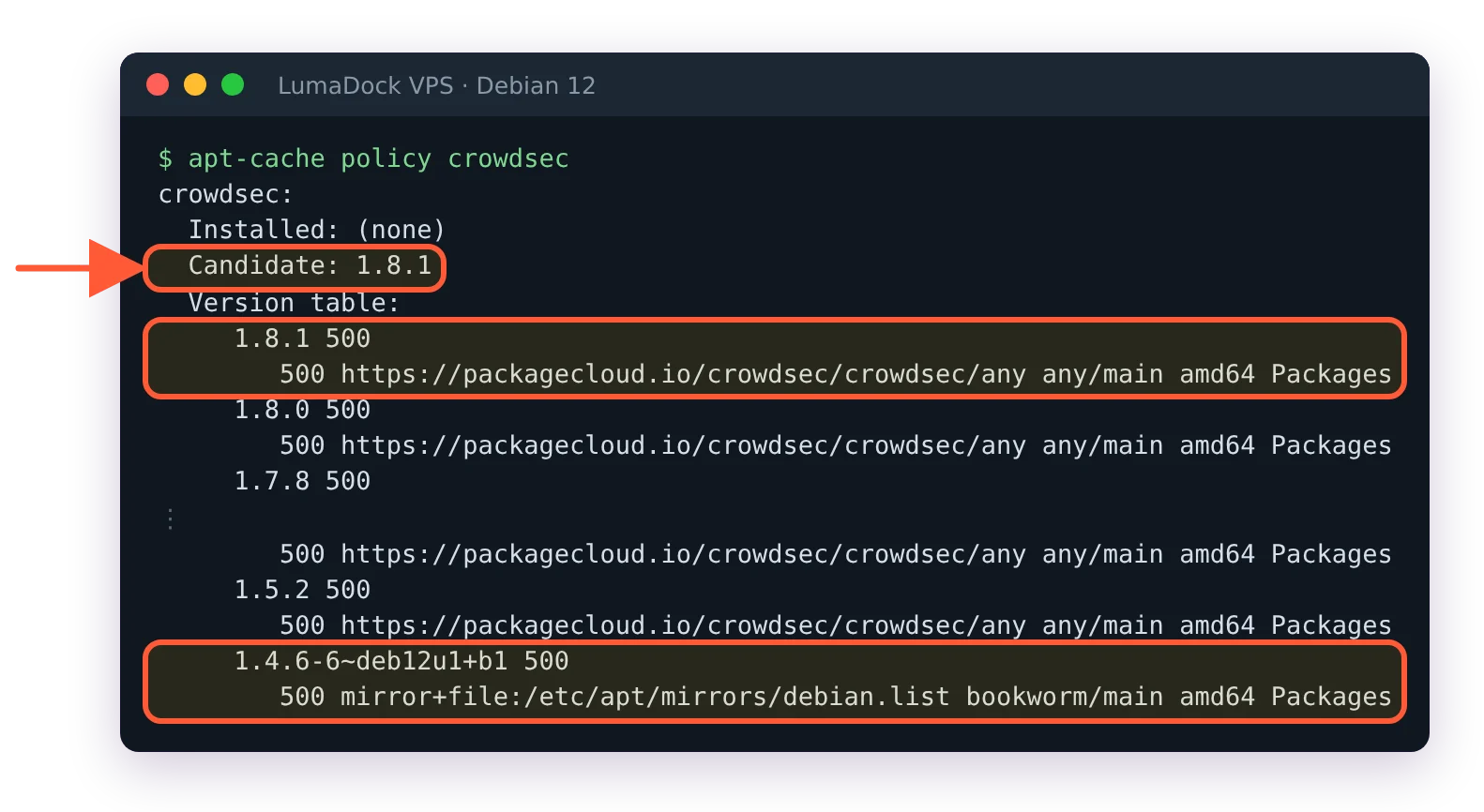
The repository's 1.8.1 is the candidate; Debian's own 1.4.6 loses on version number.
The candidate should be the repository's current release (1.8.1 when I last ran this), not the 1.4.6 that Debian 12 and Ubuntu 24.04 carry. On Debian 12 and Ubuntu 24.04 the repo version wins on version number alone. If an old distro candidate wins instead, apt pinning fixes the priority; the install docs include a ready-made preferences file for exactly this. Then install:
sudo apt update
sudo apt install crowdsec
Small aside before the config spelunking starts: if this server doesn't exist yet, LumaDock has an Ubuntu 24.04 + CrowdSec template you pick during ordering. It deploys in seconds with the engine and a firewall bouncer already wired, so CrowdSec is watching from first boot and you can skip the bouncer step further down. I still think you should read on so you know what's running, but you don't have to type any of it.
What the post-install step auto-detects
The package's post-install hook runs service detection against your box (since the 1.7 line this is cscli setup doing the work). On a bare VPS it finds sshd and the system logs, installs the crowdsecurity/linux collection and registers the machine with the local API. On fresh Debian 12 and Ubuntu 24.04 servers it also added crowdsecurity/sshd and crowdsecurity/whitelist-good-actors. A collection is a bundle of parsers and scenarios; crowdsecurity/linux pulls in SSH brute force detection among other things. Check what landed:
sudo cscli collections list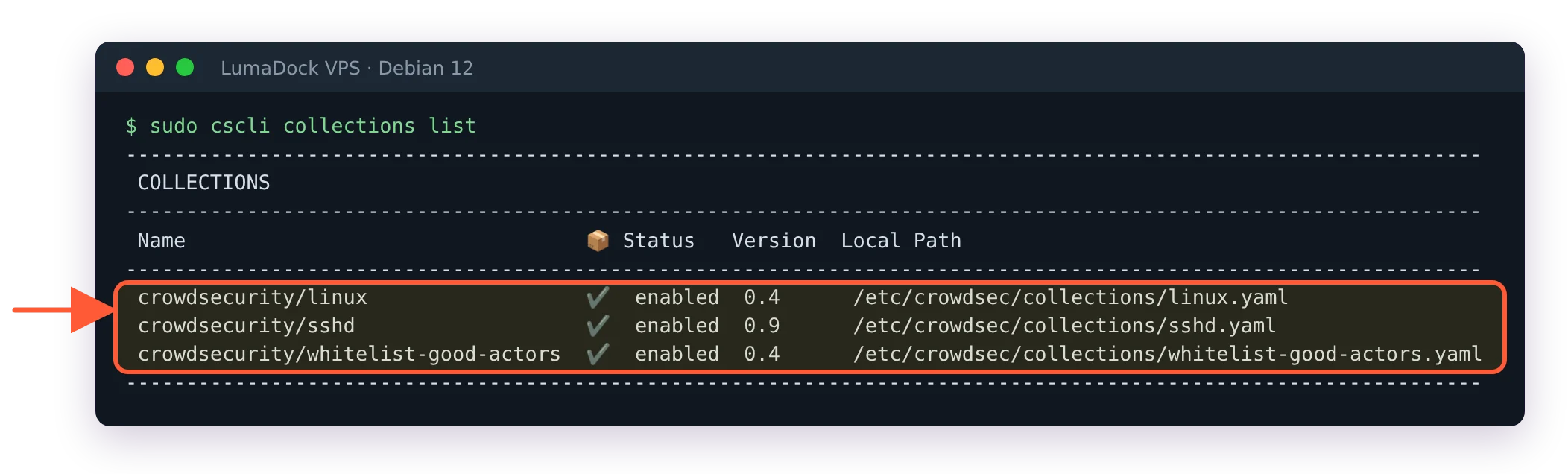
After install, service detection enabled the linux, sshd and whitelist-good-actors collections.
If you later add nginx or Postfix, install the matching collection from the CrowdSec hub and the engine starts covering those services too.
Acquisitions on Debian: journald vs auth.log
Acquisitions tell the engine which logs to read. They live in the /etc/crowdsec/acquis.d/ directory, where setup writes what it detected as setup.*.yaml files, and on older installs in /etc/crowdsec/acquis.yaml too. A fresh 1.8 install doesn't create that second file. Here's the wrinkle that catches people on modern Debian: rsyslog isn't installed on a fresh Debian 12 VPS, so /var/log/auth.log doesn't exist and SSH events live in journald instead.
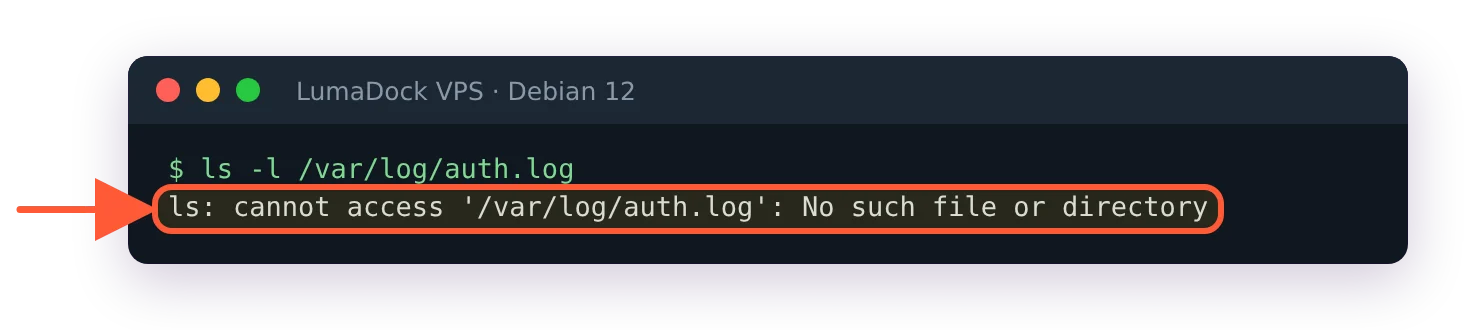
No rsyslog on a fresh Debian 12 VPS, so no /var/log/auth.log.
Setup handles this on its own. It writes /etc/crowdsec/acquis.d/setup.sshd.yaml with a journald source for ssh.service, which looks like this:
source: journalctl
journalctl_filter:
 - "_SYSTEMD_UNIT=ssh.service"
labels:
  type: syslog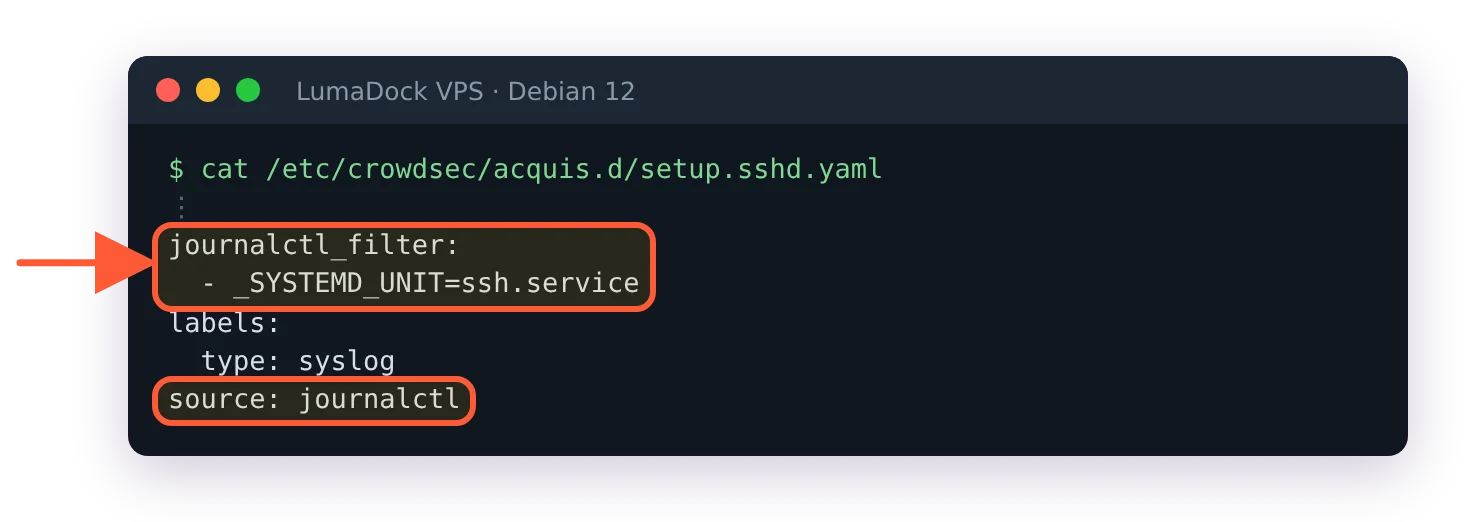
What setup wrote on its own on Debian 12: the same journald acquisition.
It also writes setup.linux.yaml for /var/log/syslog, messages and kern.log, none of which exist without rsyslog. CrowdSec logs a No matching files for pattern warning for each in /var/log/crowdsec.log and carries on, so SSH detection still works. If you write an acquisition by hand for a file that's never written, that warning is the only sign. Ubuntu 24.04 still ships rsyslog, so there you'll see a file acquisition on /var/log/auth.log instead, which works fine.
After any acquisition change, restart the engine with sudo systemctl restart crowdsec.
Confirm detection with cscli metrics and alerts
Two checks. First, is the engine reading anything at all?
sudo cscli metrics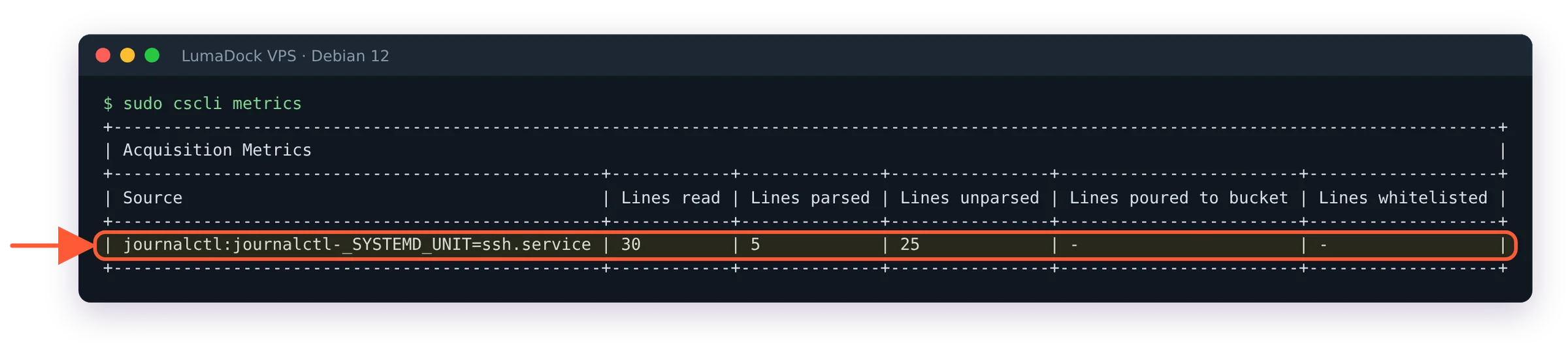
Lines read and parsed from the ssh.service journal mean the engine is reading SSH logs.
The acquisition table shows lines read and lines parsed per source. A source missing from the table, or showing zero lines read, means your acquisition path is wrong. Lines read with nothing parsed at all usually means a label mismatch. A high unparsed count next to a healthy parsed count is normal, since sshd logs plenty of lines no scenario cares about.
Second, trigger it on purpose. From a different machine, fail a handful of SSH logins against the server. One warning about this test: since 1.6.3 the engine whitelists private RFC1918 ranges by default, so hammering from a LAN address will never produce a ban. Test from a genuinely external IP. Then:
sudo cscli alerts list
sudo cscli decisions list
You should see an SSH brute force alert against your test IP and a matching ban decision. On a VPS with a public IP you may not need the test at all: on a fresh Debian 12 test server a real SSH brute-force alert and a four-hour ban showed up about two minutes after install (crowdsecurity/ssh-slow-bf first, then crowdsecurity/ssh-bf a couple of minutes later). Nothing is blocked yet, though, which brings us to the part people skip.

Real SSH brute-force bans from the internet, the first about two minutes after install.
Install the firewall bouncer
The engine alone is a smoke detector. Decisions pile up in the local API and nothing enforces them until a Remediation Component subscribes. For a plain VPS the firewall bouncer is the right first one:
sudo apt install crowdsec-firewall-bouncer-iptablesThere's a crowdsec-firewall-bouncer-nftables package as well, and on Debian 12/13 (where iptables is a compatibility shim over nftables) it's arguably the cleaner pick. I've gone deep on modes, ipsets and the Docker traps in a dedicated firewall bouncer guide, so here I'll just verify it registered:
sudo cscli bouncers list
The firewall bouncer is registered and pulling decisions: a recent last API pull is what you want.
The bouncer should appear with a recent pull timestamp. Now repeat the failed-login test from outside and watch the connection start timing out mid-test. Before you do, read up on rolling CrowdSec out without locking yourself out; testing brute force detection from the same laptop you administer the box from is a classic way to ban your own IP.
Console enrollment and the community blocklist
Your engine already shares alert signals with the Central API and receives the community blocklist in return, a curated feed of IPs currently attacking the wider CrowdSec network. Verify the link is healthy:
sudo cscli capi status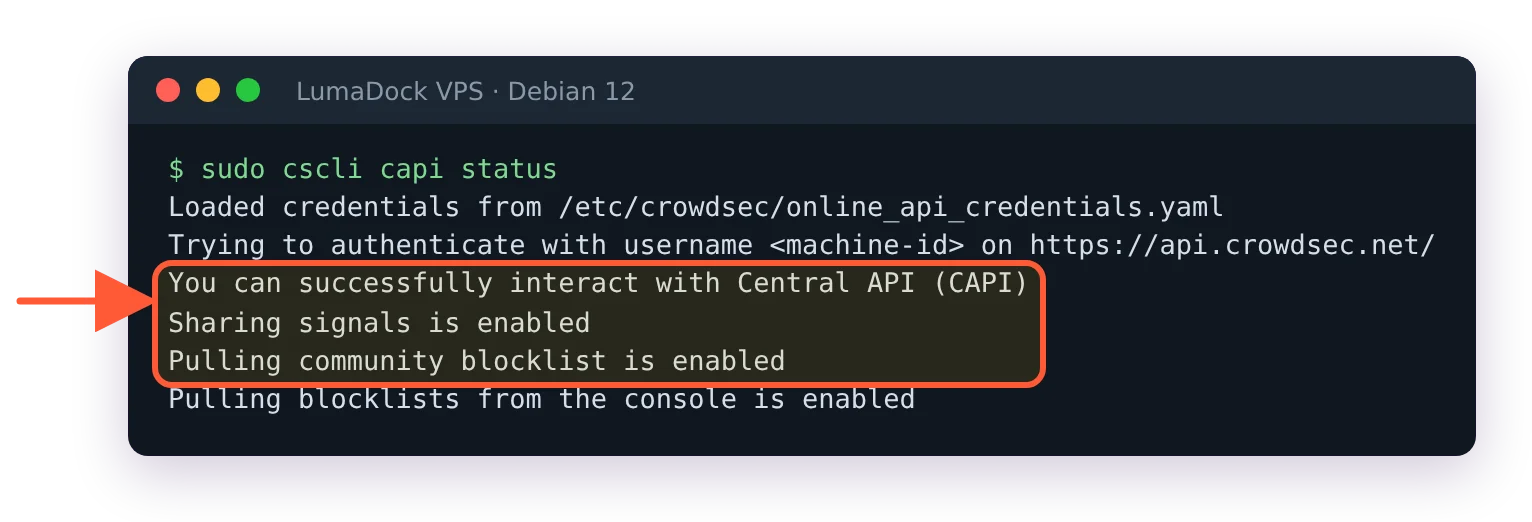
The Central API link is healthy: signal sharing and the community blocklist pull are enabled.
"Enabled" means the pull is switched on, not that a list has arrived. On a new install the first community blocklist can take a while; on the servers this guide was tested on it showed up after about two hours, and sudo cscli decisions list --origin CAPI lists it once it's there.
Enrolling the engine in the free console at app.crowdsec.net adds a web view of your alerts plus extra blocklist subscriptions. Grab the enrollment key from the console and run:
sudo cscli console enroll YOUR_ENROLL_KEYThen approve the machine in the web UI and restart crowdsec. sudo cscli console status shows the change: Enrolled flips from not enrolled to enrolled. Until you enroll, crowdsec.log carries a "Machine is not enrolled in the console" error at startup, which is harmless. I resisted the console for a while out of self-hosting stubbornness and eventually caved; seeing which scenarios fire across several servers in one place is worth the account.


