Back to Article List

KVM VPS explained: Isolation, vCPUs and performance

KVM VPS explained: Isolation, vCPUs and performance

Updated and tested 24 August 2026

Run this on any Linux server you're paying for and read the one word it prints:

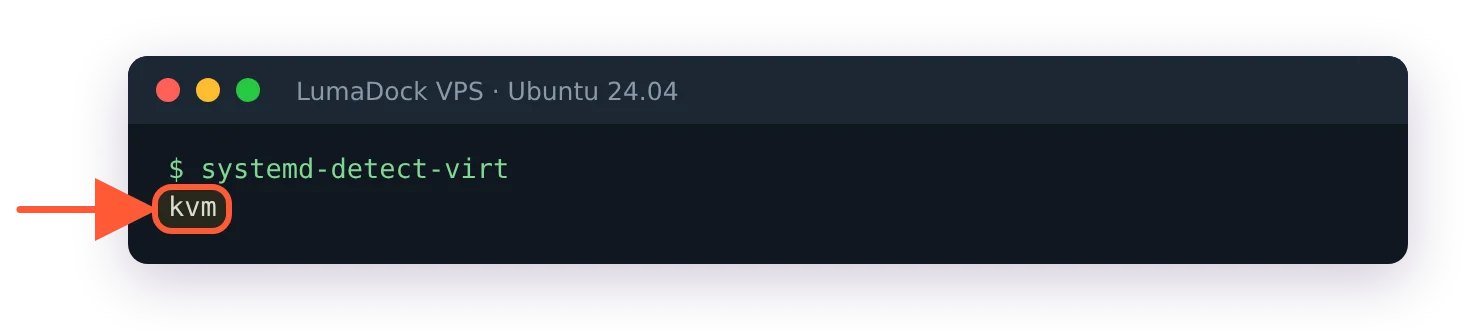
systemd-detect-virt

kvm means you have a real virtual machine with its own kernel. openvz or lxc means you have a container on somebody else's kernel, whatever the order page called it. none means bare metal. The command is on every systemd distro (Ubuntu 24.04 LTS is what I'm running the examples on here), and it's the fastest way I know to settle an argument about what a "VPS" is under the plan name.

This page is about the first answer. KVM VPS hosting is the standard now, mostly because of the kernel: yours, not shared. What follows is how KVM and QEMU divide the work, why the guest kernel matters in practice, what virtio does, what "dedicated vCPU" means at the scheduler, why memory behaves the way it does and why your VPS probably can't run VirtualBox. I've kept the general what-is-a-VPS material in the explainer on what a VPS server is and won't repeat it. Come back to this one when two plans look identical on paper and you want to know why one costs more.

KVM is a kernel module and QEMU is the machine

KVM (Kernel-based Virtual Machine) is a Linux kernel module. It exposes a device, /dev/kvm, and a userspace program opens that device, asks the kernel to create a VM, asks for virtual CPUs inside it and then tells each vCPU to run. The kernel's KVM API documentation describes exactly that sequence: a system ioctl creates the VM, a VM ioctl creates the vCPUs, and a KVM_RUN ioctl hands the physical CPU over to guest code until something happens that the guest can't handle on its own (a disk read, a network packet, a privileged instruction). At that point control returns to userspace.

The userspace program is QEMU. QEMU can emulate a whole CPU in software, slowly, or it can hand the CPU work to KVM and keep only the parts a virtual machine still needs: the emulated motherboard, the disk controller, the network card, the display, the firmware. QEMU's own overview documentation puts it as the CPU being "fully emulated, or it may work with a hypervisor such as KVM" so the guest runs directly on the host processor. On a hosting node it's always the second. Every VPS on the host is one QEMU process, and each vCPU is a thread inside that process.

What makes the direct execution possible is a set of CPU extensions, VT-x on Intel and AMD-V on AMD, that let the processor run guest code in a lower-privilege mode with hardware enforcing the boundary. The guest kernel thinks it's in ring 0. It is, from its own point of view, and the CPU traps out to the host the moment it tries something that would affect the physical machine. That trap-and-return loop is the entire performance story of KVM: most instructions never trap, so a CPU-bound program in a guest runs at the same speed as on bare metal, and the overhead shows up only around I/O and the occasional privileged operation.

Why a KVM guest runs its own kernel

Because the hypervisor gives it a whole virtual machine, the guest boots like a computer: firmware, bootloader, kernel, init. The kernel is whatever is on the disk image. Ubuntu's, Debian's, a mainline build you compiled yourself, FreeBSD's, the Windows kernel. The host neither knows nor cares.

In practice this is the list of things that only work because of it. Loading kernel modules, which means WireGuard on an older kernel, ZFS, out-of-tree drivers, anything that ships as a DKMS package. Running Docker and Kubernetes without restrictions, since the container runtime needs namespaces, cgroups and overlay filesystems from a kernel it controls; I've put the specifics in the guide to running Docker on a VPS. Changing sysctls the host would otherwise pin. Using a filesystem the host doesn't have. Swapping the distro by booting an ISO. And running a non-Linux OS, which is the one a container can never do.

Windows on a KVM VPS is a normal thing. The provider supplies the VM and usually a template; the licence comes from you, either your own or through a per-month arrangement you pay for separately. Full GPU passthrough into a Windows VM, covered in Windows VPS with a graphics card, is the next step on the same idea: the hypervisor hands a whole PCIe device to the guest and the guest kernel drives it directly. Windows guests also want the virtio drivers installed to get proper disk and network speed, which the templates handle.

KVM vs OpenVZ and LXC containers

A container VPS is a set of processes on the host's kernel, walled off with namespaces so they see their own filesystem, PIDs, users and network stack, and limited with cgroups so they can't take all the RAM or CPU. OpenVZ, Virtuozzo and LXC all work this way. The OpenVZ project's own description of containers states it plainly: "Container can't load its own kernel modules (it uses host system kernel modules)", and a container "can only run the same OS as the host". LXC is the same kernel mechanism with different tooling, and the same limits.

That has four consequences a buyer feels. The first is the module problem above: no WireGuard unless the host loaded it, no Docker unless the host enabled the right features, no ZFS, no custom kernel, ever. The second is memory. A container's RAM is a cgroup limit, and on older OpenVZ kernels it was a bundle of "beancounters" that could refuse an allocation in ways applications didn't expect (Java heaps were famous for it); a KVM guest has memory the hypervisor gave it and the kernel manages it like any machine's. The third is the kernel version. On a container you run whatever the host runs, which on some platforms has meant a kernel years behind the distro's own, with the syscalls and features to match. The fourth is visibility: the host operator sees every process in a container with a plain ps, while a VM appears to them as one QEMU process and an opaque disk image.

Where containers are the better product

Density and start time. A container has no kernel to boot and no firmware, so it starts in a second and the host can pack more of them per gigabyte of RAM. For a small static site, a DNS resolver or a CI runner that gets recreated hourly, an LXC-style VPS costs the host less to run and there's nothing wrong with buying one. My rule is that if the answer to "will I ever need a kernel module or a non-Linux OS" is anything other than no, it's KVM.

Xen, Hyper-V and the rest

Xen and Hyper-V are also full hypervisors with their own guest kernels, and a Xen HVM or Hyper-V VPS is closer to KVM than to OpenVZ in every way that matters. They're rarer in the VPS market now. The Linux hosting stack has consolidated on KVM, in most cases through Proxmox VE, libvirt or a panel like Virtualizor built on QEMU. Proxmox VE 9.2 shipped on 21 May 2026 with QEMU 11.0 and a 7.0 kernel, which gives you a feel for how current the software under a well-run KVM host is.
Your idea deserves better hosting

24/7 support 30-day money-back guaranteeRefund covers the VPS plan on your first order. Cancel anytime
Ciclo di fatturazione

VPS.S1

$5.99 Save  17 %
$4.99 Mensile
  • 2 vCPU AMD EPYC
  • 2 GB RAMMEMORIA
  • 30 GB NVMeDISCO
  • Banda illimitata
  • IPv4 & IPv6Il supporto IPv6 al momento non è disponibile in Francia, Finlandia o nei Paesi Bassi. inclusi

VPS.S3

$14.99 Save  33 %
$9.99 Mensile
  • 4 vCPU AMD EPYC
  • 6 GB RAMMEMORIA
  • 70 GB NVMeDISCO
  • Banda illimitata
  • IPv4 & IPv6Il supporto IPv6 al momento non è disponibile in Francia, Finlandia o nei Paesi Bassi. inclusi

VPS.S4

$19.99 Save  20 %
$15.99 Mensile
  • 6 vCPU AMD EPYC
  • 8 GB RAMMEMORIA
  • 80 GB NVMeDISCO
  • Banda illimitata
  • IPv4 & IPv6Il supporto IPv6 al momento non è disponibile in Francia, Finlandia o nei Paesi Bassi. inclusi

EPYC VPS.P1

$8.99 Save  22 %
$6.99 Mensile
  • 2 vCPU AMD EPYC
  • 4 GB RAMMEMORIA
  • 40 GB NVMeDISCO
  • Banda illimitata
  • IPv4 & IPv6Il supporto IPv6 al momento non è disponibile in Francia, Finlandia o nei Paesi Bassi. inclusi
  • Backup automatico gratuitoInclude uno slot di backup che puoi impostare su esecuzione giornaliera, settimanale o mensile.

EPYC VPS.P2

$16.99 Save  24 %
$12.99 Mensile
  • 2 vCPU AMD EPYC
  • 8 GB RAMMEMORIA
  • 80 GB NVMeDISCO
  • Banda illimitata
  • IPv4 & IPv6Il supporto IPv6 al momento non è disponibile in Francia, Finlandia o nei Paesi Bassi. inclusi
  • Backup automatico gratuitoInclude uno slot di backup che puoi impostare su esecuzione giornaliera, settimanale o mensile.

EPYC VPS.P4

$29.99 Save  23 %
$22.99 Mensile
  • 4 vCPU AMD EPYC
  • 16 GB RAMMEMORIA
  • 160 GB NVMeDISCO
  • Banda illimitata
  • IPv4 & IPv6Il supporto IPv6 al momento non è disponibile in Francia, Finlandia o nei Paesi Bassi. inclusi
  • Backup automatico gratuitoInclude uno slot di backup che puoi impostare su esecuzione giornaliera, settimanale o mensile.

EPYC VPS.P5

$39.99 Save  25 %
$29.99 Mensile
  • 8 vCPU AMD EPYC
  • 16 GB RAMMEMORIA
  • 180 GB NVMeDISCO
  • Banda illimitata
  • IPv4 & IPv6Il supporto IPv6 al momento non è disponibile in Francia, Finlandia o nei Paesi Bassi. inclusi
  • Backup automatico gratuitoInclude uno slot di backup che puoi impostare su esecuzione giornaliera, settimanale o mensile.

EPYC VPS.P6

$59.99 Save  25 %
$44.99 Mensile
  • 8 vCPU AMD EPYC
  • 32 GB RAMMEMORIA
  • 200 GB NVMeDISCO
  • Banda illimitata
  • IPv4 & IPv6Il supporto IPv6 al momento non è disponibile in Francia, Finlandia o nei Paesi Bassi. inclusi
  • Backup automatico gratuitoInclude uno slot di backup che puoi impostare su esecuzione giornaliera, settimanale o mensile.

EPYC VPS.P7

$69.99 Save  29 %
$49.99 Mensile
  • 16 vCPU AMD EPYC
  • 32 GB RAMMEMORIA
  • 240 GB NVMeDISCO
  • Banda illimitata
  • IPv4 & IPv6Il supporto IPv6 al momento non è disponibile in Francia, Finlandia o nei Paesi Bassi. inclusi
  • Backup automatico gratuitoInclude uno slot di backup che puoi impostare su esecuzione giornaliera, settimanale o mensile.

Genoa VPS.G2

$24.99 Save  20 %
$19.99 Mensile
  • 2 vCPUAMD EPYC Genoa 4ª generazione 9xx4 a 3,25 GHz o equivalente, su architettura Zen 4. AMD EPYC G4
  • 4 GB DDR5MEMORIA
  • 50 GB NVMeDISCO
  • Banda illimitata
  • IPv4 & IPv6Il supporto IPv6 al momento non è disponibile in Francia, Finlandia o nei Paesi Bassi. inclusi
  • Backup automatico gratuitoInclude uno slot di backup che puoi impostare su esecuzione giornaliera, settimanale o mensile.

Genoa VPS.G4

$44.99 Save  22 %
$34.99 Mensile
  • 4 vCPUProcessore AMD EPYC con core vCPU dedicati, su hardware server enterprise. AMD EPYC G4
  • 8 GB DDR5MEMORIA
  • 100 GB NVMeDISCO
  • Banda illimitata
  • IPv4 & IPv6Il supporto IPv6 al momento non è disponibile in Francia, Finlandia o nei Paesi Bassi. inclusi
  • Backup automatico gratuitoInclude uno slot di backup che puoi impostare su esecuzione giornaliera, settimanale o mensile.

Genoa VPS.G6

$89.99 Save  22 %
$69.99 Mensile
  • 8 vCPUProcessore AMD EPYC con core vCPU dedicati, su hardware server enterprise. AMD EPYC G4
  • 16 GB DDR5MEMORIA
  • 200 GB NVMeDISCO
  • Banda illimitata
  • IPv4 & IPv6Il supporto IPv6 al momento non è disponibile in Francia, Finlandia o nei Paesi Bassi. inclusi
  • Backup automatico gratuitoInclude uno slot di backup che puoi impostare su esecuzione giornaliera, settimanale o mensile.

Genoa VPS.G7

$159.99 Save  22 %
$124.99 Mensile
  • 8 vCPUProcessore AMD EPYC con core vCPU dedicati, su hardware server enterprise. AMD EPYC G4
  • 32 GB DDR5MEMORIA
  • 250 GB NVMeDISCO
  • Banda illimitata
  • IPv4 & IPv6Il supporto IPv6 al momento non è disponibile in Francia, Finlandia o nei Paesi Bassi. inclusi
  • Backup automatico gratuitoInclude uno slot di backup che puoi impostare su esecuzione giornaliera, settimanale o mensile.

AMD Ryzen VPS.R1

$16.99 Save  18 %
$13.99 Mensile
  • 1 CPU dedicato AMD Ryzen 9 7950X a 4,5 GHz o equivalente, su architettura Zen 4. vCPU
  • 4 GB DDR5MEMORIA
  • 50 GB NVMeDISCO
  • Banda illimitata
  • IPv4 & IPv6 inclusi Il supporto IPv6 al momento non è disponibile in Francia, Finlandia o nei Paesi Bassi.
  • Backup automatico incluso

AMD Ryzen VPS.R2

$29.99 Save  17 %
$24.99 Mensile
  • 2 CPU dedicate AMD Ryzen 9 7950X a 4,5 GHz o equivalente, su architettura Zen 4. vCPU
  • 8 GB DDR5MEMORIA
  • 100 GB NVMeDISCO
  • Banda illimitata
  • IPv4 & IPv6 inclusi Il supporto IPv6 al momento non è disponibile in Francia, Finlandia o nei Paesi Bassi.
  • Backup automatico incluso

AMD Ryzen VPS.R4

$109.99 Save  18 %
$89.99 Mensile
  • 8 CPU dedicate AMD Ryzen 9 7950X a 4,5 GHz o equivalente, su architettura Zen 4. vCPU
  • 32 GB DDR5MEMORIA
  • 400 GB NVMeDISCO
  • Banda illimitata
  • IPv4 & IPv6 inclusi Il supporto IPv6 al momento non è disponibile in Francia, Finlandia o nei Paesi Bassi.
  • Backup automatico incluso

*VAT excluded.

INCLUDED WITH EVERY PLAN

✓ No setup fees ✓1 Gbps network
✓ Full root access on KVM ✓ Free server monitoring ✓ Firewall management ✓24/7 support

Virtio drivers for disk and network

QEMU can emulate a real Intel e1000 NIC or an IDE disk controller, and a guest with no special drivers will work with those. It'll also be slow, because every register access on an emulated device traps to userspace. Virtio is the alternative: a standard for virtual devices that both sides agree on, so the guest driver knows it's talking to a hypervisor and passes requests in batches through shared memory instead of poking pretend hardware. The OASIS VIRTIO specification covers block devices, network, SCSI, the memory balloon, GPUs, filesystems and more, and Linux has had the drivers in-tree for years.

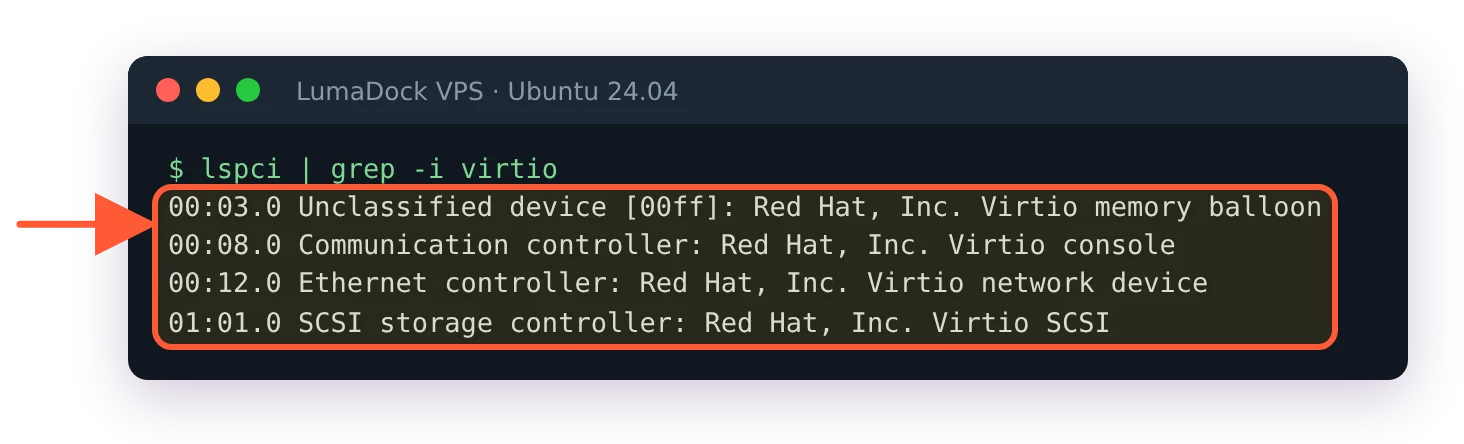
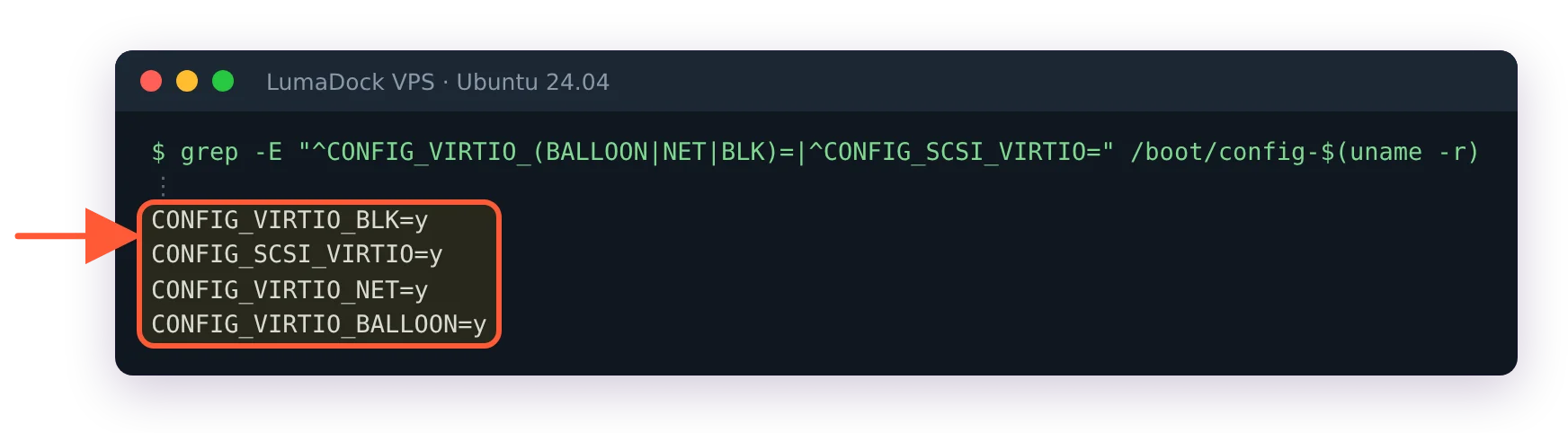
On a KVM VPS you can see it in the device names. The root disk is /dev/vda (virtio-blk) or /dev/sda behind a virtio-scsi controller, and the NIC is a virtio_net device. On Ubuntu those drivers are built into the kernel, so lsmod prints nothing for them; the virtio drivers the kernel has registered are listed in sysfs instead:

lsblk
lspci | grep -i virtio
ls /sys/bus/virtio/drivers/

lspci | grep -i virtio: Virtio memory balloon, console, network device and Virtio SCSI controller

The paravirtual devices a KVM guest sees: network, SCSI disk controller, console and the memory balloon.

The lspci line lists something like "Virtio block device" or "Virtio SCSI", "Virtio network device" and, on a lot of hosts, "Virtio memory balloon" and "Virtio RNG". The sysfs listing shows driver names such as virtio_net, virtio_scsi and virtio_balloon. If a provider gave you an e1000 NIC and an IDE disk, that's a configuration choice on their side and worth a ticket, because the difference on random disk I/O is not subtle.

Ubuntu kernel config: CONFIG_VIRTIO_BLK, SCSI_VIRTIO, VIRTIO_NET and VIRTIO_BALLOON all set to y

Why lsmod shows no virtio drivers on Ubuntu: they are built into the kernel.

Virtio-scsi supports discard (TRIM) passthrough, which lets the guest tell the host which blocks are free so a thin-provisioned disk image on NVMe stays thin. fstrim -v / on a Ubuntu guest reports how much it trimmed. On virtio-blk it depends on the QEMU version and the host config.

Shared vCPU vs dedicated vCPU at the scheduler

Each vCPU is a thread. The host's Linux scheduler treats those threads like any others, so a host with 64 hardware threads and 200 vCPUs handed out is running exactly the way a busy multi-threaded application runs: fine while most threads sleep, and queued when they don't. A shared vCPU means your thread competes on equal terms with every other guest's threads for the physical cores. When yours is ready to run and the core is busy, the time it waits is accounted as steal in your guest, which is the subject of the article on VPS CPU steal time and noisy neighbours. On a quiet host that number rounds to zero, which is how most shared plans feel most of the time.

A dedicated vCPU means the provider pinned your thread to a physical core (or a core plus its hyperthread sibling) and doesn't schedule other guests there. The mechanism on a libvirt or Proxmox host is CPU affinity on the QEMU process, and the effect inside the guest is that the vCPU never queues behind a stranger. That's the product sold as a VDS, and the piece on VPS vs VDS and dedicated cores goes through when it pays off and when it doesn't. Game servers and trading terminals are the usual buyers.

A weight is the middle ground. Hosts can give one VM's threads more scheduler weight than another's, and cap a VM at a percentage of host CPU time, without pinning anything. You can't see either setting from inside the guest.

Get CPU cores all to yourself

Ryzen 9 7950X cores reserved for your server and boosting to 4.5 GHz keep builds and game servers at full pace when the host is busy.

Memory ballooning and why your RAM shows as sold

A KVM guest's memory is backed by host RAM that the hypervisor allocated for it. The guest's free -m shows the configured size (a little under it, since the kernel reserves some at boot), and unlike a container the guest kernel owns the page cache, swap decisions and OOM behaviour within it.

The balloon device is the exception people worry about. The virtio balloon driver inside the guest can, on the host's instruction, "inflate" by grabbing pages and handing them back to the host, so the host can reclaim memory from an idle VM for a busier one. A provider that sets a VM's minimum memory below its maximum is using this. When the balloon inflates, the guest's total in free -m drops. Most VPS platforms set minimum equal to maximum, which makes the balloon inert, and a provider running memory overcommit through ballooning ought to say so. You can check that the balloon device is present with lspci | grep -i balloon (on Ubuntu the driver is built into the kernel, so lsmod won't list it), and a sudden drop in MemTotal in /proc/meminfo while the VM is running is the sign it has been used on you.

Kernel same-page merging (KSM) is the other memory trick. It lets the host deduplicate identical pages across guests, and it's invisible from inside apart from a small CPU cost on the host. I don't know how many hosting providers leave KSM on for customer VMs. Proxmox enables the ksmtuned service by default, the side-channel research against KSM is a decade old and public, and I've never seen a VPS provider state its policy either way.

Nested virtualization on a VPS

Running a hypervisor inside your VPS (VirtualBox, an Android emulator, KVM itself, Docker Desktop's VM, Windows Sandbox) requires the guest to see the VT-x or AMD-V extension, which means the host has to expose it. Two things have to be true. Nested support has to be on in the host's KVM module, which the kernel's nested-guests documentation notes has been the default since Linux 4.20, so on any current host it is. And the VM's CPU model has to pass the flag through, which on Proxmox means a CPU type of host or an explicit +vmx / +svm flag on the VM.

The second one is the provider's choice, and most don't make it, because exposing the host CPU model exactly complicates live migration between hosts with different processors. So the usual state on a rented VPS is: nested is possible on the host and not exposed to you. Check with:

grep -c -w -E 'vmx|svm' /proc/cpuinfo

Zero means no nested virtualization on this VM. Anything above zero and kvm-ok (from the cpu-checker package) will confirm that /dev/kvm can be used. If you need it, ask before buying; some providers enable it on request and some never do.

How to check a VPS is KVM from inside

All of these read as one on a KVM guest, and together they take ten seconds.

systemd-detect-virt
lscpu | grep -E '^(Hypervisor|Virtualization)'
sudo dmesg | grep -i kvm
grep -m1 -o -w hypervisor /proc/cpuinfo
lsblk

systemd-detect-virt prints kvm on a KVM virtual machine

One word settles it: this VPS is a KVM virtual machine.

Expected output, in order. kvm. Then Hypervisor vendor: KVM and Virtualization type: full, plus a Virtualization: AMD-V or VT-x line if the host exposes nested virtualization. Then a handful of boot lines starting with Hypervisor detected: KVM and kvm-clock: Using msrs, which is the guest kernel picking the paravirtual clock. Then the word hypervisor from the CPU flags, which the processor sets for any guest. And a disk named vda or an sda on a virtio-scsi controller, with no sign of a host filesystem being bind-mounted in.

On a container the picture is different in every line. systemd-detect-virt prints lxc or openvz, lscpu shows the host's real CPU with no hypervisor line, dmesg is either the host's log or permission denied, /proc/vz or /proc/user_beancounters exists on OpenVZ and lsblk shows the host's devices or nothing useful. The man page for systemd-detect-virt has the full list of identifiers. It's careful to say that kvm is reported only for KVM with QEMU, while qemu on its own means software emulation without KVM, which you'll only ever see on a misconfigured host and should treat as a defect.

One more that I like: cat /sys/devices/system/clocksource/clocksource0/current_clocksource. On a KVM guest it's kvm-clock or tsc. If it's hpet or acpi_pm, timekeeping is falling back to an emulated device and you'll pay for it in system time.

What KVM isolation doesn't cover

The boundary is between guests and between guest and host, and it stops there; the physical resources under it are still shared. Your vCPU still shares a core's execution units and caches with whichever thread is on the sibling hyperthread, your disk image still sits on the same NVMe as the neighbours' and packets still leave through the same port. Isolation in the QEMU sense stops a guest reading another guest's memory or files. Slowing you down is still allowed. (One aside on where this lands in practice: LumaDock's Docker VPS hosting exists because a KVM guest with its own kernel is the only kind of VPS where Docker runs with no host-imposed limits, which is the whole argument of this page in one product.) The slowing-down is the gap that steal time and disk await are there to measure.

The CPU side-channel families of the last decade (Spectre, MDS, the L1TF cases) are the one place where the guest boundary itself has been in question, and the mitigations are in the host kernel and microcode, where you can't see them. A provider that keeps host kernels current is doing that work for you. The command that tells you what your own guest kernel thinks of its situation is grep . /sys/devices/system/cpu/vulnerabilities/*, and reading it on a new server is a good habit whatever the answer turns out to be.

Questions?

Can my VPS provider see my files?

Technically yes, because whoever runs the hypervisor can read your disk image and your VM's memory. KVM's isolation keeps other customers out of your VM, and the host sits outside that boundary. Data you encrypt on your own machine before uploading stays unreadable, since the key never reaches the server. The hardware exception is AMD SEV, which encrypts guest memory so the hypervisor reads only ciphertext, and it applies only when a provider sells confidential VMs and says so.

About the author

William Ramsay

I've earned my living from technical writing for more than 20 years. There were a few other jobs before that: university IT, a spell doing Unix administration, some training/paid work. Over these years, writing became the part people kept asking me to do, so I stopped pretending it was secondary.

Most of my career has been in infrastructure. The names have changed. We had dedicated servers, then virtual servers, then cloud instances; now there are another dozen ways to rent somebody else's computer. But the underlying problems don't change nearly as quickly. I'm in Glasgow, where I've lived for most of my life. I keep paper notebooks, walk in the hills when my knees agree to it and repair old hand tools. I've never been particularly interested in gadgets for their own sake. I like knowing how things work and being able to fix them.

Deploy your next project in seconds

Bring your winning ideas online faster, with modern hardware and unmetered bandwidth. Join a European cloud trusted by thousands of developers and businesses worldwide.