Back to Article List

Back up and restore Pi-hole v6 with Teleporter

Back up and restore Pi-hole v6 with Teleporter - Back up and restore Pi-hole v6 with Teleporter

Updated and tested 2 October 2026

Run this on the Pi-hole server, in the directory where the archive should land:

cd /var/backups && sudo pihole-FTL --teleporter

FTL prints the file name it wrote, in the form pi-hole_<hostname>_teleporter_<time>.zip, and exits. That zip is the same Teleporter archive the web interface produces under Settings > Teleporter, and it is the backup the July 2026 release post for FTL v6.7, Web v6.6 and Core v6.4.3 points to at the end of its update advice. The exact wording:

Don't forget, you can use Teleporter to export your configuration. It can be found under the settings menu of the web interface or on the command line with pihole-FTL --teleporter

The command-line form is easy to miss; discourse thread 79890 from May 2025 is where someone asking for a command-line export was pointed to it; in v5 that job belonged to pihole -a -t. The web route needs a browser on a tunnel peer. The CLI route needs only SSH, which is why the cron section below uses it.

What the Teleporter archive contains

The archive writer in FTL's teleporter.c adds /etc/pihole/pihole.toml, /etc/hosts, /etc/pihole/dhcp.leases if it exists and every file in /etc/dnsmasq.d/ if that directory exists. Then it adds a reduced copy of gravity.db holding the group, adlist, adlist_by_group, domainlist, domainlist_by_group, client and client_by_group tables, and a reduced copy of pihole-FTL.db holding message, aliasclient, network and network_addresses.
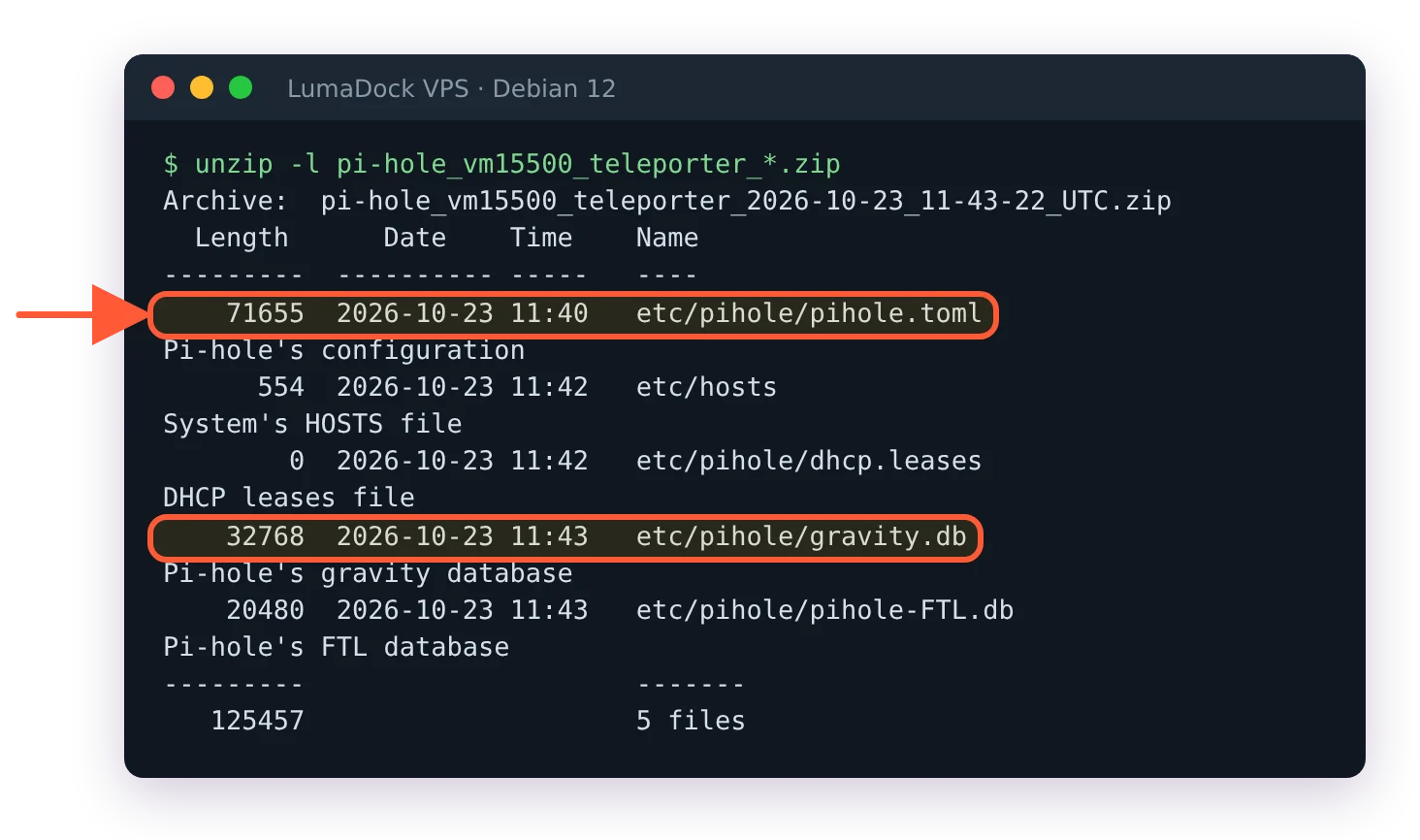
unzip -l of a Pi-hole v6 Teleporter archive: pihole.toml, hosts, dhcp.leases, gravity.db and pihole-FTL.db

A v6 Teleporter archive holds pihole.toml, the hosts file, DHCP leases and both databases.

So lists, domains, groups, clients, the whole configuration and the network table are in. The gravity table itself is not; a restored Pi-hole rebuilds it from the list URLs on the next pihole -g. Query history is not in the archive either. If you want the long-term query database, see the sqlite3 step below.

A note for the VPS case: pihole.toml carries webserver.api.pwhash, the TLS paths and every upstream you set, which makes the zip sensitive. It belongs on an encrypted disk or in a private bucket, not in a chat. On the server it starts out less private than that: pihole-FTL --teleporter writes the zip as -rw-r--r-- root root, so any local account can read the password hash in it, and the cron export below does the same. On a VPS where you are the only user that costs little; with other accounts on the box, keep the backup directory readable by root alone.

Schedule the export with cron

FTL writes into the current directory, so the cron line changes into the target first. As root (sudo crontab -e):

0 4 * * 1 cd /var/backups/pihole && pihole-FTL --teleporter >/dev/null 2>&1 && find /var/backups/pihole -name 'pi-hole_*_teleporter_*.zip' -mtime +90 -delete

Create /var/backups/pihole once with sudo mkdir -p /var/backups/pihole. The line runs every Monday at 04:00, keeps about thirteen weekly archives and deletes older ones. The file name carries the timestamp, so nothing is overwritten.

A backup that only exists on the machine it protects goes down with it, and a VPS that gets reinstalled takes /var/backups along.

Then copy the newest zip off the server. From a WireGuard client that reaches the VPS at its tunnel address:

scp '[email protected]:/var/backups/pihole/pi-hole_*_teleporter_*.zip' ~/pihole-backups/
Save your best work

Send your backups to a storage VPS with room for years of archives, unmetered bandwidth and a cost per gigabyte that stays low.

Download the archive through the API

The same archive is one authenticated GET away, which suits a backup host that already pulls from several servers. On a VPS whose web server is bound to the tunnel, as in the VPS behind WireGuard setup, the host is 10.100.0.1 and only a connected peer can reach it. Pi-hole v6 uses session IDs rather than static tokens, and the API authentication page shows the flow: a POST to /api/auth with the password returns a sid, and the sid goes into later requests as the X-FTL-SID header. Three lines do it:

SID=$(curl -sk -X POST "https://10.100.0.1/api/auth" --data '{"password":"your-password"}' | jq -r .session.sid)
curl -sk -H "X-FTL-SID: $SID" -o pihole-$(date +%F).zip "https://10.100.0.1/api/teleporter"
curl -sk -X DELETE "https://10.100.0.1/api/auth?sid=$SID"

-k is there because the certificate at /etc/pihole/tls.pem is self-signed by default. For a script, generate an application password in the web interface instead of using the admin one; where it lives and how 2FA interacts with it is in reset the Pi-hole v6 admin password. The third line logs the session out; FTL allows 16 concurrent sessions by default and a script that never logs out uses them up. The API docs say a session is bound to the client IP, so run all three lines from the same host.

Restore from a Teleporter archive

Three routes, same result. In the web interface, Settings > Teleporter has an import box with checkboxes for which parts to bring back. On the command line:

sudo pihole-FTL --teleporter pi-hole_<hostname>_teleporter_<time>.zip

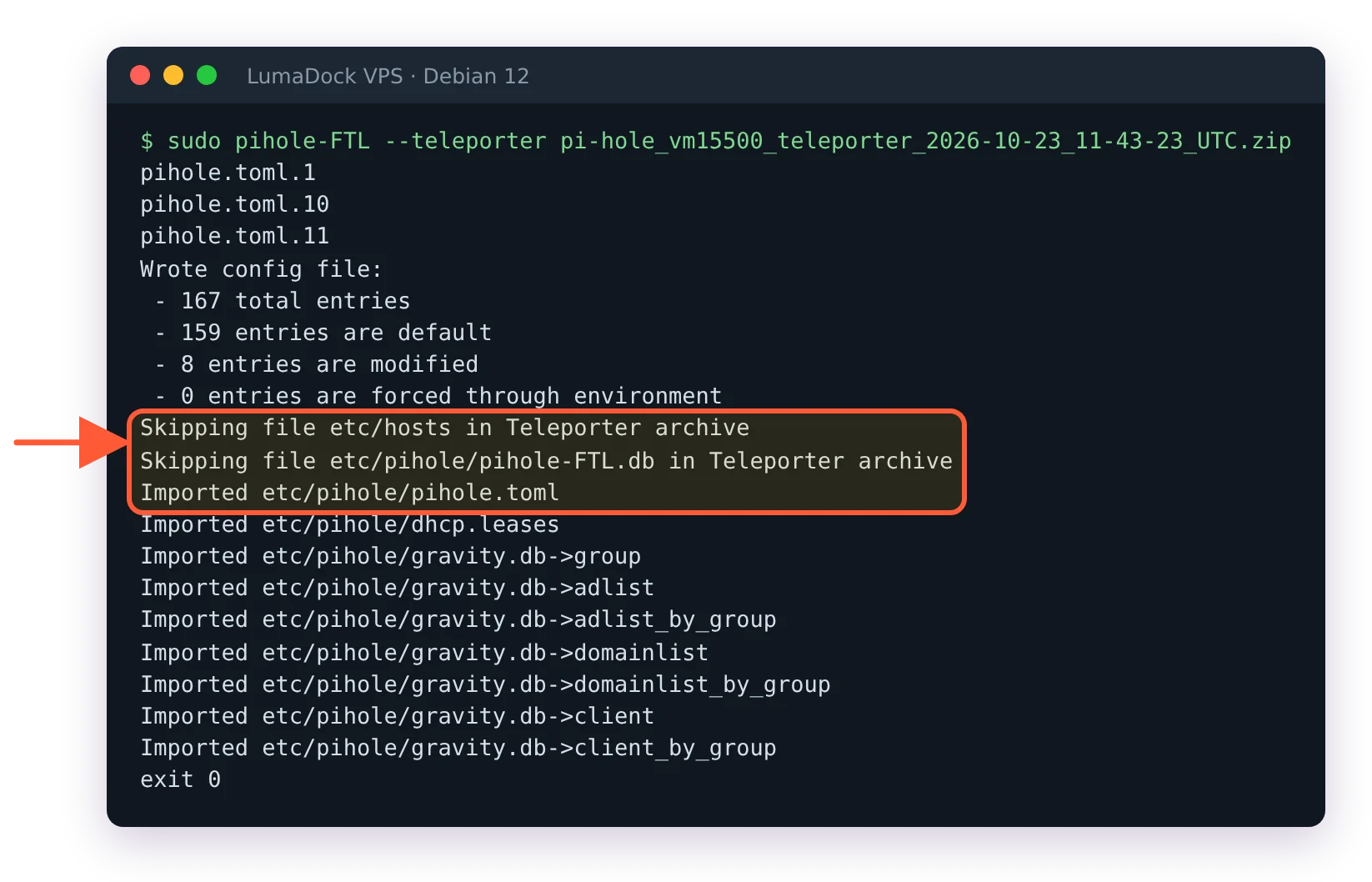
pihole-FTL --teleporter restoring a zip: pihole.toml imported, etc/hosts and pihole-FTL.db skipped, gravity tables imported

A command-line restore imports the config and gravity tables and skips the hosts file and query database.

FTL prints Imported etc/pihole/pihole.toml, Imported etc/pihole/dhcp.leases and one line per gravity table, such as Imported etc/pihole/gravity.db->adlist. Two files are passed over with Skipping file etc/hosts in Teleporter archive and Skipping file etc/pihole/pihole-FTL.db in Teleporter archive, so a command-line restore brings back neither /etc/hosts nor the network table, and an API import of the same zip on FTL v6.8 listed the same set. Through the API it is a multipart POST to /api/teleporter with the zip as the file field and an optional import object choosing config, dhcp_leases and individual gravity tables. The endpoint description is blunt about what happens next: "Note that this will overwrite your current configuration." The one time I restored an archive I had never tried, I read that sentence twice before clicking; a throwaway Pi-hole is a calmer place to find out what an archive brings back.

If the archive you hold was exported by a v5 Pi-hole, read the Pi-hole v5 to v6 upgrade page first for what moved where. The command-line import reads only the v6 zip; the web interface and the API also accept the v5 .tar.gz, import its tables and setupVars.conf, then restart FTL to migrate them. Since FTL v6.7.1 an imported pihole.toml also passes through the same validators as a pihole-FTL --config call, after the project fixed a validator bypass through Teleporter imports (GHSA-gx63-h4w6-f46g). A value the validators refuse is refused on import too.

How pihole.toml works in Pi-hole v6 explains why FTL rewrites the file and keeps rotated copies. The practical point for a restore: before the import FTL rotates the current pihole.toml into /etc/pihole/config_backups/, so the configuration you just overwrote is one directory away.

Back up the query history separately

Need the query history too? The query database page documents the long-term database at /etc/pihole/pihole-FTL.db, written once a minute by default. Pruning follows database.maxDBdays, 91 days in the current configuration reference (that page still says 365). The safe way to copy it while FTL is running is SQLite's online backup, from that page. Pi-hole doesn't install the sqlite3 command (on Debian 12 sudo sqlite3 ends in command not found), but FTL ships the same shell:

sudo pihole-FTL sqlite3 /etc/pihole/pihole-FTL.db ".backup /var/backups/pihole/pihole-FTL.db.backup"

A plain sqlite3 works the same way if you installed it yourself. Do not cp the file while FTL is up; the database is mid-write every minute. The same page describes rotating the file monthly with FTL stopped, which costs DNS for the duration of the stop, so the online backup is the better fit for a resolver other people depend on.

Restoring that copy is the reverse: stop FTL, put the file back at /etc/pihole/pihole-FTL.db, start FTL. For everything else, the configuration, the lists and the clients, the archive is the restore:

sudo pihole-FTL --teleporter pi-hole_<hostname>_teleporter_<time>.zip

Questions?

How do I move Pi-hole to a new server with Teleporter?

Export the archive on the old server, install Pi-hole v6 on the new one and import the zip there; in the forum thread on moving Pi-hole to another machine, that plan got a "That's about it" from the Pi-hole team. After the import, check the values that described the old host, such as dns.interface, a webserver.port bound to an old address and dns.hosts entries pointing at old IPs. An import through the web interface or the API keeps the new server's own misc.dnsmasq_lines, webserver.advancedOpts and webserver.paths values and reports each skipped value that differed on the diagnosis page. sudo pihole-FTL --teleporter on the command line applies them.

Barry Sandford
About the author

Barry Sandford

Barry spent nearly 15 years in network engineering, mostly with UK hosting providers and regional ISPs. He worked in NOC operations and network design, including infrastructure migrations, and still keeps a lab environment at home to test configurations before he writes about them. His favorite topics tend to be the parts of infrastructure that become visible when something goes wrong: routing, DNS, address planning, firewalls and connectivity between systems that each appear fine on their own. IPv6 has been running on his home network for years. Barry lives in West Yorkshire, has an allotment, follows non-league football and does quite a lot of walking, usually with an OS map folded into a pocket.

Deploy your next project in seconds

Bring your winning ideas online faster, with modern hardware and unmetered bandwidth. Join a European cloud trusted by thousands of developers and businesses worldwide.