





.svg)
.svg)
.svg)
.svg)

.svg)
.svg)
.svg)


Updated and tested 18 October 2026
Open the two logs first: sudo tail -n 100 /var/log/pihole/FTL.log for the daemon and pihole -t for queries. Every error below names which one it lives in. FTL.log lines carry a priority (CRIT, ERROR, WARNING, INFO), dnsmasq warnings go to /var/log/pihole/pihole.log, and a copy of each warning lands on the web interface's diagnosis page with a dnsmasq: prefix. The strings are quoted as the current source prints them, so a paste into the page search should find yours. Right after a fresh install FTL.log can be close to empty, because FTL logs only to journalctl -u pihole-FTL until its first restart; sudo service pihole-FTL restart once and the file fills normally.
The fixes assume the layout from the guide to Pi-hole v6 on a VPS behind WireGuard: Debian 12 or Ubuntu 24.04, Pi-hole listening on wg0, port 53 closed on the public interface. None of them opens the resolver to the internet; where a fix would, it says so and offers the other route.
failed to create listening socket for port 53: Address in use
FTL.log, at CRIT, as Error in dnsmasq configuration: failed to create listening socket for port 53: Address in use. Forum threads often quote it as "Address already in use"; current FTL prints the shorter form. The web interface still loads and the login page shows DNS Server failure detected, log in to see Pi-hole diagnosis messages, but the diagnosis page behind it can stay empty, so FTL.log is the place that names the cause. Don't trust pihole status here either: in a test on FTL v6.8 it still printed FTL is listening on port 53 while every query timed out. Something else owns UDP or TCP 53.
sudo ss -tulpn 'sport = :53'
The exact line FTL logs when another service holds port 53.
On Ubuntu 24.04 the owner is systemd-resolved on 127.0.0.53. The installer handles that itself by writing /etc/systemd/resolved.conf.d/90-pi-hole-disable-stub-listener.conf with DNSStubListener=no under [Resolve] and reloading resolved, so seeing the error on Ubuntu after a clean install means the drop-in went missing or resolved was reconfigured later. The Docker tips and tricks page gives the manual equivalent, a one-line printf into /etc/systemd/resolved.conf.d/no-stub.conf, and warns against disabling resolved entirely because that "can cause problems with name resolution in VPNs". LumaDock's Debian 12 image runs systemd-resolved as well, so the same drop-in applies there and the same check finds it. On a Debian 12 install without resolved, the owner is a package someone installed: a stand-alone dnsmasq, unbound or bind9 bound to the wildcard address, or the dnsmasq that libvirt and some Docker setups start. In the Discourse thread FTL failed to start due to failed to create listening socket for port 53 jfb's answer was the whole fix: "Stop and disable dnsmasq (and you can uninstall it). Then restart pihole-FTL and it will bind to port 53."
sudo systemctl disable --now dnsmasq
sudo service pihole-FTL restart
Unbound is the one exception you keep. It belongs on 127.0.0.1 port 5335, not 53, which is what the Pi-hole docs' config file sets.
Error: Unable to install Pi-hole dependency package.
This one is printed by the installer, in red, after a status line Installing Pi-hole dependency package turns into a cross. The v6 installer no longer installs packages one by one. It builds a meta package, /tmp/pihole-meta.deb, whose control file depends on awk, bash-completion, binutils, ca-certificates, cron (or cron-daemon), curl, dialog, bind9-dnsutils (or dnsutils), dns-root-data, git, grep, iproute2, iputils-ping, jq, libcap2, libcap2-bin, logrotate, lshw, procps, psmisc, sudo and unzip, then hands it to apt-get with the output sent to /dev/null. Whatever apt complained about, you didn't see it.
Run the apt step by hand to read the real message. The meta package depends on awk, which is a virtual package that apt won't install by that name, so the command uses mawk in its place:
sudo apt-get update
sudo apt-get install --no-install-recommends mawk bash-completion binutils ca-certificates cron curl dialog bind9-dnsutils dns-root-data git grep iproute2 iputils-ping jq libcap2 libcap2-bin logrotate lshw procps psmisc sudo unzip
Typed by hand, the dependency list stops at awk, which is a virtual package on Debian 12.
A mirror that can't be reached, a sources list missing the main component, a held package or no DNS on the VPS are the usual answers, and sudo apt --fix-broken install clears a half-finished earlier run. The same installer runs again under pihole -r, under pihole -up when Core or FTL has an update, and during the v5 to v6 upgrade, so the line can appear on a box that has been running for years. If apt-get update itself fails the installer stops earlier with Error: Unable to update package cache. Please try "sudo apt update".
DNS resolution is currently unavailable
Printed by pihole -g, and by Tools > Update Gravity in the web interface, which streams the same script. Gravity checks that the host itself can resolve names with getent hosts raw.githubusercontent.com under a four-second timeout; when that fails it prints this line, then Waiting up to 120 seconds for DNS resolution..., and if nothing changes No DNS resolution available. Please contact support. and exits.
The host's resolver is the problem, not Pi-hole's. /etc/resolv.conf points at 127.0.0.1 or 127.0.0.53 while FTL is down, which is exactly the state after the port 53 failure above; or it points at a server the VPS can't reach; or an outbound firewall rule drops port 53. The post-install page in the docs says it plainly: "If your Pi-hole host is using Pi-hole as upstream DNS server and Pi-hole fails, your host loses DNS resolution." On a box with Unbound, the unbound-resolvconf.service on Debian writes nameserver 127.0.0.1 without the 5335 port into resolv.conf, which produces this line every time FTL is stopped.
jfb's fix in pihole -g DNS resolution is currently unavailable is temporary and works: put nameserver 9.9.9.9 in /etc/resolv.conf and run pihole -d; the same edit gets pihole -g through, and the file goes back afterwards. The lasting fix is to get FTL running and to point the host at something that answers, Pi-hole itself once it is up or the upstream directly.
ignoring query from non-local network
A WARNING in pihole.log, in the UDP form ignoring query from non-local network 192.168.1.20 (logged only once), and on the diagnosis page. The docs page on known dnsmasq warnings explains it in one sentence: with local-service, which is what dns.listeningMode LOCAL writes, dnsmasq accepts "queries from at-most-one-hop-away addresses" and discards the rest. Pi-hole can't see the subnet the query came from on any of its own interfaces, so it drops the query without answering.

In LOCAL mode a query from a router peer's LAN address is ignored and logged once.
Over WireGuard that happens when a home router is one of the peers and forwards its LAN clients' queries unchanged: the source address is 192.168.1.20, which is on no subnet of the VPS, so the query is two hops away by dnsmasq's test. A client whose tunnel address isn't inside 10.100.0.0/24 gets the same treatment. I think SINGLE is the better fix on a VPS than keeping LOCAL and reworking the router, because the one-hop test is exactly the thing a router peer fails and interface=wg0 replaces it with a test on where the packet arrived:
sudo pihole-FTL --config dns.interface wg0
sudo pihole-FTL --config dns.listeningMode SINGLE
Both keys restart FTL by themselves. The docs note that local-service is ignored once any interface option is present, so the two modes don't stack. The one mode never to pick here is ALL; it lifts the origin check on the public interface as much as on wg0, and the configuration reference calls it "a dangerous thing to do as your Pi-hole could become an open resolver". With SINGLE the router peer becomes a single client as far as Pi-hole can tell, which is where the next line comes from.
Rate-limiting 10.0.1.39 for at least 44 seconds
An INFO line in FTL.log, with your client's address in place of the docs' example. FTL permits 1000 queries per client in 60 seconds, answers everything above that with REFUSED until the interval ends, then logs Still rate-limiting 10.0.1.39 as it made additional 5007 queries if the client kept going and Ending rate-limitation of 10.0.1.39 once it slows down. The two values are dns.rateLimit.count and dns.rateLimit.interval, described under dns.rateLimit in the configuration reference. The interval is counted from the moment FTL finished starting.
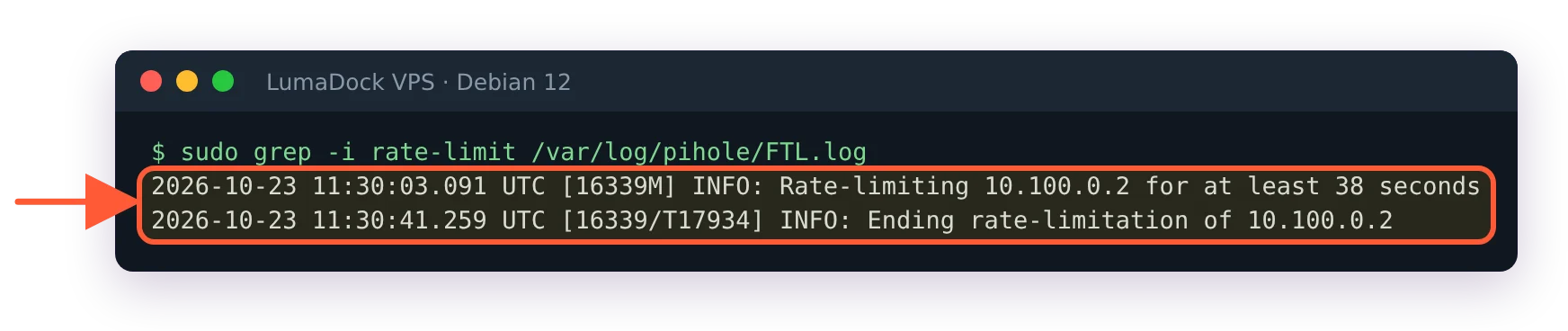
The rate limit starts and ends in FTL.log, naming the client and how long it waits.
A phone or a laptop on its own tunnel address doesn't get near 1000 a minute. A router peer carrying a whole household does, because every device behind it arrives as the router's one tunnel address. I have not tested how many devices it takes. Raise the count, or switch the limit off by setting both values to zero:
sudo pihole-FTL --config dns.rateLimit.count 0
sudo pihole-FTL --config dns.rateLimit.interval 0
The cleaner alternative is a tunnel address per device, so each one gets its own budget and the query log shows which device is talking.
Start of webserver failed! Web interface will not be available!
FTL.log, ERROR, followed by an indented Error: line with CivetWeb's reason and Hint: Check the webserver log at /var/log/pihole/webserver.log. A port in webserver.port without the o suffix couldn't be opened, and the indented line reads Error: Failed to setup server ports (error code 10.0). With the suffix, the default for all four entries, a busy port is skipped without this line, which is its own kind of silent failure. A malformed webserver.acl stops the web server the same way, with Failed to setup access control list (error code 12.0) and check_acl: subnet must be [+|-]IP-addr[/x] in webserver.log: every subnet in the ACL needs its + or - in front, and a hand edit without it is accepted by FTL without complaint until the web server fails. For a busy port the check is this:
sudo ss -tlpn 'sport = :80'
sudo pihole-FTL --config webserver.port
Move Pi-hole to 8080 and 8443, or move the other server, and restart FTL. The port fallback, the lighttpd leftover from v5 and the other reasons the dashboard won't open have their own page, pi.hole/admin not working. A related line, Not starting web server as webserver.port is empty. API will not be available!, means the key is an empty string; set it back to 80o,443os,[::]:80o,[::]:443os, or to the tunnel-bound form on a VPS.
List download failed: using previously cached list
From pihole -g, right after a per-list status such as Status: Retrieval failed (exit_code=6 Msg: Could not resolve host: raw.githubusercontent.com) or Status: Not found. Gravity keeps the last good copy of that list and tells you so; the web interface marks it "List unavailable, Pi-hole used a local copy". With no earlier copy the line is List download failed: no cached list available and the list contributes nothing.
The exit code is curl's. 6 is a name that didn't resolve, which on a VPS points back at the host's resolver (see the gravity section above); 7 is a connection that never opened, so a firewall or an outbound HTTPS block. An HTTP code maps to its own status text: Status: Forbidden for 403, Status: Not found for a list URL that moved, and the Cloudflare pair Status: Web Server Is Down (Cloudflare) and Status: Connection Timed Out (Cloudflare) for 521 and 522. A 403 from a list host against a datacenter address is worth one curl -I of the URL from the VPS before you assume the list is dead. Remove or disable a list that stays dead in Group Management > Lists.
Wrong password!
The login page's default message when /api/auth answers 401. The box under it, "Forgot password?", says what to do: the password shown once at install can't be retrieved, and sudo pihole setpassword sets a new one or, left blank, removes it. The Pi-hole v6 password reset article has the Docker and 2FA variants. Too many wrong attempts in a row return 429 with Rate-limiting login attempts; wait and try again. If the message is Server unreachable! instead, FTL isn't answering at all and the port 53 section is the more likely place to look.
Unauthorized
The JSON an authenticated endpoint returns without a valid session: {"error":{"key":"unauthorized","message":"Unauthorized","hint":null}}. Scripts hit it when the session ID expired or when the password changed, which drops every open session. The API docs say sessions are bound to the client address, but on FTL v6.8 a session ID reused from a second tunnel address was accepted, so an IP change alone isn't the cause on current versions. GET /api/auth reports the state in the session object: session expired, session unknown, no SID provided.
Sessions last webserver.session.timeout seconds of inactivity, 1800 by default, and the interface refreshes its own while a tab is open. A script should log in with POST /api/auth, send the SID in the X-FTL-SID header, and log out with DELETE /api/auth when done, because FTL allows 16 concurrent sessions (webserver.api.max_sessions) and refuses the seventeenth with API seats exceeded. On the box itself, members of the pihole group skip authentication for pihole commands; sudo usermod -aG pihole $USER adds you.
has been reset to its default value
A hand edit to /etc/pihole/pihole.toml that FTL rejected. FTL watches the file and, on a change, logs Reloading config due to pihole.toml change, parses it and validates every key. A value that parses but fails a key's validator gives Invalid value: with the reason and the reset line, both at ERROR. For a domain with a space in it, that is Invalid value: webserver.domain: not a valid domain ("bad domain!") followed by ----> webserver.domain has been reset to its default value; FTL keeps the rest of the file and puts that one key at its default, which isn't necessarily what was running before. A key with a fixed list of options behaves differently: listeningMode = "SINGEL" logs WARNING: Config setting dns.listeningMode is invalid and the key keeps the value it had. An array such as dns.hosts is the exception: it loses only the entries that fail, each logged with has been removed. A file that won't parse gives Cannot parse TOML file: with the TOML error, and the running configuration stays as it was. In both cases FTL then rewrites the file, so your edit disappears.
The CLI exists so this doesn't happen. It validates before writing and tells you why a value is refused:
sudo pihole-FTL --config -t dns.listeningMode SINGLE
sudo pihole-FTL --config dns.listeningMode SINGLE
The -t form tests without applying. String values with spaces or brackets need quoting, arrays take the TOML form ('[ "127.0.0.1#5335" ]'), and a key set through a FTLCONF_ environment variable is read-only for the CLI and the file alike. The pihole.toml reference covers the file header annotations, the restart-flagged keys and the backups FTL keeps in /etc/pihole/config_backups. At startup, a file FTL can't parse makes it try the rotated copies in that directory, and if none of those parses either it renames the file pihole.toml.broken and writes defaults.
warning: no upstream servers configured
A dnsmasq warning at FTL start, in pihole.log, and the docs' gloss is the whole explanation: "Only local names can be answered as no server=... lines are defined." dns.upstreams is an empty array. The query log then shows every forwarded name as REFUSED (nowhere to forward to), and pihole.log writes config error is REFUSED (EDE: not ready) for each, while dig on the client shows status: REFUSED with EDE: 14 (Not Ready). It happens after a Teleporter import from a differently configured box, a compose file where the upstream line is commented out, or a hand edit that emptied the array.
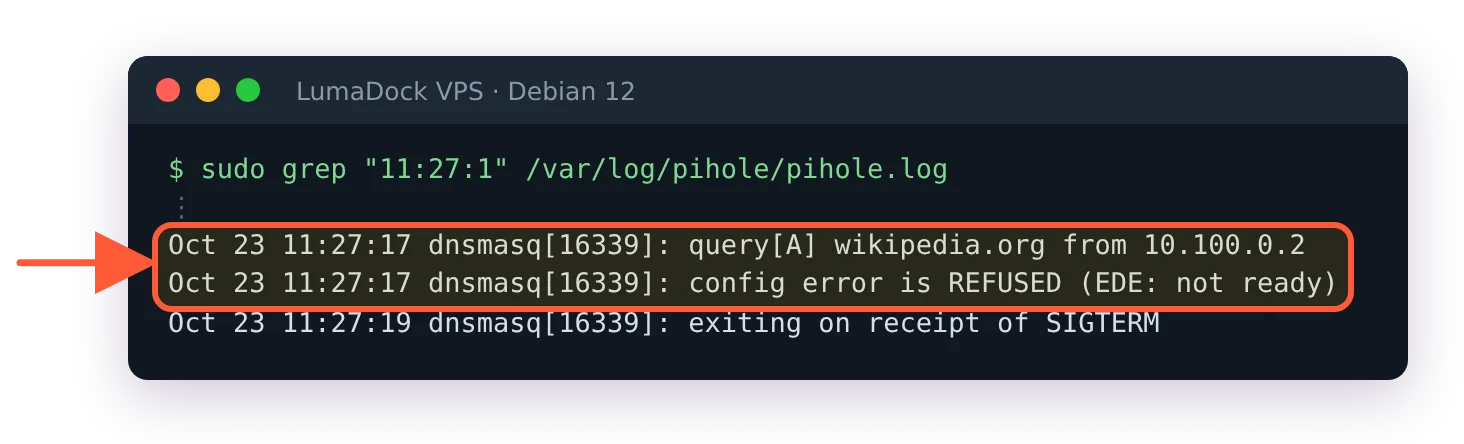
With no upstream configured, every forwarded query is refused.
sudo pihole-FTL --config dns.upstreams '[ "127.0.0.1#5335" ]'Or Settings > DNS in the interface, tick an upstream, Save & Apply. The key restarts FTL on its own.
dig @10.100.0.1 times out while the tunnel is up
No error string, which is why it takes longest. The handshake is recent, the client reaches 10.100.0.1 with ping, and dig @10.100.0.1 example.com waits and gives up. Four places to look, from the server side.
The firewall on the VPS: 53 must be allowed on wg0 for both UDP and TCP, and only there. sudo nft list ruleset on Debian or sudo ufw status on Ubuntu shows what is in force; a rule written for eth0 by mistake drops tunnel queries without logging anything. Then FTL itself: pihole status says DNS service is NOT running when it isn't, and sudo ss -tulpn 'sport = :53' shows the socket. Then the two listening keys: dns.interface must read wg0, and if it names an interface that doesn't exist pihole.log says warning: interface wg0 does not currently exist, which also happens when FTL started before the tunnel did. DNS comes back on its own once wg0 appears, but a web interface bound to 10.100.0.1 stays down until sudo service pihole-FTL restart; sudo pihole-FTL --config misc.delay_startup 10 stops it from happening at the next boot. Last, the mode: LOCAL with a mismatched tunnel subnet gives the non-local warning from earlier in this page.
If ping doesn't reach 10.100.0.1 either, the problem is below DNS. wg show wg0 latest-handshakes on the server and the checklist in fix a WireGuard handshake that never completes come before anything on this page, and the three-command Pi-hole test confirms the fix from the client side.
reply error is SERVFAIL
In pihole.log, one per failed lookup, after the forwarded lines for the name, sometimes with an EDNS reason appended such as (EDE: upstream returned SERVFAIL) or (EDE: network error). Pi-hole forwarded the query and the upstream answered that it couldn't. A dead upstream looks different: with Unbound as the only upstream and Unbound stopped, Pi-hole doesn't answer at all, clients time out and pihole.log shows only forwarded ... to 127.0.0.1#5335. Both cases start with the same two checks.
systemctl status unbound
dig pi-hole.net @127.0.0.1 -p 5335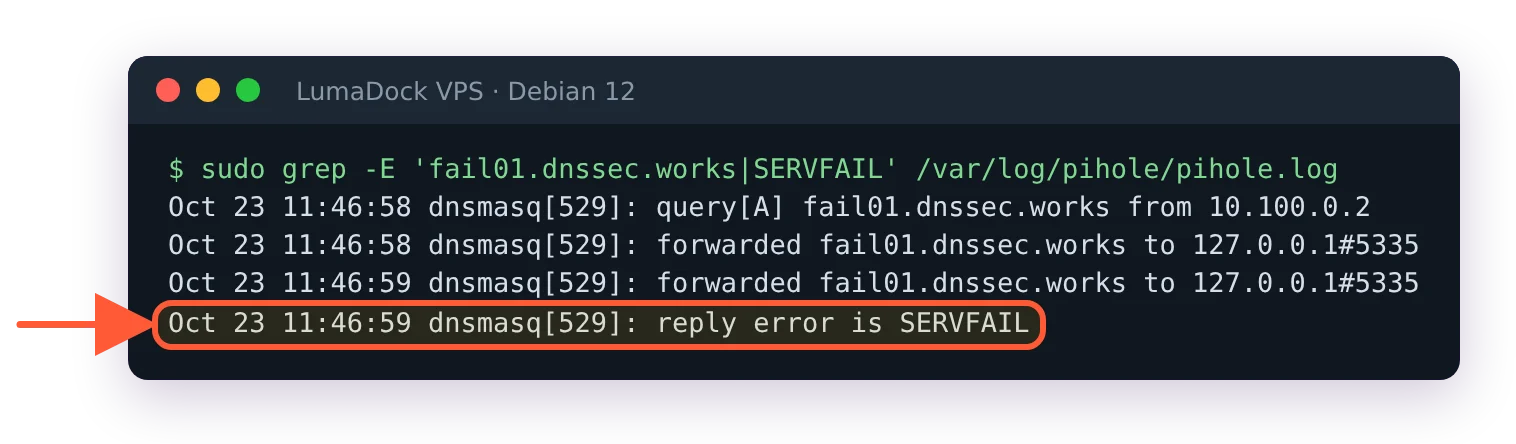
A SERVFAIL from the upstream appears in pihole.log as reply error is SERVFAIL.
A SERVFAIL from that dig while Unbound runs points at DNSSEC: the docs' config validates in Unbound, and dig fail01.dnssec.works @127.0.0.1 -p 5335 is supposed to fail, while dig dnssec.works @127.0.0.1 -p 5335 should return NOERROR. If the second one fails too, the upstream path from the VPS is broken, and the Unbound guide notes that some ISPs intercept outbound port 53. The Unbound on the same VPS article has the root-server reachability checks for that case. A single domain failing while everything else works is that domain's DNSSEC or its authoritative servers, and nothing on your side.
When none of the sections match, generate a debug log. pihole -d runs the checks the Pi-hole team asks for in every support thread and writes the result on the server. With -a it uploads the log to tricorder.pi-hole.net for the team to read, and -c adds a database integrity check.
pihole -d -a
