






.svg)
.svg)
.svg)
.svg)

.svg)
.svg)
.svg)


Updated and tested 14 October 2026
A handshake proves the tunnel is up. It proves nothing about where your DNS queries go. WireGuard moves packets whose destination falls inside AllowedIPs and ignores everything else, and a DNS query is a packet like any other: if the device decides to ask a different resolver, over a different port, through a different adapter, the tunnel never sees it and Pi-hole never logs it. The ads come back, the dashboard stays flat and wg show on the VPS reports a fresh handshake the whole time.
The setup every cause below assumes is the one from Pi-hole on a VPS behind WireGuard: resolver on 10.100.0.1, reachable only through the tunnel, with the client's DNS line pointing at it. Each cause is a device, an app or a config line deciding otherwise, and each has a different fix.
A missing or wrong DNS line in the client config
The DNS = 10.100.0.1 line is what tells the device to use the Pi-hole. Without it, WireGuard brings up the interface, routes packets for 10.100.0.1 through it, and the operating system goes on asking whatever resolver the network handed out over DHCP. nslookup on the device names that resolver on its Server: line, doubleclick.net resolves to a real address instead of 0.0.0.0, and Pi-hole's log has nothing from the device. The same happens when the line names the VPS's public IP instead of its tunnel address: the query leaves over the normal interface, hits a firewalled port 53 and times out, so this one at least is visible.
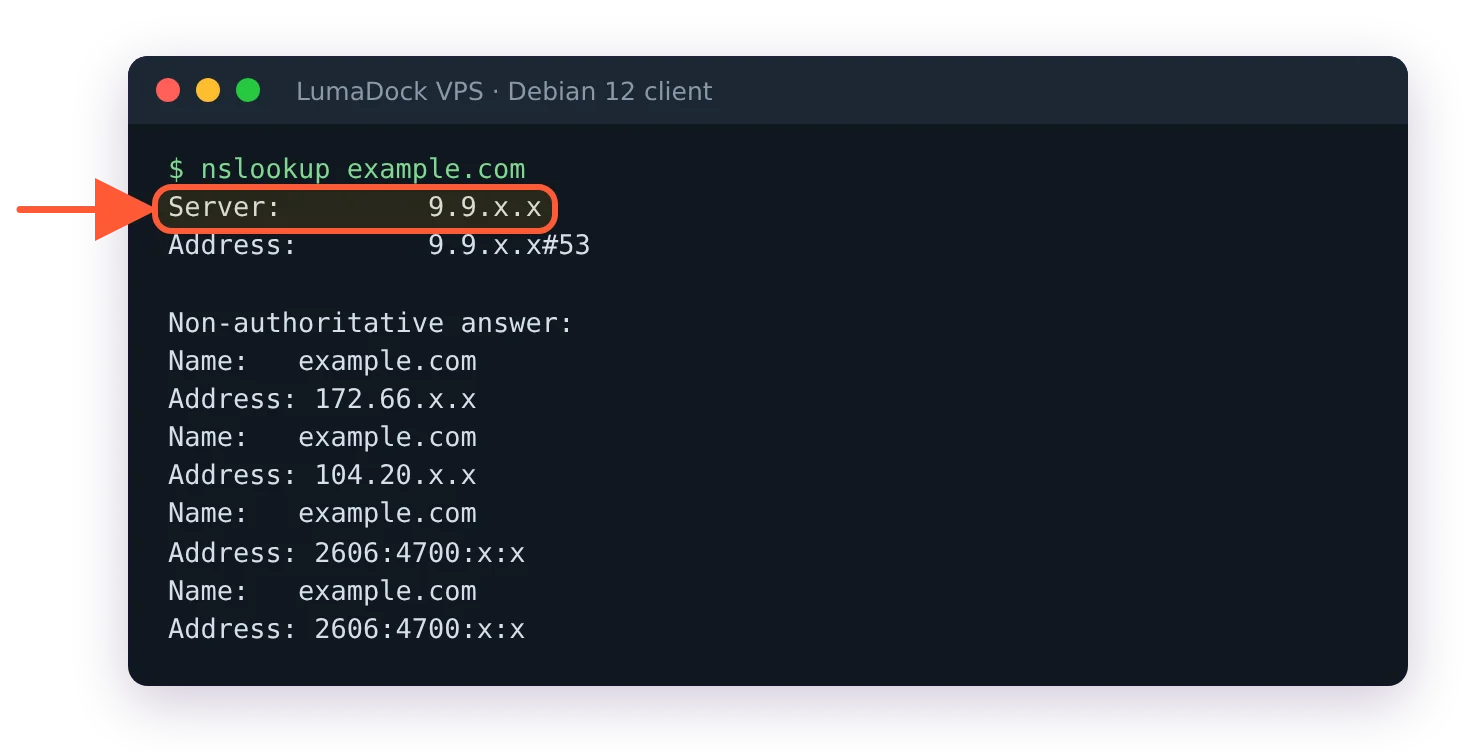
Without a DNS line the client keeps asking its old resolver, so Pi-hole never sees the query.
Check the file on the device. A config pasted into a desktop app by hand can lose the line; a QR code scanned from the server's copy can't.
AllowedIPs without the resolver's address
A query to 10.100.0.1 only enters the tunnel if 10.100.0.1 is inside AllowedIPs. 10.100.0.1/32, 10.100.0.0/24 and 0.0.0.0/0 all contain it. A list someone narrowed to a LAN behind the server, say 192.168.1.0/24 alone, does not. The split tunnel for DNS only article goes through what each value of that line carries; the short version is that the resolver's address has to be in it. With it missing, the DNS line points at an address the device has no route to.
The Android app's tunnel editor has an "Exclude private IPs" switch, and 10.100.0.1 is a private address, but the switch keeps the resolver covered. It only appears on a config with a single peer and 0.0.0.0/0 in AllowedIPs, and when it swaps that range for the list of public ones, PeerProxy.kt in the app's source adds every IPv4 address on the DNS line back as a /32. The AllowedIPs line the app shows afterwards includes 10.100.0.1/32.
Android Private DNS overrides the tunnel resolver
Android has a system-wide Private DNS setting. When it's set to a hostname (dns.google, one.one.one.one, a provider's DoT address), the phone sends its lookups over DNS over TLS to that provider, and the resolver the tunnel handed out is not consulted. The setting sits above every VPN on the device. Set Private DNS to Off, or to Automatic, which uses the resolver the phone already has and falls back to plain DNS when that resolver doesn't speak TLS, which a stock Pi-hole doesn't.
On a phone that "connects but doesn't block", check this setting before anything in WireGuard or Pi-hole. The phone was told, by its owner or by an earlier setup guide, to encrypt DNS to a specific company, and it's doing exactly that.
iCloud Private Relay on iPhone and Mac
Private Relay routes Safari traffic and DNS through Apple's relays, and a device with it on asks Apple's resolvers, not yours. Pi-hole handles this server-side with a setting that is on by default. The config reference's entry for dns.specialDomains.iCloudPrivateRelay asks if Pi-hole should "always reply with NXDOMAIN to A and AAAA queries of mask.icloud.com and mask-h2.icloud.com to disable Apple's iCloud Private Relay to prevent Apple devices from bypassing Pi-hole", following Apple's own guidance to network operators. So when the device does ask Pi-hole for those names, Private Relay fails to start and the device falls back to normal DNS through the tunnel.
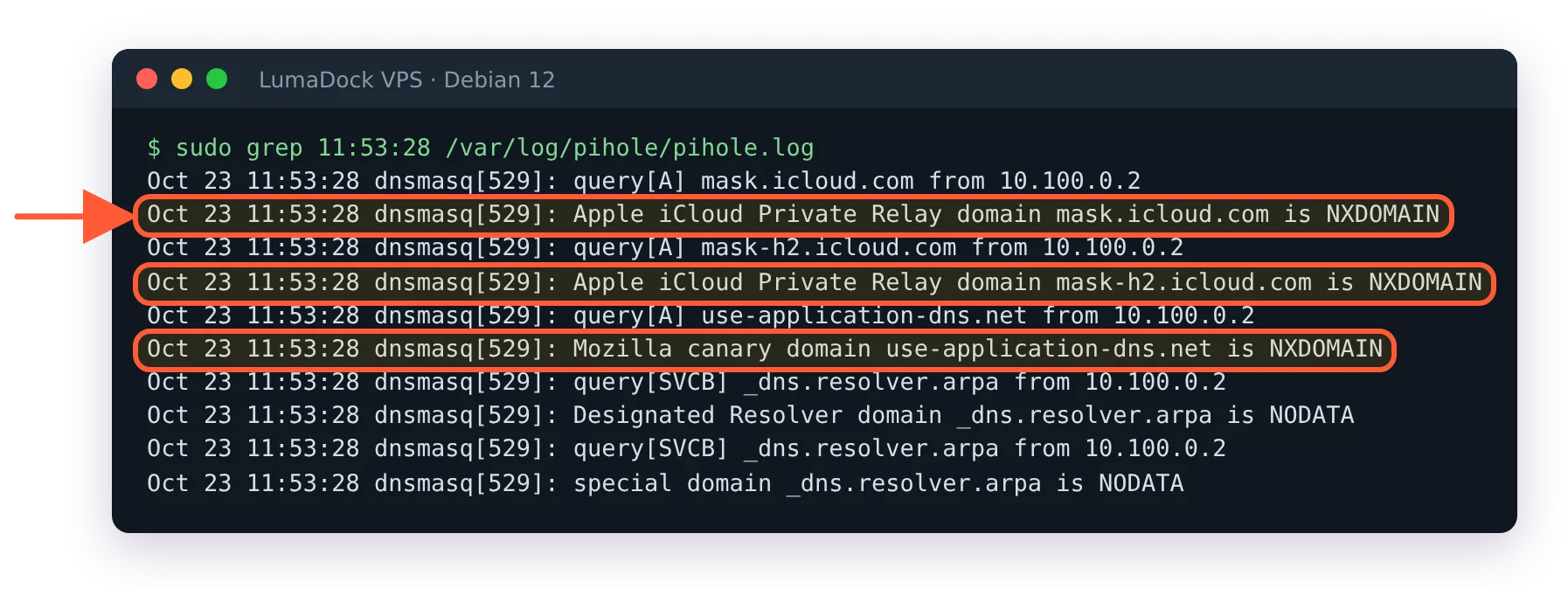
Pi-hole answers the Private Relay and Firefox canary domains with NXDOMAIN by default.
The order matters. Pi-hole can only answer the mask.icloud.com lookup if the lookup reached Pi-hole, which brings this back to the DNS line and AllowedIPs above. On an iPhone with the line set, the packet tunnel settings generator in the app's source hands the system a single empty match domain whenever a DNS server is set, which forces every query through the tunnel DNS.
Firefox DNS over HTTPS and the Mozilla canary
Firefox can resolve names over HTTPS to a provider of its own, inside the browser, and a query that never leaves the browser as plain DNS is invisible to the tunnel's resolver. Mozilla ships a canary domain so networks can opt out of the automatic mode, and Pi-hole answers it by default:
Should Pi-hole always reply with NXDOMAIN to A and AAAA queries of use-application-dns.net to disable Firefox automatic DNS-over-HTTP?
That's dns.specialDomains.mozillaCanary in the config reference, default true, with the Mozilla support page it follows linked under it. The word that limits it is "automatic". A Firefox profile where someone switched DoH on by hand, at the strictest level, is a browser setting and only a browser setting changes it: in Firefox's own DNS over HTTPS preference, set it off or back to the default level so the canary is honoured again.
The third key in the same group, dns.specialDomains.designatedResolver, answers NODATA for the resolver.arpa zone so that devices using Discovery of Designated Resolvers (RFC 9462) don't upgrade themselves to an encrypted resolver behind Pi-hole's back. It is also on by default. Each of the three leaves its own line in /var/log/pihole/pihole.log when it fires, which makes them easy to grep for: Apple iCloud Private Relay domain mask.icloud.com is NXDOMAIN, Mozilla canary domain use-application-dns.net is NXDOMAIN and Designated Resolver domain _dns.resolver.arpa is NODATA. If any of the three has been switched off on your install, sudo pihole-FTL --config dns.specialDomains.mozillaCanary prints the current value and the same command with true on the end restores it.
Browsers and apps with their own DoH
Chrome, Edge and Brave have a secure DNS setting of their own, and more and more apps ship with a DoH client and a resolver address compiled in. None of them honour the Mozilla canary; it's Mozilla's convention. What Pi-hole can do is refuse to resolve the DoH provider's hostname when the app does ask for it, which is a job for a blocklist entry. What it can't do is see traffic that goes straight to a hard-coded IP over port 443. For the browsers, turn secure DNS off or point it at the operating system's resolver; for an app with its own resolver baked in there is no DNS-level fix, and Pi-hole won't see that app's lookups.
Windows uses other adapters' resolvers without the kill switch
On Windows the WireGuard app sets the DNS servers from the config on the tunnel adapter, and the Ethernet or Wi-Fi adapter keeps the resolvers it got from DHCP. Which one a given lookup uses is Windows' decision, and the project's netquirk document is explicit about when the tunnel service steps in: only with a single peer whose AllowedIPs contains 0.0.0.0/0 or ::/0 (the "Block untunneled traffic" checkbox in the editor) are packets to port 53 restricted to the configured DNS servers and all other untunneled traffic blocked. With a split tunnel that rule doesn't exist, and a program that names its own resolver can reach it over the normal adapter.
Does that mean a DNS-only tunnel can't work on Windows? The configured servers are set on the adapter, so the system resolver has them; what the tunnel service doesn't do with a split tunnel is stop anything from asking elsewhere. If the guarantee matters, switch that one client to 0.0.0.0/0 with the kill switch on, and give the VPS the forwarding and NAT a full tunnel needs.
The DNS line failed on Linux without resolvconf
On a Linux laptop wg-quick applies the DNS line by calling resolvconf. A Debian 12 install without systemd-resolved has no such command and wg-quick doesn't check, so wg-quick up prints resolvconf: command not found, deletes the interface and the system keeps its old resolvers. That is a leak with an error message attached, the only one on this page that announces itself. On such a machine, install openresolv. On a system that runs systemd-resolved (some Debian 12 images do), the command already exists, and installing openresolv would remove systemd-resolved; there, replace the DNS line with a PostUp that calls resolvectl dns %i 10.100.0.1 and resolvectl domain %i ~.. On Ubuntu 24.04 systemd-resolved provides the resolvconf command itself and maps wg-quick's -x flag to a ~. routing domain, so the tunnel's resolver wins for all names and this cause doesn't apply.
How to check where the queries go
Three checks, in this order, and the first settles it. From the device with the tunnel up, open http://10.100.0.1/admin/ and watch the Query Log while you load a page in the browser. Lines with your tunnel address as the client, 10.100.0.2 for the first peer, mean the lookups reach Pi-hole. No lines while the page loads means they go somewhere else, and the cause is on this page. Without a browser on the device, sudo tail -f /var/log/pihole/pihole.log on the VPS shows the same thing: each query ends in from 10.100.0.2. (If the admin page itself won't open, the pi.hole/admin page covers that separately; it's usually the missing /admin/ on the URL.)
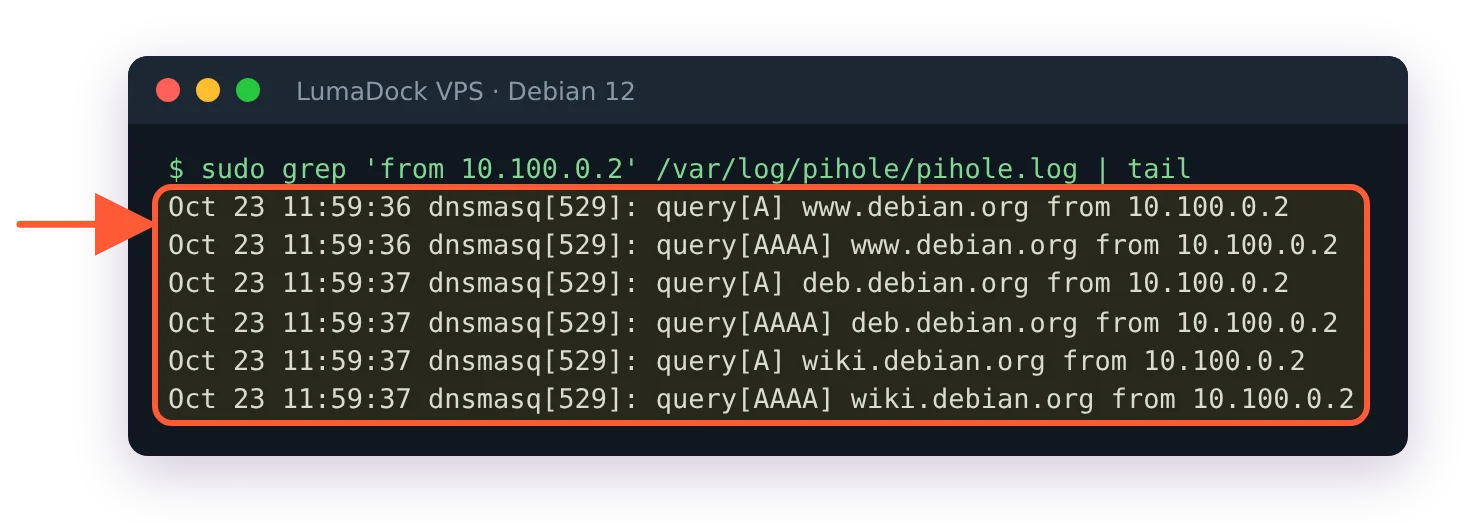
The client's own lookups arrive at Pi-hole from its tunnel address.
Second, nslookup pi.hole with no server argument. Pi-hole answers that name for itself and nothing else on the internet does, so an answer of 10.100.0.1 proves the operating system's resolver is the Pi-hole. Success here with a Query Log that stays empty while you browse points at a browser doing its own DoH.
Third, the leak test the Pi-hole client guide recommends, at dnsleaktest.com. It should list only the upstream you set in Pi-hole or, with Unbound on the VPS, only the VPS's own public address. A home ISP's resolver in that list is the leak, and the longer set of Pi-hole checks has the same test with the open-resolver probe added. Then go back to the Query Log: the leak test says that something leaked, the log says which device and which name, and the name tells you which section above to read.


