Back to Article List

Portainer ports 9443, 9000 and 8000 explained

Portainer ports 9443, 9000 and 8000 explained - Portainer ports 9443, 9000 and 8000 explained

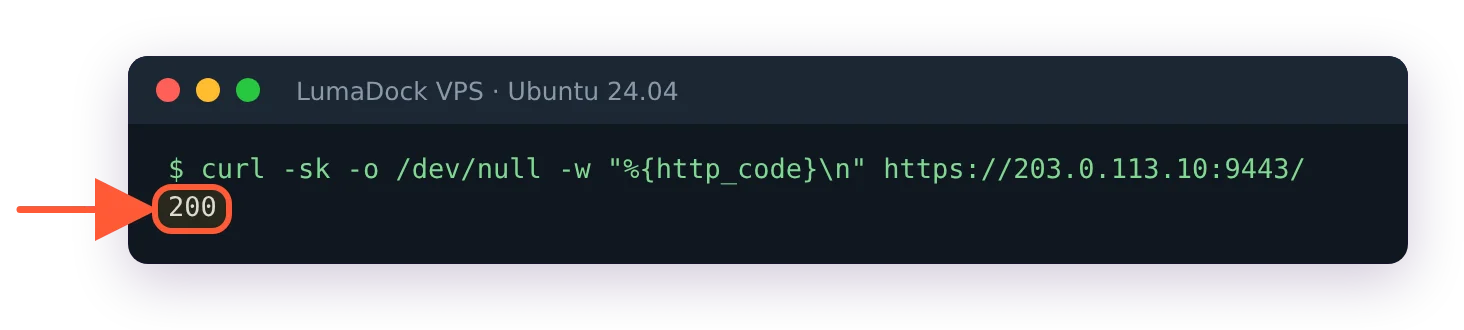
Quick answer first, because most people arrive mid-task: the Portainer default port is 9443, HTTPS, for the web UI. Port 9000 is the old HTTP interface and modern installs don't publish it. Port 8000 belongs to Edge agents and stays closed unless you use them. That's the whole map; the rest of this page is what each one means in practice, when 9000 still earns a place and which ports face the internet on a real server.

What each Portainer port does

A standard install publishes two ports and people remember a third from older tutorials:

  • 9443/TCP, the UI over HTTPS with a self-signed certificate out of the box. Every current guide, including our Portainer install walkthrough, points you here.
  • 8000/TCP, a tunnel server for Edge agents (Portainer's mechanism for managing remote machines behind NAT). No Edge agents, no reason for this port to exist publicly; it rides along in the official run command and can be dropped from it entirely.
  • 9000/TCP, the legacy HTTP UI. Portainer served plain HTTP here for years, which is why the internet's muscle memory says 9000. It still works if you publish it (-p 9000:9000), and unencrypted admin panels stopped being acceptable a while ago, so treat it as a compatibility escape hatch rather than an option.

The one case where I still publish 9000 on purpose: behind a reverse proxy on the same machine, where the proxy terminates real HTTPS and talks plain HTTP to Portainer over localhost. Proxying to 9443's self-signed HTTPS works too but needs the proxy told to skip upstream verification, and plain-HTTP-on-localhost is the simpler contract. Either way the proxy owns the public side; the pattern is the same one our Nginx reverse proxy guide builds.

Firewall rules for each kind of setup

Three scenarios cover nearly everyone. On a home LAN box, allow 9443 from your local subnet and open nothing in the router; Portainer has no business being internet-reachable from a household setup. On a VPS you admin alone, my preferred arrangement is 9443 closed in the cloud firewall and reached through an SSH tunnel (ssh -L 9443:localhost:9443 user@server), which costs one command per session and removes the login page from the internet entirely; a control panel that can start privileged containers is the most valuable target on the machine. On a VPS a small team shares, the tunnel gets old, so front it with the reverse proxy on 443, restrict by IP where the team's addresses allow it and keep 9443 and 8000 off the public interface. The panel firewall on our Portainer VPS plans handles the cloud-side half of those rules.

Ubuntu-side, the strict versions look like:

sudo ufw allow from 192.168.1.0/24 to any port 9443 proto tcp   # LAN case
sudo ufw deny 9443/tcp                                          # VPS + tunnel case

Changing the Portainer port

Port collisions happen (another panel, another app claiming 9443). The published port is yours to move in the run command or compose file; only the left side changes:

ports:
  - "9543:9443"

Portainer now answers on 9543 while the container still listens internally on 9443. Update bookmarks and any proxy upstreams, and note the same left-side-only rule applies if you ever remap 8000. There's no in-app setting for this; the mapping is Docker's job, one of the small ways Portainer stays a well-behaved container like any other.

Check which ports are live

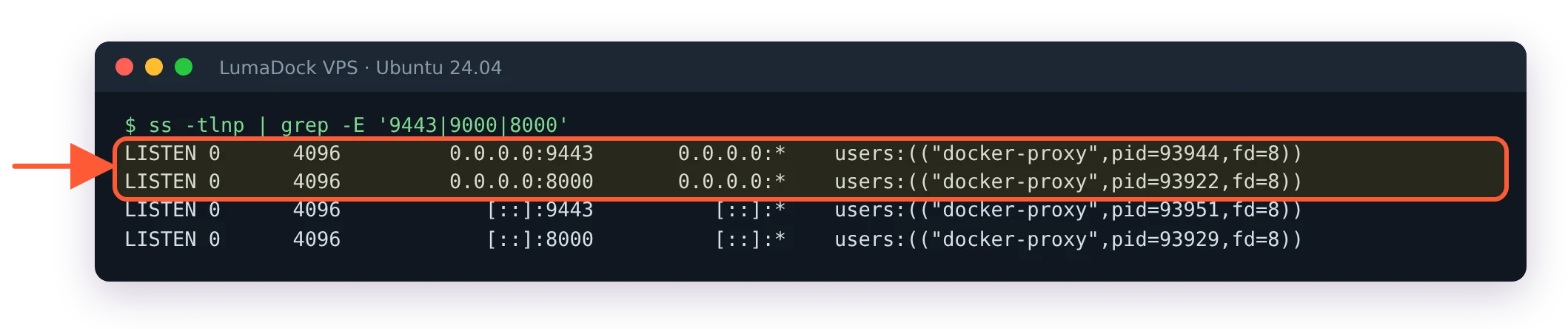
When the UI won't load and you suspect ports, two commands settle it from the server:

docker port portainer
ss -tlnp | grep -E '9443|9000|8000'

The first prints the container's actual mappings (the truth beats whatever the compose file was supposed to say), the second shows what the host is listening on. Mappings correct but no answer from outside means firewall or security group; no mappings at all means the container isn't running, which is a restart-from-terminal situation rather than a networking one. Two commands, ninety seconds, and the port question stops being a mystery, which is about all a ports page can promise.

Your idea deserves better hosting

24/7 support 30-day money-back guarantee Cancel anytime
Billing Cycle

VPS.S1

27.20 RON Save  17 %
22.66 RON Monthly
  • 2 vCPU AMD EPYC
  • 2 GB RAMMEMORY
  • 30 GB NVMeSTORAGE
  • Unmetered bandwidth
  • IPv4 & IPv6IPv6 is currently unavailable in France, Finland or the Netherlands. included

VPS.S3

68.07 RON Save  33 %
45.37 RON Monthly
  • 4 vCPU AMD EPYC
  • 6 GB RAMMEMORY
  • 70 GB NVMeSTORAGE
  • Unmetered bandwidth
  • IPv4 & IPv6IPv6 is currently unavailable in France, Finland or the Netherlands. included

EPYC VPS.P1

40.83 RON Save  22 %
31.74 RON Monthly
  • 2 vCPU AMD EPYC
  • 4 GB RAMMEMORY
  • 40 GB NVMeSTORAGE
  • Unmetered bandwidth
  • IPv4 & IPv6IPv6 is currently unavailable in France, Finland or the Netherlands. included
  • Free auto backupsIncludes one backup slot you can set to run daily, weekly or monthly.

EPYC VPS.P2

77.15 RON Save  24 %
58.99 RON Monthly
  • 2 vCPU AMD EPYC
  • 8 GB RAMMEMORY
  • 80 GB NVMeSTORAGE
  • Unmetered bandwidth
  • IPv4 & IPv6IPv6 is currently unavailable in France, Finland or the Netherlands. included
  • Free auto backupsIncludes one backup slot you can set to run daily, weekly or monthly.

EPYC VPS.P4

136.19 RON Save  23 %
104.40 RON Monthly
  • 4 vCPU AMD EPYC
  • 16 GB RAMMEMORY
  • 160 GB NVMeSTORAGE
  • Unmetered bandwidth
  • IPv4 & IPv6IPv6 is currently unavailable in France, Finland or the Netherlands. included
  • Free auto backupsIncludes one backup slot you can set to run daily, weekly or monthly.

EPYC VPS.P5

181.60 RON Save  25 %
136.19 RON Monthly
  • 8 vCPU AMD EPYC
  • 16 GB RAMMEMORY
  • 180 GB NVMeSTORAGE
  • Unmetered bandwidth
  • IPv4 & IPv6IPv6 is currently unavailable in France, Finland or the Netherlands. included
  • Free auto backupsIncludes one backup slot you can set to run daily, weekly or monthly.

EPYC VPS.P6

272.43 RON Save  25 %
204.31 RON Monthly
  • 8 vCPU AMD EPYC
  • 32 GB RAMMEMORY
  • 200 GB NVMeSTORAGE
  • Unmetered bandwidth
  • IPv4 & IPv6IPv6 is currently unavailable in France, Finland or the Netherlands. included
  • Free auto backupsIncludes one backup slot you can set to run daily, weekly or monthly.

EPYC VPS.P7

317.84 RON Save  29 %
227.02 RON Monthly
  • 16 vCPU AMD EPYC
  • 32 GB RAMMEMORY
  • 240 GB NVMeSTORAGE
  • Unmetered bandwidth
  • IPv4 & IPv6IPv6 is currently unavailable in France, Finland or the Netherlands. included
  • Free auto backupsIncludes one backup slot you can set to run daily, weekly or monthly.

Genoa VPS.G2

113.48 RON Save  20 %
90.78 RON Monthly
  • 2 vCPUAMD EPYC Genoa 4th generation 9xx4 with 3.25 GHz or similar, on Zen 4 architecture. AMD EPYC G4
  • 4 GB DDR5MEMORY
  • 50 GB NVMeSTORAGE
  • Unmetered bandwidth
  • IPv4 & IPv6IPv6 is currently unavailable in France, Finland or the Netherlands. included
  • Free auto backupsIncludes one backup slot you can set to run daily, weekly or monthly.

Genoa VPS.G4

204.31 RON Save  22 %
158.90 RON Monthly
  • 4 vCPUAMD EPYC processor with dedicated vCPU cores, on enterprise server hardware. AMD EPYC G4
  • 8 GB DDR5MEMORY
  • 100 GB NVMeSTORAGE
  • Unmetered bandwidth
  • IPv4 & IPv6IPv6 is currently unavailable in France, Finland or the Netherlands. included
  • Free auto backupsIncludes one backup slot you can set to run daily, weekly or monthly.

Genoa VPS.G6

408.66 RON Save  22 %
317.84 RON Monthly
  • 8 vCPUAMD EPYC processor with dedicated vCPU cores, on enterprise server hardware. AMD EPYC G4
  • 16 GB DDR5MEMORY
  • 200 GB NVMeSTORAGE
  • Unmetered bandwidth
  • IPv4 & IPv6IPv6 is currently unavailable in France, Finland or the Netherlands. included
  • Free auto backupsIncludes one backup slot you can set to run daily, weekly or monthly.

Genoa VPS.G7

726.55 RON Save  22 %
567.61 RON Monthly
  • 8 vCPUAMD EPYC processor with dedicated vCPU cores, on enterprise server hardware. AMD EPYC G4
  • 32 GB DDR5MEMORY
  • 250 GB NVMeSTORAGE
  • Unmetered bandwidth
  • IPv4 & IPv6IPv6 is currently unavailable in France, Finland or the Netherlands. included
  • Free auto backupsIncludes one backup slot you can set to run daily, weekly or monthly.

AMD Ryzen VPS.R1

77.15 RON Save  18 %
63.53 RON Monthly
  • 1 dedicated CPU AMD Ryzen 9 7950X with 4.5 GHz or similar, on Zen 4 architecture. vCPU
  • 4 GB DDR5MEMORY
  • 50 GB NVMeSTORAGE
  • Unmetered bandwidth
  • IPv4 & IPv6 included IPv6 support is currently unavailable in France, Finland or the Netherlands.
  • Auto backup included

AMD Ryzen VPS.R2

136.19 RON Save  17 %
113.49 RON Monthly
  • 2 dedicated CPUs AMD Ryzen 9 7950X with 4.5 GHz or similar, on Zen 4 architecture. vCPU
  • 8 GB DDR5MEMORY
  • 100 GB NVMeSTORAGE
  • Unmetered bandwidth
  • IPv4 & IPv6 included IPv6 support is currently unavailable in France, Finland or the Netherlands.
  • Auto backup included

AMD Ryzen VPS.R4

499.49 RON Save  18 %
408.66 RON Monthly
  • 8 dedicated CPUs AMD Ryzen 9 7950X with 4.5 GHz or similar, on Zen 4 architecture. vCPU
  • 32 GB DDR5MEMORY
  • 400 GB NVMeSTORAGE
  • Unmetered bandwidth
  • IPv4 & IPv6 included IPv6 support is currently unavailable in France, Finland or the Netherlands.
  • Auto backup included

Frequent questions

Why does my browser warn about the certificate on 9443?

Portainer generates a self-signed certificate at install, so the warning is expected and the connection is still encrypted. Replace it with a real certificate in Settings, or put a reverse proxy with Let's Encrypt in front, and the warning retires.

GPU products are in high demand at the moment. Fill the form to get notified as soon as your preferred GPU server is back in stock.