Back to Article List

Komodo vs Portainer on more than one server

Komodo vs Portainer on more than one server

Updated and tested 30 October 2026

Komodo is a Rust application from moghtech, licensed GPL-3.0, split into a Core that hosts the API and web UI and a Periphery agent that runs on every server you connect. Version 2.3.4 shipped on 22 October 2026. Portainer is a Go application, licensed zlib, split into a Server and an Agent in much the same shape, and its 2.45 LTS line arrived on 27 August 2026 as what Portainer has called the last 2.x release. Both were built for the case where Docker runs on several machines and one browser tab has to see all of them. On a single box the comparison changes and Dockge joins it, which is the subject of the Portainer vs Dockge comparison. That several-machine case is where Komodo vs Portainer is a real question, so this article assumes two servers or more.

Architecture: Core and Periphery vs Server and Agent

The two products look alike from a distance, and since March 2026 they also match in the one place that matters most for a fleet: the connection between the central piece and a managed machine can be opened from either end. What differs is how each one sets that up.

How Komodo reaches a server

The Komodo connect-servers page now leads with the outbound route, which version 2.0.0 added with the line "Periphery can now initiate the connection to Komodo Core." An admin creates an onboarding key in Core, then installs Periphery on the server with --core-address, --connect-as and --onboarding-key, and the host needs no inbound port at all. The single-host compose file works the same way: on my test server the bundled Periphery dialled Core over the compose network and published no port.
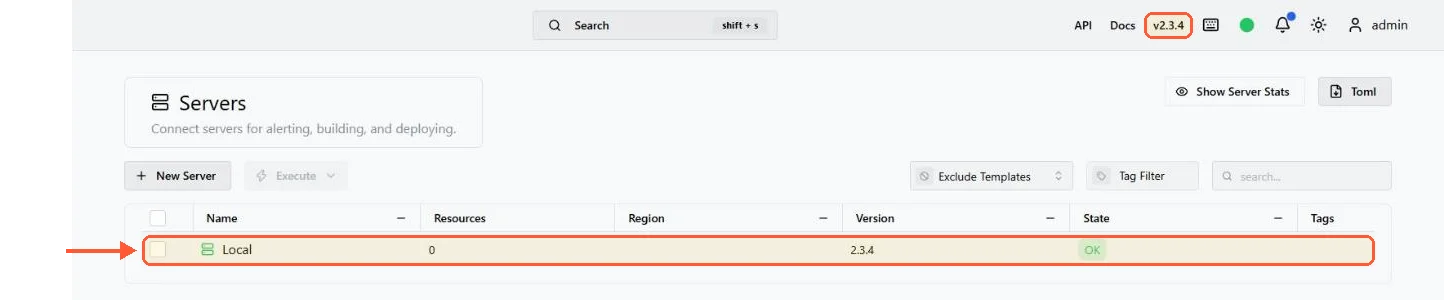
Komodo 2.3.4 Servers page: one server Local, Periphery version 2.3.4, state OK

The Periphery bundled with the compose install connected out to Core and reports OK, with no port published for it.

Inbound is still supported. Periphery listens on port 8120, you add the server in the Core UI with its address and Core connects to it from then on. That leaves an open inbound port on every managed host, so I'd restrict 8120 to the Core's address; allowed_ips in periphery.config.toml does the same inside Periphery. Passkeys are out either way, since the v2.0.0 release notes deprecate them: Core and Periphery now authenticate with auto-generated key pairs that rotate automatically, and an inbound Periphery lists the Core it trusts in core_public_keys.

Periphery installs either from an installer script piped from curl (as root, or as a normal user with a --user flag), as a systemd service pointed at a periphery.config.toml or as a container. Core itself needs a database, and the docs recommend MongoDB, with FerretDB as the alternative for systems that can't run the latest MongoDB. The Core install is one compose command against the files from the repo:

docker compose -p komodo -f komodo/mongo.compose.yaml --env-file komodo/compose.env up -d

Change every password and secret in compose.env before that first start. The file as shipped sets KOMODO_DATABASE_PASSWORD=admin and placeholder secrets, and the compose file pulls mongo with no tag, so pin one. Core creates the admin account from compose.env on first start, and the login page still offers Sign Up: when I tested a sign-up from outside, Komodo returned a token for a new account that stayed disabled until an admin enabled it. Set KOMODO_DISABLE_USER_REGISTRATION=true once your admin exists.
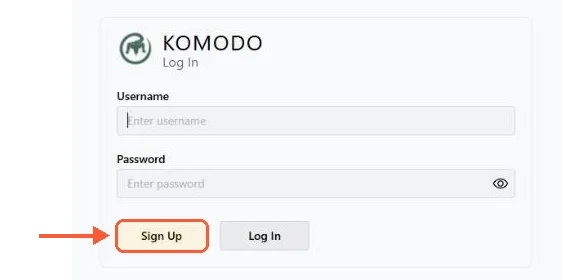
Komodo login card with username and password fields and a Sign Up button next to Log In

With the shipped compose.env, the Komodo login page offers Sign Up to anyone who can reach it.

Core serves its UI on port 9120. Put a reverse proxy in front of it, because that port is plain HTTP and the docs' own reverse proxy example points at komodo-core:9120.
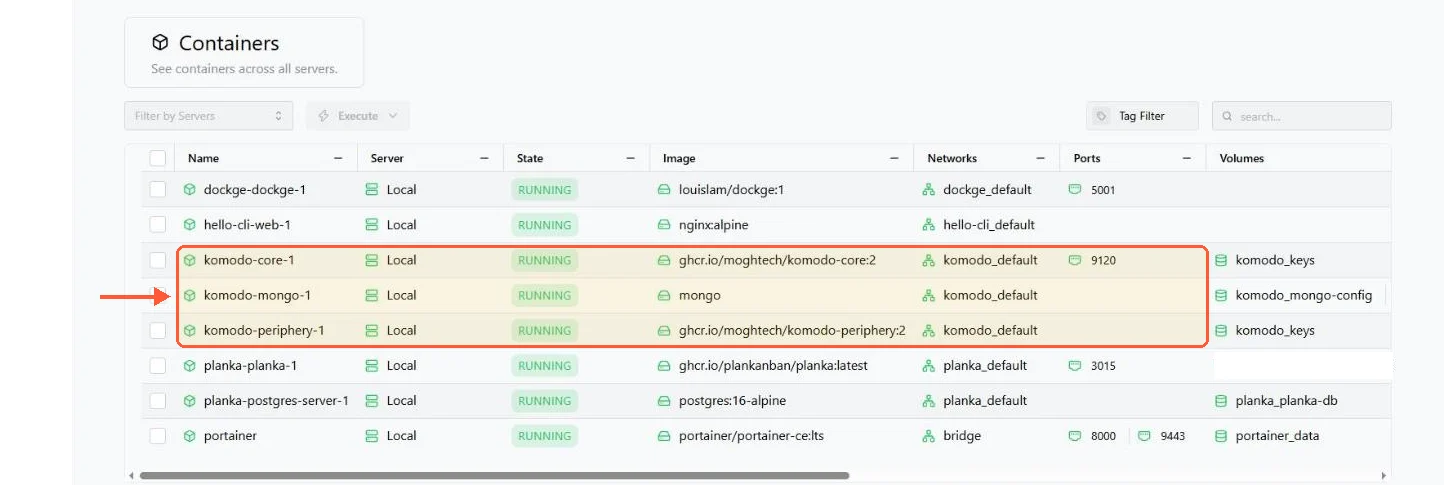
Komodo Containers page: komodo-core-1 publishes 9120, komodo-mongo-1 and komodo-periphery-1 publish no port

Komodo lists every container on the server; of its own three, only Core publishes a port.

How the Portainer Agent reaches a server

Portainer has two agents. The standard Agent is a container listening on 9001 that the Portainer Server connects to, so the connection direction and the firewall consequence are the same as Komodo's: inbound port on the managed host, restrict it to the server's address. On a Swarm the agent deploys as a global service and one endpoint covers the cluster.

The Edge Agent flips the direction. It runs on the managed host and dials out to the Portainer Server over port 8000, which the Edge Agent documentation describes as a TLS tunnel server, and the UI is served on 9443 as usual. The managed machine needs no inbound port at all. A host behind NAT, a box in an office with a dynamic IP, a Raspberry Pi in a cupboard: all reachable, none of them exposing a management port. Komodo's outbound Periphery covers the same situation. Before March 2026 that was a reason to pick Portainer on its own; now it only means the question is which onboarding flow you prefer.

The Portainer ports guide goes through the Portainer side in more detail, including what to close. The full list, for reference: Portainer Server 9443 (HTTPS), 9000 (HTTP, older), 8000 (Edge tunnel); Portainer Agent 9001; Komodo Core 9120; Komodo Periphery 8120.

Your idea deserves better hosting

24/7 support 30-day money-back guaranteeRefund covers the VPS plan on your first order. Cancel anytime
Строк Оплати

VPS.S1

£4.47 Save  17 %
£3.72 Щомісячно
  • 2 vCPU AMD EPYC
  • 2 GB RAMПАМʼЯТЬ
  • 30 GB NVMeСХОВИЩЕ
  • Безлімітний трафік
  • IPv4 & IPv6Підтримка IPv6 наразі недоступна у Франції, Фінляндії чи Нідерландах. включено

VPS.S3

£11.19 Save  33 %
£7.46 Щомісячно
  • 4 vCPU AMD EPYC
  • 6 GB RAMПАМʼЯТЬ
  • 70 GB NVMeСХОВИЩЕ
  • Безлімітний трафік
  • IPv4 & IPv6Підтримка IPv6 наразі недоступна у Франції, Фінляндії чи Нідерландах. включено

VPS.S4

£14.92 Save  20 %
£11.93 Щомісячно
  • 6 vCPU AMD EPYC
  • 8 GB RAMПАМʼЯТЬ
  • 80 GB NVMeСХОВИЩЕ
  • Безлімітний трафік
  • IPv4 & IPv6Підтримка IPv6 наразі недоступна у Франції, Фінляндії чи Нідерландах. включено

EPYC VPS.P1

£6.71 Save  22 %
£5.22 Щомісячно
  • 2 vCPU AMD EPYC
  • 4 GB RAMПАМʼЯТЬ
  • 40 GB NVMeСХОВИЩЕ
  • Безлімітний трафік
  • IPv4 & IPv6Підтримка IPv6 наразі недоступна у Франції, Фінляндії чи Нідерландах. включено
  • Безкоштовний авто бекапМістить один слот резервного копіювання, який можна налаштувати на щоденний, щотижневий або щомісячний запуск.

EPYC VPS.P2

£12.68 Save  24 %
£9.70 Щомісячно
  • 2 vCPU AMD EPYC
  • 8 GB RAMПАМʼЯТЬ
  • 80 GB NVMeСХОВИЩЕ
  • Безлімітний трафік
  • IPv4 & IPv6Підтримка IPv6 наразі недоступна у Франції, Фінляндії чи Нідерландах. включено
  • Безкоштовний авто бекапМістить один слот резервного копіювання, який можна налаштувати на щоденний, щотижневий або щомісячний запуск.

EPYC VPS.P4

£22.38 Save  23 %
£17.16 Щомісячно
  • 4 vCPU AMD EPYC
  • 16 GB RAMПАМʼЯТЬ
  • 160 GB NVMeСХОВИЩЕ
  • Безлімітний трафік
  • IPv4 & IPv6Підтримка IPv6 наразі недоступна у Франції, Фінляндії чи Нідерландах. включено
  • Безкоштовний авто бекапМістить один слот резервного копіювання, який можна налаштувати на щоденний, щотижневий або щомісячний запуск.

EPYC VPS.P5

£29.85 Save  25 %
£22.38 Щомісячно
  • 8 vCPU AMD EPYC
  • 16 GB RAMПАМʼЯТЬ
  • 180 GB NVMeСХОВИЩЕ
  • Безлімітний трафік
  • IPv4 & IPv6Підтримка IPv6 наразі недоступна у Франції, Фінляндії чи Нідерландах. включено
  • Безкоштовний авто бекапМістить один слот резервного копіювання, який можна налаштувати на щоденний, щотижневий або щомісячний запуск.

EPYC VPS.P6

£44.77 Save  25 %
£33.58 Щомісячно
  • 8 vCPU AMD EPYC
  • 32 GB RAMПАМʼЯТЬ
  • 200 GB NVMeСХОВИЩЕ
  • Безлімітний трафік
  • IPv4 & IPv6Підтримка IPv6 наразі недоступна у Франції, Фінляндії чи Нідерландах. включено
  • Безкоштовний авто бекапМістить один слот резервного копіювання, який можна налаштувати на щоденний, щотижневий або щомісячний запуск.

EPYC VPS.P7

£52.24 Save  29 %
£37.31 Щомісячно
  • 16 vCPU AMD EPYC
  • 32 GB RAMПАМʼЯТЬ
  • 240 GB NVMeСХОВИЩЕ
  • Безлімітний трафік
  • IPv4 & IPv6Підтримка IPv6 наразі недоступна у Франції, Фінляндії чи Нідерландах. включено
  • Безкоштовний авто бекапМістить один слот резервного копіювання, який можна налаштувати на щоденний, щотижневий або щомісячний запуск.

Genoa VPS.G2

£18.65 Save  20 %
£14.92 Щомісячно
  • 2 vCPUAMD EPYC Genoa 4-го покоління 9xx4 з 3,25 GHz або подібний, на архітектурі Zen 4. AMD EPYC G4
  • 4 GB DDR5ПАМʼЯТЬ
  • 50 GB NVMeСХОВИЩЕ
  • Безлімітний трафік
  • IPv4 & IPv6Підтримка IPv6 наразі недоступна у Франції, Фінляндії чи Нідерландах. включено
  • Безкоштовний авто бекапМістить один слот резервного копіювання, який можна налаштувати на щоденний, щотижневий або щомісячний запуск.

Genoa VPS.G4

£33.58 Save  22 %
£26.11 Щомісячно
  • 4 vCPUПроцесор AMD EPYC з виділеними ядрами vCPU, на серверному обладнанні корпоративного класу. AMD EPYC G4
  • 8 GB DDR5ПАМʼЯТЬ
  • 100 GB NVMeСХОВИЩЕ
  • Безлімітний трафік
  • IPv4 & IPv6Підтримка IPv6 наразі недоступна у Франції, Фінляндії чи Нідерландах. включено
  • Безкоштовний авто бекапМістить один слот резервного копіювання, який можна налаштувати на щоденний, щотижневий або щомісячний запуск.

Genoa VPS.G6

£67.16 Save  22 %
£52.24 Щомісячно
  • 8 vCPUПроцесор AMD EPYC з виділеними ядрами vCPU, на серверному обладнанні корпоративного класу. AMD EPYC G4
  • 16 GB DDR5ПАМʼЯТЬ
  • 200 GB NVMeСХОВИЩЕ
  • Безлімітний трафік
  • IPv4 & IPv6Підтримка IPv6 наразі недоступна у Франції, Фінляндії чи Нідерландах. включено
  • Безкоштовний авто бекапМістить один слот резервного копіювання, який можна налаштувати на щоденний, щотижневий або щомісячний запуск.

Genoa VPS.G7

£119.41 Save  22 %
£93.28 Щомісячно
  • 8 vCPUПроцесор AMD EPYC з виділеними ядрами vCPU, на серверному обладнанні корпоративного класу. AMD EPYC G4
  • 32 GB DDR5ПАМʼЯТЬ
  • 250 GB NVMeСХОВИЩЕ
  • Безлімітний трафік
  • IPv4 & IPv6Підтримка IPv6 наразі недоступна у Франції, Фінляндії чи Нідерландах. включено
  • Безкоштовний авто бекапМістить один слот резервного копіювання, який можна налаштувати на щоденний, щотижневий або щомісячний запуск.

AMD Ryzen VPS.R1

£12.68 Save  18 %
£10.44 Щомісячно
  • 1 виділений CPU AMD Ryzen 9 7950X з 4,5 GHz або подібний, на архітектурі Zen 4. vCPU
  • 4 GB DDR5ПАМ'ЯТЬ
  • 50 GB NVMeСХОВИЩЕ
  • Безлімітний трафік
  • IPv4 & IPv6 включено Підтримка IPv6 наразі недоступна у Франції, Фінляндії чи Нідерландах.
  • Авто бекап включено

AMD Ryzen VPS.R2

£22.38 Save  17 %
£18.65 Щомісячно
  • 2 виділених CPU AMD Ryzen 9 7950X з 4,5 GHz або подібний, на архітектурі Zen 4. vCPU
  • 8 GB DDR5ПАМ'ЯТЬ
  • 100 GB NVMeСХОВИЩЕ
  • Безлімітний трафік
  • IPv4 & IPv6 включено Підтримка IPv6 наразі недоступна у Франції, Фінляндії чи Нідерландах.
  • Авто бекап включено

AMD Ryzen VPS.R4

£82.09 Save  18 %
£67.16 Щомісячно
  • 8 виділених CPU AMD Ryzen 9 7950X з 4,5 GHz або подібний, на архітектурі Zen 4. vCPU
  • 32 GB DDR5ПАМ'ЯТЬ
  • 400 GB NVMeСХОВИЩЕ
  • Безлімітний трафік
  • IPv4 & IPv6 включено Підтримка IPv6 наразі недоступна у Франції, Фінляндії чи Нідерландах.
  • Авто бекап включено

*VAT excluded.

INCLUDED WITH EVERY PLAN

✓ No setup fees ✓1 Gbps network
✓ Full root access on KVM ✓ Free server monitoring ✓ Firewall management ✓24/7 support

Feature differences on a fleet

Stacks, deployments and git

Both deploy compose stacks from a git repository. Portainer's stack screen takes a git Source, a reference and a path to the compose file. On my CE 2.45.3 install a webhook could be switched on while creating the stack, adding one to a stack that already runs was reserved for Business Edition, and the form had nowhere to set a polling interval. Komodo's Stacks resource does the same job and adds two things Portainer doesn't have. Builds pull a repo, build the image and push it to your registry, so the whole path from commit to running container can live inside Komodo without a separate CI system. And Resource Syncs let you define every server, stack, build and procedure as TOML files in a git repo, then sync the whole configuration into Core, which is the closest thing in this category to infrastructure-as-code for a Docker fleet.

That sync feature deserves a short detour. The TOML files are readable enough that a fleet of ten servers and forty stacks fits in a repo a new team member can read top to bottom in an afternoon, and a change to any of it is a pull request with a diff. Portainer keeps its equivalent state in a database inside the portainer_data volume. You can back that up and restore it, but you can't review it.

Komodo also has a Deployments resource for single containers configured in the UI rather than through a compose file, and Procedures and Actions for chaining steps: pull three repos, build two images, redeploy four stacks, in that order, on a schedule or on demand. Portainer has nothing comparable to Procedures. You'd script it against the Portainer API.

Access control and what it costs

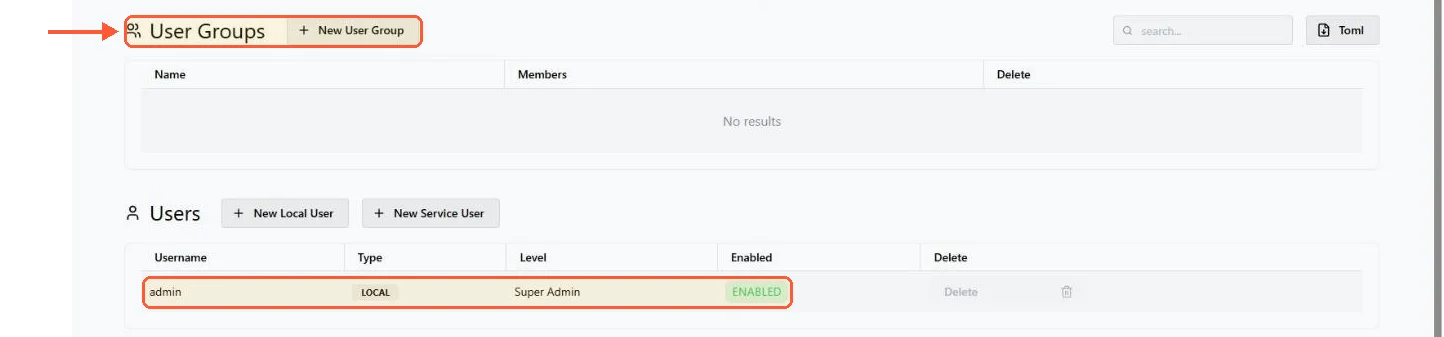
Komodo ships role-based access control in the free product: user groups, per-resource permission levels and restrictions by resource type, all under the GPL licence with, in the words of its README, "There is no limit to the number of servers you can connect, and there will never be."

Komodo Settings, Users tab: User Groups with New User Group, and the admin user as LOCAL Super Admin, ENABLED

User groups and permission levels come with Komodo itself, with no licence to buy.

Portainer Community Edition has users, teams and access per environment, and stops there. Roles with granular permissions are a Business Edition feature, and the whole Community and Business split gets its own article in Portainer CE vs Business Edition. The short version: Business Edition is free for up to 3 nodes under Portainer's 3 Nodes Free program, which replaced an older 5-node free tier, and above that the paid Starter plan on the Portainer pricing page starts at 5 nodes. On a four-server fleet where two people need different permission levels, Komodo is free and Portainer isn't. On a three-server fleet, Portainer Business is also free and the gap closes. Check which side of that line you're on before reading on.

Swarm, Kubernetes and Podman

Komodo manages Docker Swarm: nodes, services, stacks, configs and secrets across more than one swarm from one Core. Portainer manages Swarm, Kubernetes (with Helm charts from a repository) and Podman environments in the Community Edition, so if a K3s cluster is anywhere in your next twelve months, it's the only one of the two that will see it. Komodo does not manage Kubernetes and its docs don't mention it.

Monitoring, alerts and terminals

Komodo monitors CPU, memory and disk on every connected server, sends threshold alerts through its Alerters and opens persistent browser terminals on servers and containers. Portainer CE shows live container stats and opens a console into a container, and has no alerting of its own; Business Edition has an Alerting page that notifies Slack, Teams, email or a webhook. Pairing CE with Uptime Kuma or Prometheus is the usual answer and it works, but it is an extra thing to run.

Picking one for two to twenty servers

Komodo fits a fleet that's yours end to end: compose files you wrote, a preference for keeping the whole configuration in git and a willingness to run MongoDB or FerretDB for the Core. It's the more opinionated product and the opinions are good ones. Add that it's GPL with RBAC included and it wins on cost the moment the fleet passes three nodes.

Portainer fits a fleet with edges. Kubernetes anywhere in it, colleagues who want a general Docker UI rather than a deployment system, a Windows Docker host in the mix or a Swarm alongside a couple of standalone boxes. The Server needs nothing more than a small VPS; LumaDock's Portainer VPS one-click template puts Portainer CE on it at order time, and Agents go on the rest. It also fits the case where you'd rather not learn a new resource model at all, because everything in it maps directly onto Docker objects you already know.

One gap in this comparison: how Komodo Core behaves on FerretDB over a long period with a large number of resources, as opposed to MongoDB proper. The docs present FerretDB as the alternative for systems that can't run the latest MongoDB, not as an equal, and there's no long-term data here either way. If you can run MongoDB, run MongoDB.

The remaining options in the category, including the ones that only handle a single host, are lined up in the Portainer alternatives roundup, and none of them changes the hardware question. Neither product here is heavy. Both Core and Server idle at a fraction of a small VPS, the agents are smaller still, and on a fleet the sizing is about the stacks, not the manager.

Questions?

Can I migrate from Portainer to Komodo?

Yes, stack by stack, and the containers don't have to stop first, because Komodo can take over a running Compose project. Create a Stack on the matching Server in Komodo and paste the compose file from Portainer's editor. Komodo recognises the running project by its Compose project name; if that name differs from the Stack's, set project_name, and docker compose ls on the host lists the names. Portainer can stay on the host while you move, since both tools only talk to the Docker daemon, and on my test server Portainer showed Komodo's own compose install as a stack with Limited control.

About the author

Diego Cabrera Domínguez

My job is systems administration. I write in the evenings or at the weekend, depending on the week. I started because I kept notes for everything I configured: mail servers, backups, monitoring, Docker, strange permissions problems, things I knew I would forget six months later. Some of those notes became articles. If I have not tested a procedure myself, I do not feel comfortable writing instructions for it!

I am from Granada and still live there. I studied computer systems administration and went directly into IT. I play football with friends once a week when enough people answer the group chat, and I repair old electronics, mostly motherboards and game consoles. I keep several boxes of parts that my mother believes should have been thrown away a long time ago. That's about it. I'm not very good at biographies.

Deploy your next project in seconds

Bring your winning ideas online faster, with modern hardware and unmetered bandwidth. Join a European cloud trusted by thousands of developers and businesses worldwide.