.svg)
.svg)
.svg)
.svg)

.svg)
.svg)
.svg)

Updated and tested 30 October 2026
Komodo is a Rust application from moghtech, licensed GPL-3.0, split into a Core that hosts the API and web UI and a Periphery agent that runs on every server you connect. Version 2.3.4 shipped on 22 October 2026. Portainer is a Go application, licensed zlib, split into a Server and an Agent in much the same shape, and its 2.45 LTS line arrived on 27 August 2026 as what Portainer has called the last 2.x release. Both were built for the case where Docker runs on several machines and one browser tab has to see all of them. On a single box the comparison changes and Dockge joins it, which is the subject of the Portainer vs Dockge comparison. That several-machine case is where Komodo vs Portainer is a real question, so this article assumes two servers or more.
Architecture: Core and Periphery vs Server and Agent
The two products look alike from a distance, and since March 2026 they also match in the one place that matters most for a fleet: the connection between the central piece and a managed machine can be opened from either end. What differs is how each one sets that up.
How Komodo reaches a server
The Komodo connect-servers page now leads with the outbound route, which version 2.0.0 added with the line "Periphery can now initiate the connection to Komodo Core." An admin creates an onboarding key in Core, then installs Periphery on the server with --core-address, --connect-as and --onboarding-key, and the host needs no inbound port at all. The single-host compose file works the same way: on my test server the bundled Periphery dialled Core over the compose network and published no port.
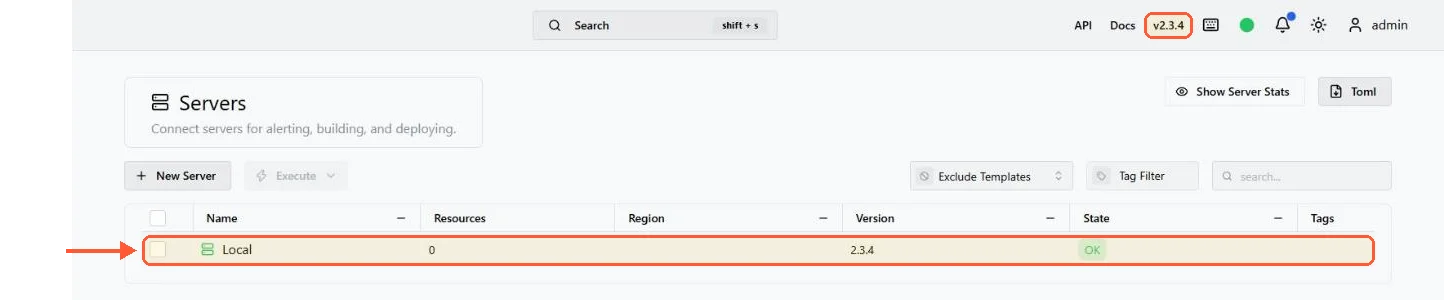
The Periphery bundled with the compose install connected out to Core and reports OK, with no port published for it.
Inbound is still supported. Periphery listens on port 8120, you add the server in the Core UI with its address and Core connects to it from then on. That leaves an open inbound port on every managed host, so I'd restrict 8120 to the Core's address; allowed_ips in periphery.config.toml does the same inside Periphery. Passkeys are out either way, since the v2.0.0 release notes deprecate them: Core and Periphery now authenticate with auto-generated key pairs that rotate automatically, and an inbound Periphery lists the Core it trusts in core_public_keys.
Periphery installs either from an installer script piped from curl (as root, or as a normal user with a --user flag), as a systemd service pointed at a periphery.config.toml or as a container. Core itself needs a database, and the docs recommend MongoDB, with FerretDB as the alternative for systems that can't run the latest MongoDB. The Core install is one compose command against the files from the repo:
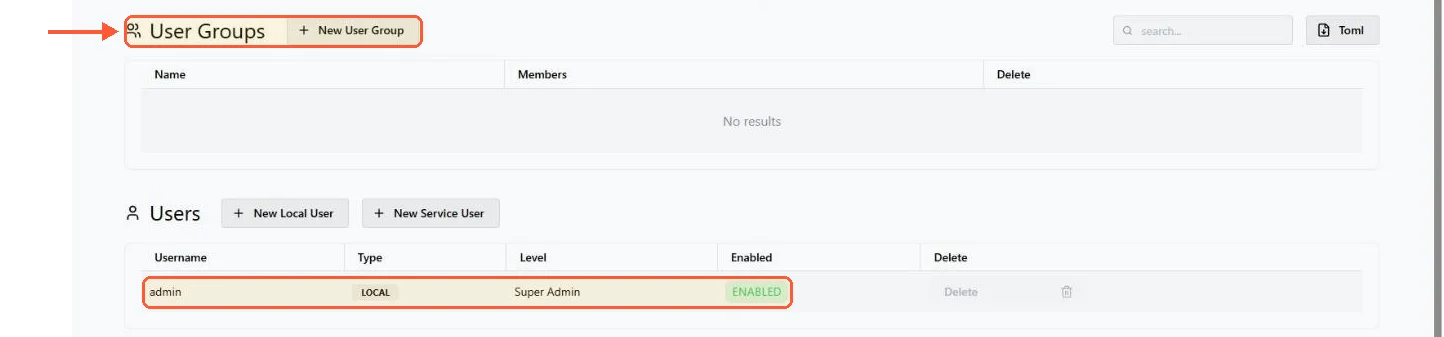
docker compose -p komodo -f komodo/mongo.compose.yaml --env-file komodo/compose.env up -dChange every password and secret in compose.env before that first start. The file as shipped sets KOMODO_DATABASE_PASSWORD=admin and placeholder secrets, and the compose file pulls mongo with no tag, so pin one. Core creates the admin account from compose.env on first start, and the login page still offers Sign Up: when I tested a sign-up from outside, Komodo returned a token for a new account that stayed disabled until an admin enabled it. Set KOMODO_DISABLE_USER_REGISTRATION=true once your admin exists.
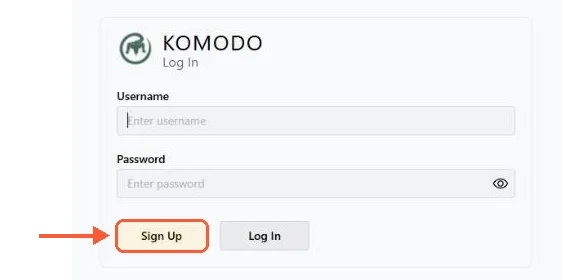
With the shipped compose.env, the Komodo login page offers Sign Up to anyone who can reach it.
Core serves its UI on port 9120. Put a reverse proxy in front of it, because that port is plain HTTP and the docs' own reverse proxy example points at komodo-core:9120.
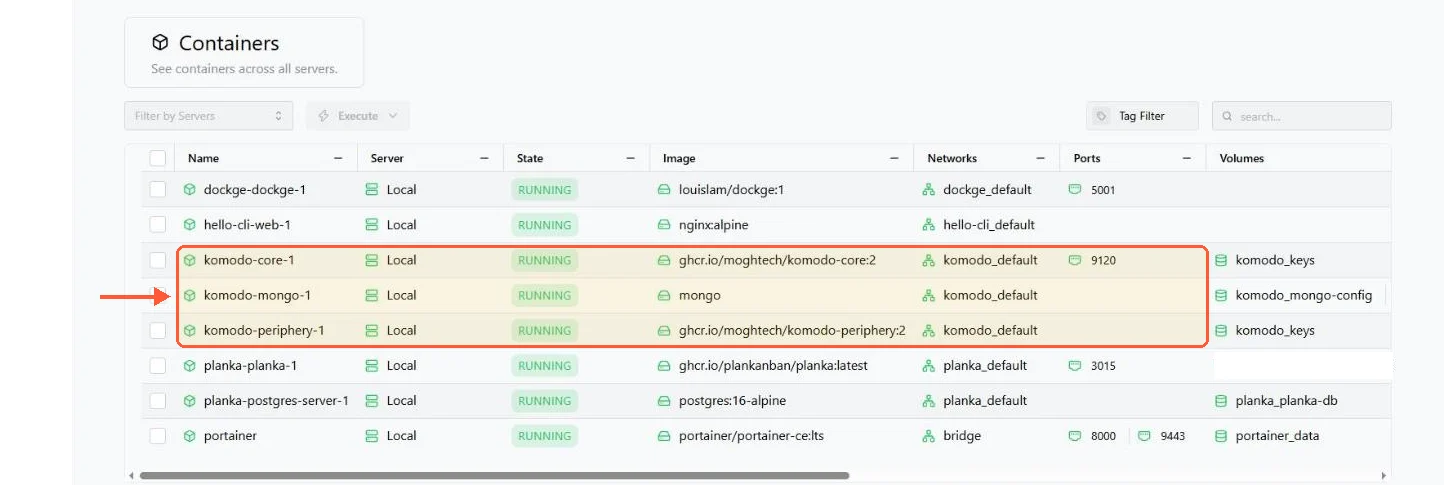
Komodo lists every container on the server; of its own three, only Core publishes a port.
How the Portainer Agent reaches a server
Portainer has two agents. The standard Agent is a container listening on 9001 that the Portainer Server connects to, so the connection direction and the firewall consequence are the same as Komodo's: inbound port on the managed host, restrict it to the server's address. On a Swarm the agent deploys as a global service and one endpoint covers the cluster.
The Edge Agent flips the direction. It runs on the managed host and dials out to the Portainer Server over port 8000, which the Edge Agent documentation describes as a TLS tunnel server, and the UI is served on 9443 as usual. The managed machine needs no inbound port at all. A host behind NAT, a box in an office with a dynamic IP, a Raspberry Pi in a cupboard: all reachable, none of them exposing a management port. Komodo's outbound Periphery covers the same situation. Before March 2026 that was a reason to pick Portainer on its own; now it only means the question is which onboarding flow you prefer.
The Portainer ports guide goes through the Portainer side in more detail, including what to close. The full list, for reference: Portainer Server 9443 (HTTPS), 9000 (HTTP, older), 8000 (Edge tunnel); Portainer Agent 9001; Komodo Core 9120; Komodo Periphery 8120.