Back to Article List

How to restart Portainer from the terminal

How to restart Portainer from the terminal

The command is:

docker restart portainer

That's it for the common case, on a Raspberry Pi, a VPS or anything else running Docker, because Portainer is just a container and containers restart like containers. You can stop reading if the UI is back at :9443. You're welcome - because I don't like to make you read an entire article for a simple answer.

The rest of this page is the variants (compose installs, unknown container names, restart-at-boot) and the three situations where people search for this command in the first place, each with its own follow-up.

Restart variants by install type

The plain command assumes the container is named portainer, which the official install does. Name unknown or nonstandard? Find it, then restart by whatever it's called:

docker ps -a --format '{{.Names}}\t{{.Image}}' | grep -i portainer
docker restart YOUR_NAME

Compose installs restart from the directory holding the compose file (or with -f pointing at it):

docker compose restart portainer

And the harder reset, for when a plain restart didn't clear whatever state you're fighting: recreate instead of restart. docker stop portainer && docker rm portainer, then re-run the original run command from the install guide; the data volume survives and you get a genuinely fresh process. On compose that's docker compose up -d --force-recreate portainer, one line doing the same surgery.

Restarting Portainer on a Raspberry Pi

Nothing about the commands changes on a Pi (the search phrase suggests otherwise, so let's be explicit: same Docker, same syntax, ARM images handle themselves). What is Pi-specific is the aftermath: SD-card storage makes Portainer's startup noticeably slower than on a VPS, so give it thirty seconds before declaring the restart failed, and docker logs -f portainer shows it working through startup if you're the impatient type. I am, it's fine.

Pi people also hit reboots more often (power blips, the SD card lottery), which makes the next section theirs especially.

Restart Portainer at boot automatically

Portainer should come back on its own after every reboot, and the restart policy in the run command is what promises that. Check yours:

docker inspect -f '{{.HostConfig.RestartPolicy.Name}}' portainer

always is the answer you want. Anything else (empty, no) means someone's install command dropped the flag, fixable in place without recreating anything:

docker update --restart=always portainer

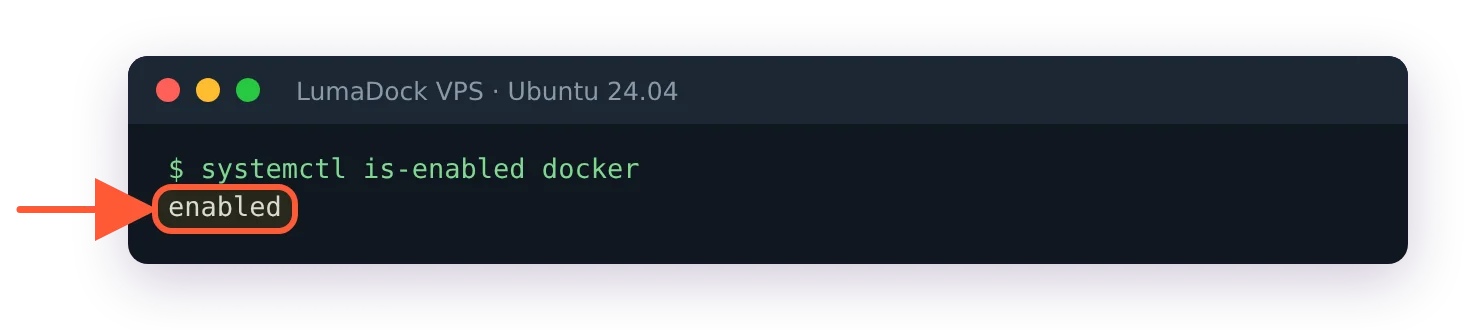
One layer beneath that, Docker itself has to start at boot for the policy to matter: systemctl is-enabled docker should say enabled, and sudo systemctl enable docker fixes it where it doesn't. Those two settings together are the difference between a self-healing setup and a Pi in a cupboard nobody can log into after a power cut.


The three reasons people restart Portainer, and what comes after

From forum archaeology and my own history, this command gets reached for in three situations, and the restart is only step one in two of them.

The security timeout on a fresh install. New Portainer, nobody created the admin account within the five-minute window, and the UI now shows "your Portainer instance has timed out for security purposes". The restart re-arms the timer, per Portainer's own FAQ; go create the account promptly this time. This is the number one source of first-day restarts and it's working as designed, oddly comforting once you know.

The UI stopped responding. A restart usually clears it, and if it recurs, the restart is treating a symptom: check the machine's memory and disk (free -h, df -h), since a starving host strangles the panel first and your containers next. Chronic unresponsiveness on an overloaded box is a sizing conversation, the kind the Portainer VPS tiers exist to end.

Something's wrong after a change. An update, an environment edit, a migration. Restart, sure, and read docker logs --tail 50 portainer before assuming the restart fixed it; errors that survive a restart are configuration, and the message names which kind. The one that mentions environments has its own page in our local environment error fix.

Restarting Portainer is wonderfully consequence-free, by the way, and worth internalizing: your containers belong to Docker and keep running through it, sessions reconnect, nothing about your stacks changes. It's the rare admin action with no downside, wich is exactly why it makes such a good first move.

Your idea deserves better hosting

24/7 support 30-day money-back guarantee Cancel anytime
Betalingscyclus

VPS.S1

$5.99 Save  17 %
$4.99 Maandelijks
  • 2 vCPU AMD EPYC
  • 2 GB RAMGEHEUGEN
  • 30 GB NVMeOPSLAG
  • Ongelimiteerde bandbreedte
  • IPv4 & IPv6IPv6-ondersteuning is momenteel niet beschikbaar in Frankrijk, Finland of Nederland. inbegrepen

VPS.S3

$14.99 Save  33 %
$9.99 Maandelijks
  • 4 vCPU AMD EPYC
  • 6 GB RAMGEHEUGEN
  • 70 GB NVMeOPSLAG
  • Ongelimiteerde bandbreedte
  • IPv4 & IPv6IPv6-ondersteuning is momenteel niet beschikbaar in Frankrijk, Finland of Nederland. inbegrepen

EPYC VPS.P1

$8.99 Save  22 %
$6.99 Maandelijks
  • 2 vCPU AMD EPYC
  • 4 GB RAMGEHEUGEN
  • 40 GB NVMeOPSLAG
  • Ongelimiteerde bandbreedte
  • IPv4 & IPv6IPv6-ondersteuning is momenteel niet beschikbaar in Frankrijk, Finland of Nederland. inbegrepen
  • Gratis auto back-upBevat één back-upslot dat je kunt instellen op dagelijks, wekelijks of maandelijks.

EPYC VPS.P2

$16.99 Save  24 %
$12.99 Maandelijks
  • 2 vCPU AMD EPYC
  • 8 GB RAMGEHEUGEN
  • 80 GB NVMeOPSLAG
  • Ongelimiteerde bandbreedte
  • IPv4 & IPv6IPv6-ondersteuning is momenteel niet beschikbaar in Frankrijk, Finland of Nederland. inbegrepen
  • Gratis auto back-upBevat één back-upslot dat je kunt instellen op dagelijks, wekelijks of maandelijks.

EPYC VPS.P4

$29.99 Save  23 %
$22.99 Maandelijks
  • 4 vCPU AMD EPYC
  • 16 GB RAMGEHEUGEN
  • 160 GB NVMeOPSLAG
  • Ongelimiteerde bandbreedte
  • IPv4 & IPv6IPv6-ondersteuning is momenteel niet beschikbaar in Frankrijk, Finland of Nederland. inbegrepen
  • Gratis auto back-upBevat één back-upslot dat je kunt instellen op dagelijks, wekelijks of maandelijks.

EPYC VPS.P5

$39.99 Save  25 %
$29.99 Maandelijks
  • 8 vCPU AMD EPYC
  • 16 GB RAMGEHEUGEN
  • 180 GB NVMeOPSLAG
  • Ongelimiteerde bandbreedte
  • IPv4 & IPv6IPv6-ondersteuning is momenteel niet beschikbaar in Frankrijk, Finland of Nederland. inbegrepen
  • Gratis auto back-upBevat één back-upslot dat je kunt instellen op dagelijks, wekelijks of maandelijks.

EPYC VPS.P6

$59.99 Save  25 %
$44.99 Maandelijks
  • 8 vCPU AMD EPYC
  • 32 GB RAMGEHEUGEN
  • 200 GB NVMeOPSLAG
  • Ongelimiteerde bandbreedte
  • IPv4 & IPv6IPv6-ondersteuning is momenteel niet beschikbaar in Frankrijk, Finland of Nederland. inbegrepen
  • Gratis auto back-upBevat één back-upslot dat je kunt instellen op dagelijks, wekelijks of maandelijks.

EPYC VPS.P7

$69.99 Save  29 %
$49.99 Maandelijks
  • 16 vCPU AMD EPYC
  • 32 GB RAMGEHEUGEN
  • 240 GB NVMeOPSLAG
  • Ongelimiteerde bandbreedte
  • IPv4 & IPv6IPv6-ondersteuning is momenteel niet beschikbaar in Frankrijk, Finland of Nederland. inbegrepen
  • Gratis auto back-upBevat één back-upslot dat je kunt instellen op dagelijks, wekelijks of maandelijks.

Genoa VPS.G2

$24.99 Save  20 %
$19.99 Maandelijks
  • 2 vCPUAMD EPYC Genoa 4e generatie 9xx4 met 3,25 GHz of vergelijkbaar, op Zen 4-architectuur. AMD EPYC G4
  • 4 GB DDR5GEHEUGEN
  • 50 GB NVMeOPSLAG
  • Ongelimiteerde bandbreedte
  • IPv4 & IPv6IPv6-ondersteuning is momenteel niet beschikbaar in Frankrijk, Finland of Nederland. inbegrepen
  • Gratis auto back-upBevat één back-upslot dat je kunt instellen op dagelijks, wekelijks of maandelijks.

Genoa VPS.G4

$44.99 Save  22 %
$34.99 Maandelijks
  • 4 vCPUAMD EPYC processor met dedicated vCPU cores, op enterprise serverhardware. AMD EPYC G4
  • 8 GB DDR5GEHEUGEN
  • 100 GB NVMeOPSLAG
  • Ongelimiteerde bandbreedte
  • IPv4 & IPv6IPv6-ondersteuning is momenteel niet beschikbaar in Frankrijk, Finland of Nederland. inbegrepen
  • Gratis auto back-upBevat één back-upslot dat je kunt instellen op dagelijks, wekelijks of maandelijks.

Genoa VPS.G6

$89.99 Save  22 %
$69.99 Maandelijks
  • 8 vCPUAMD EPYC processor met dedicated vCPU cores, op enterprise serverhardware. AMD EPYC G4
  • 16 GB DDR5GEHEUGEN
  • 200 GB NVMeOPSLAG
  • Ongelimiteerde bandbreedte
  • IPv4 & IPv6IPv6-ondersteuning is momenteel niet beschikbaar in Frankrijk, Finland of Nederland. inbegrepen
  • Gratis auto back-upBevat één back-upslot dat je kunt instellen op dagelijks, wekelijks of maandelijks.

Genoa VPS.G7

$159.99 Save  22 %
$124.99 Maandelijks
  • 8 vCPUAMD EPYC processor met dedicated vCPU cores, op enterprise serverhardware. AMD EPYC G4
  • 32 GB DDR5GEHEUGEN
  • 250 GB NVMeOPSLAG
  • Ongelimiteerde bandbreedte
  • IPv4 & IPv6IPv6-ondersteuning is momenteel niet beschikbaar in Frankrijk, Finland of Nederland. inbegrepen
  • Gratis auto back-upBevat één back-upslot dat je kunt instellen op dagelijks, wekelijks of maandelijks.

AMD Ryzen VPS.R1

$16.99 Save  18 %
$13.99 Maandelijks
  • 1 dedicated CPU AMD Ryzen 9 7950X met 4,5 GHz of vergelijkbaar, op Zen 4-architectuur. vCPU
  • 4 GB DDR5GEHEUGEN
  • 50 GB NVMeOPSLAG
  • Ongelimiteerde bandbreedte
  • IPv4 & IPv6 inbegrepen IPv6-ondersteuning is momenteel niet beschikbaar in Frankrijk, Finland of Nederland.
  • Auto back-up inbegrepen

AMD Ryzen VPS.R2

$29.99 Save  17 %
$24.99 Maandelijks
  • 2 dedicated CPUs AMD Ryzen 9 7950X met 4,5 GHz of vergelijkbaar, op Zen 4-architectuur. vCPU
  • 8 GB DDR5GEHEUGEN
  • 100 GB NVMeOPSLAG
  • Ongelimiteerde bandbreedte
  • IPv4 & IPv6 inbegrepen IPv6-ondersteuning is momenteel niet beschikbaar in Frankrijk, Finland of Nederland.
  • Auto back-up inbegrepen

AMD Ryzen VPS.R4

$109.99 Save  18 %
$89.99 Maandelijks
  • 8 dedicated CPUs AMD Ryzen 9 7950X met 4,5 GHz of vergelijkbaar, op Zen 4-architectuur. vCPU
  • 32 GB DDR5GEHEUGEN
  • 400 GB NVMeOPSLAG
  • Ongelimiteerde bandbreedte
  • IPv4 & IPv6 inbegrepen IPv6-ondersteuning is momenteel niet beschikbaar in Frankrijk, Finland of Nederland.
  • Auto back-up inbegrepen

Other questions & clarifications

Does restarting Portainer restart my other containers?

No. Portainer manages containers but doesn't run them; Docker does. The panel blinking out for ten seconds changes nothing about the apps, downloads or databases running beside it.

GPU products are in high demand at the moment. Fill the form to get notified as soon as your preferred GPU server is back in stock.