Back to Article List

WireGuard split tunnel for DNS only on a VPS

WireGuard split tunnel for DNS only on a VPS

Updated and tested 12 October 2026

AllowedIPs decides everything. With 10.100.0.1/32 the tunnel carries traffic for one host, the resolver on the VPS; with 0.0.0.0/0 it carries all of it. Every other line in a WireGuard client config is about keys, addresses and keeping the connection alive. That one line is the routing policy, and a split tunnel for DNS is that line set to the Pi-hole's address with the default route left alone.

How AllowedIPs routes traffic

WireGuard has no routing table of its own; the wg(8) man page gives it one list per peer instead, defined in a single sentence. Here it is in full:

a comma-separated list of IP (v4 or v6) addresses with CIDR masks from which incoming traffic for this peer is allowed and to which outgoing traffic for this peer is directed.

The project calls this cryptokey routing. A public key is bound to a set of addresses, and the set does two jobs at once. Outbound, a packet whose destination falls inside a peer's AllowedIPs is encrypted for that peer's key and sent to its endpoint. Inbound, a decrypted packet is accepted only if its source address is inside the AllowedIPs of the key that produced it, and dropped otherwise. The one list is both the route and the access rule. For my first few tunnels I treated it as a firewall list and nothing more, and the routing half only clicked once I watched ip route change as the interface came up.

On the client, wg-quick turns the list into kernel routes when the interface comes up. For 10.100.0.1/32 that is one host route via wg0. For 0.0.0.0/0 the man page says it "uses ip-rule(8) to handle overriding of the default gateway", which is the full-tunnel case and the only one where the server has to forward packets for you.

Client config for DNS only

[Interface]
Address = 10.100.0.2/32
DNS = 10.100.0.1
PrivateKey = CLIENT_PRIVATE_KEY

[Peer]
PublicKey = SERVER_PUBLIC_KEY
PresharedKey = PRESHARED_KEY
Endpoint = YOUR_SERVER_IP:51820
AllowedIPs = 10.100.0.1/32
PersistentKeepalive = 25

The Pi-hole project's client guide ships this same shape as its default; the project's page on reaching internal devices says that in the standard configuration the clients "can only speak to the server". The tunnel carries two kinds of packet: DNS to 10.100.0.1 and the keepalive. Web traffic, video, the laptop's backup job, all of it leaves through the normal interface as before, with whatever address the local network gave you. What changes is who answers your name lookups, and that is now the Pi-hole on the VPS, whose listening mode and firewall are set up in run Pi-hole v6 on a VPS behind WireGuard, over an encrypted path.

One consequence: peers can't reach each other, because each client's AllowedIPs contains only the server, so a packet from 10.100.0.2 to 10.100.0.3 never enters the tunnel. The Pi-hole guide's helper script comments that line with "clients isolated from one another".

Client config for the tunnel subnet

If other machines sit on the same tunnel, a NAS with a peer config of its own or a second server, widen the line to the subnet:

[Peer]
PublicKey = SERVER_PUBLIC_KEY
PresharedKey = PRESHARED_KEY
Endpoint = YOUR_SERVER_IP:51820
AllowedIPs = 10.100.0.0/24
PersistentKeepalive = 25
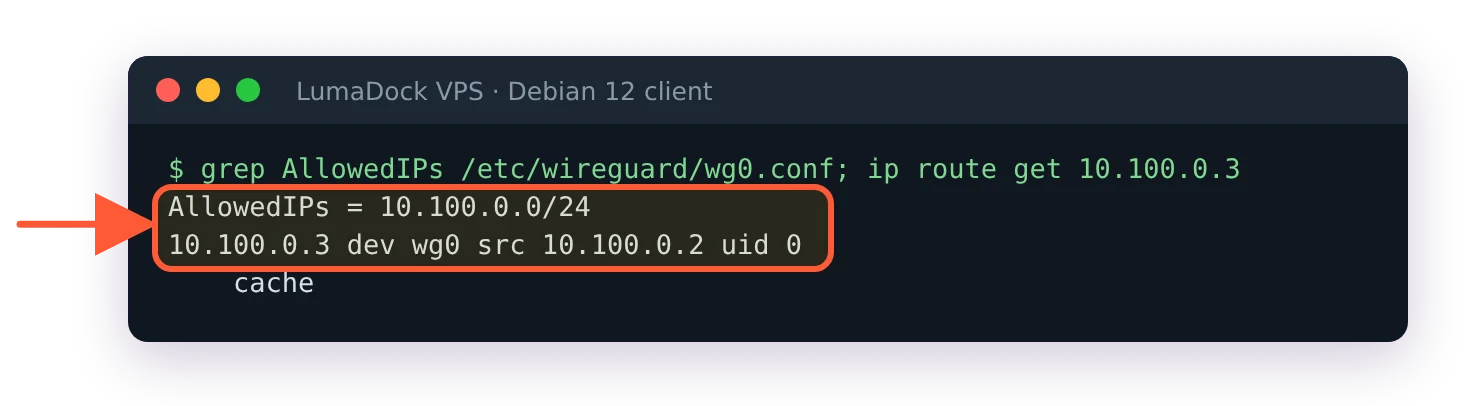
Client with AllowedIPs = 10.100.0.0/24: ip route get 10.100.0.3 goes through dev wg0

With the tunnel-subnet AllowedIPs, the other peer at 10.100.0.3 is reached through wg0.

Everything in 10.100.0.0/24 is now reachable through the tunnel and the default route is still untouched. For traffic to pass from one peer to another, the VPS in the middle has to forward it (net.ipv4.ip_forward = 1) and its firewall's forward chain has to accept packets coming in on wg0 and going back out on wg0. The Pi-hole article leaves that chain on drop on purpose, so peer-to-peer pings fail there even with forwarding on. Add this line to the forward chain in /etc/nftables.conf, then run sudo systemctl reload nftables:

iifname "wg0" oifname "wg0" accept

The DNS line is unchanged, and a name for the NAS added to Pi-hole's local DNS records resolves for every peer at once.

Full tunnel config and what the server needs

[Peer]
PublicKey = SERVER_PUBLIC_KEY
PresharedKey = PRESHARED_KEY
Endpoint = YOUR_SERVER_IP:51820
AllowedIPs = 0.0.0.0/0, ::/0
PersistentKeepalive = 25

Now every packet goes to the VPS first, and the VPS has to pass it on to the internet and bring the reply back. Two things make that work, neither of which the DNS-only setup needed: forwarding switched on in sysctl, and a masquerade rule for the tunnel subnet on the public interface so that replies find their way back into the tunnel. If the firewall from the Pi-hole article is loaded, its forward chain needs two accept rules as well, and that article lists them. The Pi-hole docs give the nftables PostUp line for the NAT part, and the Debian 12 WireGuard server install carries the sysctl file and the PostUp and PostDown pair in a step marked optional, because for a resolver it is. Without them the symptom is the one the Pi-hole route-everything page describes: the handshake succeeds, addresses inside the tunnel answer and the internet appears to be gone.

With ::/0 in the list, IPv6 goes into the tunnel too; if the VPS has none, the client has none while connected. Drop ::/0 if something on the client needs it.
Your idea deserves better hosting

24/7 support 30-day money-back guaranteeRefund covers the VPS plan on your first order. Cancel anytime
Fatura Kesim Döngüsü

VPS.S1

€5.35 Save  17 %
€4.45 Aylık
  • 2 vCPU AMD EPYC
  • 2 GB RAMBELLEK
  • 30 GB NVMeDEPOLAMA
  • Sınırsız bant genişliği
  • IPv4 & IPv6IPv6 desteği şu anda Fransa, Finlandiya veya Hollanda'da mevcut değil. dahil

VPS.S3

€13.38 Save  33 %
€8.92 Aylık
  • 4 vCPU AMD EPYC
  • 6 GB RAMBELLEK
  • 70 GB NVMeDEPOLAMA
  • Sınırsız bant genişliği
  • IPv4 & IPv6IPv6 desteği şu anda Fransa, Finlandiya veya Hollanda'da mevcut değil. dahil

VPS.S4

€17.84 Save  20 %
€14.27 Aylık
  • 6 vCPU AMD EPYC
  • 8 GB RAMBELLEK
  • 80 GB NVMeDEPOLAMA
  • Sınırsız bant genişliği
  • IPv4 & IPv6IPv6 desteği şu anda Fransa, Finlandiya veya Hollanda'da mevcut değil. dahil

EPYC VPS.P1

€8.02 Save  22 %
€6.24 Aylık
  • 2 vCPU AMD EPYC
  • 4 GB RAMBELLEK
  • 40 GB NVMeDEPOLAMA
  • Sınırsız bant genişliği
  • IPv4 & IPv6IPv6 desteği şu anda Fransa, Finlandiya veya Hollanda'da mevcut değil. dahil
  • Ücretsiz otomatik yedeklemeGünlük, haftalık veya aylık çalışacak şekilde ayarlayabileceğiniz bir yedekleme alanı içerir.

EPYC VPS.P2

€15.16 Save  24 %
€11.59 Aylık
  • 2 vCPU AMD EPYC
  • 8 GB RAMBELLEK
  • 80 GB NVMeDEPOLAMA
  • Sınırsız bant genişliği
  • IPv4 & IPv6IPv6 desteği şu anda Fransa, Finlandiya veya Hollanda'da mevcut değil. dahil
  • Ücretsiz otomatik yedeklemeGünlük, haftalık veya aylık çalışacak şekilde ayarlayabileceğiniz bir yedekleme alanı içerir.

EPYC VPS.P4

€26.76 Save  23 %
€20.52 Aylık
  • 4 vCPU AMD EPYC
  • 16 GB RAMBELLEK
  • 160 GB NVMeDEPOLAMA
  • Sınırsız bant genişliği
  • IPv4 & IPv6IPv6 desteği şu anda Fransa, Finlandiya veya Hollanda'da mevcut değil. dahil
  • Ücretsiz otomatik yedeklemeGünlük, haftalık veya aylık çalışacak şekilde ayarlayabileceğiniz bir yedekleme alanı içerir.

EPYC VPS.P5

€35.69 Save  25 %
€26.77 Aylık
  • 8 vCPU AMD EPYC
  • 16 GB RAMBELLEK
  • 180 GB NVMeDEPOLAMA
  • Sınırsız bant genişliği
  • IPv4 & IPv6IPv6 desteği şu anda Fransa, Finlandiya veya Hollanda'da mevcut değil. dahil
  • Ücretsiz otomatik yedeklemeGünlük, haftalık veya aylık çalışacak şekilde ayarlayabileceğiniz bir yedekleme alanı içerir.

EPYC VPS.P6

€53.54 Save  25 %
€40.15 Aylık
  • 8 vCPU AMD EPYC
  • 32 GB RAMBELLEK
  • 200 GB NVMeDEPOLAMA
  • Sınırsız bant genişliği
  • IPv4 & IPv6IPv6 desteği şu anda Fransa, Finlandiya veya Hollanda'da mevcut değil. dahil
  • Ücretsiz otomatik yedeklemeGünlük, haftalık veya aylık çalışacak şekilde ayarlayabileceğiniz bir yedekleme alanı içerir.

EPYC VPS.P7

€62.46 Save  29 %
€44.61 Aylık
  • 16 vCPU AMD EPYC
  • 32 GB RAMBELLEK
  • 240 GB NVMeDEPOLAMA
  • Sınırsız bant genişliği
  • IPv4 & IPv6IPv6 desteği şu anda Fransa, Finlandiya veya Hollanda'da mevcut değil. dahil
  • Ücretsiz otomatik yedeklemeGünlük, haftalık veya aylık çalışacak şekilde ayarlayabileceğiniz bir yedekleme alanı içerir.

Genoa VPS.G2

€22.30 Save  20 %
€17.84 Aylık
  • 2 vCPUAMD EPYC Genoa 4. nesil 9xx4, 3,25 GHz veya benzeri, Zen 4 mimarisinde. AMD EPYC G4
  • 4 GB DDR5BELLEK
  • 50 GB NVMeDEPOLAMA
  • Sınırsız bant genişliği
  • IPv4 & IPv6IPv6 desteği şu anda Fransa, Finlandiya veya Hollanda'da mevcut değil. dahil
  • Ücretsiz otomatik yedeklemeGünlük, haftalık veya aylık çalışacak şekilde ayarlayabileceğiniz bir yedekleme alanı içerir.

Genoa VPS.G4

€40.15 Save  22 %
€31.23 Aylık
  • 4 vCPUKurumsal sunucu donanımında, ayrılmış vCPU çekirdeklerine sahip AMD EPYC işlemci. AMD EPYC G4
  • 8 GB DDR5BELLEK
  • 100 GB NVMeDEPOLAMA
  • Sınırsız bant genişliği
  • IPv4 & IPv6IPv6 desteği şu anda Fransa, Finlandiya veya Hollanda'da mevcut değil. dahil
  • Ücretsiz otomatik yedeklemeGünlük, haftalık veya aylık çalışacak şekilde ayarlayabileceğiniz bir yedekleme alanı içerir.

Genoa VPS.G6

€80.31 Save  22 %
€62.46 Aylık
  • 8 vCPUKurumsal sunucu donanımında, ayrılmış vCPU çekirdeklerine sahip AMD EPYC işlemci. AMD EPYC G4
  • 16 GB DDR5BELLEK
  • 200 GB NVMeDEPOLAMA
  • Sınırsız bant genişliği
  • IPv4 & IPv6IPv6 desteği şu anda Fransa, Finlandiya veya Hollanda'da mevcut değil. dahil
  • Ücretsiz otomatik yedeklemeGünlük, haftalık veya aylık çalışacak şekilde ayarlayabileceğiniz bir yedekleme alanı içerir.

Genoa VPS.G7

€142.78 Save  22 %
€111.55 Aylık
  • 8 vCPUKurumsal sunucu donanımında, ayrılmış vCPU çekirdeklerine sahip AMD EPYC işlemci. AMD EPYC G4
  • 32 GB DDR5BELLEK
  • 250 GB NVMeDEPOLAMA
  • Sınırsız bant genişliği
  • IPv4 & IPv6IPv6 desteği şu anda Fransa, Finlandiya veya Hollanda'da mevcut değil. dahil
  • Ücretsiz otomatik yedeklemeGünlük, haftalık veya aylık çalışacak şekilde ayarlayabileceğiniz bir yedekleme alanı içerir.

AMD Ryzen VPS.R1

€15.16 Save  18 %
€12.49 Aylık
  • 1 özel CPU AMD Ryzen 9 7950X, 4,5 GHz veya benzeri, Zen 4 mimarisinde. vCPU
  • 4 GB DDR5BELLEK
  • 50 GB NVMeDEPOLAMA
  • Sınırsız bant genişliği
  • IPv4 & IPv6 dahil IPv6 desteği şu anda Fransa, Finlandiya veya Hollanda'da mevcut değil.
  • Otomatik yedekleme dahil

AMD Ryzen VPS.R2

€26.76 Save  17 %
€22.30 Aylık
  • 2 özel CPU AMD Ryzen 9 7950X, 4,5 GHz veya benzeri, Zen 4 mimarisinde. vCPU
  • 8 GB DDR5BELLEK
  • 100 GB NVMeDEPOLAMA
  • Sınırsız bant genişliği
  • IPv4 & IPv6 dahil IPv6 desteği şu anda Fransa, Finlandiya veya Hollanda'da mevcut değil.
  • Otomatik yedekleme dahil

AMD Ryzen VPS.R4

€98.16 Save  18 %
€80.31 Aylık
  • 8 özel CPU AMD Ryzen 9 7950X, 4,5 GHz veya benzeri, Zen 4 mimarisinde. vCPU
  • 32 GB DDR5BELLEK
  • 400 GB NVMeDEPOLAMA
  • Sınırsız bant genişliği
  • IPv4 & IPv6 dahil IPv6 desteği şu anda Fransa, Finlandiya veya Hollanda'da mevcut değil.
  • Otomatik yedekleme dahil

*VAT excluded.

INCLUDED WITH EVERY PLAN

✓ No setup fees ✓1 Gbps network
✓ Full root access on KVM ✓ Free server monitoring ✓ Firewall management ✓24/7 support

What the DNS line does on each platform

DNS = 10.100.0.1 is a wg-quick key, not a WireGuard one. The wg-quick(8) man page spells out what it does on Linux: "Upon bringing the interface up, this runs resolvconf -a tun.INTERFACE -m 0 -x and upon bringing it down, this runs resolvconf -d tun.INTERFACE." Two consequences follow from that one sentence.

Ubuntu 24.04 answers that resolvconf call with systemd-resolved's compatibility shim. The -x wg-quick passes becomes a ~. routing domain on wg0 (resolvectl(1) has the exact wording), and the effect is that wg0 wins the lookups unless some other link claims a more specific domain. A split tunnel on Ubuntu therefore uses Pi-hole for everything, as intended. Debian 12 depends on what is installed: wireguard-tools lists openresolv and resolvconf under Suggests, nothing installs them for you, and wg-quick never checks before calling the command. On a Debian 12 machine with no resolvconf at all, wg-quick up stops at resolvconf: command not found and removes the interface it had just created. Some Debian 12 images ship systemd-resolved, though (LumaDock's does), and then resolvconf already exists as its compatibility command. Check with systemctl is-active systemd-resolved first. If it isn't active, install openresolv. If it is, don't: apt removes systemd-resolved to make room for openresolv. Drop the DNS line instead and set the resolver in a PostUp with resolvectl dns %i 10.100.0.1 and resolvectl domain %i ~..

The mobile and desktop apps don't use wg-quick, and each enforces the line its own way. The iOS and macOS app sets the servers on the tunnel and, when the list isn't empty, sets the match domains to a single empty string; the comment next to that line in the source reads "All DNS queries must first go through the tunnel's DNS". The Android app adds each address through the system VPN builder's DNS server call, which Android's own API describes as adding a DNS server to the VPN connection. Windows sets the servers on the WireGuard adapter, and that is as far as it goes by itself. The project's netquirk document explains that only when a single peer has 0.0.0.0/0 (the kill switch) does the tunnel service restrict port 53 to the configured servers and block everything untunneled; with a split tunnel, nothing in the tunnel service stops a program that names its own resolver from reaching it over the normal adapter. Windows is the one platform where "DNS only" and "DNS enforced" come apart; the reasons DNS still leaks past Pi-hole go on from there to Private DNS on Android, iCloud Private Relay and DoH inside the browser. None of those is a WireGuard setting, which is why they get a page of their own.

PersistentKeepalive on phones

A phone on mobile data sits behind carrier NAT, and a NAT mapping with no traffic through it expires. With PersistentKeepalive = 25 the client sends an authenticated empty packet every 25 seconds, which the quickstart calls a "sensible interval that works with a wide variety of firewalls". A phone can go minutes without a lookup, the mapping lapses and the next query waits for a fresh handshake before it gets an answer. Set it on every mobile peer. On a desktop that is never behind NAT it can stay off; leave the line out, or set it to 0 or "off", which the man page says disables it.

Server-side AllowedIPs for the same peer

The server's [Peer] block for this client says AllowedIPs = 10.100.0.2/32, and it keeps saying that no matter which of the three client configs above is in use. The list is also the inbound filter, so on the server it answers a different question: which source addresses may arrive from this key. The answer is the client's tunnel address and nothing else. Putting 0.0.0.0/0 on the server side would tell the VPS to route all of its own outbound traffic to that phone, which is a fast way to lose SSH. The split-or-full decision lives in the client file alone.

When the server's line is wrong (a typo in the address, or a /24 that overlaps another peer's), the client handshakes fine and then nothing flows. The server drops the client's packets on arrival, because their source address isn't in that peer's AllowedIPs. Ping the client from the server to see the other half: ping 10.100.0.2 prints ping: sendmsg: Required key not available, since the server has a route to the address on wg0 but no peer that owns it. That case, and the ones where the handshake itself never completes, are in fix a WireGuard handshake that never completes, which starts from the same two commands as the check below. Read the server file first; a wrong address there is quicker to spot than anything on the phone.

Handshake works but DNS does not

Two commands separate a tunnel problem from a resolver problem. On the server:

sudo wg show wg0 latest-handshakes

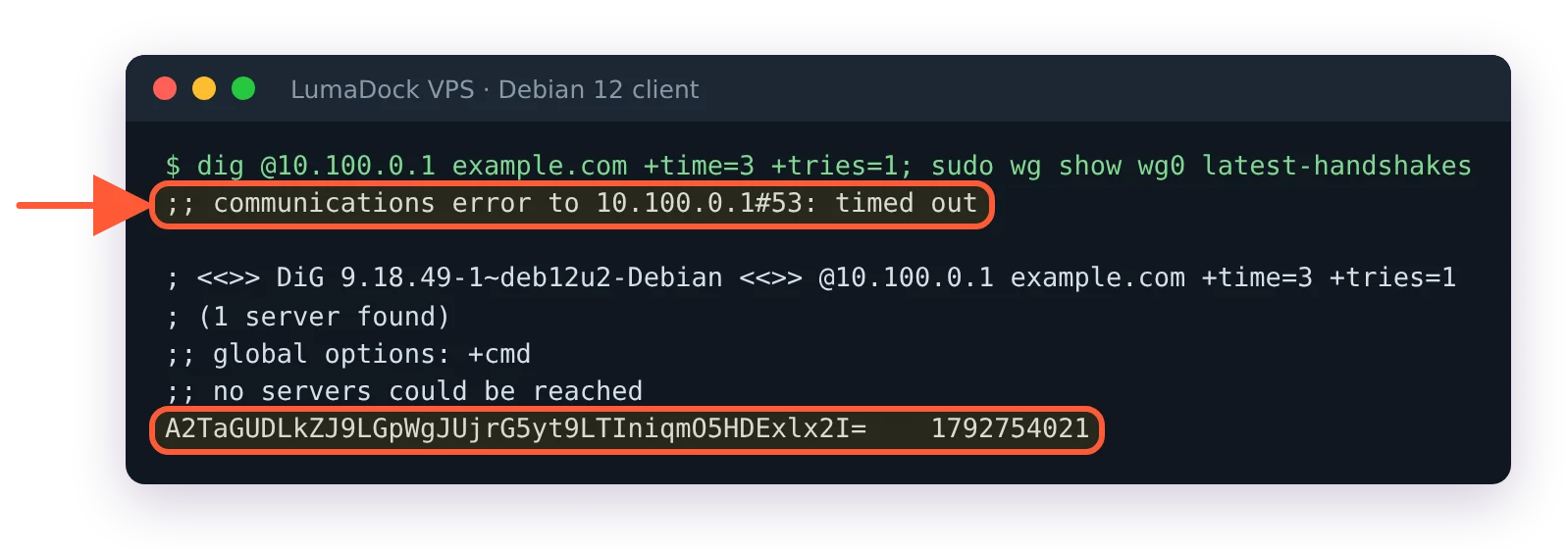
One line per peer, the public key and a Unix timestamp. 0 means that key has never completed a handshake; a recent timestamp means the tunnel is fine and whatever is wrong sits above it. Then from the client, with the tunnel up, a timeout here with a fresh handshake above points at the resolver's listening mode or the firewall on wg0, and an answer means the tunnel is doing its one job:

dig @10.100.0.1 example.com

Client dig to 10.100.0.1 timing out while wg show latest-handshakes has a fresh timestamp

The handshake is fresh, yet the DNS query times out: the server-side AllowedIPs for this peer is wrong.

Questions?

Can I keep one app out of the tunnel on my phone?

On Android, yes: the WireGuard app's tunnel editor has an applications setting with two modes, Exclude and Include only, which it hands to Android's VPN builder as disallowed or allowed apps. Android's documentation says a denied app uses networking as if the VPN wasn't running, so its lookups skip the Pi-hole as well.

Barry Sandford
About the author

Barry Sandford

Barry spent nearly 15 years in network engineering, mostly with UK hosting providers and regional ISPs. He worked in NOC operations and network design, including infrastructure migrations, and still keeps a lab environment at home to test configurations before he writes about them. His favorite topics tend to be the parts of infrastructure that become visible when something goes wrong: routing, DNS, address planning, firewalls and connectivity between systems that each appear fine on their own. IPv6 has been running on his home network for years. Barry lives in West Yorkshire, has an allotment, follows non-league football and does quite a lot of walking, usually with an OS map folded into a pocket.

Deploy your next project in seconds

Bring your winning ideas online faster, with modern hardware and unmetered bandwidth. Join a European cloud trusted by thousands of developers and businesses worldwide.